| 赞 | 168 |
| VIP | |
| 好人卡 | |
| 积分 | 229 |
| 经验 | |
| 最后登录 | 2025-4-1 |
| 在线时间 | 8598 小时 |
- 梦石
- 0
- 星屑
- 22879
- 在线时间
- 8598 小时
- 注册时间
- 2011-12-31
- 回帖
- 3270
|
 发表于 2018-4-20 09:19:44
|
显示全部楼层
本帖最后由 tseyik 于 2018-4-20 09:22 编辑
http://woodpenguin.web.fc2.com/MV_Plugin/MoveRouteEX.html
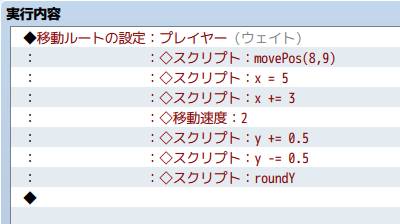
◆[プラグインコマンド]にて以下のコマンドを使用することで、指定したキャラクターの移動ルートが終了するまでウェイトをかけます。
WaitRoute id イベントid番の移動ルートが終了するまでウェイト
-1:プレイヤー、0:このイベント
◆[移動ルートの設定]の[スクリプト]にて、以下のコマンドが使用できます。
movePos(x, y)
movePos(x, y, skip) 座標(x,y)に向かって移動
詳細はプラグインのヘルプ参照
x = n X座標 n まで移動します。
x += n 現在のX座標から n マス右に移動します。
x -= n 現在のX座標から n マス左に移動します。
y = n Y座標 n まで移動します。
y += n 現在のY座標から n マス下に移動します。
y -= n 現在のY座標から n マス上に移動します。
roundX X座標の値を四捨五入して、最も近い整数にします。
roundY Y座標の値を四捨五入して、最も近い整数にします。
需科學上網
MPP_MoveRouteEX.js- //=============================================================================
- // MPP_MoveRouteEX.js
- //=============================================================================
- // Copyright (c) 2016 Mokusei Penguin
- // Released under the MIT license
- // [url]http://opensource.org/licenses/mit-license.php[/url]
- //=============================================================================
- /*:
- * @plugindesc 【ver.1.0】移動ルートに関するコマンド詰め合わせ。
- * @author 木星ペンギン
- *
- * @help プラグインコマンド:
- * WaitRoute n # イベントID n 番の移動が完了するまでウェイト
- * # -1:プレイヤー, 0:このイベント
- *
- * 移動ルートのスクリプト:
- * movePos(x, y) # 座標(x, y)に向かって移動します。
- * movePos(x, y, skip)
- * x = n # X座標 n まで移動します。
- * x += n # 現在のX座標から n マス右に移動します。
- * x -= n # 現在のX座標から n マス左に移動します。
- * y = n # Y座標 n まで移動します。
- * y += n # 現在のY座標から n マス下に移動します。
- * y -= n # 現在のY座標から n マス上に移動します。
- * roundX # X座標の値を四捨五入して、最も近い整数にします。
- * roundY # Y座標の値を四捨五入して、最も近い整数にします。
- *
- *
- * ●movePosの詳細
- * ・skip で true を設定した場合、移動できなかった時点で移動を中断します。
- *
- * ・[移動ルートの設定]のオプションにある[移動できない場合は飛ばす]には
- * チェックを入れないでください。
- *
- * ・プラグインパラメータで指定できる[Search Limit(移動できる距離)]が
- * 一度に移動できる最大距離です。
- * 現在位置からこの数値以上に遠い座標を指定することはできません。
- * 一度で移動するのではなく複数回に分けて移動させてください。
- *
- * ・[Search Limit(移動できる距離)]を増やすことで一度に移動できる距離を
- * 増やせますが、処理が重くなります。
- *
- *
- * ●移動先座標の直接入力の詳細
- * ・x および y は大文字小文字どちらでも可能です。
- *
- * ・n の値はマイナスでも動作します。
- *
- * ・n の値は小数点以下の数値でも動作します。
- * ただし、座標の値が整数でない場合、通常の移動に支障が出るため、
- * 小数点以下を使用した後はroundX等を使って整数に戻してください。
- *
- * ・スペースはあってもなくても動作しますが、2つ以上のスペースでは動作しません。
- *
- * ・衝突判定は一切しません。指定座標までまっすぐ移動します。
- * はしご、茂み、ダメージ床も無視されます。
- *
- * ・マップのループ移動には対応していません。
- *
- * ・マップの外の座標を指定した場合、キャラクターは画面の外まで移動します。
- *
- * ●座標の四捨五入(roundX, roundY)の詳細
- * ・キャラクターの向き変更や歩行アニメは行いません。
- *
- * ================================
- * 制作 : 木星ペンギン
- * URL : [url]http://woodpenguin.blog.fc2.com/[/url]
- *
- * @requiredAssets img/characters/Damage1
- *
- * @param Search Limit
- * @desc 移動できる距離
- * @default 12
- *
- */
- (function() {
- var Alias = {};
- var parameters = PluginManager.parameters('MPP_MoveRouteEX');
- var searchLimit = Number(parameters['Search Limit']);
- //-----------------------------------------------------------------------------
- // Game_Character
- //125
- Alias.GaCh_processMoveCommand = Game_Character.prototype.processMoveCommand;
- Game_Character.prototype.processMoveCommand = function(command) {
- if (command.code === Game_Character.ROUTE_SCRIPT) {
- command = { code: command.code,
- parameters: [this.convertScript(command.parameters[0])] };
- }
- Alias.GaCh_processMoveCommand.call(this, command);
- };
- Game_Character.prototype.convertScript = function(script) {
- script = script.replace(/^movePos\(/, 'this.movePos(');
- script = script.replace(/^x\s?=\s?(-?\d+\.?\d*)/i, function() {
- return 'this.moveX(' + arguments[1] + ')';
- }.bind(this));
- script = script.replace(/^x\s?\+=\s?(-?\d+\.?\d*)/i, function() {
- var x = this._x + Number(arguments[1]);
- return 'this.moveX(' + x + ')';
- }.bind(this));
- script = script.replace(/^x\s?\-=\s?(-?\d+\.?\d*)/i, function() {
- var x = this._x - Number(arguments[1]);
- return 'this.moveX(' + x + ')';
- }.bind(this));
- script = script.replace(/^y\s?=\s?(-?\d+\.?\d*)/i, function() {
- return 'this.moveY(' + arguments[1] + ')';
- }.bind(this));
- script = script.replace(/^y\s?\+=\s?(-?\d+\.?\d*)/i, function() {
- var y = this._y + Number(arguments[1]);
- return 'this.moveY(' + y + ')';
- }.bind(this));
- script = script.replace(/^y\s?\-=\s?(-?\d+\.?\d*)/i, function() {
- var y = this._y - Number(arguments[1]);
- return 'this.moveY(' + y + ')';
- }.bind(this));
- script = script.replace(/^roundX/, 'this._x = Math.round(this._x)');
- script = script.replace(/^roundY/, 'this._y = Math.round(this._y)');
- return script;
- };
- Game_Character.prototype.movePos = function(x, y, skippable) {
- skippable = skippable || false;
- var direction = this.findDirectionTo(x, y);
- if (direction > 0) {
- this.moveStraight(direction);
- this.setMovementSuccess(false);
- } else if (Math.abs(this._x - x) + Math.abs(this._y - y) < searchLimit) {
- this.setMovementSuccess(skippable || this.pos(x, y));
- }
- };
- Game_Character.prototype.moveX = function(x) {
- if (this._x > x) this.setDirection(4);
- if (this._x < x) this.setDirection(6);
- this._x = x;
- this.resetStopCount();
- };
- Game_Character.prototype.moveY = function(y) {
- if (this._y < y) this.setDirection(2);
- if (this._y > y) this.setDirection(8);
- this._y = y;
- this.resetStopCount();
- };
- //558
- Game_Character.prototype.searchLimit = function() {
- return searchLimit;
- };
- //-----------------------------------------------------------------------------
- // Game_Interpreter
- //1722
- Alias.GaIn_pluginCommand = Game_Interpreter.prototype.pluginCommand;
- Game_Interpreter.prototype.pluginCommand = function(command, args) {
- Alias.GaIn_pluginCommand.call(this, command, args);
- if (command === 'WaitRoute') {
- this._waitMode = 'route';
- this._character = this.character(Number(args[0]));
- }
- };
- })();
|
|



 写轮眼

 提升卡
 沉默号角
 喧嚣号角
 变色卡
 升龙剑


