| 赞 | 59 |
| VIP | |
| 好人卡 | |
| 积分 | 88 |
| 经验 | |
| 最后登录 | 2024-2-2 |
| 在线时间 | 501 小时 |
- 梦石
- 2
- 星屑
- 6767
- 在线时间
- 501 小时
- 注册时间
- 2018-3-23
- 回帖
- 487

|
加入我们,或者,欢迎回来。
您需要 登录 才可以下载或查看,没有账号?注册会员
×
本帖最后由 MCCF 于 2020-3-20 23:13 编辑
TyStatus和TyPath一样,都是作者突发奇想作出的玩意儿,大概兼容性和用途还是不错的吧……(保命)
前言
众所周知,RMVA自带的状态窗口仅仅能够让玩家查看数据,而不能交互式地点击查看详情。
TyStatus重构了状态页面,使得玩家可以自由地选择指定内容,并查看详细信息。
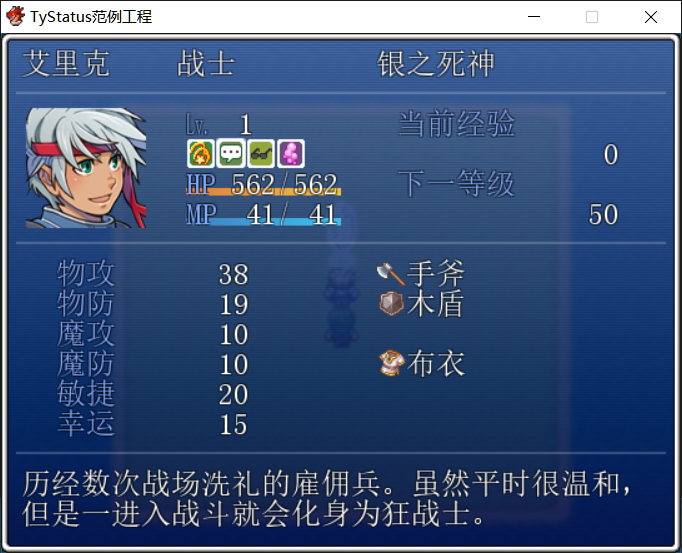
目前的效果是,可以左右移动光标来查看角色附着的状态信息了。
截图
回车键查看状态信息
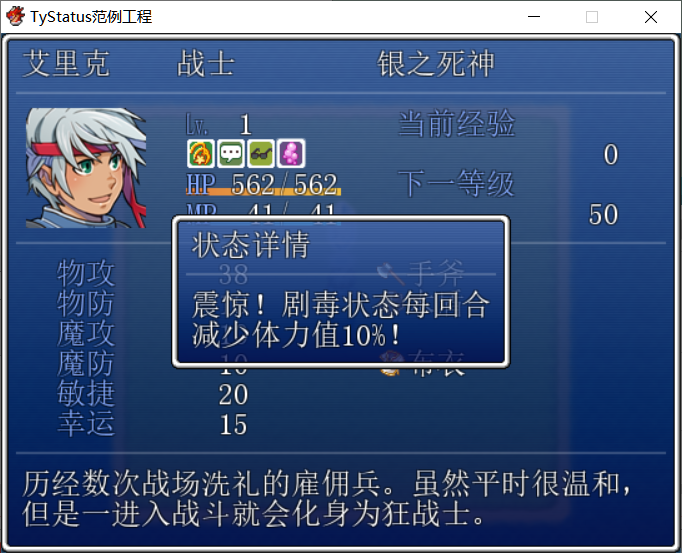
左右移动光标选择状态
脚本[pre lang="ruby"]#==============================================================================
# TyPath寻路 V1.0
# by MCCF
#------------------------------------------------------------------------------
# [说明]
# - RMVA自带的状态窗口仅仅能够让玩家查看数据,而不能交互式地点击查看详情。
# - TyStatus重构了状态页面,使得玩家可以自由地选择指定内容,并查看详细信息。
#
# - 目前提供了快速查看角色附着的状态信息的功能,玩家就不会因不知道状态的具体效果
# 而不知所措了。
# - 注意状态和BUFF的区别:BUFF是可能并非由状态导致的强化 / 弱化效果(例如技能
# 效果),但是也可以在状态页面中显示。
#------------------------------------------------------------------------------
# [使用方法]
# - 复制到Main之前
# - 在状态-备注中添加<desc>内容</desc>格式的备注,可以设置在状态页面显示的说明
# 信息(支持换行和转义符)。例如"<desc>该状态可大幅提升\I[116]攻击力</desc>"。
# - <desc>默认支持最多两行,每行约10个中文全角字符。
#------------------------------------------------------------------------------
# [使用条款]
# - 只要署名MCCF即可。只要不以自己的名义发布,您可以自由修改此脚本。
#------------------------------------------------------------------------------
# [兼容性]
# - 对状态页面的修改是基于原生状态页面的,如需要支持在非原生状态页面上制作交互式
# 功能,则需要调整Window_Status#item_rect的内容。
# - 由于对状态界面进行了部分重构,可能与少数的魔改状态页面的脚本不兼容。
#------------------------------------------------------------------------------
# 通用配置模块
#==============================================================================
module TyStatus_Config
# 基本设置 ------------------------------------------------------------------
# 指示是否启用TyStatus的开关ID
# 为0则不使用开关控制,始终启用
TYSTATUS_SWITCH_ID = 0
# 用语 ------------------------------------------------------------------
# 状态/BUFF详情的标题用语
TYSTATUS_TITLE = "状态详情"
# 正面BUFF详情的内容用语
# %s将分别被替换为BUFF的效果及BUFF的效果倍率(百分数)
TYSTATUS_BUFF_VOCAB = "%s 增加 %s% 效果"
# 负面BUFF详情的内容用语
TYSTATUS_DEBUFF_VOCAB = "%s 减少 %s% 效果"
end
#==============================================================================
# 设定结束
#==============================================================================
#==============================================================================
# ■ RPG::State
#------------------------------------------------------------------------------
# 状态的数据类。
#==============================================================================
class RPG::State
#--------------------------------------------------------------------------
# ● 获取说明信息
#--------------------------------------------------------------------------
def state_desc
return /<desc>([\s\S]*)<\/desc>/i =~ @note ? $1 : ""
end
end
#==============================================================================
# ■ Game_BattlerBase
#------------------------------------------------------------------------------
# 管理战斗者的类。主要含有能力值计算的方法。Game_Battler 类的父类。
#==============================================================================
class Game_BattlerBase
#--------------------------------------------------------------------------
# ● 定义实例变量
#--------------------------------------------------------------------------
attr_reader :buffs # 强化 / 弱化列表
end
#==============================================================================
# ■ Scene_Status
#------------------------------------------------------------------------------
# 状态画面
#==============================================================================
class Scene_Status < Scene_MenuBase
#--------------------------------------------------------------------------
# ● 开始处理
#--------------------------------------------------------------------------
alias tystatus_start start
def start
tystatus_start
@detail_window = Window_StatusDetail.new
@detail_window.hide
@status_window.activate
end
#--------------------------------------------------------------------------
# ● 打开详情窗口
#--------------------------------------------------------------------------
def call_detail
return close_detail if @detail_window.visible
return unless @status_window.current_data
data = @status_window.current_data
@detail_window.set_title(TyStatus_Config::TYSTATUS_TITLE)
if data.is_a?(RPG::State)
@detail_window.set_text(data.state_desc)
else
text = sprintf(TyStatus_Config::TYSTATUS_BUFF_VOCAB,
Vocab::param(@status_window.index - @actor.states.size), data * 100)
@detail_window.set_text(text)
end
@detail_window.show.open
@status_window.deactivate
end
#--------------------------------------------------------------------------
# ● 关闭详情窗口
#--------------------------------------------------------------------------
def close_detail
if @detail_window.visible
@detail_window.close.hide
@status_window.activate
end
end
#--------------------------------------------------------------------------
# ● 关闭详情窗口
#--------------------------------------------------------------------------
alias tystatus_update update
def update
tystatus_update
call_detail if Input.trigger?(:C)
close_detail if Input.trigger?(:B)
end
end
#==============================================================================
# ■ Window_StatusDetail
#------------------------------------------------------------------------------
# 技能画面中,显示详情的窗口。
#==============================================================================
class Window_StatusDetail < Window_Base
#--------------------------------------------------------------------------
# ● 初始化对象
#--------------------------------------------------------------------------
def initialize
super(window_x, window_y, window_width, window_height)
end
#--------------------------------------------------------------------------
# ● 获取窗口的 X 坐标
#--------------------------------------------------------------------------
def window_x
Graphics.width / 2 - window_width / 2
end
#--------------------------------------------------------------------------
# ● 获取窗口的 Y 坐标
#--------------------------------------------------------------------------
def window_y
Graphics.height / 2 - window_height / 2
end
#--------------------------------------------------------------------------
# ● 获取窗口的宽度
#--------------------------------------------------------------------------
def window_width
Graphics.width / 2
end
#--------------------------------------------------------------------------
# ● 获取窗口的高度
#--------------------------------------------------------------------------
def window_height
fitting_height(4.2)
end
#--------------------------------------------------------------------------
# ● 设置标题
#--------------------------------------------------------------------------
def set_title(title)
if title != @title
@title = title
refresh
end
end
#--------------------------------------------------------------------------
# ● 设置内容
#--------------------------------------------------------------------------
def set_text(text, line_number = 2)
if text != @text
@text = text
refresh
end
end
#--------------------------------------------------------------------------
# ● 刷新
#--------------------------------------------------------------------------
def refresh
contents.clear
draw_text_ex(4, line_height * 0, @title)
draw_horz_line(line_height * 1)
draw_text_ex(4, line_height * 2, @text)
end
#--------------------------------------------------------------------------
# ● 绘制水平线
#--------------------------------------------------------------------------
def draw_horz_line(y)
line_y = y + line_height / 2 - 1
contents.fill_rect(0, line_y, contents_width, 2, line_color)
end
#--------------------------------------------------------------------------
# ● 获取水平线的颜色
#--------------------------------------------------------------------------
def line_color
color = normal_color
color.alpha = 48
color
end
end
#==============================================================================
# ■ Window_Status
#------------------------------------------------------------------------------
# 状态画面中,显示角色基本信息的窗口。
#==============================================================================
class Window_Status < Window_Selectable
#--------------------------------------------------------------------------
# ● 初始化对象
#--------------------------------------------------------------------------
alias tystatus_initialize initialize
def initialize(actor)
@data = actor.states + actor.buffs.reject {|buff| buff == 0 }
tystatus_initialize(actor)
@index = 0
end
#--------------------------------------------------------------------------
# ● 获取显示行数
#--------------------------------------------------------------------------
def visible_line_number
return 1
end
#--------------------------------------------------------------------------
# ● 获取列数
#--------------------------------------------------------------------------
def col_max
item_max
end
#--------------------------------------------------------------------------
# ● 获取项目数
#--------------------------------------------------------------------------
def item_max
@actor ? [[@data.size, 4].min, 1].max : 1
end
#--------------------------------------------------------------------------
# ● 获取项目的宽度
#--------------------------------------------------------------------------
def item_width
return 24
end
#--------------------------------------------------------------------------
# ● 获取项目的绘制矩形
#--------------------------------------------------------------------------
def item_rect(index)
rect = Rect.new
rect.width = item_width
rect.height = item_height
rect.x = 136 + index * 24
rect.y = line_height * 3
rect
end
#--------------------------------------------------------------------------
# ● 获取指定选项的图标ID
#--------------------------------------------------------------------------
def icon_index(index)
return unless @data && @data[index]
state = @data[index]
if state.is_a?(RPG::State)
state.icon_index
else
@actor.buff_icon_index(state, index - @actor.states.size)
end
end
#--------------------------------------------------------------------------
# ● 获取选项的指令数据
#--------------------------------------------------------------------------
def current_data
return nil unless @actor
return @data[index]
end
#--------------------------------------------------------------------------
# ● 绘制项目
#--------------------------------------------------------------------------
def draw_item(index)
return unless @data[index]
rect = item_rect(index)
icon = icon_index(index)
draw_icon(icon, rect.x, rect.y)
end
#--------------------------------------------------------------------------
# ● 刷新
#--------------------------------------------------------------------------
alias tystatus_refresh refresh
def refresh
tystatus_refresh
draw_all_items
end
#--------------------------------------------------------------------------
# ● 绘制强化/弱化状态的图标
#--------------------------------------------------------------------------
def draw_actor_icons(actor, x, y, width = 96)
end
end[/pre]
说明
由于目前仍是测试版,并且找不到能够保留BUFF到状态页面的方法,希望有dalao告知。
由于用法简单所以暂时不提供范例工程,如有BUG还请反馈。
|
|



 写轮眼
写轮眼
 发表于 2020-3-20 22:39:19
 提升卡
提升卡 沉默号角
沉默号角 喧嚣号角
喧嚣号角 变色卡
变色卡 升龙剑
升龙剑