查看: 3761|回复: 10

[已经过期] 连击系统如何设计?左右手武器都要行动、对象方动画?

[复制链接]
梦石
0
星屑
15041
在线时间
2230 小时
注册时间
2019-1-24
回帖
964

R考场第七期纪念奖

发表于 2020-4-10 08:21:28 | 显示全部楼层 |阅读模式

加入我们,或者,欢迎回来。

您需要 登录 才可以下载或查看,没有账号?注册会员

×
本帖最后由 miantouchi 于 2020-4-10 08:36 编辑

一.篇幅应该有点长,先听我细细说来是什么效果
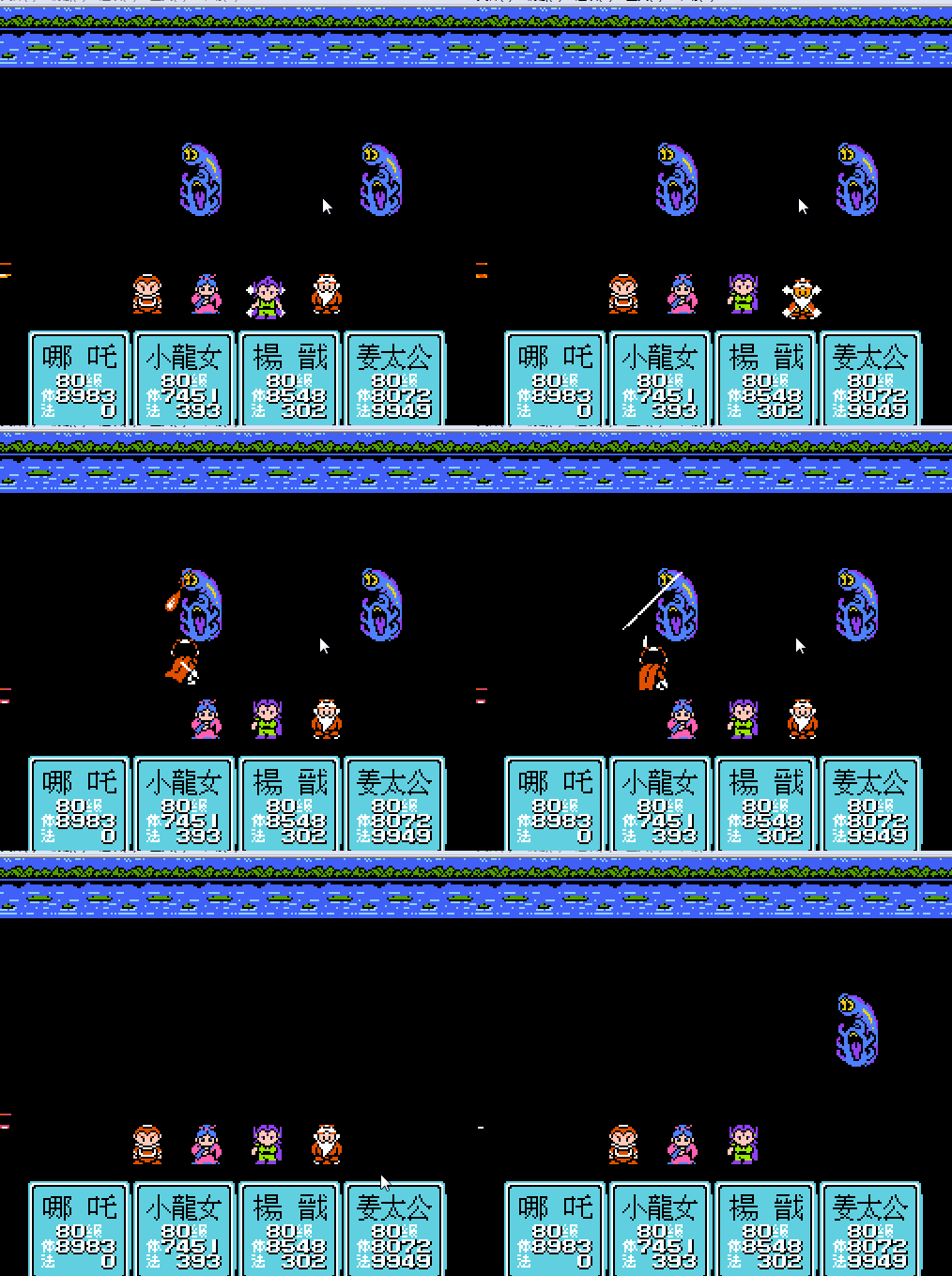
比如哪吒,拿武器分左右手,也就是双手都有武器都有行动方和对象方动画
武器影响角色的攻击动作和打在敌人身上的效果。
也就是说:剑+剑,刀+刀,枪+枪,刀+枪,枪+剑,刀+剑。。。。就不一一列举了,可以形成各种人物攻击动作和对应的打击效果。。。
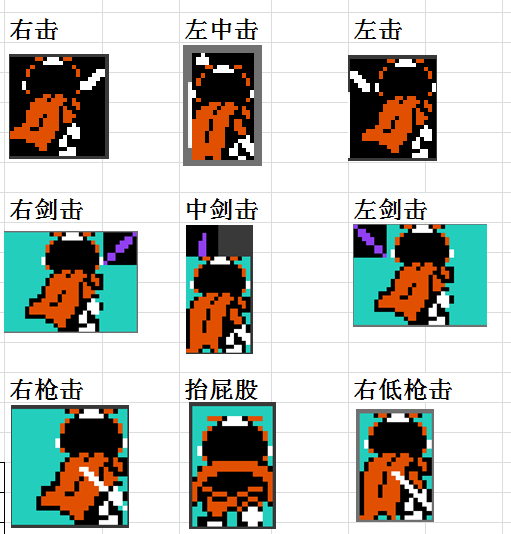
下面是我截取VA的图片,因为XP默认没有双持武器。
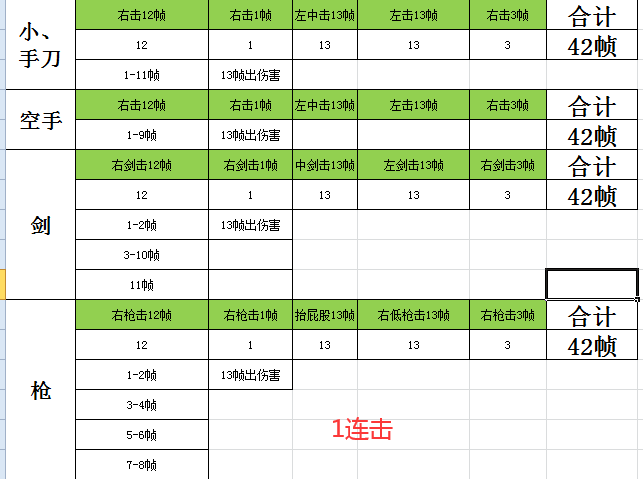
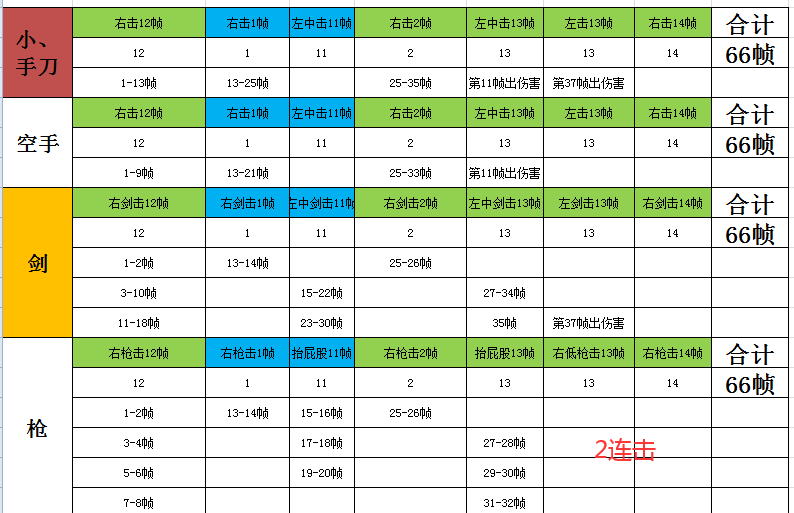
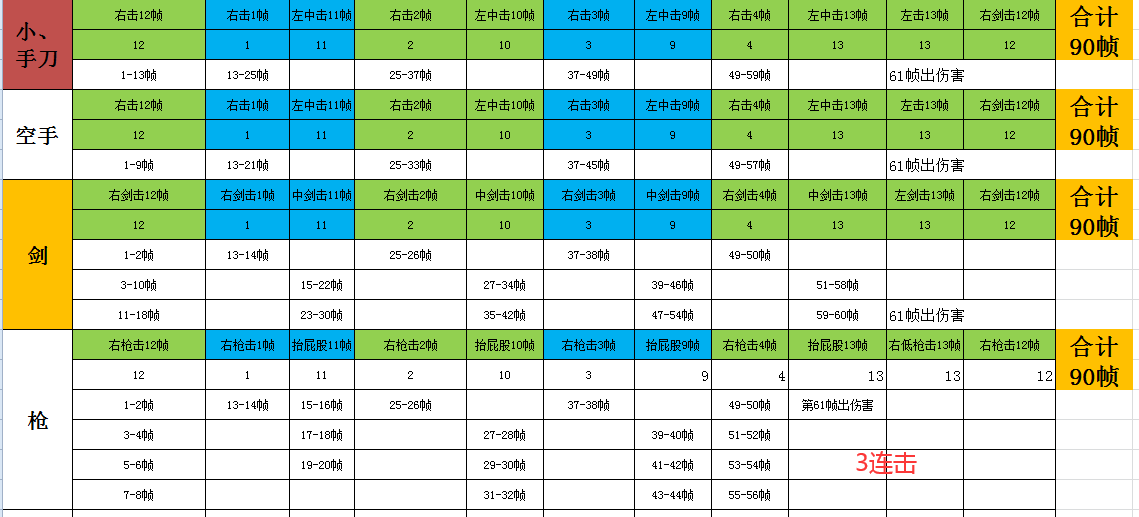
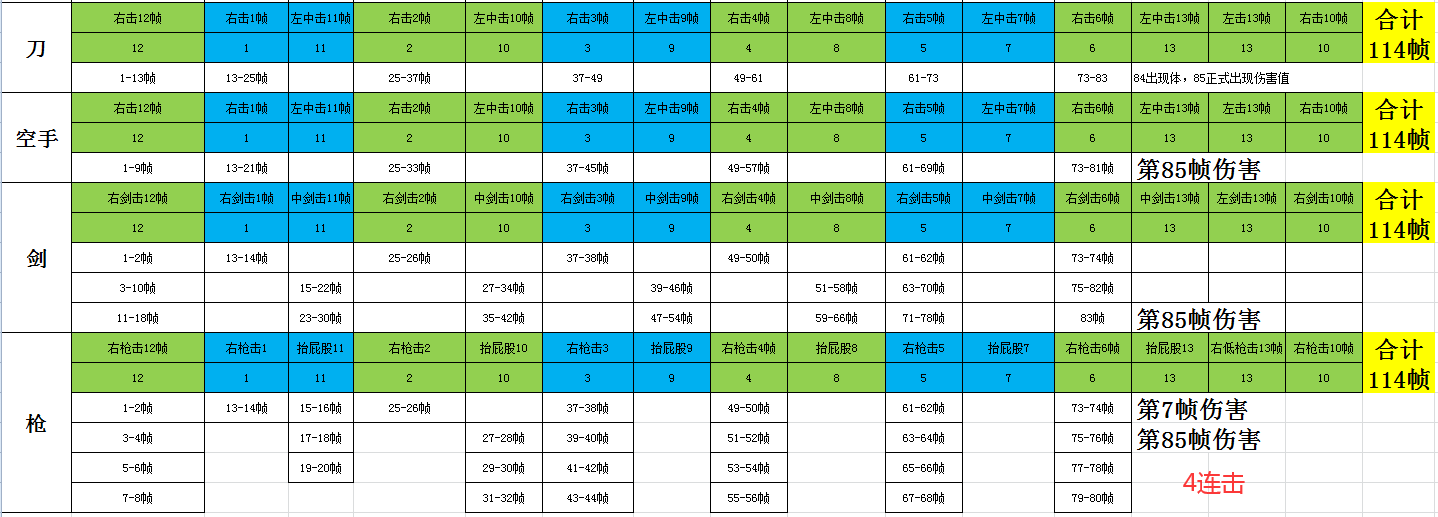
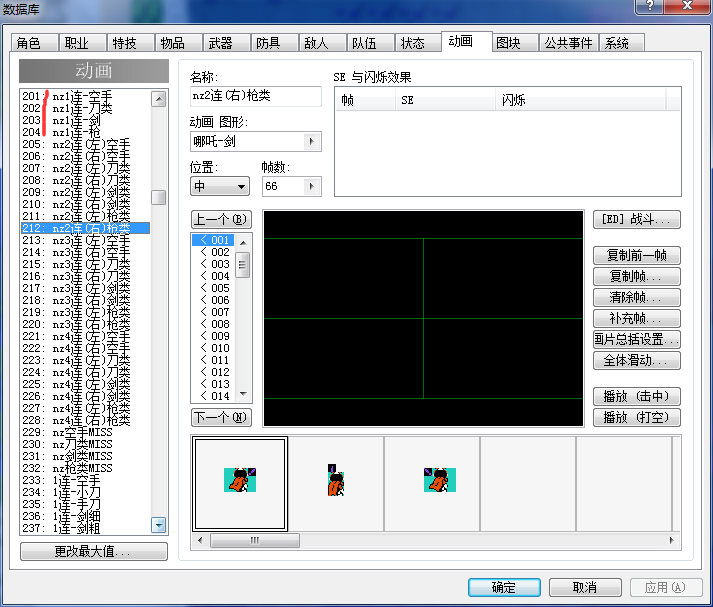
二.经过我长期分析数帧,这个游戏就是最多4连击,武器类型多种多样。
例如哪吒:可以使用武器、刀、剑、枪、圈类四大并且
1连击:左手武器动画 = 42帧
2连击:左手武器动画+右手武器动画+左手武器动画 =66帧
3连击:左手武器动画+右手武器动画+左手武器动画+右手武器动画+左手武器动画 = 90帧
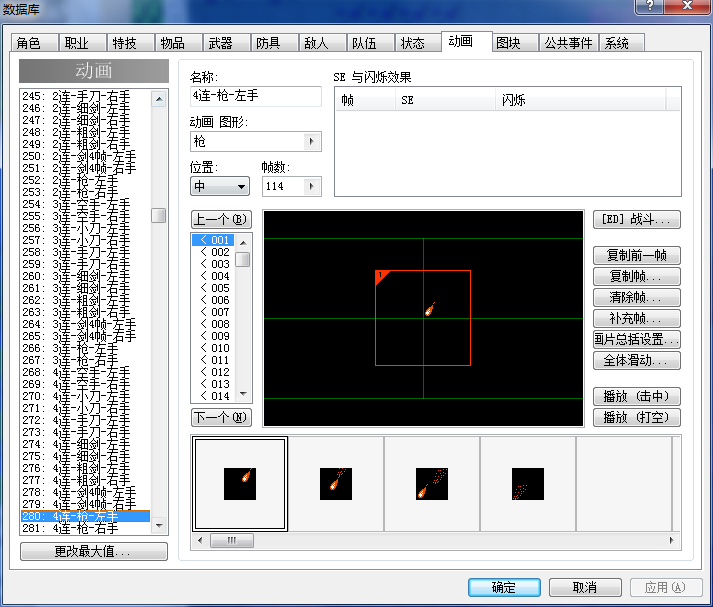
4连击:左手武器动画+右手武器动画+左手武器动画+右手武器动画+左手武器动画+右手武器动画+左手武器动画 =114帧
以上情况,
1.如果左手或者右手没有装备武器的情况,就显示空手攻击动画。
2.以上左手、右手动画,每个连击不是规律的,我打个比方,1连击光左手就42帧。
3.行动方和对象方动画应该是同时的,出左手时,行动方动画和对象方动画出现、出右手时行动方和对象方动画出现。
由此形成了人物连击的感觉。
4.我的想法是,左手行动方+右手行动方,比方说现在2连击了,我把左手设置66帧、右手66帧,同时播放。中间的空白帧互补。
没想到哪吒一个人就弄了好100个动画 。
5.图片中、涂绿色的是左手装备、蓝色是右手装备,下面写的帧数是对应武器的对象方动画(也就是攻击到敌人身上的动画)
三,最后是找的一部分功能,想改造成这个效果,我就把重点相关联的地方贴出来。
感觉这个代码还是不是太适合我一些地方,还请大家帮忙想想看还有没有什么好办法
[pre lang="ruby"]class Game_Actor < Game_Battler
  #--------------------------------------------------------------------------
  # ● 公开实例变量
  #--------------------------------------------------------------------------
  attr_reader   :weapon_id                # 武器 ID
  attr_reader   :weapon2_id               # 二刀流武器 ID
  #--------------------------------------------------------------------------
  # ● 设置
  #     actor_id : 角色 ID
  #--------------------------------------------------------------------------
  def setup(actor_id)
    # --- 从这里追加部分 ---
    @weapon_id = 0
    @weapon2_id = actor.armor1_id
    $game_party.gain_weapon(actor.weapon_id, 1)
    equip(0, actor.weapon_id)
    # --- 添加部分结束 ---
    @armor1_id = 0#actor.armor1_id
    @armor2_id = actor.armor3_id  #############
    @armor3_id = actor.armor2_id  ###############
    @armor4_id = actor.armor4_id
  end
  #--------------------------------------------------------------------------
  # ● 普通攻击 获取攻击方动画 ID
  #--------------------------------------------------------------------------

  def animation1_id
    weapon = $data_weapons[@weapon_id]
    # --- 更改部分 ---
    weapon2 = $data_weapons[@weapon2_id]
    animations = []
    animations.push(weapon.animation1_id) if weapon != nil
    animations.push(weapon2.animation1_id) if weapon2 != nil
    animations.delete(0)
    return animations.empty? ? 0 : animations
    # --- 完成修改 ---
  end

  #--------------------------------------------------------------------------
  # ● 普通攻击 获取对像方动画 ID
  #--------------------------------------------------------------------------
  def animation2_id
    weapon = $data_weapons[@weapon_id]
    # --- 更改部分 ---
    weapon2 = $data_weapons[@weapon2_id]
    animations = []
    animations.push(weapon.animation2_id) if weapon != nil
    animations.push(weapon2.animation2_id) if weapon2 != nil
    animations.delete(0)
    return animations.empty? ? 0 : animations
    # --- 完成修改 ---
  end

class Scene_Battle
  #--------------------------------------------------------------------------
  # ● 生成基本行动结果
  #--------------------------------------------------------------------------
  def make_basic_action_result
    # 攻击的情况下
    if @active_battler.current_action.basic == 0
      # ★★★★★★★★★★★★★★★★---更改部分 ---★★★★★★★★★★★★★★★★
      # 设置攻击 ID
      @animation1_id = @active_battler.animation1_id.is_a?(Array) ? @active_battler.animation1_id.dup : @active_battler.animation1_id
      @animation2_id = @active_battler.animation2_id.is_a?(Array) ? @active_battler.animation2_id.dup : @active_battler.animation2_id
      # ★★★★★★★★★★★★★★★★---完成修改 ------★★★★★★★★★★★★★★★
      # 行动方的战斗者是敌人的情况下
      if @active_battler.is_a?(Game_Enemy)
        if @active_battler.restriction == 3
          target = $game_troop.random_target_enemy
        elsif @active_battler.restriction == 2
          target = $game_party.random_target_actor
        else
          index = @active_battler.current_action.target_index
          target = $game_party.smooth_target_actor(index)
        end
      end
      # 行动方的战斗者是角色的情况下
      if @active_battler.is_a?(Game_Actor)
        if @active_battler.restriction == 3
          target = $game_party.random_target_actor
        elsif @active_battler.restriction == 2
          target = $game_troop.random_target_enemy
        else
          index = @active_battler.current_action.target_index
          target = $game_troop.smooth_target_enemy(index)
        end
      end
      # 设置对像方的战斗者序列
      @target_battlers = [target]
      # 应用通常攻击效果
      for target in @target_battlers
        target.attack_effect(@active_battler)
      end
      return
    end
    # 防御的场合
    if @active_battler.current_action.basic == 1
      # 帮助窗口显示"防御"
      @help_window.set_text($data_system.words.guard, 1)
      return
    end
    # 逃跑的情况下
    if @active_battler.is_a?(Game_Enemy) and
       @active_battler.current_action.basic == 2
      # 帮助窗口"逃跑"显示
      @help_window.set_text("逃跑", 1)
      # 逃跑
      @active_battler.escape
      return
    end
    # 什么也不做的情况下
    if @active_battler.current_action.basic == 3
      # 清除强制行动对像的战斗者
      $game_temp.forcing_battler = nil
      # 移至步骤 1
      @phase4_step = 1
      return
    end
  end

  #--------------------------------------------------------------------------
  # ● 刷新画面 (主回合步骤 3 : 行动方动画)
  #--------------------------------------------------------------------------
  def update_phase4_step3
    # ★★★★★★★★★★★★★★★★---更改部分 ---★★★★★★★★★★★★★★★★
    # 开始动画排列
    if @animation1_id.is_a?(Integer)
      @animation1_id = [@animation1_id]
    end
    animation = @animation1_id.shift
    # 行动方动画 (ID 为 0 的情况下是白色闪烁)
    if animation == 0
      @active_battler.white_flash = true
    else
      @active_battler.animation_id = animation
      @active_battler.animation_hit = true
    end
    # 动画丢失后移至步骤4
    @phase4_step = 4 if @animation1_id.empty?
    # ★★★★★★★★★★★★★★★★---完成修改 ------★★★★★★★★★★★★★★★
  end

  #--------------------------------------------------------------------------
  # ● 刷新画面 (主回合步骤 4 : 对像方动画)
  #--------------------------------------------------------------------------
  def update_phase4_step4
    # ★★★★★★★★★★★★★★★★---更改部分 ---★★★★★★★★★★★★★★★★
    # 开始动画排列
    if @animation2_id.is_a?(Integer)
      @animation2_id = [@animation2_id]
    end
    animation = @animation2_id.shift
    # 对像方动画
    for target in @target_battlers
      target.animation_id = animation
      target.animation_hit = (target.damage != "Miss")
    end
    # 不管动画长度如何,至少等8帧
    @wait_count = 8
    # 动画丢失后移至步骤5
    @phase4_step = 5 if @animation2_id.empty?
    # ★★★★★★★★★★★★★★★★---完成修改 ------★★★★★★★★★★★★★★★
  end
end
#==============================================================================
# 本脚本来自www.66RPG.com,使用和转载请保留此信息
#============================================================================== [/pre]
更多图片 小图 大图
组图打开中,请稍候......

遠航の猫咪

梦石
3
星屑
26947
在线时间
2423 小时
注册时间
2005-10-15
回帖
987

开拓者

发表于 2020-4-10 16:24:47 | 显示全部楼层
本帖最后由 SailCat 于 2020-4-10 16:25 编辑

[pre lang="ruby"]#==============================================================================
# ■ 战斗动画增强 v1.0 by SailCat
#------------------------------------------------------------------------------
#   方法:本脚本插入到Main之前使用
#   依赖:无
#   版本:v1.0 (Build 171125)
#   效果:
#     1. 允许战斗者在一个主回合中连续播放多个动画并显示多个伤害值
#     2. 在所有动画和伤害值显示完毕以前,战斗者不会倒下
#   配置:关于时间间隔的若干配置项
#   冲突:其他动画增强脚本
#   说明:
#     每当需要让战斗者连续显示动画时,使用
#     battler.pend_animation(动画ID, 伤害, 会心一击标志)   # 追加到动画的队尾
#     battler.insert_animation(动画ID, 伤害, 会心一击标志) # 在当前动画后切入
#     后两个参数可以省略,取自己的当前值,此外,还可使用
#     battler.animation_id = 动画ID                        # 立即切入,队列顺延
#==============================================================================
#==============================================================================
# ■ SailCat's 插件公用
#==============================================================================
module SailCat
  $sailcat_import ||= {}
  #--------------------------------------------------------------------------
  # ● 植入
  #--------------------------------------------------------------------------
  $sailcat_import[:BattleAnimation] = 1.0
  #--------------------------------------------------------------------------
  # ● 脚本配置区
  #--------------------------------------------------------------------------
  module BattleAnimation_Config
    AWAIT_HIT_INTERVAL = 0                # 每两次动画之间的间隔帧数
    AWAIT_DAMAGE_INTERVAL = 8             # 每一击显示伤害的等待时间帧数
    AWAIT_DAMAGE_FINAL = 8                # 播放完所有动画后的等待时间帧数
  end
end

#==============================================================================
# ■ Game_Battler
#==============================================================================
class Game_Battler
  #--------------------------------------------------------------------------
  # ● 定义实例变量
  #--------------------------------------------------------------------------
  attr_reader   :pending_animations       # 缓存的动画
  #--------------------------------------------------------------------------
  # ● 方法重定义
  #--------------------------------------------------------------------------
  unless method_defined?(:sailcat_battleani_initialize)
    alias sailcat_battleani_initialize initialize
  end
  #--------------------------------------------------------------------------
  # ● 初期化
  #--------------------------------------------------------------------------
  def initialize
    sailcat_battleani_initialize
    @pending_animations = []
  end
  #--------------------------------------------------------------------------
  # ● 立即切入动画
  #     value : 新的动画ID
  #--------------------------------------------------------------------------
  def animation_id=(value)
    # 当前动画未处理,又要播放新动画时
    insert_animation(@animation_id) if value > 0 and @animation_id > 0
    @animation_id = value
  end
  #--------------------------------------------------------------------------
  # ● 缓存动画(在前)
  #     ani_id  : 动画ID
  #     damage  : 伤害
  #     critical: 会心一击标志
  #--------------------------------------------------------------------------
  def insert_animation(ani_id, damage = @damage, critical = @critical)
    # 追加到动画序列的开头
    @pending_animations.shift([ani_id, damage, critical])
  end
  #--------------------------------------------------------------------------
  # ● 缓存动画(在后)
  #     ani_id  : 动画ID
  #     damage  : 伤害
  #     critical: 会心一击标志
  #--------------------------------------------------------------------------
  def pend_animation(ani_id, damage = @damage, critical = @critical)
    # 追加到动画序列的末尾
    @pending_animations.push([ani_id, damage, critical])
  end
  #--------------------------------------------------------------------------
  # ● 动画等待判定
  #--------------------------------------------------------------------------
  def animation_pending?
    not @pending_animations.empty?
  end
  #--------------------------------------------------------------------------
  # ● 执行下一动画
  #--------------------------------------------------------------------------
  def next_animation
    # 没有动画的情况下返回
    return unless animation_pending?
    # 动画没播放完的情况下返回
    return if @animation_id > 0
    animation = @pending_animations.shift
    @animation_id = animation[0]
    @damage = animation[1]
    @critical = animation[2]
    @animation_hit = @damage != Vocab.miss
  end
end
  
#==============================================================================
# ■ Sprite_Battler
#==============================================================================
class Sprite_Battler < RPG::Sprite
  include SailCat::BattleAnimation_Config
  #--------------------------------------------------------------------------
  # ● 效果中判定
  #--------------------------------------------------------------------------
  def effect?
    @_whiten_duration > 0 or
    @_appear_duration > 0 or
    @_escape_duration > 0 or
    @_animation_duration > 0 or
    @_collapse_duration > 0 or
    @_damage_duration > ($scene.phase4_step == 6 ? 0 : 40 - AWAIT_HIT_INTERVAL)
  end
  #--------------------------------------------------------------------------
  # ● 刷新画面
  #--------------------------------------------------------------------------
  def update
    super
    # 战斗者为 nil 的情况下
    if @battler == nil
      self.bitmap = nil
      loop_animation(nil)
      return
    end
    # 总是更新
    update_battler_change
    update_battler_loop_animation
    update_battler_main_phase
    update_battler_blink
    update_battler_appear
    # 可见时更新
    if @battler_visible
      update_battler_escape
      update_battler_whiten
      update_battler_animation
      update_battler_damage
      update_battler_collapse
    end
    # 设置活动块的坐标
    self.x = @battler.screen_x
    self.y = @battler.screen_y
    self.z = @battler.screen_z
  end
  #--------------------------------------------------------------------------
  # ● 更新画面差异
  #--------------------------------------------------------------------------
  def update_battler_change
    # 文件名和色相与当前情况有差异的情况下
    if @battler.battler_name != @battler_name or
       @battler.battler_hue != @battler_hue
      # 获取、设置位图
      @battler_name = @battler.battler_name
      @battler_hue = @battler.battler_hue
      self.bitmap = RPG::Cache.battler(@battler_name, @battler_hue)
      @width = bitmap.width
      @height = bitmap.height
      self.ox = @width >> 1
      self.oy = @height
      # 如果是战斗不能或者是隐藏状态就把透明度设置成 0
      if @battler.dead? or @battler.hidden
        self.opacity = 0
      end
    end
  end
  #--------------------------------------------------------------------------
  # ● 更新状态动画
  #--------------------------------------------------------------------------
  def update_battler_loop_animation
    # 动画 ID 与当前的情况有差异的情况下
    if @battler.damage == nil and
       @battler.state_animation_id != @state_animation_id
      @state_animation_id = @battler.state_animation_id
      loop_animation($data_animations[@state_animation_id])
    end
  end
  #--------------------------------------------------------------------------
  # ● 更新显示效果
  #--------------------------------------------------------------------------
  def update_battler_main_phase
    # 应该被显示的角色的情况下
    if @battler.is_a?(Game_Actor) and @battler_visible
      # 不是主状态的时候稍稍降低点透明度
      if $game_temp.battle_main_phase
        self.opacity += 3 if self.opacity < 255
      else
        self.opacity -= 3 if self.opacity > 207
      end
    end
  end
  #--------------------------------------------------------------------------
  # ● 更新明灭
  #--------------------------------------------------------------------------
  def update_battler_blink
    if @battler.blink
      blink_on
    else
      blink_off
    end
  end
  #--------------------------------------------------------------------------
  # ● 更新出现
  #--------------------------------------------------------------------------
  def update_battler_appear
    # 不可见的情况下
    unless @battler_visible
      # 出现
      if not @battler.hidden and not @battler.dead? and
         (@battler.damage == nil or @battler.damage_pop)
        appear
        @battler_visible = true
      end
    end
  end
  #--------------------------------------------------------------------------
  # ● 更新逃跑
  #--------------------------------------------------------------------------
  def update_battler_escape
    if @battler.hidden
      $game_system.se_play($data_system.escape_se)
      escape
      @battler_visible = false
    end
  end
  #--------------------------------------------------------------------------
  # ● 更新白色闪烁
  #--------------------------------------------------------------------------
  def update_battler_whiten
    if @battler.white_flash
      whiten
      @battler.white_flash = false
    end
  end
  #--------------------------------------------------------------------------
  # ● 更新动画
  #--------------------------------------------------------------------------
  def update_battler_animation
    if @battler.animation_id != 0
      animation = $data_animations[@battler.animation_id]
      animation(animation, @battler.animation_hit)
      @battler.animation_id = 0
    end
  end
  #--------------------------------------------------------------------------
  # ● 更新伤害
  #--------------------------------------------------------------------------
  def update_battler_damage
    if @battler.damage_pop
      damage(@battler.damage, @battler.critical)
      @battler.damage = nil
      @battler.critical = false
      @battler.damage_pop = false
    end
  end
  #--------------------------------------------------------------------------
  # ● 更新死亡
  #--------------------------------------------------------------------------
  def update_battler_collapse
    # 如果动画没有播放完,不执行死亡效果
    return if @battler.animation_pending?
    if @battler.damage == nil and @battler.dead?
      if @battler.is_a?(Game_Enemy)
        $game_system.se_play($data_system.enemy_collapse_se)
      else
        $game_system.se_play($data_system.actor_collapse_se)
      end
      collapse
      @battler_visible = false
    end
  end
end

#==============================================================================
# ■ Scene_Battle
#==============================================================================
class Scene_Battle
  include SailCat::BattleAnimation_Config
  #--------------------------------------------------------------------------
  # ● 定义实例变量
  #--------------------------------------------------------------------------
  attr_accessor :animation1_id
  attr_accessor :animation2_id
  attr_reader :phase4_step
  #--------------------------------------------------------------------------
  # ● 刷新画面 (主回合步骤 3 : 行动方动画)
  #--------------------------------------------------------------------------
  def update_phase4_step3
    # 行动方动画 (ID 为 0 的情况下是白色闪烁)
    @pending = false
    if @animation1_id == 0
      @active_battler.white_flash = true
    else
      # 如果行动者没有设置缓存动画,则设置默认的动画
      unless @active_battler.animation_pending?
        @active_battler.animation_id = @animation1_id
        @active_battler.animation_hit = true
      # 如果已经设置了缓存动画,则播放下一个缓存动画
      else
        @active_battler.next_animation
        @pending |= @active_battler.animation_pending?
      end
    end
    # 行动方动画没有播完的情况下,返回
    return if @pending
    # 为对像方准备默认动画的缓存(如果没有设置)
    for target in @target_battlers
      target.pend_animation(@animation2_id) unless target.animation_pending?
    end
    # 移至步骤 4
    @phase4_step = 4
  end
  #--------------------------------------------------------------------------
  # ● 刷新画面 (主回合步骤 4 : 对像方动画)
  #--------------------------------------------------------------------------
  def update_phase4_step4
    # 对像方动画
    @pending = false
    for target in @target_battlers
      # 战斗者显示下一动画
      target.next_animation if target.animation_pending?
      # 仍有动画没显示完的情况下,设置标志
      @pending |= target.animation_pending?
    end
    # 弹出伤害的等待时间
    @wait_count = @pending ? AWAIT_DAMAGE_INTERVAL : AWAIT_DAMAGE_FINAL
    # 移至步骤 5
    @phase4_step = 5
  end
  #--------------------------------------------------------------------------
  # ● 刷新画面 (主回合步骤 5 : 显示伤害)
  #--------------------------------------------------------------------------
  def update_phase4_step5
    # 隐藏帮助窗口
    @help_window.visible = false
    # 刷新状态窗口
    @status_window.refresh
    # 显示伤害
    @target_battlers.each {|t| t.damage_pop = true if t.damage}
    # 仍然有待播放缓存动画的情况下,移至步骤4,否则移到步骤6
    @phase4_step = @pending ? 4 : 6
  end
end[/pre]

点评

看了半天不知道battler.pend_animation这些往哪里放,能提示下吗?希望能整合到我的工程里面。  发表于 2020-4-11 11:43

评分

参与人数 1赞 +1 收起 理由
taeckle + 1 大神威武!

查看全部评分

SailCat (小猫子·要开心一点) 共上站 24 次,发表过 11 篇文章 上 次 在: [2006年01月28日11:41:18 星期六] 从 [162.105.120.91] 到本站一游。
回复

使用道具 举报

梦石
0
星屑
15041
在线时间
2230 小时
注册时间
2019-1-24
回帖
964

R考场第七期纪念奖

 楼主| 发表于 2020-4-16 15:01:56 | 显示全部楼层
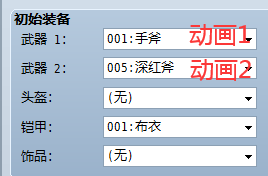
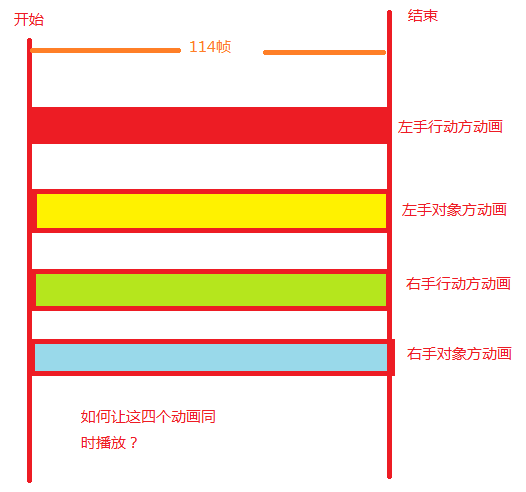
这么说吧,正常默认动画是一个行动方动画,一个对象方动画,顶多做出齐时动画,现在我想让这4个动画同时播放。
动画.png

点评

哎呀!费劲了这下。。。貌似论坛里面找到当初柳柳的叠加动画,但是苦于没有范例,不确定是不是能实现这个效果,状态法更是不知道咋整了  发表于 2020-4-16 21:20
我只能说思路,己方和对象都可以附加状态不是,第二个动画就是状态动画,状态动画可以多个,不嫌乱塞十个都能同时显示。视觉效果你自己调  发表于 2020-4-16 20:48
你这个相当于同时超过两个动画,而rm现在同时只能两个动画一个出手一个对象,用状态法可以出手两个,具体你问下菜刀我召唤精灵做法。  发表于 2020-4-16 20:42
要能这么做我好多效果早不发愁了,印象里应该是没接口了。最多同事两个动画,想再多得用纯脚本显示图片序列帧做了,超级不直观而且麻烦。  发表于 2020-4-16 20:41
回复

使用道具 举报

梦石
0
星屑
11809
在线时间
623 小时
注册时间
2016-8-25
回帖
1340

R考场第七期纪念奖

发表于 2020-4-16 20:18:07 | 显示全部楼层
分事件执行???

点评

?具体点呗  发表于 2020-4-16 20:30
回复

使用道具 举报

梦石
0
星屑
6483
在线时间
119 小时
注册时间
2020-1-8
回帖
205
发表于 2020-7-8 09:00:07 | 显示全部楼层
在Scene_battle4中 主回合4的step3(行动方动画)、step4(对象方动画)、step5(伤害显示)
可以自由添加步骤(得在Game_Battler中做好相应的判定)
主回合4的刷新 添加上自定义步骤即可
动画帧数小的话 很连贯的  
比如3.1左行动 3.2右行动 4.1左对象 4.2右对象
3.1→4.1→3.2→4.2
3.1→3.2→4.1→4.2
都可以自己排
角色是否双持武器,连击次数,伤害显示分开还是一起就楼主自己考虑去吧
回复

使用道具 举报

您需要登录后才可以回帖 登录 | 注册会员

本版积分规则

Powered by Discuz! X5.0 © 2001-2026 Discuz! Team.

在本版发帖返回顶部