查看: 3286|回复: 6

[原创发布] 猪都能学会的菜单教程

[复制链接]
梦石
0
星屑
100
在线时间
1022 小时
注册时间
2021-3-24
回帖
544

MZ评测员

发表于 2022-1-24 12:56:44 | 显示全部楼层 |阅读模式

加入我们,或者,欢迎回来。

您需要 登录 才可以下载或查看,没有账号?注册会员

×
算是自己全部功力了

-------------------------------------------------------------------
基础结构

场景   继承类  Scene_MenuBase
文字     txt
图像     sprite
命令行  commacd
值         val
计时器  time
开关     switch
-------------------------------------------------------------------
[pre lang="javascript"]var LIM=LIM||{};//;
LIM.CS=LIM.CS||{};//;
(function(_){//;
   
   _.Scene =function(){this.initialize.apply(this, arguments);}
   _.Scene.prototype = Object.create(Scene_MenuBase.prototype);
   _.Scene.prototype.constructor = _.Scene;
   /**创建*/
   _.Scene.prototype.create = function () {
      Scene_MenuBase.prototype.create.call(this);
      this.createBackground()
      if(this.Back())this.drawBack(this.Back())
      this.createSwitch()
      this.createTxt()
      this.createSprite()
      this.createCommacd()
      this.createVal()
      this.createTime()
   };
   _.Scene.prototype.update=function () {
      Scene_MenuBase.prototype.update.call(this);
   }
   /**创建背景*/
   _.Scene.prototype.createBackground=function(){
      this._background = new Sprite();
      this.addChild(this._background);
   }
   /**绘制背景*/
   _.Scene.prototype.drawBack=function(back){
      this._background.bitmap =ImageManager.loadUi(back);
      this._background.bitmap.addLoadListener(function () {
         this._background.scale.x = Graphics.boxWidth / this._background.width
         this._background.scale.y = Graphics.boxHeight / this._background.height
      }.bind(this));
   }
   /**类别开关*/
   _.Scene.prototype.createSwitch=function(){
      this.comSwitch=new Map()  //命令行状态;
      this.timeSwitch=new Map() //计时器组状态;
      this.spriteSwitch=new Map() //精灵组状态;
   }
   /**创建文本框*/
   _.Scene.prototype.createTxt=function(){
      this._txt=new Map()
   }
   /**创建精灵*/
   _.Scene.prototype.createSprite=function(){
      this._spr=new Map()
   }
   /**创建命令行*/
   _.Scene.prototype.createCommacd=function(){
      this._com=new Map()
   }
   /**创建值*/
   _.Scene.prototype.createVal=function() {
      this._val=new Map()
   }
   /**创建计时器*/
   _.Scene.prototype.createTime=function() {
      this._time=new Map()
   }
   _.Scene.prototype.Back=function() {
      return null
   }
})(LIM.CS);[/pre]
-------------------------------------------------------------------


作为继承类
-------------------------------------------------------------------
实例类 继承父类 并修改Back方法
[pre lang="javascript"]
function Scene_Game() {this.initialize.apply(this, arguments);}//;
Scene_Game.prototype = Object.create(LIM.CS.Scene.prototype)//;
Scene_Game.prototype.constructor = Scene_Game//;
Scene_Game.prototype.Back=function() {
    return "bg"
}
[/pre]


加载ui方法  需在img目录下创建ui文件夹  
----------------------------------------------------------------------
ImageManager.loadUi=function(filename,hue)//;
{return this.loadBitmap('img/ui/',filename,hue,true)}//加载ui;
//////////////////////
QQ截图20220124120333.png
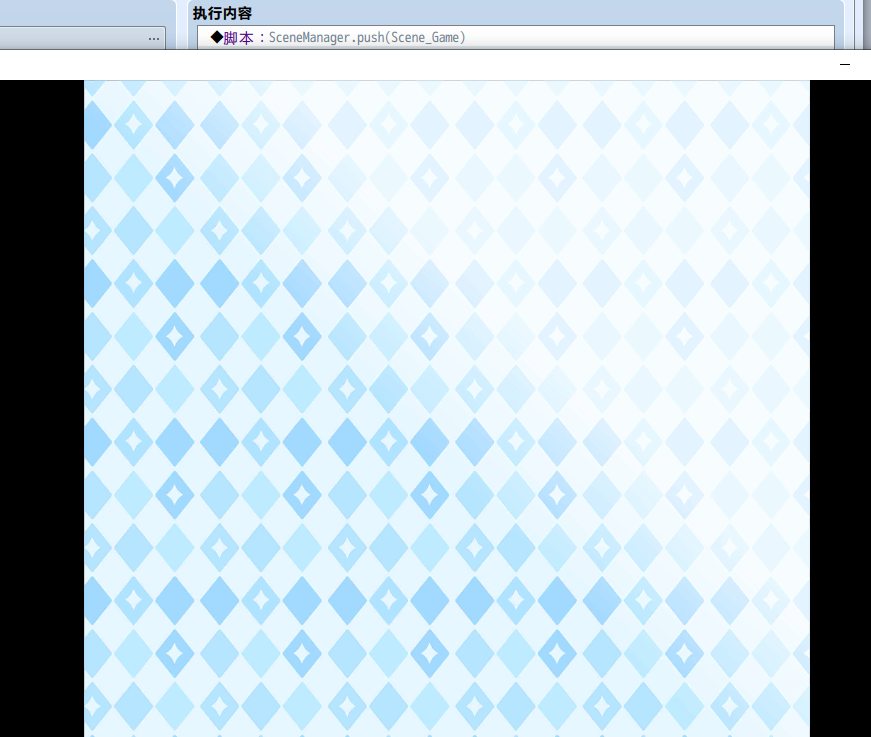
一个背景为bg 的场景就生成了,下一楼将在这个场景中创建精灵和文本。

评分

参与人数 2赞 +2 收起 理由
微笑的迪妮莎 + 1 精品文章
哇哇哇啊叭叭 + 1 精品文章

查看全部评分

全家活光光~
梦石
0
星屑
100
在线时间
1022 小时
注册时间
2021-3-24
回帖
544

MZ评测员

 楼主| 发表于 2022-1-24 14:46:24 | 显示全部楼层
创建 文本框类:

[pre lang="javascript"]
var LIM=LIM||{};//;
LIM.CS=LIM.CS||{};//;
(function(_) {//;
    _.Txt = function () {this.initialize.apply(this, arguments);}
    _.Txt.prototype = Object.create(Window_Base.prototype);
    _.Txt.prototype.constructor = _.Txt
    _.Txt.prototype.initialize = function (data) {
        this._data=data
        Window_Base.prototype.initialize.call(this,this.MarginLeft(),this.MarginTop(),this.reWidth(),this.reHeight());
        this.opacity = 0
        this.createBackground()
        if(this.Back())this.drawBack(this.Back())
        this.contents.fontSize=this.fontSize()
        this.contents.textColor=this.textColor()
        this.contents.outlineColor=this.outlineColor()
        this.contents.outlineWidth=this.outlineWidth()
    }
    _.Txt.prototype.createBackground=function(){
        this._background = new Sprite();
        this.addChildAt(this._background,0);
    }
    _.Txt.prototype.drawBack=function(back){
        this._background.bitmap =ImageManager.loadUi(back);
        this._background.bitmap.addLoadListener(function () {
            this._background.scale.x = this._width / this._background.width;
            this._background.scale.y = this._height / this._background.height
        }.bind(this));
    }

    _.Txt.prototype.paintText=function(text,line)
    {
        this.contents.drawText(text,this.PaddingLeft(),this.PaddingTop(),this.reWidth()-50,this.Line()*(line||0),this.Align())
    }
    _.Txt.prototype.clear=function(){this.contents.clear()}

    _.Txt.prototype.Back=function() {return this._data[0]||null} /**背景*/
    _.Txt.prototype.MarginLeft = function() {return LIM.MATH.lengthNumW(this._data[1]||0)};
    _.Txt.prototype.MarginTop = function() {return LIM.MATH.lengthNumH(this._data[2]||0)};
    _.Txt.prototype.reWidth = function() {return LIM.MATH.lengthNumW(this._data[3]||0)};
    _.Txt.prototype.reHeight = function() {return LIM.MATH.lengthNumH(this._data[4]||0)};
    _.Txt.prototype.PaddingLeft = function() {return this._data[5]||0};
    _.Txt.prototype.PaddingTop = function() {return this._data[6]||0};
    _.Txt.prototype.fontSize = function() {return this._data[7]||18}
    _.Txt.prototype.outlineColor = function() {return this._data[8]||"rgba(0, 0, 0, 0.5)"}
    _.Txt.prototype.textColor = function() {return this._data[9]||"#fff"}
    _.Txt.prototype.outlineWidth = function() {return this._data[10]||4}
    _.Txt.prototype.Align = function() {return this._data[11]||"left"}
    _.Txt.prototype.Line=function() {return 48}    /**行高*/
    _.Txt.prototype.standardPadding = function() {return 0};
})(LIM.CS);[/pre]
-----------------------------------------------------------
MATH百分比方法
[pre lang="javascript"]  
_.lengthNumW=function(num){
      if(isNaN(num))
      {
         let arr=num.split("%")
         let a=parseFloat(arr[0])*0.01*Graphics.width
         let b=parseFloat(arr[1])
         return  a+b
      }
      else return parseFloat(num)
   }
   _.lengthNumH=function(num){
      if(isNaN(num))
      {
         let arr=num.split("%")
         let a=parseFloat(arr[0])*0.01*Graphics.height
         let b=parseFloat(arr[1])
         return  a+b
      }
      else return parseFloat(num)
   }[/pre]
-----------------------------------------------------------
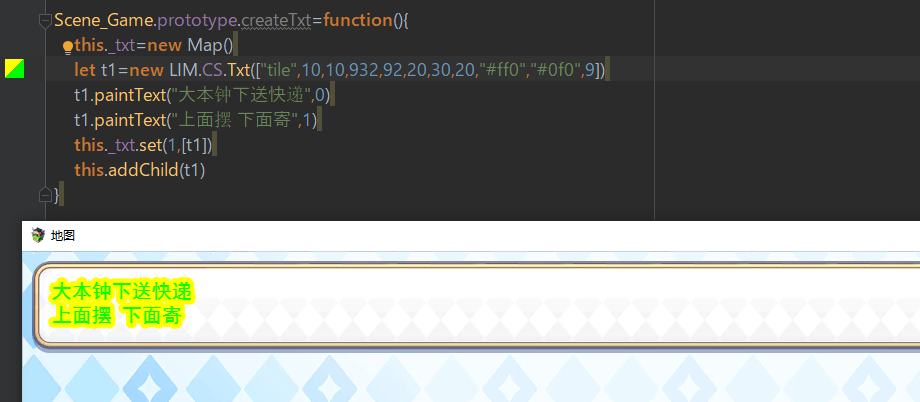
添加 创建TXT后的 实例方法
[pre lang="javascript"]
function Scene_Game() {this.initialize.apply(this, arguments);}//;
Scene_Game.prototype = Object.create(LIM.CS.Scene.prototype)//;
Scene_Game.prototype.constructor = Scene_Game//;
Scene_Game.prototype.Back=function() {
    return "bg"
}

Scene_Game.prototype.createTxt=function(){
    this._txt=new Map()
    let t1=new LIM.CS.Txt(["tile",10,10,932,92,20,30])
    t1.paintText("大本钟下送快递",0)
    t1.paintText("上面摆 下面寄",1)
    this._txt.set(1,[t1])
    this.addChild(t1)
}[/pre]
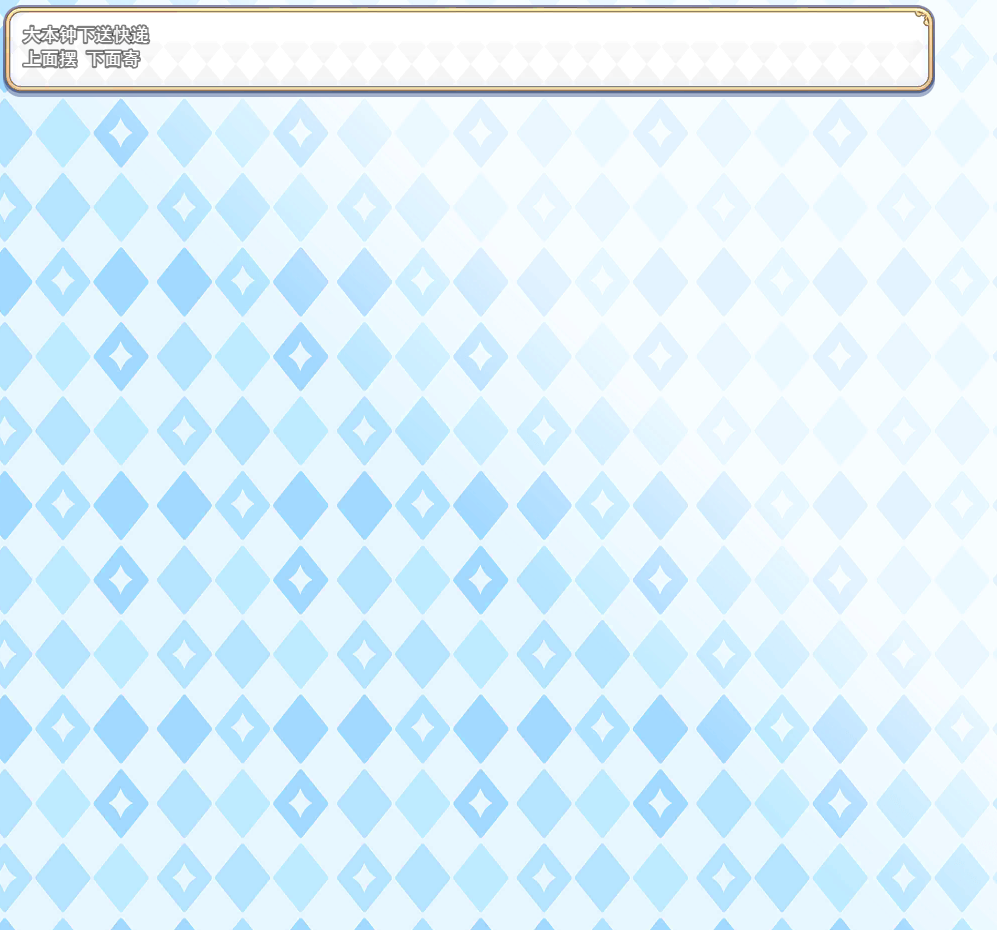
QQ截图20220124142800.png

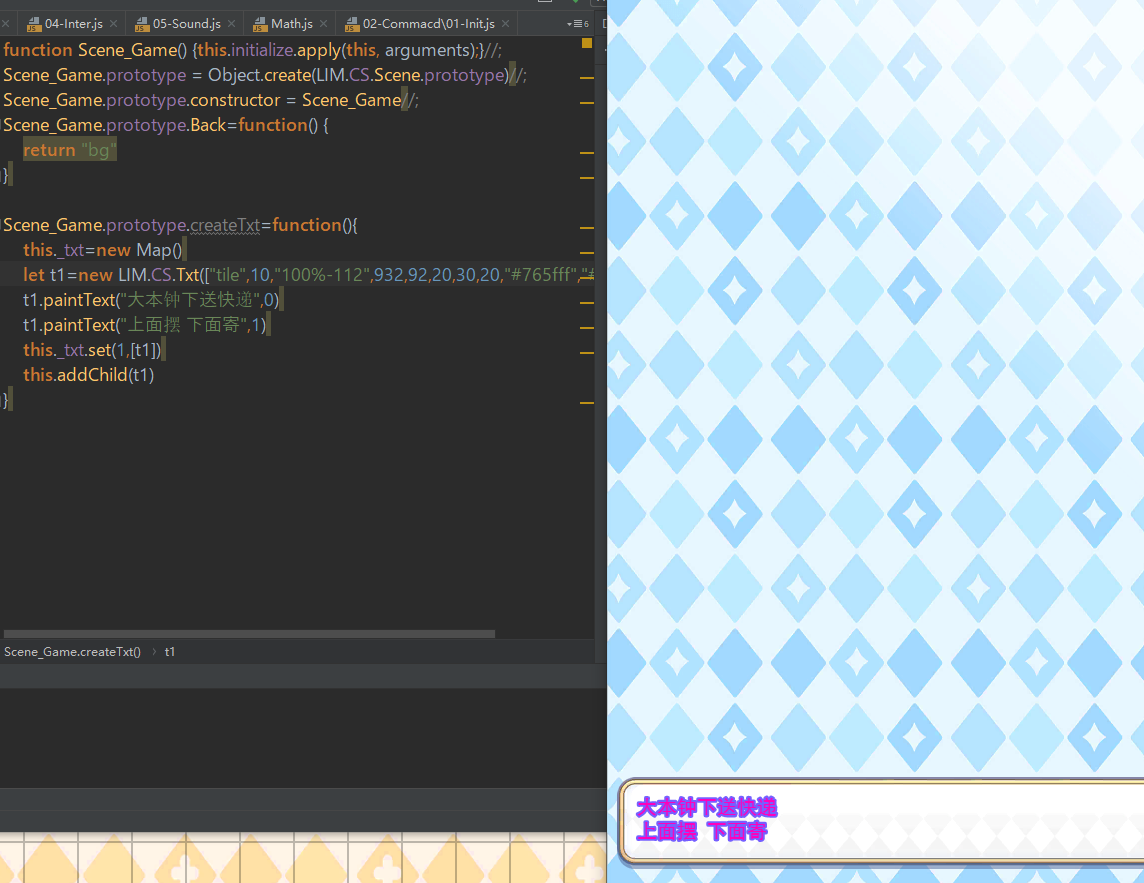
如果改变字体颜色,
规范起见 一个文本框 使用一种颜色
QQ截图20220124144312.png
QQ截图20220124143901.png

点评

意义是把功能归类,我会归为 文本 精灵 命令行,去改写一个专用类,让自己的项目里实现一个功能的方法一致。  发表于 2022-1-24 15:31
我,猪,只会抄原设定,微调,放插件覆盖处理  发表于 2022-1-24 15:24

评分

参与人数 1赞 +1 收起 理由
哇哇哇啊叭叭 + 1 猪来了,猪学了,猪没会,猪哭了.

查看全部评分

全家活光光~
回复

使用道具 举报

梦石
0
星屑
100
在线时间
1022 小时
注册时间
2021-3-24
回帖
544

MZ评测员

 楼主| 发表于 2022-1-24 17:31:05 | 显示全部楼层
创建 精灵类
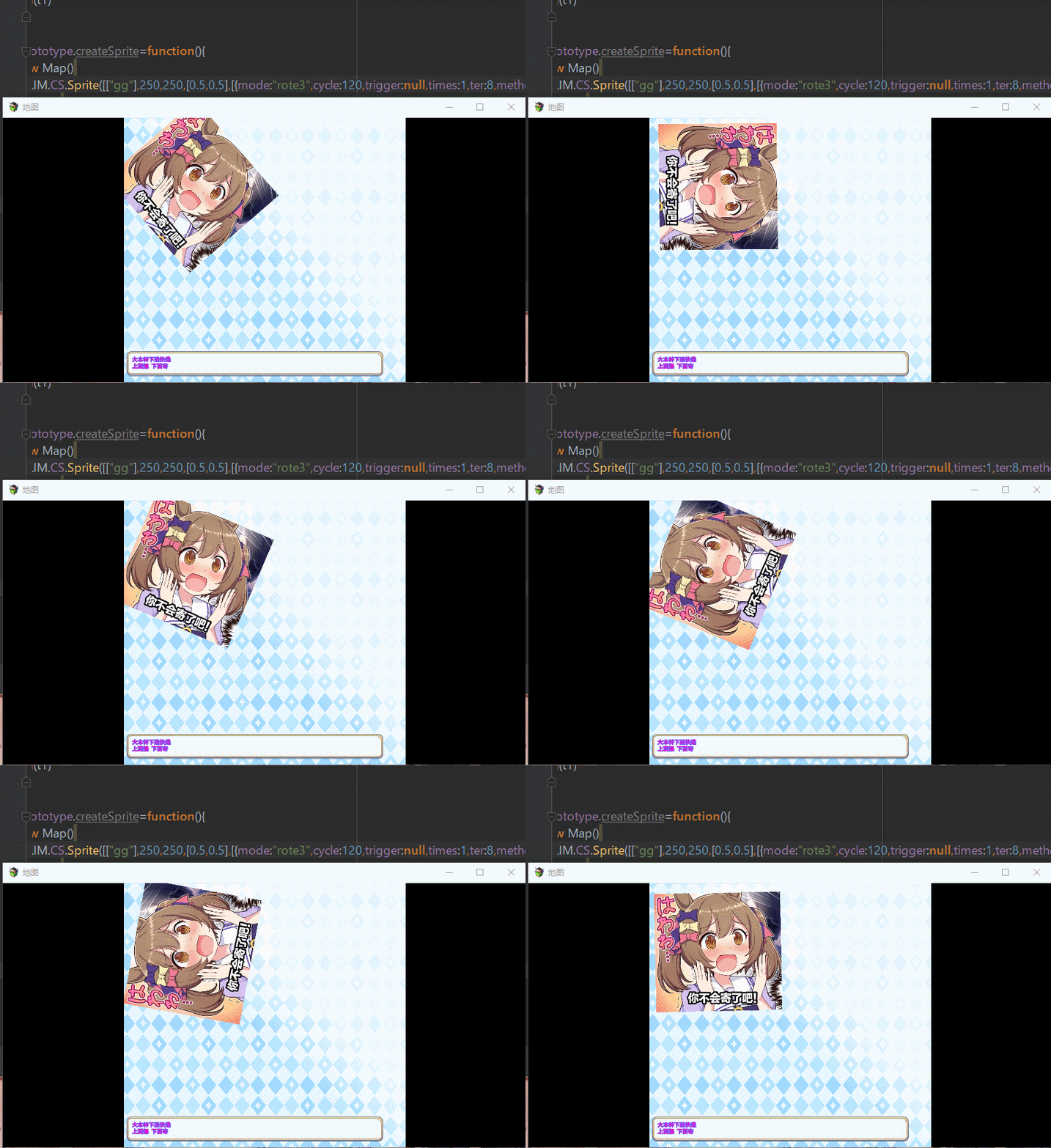
精灵可以根据正弦做简谐运动,(需要自己配),并且规定做几个周期。

[pre lang="javascript"]
var LIM=LIM||{};//;
LIM.CS=LIM.CS||{};//;
(function(_) {//;
    _.Sprite = function () {this.initialize.apply(this, arguments);}
    _.Sprite.prototype = Object.create(Sprite.prototype);
    _.Sprite.prototype.constructor = _.Sprite
    _.Sprite.prototype.initialize = function(data){
        this._data=data
        Sprite.prototype.initialize.call(this);
        this.scale.x=this.Size()
        this.scale.y=this.Size()
        this._anchor.x=this.AnchorX()
        this._anchor.y=this.AnchorY()
        this.x=this.MarginLeft()
        this.y=this.MarginTop()
        this._anime=[]
        if(data[6]>-1) this.setChartlet(data[6])
        if(data[7]>-1) this.setAnime(data[7])
    };
    _.Sprite.prototype.setAnime=function(index){
        if (this._anime.length > 0) {
            this._anime =[this._anime[0]]
            this._anime[0].times=2
            this._anime[0].time=this._anime[0].cycle*2-this._anime[0].time/2
            this._anime[0].trigger=null
        }
        else this._anime = []
        if(this.Action()&&this.Action()[index]) {
            let data=this.Action()[index]
            this._anime.push({mode:data.mode,method:data.method,time:0,cycle:data.cycle,ter:data.ter,
                trigger:data.trigger,times:(data.count?data.count+1:0)})
        }
    }
    _.Sprite.prototype.setChartlet=function (index) {
        if (this.Chartlet().length&&index>-1) {
            this.bitmap = ImageManager.loadUi(this.Chartlet()[index % this.Chartlet().length])
            this._refresh()
        }
    }
    _.Sprite.prototype.Trigger=function(code){}

    _.Sprite.prototype.Reborn=function(){
        if (this._anime.length > 0) {
            if (this._anime[0].times == 1) {
                let trigger = this._anime[0].trigger
                this._anime.splice(0, 1)
                if (trigger) this.parent.Trigger(trigger);
            }
            else {
                let num = LIM.MATH.sinNum(this._anime[0].cycle, this._anime[0].time++)
                num = (this._anime[0].method == 1 ? Math.abs(num) : this._anime[0].method == 2 ? num * num : num)
                if (Math.abs(this._anime[0].time - (this._anime[0].cycle / 2 * this._anime[0].ter)) < 1) {
                    this._anime[0].times--;
                    this._anime[0].time = 0
                }
                this.expressAnime(num, this._anime[0].mode)
            }
        }
    }
    _.Sprite.prototype.expressAnime=function(num,mode) {
        switch (mode) {
            case "shoadow":
                this._colorTone = [80 * num, 80 * num, 80 * num, 0]
                break
            case "rote":
                this.rotation = num*Math.PI
                break
            case "rote2":
                this.rotation = num*Math.PI*2
                break
            case "rote3":
                this.rotation = num*Math.PI/2
                break
            case "wobble":
                this.rotation = num*Math.PI/24
                this._anchor.y=this.AnchorY()+(num*num)*0.1
                break
            case "arouse":
                this.scale.x = num / 2 + 0.5
                this.scale.y = num / 2 + 0.5
                break
            case "countDown":
                this.scale.x = num / 2 + 0.5
                this.scale.y = num / 2 + 0.5
                this.alpha = 1 - num
                break
        }
        this._refresh()
    }

    _.Sprite.prototype.Chartlet = function() {return this._data[0]||[]};
    _.Sprite.prototype.MarginLeft = function() {return LIM.MATH.lengthNumW(this._data[1]||0)};
    _.Sprite.prototype.MarginTop = function() {return LIM.MATH.lengthNumH(this._data[2]||0)};
    _.Sprite.prototype.AnchorX = function() {return this._data[3][0]||0.5};
    _.Sprite.prototype.AnchorY = function() {return this._data[3][1]||0.5};
    _.Sprite.prototype.Action = function() {return this._data[4]||[]};
    _.Sprite.prototype.Size = function() {return this._data[5]||1};

    _.Sprite.prototype.hide=function () {
        this.alpha=0
        this.active=false
    }
    _.Sprite.prototype.show=function () {
        this.alpha=1
        this.active=true
    }
})(LIM.CS)[/pre]
/////////////////////////////////////////////////////////////
正弦波
[pre lang="javascript"]_.sinNum=function(max,i){return Math.sin(Math.PI/2/max*i).toFixed(7)}[/pre]
/////////////////////////////////////////////////////////////
添加精灵 后的  菜单实例方法
[pre lang="javascript"]
function Scene_Game() {this.initialize.apply(this, arguments);}//;
Scene_Game.prototype = Object.create(LIM.CS.Scene.prototype)//;
Scene_Game.prototype.constructor = Scene_Game//;
Scene_Game.prototype.Back=function() {
    return "bg"
}

Scene_Game.prototype.createTxt=function(){
    this._txt=new Map()
    let t1=new LIM.CS.Txt(["tile",10,"100%-112",932,92,20,30,20,"#765fff","#f0b",4])
    t1.paintText("大本钟下送快递",0)
    t1.paintText("上面摆 下面寄",1)
    this._txt.set(1,[t1])
    this.addChild(t1)
}

Scene_Game.prototype.createSprite=function(){
    this._spr=new Map()
    let s1=new LIM.CS.Sprite([["gg"],250,250,[0.5,0.5],[{mode:"wobble",cycle:60,trigger:null,times:0,ter:8,method:0}],0.5,0,0])
    this._spr.set(1,[s1])
    this.addChild(s1)

    this.spriteSwitch.set(1,true)
}[/pre]


参数解释
[
["gg"],                    图案组  
250,                       x坐标
250,                      y坐标
[0.5,0.5],               锚点
[{mode:"wobble",cycle:60,trigger:null,times:0,ter:8,method:0}],   动作     mode[动作类型]   cycle[周期速度]    trigger[动作结束触发]  times周期数  ter[峰值]  methgod[正弦波模式]   
0.5,                       缩放
0,                         初始图案
0                          初始动作
]
总之就是能搞出各种效果是了
2.gif
GIF3.gif

全家活光光~
回复

使用道具 举报

梦石
0
星屑
100
在线时间
1022 小时
注册时间
2021-3-24
回帖
544

MZ评测员

 楼主| 发表于 2022-1-25 11:50:22 | 显示全部楼层
Commcad这玩意 下面参数太多了,只能吸嗦

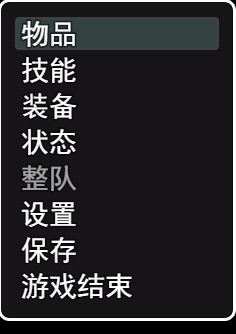
首先 Window_Command 继承的是Window_Selectable    这个东西是 一个list

如图
物品 技能 装备  是list内的item  绿框是他的rect
QQ截图20220125103737.png

单击[未选择]的item是选择,单击[选择]的item会触发他的symbol
{_index 存的是该com的当前选择}


由makeCommandList添加

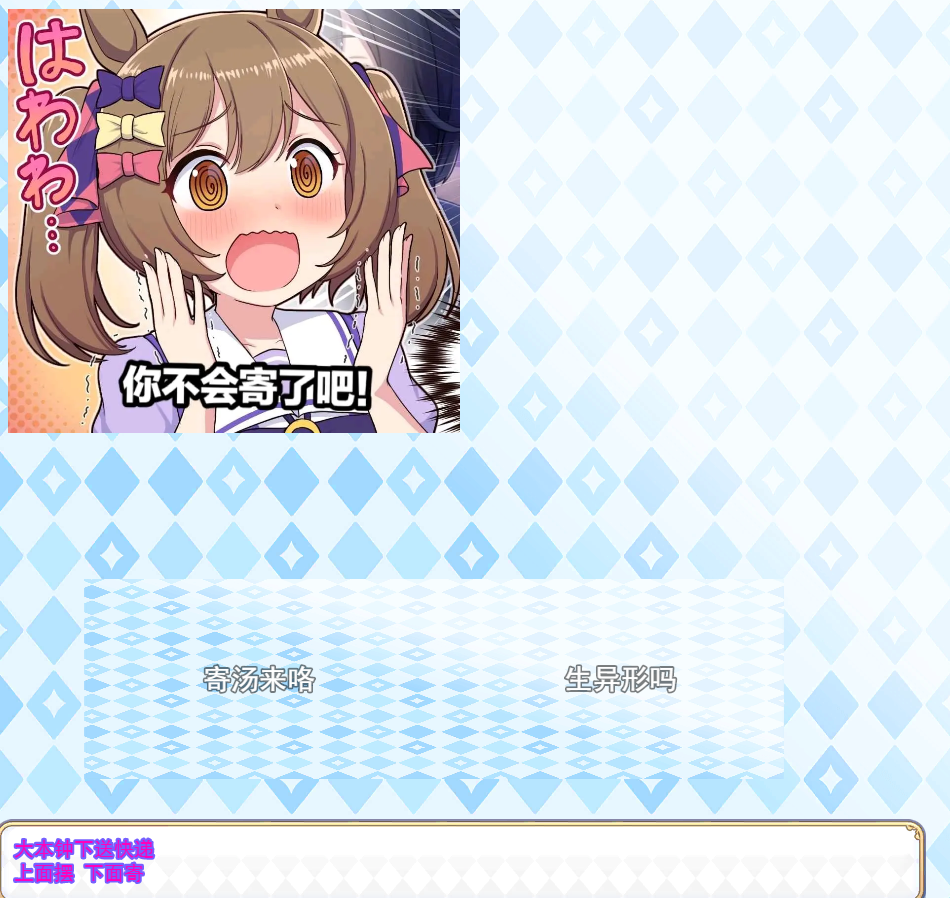
  1. Com_1.prototype.makeCommandList = function() {
  2.     this.addCommand("寄汤来咯", "TomChickenGo", true)
  3.     this.addCommand("生异形吗", "Raw", true)
  4. };
复制代码

加入this._list 并在refresh方法后呈现
QQ截图20220125114954.png
全家活光光~
回复

使用道具 举报

梦石
0
星屑
5170
在线时间
610 小时
注册时间
2017-10-21
回帖
321
发表于 2022-1-26 14:11:26 | 显示全部楼层
本帖最后由 微笑的迪妮莎 于 2022-1-26 14:13 编辑

哇~好复杂啊~我选择白piao~

另外想大吼一声,大佬牛批!
回复

使用道具 举报

您需要登录后才可以回帖 登录 | 注册会员

本版积分规则

Powered by Discuz! X5.0 © 2001-2026 Discuz! Team.

在本版发帖返回顶部