| 赞 | 5 |
| VIP | |
| 好人卡 | |
| 积分 | 39 |
| 经验 | |
| 最后登录 | 2026-8-3 |
| 在线时间 | 1899 小时 |
- 梦石
- 0
- 星屑
- 3850
- 在线时间
- 1899 小时
- 注册时间
- 2010-6-19
- 回帖
- 917
|
加入我们,或者,欢迎回来。
您需要 登录 才可以下载或查看,没有账号?注册会员
×
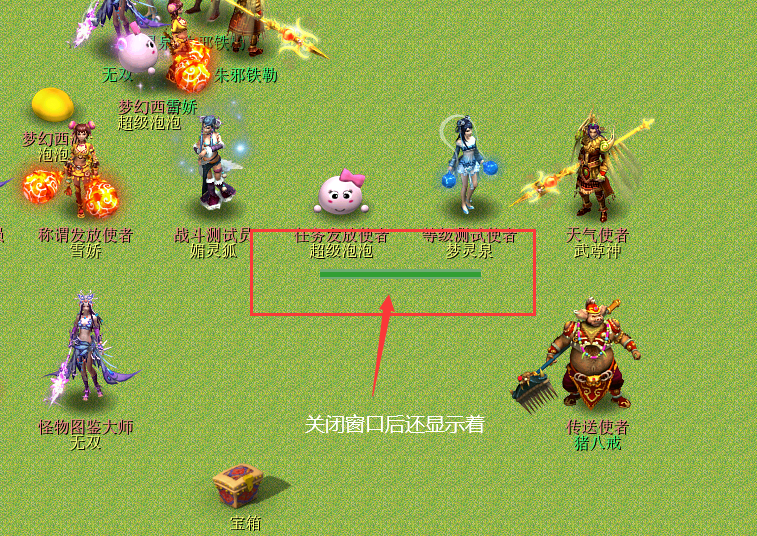
在脚本里加入了一个经验条显示的功能,但是发现关闭窗口的时候,经验条还会显示在地图上,等几秒才消失,不知道啥情况。。。
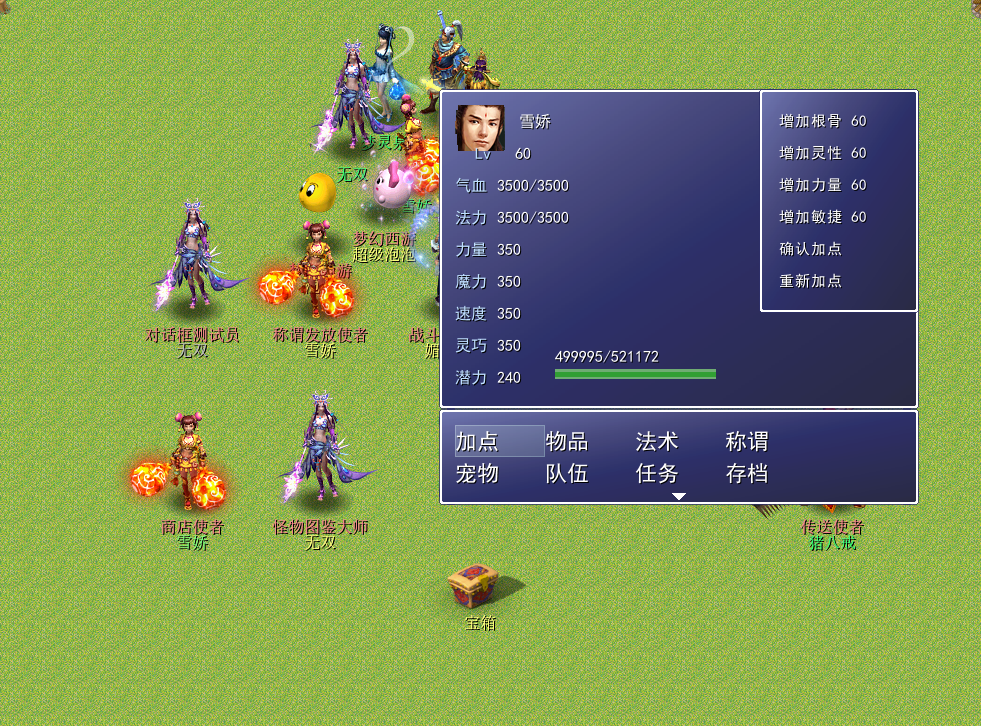
如图BUG
- #==============================================================================
- # ■ JD_DL
- #------------------------------------------------------------------------------
- # 显示加点状态窗口。
- #==============================================================================
- class JD_DL < Window_Base
- #--------------------------------------------------------------------------
- # ● 初始化对像
- # actor : 角色
- #--------------------------------------------------------------------------
- def initialize(actor)
- super(160+300, 100, 480, 320)
- self.contents = Bitmap.new(width - 32, height - 32)
- self.contents.font.size = 16
- @actor = actor
- # 文字高
- # 可以放在refresh里 实时控制
- @sh = 32
- refresh
- end
- #--------------------------------------------------------------------------
- # ● 刷新
- #--------------------------------------------------------------------------
- def refresh
- self.contents.clear
- draw_actor_face(@actor, 0, 0) # 头像
- draw_actor_name_duiwu(@actor, 20, 0) # 名字
- draw_actor_level(@actor, 20, 32) # 等级
- draw_v(0, 32*2, 0) # 气血
- draw_v(0, 32*3, 1) # 法力
- draw_dl(0, 32*4, 0) # 力量
- draw_dl(0, 32*5, 1) # 魔力
- draw_dl(0, 32*6, 2) # 速度
- draw_dl(0, 32*7, 3) # 灵巧
- # 潜力描绘
- self.contents.font.color = system_color
- str = "潜力"
- self.contents.draw_text(0, 32*8, sw(str), @sh, str) # 潜力
- cx = sw(str)
- # ** 调整颜色
- if $point != @actor.qianli
- self.contents.font.color = text_color(6)
- else
- self.contents.font.color = normal_color
- end
- # 潜力数值描绘
- self.contents.draw_text(cx + 10, 32*8, sw($point.to_s), @sh, $point.to_s) #数值
- # 描绘经验条
- self.contents.font.color = normal_color
- self.contents.draw_text(100, 235, 300, 32, @actor.exp_s + "/" + @actor.next_exp_s)
- #--------经验条显示------------------------------------------------------
- @exp_a = nil
- @exp_b = nil
- @exp_a = Sprite.new
- @exp_b = Sprite.new
- #--------经验条窗口显示--------------------------------------------------
- @exp_a.bitmap = Bitmap.new(168,10) #(经验条1宽度,第高度)
- @exp_b.bitmap = Bitmap.new(168,5) #(经验条2宽度,第高度)
- #--------经验条颜色------------------------------------------------------
- color1 = Color.new(111,172,115,255) #经验条1颜色
- color2 = Color.new(49,159,51,255) #经验条2颜色
- #--------经验值增幅度----------------------------------------------------
- next_exp = @actor.next_exp_s.to_i == 0 ? @actor.exp : @actor.next_exp_s.to_i
- @exp_d = 168*@actor.exp/next_exp
- #--------经验条增幅条1---------------------------------------------------
- @exp_a.x = 576
- @exp_a.y = 380
- @exp_a.z = 1000
- @exp_a.bitmap.fill_rect(0,0,@exp_d,32,color1)
- #--------经验条增幅条2---------------------------------------------------
- @exp_b.x = 576
- @exp_b.y = 383
- @exp_b.z = 1000
- @exp_b.bitmap.fill_rect(0,0,@exp_d,32,color2)
- end
- #--------释放经验条------------------------------------------------------
- def dispose
- super
- @exp_a.bitmap.dispose
- @exp_b.bitmap.dispose
- @exp_a.dispose
- @exp_b.dispose
- @exp_a = nil
- @exp_b = nil
- #------------------------------------------------------------------------
- end
- #--------------------------------------------------------------------------
- # ** 属性描绘
- #--------------------------------------------------------------------------
- # ** 返回字符串的宽度
- def sw(s)
- return self.contents.text_size(s).width
- end
- # ** HP AND SP 描绘
- def draw_v(x, y, type)
- case type
- when 0
- word = $data_system.words.hp
- dl = @actor.hp
- max = @actor.maxhp
- temp = $temp_hp
- when 1
- word = $data_system.words.sp
- dl = @actor.sp
- max = @actor.maxsp
- temp = $temp_sp
- else
- return
- end
- self.contents.font.color = system_color
- # ** 用语
- str = word
- self.contents.draw_text(x, y, sw(str), @sh, str)
- self.contents.font.color = normal_color
- # ** 基本值
- cx = sw(str)
- str = dl.to_s + "/"
- self.contents.draw_text(x + cx + 10, y, sw(str), @sh, str)
- cx += sw(str)
- # ** 调整颜色
- if temp > 0
- self.contents.font.color = text_color(6)
- else
- self.contents.font.color = normal_color
- end
- # ** 基本值 max
- str = (max + temp).to_s
- self.contents.draw_text(x + cx + 10, y, sw(str), @sh, str)
- cx += sw(str)
- # ** 附加值
- if temp > 0
- self.contents.font.color.set(255, 100, 100)
- str = "(+" + temp.to_s + ")"
- self.contents.draw_text(x + cx + 10, y, sw(str), @sh, str)
- end
- end
- #--------------------------------------------------------------------------
- # ** 属性描绘
- #--------------------------------------------------------------------------
- def draw_dl(x, y, type)
- # ** 准备描绘
- case type
- when 0
- word = $data_system.words.str
- dl = @actor.str
- plus = $temp_str
- when 1
- word = $data_system.words.int
- dl = @actor.int
- plus = $temp_int
- when 2
- word = $data_system.words.agi
- dl = @actor.agi
- plus = $temp_agi
- when 3
- word = $data_system.words.dex
- dl = @actor.dex
- plus = $temp_dex
- else
- return
- end
- # ** 开始描绘
- self.contents.font.color = system_color
- # ** 用语
- str = word
- self.contents.draw_text(x, y, sw(str), @sh, str)
- # ** 设置新值颜色
- if plus > 0
- self.contents.font.color = text_color(6)
- else
- self.contents.font.color = normal_color
- end
- # ** 基本值
- cx = sw(str)
- str = (dl + plus).to_s
- self.contents.draw_text(x + cx + 10, y, sw(str), @sh, str)
- cx += sw(str)
- # ** 附加值
- if plus > 0
- self.contents.font.color.set(255, 100, 100)
- str = "(+" + plus.to_s + ")"
- self.contents.draw_text(x + cx + 10, y, sw(str), @sh, str)
- end
- end
- end
|
|



 写轮眼

 发表于 2022-5-12 23:14:35
 提升卡
 沉默号角
 喧嚣号角
 变色卡
 升龙剑


 发表于 2022-5-13 00:46:18


