| 赞 | 3 |
| VIP | |
| 好人卡 | |
| 积分 | 14 |
| 经验 | |
| 最后登录 | 2025-9-28 |
| 在线时间 | 171 小时 |
- 梦石
- 0
- 星屑
- 1442
- 在线时间
- 171 小时
- 注册时间
- 2019-10-4
- 回帖
- 162
|
 发表于 2023-4-6 22:45:17
|
显示全部楼层
发表于 2023-4-6 22:45:17
|
显示全部楼层
本帖最后由 契约师Vi 于 2023-4-6 23:28 编辑
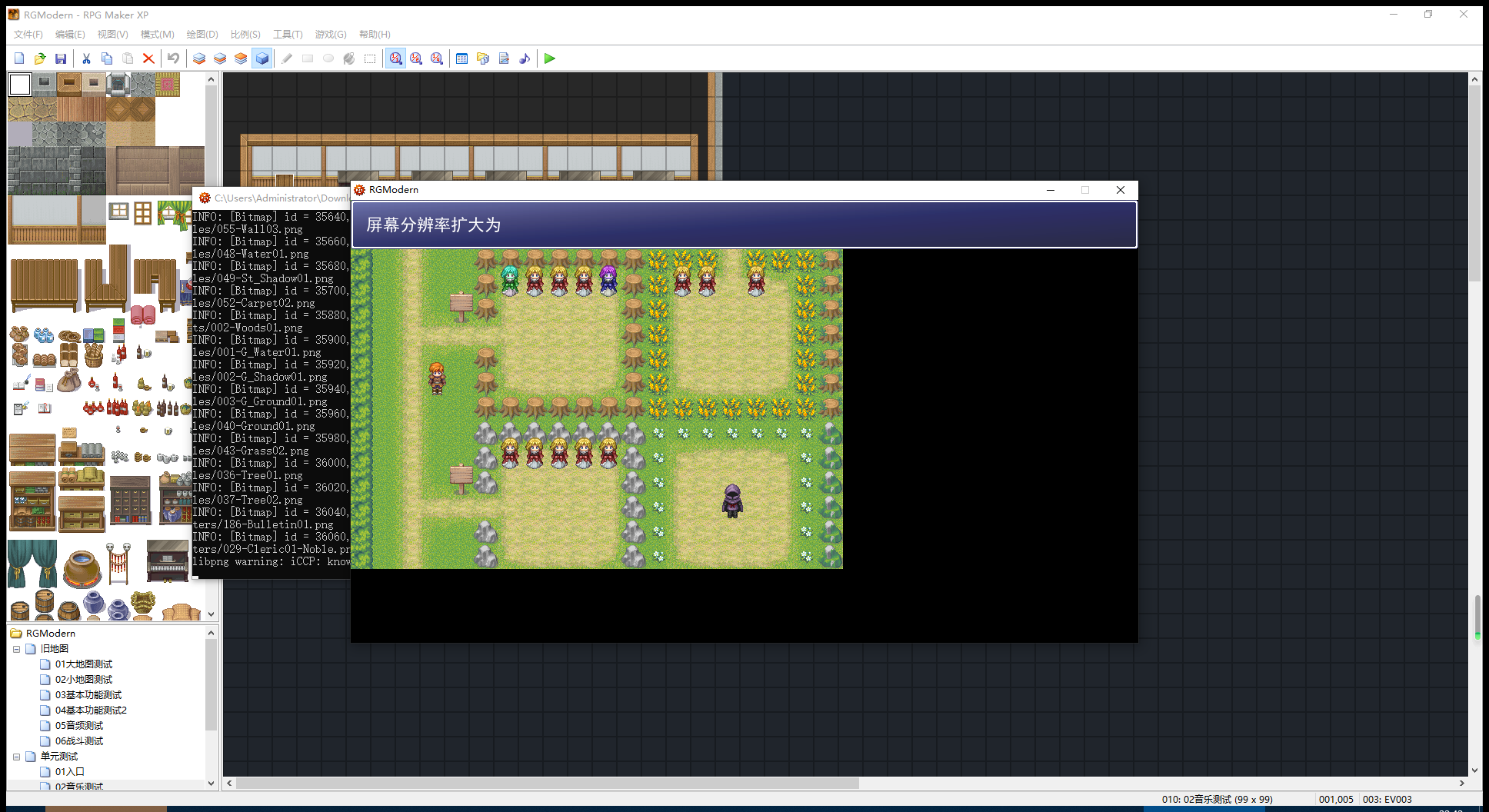 这个分辨率的黑边,希望能解决
[pre lang="ruby"]
#==============================================================================
# 本脚本来自www.66RPG.com,使用和转载请保留此信息
#==============================================================================
# ————————————————————————————————————
# ▼▲▼ XRXS_BP 1. CP制導入 ver..23 ▼▲▼
# by 桜雅 在土, 和希
#==============================================================================
# □ カスタマイズポイント
#==============================================================================
module XRXS_BP1
#
# 对齐方式。0:左 1:中央 2:右
#
ALIGN =0
#
# 人数
#
MAX = 4
end
class Scene_Battle_CP
#
# 战斗速度
#
BATTLE_SPEED = 2.0
#
# 战斗开始的时候气槽百分比
#
START_CP_PERCENT = 100
end
class Scene_Battle
# 效果音效,可以自己添加
DATA_SYSTEM_COMMAND_UP_SE = ""
# 各项数值功能消耗的CP值
CP_COST_BASIC_ACTIONS = 0 # 基础共同
CP_COST_SKILL_ACTION = 65535 # 技能
CP_COST_ITEM_ACTION = 65535 # 物品
CP_COST_BASIC_ATTACK = 65535 # 攻撃
CP_COST_BASIC_GUARD = 32768 # 防御
CP_COST_BASIC_NOTHING = 65535 # 不做任何事情
CP_COST_BASIC_ESCAPE = 65535 # 逃跑
end
#==============================================================================
# --- XRXS.コマンドウィンドウ?コマンド追加機構 ---
#------------------------------------------------------------------------------
# Window_Commandクラスに add_command メソッドを追加します。
#==============================================================================
module XRXS_Window_Command_Add_Command
#--------------------------------------------------------------------------
# ○ コマンドを追加
#--------------------------------------------------------------------------
def add_command(command)
# 初期化されていない場合、無効化判別用の配列 @disabled の初期化
#
if @disabled == nil
@disabled = []
end
if @commands.size != @disabled.size
for i in 0...@commands.size
@disabled = false
end
end
#
# 追加
#
@commands.push(command)
@disabled.push(false)
@item_max = @commands.size
self.y -= 32
self.height += 32
self.contents.dispose
self.contents = nil
self.contents = Bitmap.new(self.width - 32, @item_max * 32)
refresh
for i in 0...@commands.size
if @disabled
disable_item(i)
end
end
end
#--------------------------------------------------------------------------
# ○ 項目の無効化
# index : 項目番号
#--------------------------------------------------------------------------
def disable_item(index)
if @disabled == nil
@disabled = []
end
@disabled[index] = true
draw_item(index, disabled_color)
end
end
class Window_Command < Window_Selectable
#--------------------------------------------------------------------------
# ○ インクルード
#--------------------------------------------------------------------------
include XRXS_Window_Command_Add_Command
#--------------------------------------------------------------------------
# ● 項目の無効化
# index : 項目番号
#--------------------------------------------------------------------------
def disable_item(index)
super
end
end
#==============================================================================
# □ Scene_Battle_CP
#==============================================================================
class Scene_Battle_CP
#--------------------------------------------------------------------------
# ○ 公開インスタンス変数
#--------------------------------------------------------------------------
attr_accessor :stop # CP加算ストップ
#----------------------------------------------------------------------------
# ○ オブジェクトの初期化
#----------------------------------------------------------------------------
def initialize
@battlers = []
@cancel = false
@stop = false
@agi_total = 0
# 配列 count_battlers を初期化
count_battlers = []
# エネミーを配列 count_battlers に追加
for enemy in $game_troop.enemies
count_battlers.push(enemy)
end
# アクターを配列 count_battlers に追加
for actor in $game_party.actors
count_battlers.push(actor)
end
for battler in count_battlers
@agi_total += battler.agi
end
for battler in count_battlers
battler.cp = [[65535 * START_CP_PERCENT * (rand(15) + 85) * 4 * battler.agi / @agi_total / 10000, 0].max, 65535].min
end
end
#----------------------------------------------------------------------------
# ○ CPカウントアップ
#----------------------------------------------------------------------------
def update
# ストップされているならリターン
return if @stop
#
for battler in $game_party.actors + $game_troop.enemies
# 行動出来なければ無視
if battler.dead? == true
battler.cp = 0
next
end
battler.cp = [[battler.cp + BATTLE_SPEED * 4096 * battler.agi / @agi_total, 0].max, 65535].min
end
end
#----------------------------------------------------------------------------
# ○ CPカウントの開始
#----------------------------------------------------------------------------
def stop
@cancel = true
if @cp_thread != nil then
@cp_thread.join
@cp_thread = nil
end
end
end
#==============================================================================
# ■ Game_Battler
#==============================================================================
class Game_Battler
attr_accessor :now_guarding # 現在防御中フラグ
attr_accessor :cp # 現在CP
attr_accessor :slip_state_update_ban # スリップ?ステート自動処理の禁止
#--------------------------------------------------------------------------
# ○ CP の変更
#--------------------------------------------------------------------------
def cp=(p)
@cp = [[p, 0].max, 65535].min
end
#--------------------------------------------------------------------------
# ● 防御中判定 [ 再定義 ]
#--------------------------------------------------------------------------
def guarding?
return @now_guarding
end
#--------------------------------------------------------------------------
# ● コマンド入力可能判定
#--------------------------------------------------------------------------
alias xrxs_bp1_inputable? inputable?
def inputable?
bool = xrxs_bp1_inputable?
return (bool and (@cp >= 65535))
end
#--------------------------------------------------------------------------
# ● ステート [スリップダメージ] 判定
#--------------------------------------------------------------------------
alias xrxs_bp1_slip_damage? slip_damage?
def slip_damage?
return false if @slip_state_update_ban
return xrxs_bp1_slip_damage?
end
#--------------------------------------------------------------------------
# ● ステート自然解除 (ターンごとに呼び出し)
#--------------------------------------------------------------------------
alias xrxs_bp1_remove_states_auto remove_states_auto
def remove_states_auto
return if @slip_state_update_ban
xrxs_bp1_remove_states_auto
end
end
#==============================================================================
# ■ Game_Actor
#==============================================================================
class Game_Actor < Game_Battler
#--------------------------------------------------------------------------
# ● セットアップ
#--------------------------------------------------------------------------
alias xrxs_bp1_setup setup
def setup(actor_id)
xrxs_bp1_setup(actor_id)
@cp = 0
@now_guarding = false
@slip_state_update_ban = false
end
end
#==============================================================================
# ■ Game_Enemy
#==============================================================================
class Game_Enemy < Game_Battler
#--------------------------------------------------------------------------
# ● オブジェクト初期化
#--------------------------------------------------------------------------
alias xrxs_bp1_initialize initialize
def initialize(troop_id, member_index)
xrxs_bp1_initialize(troop_id, member_index)
@cp = 0
@now_guarding = false
@slip_state_update_ban = false
end
end
#==============================================================================
# ■ Window_BattleStatus
#==============================================================================
class Window_BattleStatus < Window_Base
#--------------------------------------------------------------------------
# ○ 公開インスタンス変数
#--------------------------------------------------------------------------
attr_accessor :update_cp_only # CPメーターのみの更新
#--------------------------------------------------------------------------
# ● オブジェクト初期化
#--------------------------------------------------------------------------
alias xrxs_bp1_initialize initialize
def initialize
@update_cp_only = false
xrxs_bp1_initialize
end
#--------------------------------------------------------------------------
# ● リフレッシュ
#--------------------------------------------------------------------------
alias xrxs_bp1_refresh refresh
def refresh
unless @update_cp_only
xrxs_bp1_refresh
end
refresh_cp
end
#--------------------------------------------------------------------------
# ○ リフレッシュ(CPのみ)
#--------------------------------------------------------------------------
def refresh_cp
for i in 0...$game_party.actors.size
actor = $game_party.actors
width = [self.width*3/4 / XRXS_BP1::MAX, 100].max
space = self.width / XRXS_BP1::MAX
case XRXS_BP1::ALIGN
when 0
actor_x = i * space + 4
when 1
actor_x = (space * ((XRXS_BP1::MAX - $game_party.actors.size)/3.0 + i)).floor
when 2
actor_x = (i + XRXS_BP1::MAX - $game_party.actors.size) * space + 4
end
actor_x += self.x
draw_actor_cp_meter(actor, actor_x, 90, width, 0)
end
end
#--------------------------------------------------------------------------
# ○ CPメーター の描画
#--------------------------------------------------------------------------
def draw_actor_cp_meter(actor, x, y, width = 200, type = 0)
self.contents.font.color = system_color
self.contents.fill_rect(x-1, y+27, width+10,9, Color.new(0, 0, 0, 150))
if actor.cp == nil
actor.cp = 0
end
w = width * [actor.cp,65535].min / 65535
self.contents.fill_rect(x, y+28, w+4,3, Color.new(0, 0, 0, 255))
self.contents.fill_rect(x, y+29, w+4,3, Color.new(255, 255, 0, 255))
self.contents.fill_rect(x, y+30, w+4,3, Color.new(200, 200, 0, 255))
self.contents.fill_rect(x, y+31, w+4,3, Color.new(128, 128, 0, 255))
end
end
#==============================================================================
# ■ Scene_Battle
#==============================================================================
class Scene_Battle
#--------------------------------------------------------------------------
# ● フレーム更新
#--------------------------------------------------------------------------
alias xrxs_bp1_update update
def update
xrxs_bp1_update
# CP更新
@cp_thread.update
end
#--------------------------------------------------------------------------
# ● バトル終了
# result : 結果 (0:勝利 1:敗北 2:逃走)
#--------------------------------------------------------------------------
alias xrxs_bp1_battle_end battle_end
def battle_end(result)
# CPカウントを停止する
@cp_thread.stop
# 呼び戻す
xrxs_bp1_battle_end(result)
end
#--------------------------------------------------------------------------
# ●战斗阶段開始
#--------------------------------------------------------------------------
alias xrxs_bp1_start_phase1 start_phase1
def start_phase1
@agi_total = 0
# CP加算を開始する
@cp_thread = Scene_Battle_CP.new
# 引索设定計算
@cp_escape_actor_command_index = @actor_command_window.height/32 - 1
# 返回命令窗口的追加
# @actor_command_window.add_command("逃跑")
if !$game_temp.battle_can_escape
# @actor_command_window.disable_item(@cp_escape_actor_command_index)
end
# 返回
xrxs_bp1_start_phase1
end
#--------------------------------------------------------------------------
# ● パーティコマンドフェーズ開始
#--------------------------------------------------------------------------
alias xrxs_bp1_start_phase2 start_phase2
def start_phase2
xrxs_bp1_start_phase2
@party_command_window.active = false
@party_command_window.visible = false
# CP加算を再開する
@cp_thread.stop = false
# 次へ
start_phase3
end
#--------------------------------------------------------------------------
# ● アクターコマンドウィンドウのセットアップ
#--------------------------------------------------------------------------
alias xrxs_bp1_phase3_setup_command_window phase3_setup_command_window
def phase3_setup_command_window
# CPスレッドを一時停止する
@cp_thread.stop = true
# ウィンドウのCP更新
@status_window.refresh_cp
# @active_battlerの防御を解除
@active_battler.now_guarding = false
# 効果音の再生
Audio.se_play(DATA_SYSTEM_COMMAND_UP_SE) if DATA_SYSTEM_COMMAND_UP_SE != ""
# 呼び戻す
xrxs_bp1_phase3_setup_command_window
end
#--------------------------------------------------------------------------
# ● フレーム更新 (アクターコマンドフェーズ : 基本コマンド)
#--------------------------------------------------------------------------
alias xrxs_bsp1_update_phase3_basic_command update_phase3_basic_command
def update_phase3_basic_command
# C ボタンが押された場合
if Input.trigger?(Input::C)
# アクターコマンドウィンドウのカーソル位置で分岐
case @actor_command_window.index
when @cp_escape_actor_command_index # 逃げる
if $game_temp.battle_can_escape
# 決定 SE を演奏
$game_system.se_play($data_system.decision_se)
# アクションを設定
@active_battler.current_action.kind = 0
@active_battler.current_action.basic = 4
# 次のアクターのコマンド入力へ
phase3_next_actor
else
# ブザー SE を演奏
$game_system.se_play($data_system.buzzer_se)
end
return
end
end
xrxs_bsp1_update_phase3_basic_command
end
#--------------------------------------------------------------------------
# ● メインフェーズ開始
#--------------------------------------------------------------------------
alias xrxs_bp1_start_phase4 start_phase4
def start_phase4
# 呼び戻す
xrxs_bp1_start_phase4
# CPスレッドを一時停止する
unless @action_battlers.empty?
@cp_thread.stop = true
end
end
#--------------------------------------------------------------------------
# ● 行動順序作成
#--------------------------------------------------------------------------
alias xrxs_bp1_make_action_orders make_action_orders
def make_action_orders
xrxs_bp1_make_action_orders
# 全員のCPを確認
exclude_battler = []
for battler in @action_battlers
# CPが不足している場合は @action_battlers から除外する
if battler.cp < 65535
exclude_battler.push(battler)
end
end
@action_battlers -= exclude_battler
end
#--------------------------------------------------------------------------
# ● フレーム更新 (メインフェーズ ステップ 1 : アクション準備)
#--------------------------------------------------------------------------
alias xrxs_bp1_update_phase4_step1 update_phase4_step1
def update_phase4_step1
# 初期化
@phase4_act_continuation = 0
# 勝敗判定
if judge
@cp_thread.stop
# 勝利または敗北の場合 : メソッド終了
return
end
# 未行動バトラー配列の先頭から取得
@active_battler = @action_battlers[0]
# ステータス更新をCPだけに限定。
@status_window.update_cp_only = true
# ステート更新を禁止。
@active_battler.slip_state_update_ban = true if @active_battler != nil
# 戻す
xrxs_bp1_update_phase4_step1
# @status_windowがリフレッシュされなかった場合は手動でリフレッシュ(CPのみ)
if @phase4_step != 2
# リフレッシュ
@status_window.refresh
# 軽量化:たったコレだけΣ(?w?
Graphics.frame_reset
end
# 禁止を解除
@status_window.update_cp_only = false
@active_battler.slip_state_update_ban = false if @active_battler != nil
end
#--------------------------------------------------------------------------
# ● フレーム更新 (メインフェーズ ステップ 2 : アクション開始)
#--------------------------------------------------------------------------
alias xrxs_bp1_update_phase4_step2 update_phase4_step2
def update_phase4_step2
# 強制アクションでなければ
unless @active_battler.current_action.forcing
# 制約が [敵を通常攻撃する] か [味方を通常攻撃する] の場合
if @active_battler.restriction == 2 or @active_battler.restriction == 3
# アクションに攻撃を設定
@active_battler.current_action.kind = 0
@active_battler.current_action.basic = 0
end
# 制約が [行動できない] の場合
if @active_battler.restriction == 4
# アクション強制対象のバトラーをクリア
$game_temp.forcing_battler = nil
if @phase4_act_continuation == 0 and @active_battler.cp >= 65535
# ステート自然解除
@active_battler.remove_states_auto
# CP消費
@active_battler.cp -= 65535
# ステータスウィンドウをリフレッシュ
@status_window.refresh
end
# ステップ 1 に移行
@phase4_step = 1
return
end
end
# アクションの種別で分岐
case @active_battler.current_action.kind
when 0
# 攻撃?防御?逃げる?何もしない時の共通消費CP
@active_battler.cp -= CP_COST_BASIC_ACTIONS if @phase4_act_continuation == 0
when 1
# スキル使用時の消費CP
@active_battler.cp -= CP_COST_SKILL_ACTION if @phase4_act_continuation == 0
when 2
# アイテム使用時の消費CP
@active_battler.cp -= CP_COST_ITEM_ACTION if @phase4_act_continuation == 0
end
# ステート自然解除
@active_battler.remove_states_auto
# 呼び戻す
xrxs_bp1_update_phase4_step2
end
#--------------------------------------------------------------------------
# ● 基本アクション 結果作成
#--------------------------------------------------------------------------
alias xrxs_bp1_make_basic_action_result make_basic_action_result
def make_basic_action_result
# 攻撃の場合
if @active_battler.current_action.basic == 0 and @phase4_act_continuation == 0
@active_battler.cp -= CP_COST_BASIC_ATTACK # 攻撃時のCP消費
end
# 防御の場合
if @active_battler.current_action.basic == 1 and @phase4_act_continuation == 0
@active_battler.cp -= CP_COST_BASIC_GUARD # 防御時のCP消費
# @active_battlerの防御をON
@active_battler.now_guarding = true
end
# 敵の逃げるの場合
if @active_battler.is_a?(Game_Enemy) and
@active_battler.current_action.basic == 2 and @phase4_act_continuation == 0
@active_battler.cp -= CP_COST_BASIC_ESCAPE # 逃走時のCP消費
end
# 何もしないの場合
if @active_battler.current_action.basic == 3 and @phase4_act_continuation == 0
@active_battler.cp -= CP_COST_BASIC_NOTHING # 何もしない時のCP消費
end
# 逃げるの場合
if @active_battler.current_action.basic == 4 and @phase4_act_continuation == 0
@active_battler.cp -= CP_COST_BASIC_ESCAPE # 逃走時のCP消費
# 逃走可能ではない場合
if $game_temp.battle_can_escape == false
# ブザー SE を演奏
$game_system.se_play($data_system.buzzer_se)
return
end
# 逃走処理
update_phase2_escape
return
end
# 呼び戻す
xrxs_bp1_make_basic_action_result
end
#--------------------------------------------------------------------------
# ● フレーム更新 (メインフェーズ ステップ 6 : リフレッシュ)
#--------------------------------------------------------------------------
alias xrxs_bp1_update_phase4_step6 update_phase4_step6
def update_phase4_step6
# スリップダメージ
if @active_battler.hp > 0 and @active_battler.slip_damage?
@active_battler.slip_damage_effect
@active_battler.damage_pop = true
# ステータスウィンドウをリフレッシュ
@status_window.refresh
end
# 呼び戻す
xrxs_bp1_update_phase4_step6
end
end
#==============================================================================
# 本脚本来自www.66RPG.com,使用和转载请保留此信息
#==============================================================================
[/pre]还有用上CP条脚本 之后战斗直接闪退 不得不说BUG还是有的 不得不说BUG还是有的
虽然很想要将旧工程,变成60帧。还有战斗图标脚本,图标就不显示了。 |
|
 楼主: guoxiaomi




 写轮眼
写轮眼



 发表于 2023-4-9 09:44:57