| 赞 | 0 |
| VIP | |
| 好人卡 | |
| 积分 | 1 |
| 经验 | |
| 最后登录 | 2014-1-19 |
| 在线时间 | 228 小时 |
- 梦石
- 0
- 星屑
- 50
- 在线时间
- 228 小时
- 注册时间
- 2012-2-27
- 回帖
- 25
|
加入我们,或者,欢迎回来。
您需要 登录 才可以下载或查看,没有账号?注册会员
×
本帖最后由 l616631804 于 2012-7-21 11:44 编辑
转载自 http://www4.plala.or.jp/findias/codecrush/material/vxace_rgss3/index.html
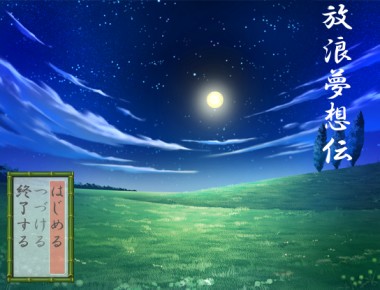
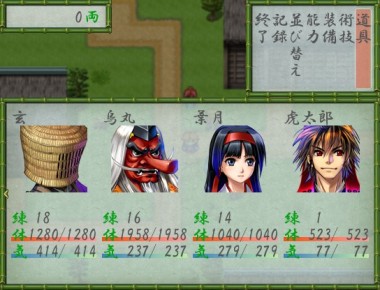
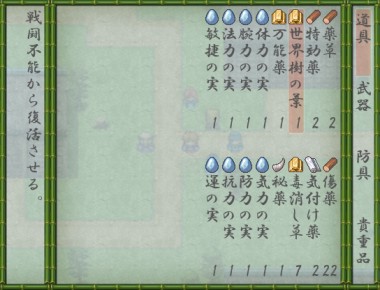
各个界面的竖排。不用添加素材,可直接使用。



[pre lang="ruby" line="1"]#==============================================================================
# ■ VXAce-RGSS3-31 和風レイアウト<base> [Ver.1.0.0] by Claimh
#------------------------------------------------------------------------------
# 和風なレイアウトに変更します。
#==============================================================================
# デフォルトフォント設定
Font.default_name = ["HGP行書体", "MS 明朝", "VL Gothic"]
Font.default_outline = false
Font.default_shadow = false
#==============================================================================
# ■ Vocab
#------------------------------------------------------------------------------
# 用語とメッセージを定義するモジュールです。定数でメッセージなどを直接定義す
# るほか、グローバル変数 $data_system から用語データを取得します。
#==============================================================================
module Vocab
# セーブ/ロード画面
SaveMessage = "どの書に記録しますか?"
LoadMessage = "どの書から読み出ししますか?"
File = "記録の書"
# アクター対象の行動結果
ActorDamage = "%sは %s の傷を受けた!"
ActorRecovery = "%sの%sが %s 回復した!"
ActorGain = "%sの%sが %s 増えた!"
ActorLoss = "%sの%sが %s 減った!"
ActorDrain = "%sは%sを %s 奪われた!"
ActorNoDamage = "%sには効かない!"
ActorNoHit = "%sには当たらない!"
# 敵キャラ対象の行動結果
EnemyDamage = "%sに %s の傷を与えた!"
EnemyRecovery = "%sの%sが %s 回復した!"
EnemyGain = "%sの%sが %s 増えた!"
EnemyLoss = "%sの%sが %s 減った!"
EnemyDrain = "%sの%sを %s 奪った!"
EnemyNoDamage = "%sには効かない!"
EnemyNoHit = "%sに当たらない!"
# 回避/反射
Evasion = "%sは攻撃をかわした!"
MagicEvasion = "%sは術を打ち消した!"
MagicReflection = "%sは術を跳ね返した!"
CounterAttack = "%sの反撃!"
Substitute = "%sが%sをかばった!"
end
class Bitmap
#--------------------------------------------------------------------------
# ● 縦テキスト描画
#--------------------------------------------------------------------------
def draw_h_text(rect, text)
t = text.to_s.split(//)
x = rect.x
y = rect.y
t.each_index do |i|
h = text_size(t).height
case t
when "。", "、"
plus = h / 2
draw_text(x+plus, y-plus, rect.width, h, t, 1)
when "っ", "ぁ", "ぃ", "ぅ", "ぇ", "ぉ", "ゃ", "ゅ", "ょ",
"ッ", "ァ", "ィ", "ゥ", "ェ", "ォ", "ャ", "ュ", "ョ"
plus = h / 5
draw_text(x+plus, y-plus, rect.width, h, t, 1)
when "\n", "\r"; next
else
draw_text(x, y, rect.width, h, t, 1)
end
y += h
end
end
#--------------------------------------------------------------------------
# ● 和数字描画
#--------------------------------------------------------------------------
def draw_jnum(rect, num, align=2)
draw_text(rect, ConvJnum.conv(num), align)
end
#--------------------------------------------------------------------------
# ● 和数字描画 <縦>
#--------------------------------------------------------------------------
def draw_h_jnum(rect, num, align=2)
draw_h_text(rect, ConvJnum.conv(num), align)
end
end
module ConvJnum
#--------------------------------------------------------------------------
# ● 和数字変換
#--------------------------------------------------------------------------
def self.conv(num)
text = ""
if num / 100000000 > 0
text += conv_o(num / 100000000)
num %= 100000000
end
if num / 10000 > 0
text += conv_m(num / 10000)
num %= 10000
end
text += conv_s(num)
text = "零" if text == ""
text
end
#--------------------------------------------------------------------------
# ● 和数字変換 (億単位)
#--------------------------------------------------------------------------
def self.conv_o(num)
conv_s(num) + "億 "
end
#--------------------------------------------------------------------------
# ● 和数字変換 (万単位)
#--------------------------------------------------------------------------
def self.conv_m(num)
conv_s(num) + "万 "
end
#--------------------------------------------------------------------------
# ● 和数字変換 (千単位以下)
#--------------------------------------------------------------------------
def self.conv_s(num)
text = ""
if num / 1000 > 0
text += conv_one(num / 1000, false) + "千"
num %= 1000
end
if num / 100 > 0
text += conv_one(num / 100, false) + "百"
num %= 100
end
if num / 10 > 0
text += conv_one(num / 10, false) + "十"
num %= 10
end
if num > 0
text +=conv_one(num, true)
end
text
end
def self.conv_one(num, one=false)
conv = {1=>"一", 2=>"二", 3=>"三", 4=>"四", 5=>"五",
6=>"六", 7=>"七", 8=>"八", 9=>"九"}
one ? conv[num] : (num > 1 ? conv[num] : "")
end
end
class Window_Base < Window
#--------------------------------------------------------------------------
# ● 各種文字色の取得
#--------------------------------------------------------------------------
def normal_color; text_color(0); end; # 通常
def system_color; text_color(11); end; # システム
def crisis_color; text_color(17); end; # ピンチ
def knockout_color; text_color(18); end; # 戦闘不能
def gauge_back_color; text_color(7); end; # ゲージ背景
def hp_gauge_color1; text_color(20); end; # HP ゲージ 1
def hp_gauge_color2; text_color(21); end; # HP ゲージ 2
def mp_gauge_color1; text_color(22); end; # MP ゲージ 1
def mp_gauge_color2; text_color(23); end; # MP ゲージ 2
def mp_cost_color; text_color(31); end; # 消費 MP
def power_up_color; text_color(24); end; # 装備 パワーアップ
def power_down_color; text_color(25); end; # 装備 パワーダウン
def tp_gauge_color1; text_color(28); end; # TP ゲージ 1
def tp_gauge_color2; text_color(29); end; # TP ゲージ 2
def tp_cost_color; text_color(30); end; # 消費 TP
#--------------------------------------------------------------------------
# ● 文字の処理
# c : 文字
# text : 描画処理中の文字列バッファ(必要なら破壊的に変更)
# pos : 描画位置 {:x, :y, :new_x, :height}
#--------------------------------------------------------------------------
def process_character(c, text, pos)
case c
when "\r" # キャリッジリターンは無視
when "\n" # 改行
process_new_line(text, pos)
when "\f" # 改ページ
process_new_page(text, pos)
when "\e" # 制御文字
process_escape_character(obtain_escape_code(text), text, pos)
else # 普通の文字
process_normal_character(c, pos)
end
end
#--------------------------------------------------------------------------
# ● シンプルなステータスの描画
#--------------------------------------------------------------------------
def draw_actor_simple_status(actor, x, y, add=120, width=124)
draw_actor_name(actor, x, y)
draw_actor_level(actor, x, y + line_height * 1)
draw_actor_icons(actor, x, y + line_height * 2)
draw_actor_class(actor, x + add, y)
draw_actor_hp(actor, x + add, y + line_height * 1, width)
draw_actor_mp(actor, x + add, y + line_height * 2, width)
end
#--------------------------------------------------------------------------
# ● 現在値/最大値を分数形式で描画
# current : 現在値
# max : 最大値
# color1 : 現在値の色
# color2 : 最大値の色
#--------------------------------------------------------------------------
def draw_current_and_max_values(x, y, width, current, max, color1, color2)
change_color(color1)
xr = x + width
if width < 106
draw_text(xr - 50, y, 52, line_height, current, 2)
else
draw_text(xr - 106, y, 52, line_height, current, 2)
change_color(color2)
draw_text(xr - 56, y, 12, line_height, "/", 2)
draw_text(xr - 52, y, 52, line_height, max, 2)
end
end
end
#==============================================================================
# ■ Window_J_Base
#------------------------------------------------------------------------------
# ゲーム中の全てのウィンドウのスーパークラスです。
#==============================================================================
class Window_J_Base < Window_Base
#--------------------------------------------------------------------------
# ● オブジェクト初期化
#--------------------------------------------------------------------------
def initialize(*args)
@jmode=true
super(*args)
end
#--------------------------------------------------------------------------
# ● 行の幅を取得
#--------------------------------------------------------------------------
def line_width
return 24
end
#--------------------------------------------------------------------------
# ● 指定行数に適合するウィンドウの幅を計算
#--------------------------------------------------------------------------
def fitting_width(line_number)
line_number * line_width + standard_padding * 2
end
#--------------------------------------------------------------------------
# ● テキストの描画 <縦書き>
# args : Bitmap#draw_text と同じ
#--------------------------------------------------------------------------
def draw_text(*args)
return super(*args) unless @jmode
if args[0].is_a?(Rect)
contents.draw_h_text(args[0], args[1])
else
contents.draw_h_text(Rect.new(args[0], args[1], args[2], args[3]), args[4])
end
end
#--------------------------------------------------------------------------
# ● 制御文字つきテキストの描画
#--------------------------------------------------------------------------
def draw_text_ex(x, y, text)
reset_font_settings
text = convert_escape_characters(text)
pos = {:x => x, :y => y, :new_y => y, :width => calc_line_width(text)}
process_character(text.slice!(0, 1), text, pos) until text.empty?
end
#--------------------------------------------------------------------------
# ● 通常文字の処理
#--------------------------------------------------------------------------
def process_normal_character(c, pos)
text_height = c.split(//).inject(0) {|r, t| r+=text_size(t).height}
draw_text(pos[:x], pos[:y], line_width, text_height, c)
pos[:y] += text_height
end
#--------------------------------------------------------------------------
# ● 改行文字の処理
#--------------------------------------------------------------------------
def process_new_line(text, pos)
pos[:x] -= pos[:width]
pos[:y] = pos[:new_y]
pos[:width] = calc_line_width(text)
end
#--------------------------------------------------------------------------
# ● 制御文字によるアイコン描画の処理
#--------------------------------------------------------------------------
def process_draw_icon(icon_index, pos)
draw_icon(icon_index, pos[:x]-pos[:width], pos[:y])
pos[:y] += 24
end
#--------------------------------------------------------------------------
# ● アイテム名の描画
# enabled : 有効フラグ。false のとき半透明で描画
#--------------------------------------------------------------------------
def draw_item_name(item, x, y, enabled = true, height = 172)
return unless item
draw_icon(item.icon_index, x, y, enabled)
change_color(normal_color, enabled)
draw_text(x, y + 24, line_width, height, item.name)
end
#--------------------------------------------------------------------------
# ● 行の幅を計算
# restore_font_size : 計算後にフォントサイズを元に戻す
#--------------------------------------------------------------------------
def calc_line_width(text, restore_font_size = true)
result = [line_width, contents.font.size].max
last_font_size = contents.font.size
text.slice(/^.*$/).scan(/\e[\{\}]/).each do |esc|
make_font_bigger if esc == "\e{"
make_font_smaller if esc == "\e}"
result = [result, contents.font.size].max
end
contents.font.size = last_font_size if restore_font_size
result
end
#--------------------------------------------------------------------------
# ● 名前の描画
#--------------------------------------------------------------------------
def draw_actor_name_l(actor, x, y, width = 112)
@jmode = false
draw_actor_name(actor, x, y, width)
@jmode = true
end
#--------------------------------------------------------------------------
# ● レベルの描画
#--------------------------------------------------------------------------
def draw_actor_level_l(actor, x, y)
@jmode = false
draw_actor_level(actor, x, y)
@jmode = true
end
#--------------------------------------------------------------------------
# ● HP の描画
#--------------------------------------------------------------------------
def draw_actor_hp_l(actor, x, y, width = 124)
@jmode = false
draw_actor_hp(actor, x, y, width)
@jmode = true
end
#--------------------------------------------------------------------------
# ● MP の描画
#--------------------------------------------------------------------------
def draw_actor_mp_l(actor, x, y, width = 124)
@jmode = false
draw_actor_mp(actor, x, y, width)
@jmode = true
end
#--------------------------------------------------------------------------
# ● シンプルなステータスの描画
#--------------------------------------------------------------------------
def draw_actor_simple_status(actor, x, y, add=120, width=124)
@jmode = false
draw_actor_name(actor, x, y, width)
draw_actor_level(actor, x, y + line_height * 1)
draw_actor_icons(actor, x, y + line_height * 2)
draw_actor_class(actor, x + add, y)
draw_actor_hp(actor, x + add, y + line_height * 1, width)
draw_actor_mp(actor, x + add, y + line_height * 2, width)
@jmode = true
end
#--------------------------------------------------------------------------
# ● シンプルなステータスの描画 <縦パターン>
#--------------------------------------------------------------------------
def draw_actor_simple_status2(actor, x, y, width=124)
@jmode = false
draw_actor_name( actor, x, y + line_height * 0, width)
draw_actor_face( actor, x+(width-96)/2, y + line_height * 1, width)
#~ draw_actor_class(actor, x, y + 96 + line_height * 1, width)
draw_actor_level(actor, x, y + 96 + line_height * 2)
draw_actor_hp( actor, x, y + 96 + line_height * 3, width)
draw_actor_mp( actor, x, y + 96 + line_height * 4, width)
draw_actor_icons(actor, x, y + 96 + line_height * 5, width)
@jmode = true
end
end
#==============================================================================
# ■ Window_J_Selectable
#------------------------------------------------------------------------------
# カーソルの移動やスクロールの機能を持つウィンドウクラスです。
#==============================================================================
class Window_J_Selectable < Window_J_Base
#--------------------------------------------------------------------------
# ● 公開インスタンス変数
#--------------------------------------------------------------------------
attr_reader :index # カーソル位置
attr_reader :help_window # ヘルプウィンドウ
attr_accessor :cursor_fix # カーソル固定フラグ
attr_accessor :cursor_all # カーソル全選択フラグ
#--------------------------------------------------------------------------
# ● オブジェクト初期化
#-------------------------------------------------------------------------
def initialize(x, y, width, height)
super
@index = -1
@handler = {}
@cursor_fix = false
@cursor_all = false
update_padding
deactivate
end
#--------------------------------------------------------------------------
# ● ウィンドウ内容の作成
#--------------------------------------------------------------------------
def create_contents
super
self.ox = contents_width - base_contents_width
end
#--------------------------------------------------------------------------
# ● 桁数の取得
#--------------------------------------------------------------------------
def col_max
return 1
end
#--------------------------------------------------------------------------
# ● 縦に項目が並ぶときの空白の幅を取得
#--------------------------------------------------------------------------
def spacing
return 32
end
#--------------------------------------------------------------------------
# ● 項目数の取得
#--------------------------------------------------------------------------
def item_max
return 0
end
#--------------------------------------------------------------------------
# ● 項目の高さを取得
#--------------------------------------------------------------------------
def item_height
(height - standard_padding * 2 + spacing) / col_max - spacing
end
#--------------------------------------------------------------------------
# ● 項目の高さを取得
#--------------------------------------------------------------------------
def item_width
line_width
end
#--------------------------------------------------------------------------
# ● 行数の取得
#--------------------------------------------------------------------------
def row_max
[(item_max + col_max - 1) / col_max, 1].max
end
#--------------------------------------------------------------------------
# ● ウィンドウ内容の幅を計算
#--------------------------------------------------------------------------
def contents_width
[super, row_max * item_width].max
end
#--------------------------------------------------------------------------
# ● ウィンドウ内容の幅を計算
#--------------------------------------------------------------------------
def base_contents_width
width - standard_padding * 2
end
#--------------------------------------------------------------------------
# ● 下端パディングの更新
#--------------------------------------------------------------------------
def update_padding_bottom
surplus = (width - standard_padding * 2) % item_width
self.padding_bottom = padding + surplus
end
#--------------------------------------------------------------------------
# ● 幅の設定
#--------------------------------------------------------------------------
def width=(width)
super
update_padding
end
#--------------------------------------------------------------------------
# ● アクティブ状態の変更
#--------------------------------------------------------------------------
def active=(active)
super
update_cursor
call_update_help
end
#--------------------------------------------------------------------------
# ● カーソル位置の設定
#--------------------------------------------------------------------------
def index=(index)
@index = index
update_cursor
call_update_help
end
#--------------------------------------------------------------------------
# ● 項目の選択
#--------------------------------------------------------------------------
def select(index)
self.index = index if index
end
#--------------------------------------------------------------------------
# ● 項目の選択解除
#--------------------------------------------------------------------------
def unselect
self.index = -1
end
#--------------------------------------------------------------------------
# ● 現在の行の取得
#--------------------------------------------------------------------------
def row
index / col_max
end
#--------------------------------------------------------------------------
# ● 先頭の行の取得
#--------------------------------------------------------------------------
def top_row
(ox - base_contents_width) / item_width
end
#--------------------------------------------------------------------------
# ● 先頭の行の設定
#--------------------------------------------------------------------------
def top_row=(row)
row = 0 if row < 0
row = row_max - 1 if row > row_max - 1
self.ox = contents_width - base_contents_width - row * item_width
end
#--------------------------------------------------------------------------
# ● 1 ページに表示できる行数の取得
#--------------------------------------------------------------------------
def page_row_max
base_contents_width / item_width
end
#--------------------------------------------------------------------------
# ● 1 ページに表示できる項目数の取得
#--------------------------------------------------------------------------
def page_item_max
page_row_max * col_max
end
#--------------------------------------------------------------------------
# ● 横選択判定
#--------------------------------------------------------------------------
def horizontal?
page_row_max == 1
end
#--------------------------------------------------------------------------
# ● 末尾の行の取得
#--------------------------------------------------------------------------
def bottom_row
top_row + page_row_max - 1
end
#--------------------------------------------------------------------------
# ● 末尾の行の設定
#--------------------------------------------------------------------------
def bottom_row=(row)
self.top_row = row - (page_row_max - 1)
end
#--------------------------------------------------------------------------
# ● 項目を描画する矩形の取得
#--------------------------------------------------------------------------
def item_rect(index)
rect = Rect.new
rect.width = item_width
rect.height = item_height
rect.x = contents_width - index / col_max * item_width - item_width
rect.y = index % col_max * (item_height + spacing)
rect
end
#--------------------------------------------------------------------------
# ● 項目を描画する矩形の取得(テキスト用)
#--------------------------------------------------------------------------
def item_rect_for_text(index)
rect = item_rect(index)
rect.y += 4
rect.height -= 8
rect
end
#--------------------------------------------------------------------------
# ● ヘルプウィンドウの設定
#--------------------------------------------------------------------------
def help_window=(help_window)
@help_window = help_window
call_update_help
end
#--------------------------------------------------------------------------
# ● 動作に対応するハンドラの設定
# method : ハンドラとして設定するメソッド (Method オブジェクト)
#--------------------------------------------------------------------------
def set_handler(symbol, method)
@handler[symbol] = method
end
#--------------------------------------------------------------------------
# ● ハンドラの存在確認
#--------------------------------------------------------------------------
def handle?(symbol)
@handler.include?(symbol)
end
#--------------------------------------------------------------------------
# ● ハンドラの呼び出し
#--------------------------------------------------------------------------
def call_handler(symbol)
@handler[symbol].call if handle?(symbol)
end
#--------------------------------------------------------------------------
# ● カーソルの移動可能判定
#--------------------------------------------------------------------------
def cursor_movable?
active && open? && !@cursor_fix && !@cursor_all && item_max > 0
end
#--------------------------------------------------------------------------
# ● カーソルを下に移動
#--------------------------------------------------------------------------
def cursor_down(wrap = false)
if col_max >= 2 && (index < item_max - 1 || (wrap && horizontal?))
select((index + 1) % item_max)
end
end
#--------------------------------------------------------------------------
# ● カーソルを上に移動
#--------------------------------------------------------------------------
def cursor_up(wrap = false)
if col_max >= 2 && (index > 0 || (wrap && horizontal?))
select((index - 1 + item_max) % item_max)
end
end
#--------------------------------------------------------------------------
# ● カーソルを右に移動
#--------------------------------------------------------------------------
def cursor_right(wrap = false)
if index >= col_max || (wrap && col_max == 1)
select((index - col_max + item_max) % item_max)
end
end
#--------------------------------------------------------------------------
# ● カーソルを左に移動
#--------------------------------------------------------------------------
def cursor_left(wrap = false)
if index < item_max - col_max || (wrap && col_max == 1)
select((index + col_max) % item_max)
end
end
#--------------------------------------------------------------------------
# ● カーソルを 1 ページ後ろに移動
#--------------------------------------------------------------------------
def cursor_pagedown
if top_row + page_row_max < row_max
self.top_row += page_row_max
select([@index + page_item_max, item_max - 1].min)
end
end
#--------------------------------------------------------------------------
# ● カーソルを 1 ページ前に移動
#--------------------------------------------------------------------------
def cursor_pageup
if top_row > 0
self.top_row -= page_row_max
select([@index - page_item_max, 0].max)
end
end
#--------------------------------------------------------------------------
# ● フレーム更新
#--------------------------------------------------------------------------
def update
super
process_cursor_move
process_handling
end
#--------------------------------------------------------------------------
# ● カーソルの移動処理
#--------------------------------------------------------------------------
def process_cursor_move
return unless cursor_movable?
last_index = @index
cursor_down (Input.trigger?(:DOWN)) if Input.repeat?(:DOWN)
cursor_up (Input.trigger?(:UP)) if Input.repeat?(:UP)
cursor_right(Input.trigger?(:RIGHT)) if Input.repeat?(:RIGHT)
cursor_left (Input.trigger?(:LEFT)) if Input.repeat?(:LEFT)
cursor_pagedown if !handle?(:pagedown) && Input.trigger?(:R)
cursor_pageup if !handle?(:pageup) && Input.trigger?(:L)
Sound.play_cursor if @index != last_index
end
#--------------------------------------------------------------------------
# ● 決定やキャンセルなどのハンドリング処理
#--------------------------------------------------------------------------
def process_handling
return unless open? && active
return process_ok if ok_enabled? && Input.trigger?(:C)
return process_cancel if cancel_enabled? && Input.trigger?(:B)
return process_pagedown if handle?(:pagedown) && Input.trigger?(:R)
return process_pageup if handle?(:pageup) && Input.trigger?(:L)
end
#--------------------------------------------------------------------------
# ● 決定処理の有効状態を取得
#--------------------------------------------------------------------------
def ok_enabled?
handle?(:ok)
end
#--------------------------------------------------------------------------
# ● キャンセル処理の有効状態を取得
#--------------------------------------------------------------------------
def cancel_enabled?
handle?(:cancel)
end
#--------------------------------------------------------------------------
# ● 決定ボタンが押されたときの処理
#--------------------------------------------------------------------------
def process_ok
if current_item_enabled?
Sound.play_ok
Input.update
deactivate
call_ok_handler
else
Sound.play_buzzer
end
end
#--------------------------------------------------------------------------
# ● 決定ハンドラの呼び出し
#--------------------------------------------------------------------------
def call_ok_handler
call_handler(:ok)
end
#--------------------------------------------------------------------------
# ● キャンセルボタンが押されたときの処理
#--------------------------------------------------------------------------
def process_cancel
Sound.play_cancel
Input.update
deactivate
call_cancel_handler
end
#--------------------------------------------------------------------------
# ● キャンセルハンドラの呼び出し
#--------------------------------------------------------------------------
def call_cancel_handler
call_handler(:cancel)
end
#--------------------------------------------------------------------------
# ● L ボタン(PageUp)が押されたときの処理
#--------------------------------------------------------------------------
def process_pageup
Sound.play_cursor
Input.update
deactivate
call_handler(:pageup)
end
#--------------------------------------------------------------------------
# ● R ボタン(PageDown)が押されたときの処理
#--------------------------------------------------------------------------
def process_pagedown
Sound.play_cursor
Input.update
deactivate
call_handler(:pagedown)
end
#--------------------------------------------------------------------------
# ● カーソルの更新
#--------------------------------------------------------------------------
def update_cursor
if @cursor_all
cursor_rect.set(0, 0, row_max * item_width, contents.height)
self.top_row = 0
elsif @index < 0
cursor_rect.empty
else
ensure_cursor_visible
cursor_rect.set(item_rect(@index))
end
end
#--------------------------------------------------------------------------
# ● カーソル位置が画面内になるようにスクロール
#--------------------------------------------------------------------------
def ensure_cursor_visible
self.top_row = row if row < top_row
self.bottom_row = row if row > bottom_row
end
#--------------------------------------------------------------------------
# ● ヘルプウィンドウ更新メソッドの呼び出し
#--------------------------------------------------------------------------
def call_update_help
update_help if active && @help_window
end
#--------------------------------------------------------------------------
# ● ヘルプウィンドウの更新
#--------------------------------------------------------------------------
def update_help
@help_window.clear
end
#--------------------------------------------------------------------------
# ● 選択項目の有効状態を取得
#--------------------------------------------------------------------------
def current_item_enabled?
return true
end
#--------------------------------------------------------------------------
# ● 全項目の描画
#--------------------------------------------------------------------------
def draw_all_items
item_max.times {|i| draw_item(i) }
end
#--------------------------------------------------------------------------
# ● 項目の描画
#--------------------------------------------------------------------------
def draw_item(index)
end
#--------------------------------------------------------------------------
# ● 項目の消去
#--------------------------------------------------------------------------
def clear_item(index)
contents.clear_rect(item_rect(index))
end
#--------------------------------------------------------------------------
# ● 項目の再描画
#--------------------------------------------------------------------------
def redraw_item(index)
clear_item(index) if index >= 0
draw_item(index) if index >= 0
end
#--------------------------------------------------------------------------
# ● 選択項目の再描画
#--------------------------------------------------------------------------
def redraw_current_item
redraw_item(@index)
end
#--------------------------------------------------------------------------
# ● リフレッシュ
#--------------------------------------------------------------------------
def refresh
contents.clear
draw_all_items
end
end
#==============================================================================
# ■ Window_J_Help
#------------------------------------------------------------------------------
# スキルやアイテムの説明、アクターのステータスなどを表示するウィンドウです。
#==============================================================================
class Window_J_Help < Window_J_Base
#--------------------------------------------------------------------------
# ● オブジェクト初期化
#--------------------------------------------------------------------------
def initialize(line_number = 2)
@line_number = line_number
super(0, 0, fitting_width(line_number), Graphics.height)
end
#--------------------------------------------------------------------------
# ● テキスト設定
#--------------------------------------------------------------------------
def set_text(text)
if text != @text
@text = text
refresh
end
end
#--------------------------------------------------------------------------
# ● クリア
#--------------------------------------------------------------------------
def clear
set_text("")
end
#--------------------------------------------------------------------------
# ● アイテム設定
# item : スキル、アイテム等
#--------------------------------------------------------------------------
def set_item(item)
set_text(item ? item.description : "")
end
#--------------------------------------------------------------------------
# ● リフレッシュ
#--------------------------------------------------------------------------
def refresh
contents.clear
draw_text_ex((@line_number-1)*line_width, 0, @text)
end
end
#==============================================================================
# ■ Window_J_Command
#------------------------------------------------------------------------------
# 一般的なコマンド選択を行うウィンドウです。
#==============================================================================
class Window_J_Command < Window_J_Selectable
#--------------------------------------------------------------------------
# ● オブジェクト初期化
#--------------------------------------------------------------------------
def initialize(x, y)
clear_command_list
make_command_list
super(x, y, window_width, window_height)
refresh
select(0)
activate
end
#--------------------------------------------------------------------------
# ● ウィンドウ高さの取得
#--------------------------------------------------------------------------
def window_width
fitting_width(visible_line_number)
end
#--------------------------------------------------------------------------
# ● ウィンドウ高さの取得
#--------------------------------------------------------------------------
def window_height
Graphics.height
end
#--------------------------------------------------------------------------
# ● 表示行数の取得
#--------------------------------------------------------------------------
def visible_line_number
(item_max * 1.0 / col_max).round
end
#--------------------------------------------------------------------------
# ● 項目数の取得
#--------------------------------------------------------------------------
def item_max
@list.size
end
#--------------------------------------------------------------------------
# ● コマンドリストのクリア
#--------------------------------------------------------------------------
def clear_command_list
@list = []
end
#--------------------------------------------------------------------------
# ● コマンドリストの作成
#--------------------------------------------------------------------------
def make_command_list
end
#--------------------------------------------------------------------------
# ● コマンドの追加
# name : コマンド名
# symbol : 対応するシンボル
# enabled : 有効状態フラグ
# ext : 任意の拡張データ
#--------------------------------------------------------------------------
def add_command(name, symbol, enabled = true, ext = nil)
@list.push({:name=>name, :symbol=>symbol, :enabled=>enabled, :ext=>ext})
end
#--------------------------------------------------------------------------
# ● コマンド名の取得
#--------------------------------------------------------------------------
def command_name(index)
@list[index][:name]
end
#--------------------------------------------------------------------------
# ● コマンドの有効状態を取得
#--------------------------------------------------------------------------
def command_enabled?(index)
@list[index][:enabled]
end
#--------------------------------------------------------------------------
# ● 選択項目のコマンドデータを取得
#--------------------------------------------------------------------------
def current_data
index >= 0 ? @list[index] : nil
end
#--------------------------------------------------------------------------
# ● 選択項目の有効状態を取得
#--------------------------------------------------------------------------
def current_item_enabled?
current_data ? current_data[:enabled] : false
end
#--------------------------------------------------------------------------
# ● 選択項目のシンボルを取得
#--------------------------------------------------------------------------
def current_symbol
current_data ? current_data[:symbol] : nil
end
#--------------------------------------------------------------------------
# ● 選択項目の拡張データを取得
#--------------------------------------------------------------------------
def current_ext
current_data ? current_data[:ext] : nil
end
#--------------------------------------------------------------------------
# ● 指定されたシンボルを持つコマンドにカーソルを移動
#--------------------------------------------------------------------------
def select_symbol(symbol)
@list.each_index {|i| select(i) if @list[:symbol] == symbol }
end
#--------------------------------------------------------------------------
# ● 指定された拡張データを持つコマンドにカーソルを移動
#--------------------------------------------------------------------------
def select_ext(ext)
@list.each_index {|i| select(i) if @list[:ext] == ext }
end
#--------------------------------------------------------------------------
# ● 項目の描画
#--------------------------------------------------------------------------
def draw_item(index)
change_color(normal_color, command_enabled?(index))
draw_text(item_rect_for_text(index), command_name(index), alignment)
end
#--------------------------------------------------------------------------
# ● アライメントの取得
#--------------------------------------------------------------------------
def alignment
return 0
end
#--------------------------------------------------------------------------
# ● 決定処理の有効状態を取得
#--------------------------------------------------------------------------
def ok_enabled?
return true
end
#--------------------------------------------------------------------------
# ● 決定ハンドラの呼び出し
#--------------------------------------------------------------------------
def call_ok_handler
if handle?(current_symbol)
call_handler(current_symbol)
elsif handle?(:ok)
super
else
activate
end
end
#--------------------------------------------------------------------------
# ● リフレッシュ
#--------------------------------------------------------------------------
def refresh
clear_command_list
make_command_list
create_contents
super
end
end
[/pre]
[pre lang="ruby" line="1"]#==============================================================================
# ■ VXAce-RGSS3-31 和風レイアウト <menu> by Claimh
#------------------------------------------------------------------------------
# メニュー画面変更
#==============================================================================
#==============================================================================
# ■ Window_J_MenuCommand
#------------------------------------------------------------------------------
# メニュー画面で表示するコマンドウィンドウです。
#==============================================================================
class Window_J_MenuCommand < Window_J_Command
#--------------------------------------------------------------------------
# ● コマンド選択位置の初期化(クラスメソッド)
#--------------------------------------------------------------------------
def self.init_command_position
@@last_command_symbol = nil
end
#--------------------------------------------------------------------------
# ● オブジェクト初期化
#--------------------------------------------------------------------------
def initialize
super(0, 0)
self.x = Graphics.width - width
select_last
end
#--------------------------------------------------------------------------
# ● ウィンドウ高さの取得
#--------------------------------------------------------------------------
def window_height
140
end
#--------------------------------------------------------------------------
# ● コマンドリストの作成
#--------------------------------------------------------------------------
def make_command_list
add_main_commands
add_formation_command
add_original_commands
add_save_command
add_game_end_command
end
#--------------------------------------------------------------------------
# ● 主要コマンドをリストに追加
#--------------------------------------------------------------------------
def add_main_commands
add_command(Vocab::item, :item, main_commands_enabled)
add_command(Vocab::skill, :skill, main_commands_enabled)
add_command(Vocab::equip, :equip, main_commands_enabled)
add_command(Vocab::status, :status, main_commands_enabled)
end
#--------------------------------------------------------------------------
# ● 並び替えをコマンドリストに追加
#--------------------------------------------------------------------------
def add_formation_command
add_command(Vocab::formation, :formation, formation_enabled)
end
#--------------------------------------------------------------------------
# ● 独自コマンドの追加用
#--------------------------------------------------------------------------
def add_original_commands
end
#--------------------------------------------------------------------------
# ● セーブをコマンドリストに追加
#--------------------------------------------------------------------------
def add_save_command
add_command(Vocab::save, :save, save_enabled)
end
#--------------------------------------------------------------------------
# ● ゲーム終了をコマンドリストに追加
#--------------------------------------------------------------------------
def add_game_end_command
add_command(Vocab::game_end, :game_end)
end
#--------------------------------------------------------------------------
# ● 主要コマンドの有効状態を取得
#--------------------------------------------------------------------------
def main_commands_enabled
$game_party.exists
end
#--------------------------------------------------------------------------
# ● 並び替えの有効状態を取得
#--------------------------------------------------------------------------
def formation_enabled
$game_party.members.size >= 2 && !$game_system.formation_disabled
end
#--------------------------------------------------------------------------
# ● セーブの有効状態を取得
#--------------------------------------------------------------------------
def save_enabled
!$game_system.save_disabled
end
#--------------------------------------------------------------------------
# ● 決定ボタンが押されたときの処理
#--------------------------------------------------------------------------
def process_ok
@@last_command_symbol = current_symbol
super
end
#--------------------------------------------------------------------------
# ● 前回の選択位置を復帰
#--------------------------------------------------------------------------
def select_last
select_symbol(@@last_command_symbol)
end
end
#==============================================================================
# ■ Window_J_MenuStatus
#------------------------------------------------------------------------------
# メニュー画面でパーティメンバーのステータスを表示するウィンドウです。
#==============================================================================
class Window_J_MenuStatus < Window_J_Selectable
#--------------------------------------------------------------------------
# ● 公開インスタンス変数
#--------------------------------------------------------------------------
attr_reader :pending_index # 保留位置(並び替え用)
#--------------------------------------------------------------------------
# ● オブジェクト初期化
#--------------------------------------------------------------------------
def initialize(x, y)
super(x, y, Graphics.width, Graphics.height - y)
@pending_index = -1
refresh
end
#--------------------------------------------------------------------------
# ● 項目数の取得
#--------------------------------------------------------------------------
def item_max
$game_party.members.size
end
#--------------------------------------------------------------------------
# ● 行の幅を取得
#--------------------------------------------------------------------------
def line_width
130
end
#--------------------------------------------------------------------------
# ● 項目の高さを取得
#--------------------------------------------------------------------------
def item_height
contents_height
end
#--------------------------------------------------------------------------
# ● 項目の描画
#--------------------------------------------------------------------------
def draw_item(index)
actor = $game_party.members[index]
enabled = $game_party.battle_members.include?(actor)
rect = item_rect_for_text(index)
draw_item_background(index)
draw_actor_simple_status2(actor, rect.x + 4, rect.y, item_width - 8)
end
#--------------------------------------------------------------------------
# ● 項目の背景を描画
#--------------------------------------------------------------------------
def draw_item_background(index)
if index == @pending_index
contents.fill_rect(item_rect(index), pending_color)
end
end
#--------------------------------------------------------------------------
# ● 決定ボタンが押されたときの処理
#--------------------------------------------------------------------------
def process_ok
super
$game_party.menu_actor = $game_party.members[index]
end
#--------------------------------------------------------------------------
# ● 前回の選択位置を復帰
#--------------------------------------------------------------------------
def select_last
select($game_party.menu_actor.index || 0)
end
#--------------------------------------------------------------------------
# ● 保留位置(並び替え用)の設定
#--------------------------------------------------------------------------
def pending_index=(index)
last_pending_index = @pending_index
@pending_index = index
redraw_item(@pending_index)
redraw_item(last_pending_index)
end
end
#==============================================================================
# ■ Scene_Map
#------------------------------------------------------------------------------
# マップ画面の処理を行うクラスです。
#==============================================================================
class Scene_Map < Scene_Base
#--------------------------------------------------------------------------
# ● メニュー画面の呼び出し
#--------------------------------------------------------------------------
def call_menu
Sound.play_ok
SceneManager.call(Scene_Menu)
Window_J_MenuCommand::init_command_position
end
end
#==============================================================================
# ■ Scene_Menu
#------------------------------------------------------------------------------
# メニュー画面の処理を行うクラスです。
#==============================================================================
class Scene_Menu < Scene_MenuBase
#--------------------------------------------------------------------------
# ● コマンドウィンドウの作成
#--------------------------------------------------------------------------
def create_command_window
@command_window = Window_J_MenuCommand.new
@command_window.set_handler(:item, method(:command_item))
@command_window.set_handler(:skill, method(:command_personal))
@command_window.set_handler(:equip, method(:command_personal))
@command_window.set_handler(:status, method(:command_personal))
@command_window.set_handler(:formation, method(:command_formation))
@command_window.set_handler(:save, method(:command_save))
@command_window.set_handler(:game_end, method(:command_game_end))
@command_window.set_handler(:cancel, method(:return_scene))
end
#--------------------------------------------------------------------------
# ● ゴールドウィンドウの作成
#--------------------------------------------------------------------------
def create_gold_window
@gold_window = Window_Gold.new
end
#--------------------------------------------------------------------------
# ● ステータスウィンドウの作成
#--------------------------------------------------------------------------
def create_status_window
@status_window = Window_J_MenuStatus.new(0, @command_window.height)
end
end
[/pre]
[pre lang="ruby" line="1"]#==============================================================================
# ■ VXAce-RGSS3-31 和風レイアウト <item> by Claimh
#------------------------------------------------------------------------------
# アイテム画面変更
#==============================================================================
#==============================================================================
# ■ Window_J_ItemCategory
#------------------------------------------------------------------------------
# アイテム画面またはショップ画面で、通常アイテムや装備品の分類を選択するウィ
# ンドウです。
#==============================================================================
class Window_J_ItemCategory < Window_J_Command
#--------------------------------------------------------------------------
# ● 公開インスタンス変数
#--------------------------------------------------------------------------
attr_reader :item_window
#--------------------------------------------------------------------------
# ● オブジェクト初期化
#--------------------------------------------------------------------------
def initialize
super(Graphics.width-fitting_width(1), 0)
end
#--------------------------------------------------------------------------
# ● 桁数の取得
#--------------------------------------------------------------------------
def col_max
return 4
end
#--------------------------------------------------------------------------
# ● 縦に項目が並ぶときの空白の幅を取得
#--------------------------------------------------------------------------
def spacing
return 0
end
#--------------------------------------------------------------------------
# ● フレーム更新
#--------------------------------------------------------------------------
def update
super
@item_window.category = current_symbol if @item_window
end
#--------------------------------------------------------------------------
# ● コマンドリストの作成
#--------------------------------------------------------------------------
def make_command_list
add_command(Vocab::item, :item)
add_command(Vocab::weapon, :weapon)
add_command(Vocab::armor, :armor)
add_command(Vocab::key_item, :key_item)
end
#--------------------------------------------------------------------------
# ● アイテムウィンドウの設定
#--------------------------------------------------------------------------
def item_window=(item_window)
@item_window = item_window
update
end
end
#==============================================================================
# ■ Window_J_ItemList
#------------------------------------------------------------------------------
# アイテム画面で、所持アイテムの一覧を表示するウィンドウです。
#==============================================================================
class Window_J_ItemList < Window_J_Selectable
#--------------------------------------------------------------------------
# ● オブジェクト初期化
#--------------------------------------------------------------------------
def initialize(x, y, width, height)
super
@category = :none
@data = []
end
#--------------------------------------------------------------------------
# ● カテゴリの設定
#--------------------------------------------------------------------------
def category=(category)
return if @category == category
@category = category
refresh
self.oy = 0
end
#--------------------------------------------------------------------------
# ● 桁数の取得
#--------------------------------------------------------------------------
def col_max
return 2
end
#--------------------------------------------------------------------------
# ● 項目数の取得
#--------------------------------------------------------------------------
def item_max
@data ? @data.size : 1
end
#--------------------------------------------------------------------------
# ● アイテムの取得
#--------------------------------------------------------------------------
def item
@data && index >= 0 ? @data[index] : nil
end
#--------------------------------------------------------------------------
# ● 選択項目の有効状態を取得
#--------------------------------------------------------------------------
def current_item_enabled?
enable?(@data[index])
end
#--------------------------------------------------------------------------
# ● アイテムをリストに含めるかどうか
#--------------------------------------------------------------------------
def include?(item)
case @category
when :item
item.is_a?(RPG::Item) && !item.key_item?
when :weapon
item.is_a?(RPG::Weapon)
when :armor
item.is_a?(RPG::Armor)
when :key_item
item.is_a?(RPG::Item) && item.key_item?
else
false
end
end
#--------------------------------------------------------------------------
# ● アイテムを許可状態で表示するかどうか
#--------------------------------------------------------------------------
def enable?(item)
$game_party.usable?(item)
end
#--------------------------------------------------------------------------
# ● アイテムリストの作成
#--------------------------------------------------------------------------
def make_item_list
@data = $game_party.all_items.select {|item| include?(item) }
@data.push(nil) if include?(nil)
end
#--------------------------------------------------------------------------
# ● 前回の選択位置を復帰
#--------------------------------------------------------------------------
def select_last
select(@data.index($game_party.last_item.object) || 0)
end
#--------------------------------------------------------------------------
# ● 項目の描画
#--------------------------------------------------------------------------
def draw_item(index)
item = @data[index]
if item
rect = item_rect(index)
rect.height -= 4
draw_item_name(item, rect.x, rect.y, enable?(item))
draw_item_number(rect, item)
end
end
#--------------------------------------------------------------------------
# ● アイテムの個数を描画
#--------------------------------------------------------------------------
def draw_item_number(rect, item)
rect.y += rect.height - line_width
rect.height = line_width
contents.draw_text(rect, sprintf("%2d", $game_party.item_number(item)), 1)
end
#--------------------------------------------------------------------------
# ● ヘルプテキスト更新
#--------------------------------------------------------------------------
def update_help
@help_window.set_item(item)
end
#--------------------------------------------------------------------------
# ● リフレッシュ
#--------------------------------------------------------------------------
def refresh
make_item_list
create_contents
draw_all_items
end
end
#==============================================================================
# ■ Scene_Item
#------------------------------------------------------------------------------
# アイテム画面の処理を行うクラスです。
#==============================================================================
class Scene_Item < Scene_ItemBase
#--------------------------------------------------------------------------
# ● カーソルが左列にあるかの判定
#--------------------------------------------------------------------------
def cursor_left?
#~ @item_window.index % 2 == 0
true
end
#--------------------------------------------------------------------------
# ● ヘルプウィンドウの作成
#--------------------------------------------------------------------------
def create_help_window
@help_window = Window_J_Help.new
@help_window.viewport = @viewport
end
#--------------------------------------------------------------------------
# ● カテゴリウィンドウの作成
#--------------------------------------------------------------------------
def create_category_window
@category_window = Window_J_ItemCategory.new
@category_window.viewport = @viewport
@category_window.help_window = @help_window
@category_window.set_handler(:ok, method(:on_category_ok))
@category_window.set_handler(:cancel, method(:return_scene))
end
#--------------------------------------------------------------------------
# ● アイテムウィンドウの作成
#--------------------------------------------------------------------------
def create_item_window
x = @help_window.width
w = Graphics.width - (@help_window.width + @category_window.width)
@item_window = Window_J_ItemList.new(x, 0, w, Graphics.height)
@item_window.viewport = @viewport
@item_window.help_window = @help_window
@item_window.set_handler(:ok, method(:on_item_ok))
@item_window.set_handler(:cancel, method(:on_item_cancel))
@category_window.item_window = @item_window
end
end[/pre]
[pre lang="ruby" line="1"]#==============================================================================
# ■ VXAce-RGSS3-31 和風レイアウト <skill> by Claimh
#------------------------------------------------------------------------------
# スキル画面変更
#==============================================================================
#==============================================================================
# ■ Window_SkillCommand
#------------------------------------------------------------------------------
# スキル画面で、コマンド(特技や魔法など)を選択するウィンドウです。
#==============================================================================
class Window_J_SkillCommand < Window_J_Command
#--------------------------------------------------------------------------
# ● 公開インスタンス変数
#--------------------------------------------------------------------------
attr_reader :skill_window
#--------------------------------------------------------------------------
# ● オブジェクト初期化
#--------------------------------------------------------------------------
def initialize(x, y)
super(x, y)
@actor = nil
end
#--------------------------------------------------------------------------
# ● ウィンドウ幅の取得
#--------------------------------------------------------------------------
def window_width
fitting_width(visible_line_number)
end
#--------------------------------------------------------------------------
# ● ウィンドウ幅の取得
#--------------------------------------------------------------------------
def window_height
return 120
end
#--------------------------------------------------------------------------
# ● アクターの設定
#--------------------------------------------------------------------------
def actor=(actor)
return if @actor == actor
@actor = actor
refresh
select_last
end
#--------------------------------------------------------------------------
# ● 表示行数の取得
#--------------------------------------------------------------------------
def visible_line_number
return 4
end
#--------------------------------------------------------------------------
# ● コマンドリストの作成
#--------------------------------------------------------------------------
def make_command_list
return unless @actor
@actor.added_skill_types.sort.each do |stype_id|
name = $data_system.skill_types[stype_id]
add_command(name, :skill, true, stype_id)
end
end
#--------------------------------------------------------------------------
# ● フレーム更新
#--------------------------------------------------------------------------
def update
super
@skill_window.stype_id = current_ext if @skill_window
end
#--------------------------------------------------------------------------
# ● スキルウィンドウの設定
#--------------------------------------------------------------------------
def skill_window=(skill_window)
@skill_window = skill_window
update
end
#--------------------------------------------------------------------------
# ● 前回の選択位置を復帰
#--------------------------------------------------------------------------
def select_last
skill = @actor.last_skill.object
if skill
select_ext(skill.stype_id)
else
select(0)
end
end
end
#==============================================================================
# ■ Window_SkillStatus
#------------------------------------------------------------------------------
# スキル画面で、スキル使用者のステータスを表示するウィンドウです。
#==============================================================================
class Window_SkillStatus < Window_Base
#--------------------------------------------------------------------------
# ● ウィンドウ幅の取得
#--------------------------------------------------------------------------
def window_width
Graphics.width - fitting_height(2) - 120
end
#--------------------------------------------------------------------------
# ● リフレッシュ
#--------------------------------------------------------------------------
def refresh
contents.clear
return unless @actor
draw_actor_face(@actor, 0, 0)
draw_actor_simple_status(@actor, 108, line_height / 2, 90)
end
end
#==============================================================================
# ■ Window_J_SkillList
#------------------------------------------------------------------------------
# スキル画面で、使用できるスキルの一覧を表示するウィンドウです。
#==============================================================================
class Window_J_SkillList < Window_J_Selectable
#--------------------------------------------------------------------------
# ● オブジェクト初期化
#--------------------------------------------------------------------------
def initialize(x, y, width, height)
super
@actor = nil
@stype_id = 0
@data = []
end
#--------------------------------------------------------------------------
# ● アクターの設定
#--------------------------------------------------------------------------
def actor=(actor)
return if @actor == actor
@actor = actor
refresh
self.oy = 0
end
#--------------------------------------------------------------------------
# ● スキルタイプ ID の設定
#--------------------------------------------------------------------------
def stype_id=(stype_id)
return if @stype_id == stype_id
@stype_id = stype_id
refresh
self.oy = 0
end
#--------------------------------------------------------------------------
# ● 桁数の取得
#--------------------------------------------------------------------------
def col_max
return 1
end
#--------------------------------------------------------------------------
# ● 項目数の取得
#--------------------------------------------------------------------------
def item_max
@data ? @data.size : 1
end
#--------------------------------------------------------------------------
# ● スキルの取得
#--------------------------------------------------------------------------
def item
@data && index >= 0 ? @data[index] : nil
end
#--------------------------------------------------------------------------
# ● 選択項目の有効状態を取得
#--------------------------------------------------------------------------
def current_item_enabled?
enable?(@data[index])
end
#--------------------------------------------------------------------------
# ● スキルをリストに含めるかどうか
#--------------------------------------------------------------------------
def include?(item)
item && item.stype_id == @stype_id
end
#--------------------------------------------------------------------------
# ● スキルを許可状態で表示するかどうか
#--------------------------------------------------------------------------
def enable?(item)
@actor && @actor.usable?(item)
end
#--------------------------------------------------------------------------
# ● スキルリストの作成
#--------------------------------------------------------------------------
def make_item_list
@data = @actor ? @actor.skills.select {|skill| include?(skill) } : []
end
#--------------------------------------------------------------------------
# ● 前回の選択位置を復帰
#--------------------------------------------------------------------------
def select_last
select(@data.index(@actor.last_skill.object) || 0)
end
#--------------------------------------------------------------------------
# ● 項目の描画
#--------------------------------------------------------------------------
def draw_item(index)
skill = @data[index]
if skill
rect = item_rect(index)
rect.width -= 4
draw_item_name(skill, rect.x, rect.y, enable?(skill))
draw_skill_cost(rect, skill)
end
end
#--------------------------------------------------------------------------
# ● スキルの使用コストを描画
#--------------------------------------------------------------------------
def draw_skill_cost(rect, skill)
rect.y = rect.height - line_width
rect.height = line_width
if @actor.skill_tp_cost(skill) > 0
change_color(tp_cost_color, enable?(skill))
contents.draw_text(rect, @actor.skill_tp_cost(skill), 2)
elsif @actor.skill_mp_cost(skill) > 0
change_color(mp_cost_color, enable?(skill))
contents.draw_text(rect, @actor.skill_mp_cost(skill), 2)
end
end
#--------------------------------------------------------------------------
# ● ヘルプテキスト更新
#--------------------------------------------------------------------------
def update_help
@help_window.set_item(item)
end
#--------------------------------------------------------------------------
# ● リフレッシュ
#--------------------------------------------------------------------------
def refresh
make_item_list
create_contents
draw_all_items
end
end
#==============================================================================
# ■ Scene_Skill
#------------------------------------------------------------------------------
# スキル画面の処理を行うクラスです。処理共通化の便宜上、スキルも「アイテム」
# として扱っています。
#==============================================================================
class Scene_Skill < Scene_ItemBase
#--------------------------------------------------------------------------
# ● カーソルが左列にあるかの判定
#--------------------------------------------------------------------------
def cursor_left?
#~ @item_window.index % 2 == 0
true
end
#--------------------------------------------------------------------------
# ● ヘルプウィンドウの作成
#--------------------------------------------------------------------------
def create_help_window
@help_window = Window_J_Help.new
@help_window.viewport = @viewport
end
#--------------------------------------------------------------------------
# ● コマンドウィンドウの作成
#--------------------------------------------------------------------------
def create_command_window
@command_window = Window_J_SkillCommand.new(0, 0)
@command_window.x = Graphics.width - @command_window.width
@command_window.viewport = @viewport
@command_window.help_window = @help_window
@command_window.actor = @actor
@command_window.set_handler(:skill, method(:command_skill))
@command_window.set_handler(:cancel, method(:return_scene))
@command_window.set_handler(:pagedown, method(:next_actor))
@command_window.set_handler(:pageup, method(:prev_actor))
end
#--------------------------------------------------------------------------
# ● ステータスウィンドウの作成
#--------------------------------------------------------------------------
def create_status_window
@status_window = Window_SkillStatus.new(@help_window.width, 0)
@status_window.viewport = @viewport
@status_window.actor = @actor
end
#--------------------------------------------------------------------------
# ● アイテムウィンドウの作成
#--------------------------------------------------------------------------
def create_item_window
wx = @help_window.width
wy = @status_window.height
ww = Graphics.width - wx
wh = Graphics.height - wy
@item_window = Window_J_SkillList.new(wx, wy, ww, wh)
@item_window.actor = @actor
@item_window.viewport = @viewport
@item_window.help_window = @help_window
@item_window.set_handler(:ok, method(:on_item_ok))
@item_window.set_handler(:cancel, method(:on_item_cancel))
@command_window.skill_window = @item_window
end
end
[/pre]
[pre lang="ruby" line="1"]#==============================================================================
# ■ VXAce-RGSS3-31 和風レイアウト <equip> by Claimh
#------------------------------------------------------------------------------
# 装備画面変更
#==============================================================================
#==============================================================================
# ■ Window_EquipStatus
#------------------------------------------------------------------------------
# 装備画面で、アクターの能力値変化を表示するウィンドウです。
#==============================================================================
class Window_EquipStatus < Window_Base
#--------------------------------------------------------------------------
# ● オブジェクト初期化
#--------------------------------------------------------------------------
def initialize(x, y)
super(x, y, window_width, window_height)
@actor = nil
@temp_actor = nil
refresh
end
#--------------------------------------------------------------------------
# ● ウィンドウ幅の取得
#--------------------------------------------------------------------------
def window_width
Graphics.width - fitting_height(2) - fitting_height(1)
end
#--------------------------------------------------------------------------
# ● ウィンドウ高さの取得
#--------------------------------------------------------------------------
def window_height
fitting_height(visible_line_number)
end
#--------------------------------------------------------------------------
# ● 表示行数の取得
#--------------------------------------------------------------------------
def visible_line_number
(7.0 / col_max).round
end
#--------------------------------------------------------------------------
# ● 桁数の取得
#--------------------------------------------------------------------------
def col_max
return 2
end
#--------------------------------------------------------------------------
# ● リフレッシュ
#--------------------------------------------------------------------------
def refresh
contents.clear
draw_actor_name(@actor, 4, 0) if @actor
6.times do |i|
x = (i % col_max) * contents_width / col_max
y = line_height * (i / col_max)
draw_item(x, y+line_height, 2 + i)
end
end
end
#==============================================================================
# ■ Window_J_EquipCommand
#------------------------------------------------------------------------------
# スキル画面で、コマンド(装備変更、最強装備など)を選択するウィンドウです。
#==============================================================================
class Window_J_EquipCommand < Window_J_Command
#--------------------------------------------------------------------------
# ● オブジェクト初期化
#--------------------------------------------------------------------------
def initialize(x, y, width)
super(x, y)
end
#--------------------------------------------------------------------------
# ● ウィンドウ幅の取得
#--------------------------------------------------------------------------
def window_width
fitting_width(1)
end
#--------------------------------------------------------------------------
# ● 桁数の取得
#--------------------------------------------------------------------------
def col_max
return 3
end
#--------------------------------------------------------------------------
# ● コマンドリストの作成
#--------------------------------------------------------------------------
def make_command_list
add_command(Vocab::equip2, :equip)
add_command(Vocab::optimize, :optimize)
add_command(Vocab::clear, :clear)
end
end
#==============================================================================
# ■ Window_J_EquipSlot
#------------------------------------------------------------------------------
# 装備画面で、アクターが現在装備しているアイテムを表示するウィンドウです。
#==============================================================================
class Window_J_EquipSlot < Window_J_Selectable
#--------------------------------------------------------------------------
# ● 公開インスタンス変数
#--------------------------------------------------------------------------
attr_reader :status_window # ステータスウィンドウ
attr_reader :item_window # アイテムウィンドウ
#--------------------------------------------------------------------------
# ● オブジェクト初期化
#--------------------------------------------------------------------------
def initialize(x, y, height)
super(x, y, window_width, height)
@actor = nil
refresh
end
#--------------------------------------------------------------------------
# ● ウィンドウ高さの取得
#--------------------------------------------------------------------------
def window_width
fitting_width(visible_line_number)
end
#--------------------------------------------------------------------------
# ● 表示行数の取得
#--------------------------------------------------------------------------
def visible_line_number
return 5
end
#--------------------------------------------------------------------------
# ● アクターの設定
#--------------------------------------------------------------------------
def actor=(actor)
return if @actor == actor
@actor = actor
refresh
end
#--------------------------------------------------------------------------
# ● フレーム更新
#--------------------------------------------------------------------------
def update
super
@item_window.slot_id = index if @item_window
end
#--------------------------------------------------------------------------
# ● 項目数の取得
#--------------------------------------------------------------------------
def item_max
@actor ? @actor.equip_slots.size : 0
end
#--------------------------------------------------------------------------
# ● アイテムの取得
#--------------------------------------------------------------------------
def item
@actor ? @actor.equips[index] : nil
end
#--------------------------------------------------------------------------
# ● 項目の描画
#--------------------------------------------------------------------------
def draw_item(index)
return unless @actor
rect = item_rect_for_text(index)
change_color(system_color, enable?(index))
draw_text(rect.x, rect.y, line_width, 96, slot_name(index))
draw_item_name(@actor.equips[index], rect.x, rect.y + 92, enable?(index))
end
#--------------------------------------------------------------------------
# ● 装備スロットの名前を取得
#--------------------------------------------------------------------------
def slot_name(index)
@actor ? Vocab::etype(@actor.equip_slots[index]) : ""
end
#--------------------------------------------------------------------------
# ● 装備スロットを許可状態で表示するかどうか
#--------------------------------------------------------------------------
def enable?(index)
@actor ? @actor.equip_change_ok?(index) : false
end
#--------------------------------------------------------------------------
# ● 選択項目の有効状態を取得
#--------------------------------------------------------------------------
def current_item_enabled?
enable?(index)
end
#--------------------------------------------------------------------------
# ● ステータスウィンドウの設定
#--------------------------------------------------------------------------
def status_window=(status_window)
@status_window = status_window
call_update_help
end
#--------------------------------------------------------------------------
# ● アイテムウィンドウの設定
#--------------------------------------------------------------------------
def item_window=(item_window)
@item_window = item_window
update
end
#--------------------------------------------------------------------------
# ● ヘルプテキスト更新
#--------------------------------------------------------------------------
def update_help
super
@help_window.set_item(item) if @help_window
@status_window.set_temp_actor(nil) if @status_window
end
end
#==============================================================================
# ■ Window_J_EquipItem
#------------------------------------------------------------------------------
# 装備画面で、装備変更の候補となるアイテムの一覧を表示するウィンドウです。
#==============================================================================
class Window_J_EquipItem < Window_J_ItemList
#--------------------------------------------------------------------------
# ● 公開インスタンス変数
#--------------------------------------------------------------------------
attr_reader :status_window # ステータスウィンドウ
#--------------------------------------------------------------------------
# ● オブジェクト初期化
#--------------------------------------------------------------------------
def initialize(x, y, width, height)
super
@actor = nil
@slot_id = 0
end
#--------------------------------------------------------------------------
# ● 桁数の取得
#--------------------------------------------------------------------------
def col_max
return 1
end
#--------------------------------------------------------------------------
# ● アクターの設定
#--------------------------------------------------------------------------
def actor=(actor)
return if @actor == actor
@actor = actor
refresh
self.oy = 0
end
#--------------------------------------------------------------------------
# ● 装備スロット ID の設定
#--------------------------------------------------------------------------
def slot_id=(slot_id)
return if @slot_id == slot_id
@slot_id = slot_id
refresh
self.oy = 0
end
#--------------------------------------------------------------------------
# ● アイテムをリストに含めるかどうか
#--------------------------------------------------------------------------
def include?(item)
return true if item == nil
return false unless item.is_a?(RPG::EquipItem)
return false if @slot_id < 0
return false if item.etype_id != @actor.equip_slots[@slot_id]
return @actor.equippable?(item)
end
#--------------------------------------------------------------------------
# ● アイテムを許可状態で表示するかどうか
#--------------------------------------------------------------------------
def enable?(item)
return true
end
#--------------------------------------------------------------------------
# ● 前回の選択位置を復帰
#--------------------------------------------------------------------------
def select_last
end
#--------------------------------------------------------------------------
# ● ステータスウィンドウの設定
#--------------------------------------------------------------------------
def status_window=(status_window)
@status_window = status_window
call_update_help
end
#--------------------------------------------------------------------------
# ● ヘルプテキスト更新
#--------------------------------------------------------------------------
def update_help
super
if @actor && @status_window
temp_actor = Marshal.load(Marshal.dump(@actor))
temp_actor.force_change_equip(@slot_id, item)
@status_window.set_temp_actor(temp_actor)
end
end
end
#==============================================================================
# ■ Scene_Equip
#------------------------------------------------------------------------------
# 装備画面の処理を行うクラスです。
#==============================================================================
class Scene_Equip < Scene_MenuBase
#--------------------------------------------------------------------------
# ● ヘルプウィンドウの作成
#--------------------------------------------------------------------------
def create_help_window
@help_window = Window_J_Help.new
@help_window.viewport = @viewport
end
#--------------------------------------------------------------------------
# ● ステータスウィンドウの作成
#--------------------------------------------------------------------------
def create_status_window
@status_window = Window_EquipStatus.new(@help_window.width, 0)
@status_window.viewport = @viewport
@status_window.actor = @actor
end
#--------------------------------------------------------------------------
# ● コマンドウィンドウの作成
#--------------------------------------------------------------------------
def create_command_window
wx = @help_window.width + @status_window.width
@command_window = Window_J_EquipCommand.new(wx, 0, 0)
@command_window.viewport = @viewport
@command_window.help_window = @help_window
@command_window.set_handler(:equip, method(:command_equip))
@command_window.set_handler(:optimize, method(:command_optimize))
@command_window.set_handler(:clear, method(:command_clear))
@command_window.set_handler(:cancel, method(:return_scene))
@command_window.set_handler(:pagedown, method(:next_actor))
@command_window.set_handler(:pageup, method(:prev_actor))
end
#--------------------------------------------------------------------------
# ● スロットウィンドウの作成
#--------------------------------------------------------------------------
def create_slot_window
wx = Graphics.width - @command_window.width
wy = @status_window.height
wh = Graphics.height - wy
@slot_window = Window_J_EquipSlot.new(wx, wy, wh)
@slot_window.x -= @slot_window.width
@slot_window.viewport = @viewport
@slot_window.help_window = @help_window
@slot_window.status_window = @status_window
@slot_window.actor = @actor
@slot_window.set_handler(:ok, method(:on_slot_ok))
@slot_window.set_handler(:cancel, method(:on_slot_cancel))
end
#--------------------------------------------------------------------------
# ● アイテムウィンドウの作成
#--------------------------------------------------------------------------
def create_item_window
wx = @help_window.width
wy = @status_window.height
ww = Graphics.width - wx - @slot_window.width - @command_window.width
wh = Graphics.height - wy
@item_window = Window_J_EquipItem.new(wx, wy, ww, wh)
@item_window.viewport = @viewport
@item_window.help_window = @help_window
@item_window.status_window = @status_window
@item_window.actor = @actor
@item_window.set_handler(:ok, method(:on_item_ok))
@item_window.set_handler(:cancel, method(:on_item_cancel))
@slot_window.item_window = @item_window
end
end[/pre]
[pre lang="ruby" line="1"]#==============================================================================
# ■ VXAce-RGSS3-31 和風レイアウト <file> by Claimh
#------------------------------------------------------------------------------
# ファイル画面変更
#==============================================================================
#==============================================================================
# ■ SaveActor : セーブファイル用のダミーアクター
#==============================================================================
class SaveActor
#--------------------------------------------------------------------------
# ● 公開インスタンス変数
#--------------------------------------------------------------------------
attr_reader :name
attr_reader :level
attr_reader :hp
attr_reader :mp
attr_reader :mhp
attr_reader :mmp
attr_reader :face_name
attr_reader :face_index
#--------------------------------------------------------------------------
# ● オブジェクト初期化
#--------------------------------------------------------------------------
def initialize(actor)
@name = actor.name
@level = actor.level
@hp = actor.hp; @mhp = actor.mhp
@mp = actor.mp; @mmp = actor.mmp
@face_name = actor.face_name
@face_index = actor.face_index
@dead = actor.dead?
end
#--------------------------------------------------------------------------
# ● 戦闘不能判定
#--------------------------------------------------------------------------
def dead?
@dead
end
#--------------------------------------------------------------------------
# ● HP の割合を取得
#--------------------------------------------------------------------------
def hp_rate
@hp.to_f / @mhp
end
#--------------------------------------------------------------------------
# ● MP の割合を取得
#--------------------------------------------------------------------------
def mp_rate
@mmp > 0 ? @mp.to_f / @mmp : 0
end
end
#==============================================================================
# ■ Game_Party
#==============================================================================
class Game_Party < Game_Unit
#--------------------------------------------------------------------------
# ● セーブファイル表示用の顔グラフィック画像情報
#--------------------------------------------------------------------------
def member_for_savefile
members.collect { |actor| SaveActor.new(actor) }
end
end
#==============================================================================
# ■ DataManager
#==============================================================================
class << DataManager
#--------------------------------------------------------------------------
# ● セーブヘッダの作成
#--------------------------------------------------------------------------
alias make_save_header_faces make_save_header
def make_save_header
header = make_save_header_faces
header[:actors] = $game_party.member_for_savefile
header
end
end
#==============================================================================
# ■ Window_J_SaveFile
#------------------------------------------------------------------------------
# セーブ画面およびロード画面で表示する、セーブファイルのウィンドウです。
#==============================================================================
class Window_J_SaveFile < Window_J_Base
#--------------------------------------------------------------------------
# ● 公開インスタンス変数
#--------------------------------------------------------------------------
attr_reader :selected # 選択状態
#--------------------------------------------------------------------------
# ● オブジェクト初期化
# index : セーブファイルのインデックス
#--------------------------------------------------------------------------
def initialize(index)
lw = fitting_width(1)
dx = Graphics.width - lw
super(dx - index * lw - lw, 0, lw, window_height)
@file_index = index
refresh
@selected = false
end
#--------------------------------------------------------------------------
# ● ウィンドウ高さ
#--------------------------------------------------------------------------
def window_height
return 200
end
#--------------------------------------------------------------------------
# ● リフレッシュ
#--------------------------------------------------------------------------
def refresh
contents.clear
change_color(normal_color)
name = Vocab::File + " " + ConvJnum.conv(@file_index + 1)
draw_text(0, 4, line_width, contents_height, name)
end
#--------------------------------------------------------------------------
# ● 選択状態の設定
#--------------------------------------------------------------------------
def selected=(selected)
@selected = selected
update_cursor
end
#--------------------------------------------------------------------------
# ● カーソルの更新
#--------------------------------------------------------------------------
def update_cursor
if @selected
cursor_rect.set(0, 0, line_width, contents_height)
else
cursor_rect.empty
end
end
end
#==============================================================================
# ■ Window_J_SaveInfo
#==============================================================================
class Window_J_SaveInfo < Window_J_Selectable
#--------------------------------------------------------------------------
# ● オブジェクト初期化
#--------------------------------------------------------------------------
def initialize(dw, dh)
@actors = []
super(0, dh, Graphics.width - dw, Graphics.height - dh)
self.file_index = index
end
#--------------------------------------------------------------------------
# ● 行の幅を取得
#--------------------------------------------------------------------------
def line_width
110
end
#--------------------------------------------------------------------------
# ● 項目の高さを取得
#--------------------------------------------------------------------------
def item_height
contents_height
end
#--------------------------------------------------------------------------
# ● ウィンドウ内容の高さを計算
#--------------------------------------------------------------------------
def contents_height
height - standard_padding * 2
end
#--------------------------------------------------------------------------
# ● 項目数の取得
#--------------------------------------------------------------------------
def item_max
return [@actors.size, 4].min
end
#--------------------------------------------------------------------------
# ● ファイル変更
#--------------------------------------------------------------------------
def file_index=(index)
return if @file_index == index
@file_index = index
header = DataManager.load_header(@file_index)
@actors = !header.nil? ? header[:actors] : []
create_contents
refresh
end
#--------------------------------------------------------------------------
# ● 項目の描画
#--------------------------------------------------------------------------
def draw_item(index)
return if @actors.empty? or @actors.nil?
actor = @actors[index]
rect = item_rect(index)
draw_actor_name_l(actor, rect.x+4, rect.y, line_width)
draw_actor_face(actor, rect.x+(line_width-96)/2, rect.y+line_height*1, !actor.dead?)
draw_actor_level_l(actor, rect.x+4, rect.y+96+line_height*1)
draw_actor_hp_l(actor, rect.x+4, rect.y+96+line_height*2, line_width-8)
draw_actor_mp_l(actor, rect.x+4, rect.y+96+line_height*3, line_width-8)
end
#--------------------------------------------------------------------------
# ● レベルの描画
#--------------------------------------------------------------------------
def draw_actor_level(actor, x, y)
change_color(system_color)
contents.draw_text(x, y, 32, line_height, Vocab::level_a)
change_color(normal_color)
contents.draw_text(x + 32, y, 24, line_height, actor.level, 2)
end
end
#==============================================================================
# ■ Scene_File
#------------------------------------------------------------------------------
# セーブ画面とロード画面の共通処理を行うクラスです。
#==============================================================================
class Scene_File < Scene_MenuBase
#--------------------------------------------------------------------------
# ● ヘルプウィンドウの作成
#--------------------------------------------------------------------------
def create_help_window
@help_window = Window_J_Help.new(1)
@help_window.x = Graphics.width - @help_window.width
@help_window.set_text(help_window_text)
end
#--------------------------------------------------------------------------
# ● セーブファイルビューポートの作成
#--------------------------------------------------------------------------
def create_savefile_viewport
@savefile_viewport = Viewport.new
@savefile_viewport.rect.width -= @help_window.width
end
#--------------------------------------------------------------------------
# ● セーブファイルウィンドウの作成
#--------------------------------------------------------------------------
def create_savefile_windows
@savefile_windows = Array.new(item_max) do |i|
Window_J_SaveFile.new(i)
end
@savefile_windows.each {|window| window.viewport = @savefile_viewport }
@info_window = Window_J_SaveInfo.new(@help_window.width, @savefile_windows[0].height)
end
#--------------------------------------------------------------------------
# ● 選択状態の初期化
#--------------------------------------------------------------------------
def init_selection
@index = first_savefile_index
@savefile_windows[@index].selected = true
self.top_index = @index - visible_max / 2
ensure_cursor_visible
@info_window.file_index = @index
end
#--------------------------------------------------------------------------
# ● 項目数の取得
#--------------------------------------------------------------------------
def item_max
DataManager.savefile_max
end
#--------------------------------------------------------------------------
# ● 画面内に表示するセーブファイル数を取得
#--------------------------------------------------------------------------
def visible_max
@savefile_viewport.rect.width / @help_window.width
end
#--------------------------------------------------------------------------
# ● セーブファイルウィンドウの幅を取得
#--------------------------------------------------------------------------
def savefile_width
@savefile_windows[0].width
end
#--------------------------------------------------------------------------
# ● 最初に選択状態にするファイルインデックスを取得
#--------------------------------------------------------------------------
def first_savefile_index
return 0
end
#--------------------------------------------------------------------------
# ● 現在のインデックスの取得
#--------------------------------------------------------------------------
def index
@index
end
#--------------------------------------------------------------------------
# ● 先頭のインデックスの取得
#--------------------------------------------------------------------------
def top_index
(@savefile_viewport.ox - @savefile_viewport.rect.width) / savefile_width
end
#--------------------------------------------------------------------------
# ● 先頭のインデックスの設定
#--------------------------------------------------------------------------
def top_index=(index)
index = 0 if index < 0
index = item_max - visible_max if index > item_max - visible_max
@savefile_viewport.ox = @help_window.width - (index+1) * savefile_width
end
#--------------------------------------------------------------------------
# ● 末尾のインデックスの取得
#--------------------------------------------------------------------------
def bottom_index
top_index + visible_max - 1
end
#--------------------------------------------------------------------------
# ● 末尾のインデックスの設定
#--------------------------------------------------------------------------
def bottom_index=(index)
self.top_index = index - (visible_max - 1)
end
#--------------------------------------------------------------------------
# ● セーブファイル選択の更新
#--------------------------------------------------------------------------
def update_savefile_selection
return on_savefile_ok if Input.trigger?(:C)
return on_savefile_cancel if Input.trigger?(:B)
update_cursor
end
#--------------------------------------------------------------------------
# ● セーブファイル[決定]
#--------------------------------------------------------------------------
def on_savefile_ok
end
#--------------------------------------------------------------------------
# ● セーブファイル[キャンセル]
#--------------------------------------------------------------------------
def on_savefile_cancel
Sound.play_cancel
return_scene
end
#--------------------------------------------------------------------------
# ● カーソルの更新
#--------------------------------------------------------------------------
def update_cursor
last_index = @index
cursor_l(Input.trigger?(:LEFT)) if Input.repeat?(:LEFT)
cursor_r(Input.trigger?(:RIGHT)) if Input.repeat?(:RIGHT)
cursor_pagedown if Input.trigger?(:L)
cursor_pageup if Input.trigger?(:R)
if @index != last_index
Sound.play_cursor
@savefile_windows[last_index].selected = false
@savefile_windows[@index].selected = true
end
@info_window.file_index = @index
end
#--------------------------------------------------------------------------
# ● カーソルを左に移動
#--------------------------------------------------------------------------
def cursor_l(wrap)
@index = (@index + 1) % item_max if @index < item_max - 1 || wrap
ensure_cursor_visible
end
#--------------------------------------------------------------------------
# ● カーソルを右に移動
#--------------------------------------------------------------------------
def cursor_r(wrap)
@index = (@index - 1 + item_max) % item_max if @index > 0 || wrap
ensure_cursor_visible
end
#--------------------------------------------------------------------------
# ● カーソルを 1 ページ後ろに移動
#--------------------------------------------------------------------------
def cursor_pagedown
if top_index + visible_max < item_max
self.top_index += visible_max
@index = [@index + visible_max, item_max - 1].min
end
end
#--------------------------------------------------------------------------
# ● カーソルを 1 ページ前に移動
#--------------------------------------------------------------------------
def cursor_pageup
if top_index > 0
self.top_index -= visible_max
@index = [@index - visible_max, 0].max
end
end
#--------------------------------------------------------------------------
# ● カーソル位置が画面内になるようにスクロール
#--------------------------------------------------------------------------
def ensure_cursor_visible
self.top_index = index if index < top_index
self.bottom_index = index if index > bottom_index
end
end
[/pre]
[pre lang="ruby" line="1"]#==============================================================================
# ■ VXAce-RGSS3-31 和風レイアウト <title> by Claimh
#------------------------------------------------------------------------------
# タイトル画面変更
#==============================================================================
#==============================================================================
# ■ Window_J_TitleCommand
#------------------------------------------------------------------------------
# タイトル画面で、ニューゲーム/コンティニューを選択するウィンドウです。
#==============================================================================
class Window_J_TitleCommand < Window_J_Command
#--------------------------------------------------------------------------
# ● オブジェクト初期化
#--------------------------------------------------------------------------
def initialize
super(0, 0)
update_placement
select_symbol(:continue) if continue_enabled
self.openness = 0
open
end
#--------------------------------------------------------------------------
# ● ウィンドウ幅の取得
#--------------------------------------------------------------------------
def window_height
return 160
end
#--------------------------------------------------------------------------
# ● ウィンドウ位置の更新
#--------------------------------------------------------------------------
def update_placement
self.x = 10
self.y = (Graphics.height - height) - 10
end
#--------------------------------------------------------------------------
# ● コマンドリストの作成
#--------------------------------------------------------------------------
def make_command_list
add_command(Vocab::new_game, :new_game)
add_command(Vocab::continue, :continue, continue_enabled)
add_command(Vocab::shutdown, :shutdown)
end
#--------------------------------------------------------------------------
# ● コンティニューの有効状態を取得
#--------------------------------------------------------------------------
def continue_enabled
DataManager.save_file_exists?
end
end
#==============================================================================
# ■ Scene_Title
#------------------------------------------------------------------------------
# タイトル画面の処理を行うクラスです。
#==============================================================================
class Scene_Title < Scene_Base
#--------------------------------------------------------------------------
# ● ゲームタイトルの描画
#--------------------------------------------------------------------------
def draw_game_title
@foreground_sprite.bitmap.font.size = 48
rect = Rect.new(420, 0, Graphics.width-420, Graphics.height / 2)
@foreground_sprite.bitmap.draw_h_text(rect, $data_system.game_title)
end
#--------------------------------------------------------------------------
# ● コマンドウィンドウの作成
#--------------------------------------------------------------------------
def create_command_window
@command_window = Window_J_TitleCommand.new
@command_window.set_handler(:new_game, method(:command_new_game))
@command_window.set_handler(:continue, method(:command_continue))
@command_window.set_handler(:shutdown, method(:command_shutdown))
end
end
[/pre]
[pre lang="ruby" line="1"]#==============================================================================
# ■ VXAce-RGSS3-31 和風レイアウト <battle> by Claimh
#------------------------------------------------------------------------------
# バトル画面変更
#==============================================================================
class Window_BattleLog < Window_Selectable
#--------------------------------------------------------------------------
# ● 背景色の取得
#--------------------------------------------------------------------------
def back_color
Color.new(255, 255, 255, back_opacity)
end
#--------------------------------------------------------------------------
# ● 背景の不透明度を取得
#--------------------------------------------------------------------------
def back_opacity
return 164
end
end
class Game_Troop < Game_Unit
#--------------------------------------------------------------------------
# ● 敵キャラ名の後ろにつける文字の表
#--------------------------------------------------------------------------
LETTER_TABLE_FULL = ['ノ壱','ノ弐','ノ参','ノ肆','ノ伍',
'ノ陸','ノ漆','ノ捌','ノ玖','ノ拾']
end
#==============================================================================
# ■ Game_Battler
#==============================================================================
class Game_Actor < Game_Battler
attr_reader :r_st # 戦闘時のステートルーレット
#--------------------------------------------------------------------------
# ● セットアップ
#--------------------------------------------------------------------------
alias setup_rst setup
def setup(actor_id)
setup_rst(actor_id)
@r_st = FvRouletStates.new(self)
end
end
#==============================================================================
# ■ FvRouletStates
#==============================================================================
class FvRouletStates
WAIT = 40 # 切り替えタイミング(frame)
#--------------------------------------------------------------------------
# ● オブジェクト初期化
#--------------------------------------------------------------------------
def initialize(actor)
reset_states(actor)
end
#--------------------------------------------------------------------------
# ● ステート情報リセット
#--------------------------------------------------------------------------
def reset_states(actor)
act_sts = actor.states.select {|s| s.icon_index != 0}
return false if act_sts == @states
@states = act_sts
@index = 0
@wait = WAIT
true
end
#--------------------------------------------------------------------------
# ● ステート情報切り替え
#--------------------------------------------------------------------------
def next_state
@index = (@index + 1) % @states.size
@wait = WAIT
true
end
#--------------------------------------------------------------------------
# ● フレーム更新
#--------------------------------------------------------------------------
def update(actor)
return true if reset_states(actor)
return false if @states.size < 2
@wait -= 1
return next_state if @wait == 0
false
end
#--------------------------------------------------------------------------
# ● アイコンIndex
#--------------------------------------------------------------------------
def icon_index
return 0 if @states.empty?
@states[@index].icon_index
end
end
#==============================================================================
# ■ Spriteset_Battle
#------------------------------------------------------------------------------
# バトル画面のスプライトをまとめたクラスです。このクラスは Scene_Battle クラ
# スの内部で使用されます。
#==============================================================================
class Spriteset_Battle
#--------------------------------------------------------------------------
# ● マップ画面を加工した戦闘背景用ビットマップの作成
#--------------------------------------------------------------------------
def create_blurry_background_bitmap
source = SceneManager.background_bitmap
bitmap = Bitmap.new(640, 480)
bitmap.stretch_blt(bitmap.rect, source, source.rect)
#~ bitmap.radial_blur(120, 16)
bitmap.blur
bitmap
end
end
#==============================================================================
# ■ Window_BattleStatus
#------------------------------------------------------------------------------
# バトル画面で、パーティメンバーのステータスを表示するウィンドウです。
#==============================================================================
class Window_J_BattleStatus < Window_J_Selectable
#--------------------------------------------------------------------------
# ● オブジェクト初期化
#--------------------------------------------------------------------------
def initialize
super(0, 0, window_width, window_height)
refresh
self.openness = 0
end
#--------------------------------------------------------------------------
# ● ウィンドウ幅の取得
#--------------------------------------------------------------------------
def item_width
base_contents_width / visible_line_number
end
#--------------------------------------------------------------------------
# ● ウィンドウ幅の取得
#--------------------------------------------------------------------------
def window_width
Graphics.width - 128
end
#--------------------------------------------------------------------------
# ● ウィンドウ高さの取得
#--------------------------------------------------------------------------
def window_height
fitting_height(visible_line_number)
end
#--------------------------------------------------------------------------
# ● 表示行数の取得
#--------------------------------------------------------------------------
def visible_line_number
return 4
end
#--------------------------------------------------------------------------
# ● 項目数の取得
#--------------------------------------------------------------------------
def item_max
$game_party.battle_members.size
end
#--------------------------------------------------------------------------
# ● HP/MP/TPの行の高さ取得
#--------------------------------------------------------------------------
def gauge_line_height
return 18
end
#--------------------------------------------------------------------------
# ● 横に項目が並ぶときの空白の幅を取得
#--------------------------------------------------------------------------
def spacing
return 0
end
#--------------------------------------------------------------------------
# ● リフレッシュ
#--------------------------------------------------------------------------
def refresh
contents.clear
draw_all_items
end
#--------------------------------------------------------------------------
# ● 項目の描画
#--------------------------------------------------------------------------
def draw_item(index)
actor = $game_party.battle_members[index]
draw_basic_area(basic_area_rect(index), actor)
draw_gauge_area(gauge_area_rect(index), actor)
end
#--------------------------------------------------------------------------
# ● 基本エリアの矩形を取得
#--------------------------------------------------------------------------
def basic_area_rect(index)
rect = item_rect(index)
rect.height -= gauge_area_height
rect
end
#--------------------------------------------------------------------------
# ● ゲージエリアの矩形を取得
#--------------------------------------------------------------------------
def gauge_area_rect(index)
rect = item_rect(index)
rect.y += contents_height - gauge_area_height - 8
rect.height = gauge_area_height
rect.width -= 24
rect
end
#--------------------------------------------------------------------------
# ● ルーレットステートの描画矩形
#--------------------------------------------------------------------------
def rst_area_rect(index)
r= basic_area_rect(index)
Rect.new(r.x+r.width-24, contents_height - 24, 24, 24)
end
#--------------------------------------------------------------------------
# ● ゲージエリアの高さを取得
#--------------------------------------------------------------------------
def gauge_area_height
return (gauge_line_height * ($data_system.opt_display_tp ? 3 : 2))
end
#--------------------------------------------------------------------------
# ● 基本エリアの描画
#--------------------------------------------------------------------------
def draw_basic_area(rect, actor)
draw_actor_face(actor, rect.x+2, rect.y+2, !actor.dead?)
x = rect.x + rect.width - line_width
draw_actor_name(actor, x, rect.y, item_height)
draw_roulet_st(actor, actor.index)
end
#--------------------------------------------------------------------------
# ● ゲージエリアの描画
#--------------------------------------------------------------------------
def draw_gauge_area(rect, actor)
if $data_system.opt_display_tp
draw_gauge_area_with_tp(rect, actor)
else
draw_gauge_area_without_tp(rect, actor)
end
end
#--------------------------------------------------------------------------
# ● ゲージエリアの描画(TP あり)
#--------------------------------------------------------------------------
def draw_gauge_area_with_tp(rect, actor)
@jmode = false
draw_actor_hp(actor, rect.x, rect.y + gauge_line_height * 0, rect.width)
draw_actor_mp(actor, rect.x, rect.y + gauge_line_height * 1, rect.width)
draw_actor_tp(actor, rect.x, rect.y + gauge_line_height * 2, rect.width)
@jmode = true
end
#--------------------------------------------------------------------------
# ● ゲージエリアの描画(TP なし)
#--------------------------------------------------------------------------
def draw_gauge_area_without_tp(rect, actor)
@jmode = false
draw_actor_hp(actor, rect.x, rect.y + gauge_line_height * 1, rect.width)
draw_actor_mp(actor, rect.x, rect.y + gauge_line_height * 2, rect.width)
@jmode = true
end
#--------------------------------------------------------------------------
# ● 名前の描画
#--------------------------------------------------------------------------
def draw_actor_name(actor, x, y, height = 112)
change_color(hp_color(actor))
draw_text(x, y, line_width, height, actor.name)
end
#--------------------------------------------------------------------------
# ● アクターの顔グラフィック描画
#--------------------------------------------------------------------------
def draw_actor_face(actor, x, y, enabled = true)
bitmap = Cache.face(actor.face_name)
rect = Rect.new(actor.face_index % 4 * 96 + 14, actor.face_index / 4 * 96 + 30, 96-26, 32)
contents.blt(x, y, bitmap, rect, enabled ? 255 : translucent_alpha)
bitmap.dispose
end
#--------------------------------------------------------------------------
# ● ルーレットステート描画
#--------------------------------------------------------------------------
def draw_roulet_st(actor, index)
return if actor.r_st.icon_index == 0
rect = rst_area_rect(index)
draw_icon(actor.r_st.icon_index, rect.x, rect.y)
end
#--------------------------------------------------------------------------
# ● ルーレットステート再描画
#--------------------------------------------------------------------------
def redraw_roulet_st(actor, index)
contents.clear_rect(rst_area_rect(index))
draw_roulet_st(actor, index)
end
#--------------------------------------------------------------------------
# ● フレーム更新
#--------------------------------------------------------------------------
def update
super
$game_party.battle_members.each do |actor|
redraw_roulet_st(actor, actor.index) if actor.r_st.update(actor)
end
end
end
#==============================================================================
# ■ Window_J_BattleActor
#------------------------------------------------------------------------------
# バトル画面で、行動対象のアクターを選択するウィンドウです。
#==============================================================================
class Window_J_BattleActor < Window_J_BattleStatus
#--------------------------------------------------------------------------
# ● オブジェクト初期化
# info_viewport : 情報表示用ビューポート
#--------------------------------------------------------------------------
def initialize(info_viewport)
super()
self.y = info_viewport.rect.y
self.visible = false
self.openness = 255
@info_viewport = info_viewport
end
#--------------------------------------------------------------------------
# ● ウィンドウの表示
#--------------------------------------------------------------------------
def show
if @info_viewport
width_remain = Graphics.width - width
self.x = width_remain
@info_viewport.rect.width = width_remain
select(0)
end
super
end
#--------------------------------------------------------------------------
# ● ウィンドウの非表示
#--------------------------------------------------------------------------
def hide
@info_viewport.rect.width = Graphics.width if @info_viewport
super
end
end
#==============================================================================
# ■ Window_J_PartyCommand
#------------------------------------------------------------------------------
# バトル画面で、戦うか逃げるかを選択するウィンドウです。
#==============================================================================
class Window_J_PartyCommand < Window_J_Command
#--------------------------------------------------------------------------
# ● オブジェクト初期化
#--------------------------------------------------------------------------
def initialize
super(0, 0)
self.openness = 0
deactivate
end
#--------------------------------------------------------------------------
# ● ウィンドウ幅の取得
#--------------------------------------------------------------------------
def window_width
fitting_width(visible_line_number)
end
#--------------------------------------------------------------------------
# ● ウィンドウ高さの取得
#--------------------------------------------------------------------------
def window_height
fitting_width(4)
end
#--------------------------------------------------------------------------
# ● 表示行数の取得
#--------------------------------------------------------------------------
def visible_line_number
return 2
end
#--------------------------------------------------------------------------
# ● コマンドリストの作成
#--------------------------------------------------------------------------
def make_command_list
add_command(Vocab::fight, :fight)
add_command(Vocab::escape, :escape, BattleManager.can_escape?)
end
#--------------------------------------------------------------------------
# ● セットアップ
#--------------------------------------------------------------------------
def setup
clear_command_list
make_command_list
refresh
select(0)
activate
open
end
end
#==============================================================================
# ■ Window_J_ActorCommand
#------------------------------------------------------------------------------
# バトル画面で、アクターの行動を選択するウィンドウです。
#==============================================================================
class Window_J_ActorCommand < Window_J_Command
#--------------------------------------------------------------------------
# ● オブジェクト初期化
#--------------------------------------------------------------------------
def initialize
super(0, 0)
self.openness = 0
deactivate
@actor = nil
end
#--------------------------------------------------------------------------
# ● ウィンドウ幅の取得
#--------------------------------------------------------------------------
def window_width
fitting_width(visible_line_number)
end
#--------------------------------------------------------------------------
# ● ウィンドウ高さの取得
#--------------------------------------------------------------------------
def window_height
fitting_width(4)
end
#--------------------------------------------------------------------------
# ● 表示行数の取得
#--------------------------------------------------------------------------
def visible_line_number
return 4
end
#--------------------------------------------------------------------------
# ● コマンドリストの作成
#--------------------------------------------------------------------------
def make_command_list
return unless @actor
add_attack_command
add_skill_commands
add_guard_command
add_item_command
end
#--------------------------------------------------------------------------
# ● 攻撃コマンドをリストに追加
#--------------------------------------------------------------------------
def add_attack_command
add_command(Vocab::attack, :attack, @actor.attack_usable?)
end
#--------------------------------------------------------------------------
# ● スキルコマンドをリストに追加
#--------------------------------------------------------------------------
def add_skill_commands
@actor.added_skill_types.sort.each do |stype_id|
name = $data_system.skill_types[stype_id]
add_command(name, :skill, true, stype_id)
end
end
#--------------------------------------------------------------------------
# ● 防御コマンドをリストに追加
#--------------------------------------------------------------------------
def add_guard_command
add_command(Vocab::guard, :guard, @actor.guard_usable?)
end
#--------------------------------------------------------------------------
# ● アイテムコマンドをリストに追加
#--------------------------------------------------------------------------
def add_item_command
add_command(Vocab::item, :item)
end
#--------------------------------------------------------------------------
# ● セットアップ
#--------------------------------------------------------------------------
def setup(actor)
@actor = actor
clear_command_list
make_command_list
refresh
select(0)
activate
open
end
end
#==============================================================================
# ■ Window_BattleSkill
#------------------------------------------------------------------------------
# バトル画面で、使用するスキルを選択するウィンドウです。
#==============================================================================
class Window_J_BattleSkill < Window_J_SkillList
#--------------------------------------------------------------------------
# ● オブジェクト初期化
# info_viewport : 情報表示用ビューポート
#--------------------------------------------------------------------------
def initialize(help_window, info_viewport)
y = help_window.height
super(0, y, Graphics.width, info_viewport.rect.y - y)
self.visible = false
@help_window = help_window
@info_viewport = info_viewport
end
#--------------------------------------------------------------------------
# ● ウィンドウの表示
#--------------------------------------------------------------------------
def show
select_last
@help_window.show
super
end
#--------------------------------------------------------------------------
# ● ウィンドウの非表示
#--------------------------------------------------------------------------
def hide
@help_window.hide
super
end
end
#==============================================================================
# ■ Window_J_BattleItem
#------------------------------------------------------------------------------
# バトル画面で、使用するアイテムを選択するウィンドウです。
#==============================================================================
class Window_J_BattleItem < Window_J_ItemList
#--------------------------------------------------------------------------
# ● オブジェクト初期化
# info_viewport : 情報表示用ビューポート
#--------------------------------------------------------------------------
def initialize(help_window, info_viewport)
y = help_window.height
super(0, y, Graphics.width, info_viewport.rect.y - y)
self.visible = false
@help_window = help_window
@info_viewport = info_viewport
end
#--------------------------------------------------------------------------
# ● 桁数の取得
#--------------------------------------------------------------------------
def col_max
return 1
end
#--------------------------------------------------------------------------
# ● アイテムをリストに含めるかどうか
#--------------------------------------------------------------------------
def include?(item)
$game_party.usable?(item)
end
#--------------------------------------------------------------------------
# ● ウィンドウの表示
#--------------------------------------------------------------------------
def show
select_last
@help_window.show
super
end
#--------------------------------------------------------------------------
# ● ウィンドウの非表示
#--------------------------------------------------------------------------
def hide
@help_window.hide
super
end
end
#==============================================================================
# ■ Scene_Battle
#------------------------------------------------------------------------------
# バトル画面の処理を行うクラスです。
#==============================================================================
class Scene_Battle < Scene_Base
#--------------------------------------------------------------------------
# ● パーティコマンドウィンドウの作成
#--------------------------------------------------------------------------
def create_party_command_window
@party_command_window = Window_J_PartyCommand.new
@party_command_window.x = Graphics.width
@party_command_window.viewport = @info_viewport
@party_command_window.set_handler(:fight, method(:command_fight))
@party_command_window.set_handler(:escape, method(:command_escape))
@party_command_window.unselect
end
#--------------------------------------------------------------------------
# ● アクターコマンドウィンドウの作成
#--------------------------------------------------------------------------
def create_actor_command_window
@actor_command_window = Window_J_ActorCommand.new
@actor_command_window.viewport = @info_viewport
@actor_command_window.set_handler(:attack, method(:command_attack))
@actor_command_window.set_handler(:skill, method(:command_skill))
@actor_command_window.set_handler(:guard, method(:command_guard))
@actor_command_window.set_handler(:item, method(:command_item))
@actor_command_window.set_handler(:cancel, method(:prior_command))
@actor_command_window.x = Graphics.width
end
#--------------------------------------------------------------------------
# ● ステータスウィンドウの作成
#--------------------------------------------------------------------------
def create_status_window
@status_window = Window_J_BattleStatus.new
@status_window.x = 128
end
#--------------------------------------------------------------------------
# ● アクターウィンドウの作成
#--------------------------------------------------------------------------
def create_actor_window
@actor_window = Window_J_BattleActor.new(@info_viewport)
@actor_window.set_handler(:ok, method(:on_actor_ok))
@actor_window.set_handler(:cancel, method(:on_actor_cancel))
end
#--------------------------------------------------------------------------
# ● スキルウィンドウの作成
#--------------------------------------------------------------------------
def create_skill_window
@skill_window = Window_J_BattleSkill.new(@help_window, @info_viewport)
@skill_window.set_handler(:ok, method(:on_skill_ok))
@skill_window.set_handler(:cancel, method(:on_skill_cancel))
end
#--------------------------------------------------------------------------
# ● アイテムウィンドウの作成
#--------------------------------------------------------------------------
def create_item_window
@item_window = Window_J_BattleItem.new(@help_window, @info_viewport)
@item_window.set_handler(:ok, method(:on_item_ok))
@item_window.set_handler(:cancel, method(:on_item_cancel))
end
#--------------------------------------------------------------------------
# ● 情報表示ビューポートの更新
#--------------------------------------------------------------------------
def update_info_viewport
move_info_viewport(@party_command_window.width) if @party_command_window.active
move_info_viewport(@actor_command_window.width) if @actor_command_window.active
move_info_viewport(64) if BattleManager.in_turn?
end
end
[/pre]
[pre lang="ruby" line="1"]#==============================================================================
# ■ VXAce-RGSS3-31 和風レイアウト <end> by Claimh
#------------------------------------------------------------------------------
# 終了画面変更
#==============================================================================
#==============================================================================
# ■ Window_GameEnd
#------------------------------------------------------------------------------
# ゲーム終了画面で、タイトルへ/シャットダウンを選択するウィンドウです。
#==============================================================================
class Window_J_GameEnd < Window_J_Command
#--------------------------------------------------------------------------
# ● オブジェクト初期化
#--------------------------------------------------------------------------
def initialize
super(0, 0)
update_placement
self.openness = 0
open
end
#--------------------------------------------------------------------------
# ● ウィンドウ高さの取得
#--------------------------------------------------------------------------
def window_height
return 160
end
#--------------------------------------------------------------------------
# ● ウィンドウ位置の更新
#--------------------------------------------------------------------------
def update_placement
self.x = (Graphics.width - width) / 2
self.y = (Graphics.height - height) / 2
end
#--------------------------------------------------------------------------
# ● コマンドリストの作成
#--------------------------------------------------------------------------
def make_command_list
add_command(Vocab::to_title, :to_title)
add_command(Vocab::shutdown, :shutdown)
add_command(Vocab::cancel, :cancel)
end
end
#==============================================================================
# ■ Scene_End
#------------------------------------------------------------------------------
# ゲーム終了画面の処理を行うクラスです。
#==============================================================================
class Scene_End < Scene_MenuBase
#--------------------------------------------------------------------------
# ● コマンドウィンドウの作成
#--------------------------------------------------------------------------
def create_command_window
@command_window = Window_J_GameEnd.new
@command_window.set_handler(:to_title, method(:command_to_title))
@command_window.set_handler(:shutdown, method(:command_shutdown))
@command_window.set_handler(:cancel, method(:return_scene))
end
end
[/pre]
|
|


 写轮眼
写轮眼
 发表于 2012-7-21 11:44:12

 提升卡
提升卡 沉默号角
沉默号角 喧嚣号角
喧嚣号角 变色卡
变色卡 升龙剑
升龙剑