| 赞 | 0 |
| VIP | |
| 好人卡 | |
| 积分 | 6 |
| 经验 | |
| 最后登录 | 2023-9-17 |
| 在线时间 | 2656 小时 |
- 梦石
- 0
- 星屑
- 618
- 在线时间
- 2656 小时
- 注册时间
- 2010-6-28
- 回帖
- 1227

|
 发表于 2013-2-8 22:53:57
|
显示全部楼层
发表于 2013-2-8 22:53:57
|
显示全部楼层
本帖最后由 我的米呀 于 2013-2-11 01:02 编辑
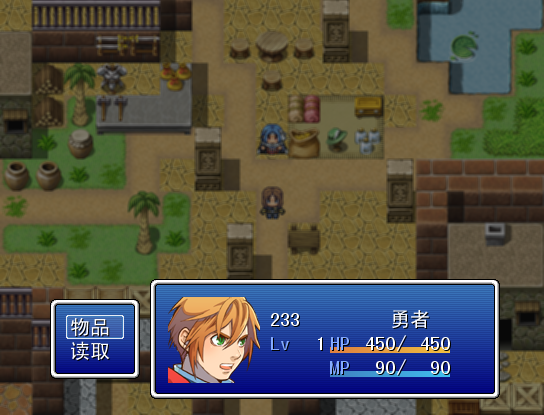
简单写了一个,顺便加了个滑动效果。
[pre lang="ruby" line="1"]=begin
#############################################################################
单人简易滑动菜单(VX) v1.0 by 我的米呀
说明:把本脚本插在Main上方即可。
#############################################################################
=end
#==============================================================================
# ■ Window_MenuStatus
#------------------------------------------------------------------------------
# 显示菜单画面和同伴状态的窗口。
#==============================================================================
class Window_MenuStatus < Window_Selectable
#--------------------------------------------------------------------------
# ● 初始化对像
# x : 窗口 X 座标
# y : 窗口 Y 座标
#--------------------------------------------------------------------------
def initialize(x, y)
super(x, y, 350, 120)
refresh
self.active = false
self.index = -1
end
#--------------------------------------------------------------------------
# ● 刷新
#--------------------------------------------------------------------------
def refresh
self.contents.clear
@item_max = $game_party.members.size
for actor in $game_party.members
draw_actor_face(actor, 2, actor.index * 96 + 2, 92)
x = 104
y = actor.index * 96 + WLH / 2
draw_actor_name(actor, x, y)
draw_actor_class(actor, x + 120, y)
draw_actor_level(actor, x, y + WLH * 1)
draw_actor_state(actor, x, y + WLH * 2)
draw_actor_hp(actor, x + 60, y + WLH * 1)
draw_actor_mp(actor, x + 60, y + WLH * 2)
end
end
end
#==============================================================================
# ■ Scene_File
#------------------------------------------------------------------------------
# 存档画面及读档画面的类。
#==============================================================================
class Scene_File_1 < Scene_Base
#--------------------------------------------------------------------------
# ● 初始化对像
# saving : 存档标志(false则为读档)
# from_title : 标志:是由标题画面的「继续游戏」调用的
# from_event : 标志:是由事件「呼叫存档画面」命令调用的
#--------------------------------------------------------------------------
def initialize(saving, from_title, from_event)
@saving = saving
@from_title = from_title
@from_event = from_event
end
#--------------------------------------------------------------------------
# ● 开始处理
#--------------------------------------------------------------------------
def start
super
create_menu_background
@help_window = Window_Help.new
create_savefile_windows
if @saving
@index = $game_temp.last_file_index
@help_window.set_text(Vocab::SaveMessage)
else
@index = self.latest_file_index
@help_window.set_text(Vocab::LoadMessage)
end
@savefile_windows[@index].selected = true
end
#--------------------------------------------------------------------------
# ● 结束处理
#--------------------------------------------------------------------------
def terminate
super
dispose_menu_background
@help_window.dispose
dispose_item_windows
end
#--------------------------------------------------------------------------
# ● 回到原画面
#--------------------------------------------------------------------------
def return_scene
$scene = Scene_Menu.new(1)
end
#--------------------------------------------------------------------------
# ● 更新画面
#--------------------------------------------------------------------------
def update
super
update_menu_background
@help_window.update
update_savefile_windows
update_savefile_selection
end
#--------------------------------------------------------------------------
# ● 生成存档窗口
#--------------------------------------------------------------------------
def create_savefile_windows
@savefile_windows = []
for i in 0..3
@savefile_windows.push(Window_SaveFile.new(i, make_filename(i)))
end
@item_max = 4
end
#--------------------------------------------------------------------------
# ● 释放存档窗口
#--------------------------------------------------------------------------
def dispose_item_windows
for window in @savefile_windows
window.dispose
end
end
#--------------------------------------------------------------------------
# ● 更新存档窗口
#--------------------------------------------------------------------------
def update_savefile_windows
for window in @savefile_windows
window.update
end
end
#--------------------------------------------------------------------------
# ● 更新存档文件选择
#--------------------------------------------------------------------------
def update_savefile_selection
if Input.trigger?(Input::C)
determine_savefile
elsif Input.trigger?(Input::B)
Sound.play_cancel
return_scene
else
last_index = @index
if Input.repeat?(Input::DOWN)
cursor_down(Input.trigger?(Input::DOWN))
end
if Input.repeat?(Input::UP)
cursor_up(Input.trigger?(Input::UP))
end
if @index != last_index
Sound.play_cursor
@savefile_windows[last_index].selected = false
@savefile_windows[@index].selected = true
end
end
end
#--------------------------------------------------------------------------
# ● 确认存档文件
#--------------------------------------------------------------------------
def determine_savefile
if @saving
Sound.play_save
do_save
else
if @savefile_windows[@index].file_exist
Sound.play_load
do_load
else
Sound.play_buzzer
return
end
end
$game_temp.last_file_index = @index
end
#--------------------------------------------------------------------------
# ● 光标下移
# wrap : 允许循环
#--------------------------------------------------------------------------
def cursor_down(wrap)
if @index < @item_max - 1 or wrap
@index = (@index + 1) % @item_max
end
end
#--------------------------------------------------------------------------
# ● 光标上移
# wrap : 允许循环
#--------------------------------------------------------------------------
def cursor_up(wrap)
if @index > 0 or wrap
@index = (@index - 1 + @item_max) % @item_max
end
end
#--------------------------------------------------------------------------
# ● 生成文件名称
# file_index : 存档位置(0~3)
#--------------------------------------------------------------------------
def make_filename(file_index)
return "Save#{file_index + 1}.rvdata"
end
#--------------------------------------------------------------------------
# ● 选择最近存档的文件
#--------------------------------------------------------------------------
def latest_file_index
index = 0
latest_time = Time.at(0)
for i in 0...@savefile_windows.size
if @savefile_windows.time_stamp > latest_time
latest_time = @savefile_windows.time_stamp
index = i
end
end
return index
end
#--------------------------------------------------------------------------
# ● 执行存档
#--------------------------------------------------------------------------
def do_save
file = File.open(@savefile_windows[@index].filename, "wb")
write_save_data(file)
file.close
return_scene
end
#--------------------------------------------------------------------------
# ● 执行读档
#--------------------------------------------------------------------------
def do_load
file = File.open(@savefile_windows[@index].filename, "rb")
read_save_data(file)
file.close
$scene = Scene_Map.new
RPG::BGM.fade(1500)
Graphics.fadeout(60)
Graphics.wait(40)
@last_bgm.play
@last_bgs.play
end
#--------------------------------------------------------------------------
# ● 写入存档数据
# file : 写入存档对象(已开启)
#--------------------------------------------------------------------------
def write_save_data(file)
characters = []
for actor in $game_party.members
characters.push([actor.character_name, actor.character_index])
end
$game_system.save_count += 1
$game_system.version_id = $data_system.version_id
@last_bgm = RPG::BGM::last
@last_bgs = RPG::BGS::last
Marshal.dump(characters, file)
Marshal.dump(Graphics.frame_count, file)
Marshal.dump(@last_bgm, file)
Marshal.dump(@last_bgs, file)
Marshal.dump($game_system, file)
Marshal.dump($game_message, file)
Marshal.dump($game_switches, file)
Marshal.dump($game_variables, file)
Marshal.dump($game_self_switches, file)
Marshal.dump($game_actors, file)
Marshal.dump($game_party, file)
Marshal.dump($game_troop, file)
Marshal.dump($game_map, file)
Marshal.dump($game_player, file)
end
#--------------------------------------------------------------------------
# ● 读出存档数据
# file : 读出存档对象(已开启)
#--------------------------------------------------------------------------
def read_save_data(file)
characters = Marshal.load(file)
Graphics.frame_count = Marshal.load(file)
@last_bgm = Marshal.load(file)
@last_bgs = Marshal.load(file)
$game_system = Marshal.load(file)
$game_message = Marshal.load(file)
$game_switches = Marshal.load(file)
$game_variables = Marshal.load(file)
$game_self_switches = Marshal.load(file)
$game_actors = Marshal.load(file)
$game_party = Marshal.load(file)
$game_troop = Marshal.load(file)
$game_map = Marshal.load(file)
$game_player = Marshal.load(file)
if $game_system.version_id != $data_system.version_id
$game_map.setup($game_map.map_id)
$game_player.center($game_player.x, $game_player.y)
end
end
end
#==============================================================================
# ■ Scene_Menu
#------------------------------------------------------------------------------
# 处理菜单画面的类。
#==============================================================================
class Scene_Menu < Scene_Base
#--------------------------------------------------------------------------
# ● 初始化对像
# menu_index : 命令窗口光标初始位置
#--------------------------------------------------------------------------
def initialize(menu_index = 0)
@menu_index = menu_index
end
#--------------------------------------------------------------------------
# ● 开始处理
#--------------------------------------------------------------------------
def start
super
create_menu_background
create_command_window
@status_window = Window_MenuStatus.new(160, 0)
@status_window.x = 650
@status_window.y = 280
@slide = false
end
#--------------------------------------------------------------------------
# ● 结束处理
#--------------------------------------------------------------------------
def terminate
super
dispose_menu_background
@command_window.dispose
@status_window.dispose
end
#--------------------------------------------------------------------------
# ● 更新画面
#--------------------------------------------------------------------------
def update
super
if @slide == false
@command_window.x += 50 unless @command_window.x == 50
@status_window.x -= 50 unless @status_window.x == 150
else
@command_window.x -= 50 unless @command_window.x == -550
@status_window.x += 50 unless @status_window.x == 650
end
update_menu_background
@command_window.update
@status_window.update
if @command_window.active
update_command_selection
elsif @status_window.active
update_actor_selection
end
end
#--------------------------------------------------------------------------
# ● 生成命令窗口
#--------------------------------------------------------------------------
def create_command_window
s1 = Vocab::item
s2 = "读取"
@command_window = Window_Command.new(90, [s1, s2])
@command_window.index = @menu_index
@command_window.x = -550
@command_window.y = 300
if $game_party.members.size == 0 # 如果队伍为空
@command_window.draw_item(0, false) # 无效化物品选项
@command_window.draw_item(1, false) # 无效化技能选项
end
end
#--------------------------------------------------------------------------
# ● 更新命令窗口
#--------------------------------------------------------------------------
def update_command_selection
$scene = Scene_Map.new if @command_window.x <= -550 and @slide == true
if Input.trigger?(Input::B)
@slide = true
Sound.play_cancel
elsif Input.trigger?(Input::C)
@slide = true
if $game_party.members.size == 0 and @command_window.index < 4
Sound.play_buzzer
return
elsif $game_system.save_disabled and @command_window.index == 4
Sound.play_buzzer
return
end
Sound.play_decision
case @command_window.index
when 0 # 物品
$scene = Scene_Item.new
when 1 # 读档
$scene = Scene_File_1.new(false, true, false)
end
end
end
end
[/pre]
效果就是这图
|
|



 写轮眼
写轮眼

 提升卡
提升卡 沉默号角
沉默号角 喧嚣号角
喧嚣号角 变色卡
变色卡 升龙剑
升龙剑


