查看: 2307|回复: 5

[已经解决] 【专业伸手党】请教一下如何实现随机下拉菜单?谢谢啦

[复制链接]

梦石
0
星屑
239
在线时间
2399 小时
注册时间
2008-4-11
回帖
11727

贵宾第6届短篇游戏比赛季军

发表于 2013-3-14 23:04:57 | 显示全部楼层 |阅读模式
悬赏10星屑已解决

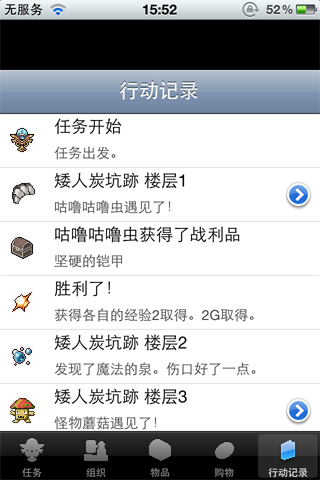
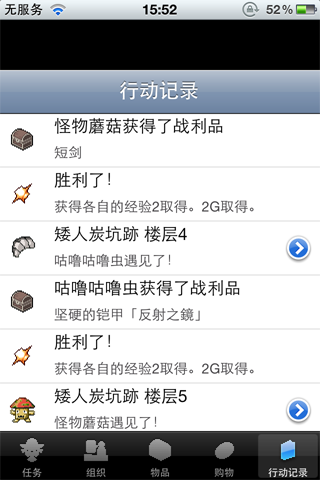
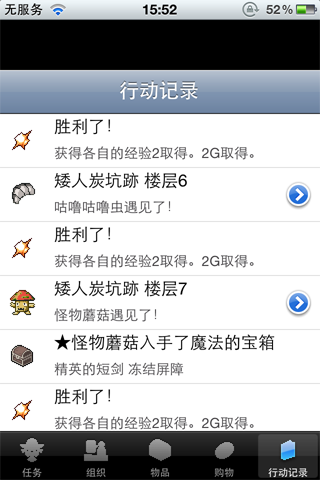
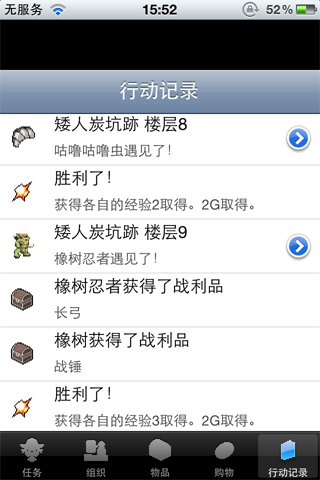
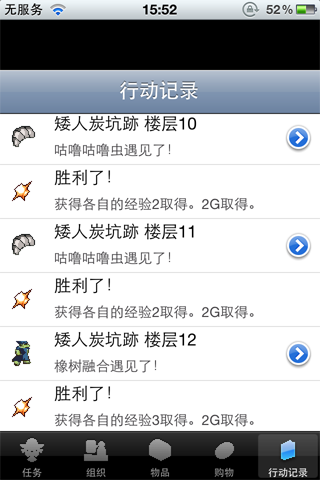
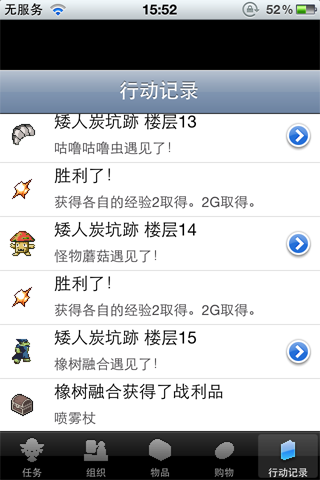
看到手机游戏里面有一个文字置放型游戏。
里面的迷宫行动,都用一行行文字来显示,
蛮好玩啊,VX怎么才能显示一行行文字这样的方式呢?
(每行文字都是独立的框,并且选择进入后可以看到下一阶的内容。)

比如:

进入迷宫第\v[1]层

得到一个宝箱(进入查看) ==》 打开宝箱得到100G

遇见一群怪物(进入查看) ==》 战斗过程。。。。


如果不进入查看的话,就显示第一阶的文字

所有的文字都可以上拉下拉来查看,最多可以保存999+行文字


谢谢啦,给你们带来困扰了。


101APPLE_IMG_1110.PNG

101APPLE_IMG_1111.PNG

101APPLE_IMG_1112.PNG

101APPLE_IMG_1113.PNG

101APPLE_IMG_1114.PNG

101APPLE_IMG_1115.PNG

最佳答案

查看完整内容

小瞬你看看这个《P叔的动作列表》是否满足你的要求。 [hr] 范例: 截图: 脚本(使用时务必注明来源): [pre lang="ruby" line="1"]#============================================================================== # ■ P叔的动作列表 #------------------------------------------------------------------------------ # 请设定动作列表保留的最大行数: Line_Max = 999 # 三点注意事项: # 1、需要保留动作的文章, ...

八宝粥的基叔

梦石
0
星屑
4957
在线时间
5234 小时
注册时间
2009-4-29
回帖
14054

贵宾

发表于 2013-3-14 23:04:58 | 显示全部楼层
本帖最后由 protosssonny 于 2013-3-15 19:08 编辑

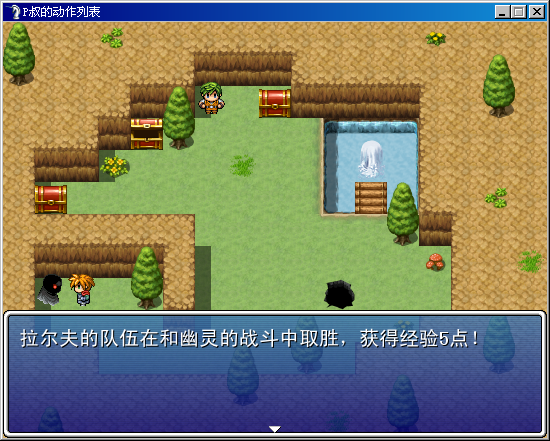
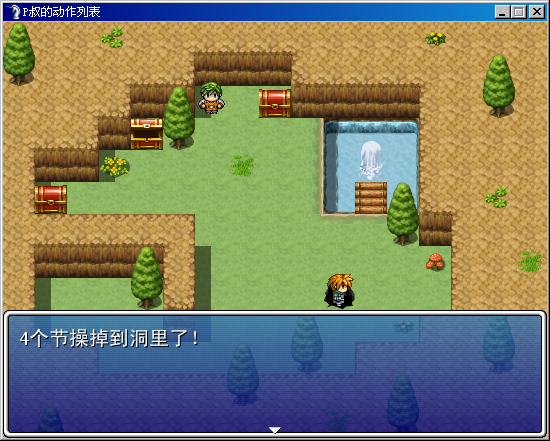
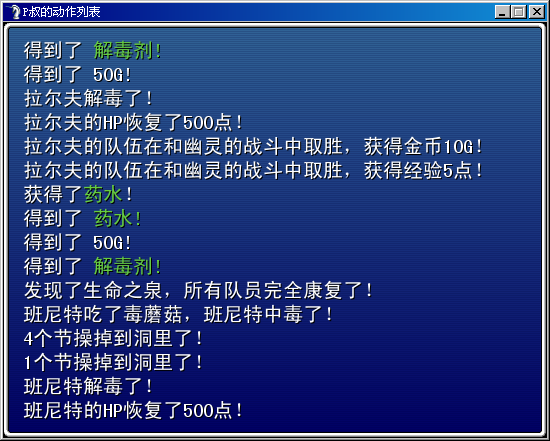
小瞬你看看这个《P叔的动作列表》是否满足你的要求。


范例: P叔的动作列表.rar (249.93 KB, 下载次数: 83)
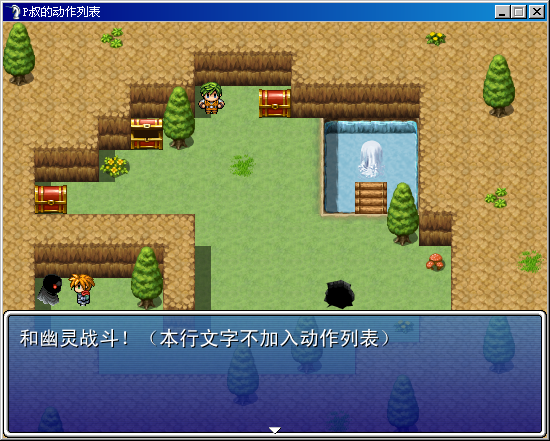
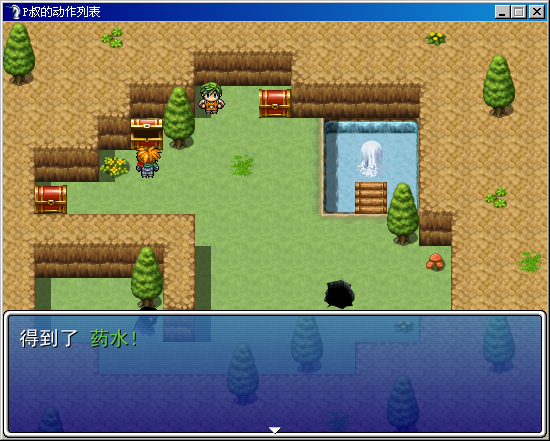
截图:
1.PNG 2.PNG 3.PNG 4.PNG 5.PNG
脚本(使用时务必注明来源):
[pre lang="ruby" line="1"]#==============================================================================
# ■ P叔的动作列表
#------------------------------------------------------------------------------
# 请设定动作列表保留的最大行数:
  Line_Max = 999
# 三点注意事项:  
# 1、需要保留动作的文章,在文章开头打上符号 \+
# 2、不需要保留动作的文章,直接打字即可
# 3、文章不要太长,一般不要超过一行,不然会显示不全
# 4、对于颜色显示、队员名称显示、变量显示都支持
#------------------------------------------------------------------------------
#                      请注明脚本来源:
#                  本脚本来自www.66rpg.com
#==============================================================================


#==============================================================================
# ■ Game_Message
#------------------------------------------------------------------------------
#  处理讯息窗口状态、执行文字显示、选项等的类。 本类的实例请参考 $game_message。
#==============================================================================

class Game_Message
  #--------------------------------------------------------------------------
  # ● 定义实例变量
  #--------------------------------------------------------------------------
  attr_accessor :action_table               # 行动列表
  #--------------------------------------------------------------------------
  # ● 初始化对像
  #--------------------------------------------------------------------------
  def initialize
    @action_table = [] if @action_table.nil?
    clear
    @visible = false
  end
end

#==============================================================================
# ■ Window_Message
#------------------------------------------------------------------------------
#  显示文章的信息窗口。
#==============================================================================

class Window_Message < Window_Selectable
  #--------------------------------------------------------------------------
  # ● 转换特殊符号
  #--------------------------------------------------------------------------
  def convert_special_characters
    @text.gsub!(/\\V\[([0-9]+)\]/i) { $game_variables[$1.to_i] }
    @text.gsub!(/\\N\[([0-9]+)\]/i) { $game_actors[$1.to_i].name }
    @text.gsub!(/\\C\[([0-9]+)\]/i) { "\x01[#{$1}]" }
    @text.gsub!(/\\G/)              { "\x02" }
    @text.gsub!(/\\\./)             { "\x03" }
    @text.gsub!(/\\\|/)             { "\x04" }
    @text.gsub!(/\\!/)              { "\x05" }
    @text.gsub!(/\\>/)              { "\x06" }
    @text.gsub!(/\\</)              { "\x07" }
    @text.gsub!(/\\\^/)             { "\x08" }
    @text.gsub!(/\\\\/)             { "\\" }
    @text.gsub!(/\\\+/)             { "" }
  end
end  

#==============================================================================
# ■ Game_Interpreter
#------------------------------------------------------------------------------
#  执行事件命令的解释器。本类在 Game_Map 类、Game_Troop 类、与
# Game_Event 类的内部使用。
#==============================================================================

class Game_Interpreter
  #--------------------------------------------------------------------------
  # ● 显示文章
  #--------------------------------------------------------------------------
  def command_101
    unless $game_message.busy
      $game_message.face_name = @params[0]
      $game_message.face_index = @params[1]
      $game_message.background = @params[2]
      $game_message.position = @params[3]
      text = ""
      @index += 1
      while @list[@index].code == 401       # 文章数据
        $game_message.texts.push(@list[@index].parameters[0])
        @index += 1
      end
      for i in 0...2
        text += $game_message.texts unless $game_message.texts.nil?
      end
      text = convert_special_characters(text)
      $game_message.action_table.push(text) if text.include?("\x09")
      if $game_message.action_table.size > 999
        $game_message.action_table.delete_at(0)
      end  
      if @list[@index].code == 102          # 显示选择项
        setup_choices(@list[@index].parameters)
      elsif @list[@index].code == 103       # 数值输入处理
        setup_num_input(@list[@index].parameters)
      end
      set_message_waiting                   # 设置等待信息结束
    end
    return false
  end
  #--------------------------------------------------------------------------
  # ● 转换特殊符号
  #--------------------------------------------------------------------------
  def convert_special_characters(texts)
    text = texts.dup
    text.gsub!(/\\V\[([0-9]+)\]/i) { $game_variables[$1.to_i] }
    text.gsub!(/\\N\[([0-9]+)\]/i) { $game_actors[$1.to_i].name }
    text.gsub!(/\\C\[([0-9]+)\]/i) { "\x01[#{$1}]" }
    text.gsub!(/\\G/)              { "" }
    text.gsub!(/\\\./)             { "" }
    text.gsub!(/\\\|/)             { "" }
    text.gsub!(/\\!/)              { "" }
    text.gsub!(/\\>/)              { "" }
    text.gsub!(/\\</)              { "" }
    text.gsub!(/\\\^/)             { "" }
    text.gsub!(/\\\\/)             { "\\" }
    text.gsub!(/\\\+/)             { "\x09" }
    return text
  end
end  

#==============================================================================
# ■ Window_Action
#------------------------------------------------------------------------------
#  显示行动列表的窗口。
#==============================================================================

class Window_Action < Window_Base
  #--------------------------------------------------------------------------
  # ● 初始化对像
  #     x      : 窗口 X 座标
  #     y      : 窗口 Y 座标
  #--------------------------------------------------------------------------
  def initialize(x, y)
    super(x, y, 544, 416)
    @self_index = 0
    @contents_x = 4
    refresh
  end
  def update
    max = $game_message.action_table.size
    max = 999 if max > 999
    if Input.trigger?(Input::B)
      Sound.play_cancel
      $scene = Scene_Map.new
    elsif Input.repeat?(Input::UP)
      if @self_index < max - 16
        @self_index += 1
        refresh
      else
        Sound.play_buzzer
      end  
    elsif Input.repeat?(Input::DOWN)
      if @self_index > 0
        @self_index -= 1
        refresh
      else
        Sound.play_buzzer
      end  
    elsif Input.repeat?(Input::L)
      if @self_index < max - 16
        @self_index += 16
        @self_index = max - 16 if @self_index > max - 16
        refresh
      else
        Sound.play_buzzer
      end  
    elsif Input.repeat?(Input::R)
      if @self_index > 0
        @self_index -= 16
        @self_index = 0 if @self_index < 0
        refresh
      else
        Sound.play_buzzer
      end   
    end
  end  
  #--------------------------------------------------------------------------
  # ● 刷新
  #--------------------------------------------------------------------------
  def refresh
    self.contents.clear
    max = $game_message.action_table.size
    max = 16 if max > 16
    action_table = $game_message.action_table
    for i in 0...max
      text = action_table[action_table.size - i - @self_index - 1]
      update_message(text, i)
    end
  end
  
  def update_message(text, i)
    dupped_text = text.dup
    @contents_x = 4
    join = false
    loop do
      c = dupped_text.slice!(/./m)             # 获取一个文字
      case c
      when nil                          # 无法获取文字时
        break
      when "\n"                         # 新行

      when "\x01"                       # \C[n](文字变色)
        dupped_text.sub!(/\[([0-9]+)\]/, "")
        contents.font.color = text_color($1.to_i)
        next  
      when "\x09"                       # \+(需要加入动作)
        join = true
      else  
        if join
          contents.draw_text(@contents_x, WLH * (15 - i), 544, WLH, c)
          c_width = contents.text_size(c).width
          @contents_x += c_width  
        end
      end
    end   
  end
end

#==============================================================================
# ■ Scene_Action
#------------------------------------------------------------------------------
#  处理战斗画面的类。
#==============================================================================

class Scene_Action < Scene_Base
  #--------------------------------------------------------------------------
  # ● 开始处理
  #--------------------------------------------------------------------------
  def start
    super
    @action_window = Window_Action.new(0, 0)
  end
  #--------------------------------------------------------------------------
  # ● 结束处理
  #--------------------------------------------------------------------------
  def terminate
    super
    @action_window.dispose
  end
  #--------------------------------------------------------------------------
  # ● 更新画面
  #--------------------------------------------------------------------------
  def update
    super
    @action_window.update
  end
end  [/pre]

点评

P叔V5...  发表于 2013-3-30 10:52
五个节操掉到洞里了  发表于 2013-3-16 06:45

评分

参与人数 3星屑 +72 收起 理由
0newing + 7 P叔V5!
houyuxiaoyang + 15 P叔V5!
Password + 50 P叔V5……

查看全部评分

《逝去的回忆3:四叶草之梦》真情发布,欢迎点击图片下载试玩喵。

《逝去的回忆3》的讨论群:
一群:192885514
二群:200460747
回复

使用道具 举报

梦石
0
星屑
50
在线时间
23 小时
注册时间
2013-3-12
回帖
64
发表于 2013-3-14 23:16:04 | 显示全部楼层
话说,这是什么游戏啊,头一次见呢,感觉还挺有意思,有点像塞班系统的文字网游。

点评

置放式游戏,以后消磨时光的好类型  发表于 2013-3-14 23:29
回复

使用道具 举报

梦石
0
星屑
239
在线时间
2399 小时
注册时间
2008-4-11
回帖
11727

贵宾第6届短篇游戏比赛季军

 楼主| 发表于 2013-3-24 23:49:31 | 显示全部楼层
protosssonny 发表于 2013-3-14 23:04
小瞬你看看这个《P叔的动作列表》是否满足你的要求。


范例:

有什么办法,让每行文字都能独立存在?

我可能表达不清楚,是这样的
进入这个界面后,是有那个闪动的光框在第一行文字上的
之所以要这个光框模式因为小瞬不仅仅想要看到历史文字
更想对文字进行操作:

操作一:光框所在位置点击一下确定键就能进入下一层的解释
操作二:光框所在行数,文字超过一行的会进行滚动播出
操作三:进入界面时,光框永远停留在最近一次信息位置上。

关于【操作一】的解释:

文字信息分两层
第一层是简介,第二层是内容
就像论坛里面的帖子一样
第一层就是帖子标题,第二层就是帖子内容


希望P叔把剩下的节操都给我
回复

使用道具 举报

您需要登录后才可以回帖 登录 | 注册会员

本版积分规则

Powered by Discuz! X5.0 © 2001-2026 Discuz! Team.

在本版发帖返回顶部