| 赞 | 0 |
| VIP | |
| 好人卡 | |
| 积分 | 1 |
| 经验 | |
| 最后登录 | 2018-9-22 |
| 在线时间 | 347 小时 |
- 梦石
- 0
- 星屑
- 143
- 在线时间
- 347 小时
- 注册时间
- 2010-7-7
- 回帖
- 96
|
 发表于 2013-3-20 13:20:31
|
显示全部楼层
发表于 2013-3-20 13:20:31
|
显示全部楼层
本帖最后由 yjl494356020 于 2013-3-20 13:21 编辑
这个是地图信息的脚本,可以参照一下在你想要的地方加入“声望”的变量值。
[pre lang="ruby" line="1"]#==============================================================================
# ■ Game_Player
#------------------------------------------------------------------------------
# 处理玩家人物的类。拥有事件启动的判定、地图的卷动等功能。
# 本类的实例请参考 $game_player 。
#==============================================================================
class Game_Player < Game_Character
def getX
@x
end
def getY
@y
end
end
#==============================================================================
# ■ Scene_Menu
#------------------------------------------------------------------------------
# 菜单画面
#==============================================================================
class Scene_Menu < Scene_MenuBase
#--------------------------------------------------------------------------
# ● 生成窗口
#--------------------------------------------------------------------------
def create_gold_window
@gold_window = Window_Gold.new
@gold_window.x = 0
@gold_window.y = Graphics.height - @gold_window.height
# 生成地图信息窗口
@mapinfos_window = Window_MapInfo.new
@mapinfos_window.x = 0
@mapinfos_window.y = Graphics.height - @mapinfos_window.height - @gold_window.height
end
end
#==============================================================================
# ■ Window_MapInfo
#------------------------------------------------------------------------------
# 显示当前信息的窗口。 By SkyZH
#==============================================================================
class Window_MapInfo < Window_Base
#--------------------------------------------------------------------------
# ● 初始化对像
#--------------------------------------------------------------------------
def initialize
super(0, 0, window_width, 120)
self.opacity = 255
refresh
end
#--------------------------------------------------------------------------
# ● 获取窗口的宽度
#--------------------------------------------------------------------------
def window_width
return 160
end
#--------------------------------------------------------------------------
# ● 刷新
#--------------------------------------------------------------------------
def refresh
self.contents.clear
self.contents.font.color = normal_color
@a=$game_map.width
@b=$game_map.height
draw_text(0, 0, window_width-24, line_height,"地图 " + $game_map.display_name)
draw_text(0, line_height, window_width-24, line_height,"坐标 " + "X" + $game_player.getX.to_s + "," + "Y" + $game_player.getY.to_s)
draw_text(0, line_height*2, window_width-24, line_height,"时间 " + $game_system.playtime_s)
draw_text(0, line_height*3, window_width-24, line_height,"声望 " + $game_variables[6].to_s)
end
end
class Spriteset_Map
#--------------------------------------------------------------------------
# ● 初始化对象
#--------------------------------------------------------------------------
def initialize
create_viewports
create_tilemap
create_parallax
create_characters
create_shadow
create_weather
create_pictures
create_timer
@MapInfoWin=Window_MapInfo.new
update
end
def dispose
dispose_tilemap
dispose_parallax
dispose_characters
dispose_shadow
dispose_weather
dispose_pictures
dispose_timer
dispose_viewports
@MapInfoWin.dispose
end
def update
update_tileset
update_tilemap
update_parallax
update_characters
update_shadow
update_weather
update_pictures
update_timer
update_viewports
if $game_switches[40]==false then #通过40号开关控制信息窗口是否显示
@MapInfoWin.visible=false
else
@MapInfoWin.visible=true
end
@MapInfoWin.refresh
end
end[/pre]
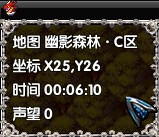
其中draw_text(0, line_height*3, window_width-24, line_height,"声望 " + $game_variables[6].to_s)
的$game_variables[6].to_s就是6号变量 |
|


 写轮眼
写轮眼
 提升卡
提升卡 沉默号角
沉默号角 喧嚣号角
喧嚣号角 变色卡
变色卡 升龙剑
升龙剑


