| 赞 | 0 |
| VIP | |
| 好人卡 | |
| 积分 | 1 |
| 经验 | |
| 最后登录 | 2023-7-26 |
| 在线时间 | 97 小时 |
- 梦石
- 0
- 星屑
- 85
- 在线时间
- 97 小时
- 注册时间
- 2012-9-8
- 回帖
- 25
|
加入我们,或者,欢迎回来。
您需要 登录 才可以下载或查看,没有账号?注册会员
×
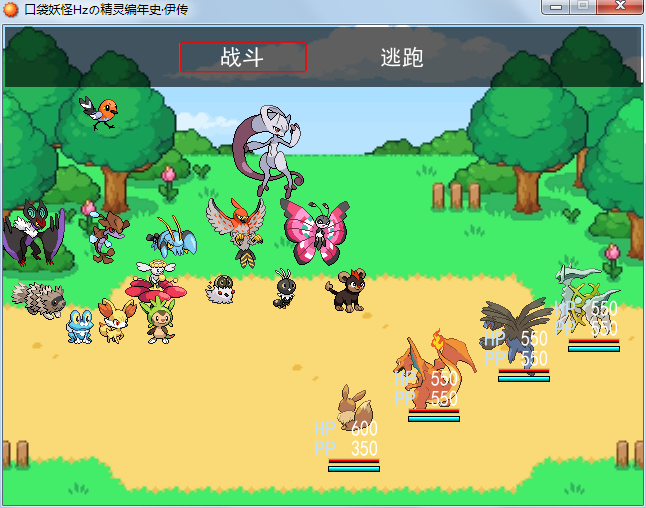
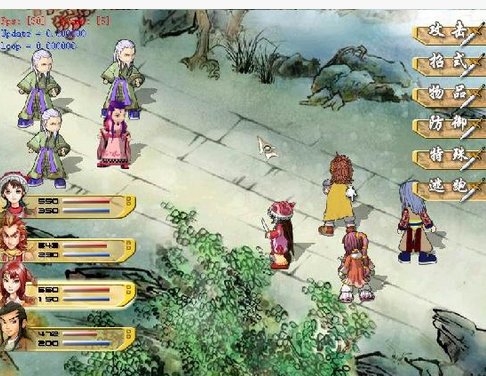
我使用主站45°脚本想做一个游戏 但是界面太丑了想美化一下
再次请问一下各位 如何把战斗图下侧的血条和HP\PP去掉改成类似右图一样的血条
谢谢了!
↓使用的脚本
[pre lang="ruby" line="1"]# ————————————————————————————————————
# 本脚本来自www.66rpg.com,转载请保留此信息
# ————————————————————————————————————
#==============================================================================
# ■ Game_Actor
#------------------------------------------------------------------------------
# 处理角色的类。本类在 Game_Actors 类 ($game_actors)
# 的内部使用、Game_Party 类请参考 ($game_party) 。
#==============================================================================
class Game_Actor < Game_Battler
#--------------------------------------------------------------------------
# ● 取得战斗画面的 X 坐标
#--------------------------------------------------------------------------
def screen_x
case self.index
when 0
return 350
when 1
return 430
when 2
return 510
when 3
return 580
else
return 600
end
end
#--------------------------------------------------------------------------
# ● 取得战斗画面的 Y 坐标
#--------------------------------------------------------------------------
def screen_y
case self.index
when 0
return 430
when 1
return 395
when 2
return 360
when 3
return 325
else
return 1000
end
end
#--------------------------------------------------------------------------
# ● 取得战斗画面的 Z 坐标
#--------------------------------------------------------------------------
def screen_z
case self.index
when 0
return 10
when 1
return 9
when 2
return 8
when 3
return 7
else
return 0
end
end
end
#==============================================================================
# ■ Window_Base
#------------------------------------------------------------------------------
# 游戏中全部窗口的超级类。
#==============================================================================
class Window_Base < Window
#--------------------------------------------------------------------------
# ● 描绘 HP
# actor : 角色
# x : 描画目标 X 坐标
# y : 描画目标 Y 坐标
# width : 描画目标的宽
#--------------------------------------------------------------------------
def draw_actor_hp1(actor, x, y, width = 72)
# 描绘字符串 "HP"
self.contents.font.color = system_color
self.contents.draw_text(x, y, 24, 24, $data_system.words.hp)
# 计算描绘 MaxHP 所需的空间
if width - 24 >= 32
hp_x = x + 32# + width - 24
end
# 描绘 HP
self.contents.font.color = actor.hp == 0 ? knockout_color :
actor.hp <= actor.maxhp / 4 ? crisis_color : normal_color
self.contents.draw_text(hp_x, y, 32, 24, actor.hp.to_s, 2)
end
#--------------------------------------------------------------------------
# ● 描绘 SP
# actor : 角色
# x : 描画目标 X 坐标
# y : 描画目标 Y 坐标
# width : 描画目标的宽
#--------------------------------------------------------------------------
def draw_actor_sp1(actor, x, y, width = 72)
# 描绘字符串 "SP"
self.contents.font.color = system_color
self.contents.draw_text(x, y, 24, 24, $data_system.words.sp)
# 计算描绘 MaxSP 所需的空间
if width - 24 >= 32
sp_x = x + 32# + width - 24
end
# 描绘 SP
self.contents.font.color = actor.sp == 0 ? knockout_color :
actor.sp <= actor.maxsp / 4 ? crisis_color : normal_color
self.contents.draw_text(sp_x, y, 32, 24, actor.sp.to_s, 2)
end
end
#==============================================================================
# ■ Window_BattleStatus
#------------------------------------------------------------------------------
# 显示战斗画面同伴状态的窗口。
#==============================================================================
class Window_BattleStatus < Window_Base
#--------------------------------------------------------------------------
# ● 初始化对像
#--------------------------------------------------------------------------
#$data_system_level_up_me = "Audio/ME/升级音乐"
def initialize
super(0, 0, 640, 480)
self.contents = Bitmap.new(width - 10, height - 32)
self.opacity = 0
@level_up_flags = [false, false, false, false]
refresh
end
#--------------------------------------------------------------------------
# ● 释放
#--------------------------------------------------------------------------
def dispose
super
end
#--------------------------------------------------------------------------
# ● 设置升级标志
# actor_index : 角色索引
#--------------------------------------------------------------------------
def level_up(actor_index)
@level_up_flags[actor_index] = true
end
#--------------------------------------------------------------------------
# ● 刷新
#--------------------------------------------------------------------------
def refresh
self.contents.clear
@item_max = $game_party.actors.size
for i in 0...$game_party.actors.size
actor = $game_party.actors
case i
when 0
x = 310
y = 390
when 1
x = 390
y = 340
when 2
x = 480
y = 300
when 3
x = 550
y = 270
end
if @level_up_flags
self.contents.font.color = normal_color
self.contents.draw_text(x, y, 80, 24, "LEVEL UP!")
Audio.me_stop
# Audio.me_play($data_system_level_up_me)
else
draw_actor_hp1(actor, x-15, y-15, 80)
draw_actor_sp1(actor, x-15, y+5, 80)
end
end
end
#--------------------------------------------------------------------------
# ● 刷新画面
#--------------------------------------------------------------------------
def update
super
# 主界面的不透明度下降
if $game_temp.battle_main_phase
self.contents_opacity -= 50 if self.contents_opacity > 1
else
self.contents_opacity += 50 if self.contents_opacity < 255
end
end
end
#==============================================================================
# ■ Window_BattleStatus
#==============================================================================
class Window_BattleStatus < Window_Base
#--------------------------------------------------------------------------
# ● 初始化
#--------------------------------------------------------------------------
alias xrxs_bp2_refresh refresh
def refresh
xrxs_bp2_refresh
@item_max = $game_party.actors.size
for i in 0...$game_party.actors.size
actor = $game_party.actors
case i
when 0
x = 310
y = 390
when 1
x = 390
y = 340
when 2
x = 480
y = 300
when 3
x = 550
y = 270
end
draw_actor_hp_meter(actor, x, y, 50)
draw_actor_sp_meter(actor, x, y + 8, 50)
end
end
end
#==============================================================================
# ■ Window_Base
#==============================================================================
class Window_Base < Window
#--------------------------------------------------------------------------
# ● HP描画
#--------------------------------------------------------------------------
def draw_actor_hp_meter(actor, x, y, width = 156, type = 0)
if type == 1 and actor.hp == 0
return
end
self.contents.font.color = system_color
self.contents.fill_rect(x-1, y+27, width+2,6, Color.new(0, 0, 0, 25))
w = width * actor.hp / actor.maxhp
self.contents.fill_rect(x, y+28, w,1, Color.new(255, 96, 96, 255))
self.contents.fill_rect(x, y+29, w,1, Color.new(255, 0, 0, 255))
self.contents.fill_rect(x, y+30, w,1, Color.new(128, 0, 0, 255))
self.contents.fill_rect(x, y+31, w,1, Color.new(0, 0, 0, 255))
end
#--------------------------------------------------------------------------
# ● SP描画
#--------------------------------------------------------------------------
def draw_actor_sp_meter(actor, x, y, width = 156, type = 0)
if type == 1 and actor.hp == 0
return
end
self.contents.font.color = system_color
self.contents.fill_rect(x-1, y+27, width+2,6, Color.new(0, 0, 0, 255))
w = width * actor.sp / actor.maxsp
self.contents.fill_rect(x, y+28, w,1, Color.new(128, 255, 255, 255))
self.contents.fill_rect(x, y+29, w,1, Color.new(0, 255, 255, 255))
self.contents.fill_rect(x, y+30, w,1, Color.new(0, 192, 192, 255))
self.contents.fill_rect(x, y+31, w,1, Color.new(0, 128, 128, 255))
end
end[/pre] |
|


 写轮眼
写轮眼
 发表于 2013-6-24 23:10:10
 提升卡
提升卡 沉默号角
沉默号角 喧嚣号角
喧嚣号角 变色卡
变色卡 升龙剑
升龙剑