| 赞 | 0 |
| VIP | |
| 好人卡 | |
| 积分 | 1 |
| 经验 | |
| 最后登录 | 2014-11-22 |
| 在线时间 | 23 小时 |
- 梦石
- 0
- 星屑
- 50
- 在线时间
- 23 小时
- 注册时间
- 2013-8-30
- 回帖
- 19
|
加入我们,或者,欢迎回来。
您需要 登录 才可以下载或查看,没有账号?注册会员
×
本帖最后由 桃戊喵喵 于 2014-1-10 00:24 编辑
想在战斗中插入一段回忆作为战斗教程,结果发现对话框却在上面,我想按照平常一样在下面来着,用了更改文章选项也没有用,求大神帮忙看看
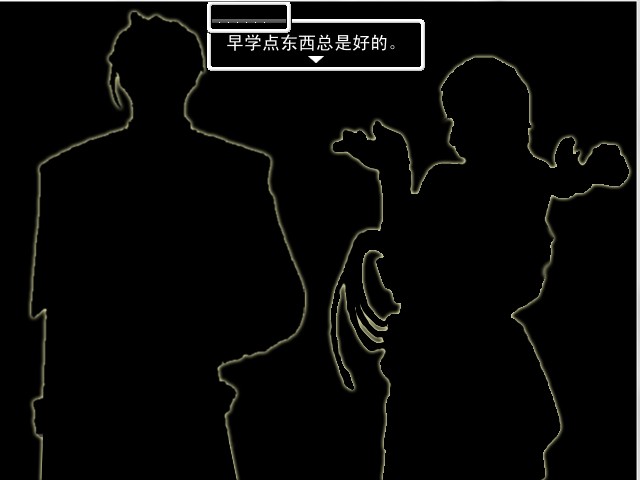
另外我用的是菜鸟横版战斗系统脚本和超简化版fuki对话加强:
[pre lang="" line="1"]=begin
###############################################################################
全局行走图战斗 v1.1
本版本只经低测试,可能存在某些bug。
请注意更新
http://rpg.blue/viewthread.php?tid=129875&extra=page%3D1
###############################################################################
------------------------------------------------------------------------------
经过了两次的修改,终于完全实现了远距离攻击的效果(弓箭、铳类)
另外,也实现了简单的回旋攻击(类似回力镖的攻击)和攻击道具(类似石头或炸弹)
这个脚本的更动分为2部分:
1)战斗动作 - 新加了数个动作,如:“弓箭攻击”、“远距离发动”等等
2)战斗动画 - 基本上是脚本原带的。只是这个功能被隐藏起来了。现在已恢复。
用法:
在相应的脚本行加入武器/技能/道具的数据库id(id之间要用“,”来分开)
如果不要某些功能的话就随便填一个外太空id就行了(没有用到的id)
1)战斗动作(角色/行走图的动作)
脚本355行: 远程武器的id (普通攻击时使用远程射击)
脚本357行: 回旋武器的id (普通攻击时会飞回手上的武器,如:回力镖)
脚本370行: 远程技能的id (使用技能时是远程射击)
脚本372行: 回旋技能的id (使用技能时,飞出的武器会飞回手上)
2)战斗动画(显示‘对象方的动画’之前先显示‘飞行武器射去敌人身上’的动画)
脚本453行: 回旋武器的id (攻击时会显示一段类似回力镖的动画)
脚本455行: 弓箭武器的id (攻击时会显示箭射去敌人身上的动画)
脚本457行: 铳类武器的id (攻击时会显示子弹射去敌人身上的动画)
脚本470行: 回旋技能的id (技能使用时会显示一段类似回力镖的动画)
脚本472行: 弓箭技能的id (技能使用时会显示箭射去敌人身上的动画)
脚本474行: 铳类技能的id (技能使用时会显示子弹射去敌人身上的动画)
脚本486行: 抛击道具的id (使用该道具时,道具被丢到敌人身上)
〉注意:
〉‘飞行武器射去敌人身上’的动画是在设定id之后的那句脚本里面设置
〉例子:(脚本第455和456行)
〉 when 17,18,19,20 #远程武器1(弓箭类)的id
〉 return [101,32,false,false]
〉这样,武器17~20(都是弓箭)在显示‘对象方的动画’之前会先显示第101号动画
〉而动画的轨道是从使用者身上直到敌人身上(实现子弹射出的效果)
还有:
战斗队伍的画面位置已经被修改过,
让角色的位置与默认的战斗背景图不会有视觉上的冲突。
如果要更改请去脚本第113-116行改改就行了。
脚本‘Arrow_Enemy’和‘Arrow_Actor’被稍微修改过(可以无视)
这个范例附带了
一张经过修改的战斗背景图(027-castle03),其他的战斗背景图可以使用默认的。
一套横版的默认敌人的战斗图(从行走图改过来的)
=end #modify by darkten
###############################################################################
=begin
此版本更新了以下几点:
1.支持敌人行走图战斗
2.修正与RTAB并用的bug。
3.支持敌人也玩小石头
使用方法:
1.敌人的战斗图名称要与敌人的行走图名称相一致,具体查看本范例编号为2的敌人。
2.请自行设置 160 ~ 173 行的内容。
by ONEWateR
=end
###############################################################################
module Side_view
#--------------------------------------------------------------------------
# ● 是否与RATB并用 ☆自动识别(这到是不错~省了~)
# 在Scene_Battle计算方法是否是方法synthe?
# 在自动不想认识的时候,请重写。
#--------------------------------------------------------------------------
if Scene_Battle.method_defined?("synthe?")
RTAB = true
else
RTAB = false
end
#--------------------------------------------------------------------------
# ● 改正RATB中的位置误差 ☆自动识别
# 在自动不想认识的时候,请重写。
#--------------------------------------------------------------------------
def camera_correctness
return false if !RTAB
begin
return $scene.drive
rescue
return false
end
end
#--------------------------------------------------------------------------
# ● 队伍中的最大人数
#--------------------------------------------------------------------------
Party_max = 4
#--------------------------------------------------------------------------
# ● 战斗图的扩大率(1.0的时候是保持原有大小)
#--------------------------------------------------------------------------
CHAR_ZOOM = 1.0
#--------------------------------------------------------------------------
# ● 光标的位置修正(基本不需要改~)
#--------------------------------------------------------------------------
ARROW_OX = 0
ARROW_OY = 64
#--------------------------------------------------------------------------
# ● 名状态作为飞行管理的排列(不知道什么意思....)
#--------------------------------------------------------------------------
FLY_STATES = ["飛行"]
#--------------------------------------------------------------------------
# ● 战斗画面的位置
#--------------------------------------------------------------------------
#bearrpg
#创建角色坐标数组
ACTOR_X = []
ACTOR_Y = []
#分别表示队伍中1号角色X,2号角色X,3号角色X……,如果nil采用默认计算方式。
ACTOR_X = [500,420,450,480]#不要忘了用英文逗号区分开。
#分别表示1号角色Y,2号角色Y,3号角色Y……,如果nil采用默认计算方式。
#数组第5个数表示当队伍人数不满4个人时进行自动计算的间隔。
ACTOR_Y = [200,250,290,320,48]#不要忘了用英文逗号区分开。
#当队伍人数不足4个人的时候,采用下面那个变量重新计算角色Y轴的排列。
#--------------------------------------------------------------------------
# ● 自定义常数
#--------------------------------------------------------------------------
NORMAL = "NORMAL"
WALK_R = "WALK_R"
WALK_L = "WALK_L"
ATTACK = "ATTACK"
ATTACK_R = "ATTACK_R"
ATTACK_L = "ATTACK_L"
MAGIC = "MAGIC"
ITEM = "ITEM"
# 动画的设定
ANIME = {
# [画像ID,是否循环,アニメスピード,动画速度,不能指向动画,武器放在右手or左手]
NORMAL => [1,true , 0,false, true ,"" ], # 通常待击
WALK_R => [2,true , 2,false, false,"" ], # 右移动
WALK_L => [1,true , 2,false, false,"" ], # 左移动
ATTACK_R => [1,false, 2,true , false,"右手"], # 右手攻击
ATTACK_L => [1,false, 2,true , false,"左手"], # 左手攻击
MAGIC => [1,false, 2,false, false,"" ], # 右手攻击
ITEM => [1,false, 2,false, false,"" ], # 左手攻击
}
# 债务不履行声明价值的设定(一个字一个字翻译的,不知道啥意思)
ANIME.default = [1,false,12,false,"",""]
# 在行动设定的时候 右手攻击 or 左手攻击 辨别を(这个不知道什么意思)的ANIME
# "角色动画变更#ATTACK"在玩了と(还是不知道啥意思..)的时候,辨别ATTACK_R或者ATTACK_L
DUAL_WEAPONS_ANIME = [ATTACK]
#--------------------------------------------------------------------------
# ● 战斗图不是行走图的敌人编号
#--------------------------------------------------------------------------
NOT_CHARACTER_EMEMY = [3]
#--------------------------------------------------------------------------
# ● 敌人使用的武器
# 敌人编号=>武器编号
#--------------------------------------------------------------------------
EMEMY_WEAPO = {2=>5,7=>17}
#--------------------------------------------------------------------------
# ● 敌人使用的武器 (二刀流)
# 敌人编号=>武器编号
#--------------------------------------------------------------------------
EMEMY_WEAPO2 = {}
#--------------------------------------------------------------------------
# ● 摇晃的设定
#--------------------------------------------------------------------------
SHAKE_FILE = "摇晃" # 文件名
SHAKE_POWER = 5 # 强度
SHAKE_SPEED = 5 # 速度
SHAKE_DURATION = 5 # 时间
#--------------------------------------------------------------------------
# ● 上下反转地的设定
#--------------------------------------------------------------------------
UPSIDE_DOWN_FILE = "上下反转" # 文件名
#--------------------------------------------------------------------------
# ● 左右反转地的设定
#--------------------------------------------------------------------------
REVERSE_FILE = "左右反转" # 文件名
#--------------------------------------------------------------------------
# ● 回转地的设定
#--------------------------------------------------------------------------
TURNING_FILE = "回转" # 文件名
TURNING_DIRECTION = 1 # 方向(1.逆时针,-1.顺时针)(|||-_-汗..怎么还有用-1做带入值的...)
TURNING_SPEED = 40 # 速度
TURNING_DURATION = 1 # 回转数
#--------------------------------------------------------------------------
# ● 移动的设定
#--------------------------------------------------------------------------
MOVE_FILE = "移动" # 文件名
MOVE_RETURN = 1 # 回到原来的位置吗?(光写了个1,也不知道不回到该怎么写?0?)
MOVE_SPEED = 32 # 速度
MOVE_COORDINATES = [0,-640] # 原来位置的相对坐标
#--------------------------------------------------------------------------
# ● 动画追加的设定
#--------------------------------------------------------------------------
ADD_ANIME_FILE = "动画追加" # 文件名
ADD_ANIME_ID = 0 # 动画的ID
#--------------------------------------------------------------------------
# ● 债务不履行声明和RTAB的数据转换
#--------------------------------------------------------------------------
def convert_battler
return RTAB ? @active_actor : @active_battler
end
#--------------------------------------------------------------------------
# ● 债务不履行声明和RTAB的数据转换2
#--------------------------------------------------------------------------
def convert_battler2(*arg)
return RTAB ? arg[0] : @active_battler
end
end
#--------------------------------------------------------------------------
# ● 行动設定
#--------------------------------------------------------------------------
module BattleActions
# 下のものはあくまでも一例なので
# 独自に作ってください。
Actions = {
"通常攻撃" => [
"閃きアニメ",
"アクターアニメ変更#WALK_L",
"移動#target,32,0,64,0",
"行動アニメ",
"アクターアニメ変更#ATTACK",
"遠距離アニメ",
"対象アニメ",
"アクターアニメ変更#WALK_L",
"SEの演奏#016-Jump02,80,100",
"移動#self,0,0,48,32",
"終了"
],
"エネミー攻撃" => [
"閃きアニメ",
"アクターアニメ変更#WALK_L",
"移動#self,-36,0,12,0",
"行動アニメ",
"アクターアニメ変更#ATTACK",
"遠距離アニメ",
"対象アニメ",
"アクターアニメ変更#WALK_L",
"移動#self,0,0,12,0",
"終了"
],
"術発動" => [
"閃きアニメ",
"アクターアニメ変更#WALK_L",
"移動#self,-32,0,4,0",
"アクターアニメ変更#MAGIC",
"行動アニメ",
"ウエイト#15",
"遠距離アニメ",
"対象アニメ",
"アクターアニメ変更#WALK_L",
"移動#self,0,0,4,2",
"終了"
],
"アイテム使用" => [
"閃きアニメ",
"アクターアニメ変更#WALK_L",
"移動#self,-32,0,4,0",
"行動アニメ",
"アクターアニメ変更#ITEM",
"ウエイト#15",
"遠距離アニメ",
"対象アニメ",
"アクターアニメ変更#WALK_L",
"移動#self,0,0,4,2",
"終了"
],
"払い抜け" => [
"閃きアニメ",
"アクターアニメ変更#WALK_L",
"移動#target_near,50,0,48,30",
"左右反転",
"アクターアニメ固定#ATTACK#3",
"行動アニメ",
"SEの演奏#135-Light01,100,100",
"アニメーションの表示#self,42",
"ウエイト#15",
"左右反転",
"残像表示",
"移動#target_far,-50,0,48,0",
"対象アニメ",
"残像消去",
"アニメ固定解除",
"アクターアニメ変更#WALK_L",
"移動#self,0,0,48,1,0",
"終了"
],
"弓箭攻撃" => [
"閃きアニメ",
"アクターアニメ変更#WALK_L",
"移動#self,-32,0,4,0",
"行動アニメ",
"アクターアニメ変更#ATTACK",
"遠距離アニメ",
"対象アニメ",
"アクターアニメ変更#WALK_L",
"移動#self,0,0,4,2",
"終了"
],
"回旋攻撃" => [
"閃きアニメ",
"アクターアニメ変更#WALK_L",
"移動#self,-32,0,4,0",
"行動アニメ",
"アクターアニメ変更#STAND_L",
"遠距離アニメ",
"対象アニメ",
"アクターアニメ変更#WALK_L",
"移動#self,0,0,4,2",
"終了"
],
"远距离発動" => [
"閃きアニメ",
"アクターアニメ変更#WALK_L",
"移動#self,-32,0,4,0",
"アクターアニメ変更#MAGIC",
"行動アニメ",
"アクターアニメ変更#ATTACK",
"遠距離アニメ",
"対象アニメ",
"アクターアニメ変更#WALK_L",
"移動#self,0,0,4,2",
"終了"
],
"回旋発動" => [
"閃きアニメ",
"アクターアニメ変更#WALK_L",
"移動#self,-32,0,4,0",
"アクターアニメ変更#MAGIC",
"行動アニメ",
"アクターアニメ変更#STAND_L",
"遠距離アニメ",
"対象アニメ",
"アクターアニメ変更#WALK_L",
"移動#self,0,0,4,2",
"終了"
],
} # ここで終わり 消さないでください
end
module RPG
class Weapon
#--------------------------------------------------------------------------
# ● アクション設定
#--------------------------------------------------------------------------
def battle_actions
case @id
when 17,18,19,20,21,22,23,24 # 远程武器的id回旋攻撃
return BattleActions::Actions["弓箭攻撃"]
when 34 # 回旋武器的id
return BattleActions::Actions["回旋攻撃"]
end
else
return BattleActions::Actions["通常攻撃"]
end
end
class Skill
#--------------------------------------------------------------------------
# ● アクション設定
#--------------------------------------------------------------------------
def battle_actions
case @id
when 73,74,75,76,77,78,79,80 # 远程技能的id
return BattleActions::Actions["远距离発動"]
when 82 # 回旋技能的id
return BattleActions::Actions["回旋発動"]
end
else
if self.magic?
return BattleActions::Actions["術発動"]
else
return BattleActions::Actions["払い抜け"]
end
end
end
class Item
#--------------------------------------------------------------------------
# ● アクション設定
#--------------------------------------------------------------------------
def battle_actions
return BattleActions::Actions["アイテム使用"]
end
end
end
#class Game_Enemy < Game_Battler
#--------------------------------------------------------------------------
# ● アクション設定
#--------------------------------------------------------------------------
#~ def battle_actions
#~ return BattleActions::Actions["エネミー攻撃"]
#~ end
#end
=begin
#--------------------------------------------------------------------------
# ● 遠距離アニメーション
#--------------------------------------------------------------------------
☆ 説明
行動者から対象者にアニメを飛ばします。
飛ばすアニメを データベース‐アニメーション で作ります。
[アニメーションID, スピード, 往復するか?,直線(false)or曲線(true)] で指定します。
● カスタマイズ方法
case @id
when 17,18,19,20
return [101,32,false,false]
when 21,22,23,24
return [102,32,false,false]
end
return 0
のように描くとID別に指定可能です。
● アニメーションID
飛ばすアニメーションIDです。短い場合は繰り返しで表示されます。
● スピード
大きいほうが早い(0だとアニメは移動しません)
1 = 1フレームで1ドット進むと考えてください。
● 往復するか?
true とした場合、ブーメランのようにアニメが戻ります。
● 直線(false)or曲線(true)
true = 対象に向かって曲線で、アニメが飛びます。(修正の余地ありですが・・・)
false = 対象に向かって直線で、アニメが飛びます。
=end
module RPG
class Weapon
#--------------------------------------------------------------------------
# ● 遠距離アニメーション
#--------------------------------------------------------------------------
def flying_anime
# ID 指定 の例(武器的id,分类是根据飞行武器的动画id)
case @id
when 34 #回旋武器(类似回力镖)的id
return [103,32,true,true]
when 17,18,19,20 #远程武器1(弓箭类)的id
return [101,32,false,false]
when 21,22,23,24 #远程武器2(铳类)的id
return [102,32,false,false]
end
return [0,0,false,false]
end
end
class Skill
#--------------------------------------------------------------------------
# ● 遠距離アニメーション
#--------------------------------------------------------------------------
def flying_anime
# ID 指定 の例(技能的id,分类是根据飞行武器的动画id)
case @id
when 82 #回旋技能(类似回力镖)的id
return [103,32,true,true]
when 73,74,75,76 #远程技能1(弓箭类)的id
return [101,32,false,false]
when 77,78,79,80 #远程技能2(铳类)的id
return [102,32,false,false]
end
return [0,0,false,false]
end
end
class Item
#--------------------------------------------------------------------------
# ● 遠距離アニメーション
#--------------------------------------------------------------------------
def flying_anime
case @id
when 34 #抛击类道具(如炸弹一类)的id
return [104,32,false,true]
end
return [0,0,false,false]
end
end
end
#class Game_Enemy < Game_Battler
#--------------------------------------------------------------------------
# ● 遠距離アニメーション
#--------------------------------------------------------------------------
#~ def flying_anime
#~ return [0,0,false,false]
#~ end
#end
#==============================================================================
# ■ Game_Battler
#==============================================================================
class Game_Battler
include Side_view
#--------------------------------------------------------------------------
# ● 追加・公開インスタンス変数
#--------------------------------------------------------------------------
attr_accessor :height # 画像の高さ
attr_accessor :real_x # X座標補正
attr_accessor :real_y # Y座標補正
attr_accessor :real_zoom # 拡大率
attr_accessor :wait_count # アニメーション 待ち時間
attr_accessor :wait_count2 # アニメーション 待ち時間2
attr_accessor :pattern # アニメーション カウント(キャラ)
attr_accessor :shake # シェイク開始フラッグ
attr_accessor :reverse # 左右反転フラッグ
attr_accessor :shadow # 残像フラッグ
attr_accessor :flash_flag # 閃きフラッグ
attr_reader :ox # X座標補正
attr_reader :oy # Y座標補正
attr_reader :flying_x # 遠距離アニメX座標
attr_reader :flying_y # 遠距離アニメY座標
attr_reader :flying_anime # 遠距離アニメ
attr_reader :animation1_on # 行動アニメ開始フラッグ
attr_reader :animation2_on # 対象アニメ開始フラッグ
#--------------------------------------------------------------------------
# ● デフォルトのアニメーション待ち時間を取得
#--------------------------------------------------------------------------
def animation_duration=(animation_duration)
@_animation_duration = animation_duration
end
#--------------------------------------------------------------------------
# ● バトル開始時のセットアップ
#--------------------------------------------------------------------------
def start_battle
@height = 0
@real_x = 0
@real_y = 0
@real_zoom = 1.0
@battler_condition = ""
@action = nil
@battle_actions = []
@battler_action = false
@step = 0
@anime_on = false
@wait_count = 0
@wait_count2 = 0
@ox = 0
@oy = 0
@pattern = 0
@pattern_log = true
@pattern_freeze = false
@condition_freeze = false
@active = false
@move_distance = nil
@move_wait = 0
@move_coordinates = [0,0,0,0]
@flying_distance = nil
@flying_wait = 0
@flying_x = 0
@flying_y = 0
@flash_flag = {}
self.flying_clear
end
#--------------------------------------------------------------------------
# ● 移動中判定
#--------------------------------------------------------------------------
def moving?
# X座標補正または、Y座標補正が0でなければ、移動中
return (@ox != 0 or @oy != 0)
end
#--------------------------------------------------------------------------
# ● 移動終了判定
#--------------------------------------------------------------------------
def move_end?
return (@ox == @move_coordinates[0] and @oy == @move_coordinates[1])
end
#--------------------------------------------------------------------------
# ● アクション開始設定
#--------------------------------------------------------------------------
def action(flag = true)
@battler_action = flag
@animation1_on = false
@animation2_on = false
@step = "setup"
end
#--------------------------------------------------------------------------
# ● アクション中判定
#--------------------------------------------------------------------------
def action?
return @battler_action
end
#--------------------------------------------------------------------------
# ● 閃き判定
#--------------------------------------------------------------------------
def flash?
return @flash_flg
end
#--------------------------------------------------------------------------
# ● 戦闘不能判定
#--------------------------------------------------------------------------
def anime_dead?
if $game_temp.in_battle and !RTAB
if [2,3,4,5].include?($scene.phase4_step)
return @last_dead
end
end
return @last_dead = self.dead?
end
#--------------------------------------------------------------------------
# ● ピンチ状態判定
#--------------------------------------------------------------------------
def crisis?
if $game_temp.in_battle and !RTAB
if [2,3,4,5].include?($scene.phase4_step)
return @last_crisis
end
end
return @last_crisis = (self.hp <= self.maxhp / 4 or badstate?)
end
#--------------------------------------------------------------------------
# ● バッドステート判定
#--------------------------------------------------------------------------
def badstate?
for i in @states
unless $data_states.nonresistance
return true
end
end
return false
end
#--------------------------------------------------------------------------
# ● 飛行
#--------------------------------------------------------------------------
def fly
if @fly != nil
return @fly
end
for id in @states
if FLY_STATES.include?($data_states[id].name)
return 60
end
end
return 0
end
#--------------------------------------------------------------------------
# ● 遠距離アニメ目標座標の計算
#--------------------------------------------------------------------------
def flying_setup
# 二度目は実行しない
return if @flying_distance != nil && !camera_correctness
if RTAB
targets = @target
else
targets = $scene.target_battlers
end
# 目的座標を計算
@f_target_x = 0
@f_target_y = 0
for t in targets
@f_target_x += t.screen_x
@f_target_y += t.screen_y
end
if targets != []
@f_target_x /= targets.size
@f_target_y /= targets.size
else
@flying_distance = 0
return
end
# 距離の計算
@flying_distance = (self.screen_x - @f_target_x).abs + (self.screen_y - @f_target_y).abs
end
#--------------------------------------------------------------------------
# ● 遠距離アニメ
#--------------------------------------------------------------------------
def flying_animation
# 戻る
if @step != "flying" or @flying_distance.nil?
return [false,true]
end
# あらかじめ計算
self_x = self.screen_x
self_y = self.screen_y
@flying_distance = @flying_distance == 0 ? 1 : @flying_distance
n1 = @flying_wait / @flying_distance.to_f
if @flying_distance - @flying_wait > @flying_distance / 2
n2 = 1.0 + 10.0 * @flying_wait / @flying_distance.to_f
else
n2 = 1.0 + 10.0 * (@flying_distance - @flying_wait) / @flying_distance.to_f
end
if !@flying_anime[4]
# 直線移動
x = (self_x + 1.0 * (@f_target_x - self_x) * n1).to_i
y = (self_y + 1.0 * (@f_target_y - self_y) * n1).to_i
else
# 曲線移動
if !@flying_proceed_end
x = (self_x + 1.0 * (@f_target_x - self_x) * n1).to_i
y = (self_y + 1.0 * (@f_target_y - self_y) * n1 - n2**2).to_i
else
x = (self_x + 1.0 * (@f_target_x - self_x) * n1).to_i
y = (self_y + 1.0 * (@f_target_y - self_y) * n1 + n2**2).to_i
end
end
# 座標代入
@flying_x = x
@flying_y = y
# ウエイト
if !@flying_proceed_end
# 開始
@flying_proceed_start = @flying_wait == 0
@flying_wait += @flying_anime[1]
@flying_wait = [@flying_wait,@flying_distance].min
@flying_proceed_end = @flying_wait == @flying_distance
else
# 開始
@flying_return_start = @flying_wait == @flying_distance
@flying_wait -= @flying_anime[1]
@flying_wait = [@flying_wait,0].max
@flying_return_end = @flying_wait == 0
end
if @flying_anime[1] == 0
@flying_end = true
elsif !@flying_anime[2]
@flying_end = @flying_proceed_end
else
@flying_end = @flying_return_end
end
# 値を返す(アニメ開始,アニメ終了)
return [@flying_proceed_start,@flying_end]
end
#--------------------------------------------------------------------------
# ● 遠距離アニメ初期化
#--------------------------------------------------------------------------
def flying_clear
@flying_proceed_start = false
@flying_proceed_end = false
@flying_return_start = false
@flying_return_end = false
@flying_end = false
@flying_anime = [0,0,false]
end
#--------------------------------------------------------------------------
# ● 移動
#--------------------------------------------------------------------------
def move
# 距離の計算
@move_distance = (@move_coordinates[2] - @move_coordinates[0]).abs +
(@move_coordinates[3] - @move_coordinates[1]).abs
if @move_distance > 0
return if @ox == @move_coordinates[0] and @oy == @move_coordinates[1]
array = @move_coordinates
# ジャンプ補正値の計算
if @move_distance - @move_wait > @move_distance / 2
jump = (@move_action[4] * @move_wait / @move_distance.to_f)**2
else
jump = (@move_action[4] * (@move_distance - @move_wait) / @move_distance.to_f)**2
end
jump = @move_action[4] > 0 ? -jump : jump
@ox = (array[2] + 1.0 * (array[0] - array[2]) * (@move_distance - @move_wait) / @move_distance.to_f).to_i
@oy = (array[3] + 1.0 * (array[1] - array[3]) * (@move_distance - @move_wait) / @move_distance.to_f + jump).to_i
# ウエイト
@move_wait -= @move_action[3]
@move_wait = [@move_wait,0].max
end
end
#--------------------------------------------------------------------------
# ● 移動アクションの取得
#--------------------------------------------------------------------------
def get_move_action
string = @action.split(/#/)[1]
string = string.split(/,/)
@move_action = [string[0],string[1].to_i,string[2].to_i,string[3].to_i,string[4].to_i,string[5].to_i]
end
#--------------------------------------------------------------------------
# ● アクションの取得
#--------------------------------------------------------------------------
def get_step
if @action.nil?
@step = "finish"
return
end
string = @action.split(/#/)[0]
if string =~ "移動"
@step = "moving_setup"
elsif string =~ "アクターアニメ実行"
@step = "action"
elsif string =~ "遠距離アニメ"
@step = "flying"
elsif string =~ "アクターアニメ変更"
@step = "change"
elsif string =~ "行動アニメ"
@step = "animation1"
elsif string =~ "対象アニメ"
@step = "animation2"
elsif string =~ "ウエイト"
@step = "wait"
elsif string =~ "左右反転"
@step = "reverse"
elsif string =~ "閃きアニメ"
@step = "flash"
elsif string =~ "残像表示"
@step = "shadow_on"
elsif string =~ "残像消去"
@step = "shadow_off"
elsif string =~ "アクターアニメ固定"
@step = "freeze"
elsif string =~ "アニメ固定解除"
@step = "freeze_lifting"
elsif string =~ "アニメーションの表示"
@step = "animation_start"
elsif string =~ "SEの演奏"
@step = "play_se"
else
@step = "finish"
end
end
#--------------------------------------------------------------------------
# ● フレーム更新 (次のアクションへ)
#--------------------------------------------------------------------------
def update_next
@action = @battle_actions.shift
@step = get_step
end
#--------------------------------------------------------------------------
# ● フレーム更新 (動作取得)
#--------------------------------------------------------------------------
def update_setup
# アクションの取得
self.get_actions
@action = @battle_actions.shift
@step = get_step
end
#--------------------------------------------------------------------------
# ● フレーム更新 (移動取得)
#--------------------------------------------------------------------------
def update_moving_setup
# 移動アクションの取得
self.get_move_action
# 移動目標の設定
self.move_setup
@step = "moving"
end
#--------------------------------------------------------------------------
# ● フレーム更新 (移動)
#--------------------------------------------------------------------------
def update_moving
# 移動
self.move
self.condition = @battler_condition
# 移動完了したら次のステップへ
if move_end?
@wait_count = 2
@action = @battle_actions.shift
@step = get_step
end
end
#--------------------------------------------------------------------------
# ● フレーム更新 (アニメ実行)
#--------------------------------------------------------------------------
def update_action
con = @action.split(/#/)[1]
# 右手・左手を分ける
if DUAL_WEAPONS_ANIME.include?(con)
if !@first_weapon and @second_weapon
con = con + "_L"
else
con = con + "_R"
end
end
# アニメ変更
self.condition = con
# ループか否か
if !ANIME[@battler_condition][1]
self.anime_on
end
@action = @battle_actions.shift
@step = get_step
end
#--------------------------------------------------------------------------
# ● フレーム更新 (遠距離アニメ)
#--------------------------------------------------------------------------
def update_flying
# 目標の設定
self.flying_setup
# 遠距離アニメ終了
if @flying_end
self.flying_clear
@action = @battle_actions.shift
@step = get_step
end
end
#--------------------------------------------------------------------------
# ● フレーム更新 (アニメ変更)
#--------------------------------------------------------------------------
def update_change
con = @action.split(/#/)[1]
# 右手・左手を分ける
if DUAL_WEAPONS_ANIME.include?(con)
if !@first_weapon and @second_weapon
con = con + "_L"
else
con = con + "_R"
end
end
# アニメ変更
self.condition = con
# ループか否か
if !ANIME[@battler_condition][1]
self.anime_on
end
@action = @battle_actions.shift
@step = get_step
end
#--------------------------------------------------------------------------
# ● フレーム更新 (行動アニメ)
#--------------------------------------------------------------------------
def update_animation1
@animation1_on = true
# 行動アニメの後に行動を開始する
if $scene.phase4_step == 3
id = RTAB ? @anime1 : $scene.animation1_id
animation = $data_animations[id]
frame_max = animation != nil ? animation.frame_max : 0
@wait_count2 = frame_max * 2
return
end
@action = @battle_actions.shift
@step = get_step
end
#--------------------------------------------------------------------------
# ● フレーム更新 (対象アニメ)
#--------------------------------------------------------------------------
def update_animation2
@animation2_on = true
# 行動アニメの後に行動を開始する
if $scene.phase4_step == 4
id = RTAB ? @anime2 : $scene.animation2_id
animation = $data_animations[id]
frame_max = animation != nil ? animation.frame_max : 0
@wait_count2 = frame_max * 2
return
end
@action = @battle_actions.shift
@step = get_step
end
#--------------------------------------------------------------------------
# ● フレーム更新 (ウエイト)
#--------------------------------------------------------------------------
def update_wait
@wait_count2 = @action.split(/#/)[1].to_i
@action = @battle_actions.shift
@step = get_step
end
#--------------------------------------------------------------------------
# ● フレーム更新 (残像表示)
#--------------------------------------------------------------------------
def update_shadow_on
@Shadow = true
@action = @battle_actions.shift
@step = get_step
end
#--------------------------------------------------------------------------
# ● フレーム更新 (残像消去)
#--------------------------------------------------------------------------
def update_shadow_off
@Shadow = false
@action = @battle_actions.shift
@step = get_step
end
#--------------------------------------------------------------------------
# ● フレーム更新 (左右反転)
#--------------------------------------------------------------------------
def update_reverse
@reverse = @reverse ? false : true
@action = @battle_actions.shift
@step = get_step
end
#--------------------------------------------------------------------------
# ● フレーム更新 (閃きアニメ)
#--------------------------------------------------------------------------
def update_flash
# 閃きアニメの後に行動を開始する
if @flash_flag["normal"]
@wait_count = $scene.flash_duration
@flash_flag["normal"] = false
return
end
@action = @battle_actions.shift
@step = get_step
end
#--------------------------------------------------------------------------
# ● フレーム更新 (SEの演奏)
#--------------------------------------------------------------------------
def update_play_se
data = @action.split(/#/)[1]
data = data.split(/,/)
# SE を演奏
Audio.se_play("Audio/SE/" + data[0], data[1].to_i, data[2].to_i)
@action = @battle_actions.shift
@step = get_step
end
#--------------------------------------------------------------------------
# ● フレーム更新 (アクターアニメ固定)
#--------------------------------------------------------------------------
def update_freeze
con = @action.split(/#/)[1]
# 右手・左手を分ける
if DUAL_WEAPONS_ANIME.include?(con)
if !@first_weapon and @second_weapon
con = con + "_L"
else
con = con + "_R"
end
end
# アニメ変更
self.condition = con
@pattern = @action.split(/#/)[2].to_i
@pattern_freeze = true
@condition_freeze = true
@action = @battle_actions.shift
@step = get_step
end
#--------------------------------------------------------------------------
# ● フレーム更新 (アクターアニメ固定解除)
#--------------------------------------------------------------------------
def update_freeze_lifting
@pattern_freeze = false
@condition_freeze = false
@action = @battle_actions.shift
@step = get_step
end
#--------------------------------------------------------------------------
# ● フレーム更新 (アニメーションの表示)
#--------------------------------------------------------------------------
def update_animation_start
data = @action.split(/#/)[1]
data = data.split(/,/)
target = data[0]
animation_id = data[1].to_i
if RTAB
case target
when "self"
@animation.push([animation_id,true])
when "target"
for tar in @target
tar.animation.push([animation_id, true])
end
end
else
case target
when "self"
@animation_id = animation_id
@animation_hit = true
when "target"
for tar in $scene.target_battlers
tar.animation_id = animation_id
tar.animation_hit = true
end
end
end
@action = @battle_actions.shift
@step = get_step
end
#--------------------------------------------------------------------------
# ● フレーム更新 (動作終了)
#--------------------------------------------------------------------------
def update_finish
# 動作終了
@battler_action = false
@step = "setup"
end
#--------------------------------------------------------------------------
# ● バトラーの状態 変更(バトラーグラフィックのタイプ)
#--------------------------------------------------------------------------
def condition=(condition)
return if @condition_freeze
@battler_condition = condition
@wait_count = ANIME[condition][2]
end
#--------------------------------------------------------------------------
# ● バトラーの状態(バトラーグラフィックのタイプ)
#--------------------------------------------------------------------------
def condition
return @battler_condition
end
#--------------------------------------------------------------------------
# ● フレーム更新
#--------------------------------------------------------------------------
def update
# ウェイト中の場合
if @wait_count > 0
return
end
# パターン更新
self.char_animation
# ウェイト中の場合
if @wait_count2 > 0
return
end
# 行動アニメーション
if @battler_action
method("update_" + @step).call
return
end
# データ初期化
@animation1_on = false
@animation2_on = false
@action = nil
@battle_actions = []
@move_wait = 0
@move_distance = nil
@flying_wait = 0
@flying_distance = nil
@Flash = false
# RTAB対応
# 通常・待機
return self.condition = NORMAL
end
#--------------------------------------------------------------------------
# ● アクションの取得
#--------------------------------------------------------------------------
def get_actions
skill = $data_skills[self.current_action.skill_id]
item = $data_items[self.current_action.item_id]
kind = self.current_action.kind
# 動作取得
@battle_actions = []
# スキル
if skill != nil && kind == 1
@battle_actions = skill.battle_actions.dup
@flying_anime = skill.flying_anime
# アイテム
elsif item != nil && kind == 2
@battle_actions = item.battle_actions.dup
@flying_anime = item.flying_anime
# 左手攻撃
elsif !@first_weapon and @second_weapon and (self.is_a?(Game_Actor) or (!self.is_a?(Game_Actor) and !self.nce))
@battle_actions = self.battle_actions2.dup
@flying_anime = self.flying_anime2
# 右手攻撃
elsif self.current_action.basic == 0 and
(self.is_a?(Game_Actor) or (!self.is_a?(Game_Actor) and !self.nce)) and self.current_action.kind == 0
@battle_actions = self.battle_actions1.dup
@flying_anime = self.flying_anime1
# 通常攻撃
elsif self.current_action.basic == 0 and self.current_action.kind == 0
# 这里啊~~ =。=b
if !self.is_a?(Game_Actor) and !self.nce
@battle_actions = self.battle_actions1.dup
else
@battle_actions = BattleActions::Actions["エネミー攻撃"].dup
end
@flying_anime = self.flying_anime
else
@battle_actions = ["終了"]
@flying_anime = [0,0,false,false]
end
end
#--------------------------------------------------------------------------
# ● ループしないアニメのセット
#--------------------------------------------------------------------------
def anime_on
@pattern = 0
@pattern_log = true
return
end
#--------------------------------------------------------------------------
# ● パターン更新
#--------------------------------------------------------------------------
def char_animation
# パタン固定の場合もどる
return if @pattern_freeze
# ループしないアニメの場合 1234 で止まる
if !ANIME[@battler_condition][1] && @pattern == 3
return
end
# アニメさせない場合 1 で止まる
if ANIME[@battler_condition][4]
@pattern = 0
return
end
@pattern = (@pattern + 1) % 4
end
#--------------------------------------------------------------------------
# ● アニメタイプ
#--------------------------------------------------------------------------
def anime_type
return ANIME[self.condition] != nil ? ANIME[self.condition][0] : 0
end
end
#==============================================================================
# ■ Game_Actor
#==============================================================================
class Game_Actor < Game_Battler
include Side_view
#--------------------------------------------------------------------------
# ● セットアップ
#--------------------------------------------------------------------------
alias side_view_setup setup
def setup(actor_id)
side_view_setup(actor_id)
start_battle
end
#--------------------------------------------------------------------------
# ● 二刀武器のID取得 ※エラー回避用
#--------------------------------------------------------------------------
def weapon2_id
return @weapon2_id != nil ? @weapon2_id : 0
end
#--------------------------------------------------------------------------
# ● X方向 ポジション 取得 (陣形スクリプト拡張用)
#--------------------------------------------------------------------------
def position
return $data_classes[@class_id].position
end
#--------------------------------------------------------------------------
# ● Y方向 ポジション 取得 (陣形スクリプト拡張用)
#--------------------------------------------------------------------------
def position2
return self.index
end
#--------------------------------------------------------------------------
# ● 武器アニメタイプ
#--------------------------------------------------------------------------
def weapon_anime_type(type)
file_name = weapon_anime_type0(type)
visible = weapon_anime_type1(type)
z = weapon_anime_type2(type)
return [file_name,visible,z]
end
# 武器アイコン取得
def weapon_anime_type0(type)
type = ANIME[type][5]
return weapon_anime1 if type == "右手"
return weapon_anime2 if type == "左手"
return nil
end
# 表示・非表示の取得
def weapon_anime_type1(type)
return ANIME[type][3]
end
# バトラーより上に表示するかどうか
def weapon_anime_type2(type)
type = ANIME[type][5]
return true if type == "左手"
return false
end
#--------------------------------------------------------------------------
# ● バトル画面 X 座標の取得(カメラ補正無し)
#--------------------------------------------------------------------------
def true_x
# bearrpg 如果有设定过角色的XP坐标就采用数组中的坐标否则用默认的计算方式。
if ACTOR_X[self.index] !=nil
return ACTOR_X[self.index]+ @ox
else
return ACTOR_X[4] + position * ACTOR_X[0] + @ox
end
end
#--------------------------------------------------------------------------
# ● バトル画面 Y 座標の取得(カメラ補正無し)
#--------------------------------------------------------------------------
def true_y
# パーティ内の並び順から Y 座標を計算して返す
if self.index != nil
#bearrpg 如果有设定过角色的XP坐标就采用数组中的坐标否则用默认的计算方式。
if ACTOR_Y[self.index] !=nil and $game_party.actors.size >3
return ACTOR_Y[self.index]+ @oy - @height / 2
else
y = position2 * ACTOR_Y[4] + ACTOR_Y[0] + @oy - @height / 2
return y
end
else
return 0
end
end
#--------------------------------------------------------------------------
# ● バトル画面 X 座標の取得
#--------------------------------------------------------------------------
def screen_x(true_x = self.true_x)
return 320 + (true_x - 320) * @real_zoom + @real_x
end
#--------------------------------------------------------------------------
# ● バトル画面 Y 座標の取得
#--------------------------------------------------------------------------
def screen_y(true_y = self.true_y)
return true_y * @real_zoom + @real_y
end
#--------------------------------------------------------------------------
# ● バトル画面 Z 座標の取得
#--------------------------------------------------------------------------
def screen_z
return screen_y + 1000
end
#--------------------------------------------------------------------------
# ● バトル画面 X 座標の取得(移動などしていない場合)
#--------------------------------------------------------------------------
def base_x
return 320 + (true_x - @ox - 320) * @real_zoom + @real_x
end
#--------------------------------------------------------------------------
# ● バトル画面 Y 座標の取得
#--------------------------------------------------------------------------
def base_y
return (true_y - @oy) * @real_zoom + @real_y
end
#--------------------------------------------------------------------------
# ● バトル画面 拡大率の取得
#--------------------------------------------------------------------------
def zoom
return ($scene.zoom_rate[1] - $scene.zoom_rate[0]) *
(true_x + @fly) / 480 + $scene.zoom_rate[0]
end
#--------------------------------------------------------------------------
# ● 攻撃用、バトル画面 X 座標の取得
#--------------------------------------------------------------------------
def attack_x(z)
return (320 - true_x) * z * 0.75
end
#--------------------------------------------------------------------------
# ● 攻撃用、バトル画面 Y 座標の取得
#--------------------------------------------------------------------------
def attack_y(z)
return (160 - (true_y + fly / 4) * z + @height * zoom * z / 2) * 0.75
end
#--------------------------------------------------------------------------
# ● 閃き待ち時間
#--------------------------------------------------------------------------
def flash_duration
return $scene.flash_duration
end
#--------------------------------------------------------------------------
# ● アニメーション取得
#--------------------------------------------------------------------------
def battle_actions1
weapon = $data_weapons[@weapon_id]
return weapon != nil ? weapon.battle_actions : BattleActions::Actions["通常攻撃"]
end
#--------------------------------------------------------------------------
# ● アニメーション取得
#--------------------------------------------------------------------------
def battle_actions2
weapon = $data_weapons[@weapon2_id]
return weapon != nil ? weapon.battle_actions : BattleActions::Actions["通常攻撃"]
end
#--------------------------------------------------------------------------
# ● 武器アニメーション取得
#--------------------------------------------------------------------------
def weapon_anime1
weapon = $data_weapons[@weapon_id]
return weapon != nil ? weapon.icon_name : ""
end
#--------------------------------------------------------------------------
# ● 武器アニメーション取得
#--------------------------------------------------------------------------
def weapon_anime2
weapon = $data_weapons[@weapon2_id]
return weapon != nil ? weapon.icon_name : ""
end
#--------------------------------------------------------------------------
# ● 遠距離アニメーション取得
#--------------------------------------------------------------------------
def flying_anime1
weapon = $data_weapons[@weapon_id]
return weapon != nil ? weapon.flying_anime : [0,0,false,false]
end
#--------------------------------------------------------------------------
# ● 遠距離アニメーション取得
#--------------------------------------------------------------------------
def flying_anime2
weapon = $data_weapons[@weapon2_id]
return weapon != nil ? weapon.flying_anime : [0,0,false,false]
end
#--------------------------------------------------------------------------
# ● 移動目標座標の計算
#--------------------------------------------------------------------------
def move_setup
if RTAB
targets = @target
else
targets = $scene.target_battlers
end
case @move_action[0]
when "self" # 自分
@target_x = self.base_x
@target_y = self.base_y
when "target_near" # 一番近くのターゲット
targets.sort!{|a,b| a.screen_x<=>b.screen_x }
targets.reverse!
if targets != []
@target_x = targets[0].screen_x
@target_y = targets[0].screen_y
else
@target_x = self.base_x
@target_y = self.base_y
end
when "target_far" # 一番遠くのターゲット
targets.sort!{|a,b| a.screen_x<=>b.screen_x }
if targets != []
@target_x = targets[0].screen_x
@target_y = targets[0].screen_y
else
@target_x = self.base_x
@target_y = self.base_y
end
when "target" # ターゲット中央
@target_x = 0
@target_y = 0
for t in targets
@target_x += t.screen_x
@target_y += t.screen_y
end
if targets != []
@target_x /= targets.size
@target_y /= targets.size
end
when "troop" # "トループ中央"
@target_x = 0
@target_y = 0
for t in $game_troop.enemies
@target_x += t.screen_x
@target_y += t.screen_y
end
if $game_troop.enemies != []
@target_x /= $game_troop.enemies.size
@target_y /= $game_troop.enemies.size
end
when "party" # "パーティ中央"
@target_x = 0
@target_y = 0
for t in $game_party.actors
@target_x += t.screen_x
@target_y += t.screen_y
end
if $game_party.actors != []
@target_x /= $game_party.actors.size
@target_y /= $game_party.actors.size
end
when "screen" # "画面"
@target_x = self.base_x
@target_y = self.base_y
end
# 補正
@target_x += @move_action[1] - self.base_x
@target_y += @move_action[2] - self.base_y
# 移動目標の座標をセット
@move_coordinates = [@target_x.to_i,@target_y.to_i,@move_coordinates[0],@move_coordinates[1]]
# 距離の計算(ウエイトの設定)
@move_wait = (@move_coordinates[2] - @move_coordinates[0]).abs +
(@move_coordinates[3] - @move_coordinates[1]).abs
end
end
#==============================================================================
# ■ Game_Enemy
#==============================================================================
class Game_Enemy < Game_Battler
attr_reader :nce
#--------------------------------------------------------------------------
# ● セットアップ
#--------------------------------------------------------------------------
alias side_view_initialize initialize
def initialize(troop_id, member_index)
side_view_initialize(troop_id, member_index)
start_battle
@nce = NOT_CHARACTER_EMEMY.include? @enemy_id
@weapon_id = EMEMY_WEAPO[@enemy_id] != nil ? EMEMY_WEAPO[@enemy_id] : 0
@weapon_id2 = EMEMY_WEAPO2[@enemy_id] != nil ? EMEMY_WEAPO2[@enemy_id] : 0
end
def character_name
return self.battler_name
end
def character_hue
return self.battler_hue
end
#--------------------------------------------------------------------------
# ● 移動
#--------------------------------------------------------------------------
def move
# 距離の計算
@move_distance = (@move_coordinates[2] - @move_coordinates[0]).abs +
(@move_coordinates[3] - @move_coordinates[1]).abs
if @move_distance > 0
return if @ox == @move_coordinates[0] and @oy == @move_coordinates[1]
array = @move_coordinates
# ジャンプ補正値の計算
if @move_distance - @move_wait > @move_distance / 2
jump = (@move_action[4] * @move_wait / @move_distance.to_f)**2
else
jump = (@move_action[4] * (@move_distance - @move_wait) / @move_distance.to_f)**2
end
jump = @move_action[4] > 0 ? -jump : jump
jump = 0 if @weapon_id + @weapon_id2 == 0
@ox = (array[2] + 1.0 * (array[0] - array[2]) * (@move_distance - @move_wait) / @move_distance.to_f).to_i
@oy = (array[3] + 1.0 * (array[1] - array[3]) * (@move_distance - @move_wait) / @move_distance.to_f + jump).to_i
# ウエイト
@move_wait -= @move_action[3]
@move_wait = [@move_wait,0].max
end
end
#--------------------------------------------------------------------------
# ● 武器アニメタイプ
#--------------------------------------------------------------------------
def weapon_anime_type(type)
file_name = weapon_anime_type0(type)
visible = weapon_anime_type1(type)
z = weapon_anime_type2(type)
return [file_name,visible,z]
end
# 武器アイコン取得
def weapon_anime_type0(type)
type = ANIME[type][5]
return weapon_anime1 if type == "右手"
return weapon_anime2 if type == "左手"
return nil
end
# 表示・非表示の取得
def weapon_anime_type1(type)
return ANIME[type][3]
end
# バトラーより上に表示するかどうか
def weapon_anime_type2(type)
type = ANIME[type][5]
return true if type == "左手"
return false
end
#--------------------------------------------------------------------------
# ● 移動目標座標の計算
#--------------------------------------------------------------------------
def move_setup
if RTAB
targets = @target
else
targets = $scene.target_battlers
end
case @move_action[0]
when "self" # 自分
@target_x = self.base_x
@target_y = self.base_y
when "target_near" # 一番近くのターゲット
targets.sort!{|a,b| a.screen_x<=>b.screen_x }
if targets != []
@target_x = targets[0].screen_x
@target_y = targets[0].screen_y
else
@target_x = self.base_x
@target_y = self.base_y
end
when "target_far" # 一番遠くのターゲット
targets.sort!{|a,b| a.screen_x<=>b.screen_x }
targets.reverse!
if targets != []
@target_x = targets[0].screen_x
@target_y = targets[0].screen_y
else
@target_x = self.base_x
@target_y = self.base_y
end
when "target" # ターゲット中央
@target_x = 0
@target_y = 0
for t in targets
@target_x += t.screen_x
@target_y += t.screen_y
end
if targets != []
@target_x /= targets.size
@target_y /= targets.size
end
when "party" # "トループ中央"
@target_x = 0
@target_y = 0
for t in $game_troop.enemies
@target_x += t.screen_x
@target_y += t.screen_y
end
if $game_troop.enemies != []
@target_x /= $game_troop.enemies.size
@target_y /= $game_troop.enemies.size
end
when "troop" # "パーティ中央"
@target_x = 0
@target_y = 0
for t in $game_party.actors
@target_x += t.screen_x
@target_y += t.screen_y
end
if $game_party.actors != []
@target_x /= $game_party.actors.size
@target_y /= $game_party.actors.size
end
when "screen" # "画面"
@target_x = self.base_x
@target_y = self.base_y
end
# 補正
@target_x -= @move_action[1] + self.base_x
@target_y -= @move_action[2] + self.base_y
# 移動目標の座標をセット
@move_coordinates = [@target_x.to_i,@target_y.to_i,@move_coordinates[0],@move_coordinates[1]]
# 距離の計算(ウエイトの設定)
@move_wait = (@move_coordinates[2] - @move_coordinates[0]).abs +
(@move_coordinates[3] - @move_coordinates[1]).abs
end
if RTAB
alias original_x true_x
alias original_y true_y
else
alias original_x screen_x
alias original_y screen_y
end
#--------------------------------------------------------------------------
# ● バトル画面 X 座標の取得(カメラ補正無し)
#--------------------------------------------------------------------------
def true_x
return original_x + @ox
end
#--------------------------------------------------------------------------
# ● バトル画面 Y 座標の取得(カメラ補正無し)
#--------------------------------------------------------------------------
def true_y
return original_y - @height / 2 + @oy
end
#--------------------------------------------------------------------------
# ● バトル画面 X 座標の取得
#--------------------------------------------------------------------------
def screen_x(true_x = self.true_x)
return true_x * @real_zoom + @real_x
end
#--------------------------------------------------------------------------
# ● バトル画面 Y 座標の取得
#--------------------------------------------------------------------------
def screen_y(true_y = self.true_y)
return true_y * @real_zoom + @real_y
end
#--------------------------------------------------------------------------
# ● バトル画面 X 座標の取得(移動などしていない場合)
#--------------------------------------------------------------------------
def base_x(true_x = self.true_x)
return (true_x - @ox) * @real_zoom + @real_x
end
#--------------------------------------------------------------------------
# ● バトル画面 Y 座標の取得(移動などしていない場合)
#--------------------------------------------------------------------------
# ● アニメーション取得
#--------------------------------------------------------------------------
def battle_actions1
weapon = $data_weapons[@weapon_id]
return weapon != nil ? weapon.battle_actions : BattleActions::Actions["通常攻撃"]
end
#--------------------------------------------------------------------------
# ● アニメーション取得
#--------------------------------------------------------------------------
def battle_actions2
weapon = $data_weapons[@weapon2_id]
return weapon != nil ? weapon.battle_actions : BattleActions::Actions["通常攻撃"]
end
#--------------------------------------------------------------------------
# ● 武器アニメーション取得
#--------------------------------------------------------------------------
def weapon_anime1
weapon = $data_weapons[@weapon_id]
return weapon != nil ? weapon.icon_name : ""
end
#--------------------------------------------------------------------------
# ● 武器アニメーション取得
#--------------------------------------------------------------------------
def weapon_anime2
weapon = $data_weapons[@weapon2_id]
return weapon != nil ? weapon.icon_name : ""
end
#--------------------------------------------------------------------------
# ● 遠距離アニメーション取得
#--------------------------------------------------------------------------
def flying_anime1
weapon = $data_weapons[@weapon_id]
return weapon != nil ? weapon.flying_anime : [0,0,false,false]
end
#--------------------------------------------------------------------------
# ● 遠距離アニメーション取得
#--------------------------------------------------------------------------
def flying_anime2
weapon = $data_weapons[@weapon2_id]
return weapon != nil ? weapon.flying_anime : [0,0,false,false]
end
def base_y(true_y = self.true_y)
return (true_y - @oy) * @real_zoom + @real_y
end
#--------------------------------------------------------------------------
#--------------------------------------------------------------------------
# ● アニメーション取得
#--------------------------------------------------------------------------
def battle_actions1
weapon = $data_weapons[@weapon_id]
return weapon != nil ? weapon.battle_actions : BattleActions::Actions["通常攻撃"]
end
#--------------------------------------------------------------------------
# ● アニメーション取得
#--------------------------------------------------------------------------
def battle_actions2
weapon = $data_weapons[@weapon2_id]
return weapon != nil ? weapon.battle_actions : BattleActions::Actions["通常攻撃"]
end
#--------------------------------------------------------------------------
# ● 武器アニメーション取得
#--------------------------------------------------------------------------
def weapon_anime1
weapon = $data_weapons[@weapon_id]
return weapon != nil ? weapon.icon_name : ""
end
#--------------------------------------------------------------------------
# ● 武器アニメーション取得
#--------------------------------------------------------------------------
def weapon_anime2
weapon = $data_weapons[@weapon2_id]
return weapon != nil ? weapon.icon_name : ""
end
#--------------------------------------------------------------------------
# ● 遠距離アニメーション取得
#--------------------------------------------------------------------------
def flying_anime1
weapon = $data_weapons[@weapon_id]
return weapon != nil ? weapon.flying_anime : [0,0,false,false]
end
#--------------------------------------------------------------------------
# ● 遠距離アニメーション取得
#--------------------------------------------------------------------------
def flying_anime2
weapon = $data_weapons[@weapon2_id]
return weapon != nil ? weapon.flying_anime : [0,0,false,false]
end
end
#==============================================================================
# ■ Game_Party
#==============================================================================
class Game_Party
#--------------------------------------------------------------------------
# ● アクターを加える
# actor_id : アクター ID
#--------------------------------------------------------------------------
alias side_view_add_actor add_actor
def add_actor(actor_id)
# アクターを取得
actor = $game_actors[actor_id]
# サイドビューデータの初期化
actor.start_battle
# 戻す
side_view_add_actor(actor_id)
end
end
class Spriteset_Battle
include Side_view
#--------------------------------------------------------------------------
# ● オブジェクト初期化
#--------------------------------------------------------------------------
alias side_veiw_initialize initialize
def initialize
side_veiw_initialize
# アクタースプライトを解放
for sprite in @actor_sprites
sprite.dispose
end
# アクタースプライトを作成
@actor_sprites = []
for i in 1..Party_max
@actor_sprites.push(Sprite_Battler.new(@viewport1))
end
update
end
#--------------------------------------------------------------------------
# ● 画面のスクロール
#--------------------------------------------------------------------------
if method_defined?("screen_scroll")
alias side_view_screen_scroll screen_scroll
def screen_scroll
side_view_screen_scroll
# アクターの位置補正
for actor in $game_party.actors
actor.real_x = @real_x
actor.real_y = @real_y
actor.real_zoom = @real_zoom
end
end
end
end
class Sprite_Battler < RPG::Sprite
include Side_view
#--------------------------------------------------------------------------
# ● オブジェクト初期化
# viewport : ビューポート
# battler : バトラー (Game_Battler)
#--------------------------------------------------------------------------
def initialize(viewport, battler = nil)
super(viewport)
@battler = battler
@battler_visible = false
@weapon = Sprite_Weapon.new(viewport, battler)
@flying = Sprite_Flying.new(viewport, battler)
@shadow = []
@fly = 0
@fly_direction = 1
@rand = rand(10)
self.effect_clear
end
#--------------------------------------------------------------------------
# ● 解放
#--------------------------------------------------------------------------
alias side_view_dispose dispose
def dispose
side_view_dispose
@weapon.dispose
@flying.dispose
if @_target_sprite != nil
@_target_sprite.bitmap.dispose
@_target_sprite.dispose
@_target_sprite = nil
end
end
#--------------------------------------------------------------------------
# ● フレーム更新
#--------------------------------------------------------------------------
def update
super
# バトラーが nil の場合
if @battler == nil
self.bitmap = nil
@weapon.bitmap = nil
loop_animation(nil)
return
end
# バトラー更新
@battler.update
# バトラーアニメのデータ取得
@anime_type = @battler.anime_type
# ファイル名か色相が現在のものと異なる場合
if @battler.is_a?(Game_Actor) or (!@battler.is_a?(Game_Actor) and !@battler.nce)
change = (@battler.character_name != @battler_name or @battler.character_hue != @battler_hue)
elsif @battler.is_a?(Game_Enemy)
change = (@battler.battler_name != @battler_name or @battler.battler_hue != @battler_hue)
else
return
end
if change
# ビットマップを取得、設定
if @battler.is_a?(Game_Actor) or (!@battler.is_a?(Game_Actor) and !@battler.nce)
@battler_name = @battler.character_name
@battler_hue = @battler.character_hue
self.bitmap = RPG::Cache.character(@battler_name, @battler_hue)
@width = bitmap.width / 4
@height = bitmap.height / 4
else
@battler_name = @battler.battler_name
@battler_hue = @battler.battler_hue
self.bitmap = RPG::Cache.battler(@battler_name, @battler_hue)
@width = bitmap.width
@height = bitmap.height
end
self.ox = @width / 2
self.oy = @height / 2
@battler.height = @height
@flag = true
# 戦闘不能または隠れ状態なら不透明度を 0 にする
if @battler.dead? or @battler.hidden
self.opacity = 0
end
end
if (@battler.is_a?(Game_Actor) and
(@battler.anime_type != @anime_type or @battler.pattern != @pattern or @flag)) or
(!@battler.is_a?(Game_Actor) and !@battler.nce)
# ビットマップを取得、設定
@pattern = @battler.pattern
self.ox = @width / 2
self.oy = @height / 2
@sx = @pattern * @width
sy = @anime_type % 4 * @height
x = sy / (@height * 2) + 4
if !@battler.is_a?(Game_Actor) and !@battler.nce and x == 4
x = 6
end # here!!
@sy = (x - 2) / 2 * @height
self.src_rect.set(@sx, @sy, @width, @height)
self.zoom_x = CHAR_ZOOM
self.zoom_y = CHAR_ZOOM
@battler.height = @height
@flag = false
end
# 飛行
update_fly
# シェイク
update_shake
# 回転
update_turning
# 反転
update_reverse
# 移動
update_moving
# 追加アニメ
update_add_anime
# エフェクト効果の適用
update_effect
# アニメーション ID が現在のものと異なる場合
flag = RTAB ? true : @battler.damage == nil
if flag and @battler.state_animation_id != @state_animation_id
@state_animation_id = @battler.state_animation_id
loop_animation($data_animations[@state_animation_id])
end
# シェイク
if @battler.shake
self.start_shake(5, 5, 5)
@battler.shake = false
end
# 明滅
if @battler.blink
blink_on
else
blink_off
end
# 不可視の場合
unless @battler_visible
flag = RTAB ? (@battler.damage.size < 2 or @battler.damage_pop.size < 2) :
(@battler.damage == nil or @battler.damage_pop)
# 出現
if not @battler.hidden and not @battler.dead? and flag
appear
@battler_visible = true
end
end
if RTAB
# ダメージ
for battler in @battler.damage_pop
if battler[0].class == Array
if battler[0][1] >= 0
$scene.skill_se
else
$scene.levelup_se
end
damage(@battler.damage[battler[0]], false, 2)
else
damage(@battler.damage[battler[0]], @battler.critical[battler[0]])
end
if @battler.damage_sp.include?(battler[0])
damage(@battler.damage_sp[battler[0]],
@battler.critical[battler[0]], 1)
@battler.damage_sp.delete(battler[0])
end
@battler.damage_pop.delete(battler[0])
@battler.damage.delete(battler[0])
@battler.critical.delete(battler[0])
end
end
# 可視の場合
if @battler_visible
# 武器アニメ
@weapon.battler = @battler
@weapon.update
# 遠距離アニメ
@flying.battler = @battler
@flying.update
# 逃走
if @battler.hidden
$game_system.se_play($data_system.escape_se)
escape
@battler_visible = false
end
# 白フラッシュ
if @battler.white_flash
whiten
@battler.white_flash = false
end
if RTAB
# アニメーション
if !@battler.animation.empty?
for animation in @battler.animation.reverse
if animation[2]
animation($data_animations[animation[0]], animation[1], true)
else
animation($data_animations[animation[0]], animation[1])
end
@battler.animation.delete(animation)
end
end
else
# アニメーション
if @battler.animation_id != 0
animation = $data_animations[@battler.animation_id]
animation(animation, @battler.animation_hit)
@battler.animation_id = 0
end
end
# ダメージ
if !RTAB and @battler.damage_pop
damage(@battler.damage, @battler.critical)
@battler.damage = nil
@battler.critical = false
@battler.damage_pop = false
end
flag = RTAB ? (@battler.damage.empty? and $scene.dead_ok?(@battler)) :
@battler.damage == nil
# コラプス
if flag and @battler.dead?
if @battler.is_a?(Game_Actor)
$game_system.se_play($data_system.actor_collapse_se)
elsif @battler.is_a?(Game_Enemy)
$game_system.se_play($data_system.enemy_collapse_se)
end
collapse
@battler_visible = false
end
end
# スプライトの座標を設定
#bearrpg
self.x = @battler.screen_x + @effect_ox
self.y = @battler.screen_y + @effect_oy
self.z = @battler.screen_z
self.zoom_x = @battler.real_zoom
self.zoom_y = @battler.real_zoom
#
# ウェイトカウントを減らす
@battler.wait_count -= 1
@battler.wait_count2 -= 1
# アニメーション待ち時間取得
@battler.animation_duration = @_animation_duration
if @battler.is_a?(Game_Actor) or (!@battler.is_a?(Game_Actor) and !@battler.nce)
self.zoom_x *= CHAR_ZOOM
self.zoom_y *= CHAR_ZOOM
@weapon.x = self.x + 2
@weapon.y = self.y + 6
@weapon.angle = 75 - (4 - @battler.pattern) * 45
if self.mirror
@weapon.angle += @weapon.angle - 180
end
if (!@battler.is_a?(Game_Actor) and !@battler.nce)
@weapon.angle = -@weapon.angle-90
end
end
# 残像
if @battler.shadow
if Graphics.frame_count % 2 == 0
shadow = ::Sprite.new(self.viewport)
shadow.bitmap = self.bitmap.dup
shadow.x = self.x
shadow.y = self.y
shadow.ox = self.ox
shadow.oy = self.oy
shadow.mirror = self.mirror
shadow.angle = self.angle
shadow.opacity = 160
shadow.zoom_x = self.zoom_x
shadow.zoom_y = self.zoom_y
if @battler.is_a?(Game_Actor) or (!@battler.is_a?(Game_Actor) and !@battler.nce)
shadow.src_rect.set(@sx, @sy, @width, @height)
else
shadow.src_rect.set(0, 0, @width, @height)
end
@shadow.push([shadow,duration = 10,@battler.true_x + @effect_ox,@battler.true_y + @effect_oy])
end
end
for s in @shadow
if !s[0].disposed?
s[0].update
s[1] -= 1
if s[1] < 1
if s[0].bitmap != nil
s[0].bitmap.dispose
end
s[0].dispose
else
s[0].x = @battler.screen_x(s[2])
s[0].y = @battler.screen_y(s[3])
end
else
s = nil
end
end
@shadow.compact!
end
#--------------------------------------------------------------------------
# ● エフェクトによる座標系の更新
#--------------------------------------------------------------------------
def update_effect
# 角度の修正
if @_upside_down
self.angle = (@_turning + 180) % 360
else
self.angle = @_turning
end
# X 座標の修正値
@effect_ox = @_shake + @_moving[0]
# Y 座標の修正値
@effect_oy = -@fly + @_moving[1]
if @_animation == nil or (RTAB and @_animation.empty?)
self.effect_clear
end
end
#--------------------------------------------------------------------------
# ● シェイク更新
#--------------------------------------------------------------------------
def update_shake
if @_shake_duration >= 1 or @_shake != 0
delta = (@_shake_power * @_shake_speed * @_shake_direction) / 10.0
if @_shake_duration <= 1 and @_shake * (@_shake + delta) < 0
@_shake = 0
else
@_shake += delta
end
if @_shake > @_shake_power * 2
@_shake_direction = -1
end
if @_shake < - @_shake_power * 2
@_shake_direction = 1
end
if @_shake_duration >= 1
@_shake_duration -= 1
end
end
end
#--------------------------------------------------------------------------
# ● 飛行更新
#--------------------------------------------------------------------------
def update_fly
if @rand > 0
@rand -= 1
return
end
if @battler.fly != 0
if @fly < @battler.fly / 4
@fly_direction = 1
elsif @fly > @battler.fly / 2
@fly_direction = -1
end
@fly += 0.5 * @fly_direction
end
end
#--------------------------------------------------------------------------
# ● 回転更新
#--------------------------------------------------------------------------
def update_turning
if @_turning_duration > 0 or @_turning != 0
@_turning += @_turning_direction * @_turning_speed / 2.0
# 残り回転数を減らす
if @_turning_direction == -1
if @_turning_duration > 0 and @_turning < 0
@_turning_duration -= 1
end
elsif @_turning_direction == 1
if @_turning_duration > 0 and @_turning >= 360
@_turning_duration -= 1
end
end
# 以下補正
while @_turning < 0
@_turning += 360
end
if @_turning_duration <= 0
@_turning = 0
end
@_turning %= 360
end
end
#--------------------------------------------------------------------------
# ● 左右反転更新
#--------------------------------------------------------------------------
def update_reverse
if @last_reverse != (@_reverse or @battler.reverse)
self.mirror = (@_reverse or @battler.reverse)
@last_reverse = (@_reverse or @battler.reverse)
end
end
#--------------------------------------------------------------------------
# ● 移動更新
#--------------------------------------------------------------------------
def update_moving
@move_distance = (@_move_coordinates[2] - @_move_coordinates[0]).abs +
(@_move_coordinates[3] - @_move_coordinates[1]).abs
if @move_distance > 0
return if @_moving[0] == @_move_coordinates[0] and @_moving[1] == @_move_coordinates[1]
array = @_move_coordinates
x = (array[2] + 1.0 * (array[0] - array[2]) * (@move_distance - @_move_duration) / @move_distance.to_f).to_i
y = (array[3] + 1.0 * (array[1] - array[3]) * (@move_distance - @_move_duration) / @move_distance.to_f).to_i
@_moving = [x, y]
if @_move_quick_return and @_move_duration == 0
@_move_coordinates = [0,0,array[0],array[1]]
@_move_duration = @move_distance
end
@_move_duration -= @_move_speed
@_move_duration = [@_move_duration, 0].max
end
end
#--------------------------------------------------------------------------
# ● 追加アニメ更新 (RTAB限定機能)
#--------------------------------------------------------------------------
def update_add_anime
if RTAB
# アニメーション
if @_add_anime_id != 0
animation = $data_animations[@_add_anime_id]
animation(animation, true)
@_add_anime_id = 0
end
end
end
#--------------------------------------------------------------------------
# ● エフェクト初期化
#--------------------------------------------------------------------------
def effect_clear
@_effect_ox = 0
@_effect_oy = 0
@_shake_power = 0
@_shake_speed = 0
@_shake_duration = 0
@_shake_direction = 1
@_shake = 0
@_upside_down = false
@_reverse = false
@_turning_direction = 1
@_turning_speed = 0
@_turning_duration = 0
@_turning = 0
@_move_quick_return = true
@_move_speed = 0
@_move_coordinates = [0,0,0,0]
@_move_jump = false
@_move_duration = 0
@_moving = [0,0]
@_add_anime_id = 0
end
#--------------------------------------------------------------------------
# ● シェイクの開始
# power : 強さ
# speed : 速さ
# duration : 時間
#--------------------------------------------------------------------------
def start_shake(power, speed, duration)
@_shake_power = power
@_shake_speed = speed
@_shake_duration = duration
end
#--------------------------------------------------------------------------
# ● 上下反転を開始
#--------------------------------------------------------------------------
def start_upside_down
@_upside_down = @_upside_down ? false : true
end
#--------------------------------------------------------------------------
# ● 左右反転を開始
#--------------------------------------------------------------------------
def start_reverse
@_reverse = @_reverse ? false : true
end
#--------------------------------------------------------------------------
# ● 回転を開始
# direction: 方向
# speed : 速さ
# duration : 時間
#--------------------------------------------------------------------------
def start_turning(direction, speed, duration)
@_turning_direction = direction
@_turning_speed = speed
@_turning_duration = duration
@_turning = @_turning_direction == 1 ? 0 : 360
end
#--------------------------------------------------------------------------
# ● 移動を開始
# quick_return : 戻るかどうか
# speed : 速さ
# x : X 座標
# y : Y 座標
#--------------------------------------------------------------------------
def start_moving(quick_return, speed, x, y)
@_move_quick_return = quick_return == 0 ? false : true
@_move_speed = speed
@_move_coordinates = [x,y,@_move_coordinates[0],@_move_coordinates[1]]
distance = (@_move_coordinates[2] - @_move_coordinates[0]).abs +
(@_move_coordinates[3] - @_move_coordinates[1]).abs
@_move_duration = distance
end
#--------------------------------------------------------------------------
# ● アニメ追加を開始
# id : ID
# hit : 命中フラッグ
#--------------------------------------------------------------------------
def start_add_anime(id)
@_add_anime_id = id
end
#--------------------------------------------------------------------------
# ● 各種エフェクトの開始判定
#--------------------------------------------------------------------------
if !method_defined?("side_view_animation_process_timing")
alias side_view_animation_process_timing animation_process_timing
end
def animation_process_timing(timing, hit)
side_view_animation_process_timing(timing, hit)
if (timing.condition == 0) or
(timing.condition == 1 and hit == true) or
(timing.condition == 2 and hit == false)
if timing.se.name =~ SHAKE_FILE
names = timing.se.name.split(/#/)
power = names[1].nil? ? SHAKE_POWER : names[1].to_i
speed = names[2].nil? ? SHAKE_SPEED : names[2].to_i
duration = names[3].nil? ? SHAKE_DURATION : names[3].to_i
# シェイクを開始
self.start_shake(power, speed, duration)
end
if timing.se.name == UPSIDE_DOWN_FILE
# 上下反転を開始
self.start_upside_down
end
if timing.se.name == REVERSE_FILE
# 左右反転を開始
self.start_reverse
end
if timing.se.name =~ TURNING_FILE
names = timing.se.name.split(/#/)
direction = names[1].nil? ? TURNING_DIRECTION : names[1].to_i
speed = names[2].nil? ? TURNING_SPEED : names[2].to_i
duration = names[3].nil? ? TURNING_DURATION : names[3].to_i
# 回転を開始
self.start_turning(direction, speed, duration)
end
if timing.se.name =~ MOVE_FILE
names = timing.se.name.split(/#/)
quick_return= names[1].nil? ? MOVE_RETURN : names[1].to_i
speed = names[2].nil? ? MOVE_SPEED : names[2].to_i
x = names[3].nil? ? MOVE_COORDINATES[0] : names[3].to_i
y = names[3].nil? ? MOVE_COORDINATES[1] : names[4].to_i
# 移動を開始
self.start_moving(quick_return, speed, x, y)
end
if timing.se.name =~ ADD_ANIME_FILE
names = timing.se.name.split(/#/)
id = names[1].nil? ? ADD_ANIME_ID : names[1].to_i
# アニメ追加を開始
self.start_add_anime(id)
end
end
end
end
#==============================================================================
# ■ Sprite_Weapon
#------------------------------------------------------------------------------
# バトラー表示用のスプライトです。Game_Battler クラスのインスタンスを監視し、
# スプライトの状態を自動的に変化させます。
#==============================================================================
class Sprite_Weapon < RPG::Sprite
include Side_view
#--------------------------------------------------------------------------
# ● 公開インスタンス変数
#--------------------------------------------------------------------------
attr_accessor :battler # バトラー
attr_reader :cw # グラフィックの幅
attr_reader :ch # グラフィックの高さ
#--------------------------------------------------------------------------
# ● オブジェクト初期化
# viewport : ビューポート
# battler : バトラー (Game_Battler)
#--------------------------------------------------------------------------
def initialize(viewport, battler = nil)
super(viewport)
@battler = battler
@battler_visible = false
end
#--------------------------------------------------------------------------
# ● 解放
#--------------------------------------------------------------------------
def dispose
if self.bitmap != nil
self.bitmap.dispose
end
super
end
#--------------------------------------------------------------------------
# ● フレーム更新
#--------------------------------------------------------------------------
def update
super
# バトラーが nil の場合
if @battler == nil or (!@battler.is_a?(Game_Actor) and @battler.nce)
self.bitmap = nil
return
end
# ウエポンアニメのデータ取得
@weapon_anime_type = @battler.weapon_anime_type(@battler.condition)
# 設定が「非表示」の場合
if !@weapon_anime_type[1] or @weapon_anime_type[0].nil?
self.visible = false
return
else
self.visible = true
end
# ファイル名が現在のものと異なる場合
if @weapon_anime_type[0] != @weapon_name
@weapon_name = @weapon_anime_type[0]
# ビットマップを取得、設定
self.bitmap = RPG::Cache.icon(@weapon_name)
@width = bitmap.width
@height = bitmap.height
@flag = true
end
# 現在アニメパターンが現在のものと異なる場合
if @pattern != @battler.pattern or @flag or @condition != @battler.condition
@pattern = @battler.pattern
@condition = @battler.condition
self.ox = @width
self.oy = @height
self.z = battler.screen_z
self.zoom_x = @battler.real_zoom * CHAR_ZOOM
self.zoom_y = @battler.real_zoom * CHAR_ZOOM
self.src_rect.set(0, 0, @width, @height)
self.opacity = 255
# バトラーより手前に表示
if @weapon_anime_type[2]
self.z += 10
# バトラーより奥に表示
else
self.z -= 10
end
@flag = false
end
end
end
#==============================================================================
# ■ Sprite_Flying
#------------------------------------------------------------------------------
# バトラー表示用のスプライトです。Game_Battler クラスのインスタンスを監視し、
# スプライトの状態を自動的に変化させます。
#==============================================================================
class Sprite_Flying < RPG::Sprite
include Side_view
#--------------------------------------------------------------------------
# ● 公開インスタンス変数
#--------------------------------------------------------------------------
attr_accessor :battler # バトラー
#--------------------------------------------------------------------------
# ● オブジェクト初期化
# viewport : ビューポート
# battler : バトラー (Game_Battler)
#--------------------------------------------------------------------------
def initialize(viewport, battler = nil)
super(viewport)
@battler = battler
@battler_visible = false
end
#--------------------------------------------------------------------------
# ● 解放
#--------------------------------------------------------------------------
def dispose
if self.bitmap != nil
self.bitmap.dispose
end
super
end
#--------------------------------------------------------------------------
# ● フレーム更新
#--------------------------------------------------------------------------
def update
super
# バトラーが nil の場合
if @battler == nil
self.bitmap = nil
loop_animation(nil)
return
end
# 遠距離アニメ
flying_animation = @battler.flying_animation
flying_start = flying_animation[0]
flying_end = flying_animation[1]
# アニメーション ID が現在のものと異なる場合
if @anime_id != @battler.flying_anime[0]
@anime_id = @battler.flying_anime[0]
@animation = $data_animations[@anime_id]
end
# アニメーション 開始
if flying_start
loop_animation(@animation)
elsif flying_end
loop_animation(nil)
end
self.x = @battler.flying_x
self.y = @battler.flying_y
self.z = @battler.screen_z + 1000
end
end
module RPG
class Skill
#--------------------------------------------------------------------------
# ● 魔法かどうかの判断
#--------------------------------------------------------------------------
def magic?
if @atk_f == 0
return true
else
return false
end
end
end
end
# アローカーソルの位置修正
class Arrow_Actor < Arrow_Base
include Side_view
#--------------------------------------------------------------------------
# ● フレーム更新
#--------------------------------------------------------------------------
alias side_view_update update
def update
side_view_update
# スプライトの座標を設定
if self.actor != nil && (self.x != self.actor.screen_x + ARROW_OX or self.y != self.actor.screen_y + ARROW_OY)
self.x = self.actor.screen_x + ARROW_OX
self.y = self.actor.screen_y + ARROW_OY
end
end
end
class Arrow_Enemy < Arrow_Base
include Side_view
#--------------------------------------------------------------------------
# ● フレーム更新
#--------------------------------------------------------------------------
alias side_view_update update
def update
side_view_update
# スプライトの座標を設定
if self.enemy != nil && self.y != self.enemy.screen_y + self.enemy.height/2
self.x = self.enemy.screen_x
self.y = self.enemy.screen_y + self.enemy.height/2
end
end
end
module Rtab_use
def update_phase4_step3(battler)
# ヘルプウィンドウの更新。アクションの種別で分岐
case battler.current_action.kind
when 0 # 基本
if battler.current_action.basic == 1
@help_window.set_text($data_system.words.guard, 1)
@help_wait = @help_time
end
if battler.is_a?(Game_Enemy) and battler.current_action.basic == 2
@help_window.set_text("逃げる", 1)
@help_wait = @help_time
end
when 1 # スキル
skill = $data_skills[battler.current_action.skill_id]
@help_window.set_text(skill.name, 1)
@help_wait = @help_time
when 2 # アイテム
item = $data_items[battler.current_action.item_id]
@help_window.set_text(item.name, 1)
@help_wait = @help_time
end
# 行動側アニメーション (ID が 0 の場合は白フラッシュ)
if battler.anime1 == 0
battler.white_flash = true
battler.wait = 5
# カメラ設定
if battler.target[0].is_a?(Game_Enemy)
camera_set(battler)
end
else
battler.animation.push([battler.anime1, true])
speller = synthe?(battler)
if speller != nil
for spell in speller
if spell != battler
if spell.current_action.spell_id == 0
spell.animation.push([battler.anime1, true])
else
skill = spell.current_action.spell_id
spell.animation.push([$data_skills[skill].animation1_id, true])
spell.current_action.spell_id = 0
end
end
end
end
battler.wait = 2 * $data_animations[battler.anime1].frame_max - 10
battler.anime1 = 0
end
# ステップ 4 に移行
battler.phase = 4 if !(!battler.animation1_on and battler.action? and !battler.flash?)
end
end
#==============================================================================
# ■ Scene_Battle
#==============================================================================
class Scene_Battle
include Side_view
include Rtab_use if RTAB
#--------------------------------------------------------------------------
# ● 公開インスタンス変数
#--------------------------------------------------------------------------
attr_reader :phase # フェーズ
attr_reader :phase4_step # フェーズ4ステップ
attr_reader :active_battler # 対象の配列
attr_reader :target_battlers # 対象の配列
attr_reader :animation1_id # 行動アニメID
attr_reader :animation2_id # 対象アニメID
#--------------------------------------------------------------------------
# ● メイン処理
#--------------------------------------------------------------------------
alias side_view_main main
def main
# バトラー初期化
for battler in $game_party.actors + $game_troop.enemies
battler.start_battle
end
# 戻す
side_view_main
end
#--------------------------------------------------------------------------
# ● 閃き判定
#--------------------------------------------------------------------------
def flash?
return @flash_flag ? true : false
end
#--------------------------------------------------------------------------
# ● 閃きアニメ待ち時間取得
#--------------------------------------------------------------------------
def flash_duration
animation = nil
if FLASH_ANIME
animation = $data_animations[FLASH_ANIMATION_ID]
end
return animation != nil ? animation.frame_max * 2 + 2 : 0
end
#--------------------------------------------------------------------------
# ● フレーム更新 (メインフェーズ ステップ 2 : アクション開始)
#--------------------------------------------------------------------------
alias side_view_update_phase4_step2 update_phase4_step2
def update_phase4_step2(*arg)
battler = convert_battler2(*arg)
battler.action
side_view_update_phase4_step2(*arg)
end
#--------------------------------------------------------------------------
# ● フレーム更新 (メインフェーズ ステップ 3 : 行動側アニメーション)
#--------------------------------------------------------------------------
alias side_view_update_phase4_step3 update_phase4_step3
def update_phase4_step3(*arg)
battler = convert_battler2(*arg)
if battler.flash? and FLASH_ANIME
battler.flash_flag["normal"] = true
end
side_view_update_phase4_step3(*arg)
end
#--------------------------------------------------------------------------
# ● フレーム更新 (メインフェーズ ステップ 4 : 対象側アニメーション)
#--------------------------------------------------------------------------
alias side_view_update_phase4_step4 update_phase4_step4
def update_phase4_step4(*arg)
battler = convert_battler2(*arg)
targets = RTAB ? battler.target : @target_battlers
return if !battler.animation2_on and battler.action? if !RTAB
side_view_update_phase4_step4(*arg)
for target in targets
if RTAB
value = nil
if target.damage_sp.include?(battler)
value = target.damage_sp[battler]
end
if target.damage.include?(battler)
if value == nil or value == "Miss"
value = target.damage[battler]
elsif value.is_a?(Numeric) && value > 0
value = target.damage[battler] == "Miss" ? value : target.damage[battler]
end
end
else
value = target.damage
end
if target.is_a?(Game_Actor)
# ダメージの場合
if value.is_a?(Numeric) && value > 0
# シェイクを開始
target.shake = true
end
elsif target.is_a?(Game_Enemy)
# ダメージの場合
if value.is_a?(Numeric) && value > 0
# シェイクを開始
target.shake = true
end
end
end
end
#--------------------------------------------------------------------------
# ● プレバトルフェーズ開始
#--------------------------------------------------------------------------
alias start_phase1_correct start_phase1
def start_phase1
# カメラの設定
# 元々フロントビュー向けの数値になっているため
@zoom_rate = [1.0, 1.0]
start_phase1_correct
end
#--------------------------------------------------------------------------
# ● アクターコマンドフェーズ開始
#--------------------------------------------------------------------------
alias start_phase3_correct start_phase3
def start_phase3
battler = convert_battler
start_phase3_correct
if RTAB
# カメラの設定
# 元々フロントビュー向けの数値になっているため
@camera = "command"
# @spriteset.screen_target(0, 0, 1.0)
end
end
def action_phase(battler)
# action が 1 の場合、バトラーが行動中かどうか確認
if @action == 1 and battler.phase < 3
for target in battler.target
speller = synthe?(target)
if speller == nil
# ターゲットが通常行動中の場合
if @action_battlers.include?(target)
if target.phase > 2
return
end
end
else
# ターゲットが連携スキル発動中の場合
for spell in speller
if @action_battlers.include?(spell)
if spell.phase > 2
return
end
end
end
end
end
end
case battler.phase
when 1
update_phase4_step1(battler)
when 2
update_phase4_step2(battler)
when 3
update_phase4_step3(battler) if !(!battler.animation1_on and battler.action? and !battler.flash?)
when 4
update_phase4_step4(battler) if !(!battler.animation2_on and battler.action?)
when 5
update_phase4_step5(battler)
when 6
update_phase4_step6(battler)
end
end
end[/pre]
对话加强脚本是用这个:
[pre lang="" line="1"] #===============================================================
#
# 呼出对话框 ver. 1.31 By パラ犬(日)
# 来自 http://rpg.para.s3p.net/
#
# 汉化修改 66RPG bbschat(2006.1.5)
# 来自
#
# 脚本更新:by KKME◎66RPG.com,2007年2月
#
#===============================================================
# ●准备工作-窗口Skin
#
# 首先,确认自己使用的对话框窗口Skin,(数据库-系统-窗口外观图形)
# 然后根据该窗口Skin制作对话框尾部使用的两个箭头图形
# 尾部箭头图形命名方式:“窗口skin名-top”,“窗口skin名-under”
# 将该图形文件存放在“Graphics/Windowskins”文件夹下。
#
# 本演示游戏内置2套窗口和箭头图形,
# 一套是游戏默认的“001-Blue01”,一套是定制的“fk”
# 玩家可以根据自己的需要参照样本定制自己的呼出对话框窗口Skin。
#
# ★●使用方法 edit by KKME◎66RPG.com
#
# 方法一:传统方法:输入脚本:chat(事件编号, "角色姓名")。这样就可以正常显示。
# 这种方法虽然使用麻烦,但是有时候也会用到(比如不显示姓名的对话)。这种方法比方法二优先度高。
# 当不需要这种对话功能时候,直接输入一个脚本:chat,就能全部清空。
#
# 方法二:新方法:直接输入对话,会自动读取人名。
# 举例:首先将事件NPC命名,比如命名为“王小二”
# 则输入对话:
# 王小二:
# 今天天气真好啊。
# 这样就能直接将对话显示在这个NPC头上。如果姓名是我方队员则可自动显示在主角头上。
# 这种方法对于我方队员的情况支持 \n[1]这样的效果。如
# \n[1]:
# 明天听说要下雨。
# 也能正确显示。对于一般的游戏制作这样已经足够了,如果还有特殊需求——小生是
# 知道有可能需要什么特殊需求的:),其实也设置了接口可以满足,不过需要你自己研究一下。
#
#
# ★●角色名字窗口使用角色图片的方法(汉化特别追加功能,原脚本只能使用文字)
#
# 如果能在对应文件夹中找到文件名和角色名字相同的图片,
# 则角色名字窗口显示角色头像图片,角色图片最好能包括角色的名字。
# 默认头像图片保存目录为“Graphics/Heads/”,玩家可自行修改。
#
# 如果不想使用角色名字直接作为头像文件名。可以使用下面在 Game_Temp 类里增加的namebmp属性。
# 重新设定角色名字与文件名的对应关系。
#
# KKME注:这里修改了原有算法,可以支持中文名。小生以为不再需要Game_Temp类了。
# 这里小生知道也会有特殊需求,也是设置好接口了的。如果需要再自己研究或问我吧。不然说多了容易误导。
#
# ●信息表示速度的变更方法
#
# 在事件命令行使用[脚本]将数值代入[$mes_speed]
# 速度为 0 即瞬间显示全部信息,数字越大,信息表示速度越慢。
# (举例:$mes_speed=1)
#
# ●其他设置
# \o[150]: 设置对话文字透明度,用来模拟将死之人。<---------沉影不器
# \a[60]: 设置对话框自动关闭时间,数字是关闭的帧数。省略时间\a默认为45帧。<---------沉影不器
#
# 请参照下面的注释
#===============================================================
module FUKI
# 头像图片保存目录的设定
HEAD_PIC_DIR = "Graphics/Heads/"
# 是否显示尾部图标
TAIL_SHOW = true
# Skin的设定
# 使用数据库默认窗口Skin情况下这里使用[""]
FUKI_SKIN_NAME = "" # 呼出对话框用Skin
NAME_SKIN_NAME = "" # 角色名字窗口用Skin
# 字体大小
MES_FONT_SIZE = 18 # 呼出对话框
NAME_FONT_SIZE = 18 # 角色名字窗口
# 字体颜色
#(设定为 Color.new(0, 0, 0, 0) 表示使用普通文字色)
FUKI_COLOR = Color.new(255, 255, 255, 255) # 呼出对话框
NAME_COLOR = Color.new(255, 255, 255, 255) # 角色名字窗口
# 窗口透明度
# 如修改窗口透明度请同时修改尾部箭头图形内部的透明度
FUKI_OPACITY = 160 # 呼出对话框
MES_OPACITY = 160 # 默认信息窗口
NAME_OPACITY =160 # 角色名字窗口
# 角色名字窗口的相对位置
NAME_SHIFT_X = 0 # 横坐标
NAME_SHIFT_Y = 16 # 纵坐标
# 窗口表示时是否根据画面大小自动检查窗口出现的位置,
# 自动改变位置( true / false )
# 设置成 true 在某些变态情况下可能出现箭头图标颠倒的问题 <- bbschat <= KKME
POS_FIX = true
# 在画面最边缘表示时的稍微挪动
# 使用圆形Skin的角和方框的角重合的情况下为 true
CORNER_SHIFT = false
SHIFT_PIXEL = 4 # true 时挪动的象素
# 角色高度尺寸
CHARACTOR_HEIGHT = 48
# 呼出对话框的相对位置(纵坐标)
POP_SHIFT_TOP = 0 # 表示位置为上的时候
POP_SHIFT_UNDER = 0 # 表示位置为下的时候
# 信息的表示速度(数字越小速度越快,0为瞬间表示)
# 游戏中 可随时用数字代入 $mes_speed 来改变消息表示速度。
MES_SPEED = 0
# 默认的文字自动消失时间为45帧
DEFAULT_AUTO_CLOSE_TIME = 45
end
#===============================================================
# 初始化两个变量,不要动(by KKME◎66RPG.com)
#===============================================================
$mes_name = ""
$mes_id = nil
#===============================================================
# 方便用户同时设置2个常用参数而使用的函数
#===============================================================
def chat(id = nil,name = "")
$mes_id = id
$mes_name = name
end
#===============================================================
# □ Game_Temp
#===============================================================
class Game_Temp
attr_accessor :namebmp #保存头像图片的Hash表
alias initialize_fuki initialize
def initialize
initialize_fuki
# 如果不想使用角色名字直接作为头像文件名
# 可在这里重新设定角色名字与文件名的对应关系
@namebmp ={}
end
end
#===============================================================
# □ Window_Message
#===============================================================
class Window_Message < Window_Selectable
#-----------------------------------------------------------
# ● 初始化状态
#-----------------------------------------------------------
def initialize
super(0, 160, 640, 160)
self.contents = Bitmap.new(width - 32, height - 32)
self.visible = false
self.z = 9998
@fade_in = false
@fade_out = false
@contents_showing = false
@cursor_width = 0
@kkme_name = ""
self.active = false
self.index = -1
@w = 0
@h = 0
@wait = 0
@dx = 0
@dy = 0
@auto_close=-1
$mes_speed = FUKI::MES_SPEED
end
#-----------------------------------------------------------
# ○ 决定窗口尺寸并生成窗口
#-----------------------------------------------------------
def refresh_create
@kkme_name = ""
begin
@kkme_name = $game_temp.message_text.split(":")[0] if $game_temp.message_text.split(":")[1] != nil
$game_temp.message_text = $game_temp.message_text[@kkme_name.size + 4,$game_temp.message_text.size] if @kkme_name != ""
rescue
end
self.contents.clear
self.contents.font.color = normal_color
self.contents.font.size = FUKI::MES_FONT_SIZE
# 取得窗口尺寸
get_windowsize
w = @w + 32 + 8
h = @h * (self.contents.font.size + 10) + 26
# 生成呼出窗口
set_fukidasi(self.x, self.y, w, h)
# 生成角色名字窗口
set_namewindow
# 初始化信息表示使用的变量
@dx = @dy = 0
@cursor_width = 0
@contents_drawing = true
# 瞬间表示的情况下
if $mes_speed == 0
# 循环信息描绘处理
while $game_temp.message_text != ""
draw_massage
end
draw_opt_text
@contents_showing_end = true
@contents_drawing = false
else
# 一个一个描绘文字
refresh_drawtext
end
end
#-----------------------------------------------------------
# ○ 一个一个描绘文字
#-----------------------------------------------------------
def refresh_drawtext
if $game_temp.message_text != nil
if @wait > 0
@wait -= 1
elsif @wait == 0
# 描绘处理
draw_massage
@wait = $mes_speed
end
end
# 描绘结束
if $game_temp.message_text == ""
draw_opt_text
@contents_showing_end = true
@contents_drawing = false
end
end
#-----------------------------------------------------------
# ○ 取得窗口尺寸
#-----------------------------------------------------------
def get_windowsize
x = y = 0
@h = @w = 0
@cursor_width = 0
# 有选择项的话,处理字的缩进
if $game_temp.choice_start == 0
x = 16
end
# 有等待显示的文字的情况下
if $game_temp.message_text != nil
text = $game_temp.message_text.clone
# 限制文字处理
begin
last_text = text.clone
text.gsub!(/\\[Vv]\[([0-9]+)\]/) { $game_variables[$1.to_i] }
end until text == last_text
text.gsub!(/\\[Nn]\[([0-9]+)\]/) do
$game_actors[$1.to_i] != nil ? $game_actors[$1.to_i].name : ""
end
# 为了方便、将 "\\\\" 变换为 "\000"
text.gsub!(/\\\\/) { "\000" }
# "\\C" 变为 "\001" 、"\\G" 变为 "\002"
text.gsub!(/\\[Cc]\[([0-9]+)\]/) { "\001" }
text.gsub!(/\\[Gg]/) { "\002" }
text.gsub!(/\\[Oo]\[([0-9]+)\]/) { "\003[#{$1}]" }
text.slice!(/\\[Aa]\[(\w+)\]/) { "" }
# c 获取 1 个字 (如果不能取得文字就循环)
while ((c = text.slice!(/./m)) != nil)
# \\ 的情况下
if c == "\000"
# 还原为本来的文字
c = "\\"
end
# \C[n] 或者 \G 的情况下
if c == "\001" or c == "\002"
# 下面的文字
next
end
# 另起一行文字的情况下
if c == "\n"
# y 累加 1
y += 1
# 取得纵横尺寸
@h = y
@w = x > @w ? x : @w
if y >= $game_temp.choice_start
@w = x + 8 > @w ? x + 8 : @w
end
x = 0
# 移动到选择项的下一行
if y >= $game_temp.choice_start
x = 8
end
# 下面的文字
next
end
# x 为要描绘文字的宽度加法运算
x += self.contents.text_size(c).width
end
end
# 输入数值的情况
if $game_temp.num_input_variable_id > 0
digits_max = $game_temp.num_input_digits_max
number = $game_variables[$game_temp.num_input_variable_id]
@h += 1
x = digits_max * self.contents.font.size + 16
@w = x > @w ? x : @w
end
end
#-----------------------------------------------------------
# ○ 描绘信息处理
#-----------------------------------------------------------
def draw_massage
# 有等待显示的文字的情况下
if $game_temp.message_text != nil
text = $game_temp.message_text
# 限制文字处理
begin
last_text = text.clone
text.gsub!(/\\[Vv]\[([0-9]+)\]/) { $game_variables[$1.to_i] }
end until text == last_text
text.gsub!(/\\[Nn]\[([0-9]+)\]/) do
$game_actors[$1.to_i] != nil ? $game_actors[$1.to_i].name : ""
end
# 为了方便、将 "\\\\" 变换为 "\000"
text.gsub!(/\\\\/) { "\000" }
# "\\C" 变为 "\001"、"\\G" 变为 "\002"
text.gsub!(/\\[Cc]\[([0-9]+)\]/) { "\001[#{$1}]" }
text.gsub!(/\\[Gg]/) { "\002" }
text.gsub!(/\\[Oo]\[([0-9]+)\]/) { "\003[#{$1}]" }
if text.slice!(/\\[Aa]\[(\w+)\]/)!=nil
@auto_close=$1.to_i
else
if text.slice!(/\\[Aa]/)!=nil
@auto_close = FUKI::DEFAULT_AUTO_CLOSE_TIME
end
end
# c 获取 1 个字
if ((c = text.slice!(/./m)) != nil)
# 选择项的情况
if @dy >= $game_temp.choice_start
# 处理字的缩进
@dx = 8
# 描绘文字
self.contents.draw_text(4 + @dx, 32 * @dy, 40, 32, c)
# x 为要描绘文字宽度的加法运算
@dx += self.contents.text_size(c).width
# 循环
while ((c = text.slice!(/./m)) != "\n")
# 描绘文字
self.contents.draw_text(4 + @dx, 32 * @dy, 40, 32, c)
# x 为要描绘文字宽度的加法运算
@dx += self.contents.text_size(c).width
end
if c == "\n"
# 更新光标宽度
@cursor_width = [@cursor_width, @dx].max
# dy 累加 1
@dy += 1
@dx = 0
end
return
end
# \\ 的情况下
if c == "\000"
# 还原为本来的文字
c = "\\"
end
#\C[n] 的情况下
if c == "\001"
# 更改文字色
text.sub!(/\[([0-9]+)\]/, "")
color = $1.to_i
if color >= 0 and color <= 7
self.contents.font.color = text_color(color)
end
return
end
# \G 的情况下
if c == "\002"
# 生成金钱窗口
if @gold_window == nil
@gold_window = Window_Gold.new
@gold_window.x = 560 - @gold_window.width
if $game_temp.in_battle
@gold_window.y = 192
else
@gold_window.y = self.y >= 128 ? 32 : 384
end
@gold_window.opacity = self.opacity
@gold_window.back_opacity = self.back_opacity
end
return
end
if c == "\003"
text.sub!(/\[([0-9]+)\]/, "")
self.contents.font.color.alpha = [[0, $1.to_i].max, 255].min
return
end
# 另起一行文字的情况下
if c == "\n"
# dy 累加 1
@dy += 1
@dx = 0
return
end
# 描绘文字
self.contents.font.size = FUKI::MES_FONT_SIZE
font_size = self.contents.font.size
self.contents.draw_text(4+@dx, (font_size+10)*@dy, font_size, font_size, c)
# dx 为要描绘文字的宽度加法运算
@dx += self.contents.text_size(c).width
end
end
end
#-----------------------------------------------------------
# ○ 选择项和输入数值的情况下
#-----------------------------------------------------------
def draw_opt_text
# 选择项的情况下
if $game_temp.choice_max > 0
@item_max = $game_temp.choice_max
self.active = true
self.index = 0
end
# 输入数值的情况下
if $game_temp.num_input_variable_id > 0
digits_max = $game_temp.num_input_digits_max
number = $game_variables[$game_temp.num_input_variable_id]
@input_number_window = Window_InputNumber.new(digits_max)
@input_number_window.number = number
@input_number_window.x = self.x + 8
@input_number_window.y = self.y + $game_temp.num_input_start * 32
end
end
#-----------------------------------------------------------
# ○ 设置呼出对话框
#-----------------------------------------------------------
def set_fukidasi(x, y, width, height)
begin
# 不显示暂停标志
self.pause = false
# 取得对话框位置
pos = get_fuki_pos(width, height)
x = pos[0]
y = pos[1]
skin = FUKI::FUKI_SKIN_NAME != "" ? FUKI::FUKI_SKIN_NAME : $game_system.windowskin_name
# 生成呼出对话框
self.windowskin = RPG::Cache.windowskin(skin)
self.x = x
self.y = y
self.height = height
self.width = width
self.contents.dispose
self.contents = Bitmap.new(width - 32, height - 32)
self.back_opacity = FUKI::FUKI_OPACITY
self.contents.clear
self.contents.font.color = normal_color
self.contents.font.size = FUKI::MES_FONT_SIZE
# 描绘尾部图标
if $game_system.message_frame == 0
# 取得位置
tale_pos = get_tale_pos
@tale = Sprite.new
# 是否显示尾部图标 <- bbschat
if FUKI::TAIL_SHOW == true
case @message_position
when 0 # 上
@tale.bitmap = RPG::Cache.windowskin(skin + "-top")
@tale.x = tale_pos[0]
@tale.y = tale_pos[1]
@tale.z = self.z + 1
when 1 # 中
@tale.dispose
@tale = nil
when 2 # 下
@tale.bitmap = RPG::Cache.windowskin(skin + "-under")
@tale.x = tale_pos[0]
@tale.y = tale_pos[1]
@tale.z = self.z + 1
end
end
end
rescue
del_fukidasi
reset_window(width, height)
end
end
#-----------------------------------------------------------
# ○ 新功能:根据输入文章计算呼出对话框的位置
#-----------------------------------------------------------
def get_character_KKME
if @kkme_name == "" or @kkme_name == nil
return nil
else
@kkme_name.gsub!(/\\[Nn]\[([0-9]+)\]/) do
$game_actors[$1.to_i] != nil ? $game_actors[$1.to_i].name : ""
end
$mes_name = @kkme_name
for ev in $game_map.events.values
if ev.name == @kkme_name
return ev
end
end
for actor in $game_party.actors
if actor.name == @kkme_name
return $game_player
end
end
return nil
end
end
#-----------------------------------------------------------
# ○ 计算呼出对话框的位置
#-----------------------------------------------------------
def get_fuki_pos(width, height)
# 取得角色
if $mes_id != nil
@character = get_character($mes_id)
else
@character = get_character_KKME
end
if @character == nil
# 角色不存在的情况下使用默认信息框
del_fukidasi
reset_window(width, height)
return
end
# 处理坐标
x = ( @character.real_x - $game_map.display_x + 64 ) * 32 / 128 - (width / 2)
# 为尽量显示在画面内而移动横坐标
if x + width > 640
x = 640 - width
elsif x < 0
x = 0
end
# 决定窗口位置
case $game_system.message_position
when 0 # 上
y = (@character.real_y - $game_map.display_y + 64) * 32 / 128 - height - FUKI::CHARACTOR_HEIGHT + FUKI::POP_SHIFT_TOP
when 1 # 中
y = (480 - height) / 2
x = (640 - width) / 2
when 2 # 下
y = (@character.real_y - $game_map.display_y + 64) * 32 / 128 + 32 + FUKI::POP_SHIFT_UNDER
end
# 纪录文章显示位置
@message_position = $game_system.message_position
# 如果选择自动修正,则如果文章会显示到画面外则自动改变窗口的尺寸(高度)
if FUKI::POS_FIX
case @message_position
when 0 # 上
if y <= 0
@message_position = 2
y = (@character.real_y - $game_map.display_y + 64) * 32 / 128 + 32 + FUKI::POP_SHIFT_UNDER
end
when 2 # 下
if y + height >= 480
@message_position = 0
y = (@character.real_y - $game_map.display_y + 64) * 32 / 128 - height - FUKI::CHARACTOR_HEIGHT + FUKI::POP_SHIFT_TOP
end
end
end
return [x,y]
end
#-----------------------------------------------------------
# ○ 计算尾部图标的位置
#-----------------------------------------------------------
def get_tale_pos
case @message_position
when 0 # 上
# 处理坐标
x = ( @character.real_x - $game_map.display_x + 64 ) * 32 / 128 - 16
# 画面边缘的话则移动位置
if FUKI::CORNER_SHIFT
if x == 0
x = FUKI::SHIFT_PIXEL
elsif x == 640 - 32
x = 640 - 32 - FUKI::SHIFT_PIXEL
end
end
y = self.y + self.height - 16
when 1 # 中
x = nil
y = nil
when 2 # 下
# 处理坐标
x = ( @character.real_x - $game_map.display_x + 64 ) * 32 / 128 - 16
# 画面边缘的话则移动位置
if FUKI::CORNER_SHIFT
if x == 0
x = FUKI::SHIFT_PIXEL
elsif @tale.x == 640 - 32
x = 640 - 32 - FUKI::SHIFT_PIXEL
end
end
y = self.y - 16
end
return [x,y]
end
#-----------------------------------------------------------
# ○ 计算名字窗口的位置
#-----------------------------------------------------------
def get_name_pos
case @face_pic_txt
when 0 # 文字
x = self.x + FUKI::NAME_SHIFT_X
y = self.y - FUKI::NAME_FONT_SIZE - 16 + FUKI::NAME_SHIFT_Y
when 1 # 图片
if self.x >= @pic_width + 5
# 默认头像显示在对话框左边
x = self.x-@pic_width-5
else
# 对话框左边放不下时头像显示在右边
x = self.x + self.width
end
y = self.y+self.height/2 - (@pic_height + 5)/2
end
return [x,y]
end
#-----------------------------------------------------------
# ○ 设置角色名字窗口
#-----------------------------------------------------------
def set_namewindow
# $mes_name为空时不显示角色名字窗口
if $mes_name == nil or $mes_name == ""
return
else
# 设定变量
mes_name = $mes_name
skin = FUKI::NAME_SKIN_NAME != "" ? FUKI::NAME_SKIN_NAME : $game_system.windowskin_name
#判断名称是否有对应的图片"Graphics/heads/" +
if $game_temp.namebmp[mes_name] == nil then
sFile = FUKI::HEAD_PIC_DIR + mes_name + ".png"
else
sFile = FUKI::HEAD_PIC_DIR + $game_temp.namebmp[mes_name] + ".png"
end
#if FileTest.exist?(sFile) == true then
begin
@face_pic_txt = 1 #名字窗口使用头像<- bbschat
# 生成头像
bmp = Bitmap.new(sFile)
@pic_width = bmp.width
@pic_height = bmp.height
if self.x >= @pic_width + 5
# 默认头像显示在对话框右边
name_x = self.x + self.width
else
# 对话框右边放不下时头像显示在左边
name_x = self.x-@pic_width-5
end
name_y = self.y+self.height/2 - (@pic_height + 5)/2
# 生成角色头像窗口
@name_win = Window_Base.new(name_x, name_y, @pic_width + 5, @pic_height + 5)
@name_win.windowskin = RPG::Cache.windowskin(skin)
@name_win.back_opacity =0
@name_win.z = self.z + 1
@name_contents = Sprite.new
@name_contents.x = name_x + 2
@name_contents.y = name_y + 2
@name_contents.bitmap = bmp
@name_contents.z = 999
#@name_contents.z = @name_win.z + 2 #这个用了似乎效果不好<- bbschat
rescue
@face_pic_txt = 0 #名字窗口使用文字<- bbschat
# 生成名字
name_width = mes_name.size / 2 * FUKI::NAME_FONT_SIZE
name_height = FUKI::NAME_FONT_SIZE
name_x = self.x + FUKI::NAME_SHIFT_X
name_y = self.y - name_height - 16 + FUKI::NAME_SHIFT_Y
# 生成角色名字窗口(只有边框)
@name_win = Window_Base.new(name_x, name_y, name_width + 16, name_height + 16)
@name_win.windowskin = RPG::Cache.windowskin(skin)
@name_win.back_opacity = FUKI::NAME_OPACITY
@name_win.z = self.z + 1
# 为了使空白比Windows类限定的更小使用双重结构
@name_contents = Sprite.new
@name_contents.x = name_x + 12
@name_contents.y = name_y + 8
@name_contents.bitmap = Bitmap.new(name_width, name_height)
@name_contents.z = @name_win.z + 2
# 设定文字色
nil_color = Color.new(0,0,0,0)
if FUKI::NAME_COLOR != nil_color
@name_contents.bitmap.font.color = FUKI::NAME_COLOR
else
@name_contents.bitmap.font.color = normal_color
end
@name_contents.bitmap.font.size = FUKI::NAME_FONT_SIZE
# 调整窗口尺寸
rect = @name_contents.bitmap.text_size(mes_name)
@name_win.width = rect.width + 32
# 描画名字
@name_contents.bitmap.draw_text(rect, mes_name)
end
end
end
#-----------------------------------------------------------
# ○ 释放呼出对话框和角色名字窗口
#-----------------------------------------------------------
def del_fukidasi
if @tale != nil
@tale.dispose
@tale = nil
end
if @name_win != nil
@name_win.dispose
@name_win = nil
@name_contents.dispose
@name_contents = nil
end
self.opacity = 0
self.x = 80
self.width = 480
self.height = 160
self.contents.dispose
self.contents = Bitmap.new(width - 32, height - 32)
self.pause = true
end
#-----------------------------------------------------------
# ○ 取得角色
# parameter : 参数
#-----------------------------------------------------------
def get_character(parameter)
# 参数分歧
case parameter
when -1 # 玩家
return $game_player
when 0 # 该事件
events = $game_map.events
return events == nil ? nil : events[$active_event_id]
else # 特定事件
events = $game_map.events
return events == nil ? nil : events[parameter]
end
end
#-----------------------------------------------------------
# ● 设定窗口位置和不透明度
#-----------------------------------------------------------
def reset_window(width = nil, height = nil)
if height != nil and width != nil
self.x = (640 - width) / 2
self.width = width
self.height = height
self.contents.dispose
self.contents = Bitmap.new(width - 32, height - 32)
end
if $game_temp.in_battle
self.y = 16
else
case $game_system.message_position
when 0 # 上
self.y = 16
when 1 # 中
self.y = 160
when 2 # 下
self.y = 304
end
end
if $game_system.message_frame == 0
self.opacity = 255
else
self.opacity = 0
end
self.back_opacity = FUKI::MES_OPACITY
end
#-----------------------------------------------------------
# ● 刷新画面
#-----------------------------------------------------------
def update
super
# 呼出模式下跟随事件移动
if @tale != nil
pos = get_fuki_pos(self.width, self.height)
self.x = pos[0]
self.y = pos[1]
tale_pos = get_tale_pos
@tale.x = tale_pos[0]
@tale.y = tale_pos[1]
if @name_win != nil
name_pos = get_name_pos
@name_win.x = name_pos[0]
@name_win.y = name_pos[1]
case @face_pic_txt
when 0 # 文字
@name_contents.x = @name_win.x + 12
@name_contents.y = @name_win.y + 8
when 1 # 图片
@name_contents.x = @name_win.x + 2
@name_contents.y = @name_win.y + 2
end
end
end
# 渐变的情况下
if @fade_in
self.contents_opacity += 24
if @name_win != nil
@name_win.opacity += 24
end
if @tale != nil
@tale.opacity += 24
end
if @input_number_window != nil
@input_number_window.contents_opacity += 24
end
if self.contents_opacity == 255
@fade_in = false
end
return
end
# 显示信息中的情况下
if @contents_drawing
refresh_drawtext
return
end
# 输入数值的情况下
if @input_number_window != nil
@input_number_window.update
# 确定
if Input.trigger?(Input::C)
$game_system.se_play($data_system.decision_se)
$game_variables[$game_temp.num_input_variable_id] =
@input_number_window.number
$game_map.need_refresh = true
# 释放输入数值窗口
@input_number_window.dispose
@input_number_window = nil
terminate_message
end
return
end
# 显示信息结束的情况下
if @contents_showing_end
# 不是显示选择项且不是呼出对话模式则显示暂停标志
if $game_temp.choice_max == 0 and @tale == nil
self.pause = true
else
self.pause = false
end
# 取消
if Input.trigger?(Input::B)
if $game_temp.choice_max > 0 and $game_temp.choice_cancel_type > 0
$game_system.se_play($data_system.cancel_se)
$game_temp.choice_proc.call($game_temp.choice_cancel_type - 1)
terminate_message
end
end
# 自动关闭
@auto_close > 0 ? @auto_close-=1 : @auto_close=-1
if @auto_close==0
# 文字还没有处理完的时候
# 选择项
if $game_temp.choice_max > 0
$game_system.se_play($data_system.decision_se)
$game_temp.choice_proc.call(self.index)
end
terminate_message
del_fukidasi
end
# 确定
if Input.trigger?(Input::C) and @auto_close == -1
if $game_temp.choice_max > 0
$game_system.se_play($data_system.decision_se)
$game_temp.choice_proc.call(self.index)
end
terminate_message
# 释放呼出窗口
del_fukidasi
end
return
end
# 在渐变以外的状态下有等待显示的信息与选择项的场合
if @fade_out == false and $game_temp.message_text != nil
@contents_showing = true
$game_temp.message_window_showing = true
reset_window
refresh_create
if @name_win != nil
@name_win.opacity = 0
end
if @tale != nil
@tale.opacity = 0
end
Graphics.frame_reset
self.visible = true
self.contents_opacity = 0
if @input_number_window != nil
@input_number_window.contents_opacity = 0
end
@fade_in = true
return
end
# 没有可以显示的信息、但是窗口为可见的情况下
if self.visible
@fade_out = true
self.opacity -= 48
if @name_win != nil
@name_win.opacity -= 48
end
if @tale != nil
@tale.opacity -= 48
end
if self.opacity == 0
self.visible = false
@fade_out = false
$game_temp.message_window_showing = false
del_fukidasi
end
return
end
end
#-----------------------------------------------------------
# ● 释放
#-----------------------------------------------------------
def dispose
terminate_message
$game_temp.message_window_showing = false
if @input_number_window != nil
@input_number_window.dispose
end
super
end
#-----------------------------------------------------------
# ● 信息结束处理
#-----------------------------------------------------------
def terminate_message
@auto_close = -1
self.active = false
self.pause = false
self.index = -1
self.contents.clear
# 清除显示中标志
@contents_showing = false
@contents_showing_end = false
unless @kkme_name == "" or @kkme_name == nil
$mes_name = ""
@kkme_name = ""
end
# 呼叫信息调用
if $game_temp.message_proc != nil
$game_temp.message_proc.call
end
# 清除文章、选择项、输入数值的相关变量
$game_temp.message_text = nil
$game_temp.message_proc = nil
$game_temp.choice_start = 99
$game_temp.choice_max = 0
$game_temp.choice_cancel_type = 0
$game_temp.choice_proc = nil
$game_temp.num_input_start = 99
$game_temp.num_input_variable_id = 0
$game_temp.num_input_digits_max = 0
# 释放金钱窗口
if @gold_window != nil
@gold_window.dispose
@gold_window = nil
end
end
#-----------------------------------------------------------
# ● 刷新光标矩形
#-----------------------------------------------------------
def update_cursor_rect
if @index >= 0
n = $game_temp.choice_start + @index
self.cursor_rect.set(8, n * 32, @cursor_width, 32)
else
self.cursor_rect.empty
end
end
#-----------------------------------------------------------
# ● 取得普通文字色
#-----------------------------------------------------------
def normal_color
nil_color = Color.new(0,0,0,0)
if FUKI::FUKI_COLOR != nil_color
color = FUKI::FUKI_COLOR
else
color = super
end
return color
end
end
#===============================================================
# ■ Window_InputNumber
#===============================================================
class Window_InputNumber < Window_Base
#-----------------------------------------------------------
# ● 初始化对像
# digits_max : 位数
#-----------------------------------------------------------
def initialize(digits_max)
@digits_max = digits_max
@number = 0
# 从数字的幅度计算(假定与 0~9 等幅)光标的幅度
dummy_bitmap = Bitmap.new(32, 32)
dummy_bitmap.font.size = FUKI::MES_FONT_SIZE
@cursor_width = dummy_bitmap.text_size("0").width + 8
dummy_bitmap.dispose
super(0, 0, @cursor_width * @digits_max + 32, 64)
self.contents = Bitmap.new(width - 32, height - 32)
self.contents.font.size = FUKI::MES_FONT_SIZE
self.z += 9999
self.opacity = 0
@index = 0
refresh
update_cursor_rect
end
end
#============================================================
# Game_Map,把events变量公开
#============================================================
class Game_Map
attr_reader :events
end
#============================================================
# 便于返回姓名
#============================================================
class Game_Event < Game_Character
def name
return @event.name
end
def name=(na)
@event.name = na
end
end
#============================================================
# 增加变量$active_event_id,用于在“本事件”显示对话
#============================================================
class Interpreter
#-----------------------------------------------------------
# ● 设置事件
# event_id : 事件 ID
#-----------------------------------------------------------
alias setup_fuki setup
def setup(list, event_id)
setup_fuki(list, event_id)
# 如果不是战斗中
if !($game_temp.in_battle)
# 记录事件 ID
$active_event_id = event_id
end
end
end[/pre] |
评分
-
查看全部评分
|


 写轮眼
写轮眼
 发表于 2014-1-10 00:22:18

 提升卡
提升卡 沉默号角
沉默号角 喧嚣号角
喧嚣号角 变色卡
变色卡 升龙剑
升龙剑


