查看: 2097|回复: 6

[已经解决] 轮盘脚本

[复制链接]
梦石
0
星屑
50
在线时间
80 小时
注册时间
2009-10-11
回帖
16
发表于 2014-8-2 12:49:04 | 显示全部楼层 |阅读模式

加入我们,或者,欢迎回来。

您需要 登录 才可以下载或查看,没有账号?注册会员

×
本帖最后由 笑傲天 于 2014-8-2 12:58 编辑

这个脚本用了没效果,需要其他脚本配合?
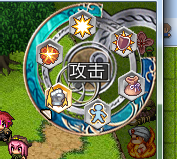
QQ截图20140802124918.png
  1. # ★ バトルレイアウト変更 (ヘルプウィンドウ通常版、少しだけ互換性が高い)
  2. #   バトルのレイアウトを変更します
  3. #   素材『ステートアイコンのアニメーション表示』の使用をお奨めします
  4. #     ▲ 入れるフォルダは Graphics/System へ

  5. #==============================================================================
  6. # ■ Ziifee
  7. #==============================================================================

  8. module Zii
  9.   # ▼ アイコンのナンバーです (縦 × 16 + 横 - 1)
  10.   FIGHT = 132                               # 戦斗
  11.   ESCAPE = 143                              # 逃跑
  12.   ATTACK = 116                                # 攻撃 (基本)
  13.   GUARD = 139                                # 防御
  14.   SKILL = 115                               # 战技
  15.   SKILL2 = 14                              # 体术
  16.   SKILL3 = 119                              # 魔法
  17.   SKILL4 = 143                              # 源术
  18.   ITEM = 260                                # アイテム
  19.   ESCAPE = 121
  20.   
  21.   # ▼ 回転方向 ( "正" か "逆" を入れる )
  22.   TURN = "正"
  23.   
  24.   # ▼ 顔グラフィック (使う場合 "使用" / 使わない場合は "")
  25.   STATUS_FACE = "使用"
  26.   
  27.   # ▼ 表示の設定 ( "名前" を "" にすると 名前を非表示)
  28.   STATUS_LINE = "名前"
  29.   
  30.   # ▼ △の大きさ ( VX 標準サイズ は 20)
  31.   LINE_SIZE = 14
  32.   
  33.   #--------------------------------------------------------------------------
  34.   # ● 通常回転 の判定
  35.   #--------------------------------------------------------------------------
  36.   def self.turn_normal?
  37.     return false if TURN == "逆"
  38.     return true  if TURN == "正"
  39.     return true
  40.   end
  41.   #--------------------------------------------------------------------------
  42.   # ● バトルオプション [顔グラフィック] の判定
  43.   #--------------------------------------------------------------------------
  44.   def self.battle_face?
  45.     return true if STATUS_FACE == "使用"
  46.     return false
  47.   end
  48.   #--------------------------------------------------------------------------
  49.   # ● バトルステートオプション [名前] の判定
  50.   #--------------------------------------------------------------------------
  51.   def self.line_name?
  52.     return true if STATUS_LINE == "名前"
  53.     return false
  54.   end
  55. end

  56. #==============================================================================
  57. # ■ Window_SpinCommand
  58. #------------------------------------------------------------------------------
  59. #  回転用コマンド選択を行うウィンドウです。
  60. #==============================================================================

  61. class Window_SpinCommand < Window_Command
  62.   #--------------------------------------------------------------------------
  63.   # ● 公開インスタンス変数
  64.   #--------------------------------------------------------------------------
  65.   attr_reader   :index                    # カーソル位置
  66.   attr_reader   :help_window              # ヘルプウィンドウ
  67.   #--------------------------------------------------------------------------
  68.   # ● オブジェクト初期化
  69.   #     cx / cy  : 中心の X座標 / Y座標
  70.   #     commands : コマンド配列 (内容 は [name, kind, pull, enabled?])
  71.   #     setting  : 設定ハッシュ ("R"=>半径 "S"=>速さ "G"=>背景 "L"=>文字)
  72.   #--------------------------------------------------------------------------
  73.   def initialize(cx, cy, commands, setting = {})
  74.     @radius    = 40#setting.has_key?("R") ? setting["R"] : 40  # 描画半径
  75.     @speed     = setting.has_key?("S") ? setting["S"] : 36  # 回転速さ
  76.     @spin_back = setting.has_key?("G") ? setting["G"] : ""  # 背景画像
  77.     @spin_line = setting.has_key?("L") ? setting["L"] : nil # 文字位置
  78.     x = cx - @radius - 28
  79.     y = cy - @radius - 28
  80.     width = height = @radius * 2 + 56 + 120
  81. #    super(x, y, width, height)
  82.     super(x, y)
  83.     self.opacity = 0
  84.     @index = 0
  85.     @commands = commands                                    # コマンド
  86.     @spin_right = true
  87.     @spin_count = 0
  88.     update_cursor
  89.   end
  90.   
  91.   def window_height
  92.     fitting_height(visible_line_number) + 120
  93.   end
  94.   def window_width
  95.     return 196
  96.   end
  97.   #--------------------------------------------------------------------------
  98.   # ▽ スピン画像を描画する (描画内容 強化用)
  99.   #     i  : インデックス
  100.   #     cx : 表示 中心位置 X座標
  101.   #     cy : 表示 中心位置 Y座標
  102.   #--------------------------------------------------------------------------
  103.   def draw_spin_graphic(i, cx, cy)
  104.     case command_kind(i)
  105.     when "icon"
  106.       draw_icon(command_pull(i), cx - 17, cy - 52, command_enabled?(i))
  107.     end
  108.   end
  109.   #--------------------------------------------------------------------------
  110.   # ★ リフレッシュ バグ回避用
  111.   #--------------------------------------------------------------------------
  112.   def refresh
  113.     set_spin
  114.   end
  115.   def refresh2(cx, cy, commands, setting = {})
  116.     @radius    = 44#setting.has_key?("R") ? setting["R"] : 40  # 描画半径
  117.     @speed     = setting.has_key?("S") ? setting["S"] : 36  # 回転速さ
  118.     @spin_back = setting.has_key?("G") ? setting["G"] : ""  # 背景画像
  119.     @spin_line = setting.has_key?("L") ? setting["L"] : nil # 文字位置
  120.     x = cx - @radius - 12
  121.     y = cy - @radius - 28
  122.     width = height = @radius * 2 + 56
  123.     #super(x, y)
  124.     self.opacity = 0
  125.     @index = 0
  126.     @commands = commands                                    # コマンド
  127.     @spin_right = true
  128.     @spin_count = 0
  129.     update_cursor
  130.   end
  131.   #--------------------------------------------------------------------------
  132.   # ★ 項目の描画 バグ回避用
  133.   #--------------------------------------------------------------------------
  134.   def draw_item(index, enabled = true)
  135.     @commands[index][3] = enabled
  136.     set_spin
  137.   end
  138.   #--------------------------------------------------------------------------
  139.   # ● 現在のコマンド名を取得する
  140.   #--------------------------------------------------------------------------
  141.   def command_name(index = @index)
  142.     return "" if index < 0
  143.     if @commands != nil
  144.     name = @commands[index][0]
  145.     end
  146.     return name != nil ? name : ""
  147.   end
  148.   #--------------------------------------------------------------------------
  149.   # ● コマンドの種類を取得
  150.   #--------------------------------------------------------------------------
  151.   def command_kind(index)
  152.     if @commands != nil
  153.     result = @commands[index][1]
  154.     end
  155.     return result != nil ? result : ""
  156.   end
  157.   #--------------------------------------------------------------------------
  158.   # ● コマンドの引数 を取得
  159.   #--------------------------------------------------------------------------
  160.   def command_pull(index)
  161.     if @commands != nil
  162.     result = @commands[index][2]
  163.     end
  164.     return result != nil ? result : ""
  165.   end
  166.   #--------------------------------------------------------------------------
  167.   # ● コマンドの有効フラグを取得
  168.   #--------------------------------------------------------------------------
  169.   def command_enabled?(index)
  170.     if @commands != nil
  171.     result = @commands[index][3]
  172.     end
  173.     return result != nil ? result : true
  174.   end
  175.   #--------------------------------------------------------------------------
  176.   # ● 名前の位置に index を設定する
  177.   #--------------------------------------------------------------------------
  178.   def set_index(name)
  179.     n = -1
  180.     for i in 0...@commands.size
  181.       n = i if @commands[i][0] == name
  182.     end
  183.     @index = n if n >= 0
  184.     update_cursor
  185.     call_update_help
  186.     set_spin
  187.   end
  188.   #--------------------------------------------------------------------------
  189.   # ● カーソル位置の設定
  190.   #     index : 新しいカーソル位置
  191.   #--------------------------------------------------------------------------
  192.   def index=(index)
  193.     @index = index
  194.     update_cursor
  195.     call_update_help
  196.     set_spin
  197.   end
  198.   #--------------------------------------------------------------------------
  199.   # ● 中心のX座標を取得
  200.   #--------------------------------------------------------------------------
  201.   def center_x
  202.     return contents.width / 2
  203.   end
  204.   #--------------------------------------------------------------------------
  205.   # ● 中心のY座標を取得
  206.   #--------------------------------------------------------------------------
  207.   def center_y
  208.     return contents.height / 2
  209.   end
  210.   #--------------------------------------------------------------------------
  211.   # ● 項目数の取得
  212.   #--------------------------------------------------------------------------
  213.   def item_max
  214.     if @commands != nil
  215.     return @commands.size
  216.   else
  217.     return 1
  218.     end
  219.   end
  220.   #--------------------------------------------------------------------------
  221.   # ● 背景の設定 (再定義 向き)
  222.   #--------------------------------------------------------------------------
  223.   def set_background
  224.     return if @spin_back == ""
  225.     bitmap = Cache.system(@spin_back)
  226.     rect = Rect.new(0, 0, bitmap.width, bitmap.height)
  227.     self.contents.blt(12 + 16 - 25, 12 + 8 -16, bitmap, rect)
  228.   end
  229.   #--------------------------------------------------------------------------
  230.   # ● 文章の設定 (再定義 向き)
  231.   #--------------------------------------------------------------------------
  232.   def set_text
  233.     return if @spin_line == nil
  234.     y = center_y - WLH / 2 + @spin_line
  235.     self.contents.draw_text(center_x - 56, y - 26 , 96, WLH, command_name, 1)
  236.   end
  237.   #--------------------------------------------------------------------------
  238.   # ● スピンアイコンの角度の差を取得する
  239.   #--------------------------------------------------------------------------
  240.   def angle_size
  241.     return (Math::PI * 2 / item_max) ###SR
  242.   end
  243.   #--------------------------------------------------------------------------
  244.   # ● スピンアイコン回転時のカウント を設定する
  245.   #--------------------------------------------------------------------------
  246.   def set_spin_count
  247.     @spin_count = angle_size * 360 / @speed
  248.     set_spin(true)
  249.   end
  250.   #--------------------------------------------------------------------------
  251.   # ● スピン設定 の実行
  252.   #     spin : 回転フラグ (true の時回転中)
  253.   #--------------------------------------------------------------------------
  254.   def set_spin(spin = false)
  255.     self.contents.clear
  256.     set_background
  257.     angle = spin ? @speed * @spin_count / 360 : 0
  258.     angle = @spin_right ? angle : -angle
  259.     for i in 0...item_max
  260.       n = (i - @index) * angle_size + angle ###SR OFFSET
  261.       cx = - @radius * Math.cos(n-44.67) + center_x#@radius * Math.sin(n) + center_x
  262.       cy = - @radius * Math.sin(n-44.67) + center_y#- @radius * Math.cos(n) + center_y
  263.       draw_spin_graphic(i, cx, cy)
  264.     end
  265.     set_text
  266.   end
  267.   #--------------------------------------------------------------------------
  268.   # ● フレーム更新
  269.   #--------------------------------------------------------------------------
  270.   def update
  271.     super
  272.     update_cursor
  273.     if @spin_count > 0
  274.       @spin_count -= 1
  275.       set_spin(@spin_count >= 1)
  276.       return
  277.     end
  278.     update_command
  279.   end
  280.   #--------------------------------------------------------------------------
  281.   # ● コマンドの移動可能判定
  282.   #--------------------------------------------------------------------------
  283.   def command_movable?
  284.     return false if @spin_count > 0
  285.     return false if (not visible or not active)
  286.     return false if (index < 0 or index > item_max or item_max == 0)
  287.     return false if (@opening or @closing)
  288.     return true
  289.   end
  290.   #--------------------------------------------------------------------------
  291.   # ● コマンドを右に移動
  292.   #--------------------------------------------------------------------------
  293.   def command_right
  294.     @index = (@index ) % item_max#(@index + 1) % item_max
  295.     @spin_right = true
  296.     set_spin_count
  297.   end
  298.   #--------------------------------------------------------------------------
  299.   # ● コマンドを左に移動
  300.   #--------------------------------------------------------------------------
  301.   def command_left
  302.     @index = (@index + item_max) % item_max#(@index - 1 + item_max) % item_max
  303.     @spin_right = false
  304.     set_spin_count
  305.   end
  306.   #--------------------------------------------------------------------------
  307.   # ● コマンド選択の更新
  308.   #--------------------------------------------------------------------------
  309.   def update_command
  310.     if command_movable?
  311.       if Input.press?(Input::UP)
  312.         Sound.play_cursor
  313.         Zii.turn_normal? ? command_left : command_right
  314.       end
  315.       if Input.press?(Input::DOWN)
  316.         Sound.play_cursor
  317.         Zii.turn_normal? ? command_right : command_left
  318.       end
  319.       # SR 1.04: 左右键切换菜单
  320.       if Input.press?(Input::LEFT)
  321.         @index -= 1
  322.         @index = 5 if @index == - 1
  323.         Sound.play_cursor
  324.         Zii.turn_normal? ? command_left : command_right
  325.       end
  326.       if Input.press?(Input::RIGHT)
  327.         @index += 1
  328.         @index = 0 if @index == 6
  329.         Sound.play_cursor
  330.         Zii.turn_normal? ? command_right : command_left
  331.       end
  332.       ###################
  333.     end
  334.     call_update_help
  335.   end
  336.   #--------------------------------------------------------------------------
  337.   # ● カーソルの更新
  338.   #--------------------------------------------------------------------------
  339.   def update_cursor
  340.     #if @index < 0
  341.     #  self.cursor_rect.empty
  342.     #else
  343.     #  rect = Rect.new(0, 0, 24, 24)
  344.     #  rect.x = center_x - rect.width / 2
  345.     #  rect.y = center_y - rect.height / 2 - @radius
  346.     #  self.cursor_rect = rect
  347.     #end
  348.   end
  349.   #--------------------------------------------------------------------------
  350.   # ● ヘルプウィンドウの設定
  351.   #     help_window : 新しいヘルプウィンドウ
  352.   #--------------------------------------------------------------------------
  353.   def help_window=(help_window)
  354.     @help_window = help_window
  355.     call_update_help
  356.   end
  357.   #--------------------------------------------------------------------------
  358.   # ● ヘルプウィンドウ更新メソッドの呼び出し
  359.   #--------------------------------------------------------------------------
  360.   def call_update_help
  361.     if self.active and @help_window != nil
  362.        update_help
  363.     end
  364.   end
  365.   #--------------------------------------------------------------------------
  366.   # ● ヘルプウィンドウの更新 (内容は継承先で定義する)
  367.   #--------------------------------------------------------------------------
  368.   def update_help
  369.   end
  370. end

  371. #==============================================================================
  372. # ■ Window_LineHelp
  373. #------------------------------------------------------------------------------
  374. #  スキルやアイテムの説明、アクターのステータスなどを表示するウィンドウです。
  375. #==============================================================================

  376. class Window_LineHelp < Window_Base
  377.   #--------------------------------------------------------------------------
  378.   # ● オブジェクト初期化
  379.   #--------------------------------------------------------------------------
  380.   def initialize
  381.     super(-16, 0, 576, WLH + 32)
  382.     self.opacity = 0
  383.   end
  384.   #--------------------------------------------------------------------------
  385.   # ● テキスト設定
  386.   #     text  : ウィンドウに表示する文字列
  387.   #     align : アラインメント (0..左揃え、1..中央揃え、2..右揃え)
  388.   #--------------------------------------------------------------------------
  389.   def set_text(text, align = 0)
  390.     if text != @text or align != @align
  391.       self.contents.clear
  392.       back_color = Color.new(0, 0, 0, 80)
  393.       self.contents.fill_rect(0, y = 12, contents.width, WLH - y, back_color)
  394.       self.contents.font.color = normal_color
  395.       self.contents.draw_text(20, 0, self.width - 72, WLH, text, align)
  396.       @text = text
  397.       @align = align
  398.     end
  399.   end
  400. end

  401. #==============================================================================
  402. # ■ Window_PartyCommand
  403. #==============================================================================

  404. class Window_PartyCommand2 < Window_SpinCommand
  405.   #--------------------------------------------------------------------------
  406.   # ● オブジェクト初期化
  407.   #--------------------------------------------------------------------------
  408.   def initialize
  409.     s1 = [Vocab::fight,  "icon", Zii::FIGHT,  true]
  410.     s2 = [Vocab::escape, "icon", Zii::ESCAPE, $game_troop.can_escape]
  411.     setting = {"R"=>40, "S"=>52, "G"=>"Spin40", "L"=>-12}
  412.     super(72, 356, [s1, s2], setting)
  413.     self.active = false
  414.     set_spin
  415.   end
  416. end

  417. #==============================================================================
  418. # ■ Window_ActorCommand
  419. #==============================================================================

  420. class Window_ActorCommand2 < Window_SpinCommand
  421.   #--------------------------------------------------------------------------
  422.   # ● オブジェクト初期化
  423.   #--------------------------------------------------------------------------
  424.   def initialize
  425.     s1 = [Vocab::attack, "icon", Zii::ATTACK, true]
  426.     s2 = [Vocab::skill,  "icon", Zii::SKILL,  true]
  427.     s3 = [Vocab::guard,  "icon", Zii::GUARD,  true]
  428.     s4 = [Vocab::item,   "icon", Zii::ITEM,   true]
  429.     s5 = [Vocab::escape,   "icon", Zii::ESCAPE,   true]
  430.     setting = {"R"=>40, "S"=>52, "G"=>"Spin40", "L"=>-12}
  431.     super(72 , 356, [s1, s2, s3, s4, s5], setting)
  432.     self.active = false
  433.     set_spin
  434.   end
  435.   
  436.   def refresh2
  437.     case @actor.id
  438.     when 1
  439.      s1 = [Vocab::attack, "icon", Zii::ATTACK, true]
  440.      s2 = ["战技",  "icon", Zii::SKILL,  true]
  441.      s3 = ["体术",  "icon", Zii::SKILL2,  true]
  442.      s4 = [Vocab::guard,  "icon", Zii::GUARD,  true]
  443.      s5 = [Vocab::item,   "icon", Zii::ITEM,   true]
  444.      s6 = [Vocab::escape,   "icon", Zii::ESCAPE,   true]
  445.      setting = {"R"=>40, "S"=>52, "G"=>"Spin40", "L"=>-12}
  446.      super(72, 356, [s1, s2, s3, s4, s5, s6], setting)
  447.      self.active = false
  448.      set_spin
  449.     when 2
  450.      s1 = [Vocab::attack, "icon", Zii::ATTACK, true]
  451.      s2 = ["战技",  "icon", Zii::SKILL,  true]
  452.      s3 = ["魔法",  "icon", Zii::SKILL3,  true]
  453.      s4 = [Vocab::guard,  "icon", Zii::GUARD,  true]
  454.      s5 = [Vocab::item,   "icon", Zii::ITEM,   true]
  455.      s6 = [Vocab::escape,   "icon", Zii::ESCAPE,   true]
  456.      setting = {"R"=>40, "S"=>52, "G"=>"Spin40", "L"=>-12}
  457.      super(72, 356, [s1, s2, s3, s4, s5, s6], setting)
  458.      self.active = false
  459.      set_spin
  460.     when 3
  461.      s1 = [Vocab::attack, "icon", Zii::ATTACK, true]
  462.      s2 = ["战技",  "icon", Zii::SKILL,  true]
  463.      s3 = ["体术",  "icon", Zii::SKILL2,  true]
  464.      s4 = [Vocab::guard,  "icon", Zii::GUARD,  true]
  465.      s5 = [Vocab::item,   "icon", Zii::ITEM,   true]
  466.      s6 = [Vocab::escape,   "icon", Zii::ESCAPE,   true]
  467.      setting = {"R"=>40, "S"=>52, "G"=>"Spin40", "L"=>-12}
  468.      super(72, 356, [s1, s2, s3, s4, s5, s6], setting)
  469.      self.active = false
  470.      set_spin
  471.     when 4
  472.      s1 = [Vocab::attack, "icon", Zii::ATTACK, true]
  473.      s2 = ["魔法",  "icon", Zii::SKILL3,  true]
  474.      s3 = ["源术",  "icon", Zii::SKILL4,  true]
  475.      s4 = [Vocab::guard,  "icon", Zii::GUARD,  true]
  476.      s5 = [Vocab::item,   "icon", Zii::ITEM,   true]
  477.      s6 = [Vocab::escape,   "icon", Zii::ESCAPE,   true]
  478.      setting = {"R"=>40, "S"=>52, "G"=>"Spin40", "L"=>-12}
  479.      super(72, 356, [s1, s2, s3, s4, s5, s6], setting)
  480.      self.active = false
  481.      set_spin
  482.     else
  483.      s1 = [Vocab::attack, "icon", Zii::ATTACK, true]
  484.      s2 = [Vocab::skill,  "icon", Zii::SKILL,  true]
  485.      s3 = [Vocab::guard,  "icon", Zii::GUARD,  true]
  486.      s4 = [Vocab::item,   "icon", Zii::ITEM,   true]
  487.      s5 = [Vocab::escape,   "icon", Zii::ESCAPE,   true]
  488.     setting = {"R"=>40, "S"=>52, "G"=>"Spin40", "L"=>-12}
  489.     super(72, 356, [s1, s2, s3, s4, s5], setting)
  490.     self.active = false
  491.     set_spin
  492.     end
  493.   end

  494.   #--------------------------------------------------------------------------
  495.   # ● 按下取消键时的处理
  496.   #--------------------------------------------------------------------------
  497.   def process_cancel
  498.     #Sound.play_cancel
  499.     #Input.update
  500.     #deactivate
  501.     #call_cancel_handler
  502.   end
  503.   #--------------------------------------------------------------------------
  504.   # ● 调用“取消”的处理方法
  505.   #--------------------------------------------------------------------------
  506.   def call_cancel_handler
  507.     #call_handler(:cancel)
  508.   end
  509.   
  510.   def clear_command_list
  511.     @list = []
  512.   end
  513.   def add_command(name, symbol, enabled = true, ext = nil)
  514.     @list.push({:name=>name, :symbol=>symbol, :enabled=>enabled, :ext=>ext})
  515.   end
  516.   #--------------------------------------------------------------------------
  517.   # ● 获取显示行数
  518.   #--------------------------------------------------------------------------
  519.   def visible_line_number
  520.     return 5#4
  521.   end
  522.   #--------------------------------------------------------------------------
  523.   # ● 生成指令列表
  524.   #--------------------------------------------------------------------------
  525.   def make_command_list
  526.     return unless @actor
  527.     add_attack_command
  528.     add_skill_commands
  529.     add_guard_command
  530.     add_item_command
  531.     add_escape_command
  532.   end
  533.   #--------------------------------------------------------------------------
  534.   # ☆ 添加逃跑指令
  535.   #--------------------------------------------------------------------------
  536.   def add_escape_command
  537.     add_command(Vocab::escape, :escape, BattleManager.can_escape?)
  538.   end
  539.   #--------------------------------------------------------------------------
  540.   # ● 添加攻击指令
  541.   #--------------------------------------------------------------------------
  542.   def add_attack_command
  543.     add_command(Zii::ATTACK, :attack, @actor.attack_usable?)
  544.   end
  545.   #--------------------------------------------------------------------------
  546.   # ● 添加技能指令
  547.   #--------------------------------------------------------------------------
  548.   def add_skill_commands
  549.     @actor.added_skill_types.sort.each do |stype_id|
  550.       name = $data_system.skill_types[stype_id]
  551.       add_command(name, :skill, true, stype_id)
  552.       refresh2
  553.     end
  554.   end
  555.   #--------------------------------------------------------------------------
  556.   # ● 添加防御指令
  557.   #--------------------------------------------------------------------------
  558.   def add_guard_command
  559.     add_command(Vocab::guard, :guard, @actor.guard_usable?)
  560.   end
  561.   #--------------------------------------------------------------------------
  562.   # ● 添加物品指令
  563.   #--------------------------------------------------------------------------
  564.   def add_item_command
  565.     add_command(Vocab::item, :item)
  566.   end
  567.   #--------------------------------------------------------------------------
  568.   # ● 设置
  569.   #--------------------------------------------------------------------------
  570.   def setup(actor)
  571.     @actor = actor
  572.     clear_command_list
  573.     make_command_list
  574.     refresh
  575.     #select(0)
  576.     activate
  577.     open
  578.     self.index = 0
  579.     set_spin
  580.   end
  581.   #--------------------------------------------------------------------------
  582.   # ● セットアップ
  583.   #     actor : アクター
  584.   #--------------------------------------------------------------------------
  585.   #def setup(actor)
  586.   #  @commands[0][2] = Zii::ATTACK
  587.   #  @commands[1][0] = Vocab::skill
  588.   #  if actor.weapons[0] != nil
  589.   #    n = actor.weapons[0].icon_index
  590.   #    @commands[0][2] = n if n > 0
  591.   #  end
  592.   #  #@commands[1][0] = actor.class.skill_name if actor.class.skill_name_valid
  593.   #  add_skill_commands
  594.   #  self.index = 0
  595.   #  set_spin
  596.   #end
  597. end
复制代码

点评

他的脚本放在這裏:http://neomemo-an.com/contents/rgss3/  发表于 2014-8-2 14:28
去谷歌了一下发现脚本原作者已经关闭博客消失了……  发表于 2014-8-2 13:16
脚本可以用工具栏的代码框<>发哦  发表于 2014-8-2 12:52
梦石
0
星屑
22879
在线时间
8598 小时
注册时间
2011-12-31
回帖
3270
发表于 2014-8-2 13:46:44 | 显示全部楼层
本帖最后由 tseyik 于 2014-8-2 14:31 编辑

VX 用的巴,?Ace的在下面
回复

使用道具 举报

…あたしは天

梦石
0
星屑
2308
在线时间
4033 小时
注册时间
2010-10-4
回帖
10548

开拓者贵宾

发表于 2014-8-2 13:58:08 来自手机 | 显示全部楼层
本帖最后由 taroxd 于 2014-8-2 14:00 编辑

爪机看不到代码,不过看这图片是glimmer的吧。

glimmer都是直接修改原脚本来实现大量脚本的整合的,请不要直接使用里面的脚本。请寻找原版的脚本。

我没记错的话这个脚本是基于某个战斗系统的?
回复

使用道具 举报

梦石
0
星屑
22879
在线时间
8598 小时
注册时间
2011-12-31
回帖
3270
发表于 2014-8-2 14:19:15 | 显示全部楼层
本帖最后由 VIPArcher 于 2014-8-2 16:55 编辑

把下面二個圖片導入至Graphics/System(要好看請自作圖片)
Ring96x88.png
Ring96x88.png
RollIconCursor.png
RollIconCursor.png
@height  论坛卖萌,无视此行
脚本
[pre lang="ruby" line="1"]=begin ************************************************************************
  ◆ 画像コマンドスクリプト (ベーススクリプト) Ver.1.82
  ---------------------------------------------------------------------------
    画像コマンドのベーススクリプトです。回転アイコンコマンドが使えます。
=end # ************************************************************************

#-information------------------------------------------------------------------
$ziifee ||= {}
$ziifee[:SpriteCommand] = true
#------------------------------------------------------------------------------
#-memo-------------------------------------------------------------------------
#  [必要画像] 以下の画像を Graphics/System にインポートしてください。
#    回転コマンド用カーソル画像 ( ファイル名 : RollIconCursor )
# - - - - - - - - - - - - - - - - - - - - - - - - - - - - - - - - - - - - - - -
#  このスクリプトは可能な限り素材の中で上部に導入してください。
#  回転アイコンコマンド選択を行いたいクラスに以下を記述します。
#    include ZiifSpriteCommand_RollIcon  # 回転アイコンコマンド選択
#------------------------------------------------------------------------------

#==============================================================================
# ■ ZiifManager
#==============================================================================

module ZiifManager
  #--------------------------------------------------------------------------
  # ▼ 定数 (アイコン番号)
  #-memo---------------------------------------------------------------------
  #  回転コマンド上に表示するアイコンはここで設定します。
  #  以下の定義の symbol がここで設定するシンボルになります。
  #    add_command(name, symbol, enabled, ext) # コマンドの追加
  # - - - - - - - - - - - - - - - - - - - - - - - - - - - - - - - - - - - - -
  #  IconSet[シンボル] = Hash.new(アイコン番号)
  #  IconSet[:skill][スキルタイプ番号] = アイコン番号  # スキルタイプ
  #--------------------------------------------------------------------------
  IconSet ||= Hash.new(Hash.new(16))           # デフォルト
  IconSet[:fight]       = Hash.new(147)        # 戦う   (バトル)
  IconSet[:escape]      = Hash.new(467)        # 逃げる (バトル)
  IconSet[:attack]      = Hash.new(175)        # 攻撃   (バトル)
  IconSet[:guard]       = Hash.new(506)        # 防御   (バトル)
  IconSet[:item]        = Hash.new(260)        # アイテム
  IconSet[:skill]       = Hash.new(112)        # スキル
  IconSet[:skill][1]    = 115                  # スキルタイプ ID:01
  IconSet[:skill][2]    = 117                  # スキルタイプ ID:02
  IconSet[:equip]       = Hash.new(436)        # 装備
  IconSet[:weapon]      = Hash.new(147)        # 武器
  IconSet[:armor]       = Hash.new(506)        # 防具
  IconSet[:key_item]    = Hash.new(243)        # キーアイテム
  IconSet[:optimize]    = Hash.new(437)        # 最強装備
  IconSet[:clear]       = Hash.new(143)        # 外す
  IconSet[:status]      = Hash.new(121)        # ステータス
  IconSet[:formation]   = Hash.new(183)        # 並び替え
  IconSet[:save]        = Hash.new(224)        # セーブ
  IconSet[:buy]         = Hash.new(270)        # 購入
  IconSet[:sell]        = Hash.new(262)        # 売却
  IconSet[:cancel]      = Hash.new(12)         # キャンセル
  IconSet[:new_game]    = Hash.new(234)        # ニューゲーム
  IconSet[:continue]    = Hash.new(224)        # コンティニュー
  IconSet[:game_end]    = Hash.new(257)        # ゲーム終了
  IconSet[:to_title]    = Hash.new(257)        # タイトルへ
  IconSet[:shutdown]    = Hash.new(143)        # シャットダウン
  #--------------------------------------------------------------------------
  # ● コマンドアイコン番号の取得
  #     command : ウィンドウのコマンド
  #--------------------------------------------------------------------------
  def self.command_icon_index(command)
    IconSet[command[:symbol]][command[:ext]]
  end
end

#==============================================================================
# ■ Game_System
#==============================================================================

class Game_System
  #--------------------------------------------------------------------------
  # ● 公開インスタンス変数 (オプション拡張用)
  #--------------------------------------------------------------------------
  attr_writer   :ziifop_reverse_roll      # 逆回転 ( true / false )
  attr_writer   :ziifop_roll_input_type   # 回転時 キー入力タイプ (0~2)
  attr_writer   :ziifop_roll_speed        # 回転時 速度 (0~4)
  #--------------------------------------------------------------------------
  # ▼ 逆回転の取得
  #--------------------------------------------------------------------------
  def ziifop_reverse_roll
    return false
  end
  #--------------------------------------------------------------------------
  # ▼ 回転キー入力タイプの取得 (0:プレス, 1:トリガー, 2:リピート)
  #--------------------------------------------------------------------------
  def ziifop_roll_input_type
    return 0
  end
  #--------------------------------------------------------------------------
  # ▼ 回転速度の取得 (0:遅い ~ 4:速い)
  #--------------------------------------------------------------------------
  def ziifop_roll_speed
    return 1
  end
end

#******************************************************************************
# ▼ 画像コマンド基本部
#******************************************************************************

#==============================================================================
# ■ Sprite_ZiifCommandSprite
#------------------------------------------------------------------------------
#  コマンド画像・背景・カーソル表示用スプライトのスーパークラスです。
#==============================================================================

class Sprite_ZiifCommandSprite < Sprite
  #--------------------------------------------------------------------------
  # ● オブジェクト初期化
  #--------------------------------------------------------------------------
  def initialize(command_set)
    super(command_set.viewport)
    @command_set = command_set
    init_basic_values
    create_bitmap
    update
  end
  #--------------------------------------------------------------------------
  # ● 基本変数の初期化
  #--------------------------------------------------------------------------
  def init_basic_values
  end
  #--------------------------------------------------------------------------
  # ● ビットマップの作成
  #--------------------------------------------------------------------------
  def create_bitmap
  end
  #--------------------------------------------------------------------------
  # ● 内容の作成
  #--------------------------------------------------------------------------
  def create_contents
  end
  #--------------------------------------------------------------------------
  # ● 内容の削除
  #--------------------------------------------------------------------------
  def clear_contents
  end
  #--------------------------------------------------------------------------
  # ● スプライトコマンドの取得
  #--------------------------------------------------------------------------
  def command_set
    return @command_set
  end
  #--------------------------------------------------------------------------
  # ● 位置の取得
  #--------------------------------------------------------------------------
  def index
    return command_set.sprite_index(self)
  end
  #--------------------------------------------------------------------------
  # ● コマンドのビューポートの取得
  #--------------------------------------------------------------------------
  def command_set_viewport
    return command_set.viewport
  end
  #--------------------------------------------------------------------------
  # ● コマンドの可視状態の取得
  #--------------------------------------------------------------------------
  def command_set_visible
    return command_set.visible && !command_set.close?
  end
  #--------------------------------------------------------------------------
  # ● コマンドの透明度の取得
  #--------------------------------------------------------------------------
  def command_set_opacity
    return command_set.contents_opacity
  end
  #--------------------------------------------------------------------------
  # ● 位置情報の更新
  #--------------------------------------------------------------------------
  def update_position
    self.viewport = command_set_viewport
    self.visible  = command_set_visible
    self.opacity  = command_set_opacity
  end
end

#==============================================================================
# ■ ZiifSpriteCommand
#------------------------------------------------------------------------------
#  画像コマンド選択を行うためのモジュールです。Mix-Inにより使用します。
#==============================================================================

module ZiifSpriteCommand
  #--------------------------------------------------------------------------
  # ● 公開インスタンス変数
  #--------------------------------------------------------------------------
  attr_reader   :windowskin               # ウィンドウスキン
  attr_reader   :viewport                 # ビューポート
  attr_reader   :active                   # 選択状態
  attr_reader   :visible                  # 可視状態
  attr_reader   :x                        # X座標
  attr_reader   :y                        # Y座標
  attr_reader   :width                    # 幅
  attr_reader   :height                   # 高さ
  attr_reader   :z                        # Z座標
  attr_reader   :ox                       # 転送元原点 X座標
  attr_reader   :oy                       # 転送元原点 Y座標
  attr_reader   :padding                  # 余白の大きさ
  attr_reader   :padding_bottom           # 下線余白の大きさ
  attr_reader   :opacity                  # 不透明度
  attr_reader   :back_opacity             # 背景の不透明度
  attr_reader   :contents_opacity         # コマンドの不透明度
  attr_reader   :openness                 # オープン度
  attr_reader   :tone                     # 背景の色調
  attr_reader   :index                    # カーソル位置
  attr_reader   :help_window              # ヘルプウィンドウ
  attr_accessor :cursor_fix               # カーソル固定フラグ
  attr_accessor :cursor_all               # カーソル全選択フラグ
  #--------------------------------------------------------------------------
  # ● オブジェクト初期化
  #--------------------------------------------------------------------------
  def initialize(*args)
    init_basic_values(*args)
    init_sprite_command
    update_tone
    refresh
    select(0)
    activate
  end
  #--------------------------------------------------------------------------
  # ● 基本変数の初期化
  #--------------------------------------------------------------------------
  def init_basic_values(x, y, width = window_width, height = window_height)
    @windowskin       = Cache.system("Window")
    @viewport         = nil
    @active           = true
    @visible          = true
    @x                = x
    @y                = y
    @width            = width
    @height = height
    @z                = 100
    @ox               = 0
    @oy               = 0
    @padding          = 12
    @padding_bottom   = 12
    @opacity          = 255
    @back_opacity     = 255
    @contents_opacity = 255
    @openness         = 255
    @tone             = Tone.new
    @index            = -1
    @handler          = {}
    @cursor_fix       = false
    @cursor_all       = false
    @opening          = false
    @closing          = false
  end
  #--------------------------------------------------------------------------
  # ● スプライトコマンド変数の初期化
  #--------------------------------------------------------------------------
  def init_sprite_command
    @command_sprites  = []
    @object_sprites   = {}
    create_dummy_bitmap
  end
  #--------------------------------------------------------------------------
  # ● 解放
  #--------------------------------------------------------------------------
  def dispose
    dispose_dummy_bitmap
    dispose_object_sprites
    dispose_command_sprites
  end
  #--------------------------------------------------------------------------
  # ● ウィンドウ幅の取得
  #--------------------------------------------------------------------------
  def window_width
    return 96
  end
  #--------------------------------------------------------------------------
  # ● ウィンドウ高さの取得
  #--------------------------------------------------------------------------
  def window_height
    return 88
  end
  #--------------------------------------------------------------------------
  # ● 項目数の取得
  #--------------------------------------------------------------------------
  def item_max
    @list.size
  end
  #--------------------------------------------------------------------------
  # ● コマンドリストのクリア
  #--------------------------------------------------------------------------
  def clear_command_list
    @list = []
  end
  #--------------------------------------------------------------------------
  # ● コマンドリストの作成
  #--------------------------------------------------------------------------
  def make_command_list
  end
  #--------------------------------------------------------------------------
  # ● コマンドの追加
  #     name    : コマンド名
  #     symbol  : 対応するシンボル
  #     enabled : 有効状態フラグ
  #     ext     : 任意の拡張データ
  #--------------------------------------------------------------------------
  def add_command(name, symbol, enabled = true, ext = nil)
    @list.push({:name=>name, :symbol=>symbol, :enabled=>enabled, :ext=>ext})
  end
  #--------------------------------------------------------------------------
  # ● コマンド名の取得
  #--------------------------------------------------------------------------
  def command(index)
    @list[index]
  end
  #--------------------------------------------------------------------------
  # ● コマンド名の取得
  #--------------------------------------------------------------------------
  def command_name(index)
    @list[index][:name]
  end
  #--------------------------------------------------------------------------
  # ● コマンドの有効状態を取得
  #--------------------------------------------------------------------------
  def command_enabled?(index)
    @list[index][:enabled]
  end
  #--------------------------------------------------------------------------
  # ● コマンドシンボルの取得
  #--------------------------------------------------------------------------
  def command_symbol(index)
    @list[index][:symbol]
  end
  #--------------------------------------------------------------------------
  # ● コマンドの拡張データの取得
  #--------------------------------------------------------------------------
  def command_ext(index)
    @list[index][:ext]
  end
  #--------------------------------------------------------------------------
  # ● 選択項目のコマンドデータを取得
  #--------------------------------------------------------------------------
  def current_data
    index >= 0 ? @list[index] : nil
  end
  #--------------------------------------------------------------------------
  # ● 選択項目のコマンド名を取得
  #--------------------------------------------------------------------------
  def current_item_name
    current_data ? current_data[:name] : ""
  end
  #--------------------------------------------------------------------------
  # ● 選択項目の有効状態を取得
  #--------------------------------------------------------------------------
  def current_item_enabled?
    current_data ? current_data[:enabled] : false
  end
  #--------------------------------------------------------------------------
  # ● 選択項目のシンボルを取得
  #--------------------------------------------------------------------------
  def current_symbol
    current_data ? current_data[:symbol] : nil
  end
  #--------------------------------------------------------------------------
  # ● 選択項目の拡張データを取得
  #--------------------------------------------------------------------------
  def current_ext
    current_data ? current_data[:ext] : nil
  end
  #--------------------------------------------------------------------------
  # ● 指定されたシンボルを持つコマンドにカーソルを移動
  #--------------------------------------------------------------------------
  def select_symbol(symbol)
    @list.each_index {|i| select(i) if @list[:symbol] == symbol }
  end
  #--------------------------------------------------------------------------
  # ● 指定された拡張データを持つコマンドにカーソルを移動
  #--------------------------------------------------------------------------
  def select_ext(ext)
    @list.each_index {|i| select(i) if @list[:ext] == ext }
  end
  #--------------------------------------------------------------------------
  # ● スプライトコマンドクラスの取得
  #--------------------------------------------------------------------------
  def sprite_command_class
    return Sprite_ZiifCommandSprite
  end
  #--------------------------------------------------------------------------
  # ● コマンド背景クラスの取得
  #--------------------------------------------------------------------------
  def sprite_background_class
    return Sprite_ZiifCommandSprite
  end
  #--------------------------------------------------------------------------
  # ● コマンドカーソルクラスの取得
  #--------------------------------------------------------------------------
  def sprite_cursor_class
    return Sprite_ZiifCommandSprite
  end
  #--------------------------------------------------------------------------
  # ● コマンドスプライトの位置を取得
  #--------------------------------------------------------------------------
  def sprite_index(sprite)
    @command_sprites.index(sprite)
  end
  #--------------------------------------------------------------------------
  # ● コマンドスプライトの作成
  #--------------------------------------------------------------------------
  def make_command_sprites
    item_max.times {|i| @command_sprites = sprite_command_class.new(self) }
  end
  #--------------------------------------------------------------------------
  # ● コマンドスプライトの解放
  #--------------------------------------------------------------------------
  def dispose_command_sprites
    @command_sprites.each {|sprite| sprite.dispose }
    @command_sprites.clear
  end
  #--------------------------------------------------------------------------
  # ● コマンドスプライトの更新
  #--------------------------------------------------------------------------
  def update_command_sprites
    @command_sprites.each {|sprite| sprite.update }
  end
  #--------------------------------------------------------------------------
  # ● コマンドスプライトの位置情報を更新
  #--------------------------------------------------------------------------
  def update_command_sprites_position
    @command_sprites.each {|sprite| sprite.update_position }
  end
  #--------------------------------------------------------------------------
  # ● オブジェクトスプライトの作成
  #--------------------------------------------------------------------------
  def make_object_sprites
    @object_sprites[:background] = sprite_background_class.new(self)
    @object_sprites[:cursor]     = sprite_cursor_class.new(self)
  end
  #--------------------------------------------------------------------------
  # ● オブジェクトスプライトの解放
  #--------------------------------------------------------------------------
  def dispose_object_sprites
    @object_sprites.each_value {|sprite| sprite.dispose }
    @object_sprites.clear
  end
  #--------------------------------------------------------------------------
  # ● オブジェクトスプライトの更新
  #--------------------------------------------------------------------------
  def update_object_sprites
    @object_sprites.each_value {|sprite| sprite.update }
  end
  #--------------------------------------------------------------------------
  # ● オブジェクトスプライトの位置情報を更新
  #--------------------------------------------------------------------------
  def update_object_sprites_position
    @object_sprites.each_value {|sprite| sprite.update_position }
  end
  #--------------------------------------------------------------------------
  # ● コマンド内容の作成
  #--------------------------------------------------------------------------
  def create_contents
    dispose_object_sprites
    dispose_command_sprites
    make_command_sprites
    make_object_sprites
  end
  #--------------------------------------------------------------------------
  # ● フレーム更新
  #--------------------------------------------------------------------------
  def update
    update_tone
    update_open if @opening
    update_close if @closing
    update_move
    update_command_sprites
    update_object_sprites
    process_cursor_move
    process_handling
  end
  #--------------------------------------------------------------------------
  # ● 位置情報の更新
  #--------------------------------------------------------------------------
  def update_position
    update_command_sprites_position
    update_object_sprites_position
  end
  #--------------------------------------------------------------------------
  # ● X座標の変更
  #--------------------------------------------------------------------------
  def x=(x)
    @x = x
    update_position
  end
  #--------------------------------------------------------------------------
  # ● Y座標の変更
  #--------------------------------------------------------------------------
  def y=(y)
    @y = y
    update_position
  end
  #--------------------------------------------------------------------------
  # ● 幅の変更
  #--------------------------------------------------------------------------
  def width=(width)
    @width = width
    update_position
  end
  #--------------------------------------------------------------------------
  # ● 高さの変更
  #--------------------------------------------------------------------------
  def height=(height)
    @height = height
    update_position
  end
  #--------------------------------------------------------------------------
  # ● Z座標の変更
  #--------------------------------------------------------------------------
  def z=(z)
    @z = z
    update_position
  end
  #--------------------------------------------------------------------------
  # ● X座標、Y座標、幅、高さをまとめて変更
  #--------------------------------------------------------------------------
  def move(x, y, width, height)
    @x      = x
    @y      = y
    @width  = width
    @height = height
    update_position
  end
  #--------------------------------------------------------------------------
  # ● 転送元原点 X座標の変更
  #--------------------------------------------------------------------------
  def ox=(ox)
    @ox = ox
    update_position
  end
  #--------------------------------------------------------------------------
  # ● 転送元原点 Y座標の変更
  #--------------------------------------------------------------------------
  def oy=(oy)
    @oy = oy
    update_position
  end
  #--------------------------------------------------------------------------
  # ● 余白の大きさの変更
  #--------------------------------------------------------------------------
  def padding=(padding)
    @padding        = padding
    @padding_bottom = padding_bottom
    update_position
  end
  #--------------------------------------------------------------------------
  # ● 下線余白の大きさの変更
  #--------------------------------------------------------------------------
  def padding_bottom=(padding_bottom)
    @padding_bottom = padding_bottom
    update_position
  end
  #--------------------------------------------------------------------------
  # ● ウィンドウスキンの変更
  #--------------------------------------------------------------------------
  def windowskin=(windowskin)
    @windowskin = windowskin
    update_position
  end
  #--------------------------------------------------------------------------
  # ● ビューポートの変更
  #--------------------------------------------------------------------------
  def viewport=(viewport)
    @viewport = viewport
    update_position
  end
  #--------------------------------------------------------------------------
  # ● 可視状態の変更
  #--------------------------------------------------------------------------
  def visible=(visible)
    @visible = visible
    update_position
  end
  #--------------------------------------------------------------------------
  # ● 表示
  #--------------------------------------------------------------------------
  def show
    self.visible = true
    self
  end
  #--------------------------------------------------------------------------
  # ● 非表示
  #--------------------------------------------------------------------------
  def hide
    self.visible = false
    self
  end
  #--------------------------------------------------------------------------
  # ● アクティブ状態の変更
  #--------------------------------------------------------------------------
  def active=(active)
    @active = active
    update_cursor
    call_update_help
  end
  #--------------------------------------------------------------------------
  # ● アクティブ化
  #--------------------------------------------------------------------------
  def activate
    self.active = true
    self
  end
  #--------------------------------------------------------------------------
  # ● 非アクティブ化
  #--------------------------------------------------------------------------
  def deactivate
    self.active = false
    self
  end
  #--------------------------------------------------------------------------
  # ● 不透明度の変更
  #--------------------------------------------------------------------------
  def opacity=(opacity)
    @opacity = [[opacity, 255].min, 0].max
    update_position
  end
  #--------------------------------------------------------------------------
  # ● 背景の不透明度の変更
  #--------------------------------------------------------------------------
  def back_opacity=(opacity)
    @back_opacity = [[opacity, 255].min, 0].max
    update_position
  end
  #--------------------------------------------------------------------------
  # ● 内容の不透明度の変更
  #--------------------------------------------------------------------------
  def contents_opacity=(opacity)
    @contents_opacity = [[opacity, 255].min, 0].max
    update_position
  end
  #--------------------------------------------------------------------------
  # ● オープン度の変更
  #--------------------------------------------------------------------------
  def openness=(openness)
    @openness = [[openness, 255].min, 0].max
    update_position
  end
  #--------------------------------------------------------------------------
  # ● 完全に開いた状態かどうか?
  #--------------------------------------------------------------------------
  def open?
    (@openness == 255)
  end
  #--------------------------------------------------------------------------
  # ● 完全に閉じた状態かどうか?
  #--------------------------------------------------------------------------
  def close?
    (@openness == 0)
  end
  #--------------------------------------------------------------------------
  # ● 開く処理値の取得
  #--------------------------------------------------------------------------
  def opening_value
    return 48
  end
  #--------------------------------------------------------------------------
  # ● 閉じる処理値の取得
  #--------------------------------------------------------------------------
  def closing_value
    return 48
  end
  #--------------------------------------------------------------------------
  # ● 開く処理の更新
  #--------------------------------------------------------------------------
  def update_open
    self.openness += opening_value
    @opening = false if open?
  end
  #--------------------------------------------------------------------------
  # ● 閉じる処理の更新
  #--------------------------------------------------------------------------
  def update_close
    self.openness -= closing_value
    @closing = false if close?
  end
  #--------------------------------------------------------------------------
  # ● 開く
  #--------------------------------------------------------------------------
  def open
    @opening = true unless open?
    @closing = false
    self
  end
  #--------------------------------------------------------------------------
  # ● 閉じる
  #--------------------------------------------------------------------------
  def close
    @closing = true unless close?
    @opening = false
    self
  end
  #--------------------------------------------------------------------------
  # ● 色調の更新
  #--------------------------------------------------------------------------
  def update_tone
  end
  #--------------------------------------------------------------------------
  # ● 移動中かどうか?
  #--------------------------------------------------------------------------
  def move?
    return false
  end
  #--------------------------------------------------------------------------
  # ● 停止中かどうか?
  #--------------------------------------------------------------------------
  def stop?
    return true
  end
  #--------------------------------------------------------------------------
  # ● 位置移動の更新
  #--------------------------------------------------------------------------
  def update_move
  end
  #--------------------------------------------------------------------------
  # ● カーソル位置の設定
  #--------------------------------------------------------------------------
  def index=(index)
    @index = index
    update_cursor
    call_update_help
  end
  #--------------------------------------------------------------------------
  # ● 項目の選択
  #--------------------------------------------------------------------------
  def select(index)
    self.index = index if index
  end
  #--------------------------------------------------------------------------
  # ● 項目の選択解除
  #--------------------------------------------------------------------------
  def unselect
    self.index = -1
  end
  #--------------------------------------------------------------------------
  # ● 動作に対応するハンドラの設定
  #     method : ハンドラとして設定するメソッド (Method オブジェクト)
  #--------------------------------------------------------------------------
  def set_handler(symbol, method)
    @handler[symbol] = method
  end
  #--------------------------------------------------------------------------
  # ● ハンドラの存在確認
  #--------------------------------------------------------------------------
  def handle?(symbol)
    @handler.include?(symbol)
  end
  #--------------------------------------------------------------------------
  # ● ハンドラの呼び出し
  #--------------------------------------------------------------------------
  def call_handler(symbol)
    @handler[symbol].call if handle?(symbol)
  end
  #--------------------------------------------------------------------------
  # ● カーソルの移動可能判定
  #--------------------------------------------------------------------------
  def cursor_movable?
    stop? && active && open? && !@cursor_fix && !@cursor_all && item_max > 0
  end
  #--------------------------------------------------------------------------
  # ● 下キーが押されているかどうか?
  #--------------------------------------------------------------------------
  def input_down?
    Input.repeat?(:DOWN)
  end
  #--------------------------------------------------------------------------
  # ● 上キーが押されているかどうか?
  #--------------------------------------------------------------------------
  def input_up?
    Input.repeat?(:UP)
  end
  #--------------------------------------------------------------------------
  # ● 右キーが押されているかどうか?
  #--------------------------------------------------------------------------
  def input_right?
    Input.repeat?(:RIGHT)
  end
  #--------------------------------------------------------------------------
  # ● 左キーが押されているかどうか?
  #--------------------------------------------------------------------------
  def input_left?
    Input.repeat?(:LEFT)
  end
  #--------------------------------------------------------------------------
  # ● カーソルを下に移動
  #--------------------------------------------------------------------------
  def cursor_down(wrap = false)
  end
  #--------------------------------------------------------------------------
  # ● カーソルを上に移動
  #--------------------------------------------------------------------------
  def cursor_up(wrap = false)
  end
  #--------------------------------------------------------------------------
  # ● カーソルを右に移動
  #--------------------------------------------------------------------------
  def cursor_right(wrap = false)
  end
  #--------------------------------------------------------------------------
  # ● カーソルを左に移動
  #--------------------------------------------------------------------------
  def cursor_left(wrap = false)
  end
  #--------------------------------------------------------------------------
  # ● カーソルの移動前処理
  #--------------------------------------------------------------------------
  def process_before_cursor_move
    @cursor_sound_value = @index
  end
  #--------------------------------------------------------------------------
  # ● カーソルの移動後処理
  #--------------------------------------------------------------------------
  def process_after_cursor_move
    Sound.play_cursor if @index != @cursor_sound_value
  end
  #--------------------------------------------------------------------------
  # ● カーソルの移動処理
  #--------------------------------------------------------------------------
  def process_cursor_move
    return unless cursor_movable?
    process_before_cursor_move
    cursor_down (Input.trigger?(:DOWN))  if input_down?
    cursor_up   (Input.trigger?(:UP))    if input_up?
    cursor_right(Input.trigger?(:RIGHT)) if input_right?
    cursor_left (Input.trigger?(:LEFT))  if input_left?
    process_after_cursor_move
  end
  #--------------------------------------------------------------------------
  # ● 決定やキャンセルなどのハンドリング処理
  #--------------------------------------------------------------------------
  def process_handling
    return unless open? && active && stop?
    return process_ok       if ok_enabled?        && Input.trigger?(:C)
    return process_cancel   if cancel_enabled?    && Input.trigger?(:B)
    return process_pagedown if handle?(:pagedown) && Input.trigger?(:R)
    return process_pageup   if handle?(:pageup)   && Input.trigger?(:L)
  end
  #--------------------------------------------------------------------------
  # ● 決定処理の有効状態を取得
  #--------------------------------------------------------------------------
  def ok_enabled?
    return true
  end
  #--------------------------------------------------------------------------
  # ● キャンセル処理の有効状態を取得
  #--------------------------------------------------------------------------
  def cancel_enabled?
    handle?(:cancel)
  end
  #--------------------------------------------------------------------------
  # ● 決定ボタンが押されたときの処理
  #--------------------------------------------------------------------------
  def process_ok
    if current_item_enabled?
      Sound.play_ok
      Input.update
      deactivate
      call_ok_handler
    else
      Sound.play_buzzer
    end
  end
  #--------------------------------------------------------------------------
  # ● 決定ハンドラの呼び出し
  #--------------------------------------------------------------------------
  def call_ok_handler
    if handle?(current_symbol)
      call_handler(current_symbol)
    elsif handle?(:ok)
      call_ok_handler_default
    else
      activate
    end
  end
  #--------------------------------------------------------------------------
  # ● 決定ハンドラの呼び出し (デフォルト)
  #--------------------------------------------------------------------------
  def call_ok_handler_default
    call_handler(:ok)
  end
  #--------------------------------------------------------------------------
  # ● キャンセルボタンが押されたときの処理
  #--------------------------------------------------------------------------
  def process_cancel
    Sound.play_cancel
    Input.update
    deactivate
    call_cancel_handler
  end
  #--------------------------------------------------------------------------
  # ● キャンセルハンドラの呼び出し
  #--------------------------------------------------------------------------
  def call_cancel_handler
    call_handler(:cancel)
  end
  #--------------------------------------------------------------------------
  # ● L ボタン(PageUp)が押されたときの処理
  #--------------------------------------------------------------------------
  def process_pageup
    Sound.play_cursor
    Input.update
    deactivate
    call_handler(:pageup)
  end
  #--------------------------------------------------------------------------
  # ● R ボタン(PageDown)が押されたときの処理
  #--------------------------------------------------------------------------
  def process_pagedown
    Sound.play_cursor
    Input.update
    deactivate
    call_handler(:pagedown)
  end
  #--------------------------------------------------------------------------
  # ● カーソルの更新
  #--------------------------------------------------------------------------
  def update_cursor
    update_position
  end
  #--------------------------------------------------------------------------
  # ● ヘルプウィンドウの設定
  #--------------------------------------------------------------------------
  def help_window=(help_window)
    @help_window = help_window
    call_update_help
  end
  #--------------------------------------------------------------------------
  # ● ヘルプウィンドウ更新メソッドの呼び出し
  #--------------------------------------------------------------------------
  def call_update_help
    update_help if active && @help_window
  end
  #--------------------------------------------------------------------------
  # ● ヘルプウィンドウの更新
  #--------------------------------------------------------------------------
  def update_help
    @help_window.clear
  end
  #--------------------------------------------------------------------------
  # ● 全項目の描画
  #--------------------------------------------------------------------------
  def draw_all_items
    item_max.times {|i| draw_item(i) }
  end
  #--------------------------------------------------------------------------
  # ● 項目の描画
  #--------------------------------------------------------------------------
  def draw_item(index)
    @command_sprites[index].create_contents
  end
  #--------------------------------------------------------------------------
  # ● 項目の消去
  #--------------------------------------------------------------------------
  def clear_item(index)
    @command_sprites[index].clear_contents
  end
  #--------------------------------------------------------------------------
  # ● 項目の再描画
  #--------------------------------------------------------------------------
  def redraw_item(index)
    clear_item(index) if index >= 0
    draw_item(index)  if index >= 0
  end
  #--------------------------------------------------------------------------
  # ● 選択項目の再描画
  #--------------------------------------------------------------------------
  def redraw_current_item
    redraw_item(@index)
  end
  #--------------------------------------------------------------------------
  # ● リフレッシュ
  #--------------------------------------------------------------------------
  def refresh
    clear_command_list
    make_command_list
    create_contents
    draw_all_items
    update_position
  end
  #--------------------------------------------------------------------------
  # ○ ダミービットマップの作成 (ウィンドウ互換用)
  #--------------------------------------------------------------------------
  def create_dummy_bitmap
    @dummy_bitmap = Bitmap.new(32, 32)
  end
  #--------------------------------------------------------------------------
  # ○ ダミービットマップの解放 (ウィンドウ互換用)
  #--------------------------------------------------------------------------
  def dispose_dummy_bitmap
    @dummy_bitmap.dispose
  end
  #--------------------------------------------------------------------------
  # ○ ウィンドウ内容の取得 (ウィンドウ互換用)
  #--------------------------------------------------------------------------
  def contents
    @dummy_bitmap
  end
  #--------------------------------------------------------------------------
  # ○ カーソルの矩形 (ウィンドウ互換用)
  #--------------------------------------------------------------------------
  def cursor_rect
    Rect.new(self.x, self.y, self.width, self.height)
  end
  #--------------------------------------------------------------------------
  # ○ スクロール用矢印の可視状態 (ウィンドウ互換用)
  #--------------------------------------------------------------------------
  def arrows_visible
    return true
  end
  #--------------------------------------------------------------------------
  # ○ スクロール用矢印の可視状態の変更 (ウィンドウ互換用)
  #--------------------------------------------------------------------------
  def arrows_visible=(arrows_visible)
  end
  #--------------------------------------------------------------------------
  # ○ ポーズの可視状態 (ウィンドウ互換用)
  #--------------------------------------------------------------------------
  def pause
    return false
  end
  #--------------------------------------------------------------------------
  # ○ ポーズの可視状態の変更 (ウィンドウ互換用)
  #--------------------------------------------------------------------------
  def pause=(pause)
  end
end

#******************************************************************************
# ▼ 回転アイコンコマンド部
#******************************************************************************

#==============================================================================
# ■ Sprite_ZiifRollIconCommand
#------------------------------------------------------------------------------
#  回転コマンドアイコン表示用のスプライトです。
#==============================================================================

class Sprite_ZiifRollIconCommand < Sprite_ZiifCommandSprite
  #--------------------------------------------------------------------------
  # ● 解放
  #--------------------------------------------------------------------------
  def dispose
    self.bitmap.dispose
    super
  end
  #--------------------------------------------------------------------------
  # ● ビットマップの作成
  #--------------------------------------------------------------------------
  def create_bitmap
    self.bitmap = Bitmap.new(24, 24)
    self.ox     = self.bitmap.width / 2
    self.oy     = self.bitmap.height / 2
  end
  #--------------------------------------------------------------------------
  # ● アイコン番号の取得
  #--------------------------------------------------------------------------
  def icon_index
    ZiifManager.command_icon_index(command_set.command(self.index))
  end
  #--------------------------------------------------------------------------
  # ● アイコン番号の取得
  #--------------------------------------------------------------------------
  def enabled
    command_set.command_enabled?(self.index)
  end
  #--------------------------------------------------------------------------
  # ● 半透明描画用のアルファ値を取得
  #--------------------------------------------------------------------------
  def translucent_alpha
    return 160
  end
  #--------------------------------------------------------------------------
  # ● 内容の作成
  #--------------------------------------------------------------------------
  def create_contents
    draw_icon
  end
  #--------------------------------------------------------------------------
  # ● アイコンを描画
  #--------------------------------------------------------------------------
  def draw_icon
    bitmap     = Cache.system("Iconset")
    icon_index = self.icon_index
    rect       = Rect.new(icon_index % 16 * 24, icon_index / 16 * 24, 24, 24)
    self.bitmap.blt(0, 0, bitmap, rect, enabled ? 255 : translucent_alpha)
  end
  #--------------------------------------------------------------------------
  # ● 内容の削除
  #--------------------------------------------------------------------------
  def clear_contents
    self.bitmap.clear
  end
  #--------------------------------------------------------------------------
  # ● 位置情報の更新
  #--------------------------------------------------------------------------
  def update_position
    super
    update_roll
  end
  #--------------------------------------------------------------------------
  # ● 回転幅の取得
  #--------------------------------------------------------------------------
  def roll_width
    command_set.width * command_set.openness / 510
  end
  #--------------------------------------------------------------------------
  # ● 回転高さの取得
  #--------------------------------------------------------------------------
  def roll_height
    command_set.height * command_set.openness / 510
  end
  #--------------------------------------------------------------------------
  # ● 回転角度の取得
  #--------------------------------------------------------------------------
  def roll_angle
    angle  = (self.index - command_set.index) * command_set.move_size
    angle += command_set.roll_angle
  end
  #--------------------------------------------------------------------------
  # ● 回転位置の更新
  #--------------------------------------------------------------------------
  def update_roll
    angle  = roll_angle
    self.x = roll_width  * Math.sin(angle)    + command_set.x
    self.y = roll_height * (-Math.cos(angle)) + command_set.y
    self.z = command_set.z
  end
end

#==============================================================================
# ■ Sprite_ZiifRollIconBackground
#------------------------------------------------------------------------------
#  画像コマンド背景のスプライトです。
#==============================================================================

class Sprite_ZiifRollIconBackground < Sprite_ZiifCommandSprite
  #--------------------------------------------------------------------------
  # ● 解放
  #--------------------------------------------------------------------------
  def dispose
    self.bitmap.dispose if command_set.background_filename.empty?
    super
  end
  #--------------------------------------------------------------------------
  # ● ビットマップの作成
  #--------------------------------------------------------------------------
  def create_bitmap
    self.bitmap = Cache.system(command_set.background_filename)
    self.ox     = self.bitmap.width / 2
    self.oy     = self.bitmap.height / 2
  end
  #--------------------------------------------------------------------------
  # ● コマンドの透明度の取得
  #--------------------------------------------------------------------------
  def command_set_opacity
    opacity  = command_set.opacity
    opacity *= command_set.back_opacity
    opacity *= command_set.openness
    opacity /= 65025
  end
  #--------------------------------------------------------------------------
  # ● 位置情報の更新
  #--------------------------------------------------------------------------
  def update_position
    super
    self.x = command_set.x
    self.y = command_set.y
    self.z = command_set.z - 10
  end
end

#==============================================================================
# ■ Sprite_ZiifRollIconCursor
#------------------------------------------------------------------------------
#  画像コマンドカーソルのスプライトです。
#==============================================================================

class Sprite_ZiifRollIconCursor < Sprite_ZiifCommandSprite
  #--------------------------------------------------------------------------
  # ● 解放
  #--------------------------------------------------------------------------
  def dispose
    self.bitmap.dispose if command_set.cursor_filename.empty?
    super
  end
  #--------------------------------------------------------------------------
  # ● ビットマップの作成
  #--------------------------------------------------------------------------
  def create_bitmap
    self.bitmap   = Cache.system(command_set.cursor_filename)
    self.ox       = self.bitmap.width / 2
    self.oy       = self.bitmap.height / 2
    @effect_count = 0
  end
  #--------------------------------------------------------------------------
  # ● コマンドの透明度の取得
  #--------------------------------------------------------------------------
  def command_set_opacity
    if @effect_count < 32
      value = 176 + @effect_count * 4
    else
      value = 432 - @effect_count * 4
    end
    return (value * command_set.contents_opacity / 255)
  end
  #--------------------------------------------------------------------------
  # ● フレーム更新
  #--------------------------------------------------------------------------
  def update
    super
    update_effect
  end
  #--------------------------------------------------------------------------
  # ● 演出効果の更新
  #--------------------------------------------------------------------------
  def update_effect
    self.opacity   = command_set_opacity
    @effect_count  = 0 if @effect_count == 64
    @effect_count += 1
  end
  #--------------------------------------------------------------------------
  # ● 回転幅の取得
  #--------------------------------------------------------------------------
  def roll_width
    return 0
  end
  #--------------------------------------------------------------------------
  # ● 回転高さの取得
  #--------------------------------------------------------------------------
  def roll_height
    (- command_set.height * command_set.openness / 510)
  end
  #--------------------------------------------------------------------------
  # ● 位置情報の更新
  #--------------------------------------------------------------------------
  def update_position
    super
    self.x = command_set.x + roll_width
    self.y = command_set.y + roll_height
    self.z = command_set.z - 5
  end
end

#==============================================================================
# ■ Window_ZiifRollIconCommandName
#------------------------------------------------------------------------------
#  回転アイコンコマンドの選択コマンド名を表示するウィンドウです。
#==============================================================================

class Window_ZiifRollIconCommandName < Window_Base
  #--------------------------------------------------------------------------
  # ● オブジェクト初期化
  #--------------------------------------------------------------------------
  def initialize(command_set)
    super(0, 0, command_set.width, fitting_height(1))
    @command_set = command_set
    self.opacity = 0
  end
  #--------------------------------------------------------------------------
  # ● スプライトコマンドの取得
  #--------------------------------------------------------------------------
  def command_set
    return @command_set
  end
  #--------------------------------------------------------------------------
  # ● X座標の取得
  #--------------------------------------------------------------------------
  def window_x
    (command_set.x - self.width / 2)
  end
  #--------------------------------------------------------------------------
  # ● Y座標の取得
  #--------------------------------------------------------------------------
  def window_y
    (command_set.y - self.height / 2)
  end
  #--------------------------------------------------------------------------
  # ● コマンドのビューポートの取得
  #--------------------------------------------------------------------------
  def command_set_viewport
    return command_set.viewport
  end
  #--------------------------------------------------------------------------
  # ● コマンドの可視状態の取得
  #--------------------------------------------------------------------------
  def command_set_visible
    return command_set.visible && command_set.open?
  end
  #--------------------------------------------------------------------------
  # ● コマンドの透明度の取得
  #--------------------------------------------------------------------------
  def command_set_opacity
    return command_set.contents_opacity
  end
  #--------------------------------------------------------------------------
  # ● 位置情報の更新
  #--------------------------------------------------------------------------
  def update_position
    set_information
    update_base_position
  end
  #--------------------------------------------------------------------------
  # ● 基本の位置情報の更新
  #--------------------------------------------------------------------------
  def update_base_position
    self.viewport         = command_set_viewport
    self.visible          = command_set_visible
    self.contents_opacity = command_set_opacity
    self.x                = window_x + command_set.info_window_offset_x
    self.y                = window_y + command_set.info_window_offset_y
    self.z                = command_set.z + 10
  end
  #--------------------------------------------------------------------------
  # ● 表示情報の設定
  #--------------------------------------------------------------------------
  def set_information
    return if command_set.current_item_name == @name
    @name = command_set.current_item_name
    refresh
  end
  #--------------------------------------------------------------------------
  # ● リフレッシュ
  #--------------------------------------------------------------------------
  def refresh
    contents.clear
    texts = command_set.info_text_separate? ? @name.scan(/\S+/) : [@name]
    texts.push("") if texts.empty?
    self.width  = texts.collect {|text| text_size(text).width + 8 }.max
    self.width += standard_padding * 2
    self.height = fitting_height(texts.size)
    create_contents
    texts.each_with_index do |text, line|
      draw_text(0, line_height * line, contents.width, line_height, text, 1)
    end
  end
end

#==============================================================================
# ■ ZiifSpriteCommand_RollIcon
#------------------------------------------------------------------------------
#  回転アイコンコマンド選択を行うモジュールです。Mix-Inにより使用します。
#==============================================================================

module ZiifSpriteCommand_RollIcon
  #--------------------------------------------------------------------------
  # ● Mix-In
  #--------------------------------------------------------------------------
  include ZiifSpriteCommand               # 画像コマンド選択モジュール
  #--------------------------------------------------------------------------
  # ● 公開インスタンス変数
  #--------------------------------------------------------------------------
  attr_reader   :move_size                # 移動サイズ
  attr_reader   :move_speed               # 移動速度
  attr_reader   :move_count               # 移動カウント
  attr_reader   :move_type                # 移動タイプ
  #--------------------------------------------------------------------------
  # ● スプライトコマンド変数の初期化
  #--------------------------------------------------------------------------
  def init_sprite_command
    super
    @move_size  = 0
    @move_speed = 64
    @move_count = 0
    @move_type  = nil
  end
  #--------------------------------------------------------------------------
  # ● 逆回転の判定
  #--------------------------------------------------------------------------
  def reverse_roll?
    return $game_system.ziifop_reverse_roll
  end
  #--------------------------------------------------------------------------
  # ● 角度の差の取得
  #--------------------------------------------------------------------------
  def angle_difference
    (item_max > 0 ? Math::PI * 2 / item_max : 0)
  end
  #--------------------------------------------------------------------------
  # ● 回転速度の取得
  #--------------------------------------------------------------------------
  def roll_speed
    ([64 - item_max * 3, 16].max * correct_roll_speed)
  end
  #--------------------------------------------------------------------------
  # ● 回転速度の補正値の取得
  #--------------------------------------------------------------------------
  def correct_roll_speed
    case $game_system.ziifop_roll_speed
    when 0; return 0.6   # 遅い
    when 1; return 0.8   # やや遅い
    when 2; return 1     # 普通
    when 3; return 1.2   # やや速い
    when 4; return 1.4   # 速い
    end
  end
  #--------------------------------------------------------------------------
  # ● 回転動作時の角度の取得
  #--------------------------------------------------------------------------
  def roll_angle
    (move? ? move_count * move_speed * correct_roll_angle / 360 : 0)
  end
  #--------------------------------------------------------------------------
  # ● 回転方向の補正値の取得
  #--------------------------------------------------------------------------
  def correct_roll_angle
    case @move_type
    when :right ; return 1   # 右回転
    when :left  ; return -1  # 左回転
    else        ; return 0
    end
  end
  #--------------------------------------------------------------------------
  # ● 回転カウント値の設定
  #--------------------------------------------------------------------------
  def roll_count
    (move_size * 360 / move_speed)
  end
  #--------------------------------------------------------------------------
  # ● 背景画像のファイル名を取得
  #--------------------------------------------------------------------------
  def background_filename
    return ""
  end
  #--------------------------------------------------------------------------
  # ● カーソル画像のファイル名を取得
  #--------------------------------------------------------------------------
  def cursor_filename
    return "RollIconCursor"
  end
  #--------------------------------------------------------------------------
  # ● 情報ウィンドウの空白文字での改行判定
  #--------------------------------------------------------------------------
  def info_text_separate?
    return false
  end
  #--------------------------------------------------------------------------
  # ● 情報ウィンドウのX座標調整
  #--------------------------------------------------------------------------
  def info_window_offset_x
    return 0
  end
  #--------------------------------------------------------------------------
  # ● 情報ウィンドウのY座標調整
  #--------------------------------------------------------------------------
  def info_window_offset_y
    return 0
  end
  #--------------------------------------------------------------------------
  # ● スプライトコマンドクラスの取得
  #--------------------------------------------------------------------------
  def sprite_command_class
    return Sprite_ZiifRollIconCommand
  end
  #--------------------------------------------------------------------------
  # ● コマンド背景クラスの取得
  #--------------------------------------------------------------------------
  def sprite_background_class
    return Sprite_ZiifRollIconBackground
  end
  #--------------------------------------------------------------------------
  # ● コマンドカーソルクラスの取得
  #--------------------------------------------------------------------------
  def sprite_cursor_class
    return Sprite_ZiifRollIconCursor
  end
  #--------------------------------------------------------------------------
  # ● 情報ウィンドウクラスの取得
  #--------------------------------------------------------------------------
  def info_window_class
    return Window_ZiifRollIconCommandName
  end
  #--------------------------------------------------------------------------
  # ● オブジェクトスプライトの作成
  #--------------------------------------------------------------------------
  def make_object_sprites
    @object_sprites[:info_window] = info_window_class.new(self)
    super
  end
  #--------------------------------------------------------------------------
  # ● コマンド内容の作成
  #--------------------------------------------------------------------------
  def create_contents
    super
    set_roll_value
  end
  #--------------------------------------------------------------------------
  # ● 回転値の設定
  #--------------------------------------------------------------------------
  def set_roll_value
    @move_size  = angle_difference
    @move_speed = roll_speed
  end
  #--------------------------------------------------------------------------
  # ● 動作中かどうか?
  #--------------------------------------------------------------------------
  def move?
    @move_type
  end
  #--------------------------------------------------------------------------
  # ● 停止中かどうか?
  #--------------------------------------------------------------------------
  def stop?
    !@move_type
  end
  #--------------------------------------------------------------------------
  # ● 位置移動の更新
  #--------------------------------------------------------------------------
  def update_move
    if move?
      @move_count -= 1
      @move_type   = nil if @move_count <= 0
      update_cursor
    end
  end
  #--------------------------------------------------------------------------
  # ● コマンドを右に回転
  #--------------------------------------------------------------------------
  def roll_right
    @index      = (@index + 1) % item_max
    @move_type  = :right
    @move_count = roll_count
    call_update_help
  end
  #--------------------------------------------------------------------------
  # ● コマンドを左に回転
  #--------------------------------------------------------------------------
  def roll_left
    @index      = (@index - 1 + item_max) % item_max
    @move_type  = :left
    @move_count = roll_count
    call_update_help
  end
  #--------------------------------------------------------------------------
  # ● 回転キーが押されているかどうか?
  #--------------------------------------------------------------------------
  def input_roll?(symbol)
    case $game_system.ziifop_roll_input_type
    when 0; return Input.press?(symbol)     # プレス
    when 1; return Input.trigger?(symbol)   # トリガー
    when 2; return Input.repeat?(symbol)    # リピート
    else  ; return Input.repeat?(symbol)
    end
  end
  #--------------------------------------------------------------------------
  # ● カーソルの移動前処理
  #--------------------------------------------------------------------------
  def process_before_cursor_move
    @cursor_sound_value = false
  end
  #--------------------------------------------------------------------------
  # ● カーソルの移動後処理
  #--------------------------------------------------------------------------
  def process_after_cursor_move
    Sound.play_cursor if @cursor_sound_value
  end
  #--------------------------------------------------------------------------
  # ● 右キーが押されているかどうか?
  #--------------------------------------------------------------------------
  def input_right?
    input_roll?(:RIGHT)
  end
  #--------------------------------------------------------------------------
  # ● 左キーが押されているかどうか?
  #--------------------------------------------------------------------------
  def input_left?
    input_roll?(:LEFT)
  end
  #--------------------------------------------------------------------------
  # ● カーソルを右に移動
  #--------------------------------------------------------------------------
  def cursor_right(wrap = false)
    reverse_roll? ? roll_left : roll_right
    @cursor_sound_value = true
  end
  #--------------------------------------------------------------------------
  # ● カーソルを左に移動
  #--------------------------------------------------------------------------
  def cursor_left(wrap = false)
    reverse_roll? ? roll_right : roll_left
    @cursor_sound_value = true
  end
end
[/pre]
[pre lang="ruby" line="1"]=begin ************************************************************************
  ◆ 回転式バトルコマンド Ver.1.11
  ---------------------------------------------------------------------------
    バトルコマンドを回転式アイコンコマンドに変更します。
=end # ************************************************************************

#-information------------------------------------------------------------------
$ziifee ||= {}
$ziifee[:RollBattleCommand] = true
#------------------------------------------------------------------------------
#-memo-------------------------------------------------------------------------
#  [必要スクリプト]
#    画像コマンドスクリプト (Ver.1.50以上)
#  [必要画像] 以下の画像を Graphics/System にインポートしてください。
#    バトルコマンド用背景画像 ( ファイル名 : Ring96x88 )
# - - - - - - - - - - - - - - - - - - - - - - - - - - - - - - - - - - - - - - -
#  このスクリプトは、画像コマンドスクリプトの下に入れてください。
#  アイコンの変更は、画像コマンドスクリプトの中で行えます。
#------------------------------------------------------------------------------

module ZiifRollBattleCommand
  # ▼ コマンド表示後に表示位置を調整する ( true / false )
  AdjustPartyWindow = true      # パーティウィンドウ
  AdjustActorWindow = true      # アクターウィンドウ
end

#******************************************************************************
# ▼ 回転式コマンド導入部
#******************************************************************************

class Window_PartyCommand; include ZiifSpriteCommand_RollIcon; end
class Window_ActorCommand; include ZiifSpriteCommand_RollIcon; end

#******************************************************************************
# ▼ レイアウト部
#******************************************************************************

#==============================================================================
# ■ Sprite_ZiifRollIconActorBattleCommand
#==============================================================================

class Sprite_ZiifRollIconActorBattleCommand < Sprite_ZiifRollIconCommand
  #--------------------------------------------------------------------------
  # ● アイコン番号の取得
  #--------------------------------------------------------------------------
  def icon_index
    if command_set.command_symbol(self.index) == :attack
      return command_set.attack_icon_index
    end
    return super
  end
end

#==============================================================================
# ■ Window_PartyCommand
#==============================================================================

class Window_PartyCommand
  #--------------------------------------------------------------------------
  # ● 幅の取得
  #--------------------------------------------------------------------------
  def window_width
    return 96
  end
  #--------------------------------------------------------------------------
  # ● 高さの取得
  #--------------------------------------------------------------------------
  def window_height
    return 88
  end
  #--------------------------------------------------------------------------
  # ● 背景画像のファイル名を取得
  #--------------------------------------------------------------------------
  def background_filename
    return "Ring96x88"
  end
end

#==============================================================================
# ■ Window_ActorCommand
#==============================================================================

class Window_ActorCommand
  #--------------------------------------------------------------------------
  # ● 幅の取得
  #--------------------------------------------------------------------------
  def window_width
    return 96
  end
  #--------------------------------------------------------------------------
  # ● 高さの取得
  #--------------------------------------------------------------------------
  def window_height
    return 88
  end
  #--------------------------------------------------------------------------
  # ● 背景画像のファイル名を取得
  #--------------------------------------------------------------------------
  def background_filename
    return "Ring96x88"
  end
  #--------------------------------------------------------------------------
  # ● スプライトコマンドクラスの取得
  #--------------------------------------------------------------------------
  def sprite_command_class
    return Sprite_ZiifRollIconActorBattleCommand
  end
  #--------------------------------------------------------------------------
  # ● 攻撃アイコン番号を取得
  #--------------------------------------------------------------------------
  def attack_icon_index
    if @actor && !@actor.weapons.compact.empty?
      return @actor.weapons.compact.first.icon_index
    end
    ZiifManager::IconSet[:attack][nil]
  end
end

#==============================================================================
# ■ Scene_Battle
#==============================================================================

class Scene_Battle
  #--------------------------------------------------------------------------
  # ● パーティコマンドウィンドウの作成
  #--------------------------------------------------------------------------
  alias :ziif_roll_battle_command_create_party_command_window :create_party_command_window
  def create_party_command_window
    ziif_roll_battle_command_create_party_command_window
    if ZiifRollBattleCommand::AdjustPartyWindow
      @party_command_window.x += 64
      @party_command_window.y += 60
    end
  end
  #--------------------------------------------------------------------------
  # ● アクターコマンドウィンドウの作成
  #--------------------------------------------------------------------------
  alias :ziif_roll_battle_command_create_actor_command_window :create_actor_command_window
  def create_actor_command_window
    ziif_roll_battle_command_create_actor_command_window
    if ZiifRollBattleCommand::AdjustActorWindow
      @actor_command_window.x += 64
      @actor_command_window.y += 60
    end
  end
end
[/pre]  

评分

参与人数 2星屑 +270 收起 理由
VIPArcher + 150 哦哦,感谢!
喵呜喵5 + 120 哦哦,感谢!

查看全部评分

回复

使用道具 举报

梦石
0
星屑
50
在线时间
80 小时
注册时间
2009-10-11
回帖
16
 楼主| 发表于 2014-8-2 16:45:37 | 显示全部楼层
tseyik 发表于 2014-8-2 14:19
把下面二個圖片導入至Graphics/System(要好看請自作圖片)
Ring96x88.png

谢谢4楼的,你给我的脚本我以前用过,记得当时有问题发帖子问过,万年沉水了,好像是脚本236行错误.

点评

现在能用吗?  发表于 2014-8-2 16:52
回复

使用道具 举报

梦石
0
星屑
50
在线时间
80 小时
注册时间
2009-10-11
回帖
16
 楼主| 发表于 2014-8-2 16:53:17 | 显示全部楼层
本帖最后由 笑傲天 于 2014-8-2 16:55 编辑

不行,提示我236错误 这个脚本原帖我看过,楼主给的解决办法不行,我试过。发过帖子问过没解决....

点评

[url=home.php?mod=space&uid=291977]@height[/url] = height 改成@height = height  发表于 2014-8-2 16:54
回复

使用道具 举报

梦石
0
星屑
50
在线时间
80 小时
注册时间
2009-10-11
回帖
16
 楼主| 发表于 2014-8-2 16:57:32 | 显示全部楼层
笑傲天 发表于 2014-8-2 16:53
不行,提示我236错误 这个脚本原帖我看过,楼主给的解决办法不行,我试过。发过帖子问过没解决.... ...

3Q用你的方法解决了{:2_276:}
回复

使用道具 举报

您需要登录后才可以回帖 登录 | 注册会员

本版积分规则

Powered by Discuz! X5.0 © 2001-2026 Discuz! Team.

在本版发帖返回顶部
