| 赞 | 0 |
| VIP | |
| 好人卡 | |
| 积分 | 1 |
| 经验 | |
| 最后登录 | 2015-4-10 |
| 在线时间 | 11 小时 |
- 梦石
- 0
- 星屑
- 50
- 在线时间
- 11 小时
- 注册时间
- 2015-3-6
- 回帖
- 10
|
加入我们,或者,欢迎回来。
您需要 登录 才可以下载或查看,没有账号?注册会员
×
本帖最后由 Eric_Zh 于 2015-3-7 16:36 编辑
我最近打算写一个战斗脚本,但是有个难题困扰着我。
我打算用IF设置一个条件语句,如果角色攻击时身上携带某种武器或防具,执行IF里的内容,反之执行ELSE的内容。
当角色被攻击时,再设置类似的内容。
不知道怎么写?
------问题补充-------
我自己一直在改脚本,但是由于是初学者,所以碰了不少壁,最近才接近目标,但还差最后一步,如下图所示。
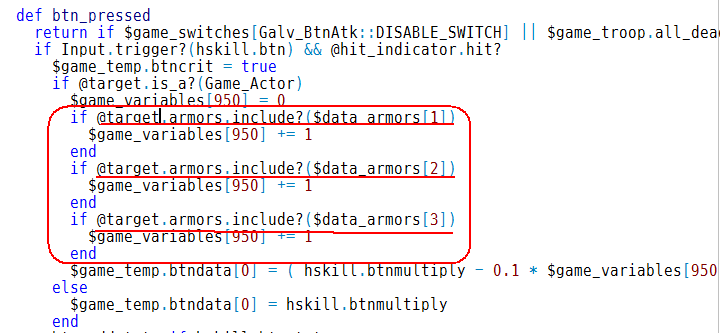
图中划线的部分,我想表达的跟原来描述的意思差不多。
不过这def是属于Scene_Battle的,所以伤害公式里的那个插入Game_Battler的就不好使了(严格来说是实际使用的时候会慢半拍)
(下面是我改过的代码,内容大约在第370行)
[pre lang="ruby"]#------------------------------------------------------------------------------#
# Galv's Timed Button Attacks
#------------------------------------------------------------------------------#
# For: RPGMAKER VX ACE
# Version 1.7
#------------------------------------------------------------------------------#
# 2013-04-25 - Version 1.7 - Added compatibility with Yanfly's cast animation
# 2013-04-17 - Version 1.6 - Fixed a pretty big bug with ending battle.
# 2013-04-17 - Version 1.5 - Fixed evaded popup appearing in Yanfly's engine
# - when hitting using 'guarantee hit' option. Added
# - fix for if battle ends early while indicator live
# 2013-04-08 - Version 1.4 - Fixed bug with defend indicator not showing on
# - correct actor.
# 2013-03-15 - Version 1.3 - Fixed animation option
# 2013-03-15 - Version 1.2 - Fixed a bug with not pressing button at all
# 2013-03-15 - Version 1.1 - added option to turn off battle log messages
# - disabled hit indicator when actor is confused
# - fixed yanfly battle engine compatability bug
# 2013-03-11 - Version 1.0 - release
#------------------------------------------------------------------------------#
# Adds a graphical indicator to selected attacks that allows the player to
# press a button at a certain time for the attack to do extra damage or apply
# a state. Different attacks can use different buttons, graphics and have
# varied speeds and difficulty.
#
# NOTES: Put this script below any battle scripts. Tested in default battle
# system as well as Yanfly's default battle script.
#
# MORE NOTES: If the indicator disappears too soon, increase the frames of the
# skill's animation in the Database Animations tab.
#
#------------------------------------------------------------------------------#
#------------------------------------------------------------------------------#
# NOTE TAGS for SKILLS or ITEMS
#------------------------------------------------------------------------------#
#
# <btnpress> # Enables the btn press with flash and SE when successful
# OR
# <btnpress n> # Enables the btn press and plays animation n when successful
# # This animation cancels the current skill's animation.
#
# # NOTE: Only one of these is required for a skill.
#
#------------------------------------------------------------------------------#
# NOTE TAGS for SKILLS or ITEMS (Leaving any of these out will use defaults)
#------------------------------------------------------------------------------#
#
# <btn x> # Use a different button to press (default :X)
# <btnmsg x> # Use a different message number when hit successful
#
# <btnmultiply x> # Multiply the damage/healing by x (default 2)
#
# <btnstates x,x,x> # Apply states with id x when timing is hit.
# <btnrstates x,x,x> # Remove states with id x when timing is hit.
#
# <btnopt a,b,c,d> # a = start time (delay before indicator moves)
# # b = target time (when button should be pressed)
# # c = indicator image number to use
# # d = difficulty number. Higher is easier to hit
#
# # The indicator will appear at the start time (a) and shrink down to meet
# # the target circle at the target time (b) when the player should press
# # the button.
# # DEFAULTS: a = 0 b = 31 c = 1 d = 0
#------------------------------------------------------------------------------#
# EXAMPLES:
#
# <btnpress 4> # Enables script and uses animation 4 on success
# <btn Y> # Use the :Y ("s" on the keyboard) button instead
# <btnmultiply 3> # 3 x damage
# <btnstates 2,3> # Applies states 2 and 3
# <btnrstates 5,6,7> # Removes states 5, 6 and 7
# <btnopt 10,61,2,0> # Indicator runs from 10-61 frames using image 2
# # and no change in difficulty
#
#------------------------------------------------------------------------------#
#------------------------------------------------------------------------------#
# NOTE TAGS for ACTORS or EQUIPS - These determine a defending timed hit
#------------------------------------------------------------------------------#
#
# <btnpress> # Enables an actor or equip defending timed hit.
# OR
# <btnpress n> # Enables def timed hit and plays animation n when successful
# # Only use this if you are using a sideview battle script.
# # Only works with battle scripts that show animations on actors
#
# # NOTE: Only one of these is required for an equip or actor.
#
#------------------------------------------------------------------------------#
# Optional NOTE TAGS for ACTORS or EQUIPS (Leaving any out will use defaults)
#------------------------------------------------------------------------------#
# <btn x> # Use a different button to press (default :Z)
# <btnmsg x> # Use a different message number when hit successful
#
# <btnmultiply x> # Multiply the damage/healing by x (default 0.5)
#
# <btnstates x,x,x> # Apply states with id x when timing is hit.
# <btnrstates x,x,x> # Remove states with id x when timing is hit.
#
# <btnopt a,b,c,d> # a = start time (delay before indicator moves)
# # DEFAULTS: a = 0 b = 31 c = 3 d = 0
#
#------------------------------------------------------------------------------#
($imported ||= {})["Galv_BtnPress_Hit"] = true
module Galv_BtnAtk
#------------------------------------------------------------------------------#
# SETUP OPTIONS
#------------------------------------------------------------------------------#
#---------------#
# PREFERENCES #
#---------------#
GUARANTEE_HIT = false # If player hits the timing, the attack cannot miss
SHOW_AS_CRIT = true # Displays hits on enemy as critical hits.
ATK_MULTIPLIER = 1.5 # Default damage/healing multipliers if the timing is
DEF_MULTIPLIER = 0.5 # successful for attacking and defending.
DIFFICULTY = 3 # The higher this number, the further away from the
# center circle will score a success. 0 is extremely
# difficult, the higher this number the easier.
DISABLE_SWITCH = 194 # Turn swith ON to disable this
ATK_BTN = :X # Default attack button to press. :X is "a"
DEF_BTN = :Z # Default defend button to press. :Z is "d"
Y_OFFSET = -50 # 0 is positioned at bottom of a battler.
Y_FRONT_OFFSET = 0 # x and y offset for targeting your party when using a
X_FRONT_OFFSET = 0 # battle system with no actor x,y locations. By default
# it centers at the top of the battle status window.
#---------------#
# VOCAB #
#---------------#
BATTLE_LOG_TXT = true # Display battle log text (below) true or false
# Displaying battle messages slows down multi-hit
# skills in some battle systems.
# Below is a list of battlelog vocab that you can add to and use for timed hit
TXT = [ # don't touch
"A perfect hit!", # 0) Default attacking timed hit success
"Super effective!", # 1) Default allied spell timed hit success
"A great block!", # 2) Default defending timed hit success
"CUSTOM TEST!", # 3) When <btnmsg 3> notetag
#"Another one", # 4) Add as many as you need
#"Another one", # 5) Add as many as you need
#"Another one", # 6) Add as many as you need
#"Another one", # 7) Add as many as you need
] # don't touch
#---------------#
# GRAPHICS #
#---------------#
TARGET_IMG = "hit_target" # The inner target that the indicator meets
INDICATOR_IMG = "hit_indicator" # The indicator that shrinks to the target
# NOTE: These are the base image names for the graphics. The actual files will
# have a number appended to them. By default this number is 1, so the file
# names by default would be: "hit_target1.png", "hit_indicator1.png"
# This number can be changed using the option notetag so different skills can
# use a different graphic. Images go in /Graphics/System/ folder.
COLOR_HIT = [0, 255, 0] # [R,G,B] indicator turns this color when success
COLOR_MISS = [255, 0, 0] # [R,G,B] indicator turns this color when fail
#---------------#
# SOUNDS #
#---------------#
SE_HIT = ["Flash1",100,100] # "SE_Name", volume, pitch when hit timing
SE_MISS = ["Buzzer1",85,100] # "SE_Name", volume, pitch when missed timing
#------------------------------------------------------------------------------#
# END SETUP OPTIONS
#------------------------------------------------------------------------------#
end
class RPG::BaseItem
def btnpress
if @btnpress.nil?
if @note =~ /<btnpress>/i
@btnpress = 0
elsif @note =~ /<btnpress[ ](.*)>/i
@btnpress = $1.to_i
else
@btnpress = -1
end
end
@btnpress
end
def btnmultiply
if @btnmultiply.nil?
if @note =~ /<btnmultiply[ ](.*)>/i
@btnmultiply = $1.to_f
else
if self.is_a?(RPG::Actor) || self.is_a?(RPG::EquipItem)
@btnmultiply = Galv_BtnAtk::DEF_MULTIPLIER
else
@btnmultiply = Galv_BtnAtk::ATK_MULTIPLIER
end
end
end
@btnmultiply
end
def btn
if @btn.nil?
if @note =~ /<btn[ ](.*)>/i
@btn = $1.to_sym
else
if self.is_a?(RPG::Actor) || self.is_a?(RPG::EquipItem)
@btn = Galv_BtnAtk::DEF_BTN
else
@btn = Galv_BtnAtk::ATK_BTN
end
end
end
@btn
end
def btnmsg
if @btnmsg.nil?
if @note =~ /<btnmsg[ ](.*)>/i
@btnmsg = $1.to_i
else
@btnmsg = nil
end
end
@btnmsg
end
def btnstates
if @btnstates.nil?
if @note =~ /<btnstates[ ](.*)>/i
@btnstates = $1.to_s.split(",").map {|i| i.to_i}
else
@btnstates = []
end
end
@btnstates
end
def btnrstates
if @btnrstates.nil?
if @note =~ /<btnrstates[ ](.*)>/i
@btnrstates = $1.to_s.split(",").map {|i| i.to_i}
else
@btnrstates = []
end
end
@btnrstates
end
def btnopt
if @btnopt.nil?
if @note =~ /<btnopt[ ](.*)>/i
@btnopt = $1.to_s.split(",").map {|i| i.to_i}
else
if self.is_a?(RPG::Actor) || self.is_a?(RPG::EquipItem)
@btnopt = [0,31,3,0]
else
@btnopt = [0,31,1,0]
end
end
end
@btnopt
end
end # RPG::BaseItem
class Game_Temp
attr_accessor :btncrit
attr_accessor :btndata
alias galv_btnhit_gt_initialize initialize
def initialize
galv_btnhit_gt_initialize
@btncrit = false
@btndata = [2,nil] # [multipler,vocab]
end
end # Game_Temp
class Game_Actor < Game_Battler
if !$imported["YEA-BattleEngine"]
attr_accessor :screen_x
attr_accessor :screen_y
end
end # Game_Actor < Game_Battler
class Game_ActionResult
# Cannot miss if hit button at right time
alias galv_btnhit_gar_hit? hit?
def hit?
if $game_temp.btncrit && Galv_BtnAtk::GUARANTEE_HIT
@missed = false
@evaded = false
@used
else
galv_btnhit_gar_hit?
end
end
# Modify damage if button is hit and make it show critical
alias galv_btnhit_gar_make_damage make_damage
def make_damage(value, item)
if $game_temp.btncrit
value = (value * $game_temp.btndata[0]).to_i
@critical = true if @battler.is_a?(Game_Enemy) && Galv_BtnAtk::SHOW_AS_CRIT
end
galv_btnhit_gar_make_damage(value, item)
end
end # Game_ActionResult
class Window_BattleLog < Window_Selectable
alias galv_btnhit_wblog_display_critical display_critical
def display_critical(target, item)
if $game_temp.btncrit && Galv_BtnAtk::BATTLE_LOG_TXT
if $game_temp.btndata[1]
text = $game_temp.btndata[1]
else
text = target.actor? ? Galv_BtnAtk::TXT[1] : Galv_BtnAtk::TXT[0]
end
add_text(text)
wait
else
galv_btnhit_wblog_display_critical(target, item)
end
end
end # Window_BattleLog < Window_Selectable
class Scene_Battle < Scene_Base
attr_accessor :btnactive
alias galv_btnhit_sb_update_basic update_basic
def update_basic
if @btnactive
btn_pressed
@hit_indicator.update if @hit_indicator
end
galv_btnhit_sb_update_basic
end
def hskill
if @def_opts
@def_opts
else
@subject.current_action.item
end
end
def btn_pressed
return if $game_switches[Galv_BtnAtk::DISABLE_SWITCH] || $game_troop.all_dead?
if Input.trigger?(hskill.btn) && @hit_indicator.hit?
$game_temp.btncrit = true
$game_temp.btndata[0] = hskill.btnmultiply
btn_addstate if hskill.btnstates
btn_remstate if hskill.btnrstates
@hit_indicator.success
if hskill.btnpress > 0
show_hit_success_anim(@current_inditargets, hskill.btnpress)
else
$game_troop.screen.start_flash(Color.new(255,255,255,255),25)
RPG::SE.new(Galv_BtnAtk::SE_HIT[0],Galv_BtnAtk::SE_HIT[1],Galv_BtnAtk::SE_HIT[2]).play
end
@btnactive = nil
elsif Input.trigger?(hskill.btn)
$game_temp.btncrit = false
@hit_indicator.fail
RPG::SE.new(Galv_BtnAtk::SE_MISS[0],Galv_BtnAtk::SE_MISS[1],Galv_BtnAtk::SE_MISS[2]).play
@btnactive = nil
end
end
def btn_addstate
@current_inditargets.each { |t|
already_dead = t.dead?
hskill.btnstates.each { |state| t.add_state(state) if !already_dead }
t.perform_collapse_effect if t.dead? && !already_dead
}
end
def btn_remstate
@current_inditargets.each { |t|
already_dead = t.dead?
hskill.btnrstates.each { |state| t.remove_state(state) }
t.perform_collapse_effect if t.dead? && !already_dead
}
end
def show_hit_success_anim(targets, animation_id, mirror = false)
if $data_animations[animation_id]
targets[0].animation_id = animation_id
targets[0].animation_mirror = mirror
end
end
alias galv_btnhit_sb_use_item use_item
def use_item
galv_btnhit_sb_use_item
$game_temp.btncrit = false
end
def do_indicator(targets)
return if targets.nil? || targets.empty? || @castanim
@def_opts = nil
item = @subject.current_action.item
target = targets[0]
if @subject.is_a?(Game_Actor) && !@subject.confusion? && item.btnpress >= 0
$game_temp.btndata[1] = item.btnmsg ? Galv_BtnAtk::TXT[item.btnmsg] : nil
@current_inditargets = targets
setup_hit_indicator(item.btnopt)
@btnactive = true
elsif target && defender?(target)
$game_temp.btndata[1] = @def_opts.btnmsg ?
Galv_BtnAtk::TXT[@def_opts.btnmsg] : Galv_BtnAtk::TXT[2]
@current_inditargets = targets
setup_hit_indicator(@def_opts.btnopt)
@btnactive = true
end
update_for_wait
end
alias galv_btnhit_sb_show_animation show_animation
def show_animation(targets, animation_id)
do_indicator(targets)
galv_btnhit_sb_show_animation(targets, animation_id)
end
def defender?(target)
return false if !target.is_a?(Game_Actor)
return false if @subject.is_a?(Game_Actor)
defend = -1
defend = $data_actors[target.id].btnpress
@def_opts = $data_actors[target.id]
target.equips.each { |i|
next if i.nil?
if i.btnpress > defend
defend = i.btnpress
@def_opts = i
end
}
return true if defend >= 0
end
def setup_hit_indicator(array)
return if @current_inditargets[0].nil? ||
$game_switches[Galv_BtnAtk::DISABLE_SWITCH] || $game_troop.all_dead?
if !@current_inditargets.empty? && @current_inditargets[0].screen_x
x = @current_inditargets[0].screen_x
y = @current_inditargets[0].screen_y + Galv_BtnAtk::Y_OFFSET
else
x = Graphics.width / 2 + Galv_BtnAtk::X_FRONT_OFFSET
y = Graphics.width / 1.7 + Galv_BtnAtk::Y_FRONT_OFFSET
end
@hit_indicator = Timed_Hits.new(x,y,array)
end
alias galv_btnhit_sb_invoke_item invoke_item
def invoke_item(target, item)
if !$imported["YEA-BattleEngine"]
@btnactive = nil
@hit_indicator.dispose if @hit_indicator
end
galv_btnhit_sb_invoke_item(target, item)
if $imported["YEA-BattleEngine"]
@btnactive = nil
@hit_indicator.dispose if @hit_indicator
end
end
alias galv_btnhit_sb_terminate terminate
def terminate
galv_btnhit_sb_terminate
@hit_indicator.dispose if @hit_indicator
end
if $imported["YEA-CastAnimations"]
alias galv_btnhit_sb_process_casting_animation process_casting_animation
def process_casting_animation
@castanim = true
item = @subject.current_action.item
cast_ani = item.cast_ani
return if cast_ani <= 0
show_animation([@subject], cast_ani)
@castanim = false
end
end
end # Scene_Battle < Scene_Base
#------------------------------------------------------------------------------#
# Class Timed_Hits
#------------------------------------------------------------------------------#
class Timed_Hits
def initialize(x,y,options)
@x = x
@y = y
@opt = options
@img = @opt[2].to_s
@start_frame = @opt[0]
@target_frame = @opt[1]
@current_frame = 0
@s = (3.to_f - 0.6) / (@target_frame - @start_frame)
@d = (Galv_BtnAtk::DIFFICULTY + @opt[3]).to_f * 0.5
create_hit_indicator
create_target_indicator
end
def create_target_indicator
@hittarget = Sprite.new(@viewport1)
@hittarget.bitmap = Cache.system(Galv_BtnAtk::TARGET_IMG + @img)
@hittarget.z = 100
@hittarget.x = @x - (@hittarget.bitmap.width / 2)
@hittarget.y = @y - (@hittarget.bitmap.height / 2)
@hittarget.opacity = 130
end
def create_hit_indicator
@hitindi = Sprite.new(@viewport1)
@hitindi.bitmap = Cache.system(Galv_BtnAtk::INDICATOR_IMG + @img)
@hitindi.x = @x
@hitindi.y = @y
@hitindi.z = 100
@hitindi.opacity = 0
@hitindi.zoom_x = 3
@hitindi.zoom_y = 3
@hitindi.color = Color.new(0, 0, 0, 0)
end
def hit?
@current_frame.between?(@target_frame - @d,@target_frame + @d)
end
def success
c = Galv_BtnAtk::COLOR_HIT
@hitindi.color = Color.new(c[0],c[1],c[2],255)
end
def fail
c = Galv_BtnAtk::COLOR_MISS
@hitindi.color = Color.new(c[0],c[1],c[2],255)
end
def update
update_indicators
end
def update_indicators
return @current_frame += 1 if @current_frame < @start_frame
@hitindi.opacity = 100
@hitindi.zoom_x -= @s
@hitindi.zoom_y -= @s
@hitindi.x = @x - (@hitindi.bitmap.width / 2) * @hitindi.zoom_x
@hitindi.y = @y - (@hitindi.bitmap.height / 2) * @hitindi.zoom_y
@current_frame += 1
if @hitindi.zoom_x <= 0
fail
SceneManager.scene.btnactive = nil
end
end
def dispose
@hitindi.dispose if @hitindi
@hittarget.dispose if @hittarget
end
end # Timed_Hits[/pre] |
|




 写轮眼
写轮眼
 发表于 2015-3-6 10:41:57
 提升卡
提升卡 沉默号角
沉默号角 喧嚣号角
喧嚣号角 变色卡
变色卡 升龙剑
升龙剑


