| 赞 | 58 |
| VIP | |
| 好人卡 | |
| 积分 | 12 |
| 经验 | |
| 最后登录 | 2023-5-29 |
| 在线时间 | 1017 小时 |
- 梦石
- 0
- 星屑
- 1232
- 在线时间
- 1017 小时
- 注册时间
- 2011-4-30
- 回帖
- 1464
|
 发表于 2015-7-15 09:33:41
|
显示全部楼层
发表于 2015-7-15 09:33:41
|
显示全部楼层
本帖最后由 RyanBern 于 2015-7-15 10:31 编辑
[pre lang="Ruby"]class Window_SaveFile
def initialize(file_index, filename)
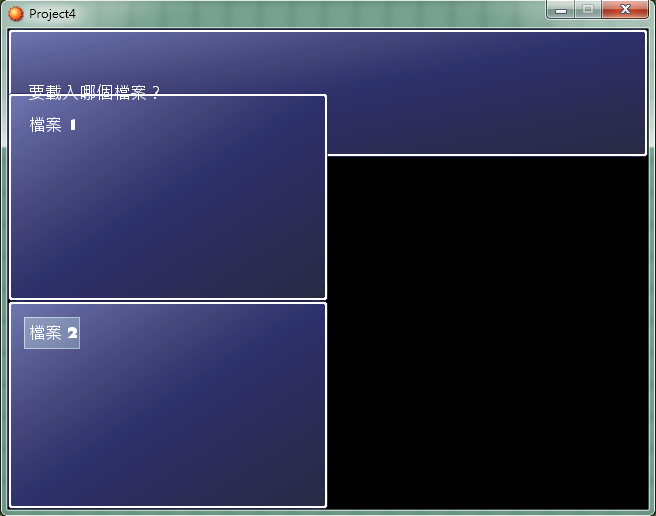
super( file_index /2 *320 , 64 + file_index % 2 * 208, 320, 208) #这一句是修改后的,实际上就是一个存档一个块,这是对一个块的设定
self.contents = Bitmap.new(width - 32, height - 32)
@file_index = file_index
@filename = "Save#{@file_index + 1}.rxdata"
@time_stamp = Time.at(0)
@file_exist = FileTest.exist?(@filename)
if @file_exist
file = File.open(@filename, "r")
@time_stamp = file.mtime
@characters = Marshal.load(file)
@frame_count = Marshal.load(file)
@game_system = Marshal.load(file)
@game_switches = Marshal.load(file)
@game_variables = Marshal.load(file)
@total_sec = @frame_count / Graphics.frame_rate
file.close
end
refresh
@selected = false
end
end[/pre]
另外
附带左右移动
[pre lang="Ruby"]#==============================================================================
# ■ Scene_File
#------------------------------------------------------------------------------
# 存档画面及读档画面的超级类。
#==============================================================================
class Scene_File
#--------------------------------------------------------------------------
# ● 初始化对像
# help_text : 帮助窗口显示的字符串
#--------------------------------------------------------------------------
def initialize(help_text)
@help_text = help_text
end
#--------------------------------------------------------------------------
# ● 主处理
#--------------------------------------------------------------------------
def main
# 生成帮助窗口
@help_window = Window_Help.new
@help_window.set_text(@help_text)
# 生成存档文件窗口
@savefile_windows = []
for i in 0..3
@savefile_windows.push(Window_SaveFile.new(i, make_filename(i)))
end
# 选择最后操作的文件
@file_index = $game_temp.last_file_index
@savefile_windows[@file_index].selected = true
# 执行过渡
Graphics.transition
# 主循环
loop do
# 刷新游戏画面
Graphics.update
# 刷新输入信息
Input.update
# 刷新画面
update
# 如果画面被切换的话就中断循环
if $scene != self
break
end
end
# 准备过渡
Graphics.freeze
# 释放窗口
@help_window.dispose
for i in @savefile_windows
i.dispose
end
end
#--------------------------------------------------------------------------
# ● 刷新画面
#--------------------------------------------------------------------------
def update
# 刷新窗口
@help_window.update
for i in @savefile_windows
i.update
end
# 按下 C 键的情况下
if Input.trigger?(Input::C)
# 调用过程 on_decision (定义继承目标)
on_decision(make_filename(@file_index))
$game_temp.last_file_index = @file_index
return
end
# 按下 B 键的情况下
if Input.trigger?(Input::B)
# 调用过程 on_cancel (定义继承目标)
on_cancel
return
end
# 按下方向键下的情况下
if Input.repeat?(Input::DOWN)
# 方向键下的按下状态不是重复的情况下、
# 并且光标的位置在 3 以前的情况下
if Input.trigger?(Input::DOWN) or @file_index < 3
# 演奏光标 SE
$game_system.se_play($data_system.cursor_se)
# 光标向下移动
@savefile_windows[@file_index].selected = false
@file_index = (@file_index + 1) % 4
@savefile_windows[@file_index].selected = true
return
end
end
# 按下方向键上的情况下
if Input.repeat?(Input::UP)
# 方向键上的按下状态不是重复的情况下、
# 并且光标的位置在 0 以后的情况下
if Input.trigger?(Input::UP) or @file_index > 0
# 演奏光标 SE
$game_system.se_play($data_system.cursor_se)
# 光标向上移动
@savefile_windows[@file_index].selected = false
@file_index = (@file_index + 3) % 4
@savefile_windows[@file_index].selected = true
return
end
end
# 按下方向键下的情况下
if Input.repeat?(Input::LEFT)
# 方向键下的按下状态不是重复的情况下、
# 并且光标的位置在 3 以前的情况下
if Input.trigger?(Input::LEFT) or @file_index < 3
# 演奏光标 SE
$game_system.se_play($data_system.cursor_se)
# 光标向下移动
@savefile_windows[@file_index].selected = false
@file_index = (@file_index + 2) % 4
@savefile_windows[@file_index].selected = true
return
end
end
# 按下方向键上的情况下
if Input.repeat?(Input::RIGHT)
# 方向键上的按下状态不是重复的情况下、
# 并且光标的位置在 0 以后的情况下
if Input.trigger?(Input::RIGHT) or @file_index > 0
# 演奏光标 SE
$game_system.se_play($data_system.cursor_se)
# 光标向上移动
@savefile_windows[@file_index].selected = false
@file_index = (@file_index + 2) % 4
@savefile_windows[@file_index].selected = true
return
end
end
end
#--------------------------------------------------------------------------
# ● 生成文件名
# file_index : 文件名的索引 (0~3)
#--------------------------------------------------------------------------
def make_filename(file_index)
return "Save#{file_index + 1}.rxdata"
end
end[/pre]
|
评分
-
查看全部评分
|


 写轮眼
写轮眼

 提升卡
提升卡 沉默号角
沉默号角 喧嚣号角
喧嚣号角 变色卡
变色卡 升龙剑
升龙剑


