查看: 2678|回复: 2

[已经解决] 存档页背景更替

[复制链接]

迷途知返,恍如隔世

梦石
0
星屑
488
在线时间
1355 小时
注册时间
2011-2-17
回帖
1173

开拓者

发表于 2015-9-6 14:12:03 | 显示全部楼层 |阅读模式

加入我们,或者,欢迎回来。

您需要 登录 才可以下载或查看,没有账号?注册会员

×
已经根据自己的需求更改了部分脚本。

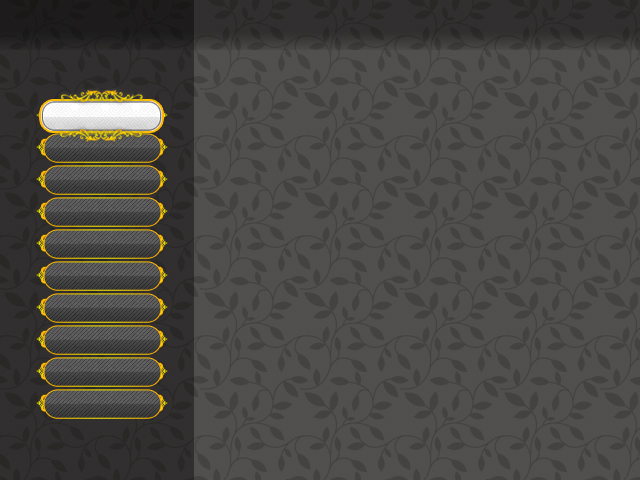
save.jpg

↑图片大概是这样,10个框,选项在第一个,显示"1.jpg"是第一个亮,以此类推"10.jpg"是第十个亮。


想要实现的效果是默认显示背景是“1.jpg"(且左边的save00X的字显示着,隐藏掉默认的选框)

按下键,背景切换到"2.jpg"……依次类推,到第10个存档显示“10.jpg”

但因为存档位 >10个,10个后会下拉,所以到第十个往下按应该都显示的是"10.jpg",往上按会显示"9.jpg"


大概就是根据展示出来的10个存档位显示相应的背景,选中哪个显示的是哪个选项亮的背景,且隐藏command默认的选框,只显示字。

有点繁琐的感觉……自己修改无果,只能再来求大神相助。


使用的是这段脚本:

[pre lang="ruby"]#-----------------------------------------------------------------------------#
# 脚本设定                                                                    #
#-----------------------------------------------------------------------------#
# 说明:                                                                      #
# ①主要采用了Snap To Bitmap这脚本省去了DLL。                                 #
# ②采用了禁术,各位不用到处改脚本了,不过冲突率也大增==                      #
# ③脚本当中采用的脚本归原作者所有。                                          #
# ④设置区域的变量请自行更改。                                                #
#-----------------------------------------------------------------------------#
SaveSettings = Struct.new(:max_save_file,:save_file_dir,:slot_name_format,
:save_help,:load_help,:override_question,:snap_no_found,:no_save_file).new
#-----------------------------------------------------------------------------#
# 设置区域
#-----------------------------------------------------------------------------#
# 最大的存档量
SaveSettings.max_save_file = 20
# 存档所在文件夹
SaveSettings.save_file_dir = "Save/"
# 存档槽的名称的格式,具体请参考sprintf
SaveSettings.slot_name_format = "Save%03d"
# 存档界面所显示的字符串
SaveSettings.save_help = ""
# 读档界面所显示的字符串
SaveSettings.load_help = ""
# 需要覆盖存档时所发问的问题
SaveSettings.override_question = "该档位已有存档,是否覆盖?"
# 找不到截图时的信息
SaveSettings.snap_no_found = "截图似乎有点问题……你都做了啥啊?"
# 存档槽没有存档时显示的信息
SaveSettings.no_save_file = "这里还没有存档哦"

#-----------------------------------------------------------------------------#
# 创建存档文件夹                                                              #
#-----------------------------------------------------------------------------#
Dir.mkdir(SaveSettings.save_file_dir) unless FileTest.directory?(SaveSettings.save_file_dir)

#-----------------------------------------------------------------------------#
# 游戏核心处理类                                                              #
#-----------------------------------------------------------------------------#
class Game_System
  #---------------------------------------------------------------------------#
  # 实例变量                                                                  #
  #---------------------------------------------------------------------------#
  attr_accessor:snap_bitmap
end

#-----------------------------------------------------------------------------#
# 拦截读档与存档界面的打开与地图进入菜单前截图                                #
#-----------------------------------------------------------------------------#
trace_var :$scene do
  if $scene.is_a?(Scene_Save)
    $scene = Scene_Save_Load.new
  elsif $scene.is_a?(Scene_Load)
    $scene = Scene_Save_Load.new(1)
  end
  if $scene.is_a?(Scene_Menu) and $_prev_scene == "Scene_Map"
    $game_system.snap_bitmap = Graphics.snap_to_bitmap
  end
  $_prev_scene = $scene.class.name
end

#-----------------------------------------------------------------------------#
# 强改Scene_Title(禁术)                                                       #
#-----------------------------------------------------------------------------#
Scene_Title.class_eval do
  instance_methods(false).each do |meth|
    remove_method(meth)
  end
  def __found_save_file
    for i in 1..SaveSettings.max_save_file
      return true if File.exist?(SaveSettings.save_file_dir + "Save#{i}.rxdata")
    end
    return false
  end
end
for i in 0...$RGSS_SCRIPTS.size
  next if ("Section%03d" % i) == __FILE__
  ary = $RGSS_SCRIPTS
  if ary[3][/class\s+Scene_Title/]
    script = ary[3].clone.gsub(/(if|unless)\s+@continue_enabled/){"#{$1} __found_save_file"}
    eval script, TOPLEVEL_BINDING, ("Section%03d" % i)
  end
end

#-----------------------------------------------------------------------------#
# 存档界面用窗口                                                              #
#-----------------------------------------------------------------------------#
class Window_Save < Window_Base
  #---------------------------------------------------------------------------#
  # 初始化                                                                    #
  #---------------------------------------------------------------------------#
  def initialize
    super(160,64,480,416)
    self.contents = Bitmap.new(width-32,height-32)
    self.opacity=0
    @_index = -1
    refresh(0)
  end
  #---------------------------------------------------------------------------#
  # 刷新                                                                      #
  #---------------------------------------------------------------------------#
  def refresh(index)
    if index != @_index
      # 清除原有资料
      self.contents.clear
      @sprite.dispose if @sprite != nil
      @sprite = nil
      # 开始读取资料
      @file_index = index
      @filename = SaveSettings.save_file_dir + "Save#{@file_index + 1}.rxdata"
      @time_stamp = Time.at(0)
      @file_exist = FileTest.exist?(@filename)
      if @file_exist
        file = File.open(@filename, "r")
        @time_stamp         = file.mtime
        @characters         = Marshal.load(file)
        @frame_count        = Marshal.load(file)
        @game_system        = Marshal.load(file)
        @game_switches      = Marshal.load(file)
        @game_variables     = Marshal.load(file)
        @game_self_switches = Marshal.load(file)
        @game_screen        = Marshal.load(file)
        @game_actors        = Marshal.load(file)
        @game_party         = Marshal.load(file)
        @game_troop         = Marshal.load(file)
        @game_map           = Marshal.load(file)
        @game_player        = Marshal.load(file)
        @bitmap             = @game_system.snap_bitmap
        @total_sec = @frame_count / Graphics.frame_rate
        file.close
        # 描绘截图的框与影子
        self.contents.fill_rect(38,11,400,300,Color.new(0,0,0))
        self.contents.fill_rect(27,0,402,302,system_color)
        self.contents.fill_rect(28,1,400,300,Color.new(0,0,0,0))
        # 如截图不为空的话
        if @bitmap != nil
          # 描绘截图
          @sprite = Sprite.new
          @sprite.bitmap = @bitmap
          @sprite.x = 160+16+28
          @sprite.y = 64+16+1
          @sprite.zoom_x = @sprite.zoom_y = 0.625
          @sprite.z = 99999
        else
          self.contents.draw_text(0,96,448,32,SaveSettings.snap_no_found,1)
        end
        # 描绘角色
        for i in 0...@characters.size
          x = i*35 +30
          bitmap = RPG::Cache.character(@characters[0], @characters[1])
          self.contents.blt(x,310,bitmap,Rect.new(0,0,bitmap.width/4,bitmap.height/4))
        end
        # 描绘游戏时间
        hour = @total_sec / 60 / 60
        min = @total_sec / 60 % 60
        sec = @total_sec % 60
        time_string = sprintf("%02d:%02d:%02d", hour, min, sec)
        self.contents.font.color = normal2_color
        self.contents.draw_text(0-25,316,448,32,time_string,2)
        # 描绘时间标记
        self.contents.font.color = normal2_color
        time_string = @time_stamp.strftime("%Y/%m/%d %H:%M")
        self.contents.draw_text(0-25,341,448,32,time_string, 2)
      else
        self.contents.draw_text(0,320,448,32,SaveSettings.no_save_file,1)
      end
      @_index = index
    end
  end
  #---------------------------------------------------------------------------#
  # 释放                                                                      #
  #---------------------------------------------------------------------------#
  def dispose
    super
    @sprite.dispose if @sprite != nil
    @sprite = nil
  end
end

#-----------------------------------------------------------------------------#
# 存档界面                                                                    #
#-----------------------------------------------------------------------------#
class Scene_Save_Load
  #---------------------------------------------------------------------------#
  # 初始化                                                                    #
  #---------------------------------------------------------------------------#
  def initialize(type=0)
    @type = type == 0 ? "save" : "load"
    case @type
    when "save"
      @word = SaveSettings.save_help
    when "load"
      @word = SaveSettings.load_help
      $game_temp = Game_Temp.new
    end
  end
  #---------------------------------------------------------------------------#
  # 主执行                                                                    #
  #---------------------------------------------------------------------------#
  def main
    # 生成帮助窗口
    @help_window = Window_Help.new
    @help_window.set_text(@word)
    @help_window.opacity =0
    # 选项窗口
    choose = []
    for i in 1..SaveSettings.max_save_file
      choose.push(SaveSettings.slot_name_format % i)
    end
    @command_window = Window_Command.new(110,choose)
    @command_window.width =110
    @command_window.height = 350
    @command_window.x = 53
    @command_window.y = 85
    @command_window.opacity=0
    @command_window.active = true
    # 存档资料窗口
    @save_window = Window_Save.new
    # 确认窗口
    @confirm_window = Window_Base.new(80,176,480,128)
    @confirm_window.contents = Bitmap.new(448,96)
    @confirm_window.contents.draw_text(0,0,448,32,SaveSettings.override_question,1)
    @confirm_window.contents.draw_text(0,64,216,32,"确定",1)
    @confirm_window.contents.draw_text(232,64,216,32,"取消",1)
    @confirm_window.cursor_rect.set(232,64,216,32)
    @confirm_window.z = 999999
    @confirm_window.visible = false
    @confirm_ok = false
    # 执行过渡
    Graphics.transition
    # 主循环
    loop do
      # 刷新游戏画面
      Graphics.update
      # 刷新输入信息
      Input.update
      # 刷新画面
      update
      # 如果画面切换的话的就中断循环
      if $scene != self
        break
      end
    end
    # 准备过渡
    Graphics.freeze
    # 释放窗口
    @help_window.dispose
    @save_window.dispose
    @command_window.dispose
    @confirm_window.dispose
    @sprite2.dispose
  end
  #---------------------------------------------------------------------------#
  # 刷新                                                                      #
  #---------------------------------------------------------------------------#
  def update
    # 选择存档窗口激活
    unless @confirm_window.visible
      update_command
    else
      update_confirm
    end
  end
  #---------------------------------------------------------------------------#
  # 选择存档窗口刷新                                                          #
  #---------------------------------------------------------------------------#
  def update_command
    @command_window.update
    @save_window.refresh(@command_window.index)
    # 按下取消键
    if Input.trigger?(Input::B)
      case @type
      when "save"
        # 演奏取消 SE
        $game_system.se_play($data_system.cancel_se)
        # 如果被事件调用
        if $game_temp.save_calling
          # 清除存档调用标志
          $game_temp.save_calling = false
          # 切换到地图画面
          $scene = Scene_Map.new
          return
        end
        # 切换到菜单画面
        $scene = Scene_Menu.new(4)
      when "load"
        # 演奏取消 SE
        $game_system.se_play($data_system.cancel_se)
        # 切换到标题画面
        $scene = Scene_Title.new
      end
    end
    # 按下确定键
    if Input.trigger?(Input::C)
      # 计算存档编号
      filename = SaveSettings.save_file_dir + "Save#{@command_window.index+1}.rxdata"
      case @type
      when "save"
        if File.exist?(filename)
          @confirm_window.visible = true
          @confirm_window.cursor_rect.set(232,64,216,32)
          @confirm_ok = false
        else
          process_save
        end
      when "load"
        # 文件不存在的情况下
        unless FileTest.exist?(filename)
          # 演奏冻结 SE
          $game_system.se_play($data_system.buzzer_se)
          return
        end
        # 演奏读档 SE
        $game_system.se_play($data_system.load_se)
        # 写入存档数据
        file = File.open(filename, "rb")
        read_save_data(file)
        file.close
        # 还原 BGM、BGS
        $game_system.bgm_play($game_system.playing_bgm)
        $game_system.bgs_play($game_system.playing_bgs)
        # 刷新地图 (执行并行事件)
        $game_map.update
        # 切换到地图画面
        $scene = Scene_Map.new
      end
    end
  end
  #---------------------------------------------------------------------------#
  # 确认窗口刷新                                                              #
  #---------------------------------------------------------------------------#
  def update_confirm
    @confirm_window.update
    if Input.trigger?(Input::LEFT) or Input.trigger?(Input::UP)
      $game_system.se_play($data_system.cursor_se)
      @confirm_ok = true
    elsif Input.trigger?(Input::RIGHT) or Input.trigger?(Input::DOWN)
      $game_system.se_play($data_system.cursor_se)
      @confirm_ok = false
    elsif Input.trigger?(Input::C)
      $game_system.se_play($data_system.decision_se)
      process_save if @confirm_ok
      @confirm_window.visible = false
    elsif Input.trigger?(Input::B)
      $game_system.se_play($data_system.cancel_se)
      @confirm_window.visible = false
    end
    @confirm_window.cursor_rect.set(232,64,216,32)
    @confirm_window.cursor_rect.set(0,64,216,32) if @confirm_ok
  end
  #---------------------------------------------------------------------------#
  # 执行存档                                                                  #
  #---------------------------------------------------------------------------#
  def process_save
    # 计算存档编号
    filename = SaveSettings.save_file_dir + "Save#{@command_window.index+1}.rxdata"
    # 演奏存档 SE
    $game_system.se_play($data_system.save_se)
    # 写入存档数据
    file = File.open(filename, "wb")
    write_save_data(file)
    file.close
    # 如果被事件调用
    if $game_temp.save_calling
      # 清除存档调用标志
      $game_temp.save_calling = false
      # 切换到地图画面
      $scene = Scene_Map.new
      return
    end
    # 切换到菜单画面
    $scene = Scene_Menu.new(4)
  end
  #---------------------------------------------------------------------------#
  # 存档                                                                      #
  #---------------------------------------------------------------------------#
  def write_save_data(file)
    # 生成描绘存档文件用的角色图形
    characters = []
    for i in 0...$game_party.actors.size
      actor = $game_party.actors
      characters.push([actor.character_name, actor.character_hue])
    end
    # 写入描绘存档文件用的角色数据
    Marshal.dump(characters, file)
    # 写入测量游戏时间用画面计数
    Marshal.dump(Graphics.frame_count, file)
    # 增加 1 次存档次数
    $game_system.save_count += 1
    # 保存魔法编号
    # (将编辑器保存的值以随机值替换)
    $game_system.magic_number = $data_system.magic_number
    # 写入各种游戏对像
    Marshal.dump($game_system, file)
    Marshal.dump($game_switches, file)
    Marshal.dump($game_variables, file)
    Marshal.dump($game_self_switches, file)
    Marshal.dump($game_screen, file)
    Marshal.dump($game_actors, file)
    Marshal.dump($game_party, file)
    Marshal.dump($game_troop, file)
    Marshal.dump($game_map, file)
    Marshal.dump($game_player, file)
  end
  #---------------------------------------------------------------------------#
  # 读档                                                                      #
  #---------------------------------------------------------------------------#
  def read_save_data(file)
    # 读取描绘存档文件用的角色数据
    characters = Marshal.load(file)
    # 读取测量游戏时间用画面计数
    Graphics.frame_count = Marshal.load(file)
    # 读取各种游戏对像
    $game_system        = Marshal.load(file)
    $game_switches      = Marshal.load(file)
    $game_variables     = Marshal.load(file)
    $game_self_switches = Marshal.load(file)
    $game_screen        = Marshal.load(file)
    $game_actors        = Marshal.load(file)
    $game_party         = Marshal.load(file)
    $game_troop         = Marshal.load(file)
    $game_map           = Marshal.load(file)
    $game_player        = Marshal.load(file)
    # 魔法编号与保存时有差异的情况下
    # (加入编辑器的编辑过的数据)
    if $game_system.magic_number != $data_system.magic_number
      # 重新装载地图
      $game_map.setup($game_map.map_id)
      $game_player.center($game_player.x, $game_player.y)
    end
    # 刷新同伴成员
    $game_party.refresh
  end
end

#-----------------------------------------------------------------------------#
# Graphics.snap_to_bitmap(优化版)                                           #
# 作者:神思                                                                  #
# 优化:釣到一隻猴子@_@  (  AAM@_@  )                                         #
# 出处:www.66rpg.com
#-----------------------------------------------------------------------------#
#-----------------------------------------------------------------------------#
# Graphics                                                                    #
#-----------------------------------------------------------------------------#
class << Graphics
  CreateDC = Win32API.new("gdi32", "CreateDC", "pppl", "l")
  CreateCompatibleBitmap = Win32API.new("gdi32", "CreateCompatibleBitmap", "lll", "l")
  CreateCompatibleDC = Win32API.new("gdi32", "CreateCompatibleDC", "l", "l")
  SelectObject = Win32API.new("gdi32", "SelectObject", "ll", "l")
  BitBlt = Win32API.new("gdi32", "BitBlt", "lllllllll", "l")
  GetBitmapBits = Win32API.new("gdi32", "GetBitmapBits", "llp", "l")
  ScreenToClient = Win32API.new("user32", "ScreenToClient", "ip", "i")
  SRCCOPY = 0xCC0020
  RtlMoveMemory = Win32API.new('kernel32', 'RtlMoveMemory', 'ipi', 'i')
  HWnd = Win32API.new("user32", "GetActiveWindow", nil, 'l').call
  DwCount = (640 * 480 * 4) * 2
  @@lpBits = "\000" * DwCount
  #---------------------------------------------------------------------------#
  # snap_to_bitmap                                                            #
  #---------------------------------------------------------------------------#
  def snap_to_bitmap
    width, height = 640,480
    hb = Bitmap.new(width, height)
    rgbs = self.bitmap_data
    len = width * 4
    for y in 0...height
      break if 2*y >= height - 1
      nth1 = y * len
      nth2 = (height - 1 - y) * len
      tStr = rgbs[nth1,len]
      rgbs[nth1, len] = rgbs[nth2, len]
      rgbs[nth2, len] = tStr
    end
    RtlMoveMemory.call(hb.address, rgbs, 640 * 480 * 4)
    return hb
  end
  #---------------------------------------------------------------------------#
  # bitmap_data                                                          #
  #---------------------------------------------------------------------------#
  def bitmap_data
    hScrDC = CreateDC.call("DISPLAY", "", "", 0)
    hMemDC = CreateCompatibleDC.call(hScrDC)
    hBitmap = CreateCompatibleBitmap.call(hScrDC, 640, 480)
    hOldBitmap = SelectObject.call(hMemDC, hBitmap)
    BitBlt.call(hMemDC, xsrc, ysrc, 640*2, 480*2, hScrDC, 0, 0, SRCCOPY)
    hBitmap = SelectObject.call(hMemDC, hOldBitmap)
    GetBitmapBits.call(hBitmap, DwCount, @@lpBits)
    return @@lpBits
  end
  #---------------------------------------------------------------------------#
  # 用户窗口的位置                                                            #
  #---------------------------------------------------------------------------#
  def xsrc
    return self.point[0]
  end
  #---------------------------------------------------------------------------#
  # 用户窗口的位置                                                            #
  #---------------------------------------------------------------------------#
  def ysrc
    return self.point[1]
  end
  #---------------------------------------------------------------------------#
  # 那个点                                                                    #
  #---------------------------------------------------------------------------#
  def point
    point = [0,0].pack("LL")
    ScreenToClient.call(HWnd, point)
    return point.unpack("LL")
  end
end

#-----------------------------------------------------------------------------#
# Font                                                                        #
#-----------------------------------------------------------------------------#
class Font
  #---------------------------------------------------------------------------#
  # marshal_dump                                                              #
  #---------------------------------------------------------------------------#
  def marshal_dump
  end
  #---------------------------------------------------------------------------#
  # marshal_load                                                              #
  #---------------------------------------------------------------------------#
  def marshal_load(obj)
  end
end

#-----------------------------------------------------------------------------#
# Bitmap                                                                      #
#-----------------------------------------------------------------------------#
class Bitmap
  RtlMoveMemory = Win32API.new('kernel32', 'RtlMoveMemory', 'pii', 'i')
  # 传送到内存的API函数
  RtlMoveMemory_pi = Win32API.new('kernel32', 'RtlMoveMemory', 'pii', 'i')
  RtlMoveMemory_ip = Win32API.new('kernel32', 'RtlMoveMemory', 'ipi', 'i')
  #---------------------------------------------------------------------------#
  # _dump                                                                     #
  #---------------------------------------------------------------------------#
  def _dump(limit)
    data = "rgba" * width * height
    RtlMoveMemory_pi.call(data, address, data.length)
    [width, height, Zlib::Deflate.deflate(data)].pack("LLa*") # 压缩
  end
  #---------------------------------------------------------------------------#
  # _load                                                                     #
  #---------------------------------------------------------------------------#
  def self._load(str)
    w, h, zdata = str.unpack("LLa*")
    b = self.new(w, h)
    RtlMoveMemory_ip.call(b.address, Zlib::Inflate.inflate(zdata), w * h * 4)
    return b
  end
  #---------------------------------------------------------------------------#
  # address                                                                   #
  #---------------------------------------------------------------------------#
  def address
    # [[[bitmap.object_id * 2 + 16] + 8] + 16] == 数据的开头
    buffer, ad = "xxxx", object_id * 2 + 16
    RtlMoveMemory.call(buffer, ad, 4)
    ad = buffer.unpack("L")[0] + 8
    RtlMoveMemory.call(buffer, ad, 4)
    ad = buffer.unpack("L")[0] + 16
    RtlMoveMemory.call(buffer, ad, 4)
    return buffer.unpack("L")[0]
  end
end[/pre]
  

评分

参与人数 1星屑 +35 收起 理由
RyanBern + 35 手动认可奖励

查看全部评分

梦石
0
星屑
9557
在线时间
5074 小时
注册时间
2013-6-21
回帖
3459

开拓者贵宾剧作品鉴家

发表于 2015-9-6 16:01:19 | 显示全部楼层
稍稍修改了一下脚本,由于没有制作好的图片无法完整测试。
去掉了窗口的光标(但是保留了滚屏的功能)。
ps原来窗口的宽高设置得有点问题,我给稍微调整了一下。
做好的图片请放到Graphics/Pictures/文件夹下,并命名为0.png~9.png
[pre lang="Ruby"]#-----------------------------------------------------------------------------#
# 脚本设定                                                                    #
#-----------------------------------------------------------------------------#
# 说明:                                                                      #
# ①主要采用了Snap To Bitmap这脚本省去了DLL。                                 #
# ②采用了禁术,各位不用到处改脚本了,不过冲突率也大增==                      #
# ③脚本当中采用的脚本归原作者所有。                                          #
# ④设置区域的变量请自行更改。                                                #
#-----------------------------------------------------------------------------#
SaveSettings = Struct.new(:max_save_file,:save_file_dir,:slot_name_format,
:save_help,:load_help,:override_question,:snap_no_found,:no_save_file).new
#-----------------------------------------------------------------------------#
# 设置区域
#-----------------------------------------------------------------------------#
# 最大的存档量
SaveSettings.max_save_file = 20
# 存档所在文件夹
SaveSettings.save_file_dir = "Save/"
# 存档槽的名称的格式,具体请参考sprintf
SaveSettings.slot_name_format = "Save%03d"
# 存档界面所显示的字符串
SaveSettings.save_help = ""
# 读档界面所显示的字符串
SaveSettings.load_help = ""
# 需要覆盖存档时所发问的问题
SaveSettings.override_question = "该档位已有存档,是否覆盖?"
# 找不到截图时的信息
SaveSettings.snap_no_found = "截图似乎有点问题……你都做了啥啊?"
# 存档槽没有存档时显示的信息
SaveSettings.no_save_file = "这里还没有存档哦"

#-----------------------------------------------------------------------------#
# 创建存档文件夹                                                              #
#-----------------------------------------------------------------------------#
Dir.mkdir(SaveSettings.save_file_dir) unless FileTest.directory?(SaveSettings.save_file_dir)

#-----------------------------------------------------------------------------#
# 游戏核心处理类                                                              #
#-----------------------------------------------------------------------------#
class Game_System
  #---------------------------------------------------------------------------#
  # 实例变量                                                                  #
  #---------------------------------------------------------------------------#
  attr_accessor:snap_bitmap
end

#-----------------------------------------------------------------------------#
# 拦截读档与存档界面的打开与地图进入菜单前截图                                #
#-----------------------------------------------------------------------------#
trace_var :$scene do
  if $scene.is_a?(Scene_Save)
    $scene = Scene_Save_Load.new
  elsif $scene.is_a?(Scene_Load)
    $scene = Scene_Save_Load.new(1)
  end
  if $scene.is_a?(Scene_Menu) and $_prev_scene == "Scene_Map"
    $game_system.snap_bitmap = Graphics.snap_to_bitmap
  end
  $_prev_scene = $scene.class.name
end

#-----------------------------------------------------------------------------#
# 强改Scene_Title(禁术)                                                       #
#-----------------------------------------------------------------------------#
Scene_Title.class_eval do
  instance_methods(false).each do |meth|
    remove_method(meth)
  end
  def __found_save_file
    for i in 1..SaveSettings.max_save_file
      return true if File.exist?(SaveSettings.save_file_dir + "Save#{i}.rxdata")
    end
    return false
  end
end
for i in 0...$RGSS_SCRIPTS.size
  next if ("Section%03d" % i) == __FILE__
  ary = $RGSS_SCRIPTS
  if ary[3][/class\s+Scene_Title/]
    script = ary[3].clone.gsub(/(if|unless)\s+@continue_enabled/){"#{$1} __found_save_file"}
    eval script, TOPLEVEL_BINDING, ("Section%03d" % i)
  end
end

#-----------------------------------------------------------------------------#
# 存档界面用窗口                                                              #
#-----------------------------------------------------------------------------#
class Window_Save < Window_Base
  #---------------------------------------------------------------------------#
  # 初始化                                                                    #
  #---------------------------------------------------------------------------#
  def initialize
    super(160,64,480,416)
    self.contents = Bitmap.new(width-32,height-32)
    self.opacity=0
    @_index = -1
    refresh(0)
  end
  #---------------------------------------------------------------------------#
  # 刷新                                                                      #
  #---------------------------------------------------------------------------#
  def refresh(index)
    if index != @_index
      # 清除原有资料
      self.contents.clear
      @sprite.dispose if @sprite != nil
      @sprite = nil
      # 开始读取资料
      @file_index = index
      @filename = SaveSettings.save_file_dir + "Save#{@file_index + 1}.rxdata"
      @time_stamp = Time.at(0)
      @file_exist = FileTest.exist?(@filename)
      if @file_exist
        file = File.open(@filename, "r")
        @time_stamp         = file.mtime
        @characters         = Marshal.load(file)
        @frame_count        = Marshal.load(file)
        @game_system        = Marshal.load(file)
        @game_switches      = Marshal.load(file)
        @game_variables     = Marshal.load(file)
        @game_self_switches = Marshal.load(file)
        @game_screen        = Marshal.load(file)
        @game_actors        = Marshal.load(file)
        @game_party         = Marshal.load(file)
        @game_troop         = Marshal.load(file)
        @game_map           = Marshal.load(file)
        @game_player        = Marshal.load(file)
        @bitmap             = @game_system.snap_bitmap
        @total_sec = @frame_count / Graphics.frame_rate
        file.close
        # 描绘截图的框与影子
        self.contents.fill_rect(38,11,400,300,Color.new(0,0,0))
        self.contents.fill_rect(27,0,402,302,system_color)
        self.contents.fill_rect(28,1,400,300,Color.new(0,0,0,0))
        # 如截图不为空的话
        if @bitmap != nil
          # 描绘截图
          @sprite = Sprite.new
          @sprite.bitmap = @bitmap
          @sprite.x = 160+16+28
          @sprite.y = 64+16+1
          @sprite.zoom_x = @sprite.zoom_y = 0.625
          @sprite.z = 99999
        else
          self.contents.draw_text(0,96,448,32,SaveSettings.snap_no_found,1)
        end
        # 描绘角色
        for i in 0...@characters.size
          x = i*35 +30
          bitmap = RPG::Cache.character(@characters[0], @characters[1])
          self.contents.blt(x,310,bitmap,Rect.new(0,0,bitmap.width/4,bitmap.height/4))
        end
        # 描绘游戏时间
        hour = @total_sec / 60 / 60
        min = @total_sec / 60 % 60
        sec = @total_sec % 60
        time_string = sprintf("%02d:%02d:%02d", hour, min, sec)
        self.contents.font.color = normal2_color
        self.contents.draw_text(0-25,316,448,32,time_string,2)
        # 描绘时间标记
        self.contents.font.color = normal2_color
        time_string = @time_stamp.strftime("%Y/%m/%d %H:%M")
        self.contents.draw_text(0-25,341,448,32,time_string, 2)
      else
        self.contents.draw_text(0,320,448,32,SaveSettings.no_save_file,1)
      end
      @_index = index
    end
  end
  #---------------------------------------------------------------------------#
  # 释放                                                                      #
  #---------------------------------------------------------------------------#
  def dispose
    super
    @sprite.dispose if @sprite != nil
    @sprite = nil
  end
end

#-----------------------------------------------------------------------------#
# 自定义 Window_Command_R : 不显示光标,但是可以滚动                          #
#-----------------------------------------------------------------------------#
class Window_Command_R < Window_Command
  #---------------------------------------------------------------------------#
  # 初始化 : 去掉光标                                                         #
  #---------------------------------------------------------------------------#
  def initialize(width, commands)
    super(width, commands)
    self.cursor_rect.empty
  end
  #--------------------------------------------------------------------------
  # ● 更新光标矩形 : 去掉设置光标的部分
  #--------------------------------------------------------------------------
  def update_cursor_rect
    # 获取当前的行
    row = @index / @column_max
    # 当前行被显示开头行前面的情况下
    if row < self.top_row
      # 从当前行向开头行滚动
      self.top_row = row
    end
    # 当前行被显示末尾行之后的情况下
    if row > self.top_row + (self.page_row_max - 1)
      # 从当前行向末尾滚动
      self.top_row = row - (self.page_row_max - 1)
    end
  end
  #---------------------------------------------------------------------------#
  # 获取光标当前位置行                                                        #
  #---------------------------------------------------------------------------#
  def cursor_row
    self.index / @column_max - top_row
  end
end

#-----------------------------------------------------------------------------#
# 存档界面                                                                    #
#-----------------------------------------------------------------------------#
class Scene_Save_Load
  #---------------------------------------------------------------------------#
  # 初始化                                                                    #
  #---------------------------------------------------------------------------#
  def initialize(type=0)
    @type = type == 0 ? "save" : "load"
    case @type
    when "save"
      @word = SaveSettings.save_help
    when "load"
      @word = SaveSettings.load_help
      $game_temp = Game_Temp.new
    end
  end
  #---------------------------------------------------------------------------#
  # 主执行                                                                    #
  #---------------------------------------------------------------------------#
  def main
    # 生成帮助窗口
    @help_window = Window_Help.new
    @help_window.set_text(@word)
    @help_window.opacity =0
    # 选项窗口
    choose = []
    for i in 1..SaveSettings.max_save_file
      choose.push(SaveSettings.slot_name_format % i)
    end
    @command_window = Window_Command_R.new(120,choose)
    @command_window.height = 352
    @command_window.x = 53
    @command_window.y = 85
    @command_window.opacity=0
    @command_window.active = true
    @command_window.cursor_rect.empty
    # 存档资料窗口
    @save_window = Window_Save.new
    # 确认窗口
    @confirm_window = Window_Base.new(80,176,480,128)
    @confirm_window.contents = Bitmap.new(448,96)
    @confirm_window.contents.draw_text(0,0,448,32,SaveSettings.override_question,1)
    @confirm_window.contents.draw_text(0,64,216,32,"确定",1)
    @confirm_window.contents.draw_text(232,64,216,32,"取消",1)
    @confirm_window.cursor_rect.set(232,64,216,32)
    @confirm_window.z = 999999
    @confirm_window.visible = false
    @confirm_ok = false
    # 背景选框
    @pic_index = @command_window.cursor_row
    @sprite_back_choice = Sprite.new
    @sprite_back_choice.bitmap = RPG::Cache.picture("#{@pic_index}.png")
    # 执行过渡
    Graphics.transition
    # 主循环
    loop do
      # 刷新游戏画面
      Graphics.update
      # 刷新输入信息
      Input.update
      # 刷新画面
      update
      # 如果画面切换的话的就中断循环
      if $scene != self
        break
      end
    end
    # 准备过渡
    Graphics.freeze
    # 释放窗口
    @help_window.dispose
    @save_window.dispose
    @command_window.dispose
    @confirm_window.dispose
    @sprite_back_choice.dispose
  end
  #---------------------------------------------------------------------------#
  # 刷新                                                                      #
  #---------------------------------------------------------------------------#
  def update
    # 选择存档窗口激活
    unless @confirm_window.visible
      update_command
    else
      update_confirm
    end
  end
  #---------------------------------------------------------------------------#
  # 选择存档窗口刷新                                                          #
  #---------------------------------------------------------------------------#
  def update_command
    @command_window.update
    @save_window.refresh(@command_window.index)
    # 刷新背景选框
    if @pic_index != @command_window.cursor_row
      @pic_index = @command_window.cursor_row
      @sprite_back_choice.bitmap = RPG::Cache.picture("#{@pic_index}.png")
    end
    # 按下取消键
    if Input.trigger?(Input::B)
      case @type
      when "save"
        # 演奏取消 SE
        $game_system.se_play($data_system.cancel_se)
        # 如果被事件调用
        if $game_temp.save_calling
          # 清除存档调用标志
          $game_temp.save_calling = false
          # 切换到地图画面
          $scene = Scene_Map.new
          return
        end
        # 切换到菜单画面
        $scene = Scene_Menu.new(4)
      when "load"
        # 演奏取消 SE
        $game_system.se_play($data_system.cancel_se)
        # 切换到标题画面
        $scene = Scene_Title.new
      end
    end
    # 按下确定键
    if Input.trigger?(Input::C)
      # 计算存档编号
      filename = SaveSettings.save_file_dir + "Save#{@command_window.index+1}.rxdata"
      case @type
      when "save"
        if File.exist?(filename)
          @confirm_window.visible = true
          @confirm_window.cursor_rect.set(232,64,216,32)
          @confirm_ok = false
        else
          process_save
        end
      when "load"
        # 文件不存在的情况下
        unless FileTest.exist?(filename)
          # 演奏冻结 SE
          $game_system.se_play($data_system.buzzer_se)
          return
        end
        # 演奏读档 SE
        $game_system.se_play($data_system.load_se)
        # 写入存档数据
        file = File.open(filename, "rb")
        read_save_data(file)
        file.close
        # 还原 BGM、BGS
        $game_system.bgm_play($game_system.playing_bgm)
        $game_system.bgs_play($game_system.playing_bgs)
        # 刷新地图 (执行并行事件)
        $game_map.update
        # 切换到地图画面
        $scene = Scene_Map.new
      end
    end
  end
  #---------------------------------------------------------------------------#
  # 确认窗口刷新                                                              #
  #---------------------------------------------------------------------------#
  def update_confirm
    @confirm_window.update
    if Input.trigger?(Input::LEFT) or Input.trigger?(Input::UP)
      $game_system.se_play($data_system.cursor_se)
      @confirm_ok = true
    elsif Input.trigger?(Input::RIGHT) or Input.trigger?(Input::DOWN)
      $game_system.se_play($data_system.cursor_se)
      @confirm_ok = false
    elsif Input.trigger?(Input::C)
      $game_system.se_play($data_system.decision_se)
      process_save if @confirm_ok
      @confirm_window.visible = false
    elsif Input.trigger?(Input::B)
      $game_system.se_play($data_system.cancel_se)
      @confirm_window.visible = false
    end
    @confirm_window.cursor_rect.set(232,64,216,32)
    @confirm_window.cursor_rect.set(0,64,216,32) if @confirm_ok
  end
  #---------------------------------------------------------------------------#
  # 执行存档                                                                  #
  #---------------------------------------------------------------------------#
  def process_save
    # 计算存档编号
    filename = SaveSettings.save_file_dir + "Save#{@command_window.index+1}.rxdata"
    # 演奏存档 SE
    $game_system.se_play($data_system.save_se)
    # 写入存档数据
    file = File.open(filename, "wb")
    write_save_data(file)
    file.close
    # 如果被事件调用
    if $game_temp.save_calling
      # 清除存档调用标志
      $game_temp.save_calling = false
      # 切换到地图画面
      $scene = Scene_Map.new
      return
    end
    # 切换到菜单画面
    $scene = Scene_Menu.new(4)
  end
  #---------------------------------------------------------------------------#
  # 存档                                                                      #
  #---------------------------------------------------------------------------#
  def write_save_data(file)
    # 生成描绘存档文件用的角色图形
    characters = []
    for i in 0...$game_party.actors.size
      actor = $game_party.actors
      characters.push([actor.character_name, actor.character_hue])
    end
    # 写入描绘存档文件用的角色数据
    Marshal.dump(characters, file)
    # 写入测量游戏时间用画面计数
    Marshal.dump(Graphics.frame_count, file)
    # 增加 1 次存档次数
    $game_system.save_count += 1
    # 保存魔法编号
    # (将编辑器保存的值以随机值替换)
    $game_system.magic_number = $data_system.magic_number
    # 写入各种游戏对像
    Marshal.dump($game_system, file)
    Marshal.dump($game_switches, file)
    Marshal.dump($game_variables, file)
    Marshal.dump($game_self_switches, file)
    Marshal.dump($game_screen, file)
    Marshal.dump($game_actors, file)
    Marshal.dump($game_party, file)
    Marshal.dump($game_troop, file)
    Marshal.dump($game_map, file)
    Marshal.dump($game_player, file)
  end
  #---------------------------------------------------------------------------#
  # 读档                                                                      #
  #---------------------------------------------------------------------------#
  def read_save_data(file)
    # 读取描绘存档文件用的角色数据
    characters = Marshal.load(file)
    # 读取测量游戏时间用画面计数
    Graphics.frame_count = Marshal.load(file)
    # 读取各种游戏对像
    $game_system        = Marshal.load(file)
    $game_switches      = Marshal.load(file)
    $game_variables     = Marshal.load(file)
    $game_self_switches = Marshal.load(file)
    $game_screen        = Marshal.load(file)
    $game_actors        = Marshal.load(file)
    $game_party         = Marshal.load(file)
    $game_troop         = Marshal.load(file)
    $game_map           = Marshal.load(file)
    $game_player        = Marshal.load(file)
    # 魔法编号与保存时有差异的情况下
    # (加入编辑器的编辑过的数据)
    if $game_system.magic_number != $data_system.magic_number
      # 重新装载地图
      $game_map.setup($game_map.map_id)
      $game_player.center($game_player.x, $game_player.y)
    end
    # 刷新同伴成员
    $game_party.refresh
  end
end

#-----------------------------------------------------------------------------#
# Graphics.snap_to_bitmap(优化版)                                           #
# 作者:神思                                                                  #
# 优化:釣到一隻猴子@_@  (  AAM@_@  )                                         #
# 出处:www.66rpg.com
#-----------------------------------------------------------------------------#
#-----------------------------------------------------------------------------#
# Graphics                                                                    #
#-----------------------------------------------------------------------------#
class << Graphics
  CreateDC = Win32API.new("gdi32", "CreateDC", "pppl", "l")
  CreateCompatibleBitmap = Win32API.new("gdi32", "CreateCompatibleBitmap", "lll", "l")
  CreateCompatibleDC = Win32API.new("gdi32", "CreateCompatibleDC", "l", "l")
  SelectObject = Win32API.new("gdi32", "SelectObject", "ll", "l")
  BitBlt = Win32API.new("gdi32", "BitBlt", "lllllllll", "l")
  GetBitmapBits = Win32API.new("gdi32", "GetBitmapBits", "llp", "l")
  ScreenToClient = Win32API.new("user32", "ScreenToClient", "ip", "i")
  SRCCOPY = 0xCC0020
  RtlMoveMemory = Win32API.new('kernel32', 'RtlMoveMemory', 'ipi', 'i')
  HWnd = Win32API.new("user32", "GetActiveWindow", nil, 'l').call
  DwCount = (640 * 480 * 4) * 2
  @@lpBits = "\000" * DwCount
  #---------------------------------------------------------------------------#
  # snap_to_bitmap                                                            #
  #---------------------------------------------------------------------------#
  def snap_to_bitmap
    width, height = 640,480
    hb = Bitmap.new(width, height)
    rgbs = self.bitmap_data
    len = width * 4
    for y in 0...height
      break if 2*y >= height - 1
      nth1 = y * len
      nth2 = (height - 1 - y) * len
      tStr = rgbs[nth1,len]
      rgbs[nth1, len] = rgbs[nth2, len]
      rgbs[nth2, len] = tStr
    end
    RtlMoveMemory.call(hb.address, rgbs, 640 * 480 * 4)
    return hb
  end
  #---------------------------------------------------------------------------#
  # bitmap_data                                                          #
  #---------------------------------------------------------------------------#
  def bitmap_data
    hScrDC = CreateDC.call("DISPLAY", "", "", 0)
    hMemDC = CreateCompatibleDC.call(hScrDC)
    hBitmap = CreateCompatibleBitmap.call(hScrDC, 640, 480)
    hOldBitmap = SelectObject.call(hMemDC, hBitmap)
    BitBlt.call(hMemDC, xsrc, ysrc, 640*2, 480*2, hScrDC, 0, 0, SRCCOPY)
    hBitmap = SelectObject.call(hMemDC, hOldBitmap)
    GetBitmapBits.call(hBitmap, DwCount, @@lpBits)
    return @@lpBits
  end
  #---------------------------------------------------------------------------#
  # 用户窗口的位置                                                            #
  #---------------------------------------------------------------------------#
  def xsrc
    return self.point[0]
  end
  #---------------------------------------------------------------------------#
  # 用户窗口的位置                                                            #
  #---------------------------------------------------------------------------#
  def ysrc
    return self.point[1]
  end
  #---------------------------------------------------------------------------#
  # 那个点                                                                    #
  #---------------------------------------------------------------------------#
  def point
    point = [0,0].pack("LL")
    ScreenToClient.call(HWnd, point)
    return point.unpack("LL")
  end
end

#-----------------------------------------------------------------------------#
# Font                                                                        #
#-----------------------------------------------------------------------------#
class Font
  #---------------------------------------------------------------------------#
  # marshal_dump                                                              #
  #---------------------------------------------------------------------------#
  def marshal_dump
  end
  #---------------------------------------------------------------------------#
  # marshal_load                                                              #
  #---------------------------------------------------------------------------#
  def marshal_load(obj)
  end
end

#-----------------------------------------------------------------------------#
# Bitmap                                                                      #
#-----------------------------------------------------------------------------#
class Bitmap
  RtlMoveMemory = Win32API.new('kernel32', 'RtlMoveMemory', 'pii', 'i')
  # 传送到内存的API函数
  RtlMoveMemory_pi = Win32API.new('kernel32', 'RtlMoveMemory', 'pii', 'i')
  RtlMoveMemory_ip = Win32API.new('kernel32', 'RtlMoveMemory', 'ipi', 'i')
  #---------------------------------------------------------------------------#
  # _dump                                                                     #
  #---------------------------------------------------------------------------#
  def _dump(limit)
    data = "rgba" * width * height
    RtlMoveMemory_pi.call(data, address, data.length)
    [width, height, Zlib::Deflate.deflate(data)].pack("LLa*") # 压缩
  end
  #---------------------------------------------------------------------------#
  # _load                                                                     #
  #---------------------------------------------------------------------------#
  def self._load(str)
    w, h, zdata = str.unpack("LLa*")
    b = self.new(w, h)
    RtlMoveMemory_ip.call(b.address, Zlib::Inflate.inflate(zdata), w * h * 4)
    return b
  end
  #---------------------------------------------------------------------------#
  # address                                                                   #
  #---------------------------------------------------------------------------#
  def address
    # [[[bitmap.object_id * 2 + 16] + 8] + 16] == 数据的开头
    buffer, ad = "xxxx", object_id * 2 + 16
    RtlMoveMemory.call(buffer, ad, 4)
    ad = buffer.unpack("L")[0] + 8
    RtlMoveMemory.call(buffer, ad, 4)
    ad = buffer.unpack("L")[0] + 16
    RtlMoveMemory.call(buffer, ad, 4)
    return buffer.unpack("L")[0]
  end
end[/pre]  

评分

参与人数 1星屑 +50 收起 理由
Anson + 50 认可答案

查看全部评分

回复

使用道具 举报

迷途知返,恍如隔世

梦石
0
星屑
488
在线时间
1355 小时
注册时间
2011-2-17
回帖
1173

开拓者

 楼主| 发表于 2015-9-6 16:55:13 | 显示全部楼层
RyanBern 发表于 2015-9-6 16:01
稍稍修改了一下脚本,由于没有制作好的图片无法完整测试。
去掉了窗口的光标(但是保留了滚屏的功能)。
ps ...


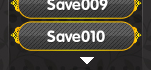
再次感谢!非常符合预期效果。
不过滚屏光标好像有点漂移,想让其居中应该调试何处?
QQ截图20150906165109.png

点评

宽度在我脚本246行调节(原来为120),x坐标是248行  发表于 2015-9-6 17:28
适当调整@command_window的x坐标和宽度(目测宽度应该为110~120之间),x坐标也要相应变化一些  发表于 2015-9-6 17:26

评分

参与人数 1星屑 +23 收起 理由
kuerlulu + 23 前辈诈尸啦

查看全部评分

回复

使用道具 举报

您需要登录后才可以回帖 登录 | 注册会员

本版积分规则

Powered by Discuz! X5.0 © 2001-2026 Discuz! Team.

在本版发帖返回顶部