| 赞 | 2 |
| VIP | |
| 好人卡 | |
| 积分 | 6 |
| 经验 | |
| 最后登录 | 2017-2-11 |
| 在线时间 | 464 小时 |
- 梦石
- 0
- 星屑
- 632
- 在线时间
- 464 小时
- 注册时间
- 2011-4-4
- 回帖
- 54
|
加入我们,或者,欢迎回来。
您需要 登录 才可以下载或查看,没有账号?注册会员
×
本帖最后由 swebok 于 2017-2-11 23:52 编辑
(反正也没有人看)因为一些原因重新找出了之前写的代码,修正了一些bug之后更新到了v1.3版。详细请见帖子后半部分的更新log。
在XP/VX/VA中使用遮罩描绘地图上瘾的同学,到了RMMV中没有相关脚本怎么行?于是在MV到货后,捣鼓了几个小时的代码,1.0版本的Overlay Mapping诞生了。
先来张图
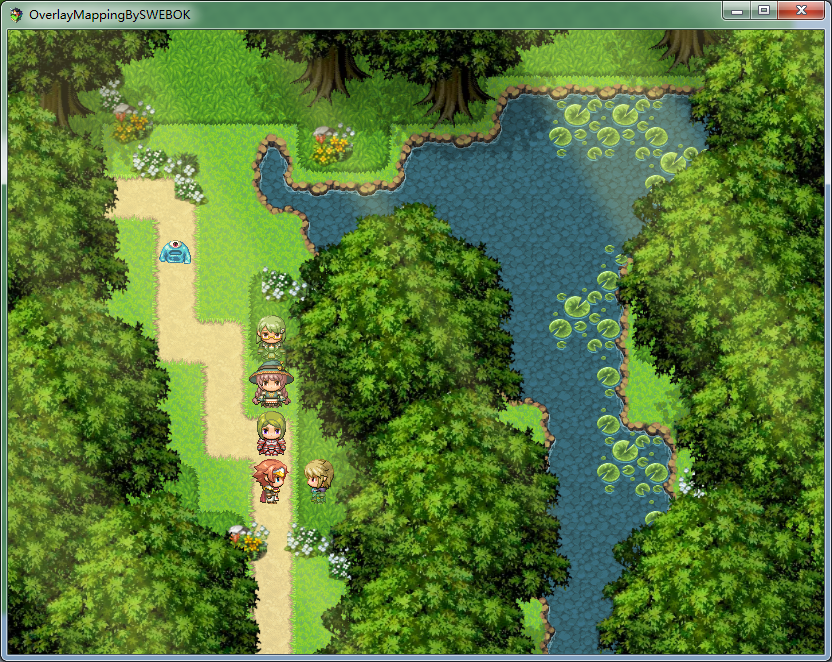
具体功能和VA中的Yami Script Ace - Overlay Mapping基本相同,唯一区别在于light和shadow整合成了同一个图层(light),并且所有的图像都必须是png格式(YSA的light和shadow使用图像的加法和减法用jpg实现的)。
由于MV有脚本管理器,所以请将脚本放入工程目录中 js/plugins文件夹后,打开脚本管理器添加该脚本。如下图所示:
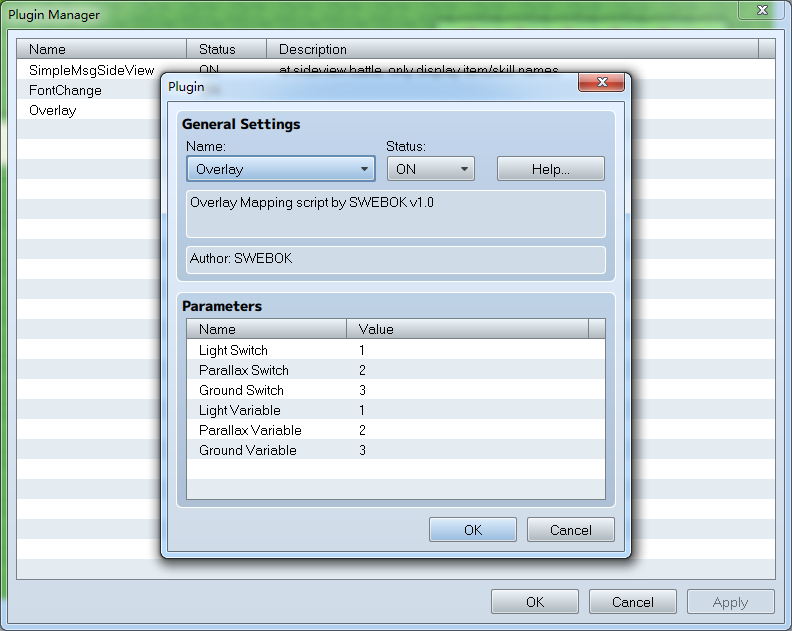
开关和变量编号在此设置,在游戏中修改开关为ON即启用对应图层;修改变量的值对应启用第几号图层。
使用方法在脚本的help里有简短说明,可以参考该说明操作。
脚本内容如下:
[pre lang="JavaScript"]//=============================================================================
// Overlay.js
//=============================================================================
/*:
* @plugindesc Overlay Mapping script by SWEBOK v1.3
* @author SWEBOK
*
* @param Light Switch
* @desc Turn on/off light layer
* @default 1
*
* @param Parallax Switch
* @desc Turn on/off parallax layer
* @default 2
*
* @param Ground Switch
* @desc Turn on/off ground layer
* @default 3
*
* @param Light Variable
* @desc Switch to another light
* @default 1
*
* @param Parallax Variable
* @desc Switch to another parallax
* @default 2
*
* @param Ground Variable
* @desc Switch to another ground
* @default 3
*
* @help This plugin does not provide plugin commands.
*
* Last Updated: 02/11/2017
* v1.0 - 10/24/2015 - first release.
* v1.1 - 10/27/2015 - upper tilemap layer problem solved
* v1.2 - 07/10/2016 - add map note tag settings, remove load pic error process
* v1.3 - 02/11/2017 - fixed a problem about ground pic wrong position
*
* This script will automatically load map's overlay by map's note, and a map can have more than
* one image per layer, so you don't have to create two or more map just for day/night or
* when an event occur.
*
* Create a folder in img and name it overlay.
* Put all of your overlay into img/overlay.
* Your overlay file will have the name set in map's note + "-" + Number.
* Number is 1, 2, 3, ... using for Overlay Variables.
*
* Example: img/overlay/ground2-1.png
*
* Map note example:
* <OVERLAY>
* LIGHT = light1
* PARALLAX = par1
* GROUND = ground1
* </OVERLAY>
*
* when variable are 1, the map loads light1-1.png, par1-1.png, ground1-1.png from overlay folder.
*
* Tips:
* All pictures must be .png
* Do not use "=" in the names of pictures
*/
(function() {
var parameters = PluginManager.parameters('Overlay');
var lightSwitch = Number(parameters['Light Switch'] || 1);
var parallaxSwitch = Number(parameters['Parallax Switch'] || 2);
var groundSwitch = Number(parameters['Ground Switch'] || 3);
var lightVariable = Number(parameters['Light Variable'] || 1);
var parallaxVariable = Number(parameters['Parallax Variable'] || 2);
var groundVariable = Number(parameters['Ground Variable'] || 3);
Game_Map.prototype.processMapNotetags = function () {
var note1 = /<(?:OVERLAY)>/i;
var note2 = /<\/(?:OVERLAY)>/i;
var notedata = $dataMap.note.split(/[\r\n]+/);
this.layerNameEval = '';
var layerNameEval = false;
this._layerName = ['', '', ''];
for (var i = 0; i < notedata.length; i++) {
var line = notedata;
console.log(line);
if (line.match(note1)) {
layerNameEval = true;
} else if (line.match(note2)) {
layerNameEval = false;
} else if (layerNameEval) {
this.layerNameEval = line;
var layerClass = this.layerNameEval.split('=')[0].trim();
var index = 1;
if (index != -1) {
switch (layerClass) {
case 'LIGHT':
this._layerName[0] = this.layerNameEval.split('=')[1].trim();
break;
case 'PARALLAX':
this._layerName[1] = this.layerNameEval.split('=')[1].trim();
break;
case 'GROUND':
this._layerName[2] = this.layerNameEval.split('=')[1].trim();
break;
}
console.log(this.layerNameEval.split('=')[1].trim());
}
}
}
};
ImageManager.loadOverlay = function(filename, hue) {
return this.loadBitmap('img/overlay/', filename, hue, false);
};
Spriteset_Map.prototype.initialize = function() {
Spriteset_Base.prototype.initialize.call(this);
this.processMapNotetags();
};
Spriteset_Map.prototype.createLowerLayer = function() {
Spriteset_Base.prototype.createLowerLayer.call(this);
this.createParallax();
this.createTilemap();
this.createOverlayGround();
this.createCharacters();
this.createOverlayParallax();
this.createShadow();
this.createOverlayLight();
this.createDestination();
this.createWeather();
};
Spriteset_Map.prototype.update = function() {
Spriteset_Base.prototype.update.call(this);
this.updateTileset();
this.updateParallax();
this.updateTilemap();
this.updateOverlayGround();
this.updateOverlayParallax();
this.updateShadow();
this.updateOverlayLight();
this.updateWeather();
};
Spriteset_Map.prototype.processMapNotetags = function() {
$gameMap.processMapNotetags();
};
Spriteset_Map.prototype.createOverlayGround = function() {
this._overlayGround = new TilingSprite();
this._overlayGround.move(0, 0, Graphics.width, Graphics.height);
// 2017.2.11 create new layer in tilemap for overlay ground, z = 1
var groundLayer = new Sprite();
this._tilemap.addChild(groundLayer);
groundLayer.z = 1;
groundLayer.addChild(this._overlayGround);
};
Spriteset_Map.prototype.createCharacters = function() {
this._characterSprites = [];
$gameMap.events().forEach(function(event) {
this._characterSprites.push(new Sprite_Character(event));
}, this);
$gameMap.vehicles().forEach(function(vehicle) {
this._characterSprites.push(new Sprite_Character(vehicle));
}, this);
$gamePlayer.followers().reverseEach(function(follower) {
this._characterSprites.push(new Sprite_Character(follower));
}, this);
this._characterSprites.push(new Sprite_Character($gamePlayer));
for (var i = 0; i < this._characterSprites.length; i++) {
this._tilemap.addChild(this._characterSprites);
}
};
Spriteset_Map.prototype.createOverlayParallax = function() {
this._overlayParallax = new TilingSprite();
this._overlayParallax.move(0, 0, Graphics.width, Graphics.height);
this._baseSprite.addChild(this._overlayParallax);
};
Spriteset_Map.prototype.createOverlayLight = function() {
this._overlayLight = new TilingSprite();
this._overlayLight.move(0, 0, Graphics.width, Graphics.height);
this._baseSprite.addChild(this._overlayLight);
};
Spriteset_Map.prototype.updateOverlayGround = function() {
var gndSwitch = $gameSwitches.value(groundSwitch);
if (gndSwitch) {
var groundIndex = $gameVariables.value(groundVariable);
if (this._overlayGroundName !== $gameMap._layerName[2] + '-' + groundIndex) {
this._overlayGroundName = $gameMap._layerName[2] + '-' + groundIndex;
if ($gameMap._layerName[2] !== '') {
this._overlayGround.bitmap = ImageManager.loadOverlay(this._overlayGroundName);
} else {
this._overlayGround.bitmap = ImageManager.loadEmptyBitmap();
}
}
if (this._overlayGround.bitmap) {
this._overlayGround.origin.x = $gameMap.displayX() * $gameMap.tileWidth();
this._overlayGround.origin.y = $gameMap.displayY() * $gameMap.tileHeight();
}
}
else {
if (this._overlayGroundName !== '') {
this._overlayGroundName = '';
this._overlayGround.bitmap = ImageManager.loadEmptyBitmap();
}
}
};
Spriteset_Map.prototype.updateOverlayParallax = function() {
var parSwitch = $gameSwitches.value(parallaxSwitch);
if (parSwitch) {
var parIndex = $gameVariables.value(parallaxVariable);
if (this._overlayParallaxName !== $gameMap._layerName[1] + '-' + parIndex) {
this._overlayParallaxName = $gameMap._layerName[1] + '-' + parIndex;
if ($gameMap._layerName[1] !== '') {
this._overlayParallax.bitmap = ImageManager.loadOverlay(this._overlayParallaxName);
} else {
this._overlayParallax.bitmap = ImageManager.loadEmptyBitmap();
}
}
if (this._overlayParallax.bitmap) {
this._overlayParallax.origin.x = $gameMap.displayX() * $gameMap.tileWidth();
this._overlayParallax.origin.y = $gameMap.displayY() * $gameMap.tileHeight();
}
}
else {
if (this._overlayParallaxName !== '') {
this._overlayParallaxName = '';
this._overlayParallax.bitmap = ImageManager.loadEmptyBitmap();
}
}
};
Spriteset_Map.prototype.updateOverlayLight = function() {
var liSwitch = $gameSwitches.value(lightSwitch);
if (liSwitch) {
var lightIndex = $gameVariables.value(lightVariable);
if (this._overlayLightName !== $gameMap._layerName[0] + '-' + lightIndex) {
this._overlayLightName = $gameMap._layerName[0] + '-' + lightIndex;
if ($gameMap._layerName[0] !== '') {
this._overlayLight.bitmap = ImageManager.loadOverlay(this._overlayLightName);
} else {
this._overlayLight.bitmap = ImageManager.loadEmptyBitmap();
}
}
if (this._overlayLight.bitmap) {
this._overlayLight.origin.x = $gameMap.displayX() * $gameMap.tileWidth();
this._overlayLight.origin.y = $gameMap.displayY() * $gameMap.tileHeight();
}
}
else {
if (this._overlayLightName !== '') {
this._overlayLightName = '';
this._overlayLight.bitmap = ImageManager.loadEmptyBitmap();
}
}
};
})();[/pre]
以下链接为JS文件:
 Overlay.zip
(1.74 KB, 下载次数: 1221, 售价: 1 星屑)
Overlay.zip
(1.74 KB, 下载次数: 1221, 售价: 1 星屑)
以下链接为范例工程:
OverlayMappingBySWEBOK_v1_1.zip
(2.15 MB, 下载次数: 2276, 售价: 1 星屑)
PS: 1. 为了节省空间,已将所有自带audio和img文件全部删除,请在使用前补齐所有文件。
2. 范例工程修改了默认字体,如果有显示上的问题请在脚本管理器中关掉。
3. 该js脚本将load image时缺失文件报错处理改为了显示一个空bitmap,需要还原报错处理的童鞋删除该部分代码即可~
4. (注意)由于脚本更新到v1.3版本,最好在最新版本MV下新建工程再制作(为了创建PixiJSv4的库文件)。原范例工程不另外上传v1.3版,直接将贴中代码替换overlay.js,再将地图标签设置为该脚本帮助内的example即可。
更新履历:
- 2015/10/24 v1.0 新规作成
- 2015/10/27 v1.1 解决人物行走图在星号地形之上的问题。(将人物行走图的创建图层改回tilemap,然后将ground的创建放在tilemap.lowerlayer上)
- 2016/07/10 v1.2 添加地图标签设置,移除图像错误处理。
- 2017/02/11 v1.3 解决了ground图形位置错误的问题。另外,使用pixiJSv4的版本的话,图像不会模糊(简单来说就是该更新MV了)。
第一次接触JavaScript,有些东西不太熟悉,如有问题请多多包涵,结合该脚本的使用反馈会进行不定期更新~ |
评分
-
查看全部评分
|




 写轮眼
写轮眼
 发表于 2015-10-24 22:28:57


 提升卡
提升卡 沉默号角
沉默号角 喧嚣号角
喧嚣号角 变色卡
变色卡 升龙剑
升龙剑


 发表于 2015-10-24 22:33:10


 插件很美 树更美 能伸手不


