| 赞 | 1 |
| VIP | |
| 好人卡 | |
| 积分 | 4 |
| 经验 | |
| 最后登录 | 2025-6-4 |
| 在线时间 | 53 小时 |
- 梦石
- 0
- 星屑
- 404
- 在线时间
- 53 小时
- 注册时间
- 2016-1-6
- 回帖
- 20
|
楼主 |
发表于 2016-1-10 12:56:35
|
显示全部楼层
喵呜喵5 发表于 2016-1-10 11:48 
请附上你修改后的脚本,这样别人才能知道你哪里做错了
啊因为觉得脚本貌似没什么问题所以就没放上来,这是Window_MenuStatus的
[pre lang="ruby" line="1"]#encoding:utf-8
#==============================================================================
# ■ Window_MenuStatus
#------------------------------------------------------------------------------
# 菜单画面中,显示队伍成员状态的窗口
#==============================================================================
class Window_MenuStatus < Window_Selectable
#--------------------------------------------------------------------------
# ● 定义实例变量
#--------------------------------------------------------------------------
attr_reader :pending_index # 保留位置(整队用)
#--------------------------------------------------------------------------
# ● 初始化对象
#--------------------------------------------------------------------------
def initialize(x, y)
super(x, y+100, window_width, window_height)
@pending_index = -1
refresh
end
#--------------------------------------------------------------------------
# ● 获取窗口的宽度
#--------------------------------------------------------------------------
def window_width
Graphics.width-160
end
#--------------------------------------------------------------------------
# ● 获取窗口的高度
#--------------------------------------------------------------------------
def window_height
Graphics.height - 96
end
#--------------------------------------------------------------------------
# ● 获取列数
#--------------------------------------------------------------------------
def col_max
return 4 #跟据分辨率的不同可以改
end
#--------------------------------------------------------------------------
# ● 获取项目数
#--------------------------------------------------------------------------
def item_max
$game_party.members.size
end
#--------------------------------------------------------------------------
# ● 获取项目的高度
#--------------------------------------------------------------------------
def item_height
height - standard_padding * 2
end
#--------------------------------------------------------------------------
# ● 获取行间距的宽度
#--------------------------------------------------------------------------
def spacing
return 0
end
#--------------------------------------------------------------------------
# ● 绘制项目
#--------------------------------------------------------------------------
def draw_item(index)
actor = $game_party.members[index]
enabled = $game_party.battle_members.include?(actor)
rect = item_rect(index)
draw_item_background(index)
draw_actor_HalfBody(actor, rect.x, rect.y, enabled)
draw_actor_name(actor,rect.x,rect.y+96)
draw_actor_icons(actor,rect.x,rect.y+50+line_height*2)
draw_actor_level(actor,rect.x,rect.y+96+line_height*2)
draw_actor_hp(actor,rect.x, rect.y+96+line_height*4)
draw_actor_mp(actor,rect.x,rect.y+96+line_height*5)
draw_actor_tp(actor,rect.x,rect.y+96+line_height*6)
end
#--------------------------------------------------------------------------
# ● 绘制项目的背景
#--------------------------------------------------------------------------
def draw_item_background(index)
if index == @pending_index
contents.fill_rect(item_rect(index), pending_color)
end
end
#--------------------------------------------------------------------------
# ● 按下确定键时的处理
#--------------------------------------------------------------------------
def process_ok
super
$game_party.menu_actor = $game_party.members[index]
end
#--------------------------------------------------------------------------
# ● 返回上一个选择的位置
#--------------------------------------------------------------------------
def select_last
select($game_party.menu_actor.index || 0)
end
#--------------------------------------------------------------------------
# ● 设置保留位置(整队用)
#--------------------------------------------------------------------------
def pending_index=(index)
last_pending_index = @pending_index
@pending_index = index
redraw_item(@pending_index)
redraw_item(last_pending_index)
end
#--------------------------------------------------------------------------
# ● 计算窗口内容的宽度
#--------------------------------------------------------------------------
def contents_width
(item_width + spacing) * item_max - spacing
end
#--------------------------------------------------------------------------
# ● 计算窗口内容的宽度
#--------------------------------------------------------------------------
def contents_height
item_height
end
#--------------------------------------------------------------------------
# ● 获取首列位置
#--------------------------------------------------------------------------
def top_col
ox / (item_width + spacing)
end
#--------------------------------------------------------------------------
# ● 设置首列位置
#--------------------------------------------------------------------------
def top_col=(col)
col = 0 if col < 0
col = col_max - 1 if col > col_max - 1
self.ox = col * (item_width + spacing)
end
#--------------------------------------------------------------------------
# ● 获取尾列位置
#--------------------------------------------------------------------------
def bottom_col
top_col + col_max - 1
end
#--------------------------------------------------------------------------
# ● 设置尾列位置
#--------------------------------------------------------------------------
def bottom_col=(col)
self.top_col = col - (col_max - 1)
end
#--------------------------------------------------------------------------
# ● 确保光标在画面范围内滚动
#--------------------------------------------------------------------------
def ensure_cursor_visible
self.top_col = index if index < top_col
self.bottom_col = index if index > bottom_col
end
#--------------------------------------------------------------------------
# ● 获取项目的绘制矩形
#--------------------------------------------------------------------------
def item_rect(index)
rect = super
rect.x = index * (item_width + spacing)
rect.y = 0
rect
end
#--------------------------------------------------------------------------
# ● 获取对齐方向
#--------------------------------------------------------------------------
def alignment
return 1
end
#--------------------------------------------------------------------------
# ● 光标向下移动
#--------------------------------------------------------------------------
def cursor_down(wrap = false)
end
#--------------------------------------------------------------------------
# ● 光标向上移动
#--------------------------------------------------------------------------
def cursor_up(wrap = false)
end
#--------------------------------------------------------------------------
# ● 光标移至下一页
#--------------------------------------------------------------------------
def cursor_pagedown
end
#--------------------------------------------------------------------------
# ● 光标移至上一页
#--------------------------------------------------------------------------
def cursor_pageup
end
end
[/pre]
这是Window_Base里关于加入半身像部分的
[pre lang="ruby" line="389"] #--------------------------------------------------------------------------
# ● 绘制角色半肖像图
#--------------------------------------------------------------------------
def draw_actor_HalfBody(actor, x, y, enabled = true)
draw_HalfBody(actor.face_name, actor.face_index, x, y, enabled)
end
#--------------------------------------------------------------------------
# ● 绘制角色半身肖像图
# enabled : 有效的标志。false 的时候使用半透明效果绘制
#--------------------------------------------------------------------------
def draw_HalfBody(face_name, face_index, x, y, enabled = true)
bitmap = Cache.HalfBody(face_name)
rect = Rect.new(face_index % 4 * 96, face_index / 4 * 194, 136, 194)
contents.blt(x, y, bitmap, rect, enabled ? 255 : translucent_alpha)
bitmap.dispose
end[/pre]
这是Cache里关于获取本身像的
[pre lang="ruby" line="134"] #--------------------------------------------------------------------------
# ● 获取角色肖像图
#--------------------------------------------------------------------------
def self.HalfBody(filename)
load_bitmap("Graphics/HalfBody/", filename)
end[/pre]
这是放图片的地方
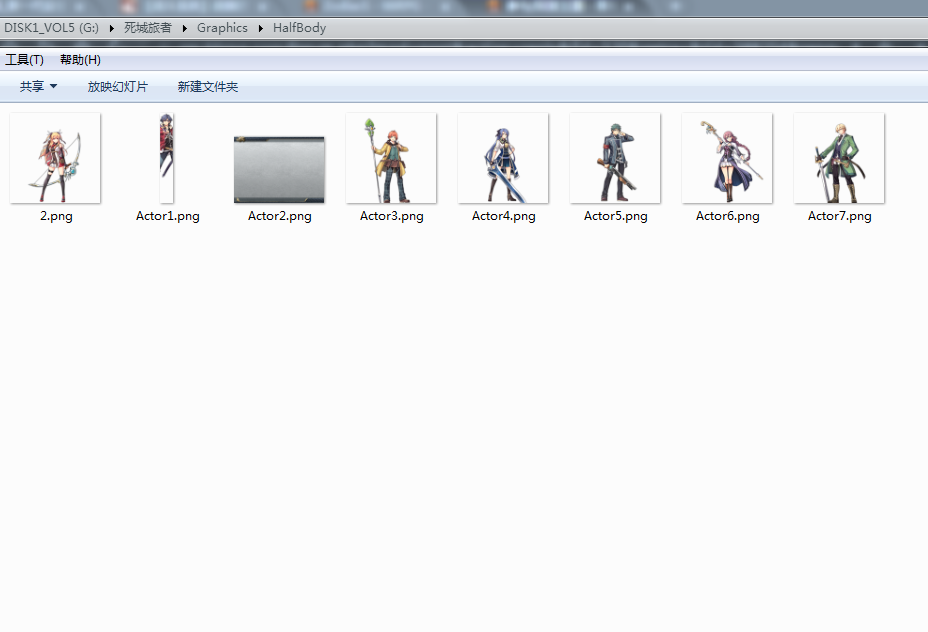
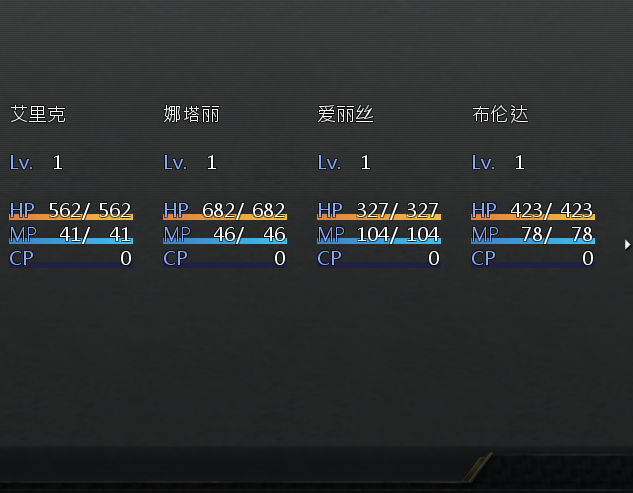
PS:安装过分辨率突破补丁和仓库脚本_(:зゝ∠)_ |
|


 写轮眼
写轮眼
 发表于 2016-1-10 03:19:36
 提升卡
提升卡 沉默号角
沉默号角 喧嚣号角
喧嚣号角 变色卡
变色卡 升龙剑
升龙剑


