| 赞 | 2 |
| VIP | |
| 好人卡 | |
| 积分 | 1 |
| 经验 | |
| 最后登录 | 2020-5-5 |
| 在线时间 | 157 小时 |
- 梦石
- 0
- 星屑
- 94
- 在线时间
- 157 小时
- 注册时间
- 2006-7-2
- 回帖
- 250
|
加入我们,或者,欢迎回来。
您需要 登录 才可以下载或查看,没有账号?注册会员
×
本帖最后由 gkl0510 于 2016-1-31 20:30 编辑
在游戏中使用了“截图扩展存档”的脚本替换了原来的脚本,
以增加存档的上限和存档的美观。
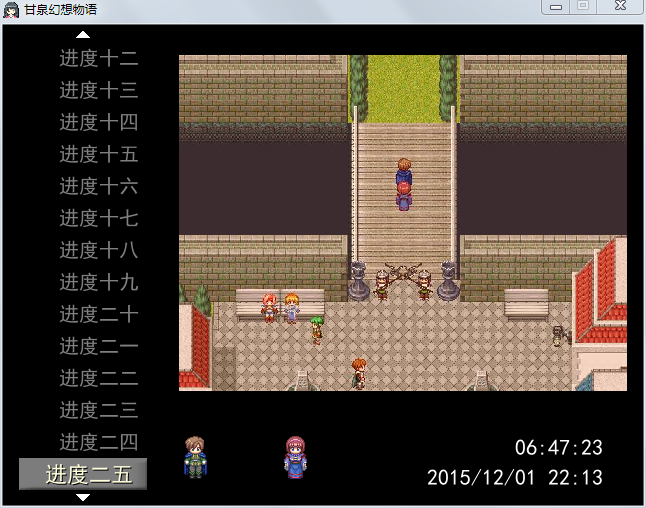
但是发生了以下两个问题
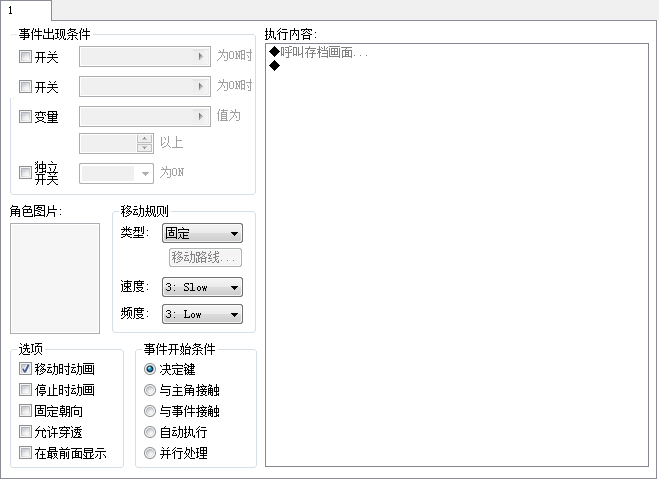
1.游戏中调用“呼出存档”指令时,调出的是默认的存档菜单,
无法调出新加入的脚本
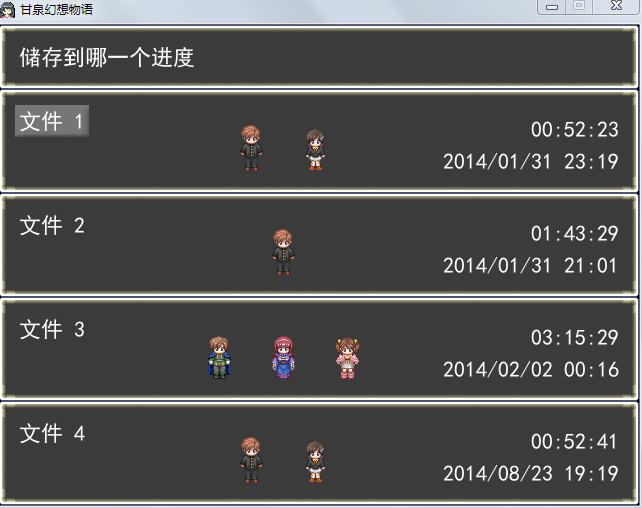
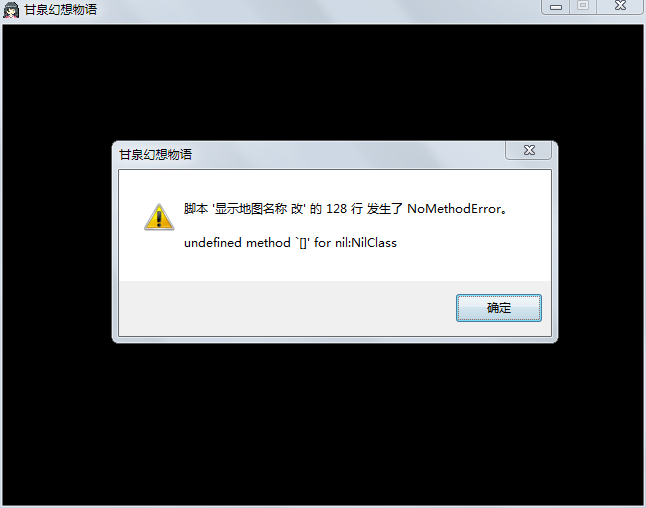
2.当读取存档的时候如果按Esc 返回键的话就会和好几个脚本报错
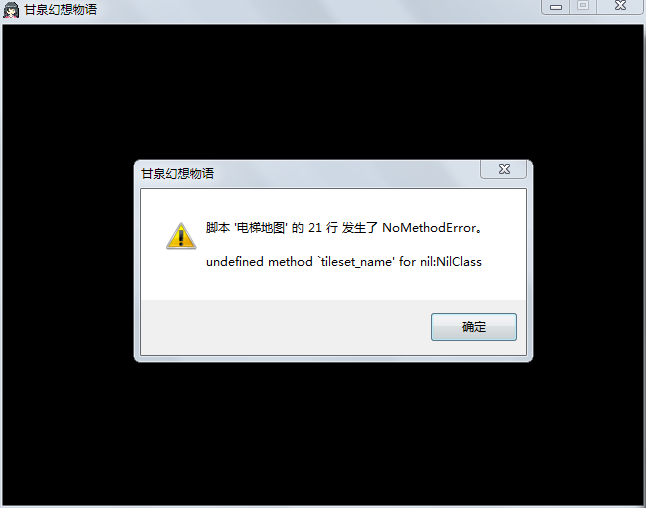
已经苦思冥想了许久不知道如何解决,期待大神解救T-T
截图扩展存档脚本
[pre lang="ruby"]###使用说明
#使用前请复制sceneshot.dll到游戏文件下,并新建文件夹Save
#将此文本插入main前面
#游戏前显示头像的文件名为:人物角色名_f,请自行建立几张做测试,不然找不到图片会报错
#自动存档按钮F5 存入档位0(也就是自动存档那栏)
#使用前,请在菜单脚本:scene_menu里面,
# when 4 # 存档
# # 禁止存档的情况下
# if $game_system.save_disabled
# # 演奏冻结 SE
# $game_system.se_play($data_system.buzzer_se)
# return
# end
# # 演奏确定 SE
# $game_system.se_play($data_system.decision_se)
# # 切换到存档画面
# $scene = Scene_Save.new <--这行
#替换为: $scene = Scene_Loadsave.new
#另,在原scene_title里,48行左右
# for i in 0..3
# for i in 0..3
# if FileTest.exist?("Save#{i+1}.rxdata")
###################改成if FileTest.exist?("Save/Save#{i+1}.rxdata")
# @continue_enabled = true
# end
# end
#否则继续游戏时会检测不到存档
class Window_File < Window_Base
attr_accessor :index
def initialize(index = 0)
@backsp = Sprite.new
# @backsp.bitmap = Bitmap.new("Graphics/Pictures/菜单底图.jpg")
@backsp.z = 100
super(160,64,480,416)
#这行可以不用
self.contents = Bitmap.new(width - 32, height - 32)
#去框##
self.opacity=0
##
@index = index
#这里我要说明一句,之所以用sprite是为了放缩图片
@sprite = Sprite.new
@sprite.visible = false
@sprite.z = 100
@sp_ch = []
@sp_ch[0] = Sprite.new
refresh
end
def refresh
self.contents.clear
for i in @sp_ch
i.visible = false
end
@sprite.visible = false
if FileTest.exist?(DIR+"Save#{@index}.rxdata")
@sprite.visible = true
if FileTest.exist?(DIR+"Save#{@index}.jpg")
@sprite.bitmap = Bitmap.new(DIR+"Save#{@index}.jpg")
else
self.contents.draw_text(32,64,400,32,"截图似乎有点问题……您搞什么了您?")
end
@sprite.x = 206
@sprite.y = 94
@sprite.zoom_x = 0.6
@sprite.zoom_y = 0.6
file = File.open(DIR+"Save#{@index}.rxdata", "r")
@time_stamp = file.mtime
@characters = Marshal.load(file)
@frame_count = Marshal.load(file)
@game_system = Marshal.load(file)
@game_switches = Marshal.load(file)
@game_variables = Marshal.load(file)
@total_sec = @frame_count / Graphics.frame_rate
file.close
for i in 0...@characters.size
bitmap = RPG::Cache.character(@characters[0], @characters[1])
cw = bitmap.rect.width / 4
ch = bitmap.rect.height / 4
src_rect = Rect.new(0, 0, cw, ch)
x = i*100
y = 320
self.contents.blt(x, y, bitmap, src_rect)
end
# 描绘游戏时间
hour = @total_sec / 60 / 60
min = @total_sec / 60 % 60
sec = @total_sec % 60
time_string = sprintf("%02d:%02d:%02d", hour, min, sec)
self.contents.font.color = normal_color
self.contents.draw_text(4, 326, 420, 32, time_string, 2)
# 描绘时间标记
self.contents.font.color = normal_color
time_string = @time_stamp.strftime("%Y/%m/%d %H:%M")
self.contents.draw_text(4, 346, 420, 32, time_string, 2)###356
else
self.contents.draw_text(32,32,420,32,"这个存档是空的")
end
end
def dispose
super
@sprite.dispose
@backsp.dispose
for i in @sp_ch
i.dispose
end
end
end
class Window_File2 < Window_Base
attr_accessor :index
def initialize(index = 0)
@backsp = Sprite.new
# @backsp.bitmap = Bitmap.new("Graphics/Pictures/菜单底图.jpg")
@backsp.z = 100
super(160,0,480,480)
#这行可以不用
self.contents = Bitmap.new(width - 32, height - 32)
#去框##
self.opacity=0
##
@index = index
#这里我要说明一句,之所以用sprite是为了放缩图片
@sprite = Sprite.new
@sprite.visible = false
@sprite.z = 100
@sp_ch = []
@sp_ch[0] = Sprite.new
refresh
end
def refresh
self.contents.clear
for i in @sp_ch
i.visible = false
end
@sprite.visible = false
if FileTest.exist?(DIR+"Save#{@index}.rxdata")
@sprite.visible = true
if FileTest.exist?(DIR+"Save#{@index}.jpg")
@sprite.bitmap = Bitmap.new(DIR+"Save#{@index}.jpg")
else
self.contents.draw_text(32,64,400,32,"截图似乎有点问题……您搞什么了您?")
end
@sprite.x = 176
@sprite.y = 30
@sprite.zoom_x = 0.7
@sprite.zoom_y = 0.7
file = File.open(DIR+"Save#{@index}.rxdata", "r")
@time_stamp = file.mtime
@characters = Marshal.load(file)
@frame_count = Marshal.load(file)
@game_system = Marshal.load(file)
@game_switches = Marshal.load(file)
@game_variables = Marshal.load(file)
@total_sec = @frame_count / Graphics.frame_rate
file.close
for i in 0...@characters.size
bitmap = RPG::Cache.character(@characters[0], @characters[1])
cw = bitmap.rect.width / 4
ch = bitmap.rect.height / 4
src_rect = Rect.new(0, 0, cw, ch)
x = i*100
self.contents.blt(x, 440 - ch, bitmap, src_rect)
end
# 描绘游戏时间
hour = @total_sec / 60 / 60
min = @total_sec / 60 % 60
sec = @total_sec % 60
time_string = sprintf("%02d:%02d:%02d", hour, min, sec)
self.contents.font.color = normal_color
self.contents.draw_text(4, 390, 420, 32, time_string, 2)
# 描绘时间标记
self.contents.font.color = normal_color
time_string = @time_stamp.strftime("%Y/%m/%d %H:%M")
self.contents.draw_text(4, 420, 420, 32, time_string, 2)
else
self.contents.draw_text(32,32,420,32,"这个存档是空的")
end
end
def dispose
super
@sprite.dispose
@backsp.dispose
for i in @sp_ch
i.dispose
end
end
end
$打开自动存档用的开关编号 = 595
$自动存档位置 = 1
$按下F5之后的自动存档的音效 = "Audio/SE/存档"
$按下F5之后禁止存档时候的音效 = "Audio/Se/错误"
DIR = "Save/"
$打开自动存档开关之后调用的公共事件 = 0 #——默认未定义
$按下F5之后可以存档调用的公共事件 = 0 #——默认未定义
$按下F5之后禁止存档调用的公共事件 = 0 #——默认未定义
class Scene_Map
alias auto_update update
def update
auto_update
#——按下F5的时候自动存档,可以修改为F5,F6,F7,F8,也可以修改成默认按键但是不推荐。
#——注意在不可存档的时候是无效的
if Input.trigger?(Input::F5)
unless $game_system.map_interpreter.running?
if $game_system.save_disabled
Audio.se_play($按下F5之后禁止存档时候的音效)
$game_temp.common_event_id = $按下F5之后禁止存档调用的公共事件
else
Audio.se_play($按下F5之后的自动存档的音效)
$game_temp.common_event_id = $按下F5之后可以存档调用的公共事件
auto_save
end
end
end
#——当BOSS战之前打开一下定义的开关,即可自动存档
if $game_switches[$打开自动存档用的开关编号] == true
$game_switches[$打开自动存档用的开关编号] = false
$game_temp.common_event_id = $打开自动存档开关之后调用的公共事件
auto_save
end
end
def auto_save
#——这里定义了储存的文件,如果不希望用Save4可以自己修改编号
# 写入存档数据
Screen::shot
file = File.open( DIR+"Save#{$自动存档位置}.rxdata", "wb")
auto_save_data(file)
if FileTest.exist?( DIR+"shot.jpg")
File.rename( DIR+"shot.jpg", DIR+"Save#{$自动存档位置}.jpg")
end
file.close
end
def auto_save_data(file)
#——以下定义内容和Scene_Save的write_save_data(file)完全一样
#——如果你修改过该存档方法,不要忘记用你修改的覆盖这部分内容。
# 生成描绘存档文件用的角色图形
characters = []
for i in 0...$game_party.actors.size
actor = $game_party.actors
characters.push([actor.character_name, actor.character_hue, actor])
end
# 写入描绘存档文件用的角色数据
Marshal.dump(characters, file)
# 写入测量游戏时间用画面计数
Marshal.dump(Graphics.frame_count, file)
# 增加 1 次存档次数
$game_system.save_count += 1
# 保存魔法编号
# (将编辑器保存的值以随机值替换)
$game_system.magic_number = $data_system.magic_number
# 写入各种游戏对像
Marshal.dump($game_system, file)
Marshal.dump($game_switches, file)
Marshal.dump($game_variables, file)
Marshal.dump($game_self_switches, file)
Marshal.dump($game_screen, file)
Marshal.dump($game_actors, file)
Marshal.dump($game_party, file)
Marshal.dump($game_troop, file)
Marshal.dump($game_map, file)
Marshal.dump($game_player, file)
end
end
DIR = "Save/" # 储存文件夹名,请制作游戏时自行建立此文件夹
module Screen
@screen = Win32API.new 'screenshot', 'Screenshot', %w(l l l l p l l), ''
@readini = Win32API.new 'kernel32', 'GetPrivateProfileStringA', %w(p p p p l
p), 'l'
@findwindow = Win32API.new 'user32', 'FindWindowA', %w(p p), 'l'
module_function
def shot(file = "shot", typ = 1)
# to add the right extension...
if typ == 0
typname = ".bmp"
elsif typ == 1
typname = ".jpg"
elsif typ == 2
typname = ".png"
end
file_index = 0
dir = "Save/"
# make the filename....
file_name = dir + file.to_s + typname.to_s
# make the screenshot.... Attention dont change anything from here on....
@screen.call(0,0,640,480,file_name,handel,typ)
end
# find the game window...
def handel
game_name = "\0" * 256
@readini.call('Game','Title','',game_name,255,".\\Game.ini")
game_name.delete!("\0")
return @findwindow.call('RGSS Player',game_name)
end
end
class Scene_Menu
alias shotsave_main main
def main
if @menu_index == 0
Screen::shot
end
shotsave_main
end
end
class Interpreter
#--------------------------------------------------------------------------
# ● 调用存档画面
#--------------------------------------------------------------------------
def command_352
# 设置战斗中断标志
$game_temp.battle_abort = true
# 设置调用存档标志
$game_temp.save_calling = true
# 推进索引
@index += 1
# 结束
Screen::shot
return false
end
end
#==============================================================================
# ■ Scene_Load
#------------------------------------------------------------------------------
# 处理读档画面的类。
#==============================================================================
class Scene_Load
#--------------------------------------------------------------------------
# ● 初始化对像
#--------------------------------------------------------------------------
def initialize
# 再生成临时对像
$game_temp = Game_Temp.new
# 选择存档时间最新的文件
$game_temp.last_file_index = 0
latest_time = Time.at(0)
for i in 0..51
filename = DIR+"Save#{i}.rxdata"
if FileTest.exist?(filename)
file = File.open(filename, "r")
if file.mtime > latest_time
latest_time = file.mtime
$game_temp.last_file_index = i
end
file.close
end
end
end
def main
#生成背景#
##生成菜单背景##
@dff_save= Sprite.new
@dff_save.bitmap = Bitmap.new("Graphics/Pictures/System/load")
##
@command_window = Window_Command.new(160,[" 自动存档"," 快速存档"," 进度二",
" 进度三"," 进度四"," 进度五"," 进度六"," 进度七"," 进度八"," 进度九"," 进度十",
" 进度十一"," 进度十二"," 进度十三"," 进度十四"," 进度十五"," 进度十六",
" 进度十七"," 进度十八"," 进度十九"," 进度二十"," 进度二一"," 进度二二",
" 进度二三"," 进度二四"," 进度二五"," 进度二六"," 进度二七"," 进度二八",
" 进度二九"," 进度三十"])
@command_window.y = 1
@command_window.height = 480
@command_window.index = $game_temp.last_file_index
@content_window = Window_File2.new($game_temp.last_file_index)
#去框##
@command_window.opacity = 0
##
# 执行过渡
Graphics.transition
# 主循环
loop do
# 刷新游戏画面
Graphics.update
# 刷新输入信息
Input.update
# 刷新画面
update
# 如果画面被切换的话就中断循环
if $scene != self
break
end
end
# 准备过渡
Graphics.freeze
@command_window.dispose
@content_window.dispose
@dff_save.dispose
@dff_save.bitmap.dispose
end
def update
@command_window.update
if @command_window.index != @content_window.index
@content_window.index = @command_window.index
@content_window.refresh
end
#——————下面这一部分是原装脚本——————#
if Input.trigger?(Input::B)
# 演奏取消 SE
$game_system.se_play($data_system.cancel_se)
# 切换到标题画面
#####$scene = Scene_Title.new
$scene = Scene_Map.new
end
#———————————————————————#
if Input.trigger?(Input::C)
# 文件不存在的情况下
unless FileTest.exist?(DIR+"Save#{@command_window.index}.rxdata")
# 演奏冻结 SE
$game_system.se_play($data_system.buzzer_se)
return
end
# 演奏读档 SE
$game_system.se_play($data_system.load_se)
# 写入存档数据
file = File.open(DIR+"Save#{@command_window.index}.rxdata", "rb")
read_save_data(file)
file.close
# 还原 BGM、BGS
$game_system.bgm_play($game_system.playing_bgm)
$game_system.bgs_play($game_system.playing_bgs)
# 刷新地图 (执行并行事件)
$game_map.update
# 切换到地图画面
$scene = Scene_Map.new
end
#———————————————————————#
end
#--------------------------------------------------------------------------
# ● 写入存档数据
# file : 写入用文件对像 (已经打开)
#--------------------------------------------------------------------------
def read_save_data(file)
# 读取描绘存档文件用的角色数据
characters = Marshal.load(file)
# 读取测量游戏时间用画面计数
Graphics.frame_count = Marshal.load(file)
# 读取各种游戏对像
$game_system = Marshal.load(file)
$game_switches = Marshal.load(file)
$game_variables = Marshal.load(file)
$game_self_switches = Marshal.load(file)
$game_screen = Marshal.load(file)
$game_actors = Marshal.load(file)
$game_party = Marshal.load(file)
$game_troop = Marshal.load(file)
$game_map = Marshal.load(file)
$game_player = Marshal.load(file)
# 魔法编号与保存时有差异的情况下
# (加入编辑器的编辑过的数据)
if $game_system.magic_number != $data_system.magic_number
# 重新装载地图
$game_map.setup($game_map.map_id)
$game_player.center($game_player.x, $game_player.y)
end
# 刷新同伴成员
$game_party.refresh
end
end
#==============================================================================
# Window_LoadCommand
#------------------------------------------------------------------------------
# 存取档画面选择按钮窗口
#==============================================================================
class Window_LoadCommand < Window_Selectable
#--------------------------------------------------------------------------
# 初始化对象
#--------------------------------------------------------------------------
def initialize
super(320, 0, 320, 64)
self.contents = Bitmap.new(width - 32, height - 32)
self.contents.font.color = normal_color
#去框#
self.opacity=0
##
@item_max = 2
@column_max = 2
@commands = ["存储", "读取"]
refresh
self.index = 0
end
#--------------------------------------------------------------------------
# 刷新
#--------------------------------------------------------------------------
def refresh
self.contents.clear
for i in 0...@item_max
draw_item(i)
end
end
#--------------------------------------------------------------------------
# 描画按钮文字
#--------------------------------------------------------------------------
def draw_item(index)
x = 4 + index * 160
self.contents.draw_text(x, 0, 144, 32, @commands[index])
end
#--------------------------------------------------------------------------
# ● 项目无效化
# index : 项目编号
#--------------------------------------------------------------------------
def disable_item(index)
draw_item(index, disabled_color)
end
end
#==============================================================================
# Scene_Loadsave
#------------------------------------------------------------------------------
# 处理存取档画面的类。
#==============================================================================
class Scene_Loadsave
#--------------------------------------------------------------------------
# ● 初始化对像
# $last_savefile_index : 记录光标位置
#--------------------------------------------------------------------------
def initialize
$last_savefile_index = 0 if $last_savefile_index == nil
# 再生成临时对像
$game_temp = Game_Temp.new
# 选择存档时间最新的文件
$game_temp.last_file_index = 0
latest_time = Time.at(0)
for i in 0..51
filename = DIR+"Save#{i}.rxdata"
if FileTest.exist?(filename)
file = File.open(filename, "r")
if file.mtime > latest_time
latest_time = file.mtime
$game_temp.last_file_index = i
end
file.close
end
end
end
#--------------------------------------------------------------------------
# 主处理
#--------------------------------------------------------------------------
def main
##生成菜单背景##
@dff_save= Sprite.new
@dff_save.bitmap = Bitmap.new("Graphics/Pictures/System/saveload")
##
@savestate = 0
# 生成窗口
@help_window = Window_LoadHelp.new
@help_window.set_text("请选择.")
@option_window = Window_LoadCommand.new
@option_window.index = $last_savefile_index
########################################################
@command_window = Window_Command.new(160,[" 自动存档"," 快速存档"," 进度二",
" 进度三"," 进度四"," 进度五"," 进度六"," 进度七"," 进度八"," 进度九"," 进度十",
" 进度十一"," 进度十二"," 进度十三"," 进度十四"," 进度十五"," 进度十六",
" 进度十七"," 进度十八"," 进度十九"," 进度二十"," 进度二一"," 进度二二",
" 进度二三"," 进度二四"," 进度二五"," 进度二六"," 进度二七"," 进度二八",
" 进度二九"," 进度三十"])
@command_window.y = 64
@command_window.height = 378
@command_window.index = $game_temp.last_file_index
@content_window = Window_File.new($game_temp.last_file_index)
@command_window.active = false
#去框##
@command_window.opacity = 0
##
###############覆盖存档
@confirm_window = Window_Base.new(120, 188, 400, 64)
@confirm_window.contents = Bitmap.new(368, 32)
@confirm_window.contents.font.color = Color.new(255,255,255,255)
string = "确定要覆盖这个进度吗?"
@confirm_window.contents.font.name = "黑体"
@confirm_window.contents.font.size = 24
@confirm_window.contents.draw_text(4, 0, 368, 32, string)
@yes_no_window = Window_Command.new(100, ["覆盖", "取消"])
@confirm_window.z = 1500
@yes_no_window.index = 1
@yes_no_window.x = 270
@yes_no_window.y = 252
@yes_no_window.z = 1500
@confirm_window.visible = false
@yes_no_window.visible = false
@yes_no_window.active = false
# 执行过渡
Graphics.transition
# 主循环
loop do
# 刷新游戏画面
Graphics.update
# 刷新输入信息
Input.update
# 刷新画面
update
# 如果画面被切换的话就中断循环
if $scene != self
break
end
end
# 准备过渡
Graphics.freeze
# 释放窗口
@command_window.dispose
@content_window.dispose
@confirm_window.dispose
@yes_no_window.dispose
@help_window.dispose
@option_window.dispose
@dff_save.dispose
@dff_save.bitmap.dispose
end
#--------------------------------------------------------------------------
# ● 刷新画面
#--------------------------------------------------------------------------
def update
# 刷新窗口
@help_window.update
@option_window.update
# @content_window.update
@command_window.update
if @yes_no_window.active
confirm_update
return
end
@content_window.index = @command_window.index
@content_window.refresh
case @savestate
when 0
if Input.trigger?(Input::B)
$game_system.se_play($data_system.cancel_se)
# 返回地图
if $menu_call == false
# 切换到地图画面
$scene = Scene_Map.new
return
end
# 切换到菜单画面
$menu_call = false
$scene = Scene_Menu.new(5)
end
if Input.trigger?(Input::C)
case @option_window.index
when 1
@command_window.active = true
@option_window.active = false
$game_system.se_play($data_system.decision_se)
@help_window.set_text("请选择一个文件进行读取.")
@savestate = 1
return
when 0
@command_window.active = true
@option_window.active = false
$game_system.se_play($data_system.decision_se)
@help_window.set_text("请选择一个文件进行存储.")
@savestate = 2
return
return
end
end
when 1,2
if Input.trigger?(Input::C)
if @savestate == 1
$menu_call = false
load_file
return
else
# 禁止存档的情况下
if $game_system.save_disabled
@help_window.set_text("抱歉,这里禁止存储.")
# 演奏冻结 SE
$game_system.se_play($data_system.buzzer_se)
return
end
$game_system.se_play($data_system.decision_se)
$last_savefile_index = @option_window.index
save_file
return
end
end
# 取消
if Input.trigger?(Input::B)
$game_system.se_play($data_system.cancel_se)
@command_window.active = false
@help_window.set_text("请选择.")
@savestate = 0
@option_window.active = true
return
end
if Input.trigger?(Input::B)
$game_system.se_play($data_system.cancel_se)
@savestate = 2
@command_window.active = true
return
end
end
end
#--------------------------------------------------------------------------
# 建立记录文件索引
#--------------------------------------------------------------------------
#--------------------------------------------------------------------------
# 读取记录文件
# filename : 被读取文件
#--------------------------------------------------------------------------
def load_file
# 文件不存在的情况下
unless FileTest.exist?( DIR+"Save#{@command_window.index}.rxdata")
# 演奏冻结 SE
$game_system.se_play($data_system.buzzer_se)
return
end
# 演奏读档 SE
$game_system.se_play($data_system.load_se)
# 写入存档数据
file = File.open( DIR+"Save#{@command_window.index}.rxdata", "rb")
read_save_data(file)
file.close
# 还原 BGM、BGS
$game_system.bgm_play($game_system.playing_bgm)
$game_system.bgs_play($game_system.playing_bgs)
# 刷新地图 (执行并行事件)
$game_map.update
# 切换到地图画面
$scene = Scene_Map.new
end
#--------------------------------------------------------------------------
# ● 读取存档数据
# file : 读取用文件对像 (已经打开)
#--------------------------------------------------------------------------
def read_save_data(file)
# 读取描绘存档文件用的角色数据
characters = Marshal.load(file)
# 读取测量游戏时间用画面计数
Graphics.frame_count = Marshal.load(file)
# 读取各种游戏对像
$game_system = Marshal.load(file)
$game_switches = Marshal.load(file)
$game_variables = Marshal.load(file)
$game_self_switches = Marshal.load(file)
$game_screen = Marshal.load(file)
$game_actors = Marshal.load(file)
$game_party = Marshal.load(file)
$game_troop = Marshal.load(file)
$game_map = Marshal.load(file)
$game_player = Marshal.load(file)
# 魔法编号与保存时有差异的情况下
# (加入编辑器的编辑过的数据)
if $game_system.magic_number != $data_system.magic_number
# 重新装载地图
$game_map.setup($game_map.map_id)
$game_player.center($game_player.x, $game_player.y)
end
# 刷新同伴成员
$game_party.refresh
end
#--------------------------------------------------------------------------
# ● 写入存档文件
#--------------------------------------------------------------------------
def save_file
if Input.trigger?(Input::C)
unless FileTest.exist?( DIR+"Save#{@command_window.index}.rxdata")
# 演奏冻结 SE
# 演奏存档 SE
$game_system.se_play($data_system.save_se)
# 写入存档数据
file = File.open( DIR+"Save#{@command_window.index}.rxdata", "wb")
write_save_data(file)
if FileTest.exist?( DIR+"shot.jpg")
File.rename( DIR+"shot.jpg", DIR+"Save#{@command_window.index}.jpg")
end
file.close
$game_temp.last_file_index = @command_window.index
# 如果被事件调用
if $game_temp.save_calling
# 清除存档调用标志
$game_temp.save_calling = false
@confirm_window.dispose
# 切换到地图画面
$scene = Scene_Map.new
return
end
# 切换到菜单画面
$scene = Scene_Menu.new(5)
end
@yes_no_window.active = true
@command_window.active = false
end
#———————————————————————#
end
#-------------------------------------------------------------------
def confirm_update
@command_index = @command_window.index
@confirm_window.visible = true
@confirm_window.z = 1500
@yes_no_window.visible = true
@yes_no_window.active = true
@yes_no_window.z = 1500
@yes_no_window.update
if Input.trigger?(Input::C)
if @yes_no_window.index == 0
#######################################################
# 演奏存档 SE
$game_system.se_play($data_system.save_se)
# 写入存档数据
file = File.open( DIR+"Save#{@command_window.index}.rxdata", "wb")
write_save_data(file)
if FileTest.exist?( DIR+"shot.jpg")
File.rename( DIR+"shot.jpg", DIR+"Save#{@command_window.index}.jpg")
end
file.close
$game_temp.last_file_index = @command_window.index
# 如果被事件调用
if $game_temp.save_calling
# 清除存档调用标志
$game_temp.save_calling = false
@confirm_window.dispose
@content_window.dispose
# 切换到地图画面
$scene = Scene_Map.new
return
end
# 切换到菜单画面
$scene = Scene_Menu.new(5)
else
@yes_no_window.visible = false
@confirm_window.visible = false
$game_system.se_play($data_system.cancel_se)
@yes_no_window.active = false
@command_window.active = true
end
end
if Input.trigger?(Input::B)
@yes_no_window.visible = false
@confirm_window.visible = false
$game_system.se_play($data_system.cancel_se)
@yes_no_window.active = false
@command_window.active = true
end
end
#--------------------------------------------------------------------------
# ● 写入存档数据
# file : 写入用文件对像 (已经打开)
#--------------------------------------------------------------------------
def write_save_data(file)
# 生成描绘存档文件用的角色图形
characters = []
for i in 0...$game_party.actors.size
actor = $game_party.actors
characters.push([actor.character_name, actor.character_hue, actor])
end
# 写入描绘存档文件用的角色数据
Marshal.dump(characters, file)
# 写入测量游戏时间用画面计数
Marshal.dump(Graphics.frame_count, file)
# 增加 1 次存档次数
$game_system.save_count += 1
# 保存魔法编号
# (将编辑器保存的值以随机值替换)
$game_system.magic_number = $data_system.magic_number
# 写入各种游戏对像
Marshal.dump($game_system, file)
Marshal.dump($game_switches, file)
Marshal.dump($game_variables, file)
Marshal.dump($game_self_switches, file)
Marshal.dump($game_screen, file)
Marshal.dump($game_actors, file)
Marshal.dump($game_party, file)
Marshal.dump($game_troop, file)
Marshal.dump($game_map, file)
Marshal.dump($game_player, file)
end
end
#==============================================================================
# ■ Window_LoadHelp
#------------------------------------------------------------------------------
# 存取档画面帮助信息的显示窗口。
#==============================================================================
class Window_LoadHelp < Window_Base
#--------------------------------------------------------------------------
# 初始化对象
#--------------------------------------------------------------------------
def initialize
super(0, 0, 320, 64)
self.contents = Bitmap.new(width - 32, height - 32)
#去框#
self.opacity=0
##
end
#--------------------------------------------------------------------------
# 刷新文本
#--------------------------------------------------------------------------
def set_text(text, align = 1)
if text != @text or align != @align
self.contents.clear
self.contents.font.color = normal_color
self.contents.draw_text(4, 0, self.width - 40, 32, text, align)
@text = text
@align = align
@actor = nil
end
self.visible = true
end
end
[/pre]
显示地图名称脚本
[pre lang="ruby"]module Sword
#=======================================
#★ 魔劍工舖 - 地圖上顯示地圖名 1.01
# http://blog.yam.com/a870053jjkj/
#=======================================
ON, OFF = true, false
#=======================================
#● 使用者自定設置
Sword67_XorY = [-10, 0] # 顯示地圖名稱的窗口位置,分別為 [X座標, Y座標] # 640, 416
Sword67_Align = 0 # 文字的靠邊位置,0為左、1為中、2為右
Sword67_Opacity = 255 # 設定窗口背景的不透明度和淡出上限
Sword67_Adjunct = 80 # 地圖名稱顯示的時間,0為永久顯示(每40約1秒)
Sword67_Switche = 600 # 指定1個開關編號,該開關為ON表示關閉此腳本功能
Sword67_Show = ON # 是否在起始地圖顯示地圖名
Sword67_Fade = [5, 5] # 設定每幀 [加, 減] 不透明度的淡出淡入效果,0為不使用
#=======================================
$Sword ? $Sword[67] = true : $Sword = {67=>true} # 腳本使用標誌
($Sword_VX = false ; RPG::Weather rescue $Sword_VX = true) if $Sword_VX == nil
Sword67s1_Fade = [Sword67_Fade[0] > 0 ? Sword67_Opacity / Sword67_Fade[0] : 0,
Sword67_Fade[1] > 0 ? Sword67_Opacity / Sword67_Fade[1] : 0]
#-------------------------------------------------------------
#● 紀錄是否在起始地圖顯示地圖名的標誌
def self.sword67=(s) ; @sword67 = s ; end
def self.sword67 ; @sword67 ; end
self.sword67 = Sword67_Show
end
#=======================================
#■ 處理主角的類
if $Sword_VX
class Game_Player < Game_Character
attr_reader :new_map_id # 新地圖的地圖編號
end
end
#=======================================
#■ 地圖名稱的窗口
class WSword_MapName < Window_Base
include Sword # 連接自定設置
#-------------------------------------------------------------
#● 初始化物件
def initialize(a = 0)
b = $Sword_VX ? 'v' : 'x'
@map_name = a == 0 ? load_data("Data/MapInfos.r#{b}data")[$game_map.map_id].name :
load_data("Data/MapInfos.r#{b}data")[a].name # 獲取地圖名稱
super(Sword67_XorY[0], Sword67_XorY[1], 33, 33)
self.contents = Bitmap.new(width - 32, height - 32)
self.windowskin = RPG::Cache.windowskin("mapname")
# self.width = contents.text_size(@map_name).width + 40
# self.height = contents.text_size(@map_name).height + 43
self.width = 870
self.height = contents.text_size(@map_name).height + 60
self.contents = Bitmap.new(width - 32, height - 32)
refresh
end
#-------------------------------------------------------------
#● 描繪內容
def refresh
self.contents.clear ; self.contents.font.color = normal_color ; self.contents.font.size = 24
case Sword67_Align # 窗口靠邊設定
when 1 ; self.x -= self.width / 2
when 2 ; self.x -= self.width
end
self.contents.draw_text(4, 0, self.width, 48, @map_name) # 窗口內容
end
end
#=======================================
#■ 處理地圖畫面的類
class Scene_Map
include Sword # 連接自定設置
#-------------------------------------------------------------
#● 主處理
alias sword67_main main unless $Sword_VX
def main
sword67_map_name ; $Sword_VX ? super : sword67_main
unless @sword_map_name == nil
@sword_map_name.dispose
@sword_map_name = nil
end
end
#-------------------------------------------------------------
#● 更新
alias sword67_update update
def update
if Sword67_Fade[0] > 0 and @sword_map_name and (not @sword_map_wait == true)
@sword_map_name.opacity = [@sword_map_name.opacity +
Sword67_Fade[0], Sword67_Opacity].min
@sword_map_name.contents_opacity = [@sword_map_name.opacity +
Sword67_Fade[0], Sword67_Opacity].min
end
# 窗口顯示時間計算
@sword_map_wait = [Graphics.frame_count, Graphics.frame_count +
Sword67_Adjunct + Sword67s1_Fade[0]] unless @sword_map_wait
if @sword_map_wait.is_a?(Array) and Sword67_Adjunct != 0
@sword_map_wait[0] <= @sword_map_wait[1] ? @sword_map_wait[0] += 1 :
@sword_map_wait = true
end
if @sword_map_wait == true ; if @sword_map_name
if @sword_map_name.opacity == 0 or Sword67_Fade[1] == 0
@sword_map_name.dispose ; @sword_map_name = nil
@sword_map_wait = nil
else
@sword_map_name.opacity = [@sword_map_name.opacity -
Sword67_Fade[1], 0].max
@sword_map_name.contents_opacity = [@sword_map_name.opacity -
Sword67_Fade[1], 0].max
end ; end ; end
sword67_update
end
#-------------------------------------------------------------
#● 主角的場所移動
if $Sword_VX ; alias sword67_transfer_player update_transfer_player
else ; alias sword67_transfer_player transfer_player ; end
def transfer_player
return unless $game_player.transfer? if $Sword_VX
$game_switches[Sword67_Switche] ? 0 : @sword_map_wait = false
# 重新顯示窗口
unless @sword_map_name == nil
@sword_map_name.dispose
@sword_map_name = nil
end
Sword.sword67 = true
sword67_transfer_player
sword67_map_name
end
def update_transfer_player ; transfer_player ; end
#-------------------------------------------------------------
#● 顯示地圖名稱窗口的處理
def sword67_map_name
if $game_switches[Sword67_Switche] == false and Sword.sword67
@sword_map_name = WSword_MapName.new($Sword_VX ?
$game_player.new_map_id : $game_temp.player_new_map_id)
# @sword_map_name.opacity = Sword67_Fade[0] > 0 ? 0 : Sword67_Opacity
@sword_map_name.opacity = 0
#@sword_map_name.contents_opacity = 0 if Sword67_Fade[0] > 0
@sword_map_name.contents_opacity = 0
Sword.sword67 = false
end
end
end[/pre]
电梯地图的脚本
[pre lang="ruby"]#==============================================================================
# ■ Spriteset_Map
#------------------------------------------------------------------------------
# 處理地圖畫面活動區塊和元件的類別。
# 本類別在 Scene_Map 類別的內部使用。
#==============================================================================
class Spriteset_Map
#--------------------------------------------------------------------------
# ● 初始化物件
#--------------------------------------------------------------------------
def initialize
# 產生顯示連接埠
@viewport1 = Viewport.new(0, 0, 640, 480)
@viewport2 = Viewport.new(0, 0, 640, 480)
@viewport3 = Viewport.new(0, 0, 640, 480)
@viewport2.z = 200
@viewport3.z = 5000
# 產生元件地圖
@tilemap = Tilemap.new(@viewport1)
@tilemap.tileset = RPG::Cache.tileset($game_map.tileset_name)
for i in 0..6
autotile_name = $game_map.autotile_names
@tilemap.autotiles = RPG::Cache.autotile(autotile_name)
end
@tilemap.map_data = $game_map.data
@tilemap.priorities = $game_map.priorities
# 產生全景平面
@panorama = Plane.new(@viewport1)
@panorama.z = -1000
# 產生霧平面
@fog = Plane.new(@viewport1)
@fog.z = 3000
# 產生角色活動區塊
@character_sprites = []
for i in $game_map.events.keys.sort
sprite = Sprite_Character.new(@viewport1, $game_map.events)
@character_sprites.push(sprite)
end
@character_sprites.push(Sprite_Character.new(@viewport1, $game_player))
# 產生天氣
@weather = RPG::Weather.new(@viewport1)
# 產生圖片
@picture_sprites = []
for i in 1..50
@picture_sprites.push(Sprite_Picture.new(@viewport2,
$game_screen.pictures))
end
# 產生計時器區塊
@timer_sprite = Sprite_Timer.new
# 更新畫面
update
end
#--------------------------------------------------------------------------
# ● 釋放
#--------------------------------------------------------------------------
def dispose
# 釋放元件地圖
@tilemap.tileset.dispose
for i in 0..6
@tilemap.autotiles.dispose
end
@tilemap.dispose
# 釋放全景平面
@panorama.dispose
# 釋放霧平面
@fog.dispose
# 釋放角色活動區塊
for sprite in @character_sprites
sprite.dispose
end
# 釋放天氣
@weather.dispose
# 釋放圖片
for sprite in @picture_sprites
sprite.dispose
end
# 釋放計時器區塊
@timer_sprite.dispose
# 釋放顯示連接埠
@viewport1.dispose
@viewport2.dispose
@viewport3.dispose
end
#--------------------------------------------------------------------------
# ● 更新畫面
#--------------------------------------------------------------------------
def update
# 全景與現在的情況有差異發情況下
if @panorama_name != $game_map.panorama_name or
@panorama_hue != $game_map.panorama_hue
@panorama_name = $game_map.panorama_name
@panorama_hue = $game_map.panorama_hue
if @panorama.bitmap != nil
@panorama.bitmap.dispose
@panorama.bitmap = nil
end
if @panorama_name != ""
@panorama.bitmap = RPG::Cache.panorama(@panorama_name, @panorama_hue)
end
Graphics.frame_reset
end
# 霧與現在的情況有差異的情況下
if @fog_name != $game_map.fog_name or @fog_hue != $game_map.fog_hue
@fog_name = $game_map.fog_name
@fog_hue = $game_map.fog_hue
if @fog.bitmap != nil
@fog.bitmap.dispose
@fog.bitmap = nil
end
if @fog_name != ""
@fog.bitmap = RPG::Cache.fog(@fog_name, @fog_hue)
end
Graphics.frame_reset
end
# 更新元件地圖
@tilemap.ox = $game_map.display_x / 4
@tilemap.oy = $game_map.display_y / 4
@tilemap.update
# 更新全景平面
@panorama.ox = $game_map.display_x / 8
@panorama.oy = $game_map.display_y / 8
# 更新霧平面
@fog.zoom_x = $game_map.fog_zoom / 100.0
@fog.zoom_y = $game_map.fog_zoom / 100.0
@fog.opacity = $game_map.fog_opacity
@fog.blend_type = $game_map.fog_blend_type
@fog.ox = $game_map.display_x / 4 + $game_map.fog_ox
@fog.oy = $game_map.display_y / 4 + $game_map.fog_oy
@fog.tone = $game_map.fog_tone
# 更新角色活動區塊
for sprite in @character_sprites
sprite.update
end
# 更新天候圖形
@weather.type = $game_screen.weather_type
@weather.max = $game_screen.weather_max
@weather.ox = $game_map.display_x / 4
@weather.oy = $game_map.display_y / 4
@weather.update
# 更新圖片
for sprite in @picture_sprites
sprite.update
end
# 更新計時器區塊
@timer_sprite.update
# 設定畫面的色調與震動位置
@viewport1.tone = $game_screen.tone
#####################################################
if $game_switches[596] == true
@viewport1.oy = $game_screen.shake
else
@viewport1.ox = $game_screen.shake
end
#####################################################
# 設定畫面的閃爍色彩
@viewport3.color = $game_screen.flash_color
# 更新顯示連接埠
@viewport1.update
@viewport3.update
end
end
[/pre] |
|


 写轮眼
写轮眼
 发表于 2016-1-31 20:26:50

 提升卡
提升卡 沉默号角
沉默号角 喧嚣号角
喧嚣号角 变色卡
变色卡 升龙剑
升龙剑