| 赞 | 0 |
| VIP | |
| 好人卡 | |
| 积分 | 1 |
| 经验 | |
| 最后登录 | 2017-5-16 |
| 在线时间 | 130 小时 |
- 梦石
- 0
- 星屑
- 50
- 在线时间
- 130 小时
- 注册时间
- 2016-1-14
- 回帖
- 106
|
加入我们,或者,欢迎回来。
您需要 登录 才可以下载或查看,没有账号?注册会员
×
本帖最后由 狼人弟弟 于 2016-5-2 14:35 编辑
我在游戏的物品页面和技能页面设置了一个人物选择窗口(共用的),脚本名是“Window_MenuTarget”。(好吧,这个脚本是从别的游戏里提取过来的)
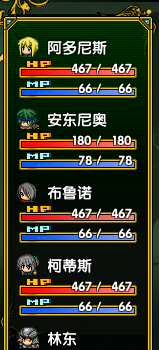
然后,我发现一个问题: 当我的队伍拥有4人以上时,就会出现如下面图片一样显示出“4个半”人。
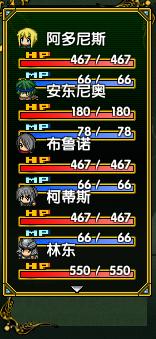
本来吧,我以为通过修改这个窗口的高度把剩下的半个人去掉,但结果却变成了这样(5个人都挤成一团):
所以百试不得其解之下,我也只能厚颜无耻的上来求高手帮帮忙了。
那么,我的问题就是:
该怎么把它设定为像下面这张图一样
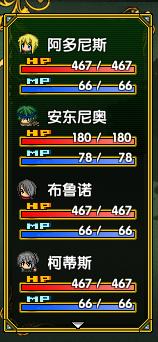
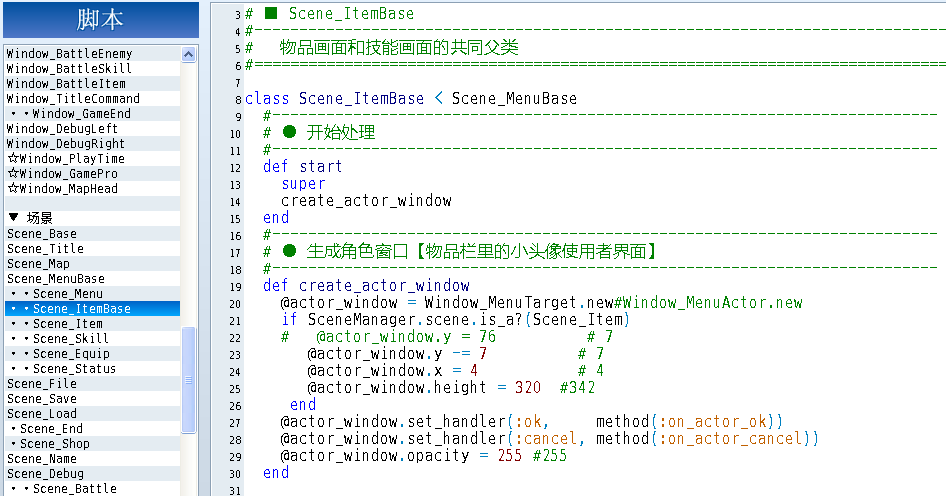
这是通过安插在“Scene_ItemBase”的脚本获得的效果,但它只能编辑物品页面的人物选择窗口,却不能控制技能页面的人物窗口,请问该怎么修改呢?
安插在“Scene_ItemBase”的脚本如下:
[pre lang="ruby"] #--------------------------------------------------------------------------
# ● 生成角色窗口【物品栏里的小头像使用者界面】
#--------------------------------------------------------------------------
def create_actor_window
@actor_window = Window_MenuTarget.new#Window_MenuActor.new
if SceneManager.scene.is_a?(Scene_Item)
# @actor_window.y = 76 # 7
@actor_window.y -= 7 # 7
@actor_window.x = 4 # 4
@actor_window.height = 320 #342
end
@actor_window.set_handler(:ok, method(:on_actor_ok))
@actor_window.set_handler(:cancel, method(:on_actor_cancel))
@actor_window.opacity = 255 #255
end [/pre]
“Window_MenuTarget”的脚本如下:
[pre lang="ruby"]#encoding:utf-8
#==============================================================================
# ■ Window_MenuStatus
#------------------------------------------------------------------------------
# 物品/技能画面中,显示队伍成员状态的窗口
#==============================================================================
class Window_MenuTarget < Window_Selectable
#--------------------------------------------------------------------------
# ● 初始化对象 # 物品/技能画面的人物小头像区域
#--------------------------------------------------------------------------
def initialize
super(4 , 82, window_width, window_height - 100 )
self.visible = true #false #判断是否直接显示
refresh
end
#--------------------------------------------------------------------------
# ● 获取窗口的宽度
#--------------------------------------------------------------------------
def window_width
150
end
#--------------------------------------------------------------------------
# ● 获取窗口的高度
#--------------------------------------------------------------------------
def window_height
390 # Graphics.height #
end
#--------------------------------------------------------------------------
# ● 获取项目数
#--------------------------------------------------------------------------
def item_max
$game_party.members.size
end
#--------------------------------------------------------------------------
# ● 获取列数
#--------------------------------------------------------------------------
def col_max
return 1
end
#--------------------------------------------------------------------------
# ● 获取项目的高度
#--------------------------------------------------------------------------
def item_height
(height - standard_padding * 2) / 4
end
#--------------------------------------------------------------------------
# ● 绘制项目
#--------------------------------------------------------------------------
def draw_item(index)
actor = $game_party.members[index]
enabled = $game_party.battle_members.include?(actor)
rect = item_rect(index)
dx = 96
m = 0.8
draw_actor_name(actor, rect.x + 32, rect.y * m + 8)
draw_actor_megaface(actor, rect.x + 2, rect.y * m + 8)
draw_actor_icons(actor, rect.x + 100, rect.y * m + 6) #中毒等状态的图标
draw_actor_hp(actor, rect.x + 1 , rect.y * m + 28)#+ line_height / 2 + line_height )
draw_actor_mp(actor, rect.x + 1 , rect.y * m + 48)#+ line_height / 2 + line_height + 16)
# draw_actor_tp(actor, rect.x + 1 , rect.y * m + 56)#+ line_height / 2 + line_height + 32)
end
#--------------------------------------------------------------------------
# ● 按下确定键时的处理
#--------------------------------------------------------------------------
def process_ok
$game_party.target_actor = $game_party.members[index] unless @cursor_all
call_ok_handler
end
#--------------------------------------------------------------------------
# ● 返回上一个选择的位置
#--------------------------------------------------------------------------
def select_last
select($game_party.menu_actor.index || 0)
end
#--------------------------------------------------------------------------
# ● 设置光标的选择位置/范围
#--------------------------------------------------------------------------
def select_for_item(item)
@item = item
@cursor_fix = item.for_user?
@cursor_all = item.for_all?
if @cursor_fix
select($game_party.menu_actor.index)
elsif @cursor_all
select(0)
else
select_last
end
end
#--------------------------------------------------------------------------
# ● 定义光标矩形
#--------------------------------------------------------------------------
def update_cursor
if @index < 0
self.cursor_rect.empty
else
ensure_cursor_visible
self.cursor_rect.set(0, @index * 72, 126, 77) #(0, @index * 78 + 4, 126, 77)
end
if @item != nil
if @item.for_all?
self.cursor_rect.set(0, 0, 126, item_max * 78 )
end
end
end
end[/pre] |
-
|


 写轮眼
写轮眼
 发表于 2016-5-2 14:15:30
 提升卡
提升卡 沉默号角
沉默号角 喧嚣号角
喧嚣号角 变色卡
变色卡 升龙剑
升龙剑


