| 赞 | 0 |
| VIP | |
| 好人卡 | |
| 积分 | 1 |
| 经验 | |
| 最后登录 | 2016-7-27 |
| 在线时间 | 158 小时 |
- 梦石
- 0
- 星屑
- 50
- 在线时间
- 158 小时
- 注册时间
- 2016-1-7
- 回帖
- 102
|
加入我们,或者,欢迎回来。
您需要 登录 才可以下载或查看,没有账号?注册会员
×
本帖最后由 燕征 于 2016-6-5 14:30 编辑
我使用下面這個腳本來做任務列表
詳盡任務顯示介面 v2.1 By 葉子[pre lang="ruby"]=begin
--------------------------------------------------------------------------
詳盡任務顯示介面 v2.1
--------------------------------------------------------------------------
By 葉子
日期與更新
3-29-2006 -v1.0
4-3-2006 -v2.0
-可以改變文字顏色,顯示變數,顯示圖示,顯示圖片
-大幅簡化了編寫任務內容的過程,加入自動換行功能
-精簡了視窗,使其還可以用作圖鑒系統、日記系統等等
4-6-2006 -v2.1
-增加了獲得全部任務與刪除全部任務命令
-改正通假字,修改了示例任務3
--------------------------------------------------------------------------
顧名思義,就是顯示任務資料的介面
任務資料要預先在這裡設定好
下載範例工程,能説明你更快更好地掌握使用方法
--------------------------------------------------------------------------
使用方法:
1、召喚任務顯示介面:$scene = Scene_Task.new
可以在事件中的“腳本”指令加入這段東西,又或者修改 Scene_Menu 來增加一個顯示
任務的選項。如果是修改 Scene_Menu 增加選項的話,在腳本倒數第30行左右,
把 $scene = Scene_Map.new 修改成 $scene = Scene_Menu.new(任務介面index)
2、設置任務資料
2.1、相關內容解析
所有內容文字必須用雙引號括住
名稱:任務的名字(顯示在左邊視窗中),大小為208×32,如果全部為文字的話,
夠放九個全形字符
簡介:任務的介紹(顯示在右邊視窗中),寬368,高不限
文字可以自動換行
2.1.1、控制碼解析
名稱和內容均可用控制碼,注意兩條反斜線都要打!
\\v[n] 顯示n號變數
\\c[n] 改變字體顏色。
n=1~7 時同“顯示文章”的\c[n],n=8 時為半透明色,n=9 時為系統色(青色)
\\n 顯示i號角色名字
\\i[檔案名] 顯示圖示
\\p[檔案名] 顯示圖片
2.1.2、高級:內嵌運算式
請參考説明-腳本入門-字串-內嵌運算式相關內容。
它可以用來在任務的名稱和簡介那裡顯示變數。
常用的運算式(注意不要漏了井號和大括弧):
#{$game_variables[n]} ——插入n號變數的值
#{$game_party.item_number(n)} ——插入持有n號物品數量
同理還有weapon_number,armor_number
還可以預先定義一個變數,再插入(例子見示例任務3-靈魂線)
2.2、注意事項
2.2.1、括弧、逗號和雙引號 [ ] , " 必須使用半形符號(英文輸入),
引號內的內容則沒有關係
2.2.2、單引號 ' 和雙引號 " 的區別:
為了不出錯誤,全部用雙引號吧!當然如果你對Ruby很熟悉,那就沒所謂了
2.3、開始設置吧!
從107行開始設置任務資料,可以參考示例任務來設置,請仔細閱讀附加講解
3、接受任務
事件裡的“腳本”指令輸入:get_task(任務ID)
例如 get_task(1) 就是接受1號任務
3.1、獲得全部任務
事件裡的“腳本”指令輸入:get_all_task
這個功能基本上是用來在編寫好所有任務資料後測試排版的
4、完成/刪除任務
事件裡的“腳本”指令輸入:finish_task(任務ID)
例如 finish_task(1) 就是完成1號任務
注意:本腳本不負責完成任務後的獎勵之類的東西,請自行在事件中判斷,
這裡的完成任務指的是從任務列表中刪去此任務
4.1、刪除全部任務
事件裡的“腳本”指令輸入:finish_all_task
作為獲得全部任務的對應功能存在,似乎不會怎麼用到
=end
class Scene_Task
# 這裡設置任務內容翻頁音效
CHANGE_PAGE_SE = "Audio/SE/046-Book01"
end
class Game_Party
#--------------------------------------------------------------------------
# ● 設置任務資料
#--------------------------------------------------------------------------
def get_tasks_info
@tasks_info = []
#-講解-
# 三個示例任務由淺入深,其實只要看懂第一個就可以使用了。
# 任務的寫法多種多樣,不限於這三個任務的方法
#----
#-----------------------------
# 示例任務1:沙漠中的五葉花
#-----------------------------
名稱 = "\\c[6]沙漠中的五葉花"
#-講解-
# 注意!腳本編輯器的變色功能並不是非常完善,所以換行後字變黑了,但仍然是字元
# 串的一部分,所以不要忘記在內容最後打一個雙引號
# 按回車是強制換行
#----
簡介 = "\\c[6]沙漠中的五葉花
\\c[9]任務目標:
獲得5朵五葉花,交給西露達
\\c[0]五葉花數目:\\v[1]/5
西露達:
人家等著你的花哦~"
#-講解-
# 每個任務最後一定要加上:
# @tasks_info[任務ID] = Game_Task.new(名稱, 簡介)
# 接受任務和完成任務都是用這個任務ID來索引
#----
@tasks_info[1] = Game_Task.new(名稱, 簡介)
#-----------------------------
# 示例任務2:克蘿莉亞的藥瓶
#-----------------------------
名稱 = "\\c[6]克蘿莉亞的藥瓶"
#-講解-
# 這裡使用了字串相加,例如 s = "a" + "b" ,s 就是 "ab"
# 還用了內嵌運算式,$game_party.item_number(38) 就是38號物品的數量
#----
簡介 = 名稱 + "
\\c[9]任務目標:
問克蘿莉亞要一個藥瓶,交給西露達
\\c[0]藥瓶:#{$game_party.item_number(38)}/1
西露達:
克蘿莉亞就在西邊的屋子裡"
@tasks_info[2] = Game_Task.new(名稱, 簡介)
#-----------------------------
# 示例任務3:靈魂線
#-----------------------------
#-講解-
# 這裡用了條件判斷,當3號變數大於等於1時,加上“完成”字樣,同時變色
#----
if $game_variables[3] >= 1
名稱 = "\\c[8]靈魂線(完成)"
item = "\\c[8]靈魂線:#{$game_variables[3]}/1 (完成)"
else
名稱 = "\\c[2]靈魂線"
item = "\\c[0]靈魂線:#{$game_variables[3]}/1"
end
#-講解-
# 預先定義變數,用內嵌運算式插入
# 最後用了顯示圖示
#----
簡介 = "#{名稱}
\\c[9]任務目標:
找到埋起來的靈魂線,交給克蘿莉亞
#{item}
\\c[0]克蘿莉亞:
靈魂線就埋在其中一棵樹下,給我好好找\\i[046-Skill03]"
@tasks_info[3] = Game_Task.new(名稱, 簡介)
end
end
#==============================================================================
# ■ Interpreter
#------------------------------------------------------------------------------
# 執行事件命令的解譯器。本類在 Game_System 類
# 與 Game_Event 類的內部使用。
#==============================================================================
class Interpreter
#--------------------------------------------------------------------------
# ● 接受任務
#--------------------------------------------------------------------------
def get_task(id)
task = $game_party.tasks_info[id]
return true if (task.nil? or $game_party.current_tasks.include?(task.id))
$game_party.current_tasks.unshift(task.id)
return true
end
#--------------------------------------------------------------------------
# ● 獲得全部任務
#--------------------------------------------------------------------------
def get_all_task
# 清空當前任務
$game_party.current_tasks.clear
for task in $game_party.tasks_info
next if task.nil?
$game_party.current_tasks.unshift(task.id)
end
return true
end
#--------------------------------------------------------------------------
# ● 完成/放棄任務
#--------------------------------------------------------------------------
def finish_task(id)
task = $game_party.tasks_info[id]
return true if task.nil?
$game_party.current_tasks.delete(task.id)
return true
end
#--------------------------------------------------------------------------
# ● 刪除全部任務
#--------------------------------------------------------------------------
def finish_all_task
$game_party.current_tasks.clear
return true
end
end
#==============================================================================
# ■ Game_Party
#------------------------------------------------------------------------------
# 處理同伴的類。包含金錢以及物品的資訊。本類的實例
# 請參考 $game_party。
#==============================================================================
class Game_Party
#--------------------------------------------------------------------------
# ● 定義執行個體變數
#--------------------------------------------------------------------------
attr_writer :latest_task # 上次查看的任務
#--------------------------------------------------------------------------
# ● 取得任務資料
#--------------------------------------------------------------------------
def tasks_info
if @tasks_info.nil?
get_tasks_info
end
return @tasks_info
end
#--------------------------------------------------------------------------
# ● 取得當前任務
#--------------------------------------------------------------------------
def current_tasks
if @current_tasks.nil?
@current_tasks = []
end
return @current_tasks
end
#--------------------------------------------------------------------------
# ● 上次查看的任務
#--------------------------------------------------------------------------
def latest_task
if !current_tasks.include?(@latest_task)
@latest_task = current_tasks[0]
end
return @latest_task
end
end
#==============================================================================
# ■ Game_Task
#------------------------------------------------------------------------------
# 處理任務的類。包含任務的資訊。
#==============================================================================
class Game_Task
attr_accessor :name # 名稱
attr_accessor :briefing # 簡介
def initialize(name, briefing)
@name = name
@briefing = briefing
end
def height
text = @briefing.clone
x = 0
y = 64
min_y = 0
# 限制文字處理
begin
last_text = text.clone
text.gsub!(/\\[Vv]\[([0-9]+)\]/) { $game_variables[$1.to_i] }
end until text == last_text
text.gsub!(/\\[Nn]\[([0-9]+)\]/) do
$game_actors[$1.to_i] != nil ? $game_actors[$1.to_i].name : ""
end
# 為了方便、將 "\\\\" 變換為 "\000"
text.gsub!(/\\\\/) { "\000" }
# "\C" 變為 "\001"
text.gsub!(/\\[Cc]\[([0-9]+)\]/) { "\001[#{$1}]" }
# "\I" 變為 "\002"
text.gsub!(/\\[Ii]/) { "\002" }
# "\P" 變為 "\003"
text.gsub!(/\\[Pp]/) { "\003" }
# c 獲取 1 個字 (如果不能取得文字就迴圈)
while ((c = text.slice!(/./m)) != nil)
# \\ 的情況下
if c == "\000"
# 還原為本來的文字
c = "\\"
end
# \C[n] 的情況下
if c == "\001"
# 更改文字色
text.sub!(/\[([0-9]+)\]/, "")
# 下面的文字
next
end
# 圖示的情況下
if c == "\002"
icon_name = ''
while ((cha = text.slice!(/./m)) != ']')
next if cha == '['
icon_name += cha
end
icon = RPG::Cache.icon(icon_name)
if x + icon.width > 368
x = 0
y += [32, min_y].max
min_y = 0
end
x += 28
next
end
# 圖片的情況下
if c == "\003"
pic_name = ''
while ((cha = text.slice!(/./m)) != ']')
next if cha == '['
pic_name += cha
end
pic = RPG::Cache.picture(pic_name)
if x + pic.width > 368
x = 0
y += [32, min_y].max
min_y = 0
end
x += pic.width
min_y = [pic.height, 32].max
next
end
# 另起一行文字的情況下
if c == "\n"
y += [32, min_y].max
min_y = 0
x = 0
# 下面的文字
next
end
# 自動換行處理
if x + 22 > 368
y += [32, min_y].max
min_y = 0
x = 0
end
# x 為要描繪文字的加法運算
x += 22
end
return (y + [32, min_y].max)
end
def id
return $game_party.tasks_info.index(self)
end
end
#==============================================================================
# ■ Window_Task_Name
#------------------------------------------------------------------------------
# 任務名稱顯示視窗。
#==============================================================================
class Window_Task_Name < Window_Selectable
#--------------------------------------------------------------------------
# ● 初始化對像
#--------------------------------------------------------------------------
def initialize(tasks)
super(0, 0, 240, 480)
@tasks = []
for id in tasks
@tasks.push($game_party.tasks_info[id])
end
@item_max = tasks.size
self.contents = Bitmap.new(
self.width - 32, @item_max == 0 ? 32 : @item_max * 32)
refresh
self.index = 0
end
#--------------------------------------------------------------------------
# ● 刷新
#--------------------------------------------------------------------------
def refresh
self.contents.clear
if @tasks != []
for task in @tasks
draw_item(task)
end
else
draw_blank
end
end
#--------------------------------------------------------------------------
# ● 描繪項目
#--------------------------------------------------------------------------
def draw_item(task)
text = task.name.clone
x = 0
y = @tasks.index(task) * 32
# 限制文字處理
begin
last_text = text.clone
text.gsub!(/\\[Vv]\[([0-9]+)\]/) { $game_variables[$1.to_i] }
end until text == last_text
text.gsub!(/\\[Nn]\[([0-9]+)\]/) do
$game_actors[$1.to_i] != nil ? $game_actors[$1.to_i].name : ""
end
# 為了方便、將 "\\\\" 變換為 "\000"
text.gsub!(/\\\\/) { "\000" }
# "\\C" 變為 "\001"
text.gsub!(/\\[Cc]\[([0-9]+)\]/) { "\001[#{$1}]" }
# "\I" 變為 "\002"
text.gsub!(/\\[Ii]/) { "\002" }
# "\P" 變為 "\003"
text.gsub!(/\\[Pp]/) { "\003" }
# c 獲取 1 個字 (如果不能取得文字就迴圈)
while ((c = text.slice!(/./m)) != nil)
# \\ 的情況下
if c == "\000"
# 還原為本來的文字
c = "\\"
end
# \C[n] 的情況下
if c == "\001"
# 更改文字色
text.sub!(/\[([0-9]+)\]/, "")
color = $1.to_i
if color >= 0 and color <= 7
self.contents.font.color = text_color(color)
elsif color == 8
self.contents.font.color = disabled_color
elsif color == 9
self.contents.font.color = system_color
end
# 下面的文字
next
end
# 圖示的情況下
if c == "\002"
icon_name = ''
while ((cha = text.slice!(/./m)) != ']')
next if cha == '['
icon_name += cha
end
icon = RPG::Cache.icon(icon_name)
if x + icon.width > self.contents.width
x = 0
y += [32, min_y].max
min_y = 0
end
self.contents.blt(x + 4, y + 4, icon, Rect.new(0, 0, 24, 24))
x += 28
next
end
# 圖片的情況下
if c == "\003"
pic_name = ''
while ((cha = text.slice!(/./m)) != ']')
next if cha == '['
pic_name += cha
end
pic = RPG::Cache.picture(pic_name)
if x + pic.width > self.contents.width
x = 0
y += [32, min_y].max
min_y = 0
end
self.contents.blt(x + 4, y, pic, Rect.new(0, 0, pic.width, pic.height))
x += pic.width
next
end
# 描繪文字
self.contents.draw_text(4 + x, y, 40, 32, c)
# x 為要描繪文字的加法運算
x += self.contents.text_size(c).width
end
end
#--------------------------------------------------------------------------
# ● 描繪空行
#--------------------------------------------------------------------------
def draw_blank
self.contents.font.color = disabled_color
rect = Rect.new(4, 0, self.contents.width - 8, 32)
self.contents.fill_rect(rect, Color.new(0, 0, 0, 0))
self.contents.draw_text(rect, '當前沒有任何任務')
end
#--------------------------------------------------------------------------
# ● 獲取任務
#--------------------------------------------------------------------------
def task
return @tasks[self.index]
end
end
#==============================================================================
# ■ Window_Task
#------------------------------------------------------------------------------
# 任務內容顯示視窗。
#==============================================================================
class Window_Task < Window_Base
#--------------------------------------------------------------------------
# ● 初始化對像
#--------------------------------------------------------------------------
def initialize(task_id)
super(240, 0, 400, 480)
refresh(task_id)
end
#--------------------------------------------------------------------------
# ● 刷新內容
#--------------------------------------------------------------------------
def refresh(task_id)
self.oy = 0
self.visible = true
return if task_id.nil?
task = $game_party.tasks_info[task_id]
if !task.nil?
self.contents = Bitmap.new(self.width - 32, task.height)
else
self.contents = Bitmap.new(self.width - 32, self.height - 32)
return
end
self.contents.font.color = normal_color
# 描繪任務內容
draw_task_info(task)
end
#--------------------------------------------------------------------------
# ● 描繪任務內容
#--------------------------------------------------------------------------
def draw_task_info(task)
# 記錄文字x座標
x = 0
# 記錄文字y座標
y = 0
# 記錄換行時y座標最小加值
min_y = 0
self.contents.font.color = normal_color
# 描繪任務簡介
text = task.briefing.clone
# 限制文字處理
begin
last_text = text.clone
text.gsub!(/\\[Vv]\[([0-9]+)\]/) { $game_variables[$1.to_i] }
end until text == last_text
text.gsub!(/\\[Nn]\[([0-9]+)\]/) do
$game_actors[$1.to_i] != nil ? $game_actors[$1.to_i].name : ""
end
# 為了方便、將 "\\\\" 變換為 "\000"
text.gsub!(/\\\\/) { "\000" }
# "\C" 變為 "\001"
text.gsub!(/\\[Cc]\[([0-9]+)\]/) { "\001[#{$1}]" }
# "\I" 變為 "\002"
text.gsub!(/\\[Ii]/) { "\002" }
# "\P" 變為 "\003"
text.gsub!(/\\[Pp]/) { "\003" }
# c 獲取 1 個字 (如果不能取得文字就迴圈)
while ((c = text.slice!(/./m)) != nil)
# \\ 的情況下
if c == "\000"
# 還原為本來的文字
c = "\\"
end
# \C[n] 的情況下
if c == "\001"
# 更改文字色
text.sub!(/\[([0-9]+)\]/, "")
color = $1.to_i
if color >= 0 and color <= 7
self.contents.font.color = text_color(color)
elsif color == 8
self.contents.font.color = disabled_color
elsif color == 9
self.contents.font.color = system_color
end
# 下面的文字
next
end
# 圖示的情況下
if c == "\002"
icon_name = ''
while ((cha = text.slice!(/./m)) != ']')
next if cha == '['
icon_name += cha
end
icon = RPG::Cache.icon(icon_name)
if x + icon.width > self.contents.width
x = 0
y += [32, min_y].max
min_y = 0
end
self.contents.blt(x + 4, y + 4, icon, Rect.new(0, 0, 24, 24))
x += 28
next
end
# 圖片的情況下
if c == "\003"
pic_name = ''
while ((cha = text.slice!(/./m)) != ']')
next if cha == '['
pic_name += cha
end
pic = RPG::Cache.picture(pic_name)
if x + pic.width > self.contents.width
x = 0
y += [32, min_y].max
min_y = 0
end
self.contents.blt(x + 4, y, pic, Rect.new(0, 0, pic.width, pic.height))
x += pic.width
min_y = [pic.height, 32].max
next
end
# 另起一行文字的情況下
if c == "\n"
y += [32, min_y].max
min_y = 0
x = 0
# 下面的文字
next
end
# 自動換行處理
if x + self.contents.text_size(c).width > self.contents.width
y += [32, min_y].max
min_y = 0
x = 0
end
# 描繪文字
self.contents.draw_text(4 + x, y, 40, 32, c)
# x 為要描繪文字的加法運算
x += self.contents.text_size(c).width
end
end
end
#==============================================================================
# ■ Scene_Task
#------------------------------------------------------------------------------
# 處理任務畫面的類。
#==============================================================================
class Scene_Task
#--------------------------------------------------------------------------
# ● 主處理
#--------------------------------------------------------------------------
def main
# 刷新任務資料
$game_party.get_tasks_info
# 生成任務名稱窗口
@task_names_window = Window_Task_Name.new($game_party.current_tasks)
@task_names_window.active = true
if $game_party.current_tasks != []
@task_names_window.index = $game_party.current_tasks.index($game_party.latest_task)
end
# 生成任務內容視窗
@task_info_window = Window_Task.new($game_party.latest_task)
@task_info_window.active = true
# 執行過渡
Graphics.transition
# 主迴圈
loop do
# 刷新遊戲畫面
Graphics.update
# 刷新輸入資訊
Input.update
# 刷新畫面
update
# 如果畫面被切換的話就中斷迴圈
if $scene != self
break
end
end
# 準備過渡
Graphics.freeze
# 釋放窗口
@task_names_window.dispose
@task_info_window.dispose
end
#--------------------------------------------------------------------------
# ● 刷新畫面
#--------------------------------------------------------------------------
def update
# 刷新窗口
@task_names_window.update
@task_info_window.update
update_task_names_window
end
#--------------------------------------------------------------------------
# ● 刷新任務名稱窗口
#--------------------------------------------------------------------------
def update_task_names_window
# 按下 B 鍵的情況下
if Input.trigger?(Input::B)
# 演奏取消 SE
$game_system.se_play($data_system.cancel_se)
# 這裡設置返回的場景,返回地圖是Scene_Map.new,菜單是Scene_Menu.new(任務介面index)
$scene = Scene_Menu.new(5)
#$scene = Scene_Map.new
return
end
# 按下 C 鍵的情況下
if Input.trigger?(Input::C)
# 無任務可顯示的話
if @task_names_window.task == nil
# 演奏凍結 SE
$game_system.se_play($data_system.buzzer_se)
return
end
# 如果游標沒有移動的話,翻頁
if $game_party.latest_task == @task_names_window.task.id
if @task_info_window.oy + @task_info_window.height - 32 > @task_info_window.contents.height
@task_info_window.oy = 0
else
@task_info_window.oy += 480-32
end
if @task_info_window.contents.height > @task_info_window.height - 32
# 演奏翻頁 SE
Audio.se_play(CHANGE_PAGE_SE)
end
else
@task_info_window.refresh(@task_names_window.task.id)
$game_party.latest_task = @task_names_window.task.id
# 演奏確定 SE
$game_system.se_play($data_system.decision_se)
end
end
end
end
[/pre]
然後照著說明去設置任務
我把簡介拿來放任務目標,而一個任務裏可能有多個目標,我想任每完成一個目標就在後面加上"(完成)"
於是我這樣寫
我設置的任務1[pre lang="ruby"]if $game_variables[11] == 2
名稱 = "\\c[8]任務1(完成)"
任務目標 =
"\\c[8]目標1(完成)\n\\c[8]目標2(完成)"
else
名稱 = "\\c[2]任務1"
任務目標 =
if $game_self_switches[[9, 6, 'A']] == true
"\\c[8]目標1(完成)\n"
else
"\\c[0]目標1"
end
if $game_self_switches[[9, 5, 'A']] == true
"\\c[8]目標2(完成)"
else
"\\c[0]目標2"
end
end
@tasks_info[1] = Game_Task.new(名稱, 任務目標)[/pre]
我的問題在於我只會顯示第二層第一個if裡的"目標1"
第二層第二個if裡要顯示的任務目標"目標2"從來都沒出現過
截圖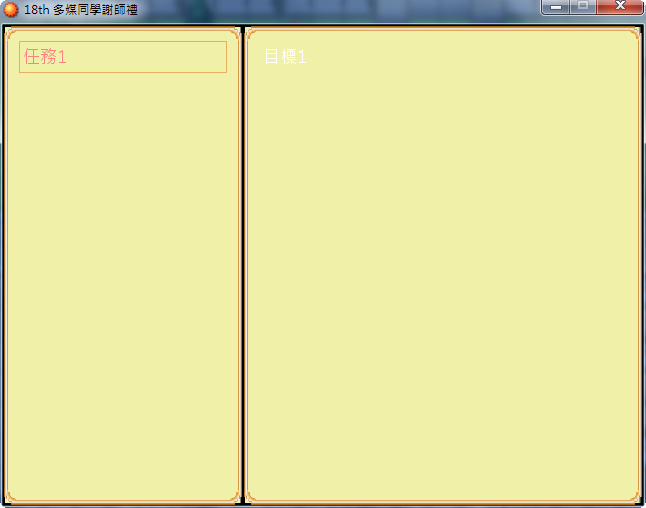
還沒有去找任務目標或只完成目標2
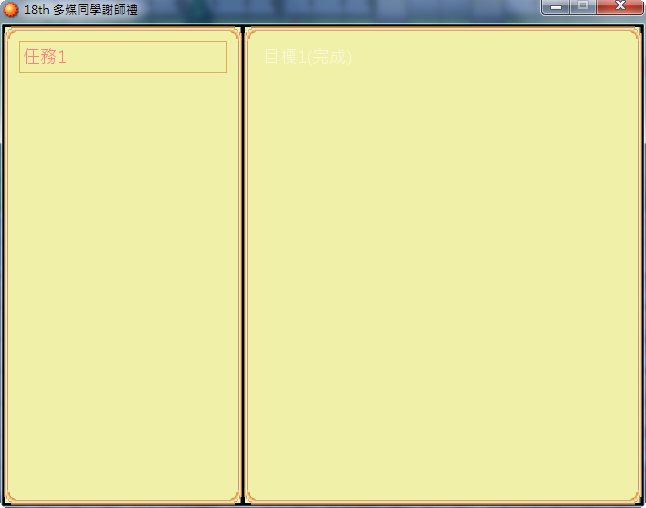
只完成目標1
雖然第二行該出現的"目標2"沒有出現過,但我確實完成"目標2"後,第一個if是有效的,兩個目標都會出現,並顯示完成
任務1完成 截圖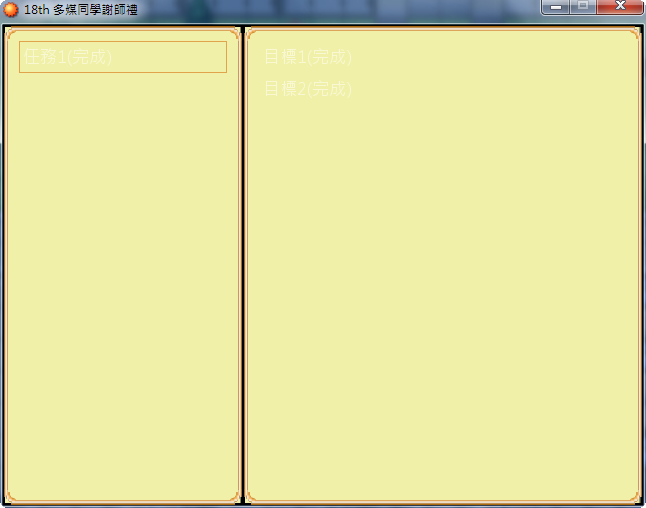
我有推測是不是他是不是只能讀到第二層第一個if,跳掉了第二個。(不過我覺得跳掉很不科學)
不知道我應該怎麼修正才好?是有什麼相關的特性嗎? |
评分
-
查看全部评分
|


 写轮眼
写轮眼
 发表于 2016-6-5 00:20:58

 提升卡
提升卡 沉默号角
沉默号角 喧嚣号角
喧嚣号角 变色卡
变色卡 升龙剑
升龙剑
