|
|
加入我们,或者,欢迎回来。
您需要 登录 才可以下载或查看,没有账号?注册会员
×
本帖最后由 百里_飞柳 于 2017-4-23 10:28 编辑
好吧我知道满大街都是显示立绘的脚本了不用再说了
我只是单纯想体验下发个脚本帖子的快乐(逃)
一句话:非常简易的,和默认显示脸图一般的(显示模式、显示位置等)显示单张立绘图片
注:只有在文本框位于底部时,才会转变为显示立绘
如果想要什么自由控制立绘移入移出、立绘多帧动态抖动特效等,请去找其他脚本,
我真记得日站有几个这种全能的脚本,但是相应地无奈便是,设置起来都十分麻烦。
所以我这次的试水便只是一个十分简易的,让你的默认对话框显示脸图机制变成显示立绘机制,且提供直接的开关操控,应该还算是可能实用的吧
其实我只是想玩下发帖排版
[fold=脸图映射到对应立绘显示][pre lang="ruby"]#==============================================================================
# ■ 脸图映射到对应立绘显示 by老鹰
#------------------------------------------------------------------------------
# 当对应开关开启时,修改脸图为对应的立绘图像显示
# 实现:在 window message 中新建了个精灵来控制显示立绘图像
#==============================================================================
# ● 更新记录
# 2017.4.23 V1.0.1 修复显示立绘的对话框后插入不显示立绘对话框时,会暂留上一次立绘图像的bug
# 2017.3.12 V1.0.0 发布
#==============================================================================
module EAGLE
module Bustup
#--------------------------------------------------------------------------
# ● 存储立绘文件的路径
#--------------------------------------------------------------------------
DIR = "Graphics/Bustups/"
#--------------------------------------------------------------------------
# ● 控制是否显示立绘的开关的序号
# - 当该序号的开关被开启时,脸图会被替换成立绘
# 【注意】
# - 当 显示文字 的位置不为 居下 时,不会显示立绘
# 【格式】
# - 在 显示文字 命令中设置的 脸图文件 和 序号 ,如:face.png,序号0
# 会被索引到 所设定 目录下的 face_0.png 立绘图像
# - 单张脸图文件中的脸图序号排列:
# 0 1 2 3
# 4 5 6 7
#--------------------------------------------------------------------------
S_ID = 1
#--------------------------------------------------------------------------
# ● 控制立绘/脸图默认朝向的开关的序号
# - 由于默认开关关闭,故默认立绘/脸图放在左侧,且文字自动缩进图像宽度
# 【显示立绘时】
# - 1.当该序号的开关被关闭时,立绘显示在左侧,其左下角与屏幕左下角重合
# - 2.当该序号的开关被开启时,立绘显示在右侧,其右下角与屏幕右下角重合
# 【显示脸图时】
# - 1.开关关闭时,为默认脸图显示方式
# - 2.开关开启时,脸图显示到对话框右侧
#--------------------------------------------------------------------------
S_ID_DIR = 2
#--------------------------------------------------------------------------
# ● 控制是否显示左右镜面翻转立绘/脸图的开关的序号
# - 当该序号的开关被开启时,启用镜面翻转
# - 注:脸图的镜面翻转可能会出现极少幅度的掉帧
#--------------------------------------------------------------------------
S_ID_MIRROR = 3
#--------------------------------------------------------------------------
# ● 设置显示立绘时左侧换行缩进的补充值的变量序号
# 【显示立绘时实际的换行缩进值】
# - 立绘显示在左侧: 图像文件宽度 + 该序号变量的值
# - 立绘显示在右侧: 该序号变量的值
#--------------------------------------------------------------------------
V_ID_LINE_POS = 1
end
end
#==============================================================================
# ■ Window_Message
#==============================================================================
class Window_Message < Window_Base
#--------------------------------------------------------------------------
# ● 初始化对象
#--------------------------------------------------------------------------
alias eagle_bustup_init initialize
def initialize
eagle_bustup_init
create_bustup_sprite
end
#--------------------------------------------------------------------------
# ● 释放
#--------------------------------------------------------------------------
alias eagle_bustup_dispose dispose
def dispose
eagle_bustup_dispose
dispose_bustup
end
#--------------------------------------------------------------------------
# ● 更新画面
#--------------------------------------------------------------------------
alias eagle_bustup_update update
def update
eagle_bustup_update
update_bustup
end
#--------------------------------------------------------------------------
# ● 生成显示立绘的精灵
#--------------------------------------------------------------------------
def create_bustup_sprite
@fail = false # 未找到立绘文件而显示脸图的标志
@bustup_sprite = Sprite.new
@bustup_sprite.bitmap = Bitmap.new(1,1)
@bustup_sprite.visible = false
@bustup_sprite.z = z + 1
end
#--------------------------------------------------------------------------
# ● 随着对话框更新立绘
#--------------------------------------------------------------------------
def update_bustup
if self.openness > 0
# 对话框开启的情况
@bustup_sprite.visible = true
@bustup_sprite.opacity += 25 if @bustup_sprite.opacity < 255
elsif self.openness < 255
# 对话框关闭的情况
if @bustup_sprite.opacity > 0
@bustup_sprite.opacity -= 51
else
@bustup_sprite.visible = false
@bustup_sprite.bitmap.dispose if @bustup_sprite.bitmap
end
end
end
#--------------------------------------------------------------------------
# ● 释放立绘精灵
#--------------------------------------------------------------------------
def dispose_bustup
@bustup_sprite.dispose
end
#--------------------------------------------------------------------------
# ● 翻页处理
#--------------------------------------------------------------------------
def new_page(text, pos)
contents.clear
draw_face_or_bustup
reset_font_settings
pos[:x] = new_line_x
pos[:y] = 0
pos[:new_x] = new_line_x
pos[:height] = calc_line_height(text)
clear_flags
end
#--------------------------------------------------------------------------
# ● 绘制立绘or脸图
#--------------------------------------------------------------------------
def draw_face_or_bustup
if(@position == 2 && $game_switches[EAGLE::Bustup::S_ID])
draw_bustup($game_message.face_name, $game_message.face_index)
else
draw_face($game_message.face_name, $game_message.face_index)
end
end
#--------------------------------------------------------------------------
# ● 绘制脸图
#--------------------------------------------------------------------------
def draw_face(face_name, face_index, x = 0, y = 0, enabled = true)
@bustup_sprite.bitmap = Bitmap.new(1,1)
dir = $game_switches[EAGLE::Bustup::S_ID_DIR]
x = dir ? (self.width - standard_padding * 2 - 96) : 0
bitmap = Cache.face(face_name)
rect = Rect.new(face_index % 4 * 96, face_index / 4 * 96, 96, 96)
if $game_switches[EAGLE::Bustup::S_ID_MIRROR]
contents.mirror_blt(x, y, bitmap, rect, enabled ? 255 : translucent_alpha)
else
contents.blt(x, y, bitmap, rect, enabled ? 255 : translucent_alpha)
end
bitmap.dispose
end
#--------------------------------------------------------------------------
# ● 绘制立绘
#--------------------------------------------------------------------------
def draw_bustup(face_name, face_index)
begin
_face_name = face_name + '_' + face_index.to_s
@bustup_sprite.bitmap = Cache.bustup(_face_name)
@bustup_sprite.mirror = $game_switches[EAGLE::Bustup::S_ID_MIRROR]
@bustup_sprite.opacity = 0
dir = $game_switches[EAGLE::Bustup::S_ID_DIR]
@bustup_sprite.x = dir ? self.width - @bustup_sprite.bitmap.width : 0
@bustup_sprite.y = Graphics.height - @bustup_sprite.bitmap.height
@fail = false
rescue
draw_face(face_name, face_index)
@fail = true
end
end
#--------------------------------------------------------------------------
# ● 获取换行位置
#--------------------------------------------------------------------------
def new_line_x
return 0 if $game_message.face_name.empty?
if $game_switches[EAGLE::Bustup::S_ID] && !@fail
# 显示立绘
offset = $game_variables[EAGLE::Bustup::V_ID_LINE_POS]
dir = $game_switches[EAGLE::Bustup::S_ID_DIR]
offset += dir ? 0 : @bustup_sprite.bitmap.width
return offset
else
# 显示脸图
$game_switches[EAGLE::Bustup::S_ID_DIR] ? 0 : 112
end
end
end
module Cache
#--------------------------------------------------------------------------
# ● 获取立绘图像
#--------------------------------------------------------------------------
def self.bustup(filename)
load_bitmap(EAGLE::Bustup::DIR, filename)
end
end
class Bitmap
#--------------------------------------------------------------------------
# ● 镜像复制位图
#--------------------------------------------------------------------------
def mirror_blt(x, y, src_bitmap, src_rect, opacity = 255)
_x = x + src_rect.width - 1
_rect = src_rect.dup
_rect.width = 1
while(_x > x)
self.blt(_x, y, src_bitmap, _rect, opacity)
_x -= 1
_rect.x += 1
end
end
end[/pre][/fold]
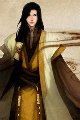
(注:出现的立绘为本人的《实验观察记录》中助手的立绘,由 骸(微博:@骸呀骸呀) 触触绘制)
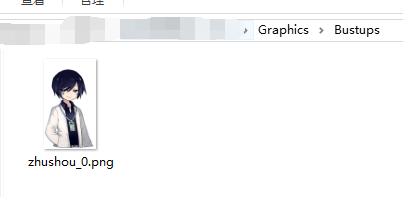
※ 立绘文件放置
注:由于立绘位置计算时只由文件大小决定,故最好图像左右不留空白 |
|
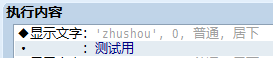
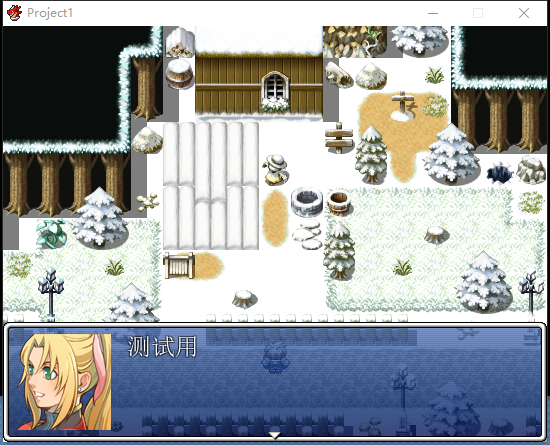
※ 实际事件中设置
注:显示文字指令后即可看到选择的脸图文件名、索引号 |
|
※ 显示立绘开关开启时
注:可利用变量来调整文字左侧缩进值 |
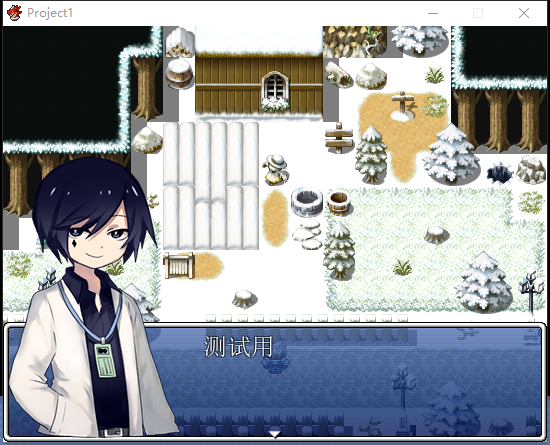
|
| ※ 显示立绘开关开启 + 显示到右侧开关开启 |
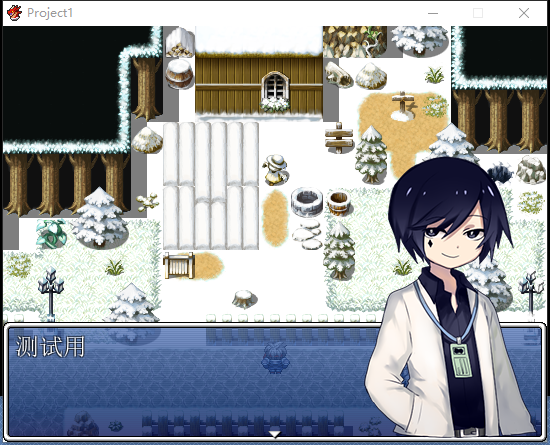
|
| ※ 显示到右侧开关开启 |
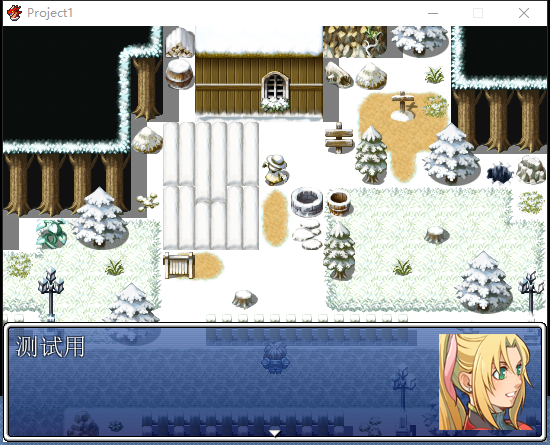
|
| ※ 显示立绘开关开启 + 镜像开关开启 |
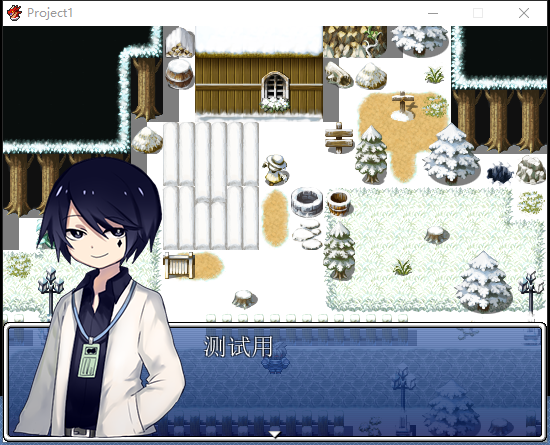
|
| ※ 镜像开关开启 |
|
|
评分
-
查看全部评分
|



 写轮眼
写轮眼


 发表于 2017-3-12 18:21:48


 提升卡
提升卡 沉默号角
沉默号角 喧嚣号角
喧嚣号角 变色卡
变色卡 升龙剑
升龙剑
 正好需要这个作用