| 赞 | 14 |
| VIP | |
| 好人卡 | |
| 积分 | 25 |
| 经验 | |
| 最后登录 | 2024-3-12 |
| 在线时间 | 912 小时 |
- 梦石
- 0
- 星屑
- 2457
- 在线时间
- 912 小时
- 注册时间
- 2014-10-14
- 回帖
- 1155

|
加入我们,或者,欢迎回来。
您需要 登录 才可以下载或查看,没有账号?注册会员
×
本帖最后由 j296196585 于 2017-8-9 01:08 编辑
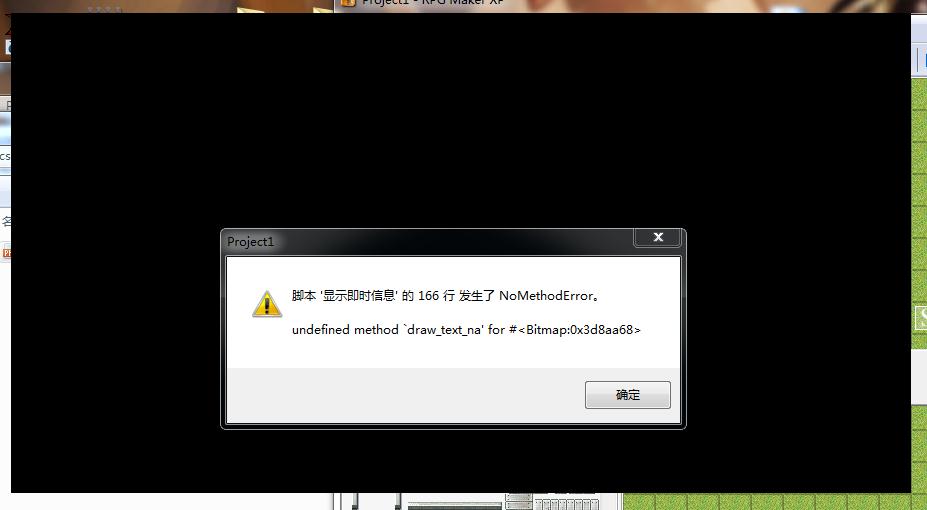
请问 为什么突然就不能用了呢
使用说明
Mess_Text.write("都做出了自己钟爱一生哒游戏啦")
自己脚本不全 。。
[pre lang="ruby"]#==============================================================================
# ■ module Mess_Text
#------------------------------------------------------------------------------
# 在地图上显示文章的模块。
#==============================================================================
module Mess_Text
MAX_LINE = 30 # 最大的行数
MAX_TIME = 1000 # 文字的维持时间
#--------------------------------------------------------------------------
# ● 初始化
#--------------------------------------------------------------------------
def self.ini
@p = Sprite.new
@p.bitmap = Bitmap.new(900,600)
@p.bitmap.blt(0,0,RPG::Cache.picture("即时信息背景"),Rect.new(0,0,900,600))
@p.x = 640
@p.y = 0
@p.z += 999999
@text_sprite = Sprite.new
@text_sprite.bitmap = Bitmap.new(800,480)
@text_sprite.x = 650
@text_sprite.y = 8
@text_sprite.z += 1
@text_sprite.z += 999999
@line = 0
@Time = MAX_TIME
end
#--------------------------------------------------------------------------
# ● 设置可见度
#--------------------------------------------------------------------------
def self.visible=(v)
@text_sprite.visible = v
end
#--------------------------------------------------------------------------
# ● 获取可见度
#--------------------------------------------------------------------------
def self.visible
return @text_sprite.disposed? ? false : @text_sprite.visible
end
#--------------------------------------------------------------------------
# ● 释放
#--------------------------------------------------------------------------
def self.dispose
@text_sprite.dispose
end
#--------------------------------------------------------------------------
# ● 清空
#--------------------------------------------------------------------------
def self.clear
@text_sprite.bitmap.clear
@line = 0
end
#--------------------------------------------------------------------------
# ● 刷新
#--------------------------------------------------------------------------
def self.update
if @time > 0
@time -= 1
end
if @time <= 0 and @line > 0
@text_sprite.bitmap.clear
@line = 0
end
end
=begin
#--------------------------------------------------------------------------
# ● 刷新
#--------------------------------------------------------------------------
def self.write(str)
#$game_system.map_text.push(str)
x = 0
if @line >= MAX_LINE
@text_sprite.bitmap.clear
@line = 0
end
@text_sprite.bitmap.font.size = 16
# 有等待显示的文字的情况下
if str != nil
text = str.dup
# 限制文字处理
begin
last_text = text.clone
text.gsub!(/\\[Vv]\[([0-9]+)\]/) { $game_variables[$1.to_i] }
end until text == last_text
text.gsub!(/\\[Nn]\[([0-9]+)\]/) do
$game_actors[$1.to_i] != nil ? $game_actors[$1.to_i].name : ""
end
# 为了方便、将 "\\\\" 变换为 "\000"
text.gsub!(/\\\\/) { "\000" }
# "\\C" 变为 "\001" に、"\\G" 变为 "\002"
text.gsub!(/\\[Cc]\[([0-9]+)\]/) { "\001[#{$1}]" }
text.gsub!(/\\[Ss]\[([0-9]+)\]/) { "\002[#{$1}]" }
# "\P" 变为 "\003"
text.gsub!(/\\[Pp]/) { "\003" }
# c 获取 1 个字 (如果不能取得文字就循环)
while ((c = text.slice!(/./m)) != nil)
# \\ 的情况下
if c == "\000"
# 还原为本来的文字
c = "\\"
end
# \C[n] 的情况下
if c == "\001"
# 更改文字色
text.sub!(/\[([0-9]+)\]/, "")
color = $1.to_i
if color >= 0 and color <= 7
@text_sprite.bitmap.font.color = text_color(color)
end
# 下面的文字
next
end
# \S[n] 的情况下
if c == "\002"
# 更改字体大小
text.sub!(/\[([0-9]+)\]/, "")
size = $1.to_i
@text_sprite.bitmap.font.size = size
end
# 图片的情况下
if c == "\003"
pic_name = ''
while ((cha = text.slice!(/./m)) != ']')
next if cha == '['
pic_name += cha
end
pic = RPG::Cache.picture(pic_name)
@text_sprite.bitmap.blt(x + 4, @line * @text_sprite.bitmap.font.size, pic, Rect.new(0, 0, pic.width, pic.height))
x += pic.width
next
end
if x > 350-32
# y 加 1
@line += 1
x = 0
# 下面的文字
next
end
# 另起一行文字的情况下
if c == "\n"
# y 加 1
@line += 1
x = 0
# 下面的文字
next
end
# 描绘文字
@text_sprite.bitmap.draw_text(4 + x, @text_sprite.bitmap.font.size * @line, 40, 32, c)
# x 为要描绘文字的加法运算
x += @text_sprite.bitmap.text_size(c).width
end
end
@line += 1
@time = MAX_TIME
end
=end
def self.write(str)
if @line >= MAX_LINE
@text_sprite.bitmap.clear
@line = 0
end
@text_sprite.bitmap.font.name = "宋体"
@text_sprite.bitmap.font.size = 13
@text_sprite.bitmap.font.color = Color.new(230, 200, 155, 255)
cw = @text_sprite.bitmap.text_size(str).width
@text_sprite.bitmap.draw_text_na(2, @line * (@text_sprite.bitmap.font.size + 2) + 5, cw, 20, str)
@line += 1
@time = MAX_TIME
end
#--------------------------------------------------------------------------
# ● 获取文字色
# n : 文字色编号 (0~7)
#--------------------------------------------------------------------------
def self.text_color(n)
case n
when 0
return Color.new(255, 255, 255, 255)
when 1
return Color.new(128, 128, 255, 255)
when 2
return Color.new(255, 128, 128, 255)
when 3
return Color.new(128, 255, 128, 255)
when 4
return Color.new(128, 255, 255, 255)
when 5
return Color.new(255, 128, 255, 255)
when 6
return Color.new(255, 255, 128, 255)
when 7
return Color.new(192, 192, 192, 255)
else
normal_color
end
end
#--------------------------------------------------------------------------
# ● 获取普通文字色
#--------------------------------------------------------------------------
def self.normal_color
return Color.new(255, 255, 255, 255)
end
end[/pre] |
|




 写轮眼
写轮眼
 发表于 2017-8-9 01:01:23

 提升卡
提升卡 沉默号角
沉默号角 喧嚣号角
喧嚣号角 变色卡
变色卡 升龙剑
升龙剑


