| 赞 | 794 |
| VIP | |
| 好人卡 | |
| 积分 | 352 |
| 经验 | |
| 最后登录 | 2026-7-22 |
| 在线时间 | 4171 小时 |
- 梦石
- 0
- 星屑
- 35248
- 在线时间
- 4171 小时
- 注册时间
- 2007-12-15
- 回帖
- 9489
|
加入我们,或者,欢迎回来。
您需要 登录 才可以下载或查看,没有账号?注册会员
×
音乐播放器脚本,很久以前下的
使用方式是建立的道具公用事件
写上我看不懂什么意思的代码
$scene = Scene_music.new
# $scene 为有效的情况下调用 main 过程
while $scene != nil
$scene.main
end
然后使用道具就而可以出现播放菜单,但是
一直有一些bug
比如用了以后存盘,再读盘就会存档损坏什么的
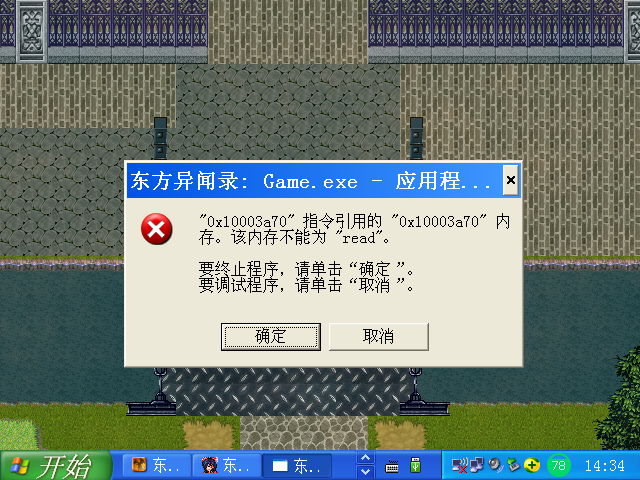
现在更好,直接给我跳这个,用都没法用了。
请问是什么原因,如何修正呢?
[pre lang="ruby"]#==============================================================================
# ■ Scene_Title音乐播放脚本,来自日本网站http://chronicle.onmitsu.jp
# 由isul和link006007帮助修改
#==============================================================================
class Scene_music
#--------------------------------------------------------------------------
# ● メイン処理
#--------------------------------------------------------------------------
def main
# データベースをロード
$data_system = load_data("Data/System.rxdata")
# システムオブジェクトを作成
$game_system = Game_System.new
# ファイルリストを作成
@filelist = Dir::entries("./Audio/BGM/")
@filelist.delete(".")
@filelist.delete("..")
if @filelist == []
# ウィンドウを作成
@filelist_window = Window_Base.new(0,0,360,480)
@filelist_window.contents = Bitmap.new(328,448)
@filelist_window.contents.font.color = Color.new(192, 224, 255, 255)
@filelist_window.contents.draw_text(0,100,328,32,"ファイルが見つかりません",1)
@filelist_window.contents.font.size = 16
@filelist_window.contents.font.color = Color.new(255, 255, 255, 255)
@filelist_window.contents.draw_text(0,150,328,32,"「Audio/BGM」フォルダに",1)
@filelist_window.contents.draw_text(0,182,328,32,"オーディオファイルを入れてください",1)
else
# ウィンドウを作成
@filelist_window = Window_Command.new(360, @filelist)
@filelist_window.height = 480
@filelist_window.x = 0
@filelist_window.y = 0
end
@s_status_window = Window_Sound_State.new(360,0,280,200)
@s_status_window.active = false
@key_help_window = Window_Key_Help.new(360,200,280,280)
@bgm = RPG::AudioFile.new
@bgm.volume = 100
@bgm.pitch = 100
# トランジション実行
Graphics.transition
# メインループ
loop do
# ゲーム画面を更新
Graphics.update
# 入力情報を更新
Input.update
# フレーム更新
update
# 画面が切り替わったらループを中断
if $scene != self
break
end
end
# トランジション準備
Graphics.freeze
# ウィンドウを解放
@filelist_window.dispose
@s_status_window.dispose
@key_help_window.dispose
end
#--------------------------------------------------------------------------
# ● フレーム更新
#--------------------------------------------------------------------------
def update
if @filelist != []
@filelist_window.update
@s_status_window.update
# C ボタンが押された場合
if Input.trigger?(Input::C)
@bgm.name = @filelist[@filelist_window.index]
@s_status_window.set_data(@bgm)
$game_system.bgm_play(@bgm)
end
# B ボタンが押された場合
if Input.trigger?(Input::B)
$game_system.bgm_stop
@filelist_window.dispose
@s_status_window.dispose
@key_help_window.dispose
$scene = Scene_Map.new
$game_map.autoplay
# $scene 为有效的情况下调用 main 过程
while $scene != nil
$scene.main
end
end
# A ボタンが押された場合
if Input.trigger?(Input::A)
if @filelist_window.active
@filelist_window.active = false
@s_status_window.active = true
@key_help_window.refresh_vol
else
@s_status_window.active = false
@filelist_window.active = true
@key_help_window.refresh
end
@bgm.name = @filelist[@filelist_window.index]
@s_status_window.set_data(@bgm)
end
end
end
end
#==============================================================================
# □ Window_Sound_State
#==============================================================================
class Window_Sound_State < Window_Base
#--------------------------------------------------------------------------
# ○ オブジェクト初期化
# x : ウィンドウの X 座標
# y : ウィンドウの Y 座標
# width : ウィンドウの幅
# height : ウィンドウの高さ
#--------------------------------------------------------------------------
def initialize(x, y, width, height)
super(x, y, width, height)
@bgm = RPG::AudioFile.new
self.contents = Bitmap.new(width - 32, height - 32)
end
#--------------------------------------------------------------------------
# ○ リフレッシュ
#--------------------------------------------------------------------------
def refresh
self.contents.clear
self.contents.font.size = 22
if self.active
self.contents.font.color = normal_color
else
self.contents.font.color = Color.new(255, 255, 64, 255)
end
rect = Rect.new(4, 16, self.contents.width - 8, 32)
self.contents.draw_text(rect, @bgm.name)
self.contents.font.color = normal_color
rect = Rect.new(4, 64, self.contents.width - 96, 32)
self.contents.draw_text(rect, "volume", 2)
rect = Rect.new(4, 96, self.contents.width - 96, 32)
self.contents.draw_text(rect, "pitch", 2)
if self.active
self.contents.font.size = 18
self.contents.font.color = system_color
rect = Rect.new(4, 64, self.contents.width - 12, 32)
self.contents.draw_text(rect, "↓ ↑", 2)
rect = Rect.new(4, 96, self.contents.width - 12, 32)
self.contents.draw_text(rect, "← →", 2)
self.contents.font.color = Color.new(255, 255, 64, 255)
end
self.contents.font.size = 22
rect = Rect.new(4, 64, self.contents.width - 32, 32)
self.contents.draw_text(rect, @bgm.volume.to_s, 2)
rect = Rect.new(4, 96, self.contents.width - 32, 32)
self.contents.draw_text(rect, @bgm.pitch.to_s, 2)
end
#--------------------------------------------------------------------------
# ○ サウンドデータをセット
#--------------------------------------------------------------------------
def set_data(bgm)
@bgm = bgm
refresh
end
#--------------------------------------------------------------------------
# ○ フレーム更新
#--------------------------------------------------------------------------
def update
super
# カーソルの移動が可能な状態の場合
if self.active
# 方向ボタンの下が押された場合
if Input.repeat?(Input::DOWN)
if @bgm.volume > 0
@bgm.volume -= 5
set_data(@bgm)
end
end
# 方向ボタンの上が押された場合
if Input.repeat?(Input::UP)
if @bgm.volume < 100
@bgm.volume += 5
set_data(@bgm)
end
end
# 方向ボタンの右が押された場合
if Input.repeat?(Input::RIGHT)
if @bgm.pitch < 150
@bgm.pitch += 5
set_data(@bgm)
end
end
# 方向ボタンの左が押された場合
if Input.repeat?(Input::LEFT)
if @bgm.pitch > 50
@bgm.pitch -= 5
set_data(@bgm)
end
end
end
end
end
#==============================================================================
# □ Window_Key_Help
#==============================================================================
class Window_Key_Help < Window_Base
#--------------------------------------------------------------------------
# ○ オブジェクト初期化
#--------------------------------------------------------------------------
def initialize(x, y, width, height)
super(x, y, width, height)
self.contents = Bitmap.new(width - 32, height - 32)
self.opacity = 0
refresh
end
#--------------------------------------------------------------------------
# ○ リフレッシュ(ファイルリスト)
#--------------------------------------------------------------------------
def refresh
self.contents.clear
self.contents.font.size = 20
rect = Rect.new(4, 0, self.contents.width - 8, 22)
self.contents.draw_text(rect, "- 说明 -",1)
self.contents.font.color = system_color
self.contents.font.size = 18
rect = Rect.new(100, 32, 180, 32)
self.contents.draw_text(rect, "Enter , Space , C")
rect = Rect.new(100, 64, 180, 32)
self.contents.draw_text(rect, "Esc , X , 0")
rect = Rect.new(100, 96, 180, 32)
self.contents.draw_text(rect, "Shift , Z")
rect = Rect.new(100, 128, 180, 32)
self.contents.draw_text(rect, "↑ , ↓")
self.contents.font.color = normal_color
self.contents.font.size = 22
rect = Rect.new(4, 32, 90, 32)
self.contents.draw_text(rect, "播放")
rect = Rect.new(4, 64, 90, 32)
self.contents.draw_text(rect, "停止")
rect = Rect.new(4, 96, 90, 32)
self.contents.draw_text(rect, "音乐选项")
rect = Rect.new(4, 128, 90, 32)
self.contents.draw_text(rect, "选曲")
end
#--------------------------------------------------------------------------
# ○ リフレッシュ(ボリュームコントロール)
#--------------------------------------------------------------------------
def refresh_vol
self.contents.clear
self.contents.font.size = 20
rect = Rect.new(4, 0, self.contents.width - 8, 22)
self.contents.draw_text(rect, "- 说明 -",1)
self.contents.font.color = system_color
self.contents.font.size = 18
rect = Rect.new(100, 32, 180, 32)
self.contents.draw_text(rect, "↑ , ↓")
rect = Rect.new(100, 64, 180, 32)
self.contents.draw_text(rect, "← , →")
rect = Rect.new(100, 96, 180, 32)
self.contents.draw_text(rect, "Enter , Space , C")
rect = Rect.new(100, 128, 180, 32)
self.contents.draw_text(rect, "Esc , X , 0")
rect = Rect.new(100, 160, 180, 32)
self.contents.draw_text(rect, "Shift , Z")
self.contents.font.color = normal_color
self.contents.font.size = 22
rect = Rect.new(4, 32, 90, 32)
self.contents.draw_text(rect, "音量")
rect = Rect.new(4, 64, 90, 32)
self.contents.draw_text(rect, "速度")
rect = Rect.new(4, 96, 90, 32)
self.contents.draw_text(rect, "播放")
rect = Rect.new(4, 128, 90, 32)
self.contents.draw_text(rect, "停止")
rect = Rect.new(4, 160, 90, 32)
self.contents.draw_text(rect, "回主菜单")
end
end
[/pre] |
|



 写轮眼
写轮眼
 发表于 2017-9-9 14:36:25
 提升卡
提升卡 沉默号角
沉默号角 喧嚣号角
喧嚣号角 变色卡
变色卡 升龙剑
升龙剑
