| 赞 | 55 |
| VIP | |
| 好人卡 | |
| 积分 | 74 |
| 经验 | |
| 最后登录 | 2025-5-13 |
| 在线时间 | 948 小时 |
- 梦石
- 0
- 星屑
- 7427
- 在线时间
- 948 小时
- 注册时间
- 2017-9-27
- 回帖
- 566
|
 发表于 2018-4-22 16:31:07
|
显示全部楼层
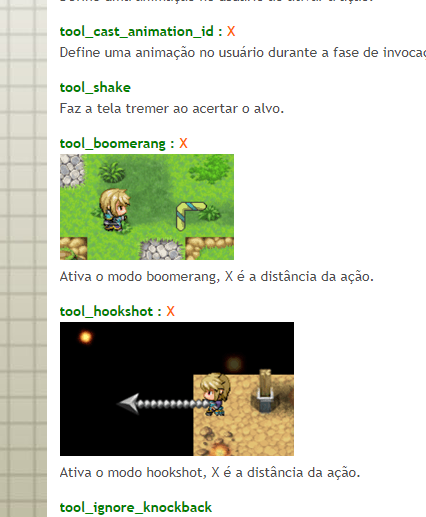
Victor系列插件中有个Throwable Objects,实现的功能相对最完善,除了飞矢、子弹之类的飞行物体之外,还能做出回旋镖之类的效果。
但是这个作者的插件跟YEP中的ActSeqPack插件冲突,如果你的工程严重依赖YEP的动作指令序列的话,就没办法用这个了。
(实际上这个作者的插件中也有实现ActSeqPack类似功能的作品,只不过知名度不高用的人不多)
我用的是这个,实测兼容YEP。
- //=============================================================================
- // MoveAnime2.js
- //=============================================================================
- //Copyright (c) 2016 Trb
- // This software is released under the MIT License.
- // [url]http://opensource.org/licenses/mit-license.php[/url]
- //
- //twitter [url]https://twitter.com/Trb_surasura[/url]
- /*:
- * @plugindesc アニメーションを飛ばすプラグイン 2
- * @author Trb
- *
- * @version 1.0(2.0) 2016 4/22 重大更新,与以前版本相比已是不同的两个插件。
- * 1.1 2016 7/ 4 修复错误的动画起始位置(当动画显示位置为【目标头部】、【目标中心】时)。
- *
- *
- * @help 让动画从使用者飞向目标。
- * 设置方式有两种:在技能的备注区写NoteTag,或者使用脚本命令。
- *
- * ----设置方式1----
- * 在技能的备注区
- * <ani_move: a>
- * <ani_arc: b>
- * <ani_deflection: c>
- * <ani_repeat: d>
- * (a,b,c,d为任意数字)
- * ani_move指令是必需的,其余指令是可选的。
- *
- * <ani_move:a>
- * 飞行动画耗费的帧数。
- * (例如要在10帧内完成飞行就写<ani_move:10>)
- *
- * <ani_arc:b>
- * 设置飞行轨迹弧线高度。
- * (单位是像素,例如<ani_arc:1>表示弧线顶点高度是1像素)
- *
- * <ani_deflection:c>
- * 设置弧线轨迹的波动范围。
- * (<ani_arc:50> <ani_deflection:100> 表示arc的实际取值范围是-50~150)
- * 一般用于多段攻击技能。
- *
- * <ani_repeat:d>
- * 设置重复播放动画的次数。
- * これはYEP_BattleCoreを入れると連続攻撃時にアニメーションが1回しか表示されない問題に
- * 対応するために追加した機能であり、
- * これ単体で使うと本来の再生回数*d回再生されるようになってしまうので注意して下さい。
- *
- *
- * ----设置方法2----
- * 脚本命令:setParams(动画ID,ani_move值,ani_arc值,ani_deflection值)
- *
- * 例如想要ID为5的动画飞行10帧
- * setParams(5,10)
- * (ani_arc值、ani_deflection值若省略,则表示其与备注内容相同)
- *
- * 一经设定,数值可长久保存,除非被新值覆盖。
- * 可以在事件中集中设置。
- * 设置的数值不会保存到存档文件中。
- *
- *
- * ==============================================================
- *
- * ----其他功能----
- *
- * setStartPosition(动画ID,x,y)
- * 可以设置动画的起始位置不是技能的使用者,而是在指定的坐标位置。
- *
- * 例如想要ID为10的动画从坐标(100,200)开始飞行
- * setStartPosition(10,100,200)
- *
- *
- * clearParams(动画ID)
- * 重置指定动画的所有设置。
- *
- *
- * @param use_field
- * @desc 在非战斗时也可以飞行?
- * 不可以・・・false 可以・・・true
- * @default false
- *
- * @param variable
- * @desc 存储setParams参数的变量ID。
- * 0表示不存储。
- * @default 0
- *
- *
- */
- (function() {
- var parameters = PluginManager.parameters('MoveAnime2');
- var UseField = String(parameters['use_field']);
- var Variable = parameters['variable'];
- var params = [];
- var subjectX = 0; //使用者的坐标
- var subjectY = 0;
- //params的内容
- var moveDuration = 0,
- arcRate = 1,
- deflection = 2,
- repeats = 3,
- startX = 4,
- startY = 5;
- //带入设定值
- setParams = function(id, move, arc, def, rep) {
- id = Math.max(id, 0);
- if (!params[id]) params[id] = [];
- params[id][moveDuration] = move || 0;
- params[id][arcRate] = arc || 0;
- params[id][deflection] = def || 0;
- params[id][repeats] = rep || 0;
- };
- setStartPosition = function(id, a, b) {
- if (!params[id]) params[id] = [];
- params[id][startX] = a;
- params[id][startY] = b;
- };
- clearParams = function(id) {
- params[id] = [];
- };
- var SBu = Sprite_Battler.prototype.update;
- Sprite_Battler.prototype.update = function() {
- SBu.call(this);
- //获取当前行动角色的坐标
- if (this._battler != null && this._battler.isActing()) {
- if (!$gameSystem.isSideView() && this._actor) {
- //前视图
- subjectX = Graphics.boxWidth / 2;
- subjectY = Graphics.boxHeight * 0.8;
- } else {
- subjectX = this.x;
- subjectY = this.y;
- }
- }
- };
- var WBsa = Window_BattleLog.prototype.startAction;
- Window_BattleLog.prototype.startAction = function(subject, action, targets) {
- var item = action.item();
- if (Number(item.meta.ani_move) > 0) { //指定在技能备注区设置的move值
- setParams(item.animationId, Number(item.meta.ani_move), Number(item.meta.ani_arc) || 0,
- Number(item.meta.ani_deflection) || 0, Number(item.meta.ani_repeat) || 0);
- }
- WBsa.call(this, subject, action, targets);
- };
- Window_BattleLog.prototype.showNormalAnimation = function(targets, animationId, mirror) {
- var animation = $dataAnimations[animationId];
- if (animation) {
- var delay = this.animationBaseDelay();
- var nextDelay = this.animationNextDelay();
- targets.forEach(function(target) {
- target.startAnimation(animationId, mirror, delay);
- delay += nextDelay;
- var repeat = params[animationId] ? params[animationId][repeats] : 0;
- while (repeat > 0) { //追加动画重复次数
- target.startAnimation(animationId, mirror, delay);
- delay += nextDelay;
- repeat -= 1;
- }
- });
- }
- };
- var SAim = Sprite_Animation.prototype.initMembers;
- Sprite_Animation.prototype.initMembers = function() {
- SAim.call(this);
- this._x2 = 0;
- this._y2 = 0;
- this._duration2 = 0;
- this._arcRate = 0;
- this._arc = 0;
- };
- //指定已设置的动画参数
- var SAs = Sprite_Animation.prototype.setup;
- Sprite_Animation.prototype.setup = function(target, animation, mirror, delay) {
- if (params[animation.id]) {
- var prm = params[animation.id];
- if (prm[startX]) { //若startX已设置,则使用它的值
- var sx = mirror ? Graphics.boxWidth - prm[startX] : prm[startX];
- } else { //否则使用技能使用者的坐标
- sx = $gameParty.inBattle() ? subjectX : $gamePlayer.screenX();
- }
- if (prm[startY]) {
- var sy = prm[startY];
- } else {
- sy = $gameParty.inBattle() ? subjectY : $gamePlayer.screenY();
- }
- if ($gameParty.inBattle()) { //战斗时
- var t = target._battler ? target : target.parent;
- var pos = animation.position; //修正坐标为动画坐标(ver.1.1修正箇所)
- this._x2 = sx - t.x;
- this._y2 = sy - t.y - t.height * (pos - 2) / 2; //
- } else if (UseField == 'true') { //非战斗时
- this._x2 = sx - target.x;
- this._y2 = sy - target.y;
- }
- this._duration2 = prm[moveDuration];
- this._arc = this._duration2;
- this._arcRate = prm[arcRate] + (Math.random() - 0.5) * prm[deflection] * 2;
- }
- SAs.call(this, target, animation, mirror, delay);
- };
- //坐标更新
- var SAup = Sprite_Animation.prototype.updatePosition;
- Sprite_Animation.prototype.updatePosition = function() {
- SAup.call(this);
- //计算更新值
- if (this._duration2 > 0) {
- this._x2 -= this._x2 / this._duration2;
- this._y2 -= this._y2 / this._duration2;
- this.x += this._x2;
- this.y += this._y2 - Math.sin(this._duration2 / this._arc * Math.PI) * this._arcRate;
- this._duration2 -= 1;
- }
- };
- //存档时保存设置
- var SSof = Scene_Save.prototype.onSavefileOk;
- Scene_Save.prototype.onSavefileOk = function() {
- if (Variable > 0) {
- $gameVariables._data[Variable] = params.clone();
- }
- SSof.call(this);
- };
- //读档时读取设置
- var SLol = Scene_Load.prototype.onLoadSuccess;
- Scene_Load.prototype.onLoadSuccess = function() {
- if (Variable > 0) {
- try {
- params = $gameVariables._data[Variable].clone();
- } catch (e) {}
- }
- SLol.call(this);
- };
- })();
|
|

 https://rpg.blue/data/attachment/album/202003/28/021323lltgrsvfytfwuya5.gif




 写轮眼


 提升卡
 沉默号角
 喧嚣号角
 变色卡
 升龙剑