查看: 3270|回复: 8

[已经解决] 怎么修改窗口位置?

[复制链接]
梦石
0
星屑
2578
在线时间
63 小时
注册时间
2016-3-19
回帖
6
发表于 2018-12-3 13:25:49 | 显示全部楼层 |阅读模式

加入我们,或者,欢迎回来。

您需要 登录 才可以下载或查看,没有账号?注册会员

×
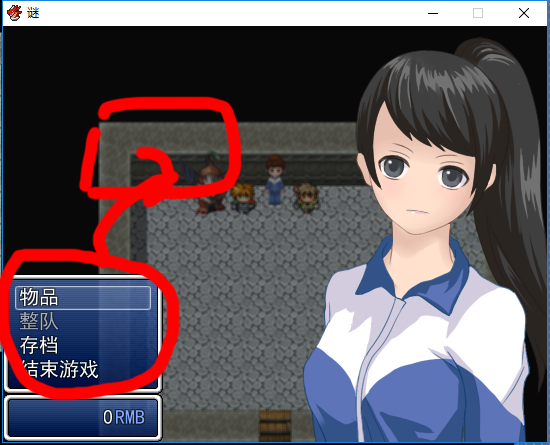
我用了立绘脚本,自己稍微修改了下,但窗口位置不知道在哪改,求指教
QQ截图20181203132012.png
梦石
0
星屑
2578
在线时间
63 小时
注册时间
2016-3-19
回帖
6
 楼主| 发表于 2018-12-3 13:26:24 | 显示全部楼层
本帖最后由 VIPArcher 于 2019-1-8 23:59 编辑

脚本如下
[pre lang="ruby"]=begin
===============================================================================
  【使用说明】
  
  一个简单的解谜游戏菜单,基本都是默认的窗口,
  至于坐标宽度和列数之类的设置,请自行修改。
  
  直接main前insert可用。
  与其他菜单类脚本冲突可能性极大,
  不提供整合和兼容服务。
  
  
  脚本中搜索:
  ·“设置部分”开始设定各个项目
    你可以在这里设定包含字号,立绘等一系列有关的项目。
   
  ·“脚本部分-Scene”查看Scene的修改内容
    这里可以调整一部分窗口的坐标和宽度等。
   
  ·“脚本部分-Window”查看各个窗口的修改内容
    这里只是对某些窗口内容的重新定义。
   
  ·“脚本部分-立绘”为新增的显示立绘脚本
    立绘的窗口,默认设定是滑动和淡入,关闭滑动不淡入。
    你也可以通过在这里设定坐标来达到从下方滑入画面的效果。
  
  
  发现BUG欢迎随时回报。
  
=end


#####################################
# 设置部分
#####################################

module SHIINA
  # 调整字号
  FONT_SIZE = 18
  
  # 是否显示立绘
  IMAGE = true
  
  # 固定的立绘(为false时立绘滚动和淡入效果)
  LOCK_IMAGE = false
  
  # 立绘左右翻转(没错这是窝偷懒用的)(← ←结果偷懒不成。。但是还是留着吧)
  IMAGE_MIRROR = false
  
  # 立绘的滑动速度(立绘不固定时生效)
  IMAGE_SLIDE_SPD = 10
  
  # 立绘文件名(放在picture文件夹内,赋值nil的话将使用菜单当前角色的名字为名的图片)
  IMAGE_NAME = nil
  
  # 是否使用物品分类选择
  ITEM_TYPE = false
  
  # 加入武器和防具分类?(使用物品分类为true时生效)
  WEAPON_ARMOR = false
  
  # 是否可以整队
  FORMATION = false
  
  # 是否显示金钱窗口
  GOLD = true
  
  # 是否显示人物的状态窗口
  STATUS = true
  
  # 状态窗口内容高度(设置为false则返回默认高度)
  STATUS_HEIGHT = 98
  
  # 状态窗口的显示项目,不显示的项目改为false或者nil,
  STATUS_ITEM = [true,   # 脸图
                 true,   # 名字
                 true,   # 等级
                 true,   # 状态图标
                 true,   # 职业
                 true,   # HP
                 true    # MP
                 ]
end
               
# 重置整体字号
Font.default_size = SHIINA::FONT_SIZE

#----------------------设置部分结束----------------------#


#####################################
# 脚本部分-Scene
#####################################
#==============================================================================
# ■ Scene_MenuBase
#==============================================================================

class Scene_MenuBase < Scene_Base
  #--------------------------------------------------------------------------
  # ● 生成帮助窗口
  #--------------------------------------------------------------------------
  def create_help_window
    @help_window = Window_Help.new
    @help_window.visible = false
    @help_window.viewport = @viewport
  end
  #--------------------------------------------------------------------------
  # ● 生成角色窗口
  #--------------------------------------------------------------------------
  def create_actor_window
    @actor_window = Window_MenuActor.new
    @actor_window.set_handler(:ok,     method(:on_actor_ok))
    @actor_window.set_handler(:cancel, method(:on_actor_cancel))
  end
  #--------------------------------------------------------------------------
  # ● 获取当前选中的物品
  #--------------------------------------------------------------------------
  def item
    @item_window.item
  end
  #--------------------------------------------------------------------------
  # ● 获取物品的使用者(直接指向当前角色)
  #--------------------------------------------------------------------------
  def user
    return @actor
#~     $game_party.movable_members.max_by {|member| member.pha }
  end
  #--------------------------------------------------------------------------
  # ● 显示子窗口
  #--------------------------------------------------------------------------
  def show_sub_window(window)
    width_remain = Graphics.width - window.width
    window.x = 0
    @viewport.rect.x = window.width
    @viewport.rect.width = Graphics.width - window.width
    window.show.activate
  end
  #--------------------------------------------------------------------------
  # ● 隐藏子窗口
  #--------------------------------------------------------------------------
  def hide_sub_window(window)
    @viewport.rect.x = @viewport.ox = 0
    @viewport.rect.width = Graphics.width
    window.hide.deactivate
    activate_item_window
  end
  #--------------------------------------------------------------------------
  # ● 角色“确定”
  #--------------------------------------------------------------------------
  def on_actor_ok
    if item_usable?
      use_item
    else
      Sound.play_buzzer
    end
  end
  #--------------------------------------------------------------------------
  # ● 角色“取消”
  #--------------------------------------------------------------------------
  def on_actor_cancel
    hide_sub_window(@actor_window)
  end
  #--------------------------------------------------------------------------
  # ● 确定物品
  #--------------------------------------------------------------------------
  def determine_item
    if item.for_friend?
      show_sub_window(@actor_window)
      @actor_window.select_for_item(item)
    else
      use_item
      activate_item_window
    end
  end
  #--------------------------------------------------------------------------
  # ● 启用物品窗口
  #--------------------------------------------------------------------------
  def activate_item_window
    @item_window.refresh
    @item_window.activate
  end
  #--------------------------------------------------------------------------
  # ● 获取物品的使用目标数组
  #--------------------------------------------------------------------------
  def item_target_actors
    if !item.for_friend?
      []
    elsif item.for_all?
      $game_party.members
    else
      [$game_party.members[@actor_window.index]]
    end
  end
  #--------------------------------------------------------------------------
  # ● 判定物品是否可以使用
  #--------------------------------------------------------------------------
  def item_usable?
    user.usable?(item) && item_effects_valid?
  end
  #--------------------------------------------------------------------------
  # ● 判定物品的效果是否有效
  #--------------------------------------------------------------------------
  def item_effects_valid?
    item_target_actors.any? do |target|
      target.item_test(user, item)
    end
  end
  #--------------------------------------------------------------------------
  # ● 对角色使用物品
  #--------------------------------------------------------------------------
  def use_item_to_actors
    item_target_actors.each do |target|
      item.repeats.times { target.item_apply(user, item) }
    end
  end
  #--------------------------------------------------------------------------
  # ● 使用物品
  #--------------------------------------------------------------------------
  def use_item
    play_se_for_item
    user.use_item(item)
    use_item_to_actors
    check_common_event
    check_gameover
    @actor_window.refresh
  end
  #--------------------------------------------------------------------------
  # ● 公共事件预定判定
  #    如果预约了事件的调用,则切换到地图画面。
  #--------------------------------------------------------------------------
  def check_common_event
    SceneManager.goto(Scene_Map) if $game_temp.common_event_reserved?
  end
end


#==============================================================================
# ■ Scene_Menu
#==============================================================================

class Scene_Menu < Scene_MenuBase
  #--------------------------------------------------------------------------
  # ● 开始处理
  #--------------------------------------------------------------------------
  def start
    super
    create_image
    create_gold_window if SHIINA::GOLD
    create_command_window
    create_status_window if SHIINA::STATUS
    create_help_window
    create_category_window
    create_item_window
    create_actor_window
  end
  
  #--------------------------------------------------------------------------
  # ● 生成立绘
  #--------------------------------------------------------------------------
  def create_image
    @image = Image.new(@actor)
  end
  
  #--------------------------------------------------------------------------
  # ● 生成指令窗口
  #--------------------------------------------------------------------------
  def create_command_window
    @command_window = Window_MenuCommand.new
    @command_window.y = SHIINA::GOLD ?
                        @gold_window.y - @command_window.height :
                        Graphics.height - @command_window.height
   
    @command_window.set_handler(:item,      method(:command_item))
    @command_window.set_handler(:formation, method(:command_formation)) if SHIINA::FORMATION
    @command_window.set_handler(:save,      method(:command_save))
    @command_window.set_handler(:game_end,  method(:command_game_end))
    @command_window.set_handler(:cancel,    method(:return_scene))
    @command_window.set_handler(:pageup,    method(:prev_actor))
    @command_window.set_handler(:pagedown,  method(:next_actor))
    # 立绘塞进指令窗口
    @command_window.image = @image
  end
  #--------------------------------------------------------------------------
  # ● 生成金钱窗口
  #--------------------------------------------------------------------------
  def create_gold_window
    @gold_window = Window_Gold.new
    @gold_window.x = 0
    @gold_window.y = Graphics.height - @gold_window.height
  end
  #--------------------------------------------------------------------------
  # ● 生成状态窗口
  #--------------------------------------------------------------------------
  def create_status_window
    @status_window = Window_MenuStatus.new(@command_window.width, 0)
    @status_window.refresh_nanikore(@actor)
    @status_window.y = Graphics.height - @status_window.height
  end
  #--------------------------------------------------------------------------
  # ● 生成分类窗口
  #--------------------------------------------------------------------------
  def create_category_window
    @category_window = Window_ItemCategory.new
    @category_window.viewport = @viewport
    @category_window.help_window = @help_window
    @category_window.y = @help_window.height
    @category_window.deactivate
    @category_window.visible = false
    @category_window.set_handler(:ok,     method(:on_category_ok))
    @category_window.set_handler(:cancel, method(:on_category_cancel))
  end
  #--------------------------------------------------------------------------
  # ● 生成物品窗口
  #--------------------------------------------------------------------------
  def create_item_window
    item_window_y      = @category_window.y + (SHIINA::ITEM_TYPE ? @category_window.height : 0)
    item_window_height = Graphics.height - item_window_y - (Graphics.height - @command_window.y)
    @item_window = Window_ItemList.new(@category_window.x, item_window_y, @command_window.width, item_window_height)
    @item_window.viewport = @viewport
    @item_window.help_window = @help_window
    @item_window.deactivate
    @item_window.visible = false
    @item_window.set_handler(:ok,     method(:on_item_ok))
    @item_window.set_handler(:cancel, method(:on_item_cancel))
    @category_window.item_window = @item_window
  end
  #--------------------------------------------------------------------------
  # ● 指令“物品”
  #--------------------------------------------------------------------------
  def command_item
    if SHIINA::ITEM_TYPE
      @category_window.activate
      @category_window.visible = true
      @item_window.visible = true
    else
      @item_window.category = :item
      @item_window.activate
      @item_window.select_last
      @item_window.visible = true
      @help_window.visible = @item_window.visible
    end
  end
  #--------------------------------------------------------------------------
  # ● 指令“整队”
  #--------------------------------------------------------------------------
  def command_formation
    return unless SHIINA::STATUS
    @status_window.select_last
    @status_window.activate
    @status_window.set_handler(:ok,     method(:on_formation_ok))
    @status_window.set_handler(:cancel, method(:on_formation_cancel))
  end
  #--------------------------------------------------------------------------
  # ● 指令“存档”
  #--------------------------------------------------------------------------
  def command_save
    SceneManager.call(Scene_Save)
  end
  #--------------------------------------------------------------------------
  # ● 指令“结束游戏”
  #--------------------------------------------------------------------------
  def command_game_end
    SceneManager.call(Scene_End)
  end
  #--------------------------------------------------------------------------
  # ● 整队“确定”
  #--------------------------------------------------------------------------
  def on_formation_ok
    if @status_window.pending_index >= 0
      $game_party.swap_order(@status_window.index,
                             @status_window.pending_index)
      @status_window.pending_index = -1
      @status_window.redraw_item(@status_window.index)
    else
      @status_window.pending_index = @status_window.index
    end
    @status_window.activate
  end
  #--------------------------------------------------------------------------
  # ● 整队“取消”
  #--------------------------------------------------------------------------
  def on_formation_cancel
    if @status_window.pending_index >= 0
      @status_window.pending_index = -1
      @status_window.activate
    else
      @status_window.unselect
      @command_window.activate
    end
  end
  #--------------------------------------------------------------------------
  # ● 分类“确定”
  #--------------------------------------------------------------------------
  def on_category_ok
    @item_window.activate
    @item_window.select_last
    @help_window.visible = @item_window.visible
  end
  #--------------------------------------------------------------------------
  # ● 分类“取消”
  #--------------------------------------------------------------------------
  def on_category_cancel
    @category_window.deactivate
    @category_window.visible = false
    @item_window.visible = false
    @help_window.visible = @item_window.visible
    @command_window.activate
  end
  #--------------------------------------------------------------------------
  # ● 物品“确定”
  #--------------------------------------------------------------------------
  def on_item_ok
    $game_party.last_item.object = item
    determine_item
  end
  #--------------------------------------------------------------------------
  # ● 物品“取消”
  #--------------------------------------------------------------------------
  def on_item_cancel
    @item_window.unselect
    if SHIINA::ITEM_TYPE
      @category_window.activate
      @help_window.visible = false
    else
      @item_window.visible = false
      @help_window.visible = @item_window.visible
      @command_window.activate
    end
  end
  #--------------------------------------------------------------------------
  # ● 播放使用物品声效
  #--------------------------------------------------------------------------
  def play_se_for_item
    Sound.play_use_item
  end
  #--------------------------------------------------------------------------
  # ● 使用物品
  #--------------------------------------------------------------------------
  def use_item
    super
    @item_window.redraw_current_item
  end
  #--------------------------------------------------------------------------
  # ● 添加切换角色定义(刷新立绘和人物信息窗口)
  #--------------------------------------------------------------------------
  # 上一个角色
  alias image_prev_actor prev_actor
  def prev_actor
    image_prev_actor
    @command_window.activate
    @command_window.select_last
    @command_window.refresh_image(@actor)
    @status_window.refresh_nanikore(@actor)
  end
  # 下一个角色
  alias image_next_actor next_actor
  def next_actor
    image_next_actor
    @command_window.activate
    @command_window.select_last
    @command_window.refresh_image(@actor)
    @status_window.refresh_nanikore(@actor)
  end
end

#----------------------Scene部分结束----------------------#


#####################################
# 脚本部分-Window
#####################################
#==============================================================================
# ■ Window_MenuCommand
#------------------------------------------------------------------------------
#  菜单画面中显示指令的窗口
#==============================================================================

class Window_MenuCommand < Window_Command
  # 立绘图像
  attr_accessor  :image
  #--------------------------------------------------------------------------
  # ● 向指令列表添加主要的指令
  #--------------------------------------------------------------------------
  def add_main_commands
    add_command(Vocab::item,   :item,   main_commands_enabled)
  end
  #--------------------------------------------------------------------------
  # ● 添加整队指令
  #--------------------------------------------------------------------------
  def add_formation_command
    return unless SHIINA::FORMATION
    add_command(Vocab::formation, :formation, formation_enabled)
  end
  #--------------------------------------------------------------------------
  # ● 刷新立绘
  #--------------------------------------------------------------------------
  def refresh_image(actor)
    @image.refresh(actor)
  end
  #--------------------------------------------------------------------------
  # ● 更新立绘
  #--------------------------------------------------------------------------
  alias image_update update
  def update
    image_update
    @image.update if @image
  end
  #--------------------------------------------------------------------------
  # ● 释放里立绘
  #--------------------------------------------------------------------------
  alias image_dispose dispose
  def dispose
    image_dispose
    @image.dispose
  end
end

#==============================================================================
# ■ Window_ItemCategory
#------------------------------------------------------------------------------
#  物品画面和商店画面中,显示装备、所持物品等项目列表的窗口。
#==============================================================================

class Window_ItemCategory < Window_HorzCommand
  #--------------------------------------------------------------------------
  # ● 生成指令列表
  #--------------------------------------------------------------------------
  def make_command_list
    add_command(Vocab::item,     :item)
    add_command(Vocab::weapon,   :weapon) if SHIINA::WEAPON_ARMOR
    add_command(Vocab::armor,    :armor) if SHIINA::WEAPON_ARMOR
    add_command(Vocab::key_item, :key_item)
  end
end

#==============================================================================
# ■ Window_ItemList
#------------------------------------------------------------------------------
#  物品画面中,显示持有物品的窗口。
#==============================================================================

class Window_ItemList < Window_Selectable
  #--------------------------------------------------------------------------
  # ● 获取列数
  #--------------------------------------------------------------------------
  def col_max
    return 1
  end
end

#==============================================================================
# ■ Window_MenuStatus
#------------------------------------------------------------------------------
#  菜单画面中,显示队伍成员状态的窗口
#==============================================================================

class Window_MenuStatus < Window_Selectable
  #--------------------------------------------------------------------------
  # ● 获取窗口的宽度
  #--------------------------------------------------------------------------
  def window_width
    Graphics.width - 160
  end
  #--------------------------------------------------------------------------
  # ● 最大数目
  #--------------------------------------------------------------------------
  def item_max
    return 1
  end
  #--------------------------------------------------------------------------
  # ● 获取窗口的高度
  #--------------------------------------------------------------------------
  def window_height
    item_max * item_height + standard_padding * 2
  end
  #--------------------------------------------------------------------------
  # ● 刷新角色(为了位置refresh的结构只能另外写个了呢)
  #--------------------------------------------------------------------------
  def refresh_nanikore(actor)
    @actor = actor
    refresh
  end
  #--------------------------------------------------------------------------
  # ● 刷新(直接描绘当前角色信息)
  #--------------------------------------------------------------------------
  def refresh
    contents.clear
    return unless @actor
    index = 0
    rect = item_rect(index)
    draw_item_background(index)
    draw_actor_face(@actor, rect.x + 1, rect.y + 1) if SHIINA::STATUS_ITEM[0]
    draw_actor_simple_status(@actor, rect.x + 108, rect.y + line_height / 2)
  end
  #--------------------------------------------------------------------------
  # ● 绘制项目(没用了呢)
  #--------------------------------------------------------------------------
  def draw_item(index); ; end
  #--------------------------------------------------------------------------
  # ● 绘制简单的状态
  #--------------------------------------------------------------------------
  def draw_actor_simple_status(actor, x, y)
    draw_actor_name(actor, x, y)                       if SHIINA::STATUS_ITEM[1]
    draw_actor_level(actor, x, y + line_height * 1)    if SHIINA::STATUS_ITEM[2]
    draw_actor_icons(actor, x, y + line_height * 2)    if SHIINA::STATUS_ITEM[3]
    draw_actor_class(actor, x + 120, y)                if SHIINA::STATUS_ITEM[4]
    draw_actor_hp(actor, x + 120, y + line_height * 1) if SHIINA::STATUS_ITEM[5]
    draw_actor_mp(actor, x + 120, y + line_height * 2) if SHIINA::STATUS_ITEM[6]
  end
  #--------------------------------------------------------------------------
  # ● 获取项目的高度
  #--------------------------------------------------------------------------
  def item_height
    if SHIINA::STATUS_HEIGHT
      return SHIINA::STATUS_HEIGHT
    else
      return (Graphics.height - standard_padding * 2) / 4
    end
  end
end

#==============================================================================
# ■ Window_MenuActor
#------------------------------------------------------------------------------
#  显示物品使用或技能使用的选择目标的窗口
#==============================================================================

class Window_MenuActor < Window_MenuStatus
  #--------------------------------------------------------------------------
  # ● 刷新(父上已经走上奇怪的路线,只能从爷爷那边搬过来→_→)
  #--------------------------------------------------------------------------
  def refresh
    contents.clear
    draw_all_items
  end
  #--------------------------------------------------------------------------
  # ● 获取项目数
  #--------------------------------------------------------------------------
  def item_max
    $game_party.members.size
  end
  #--------------------------------------------------------------------------
  # ● 绘制项目
  #--------------------------------------------------------------------------
  def draw_item(index)
    actor = $game_party.members[index]
    enabled = $game_party.battle_members.include?(actor)
    rect = item_rect(index)
    draw_item_background(index)
    draw_actor_face(actor, rect.x + 1, rect.y + 1) if SHIINA::STATUS_ITEM[0]
    draw_actor_simple_status(actor, rect.x + 108, rect.y + line_height / 2)
  end
end
#----------------------Window部分结束----------------------#


#####################################
# 脚本部分-立绘
#####################################

class Image < Sprite
  
  def initialize(actor, x=get_x, y=Graphics.height)
    super(nil)
    @actor = actor
    self.mirror = SHIINA::IMAGE_MIRROR
    self.bitmap = Cache.picture(get_pic_name)
    self.oy = self.height
    self.opacity = 0 unless SHIINA::LOCK_IMAGE
    self.x = x
    self.y = y
    set
    setn(0)
  end
  
  def get_pic_name
    actor_name = @actor ? @actor.name : $game_party.members[0].name
    return SHIINA::IMAGE_NAME.nil? ? actor_name : SHIINA::IMAGE_NAME
  end
  
  def refresh(actor)
    @actor = actor
    self.bitmap = Cache.picture(get_pic_name)
    return if SHIINA::LOCK_IMAGE
    self.opacity = 0
    set(get_x)
    setn(0)
  end
  
  def get_x
    SHIINA::LOCK_IMAGE ? 0 : 32 * 4
  end
  
  def spd
    SHIINA::IMAGE_SLIDE_SPD
  end
  
  def set(x=self.x, y=self.y)
    self.x = x
    self.y = y
    @nx = x
    @ny = y
  end
  
  def setn(x=self.x, y=self.y)
    @nx = x
    @ny = y
  end
  
  def update
    super
    return if SHIINA::LOCK_IMAGE
    update_slide
  end
  
  def slide_over?
    return (self.x==@nx && self.y=@ny)
  end
  
  def update_slide
    self.opacity += 20 unless SHIINA::LOCK_IMAGE
    return if slide_over?
    if self.x + spd < @nx
      self.x += spd
    elsif self.x - spd > @nx
      self.x -= spd
    elsif self.x != @nx
      self.x = @nx
    end
    if self.y + spd < @ny
      self.y += spd
    elsif self.y - spd > @ny
      self.y -= spd
    elsif self.y != @ny
      self.y = @ny
    end
  end
  
end

#----------------------立绘部分结束----------------------#[/pre]
回复

使用道具 举报

梦石
10
星屑
39550
在线时间
1919 小时
注册时间
2010-11-14
回帖
3214

R考场第七期纪念奖

发表于 2018-12-3 13:26:49 | 显示全部楼层
麻烦贴一下脚本。
一般窗口的位置是初始化的时候就有了
用头画头像,用脚写脚本
回复

使用道具 举报

梦石
0
星屑
2578
在线时间
63 小时
注册时间
2016-3-19
回帖
6
 楼主| 发表于 2018-12-3 13:28:29 | 显示全部楼层
KB.Driver 发表于 2018-12-3 13:26
麻烦贴一下脚本。
一般窗口的位置是初始化的时候就有了

贴了,麻烦大佬了

点评

要改到怎样的位置?  发表于 2018-12-3 13:50
回复

使用道具 举报

梦石
0
星屑
2578
在线时间
63 小时
注册时间
2016-3-19
回帖
6
 楼主| 发表于 2018-12-3 13:29:15 | 显示全部楼层

  1. ===============================================================================
  2.   【使用说明】
  3.   
  4.   一个简单的解谜游戏菜单,基本都是默认的窗口,
  5.   至于坐标宽度和列数之类的设置,请自行修改。
  6.   
  7.   直接main前insert可用。
  8.   与其他菜单类脚本冲突可能性极大,
  9.   不提供整合和兼容服务。
  10.   
  11.   
  12.   脚本中搜索:
  13.   ·“设置部分”开始设定各个项目
  14.     你可以在这里设定包含字号,立绘等一系列有关的项目。
  15.    
  16.   ·“脚本部分-Scene”查看Scene的修改内容
  17.     这里可以调整一部分窗口的坐标和宽度等。
  18.    
  19.   ·“脚本部分-Window”查看各个窗口的修改内容
  20.     这里只是对某些窗口内容的重新定义。
  21.    
  22.   ·“脚本部分-立绘”为新增的显示立绘脚本
  23.     立绘的窗口,默认设定是滑动和淡入,关闭滑动不淡入。
  24.     你也可以通过在这里设定坐标来达到从下方滑入画面的效果。
  25.   
  26.   
  27.   发现BUG欢迎随时回报。
  28.   
  29. =end


  30. #####################################
  31. # 设置部分
  32. #####################################

  33. module SHIINA
  34.   # 调整字号
  35.   FONT_SIZE = 18
  36.   
  37.   # 是否显示立绘
  38.   IMAGE = true
  39.   
  40.   # 固定的立绘(为false时立绘滚动和淡入效果)
  41.   LOCK_IMAGE = false
  42.   
  43.   # 立绘左右翻转(没错这是窝偷懒用的)(← ←结果偷懒不成。。但是还是留着吧)
  44.   IMAGE_MIRROR = false
  45.   
  46.   # 立绘的滑动速度(立绘不固定时生效)
  47.   IMAGE_SLIDE_SPD = 10
  48.   
  49.   # 立绘文件名(放在picture文件夹内,赋值nil的话将使用菜单当前角色的名字为名的图片)
  50.   IMAGE_NAME = nil
  51.   
  52.   # 是否使用物品分类选择
  53.   ITEM_TYPE = false
  54.   
  55.   # 加入武器和防具分类?(使用物品分类为true时生效)
  56.   WEAPON_ARMOR = false
  57.   
  58.   # 是否可以整队
  59.   FORMATION = false
  60.   
  61.   # 是否显示金钱窗口
  62.   GOLD = true
  63.   
  64.   # 是否显示人物的状态窗口
  65.   STATUS = true
  66.   
  67.   # 状态窗口内容高度(设置为false则返回默认高度)
  68.   STATUS_HEIGHT = 98
  69.   
  70.   # 状态窗口的显示项目,不显示的项目改为false或者nil,
  71.   STATUS_ITEM = [true,   # 脸图
  72.                  true,   # 名字
  73.                  true,   # 等级
  74.                  true,   # 状态图标
  75.                  true,   # 职业
  76.                  true,   # HP
  77.                  true    # MP
  78.                  ]
  79. end
  80.                
  81. # 重置整体字号
  82. Font.default_size = SHIINA::FONT_SIZE

  83. #----------------------设置部分结束----------------------#


  84. #####################################
  85. # 脚本部分-Scene
  86. #####################################
  87. #==============================================================================
  88. # ■ Scene_MenuBase
  89. #==============================================================================

  90. class Scene_MenuBase < Scene_Base
  91.   #--------------------------------------------------------------------------
  92.   # ● 生成帮助窗口
  93.   #--------------------------------------------------------------------------
  94.   def create_help_window
  95.     @help_window = Window_Help.new
  96.     @help_window.visible = false
  97.     @help_window.viewport = @viewport
  98.   end
  99.   #--------------------------------------------------------------------------
  100.   # ● 生成角色窗口
  101.   #--------------------------------------------------------------------------
  102.   def create_actor_window
  103.     @actor_window = Window_MenuActor.new
  104.     @actor_window.set_handler(:ok,     method(:on_actor_ok))
  105.     @actor_window.set_handler(:cancel, method(:on_actor_cancel))
  106.   end
  107.   #--------------------------------------------------------------------------
  108.   # ● 获取当前选中的物品
  109.   #--------------------------------------------------------------------------
  110.   def item
  111.     @item_window.item
  112.   end
  113.   #--------------------------------------------------------------------------
  114.   # ● 获取物品的使用者(直接指向当前角色)
  115.   #--------------------------------------------------------------------------
  116.   def user
  117.     return @actor
  118. #~     $game_party.movable_members.max_by {|member| member.pha }
  119.   end
  120.   #--------------------------------------------------------------------------
  121.   # ● 显示子窗口
  122.   #--------------------------------------------------------------------------
  123.   def show_sub_window(window)
  124.     width_remain = Graphics.width - window.width
  125.     window.x = 0
  126.     @viewport.rect.x = window.width
  127.     @viewport.rect.width = Graphics.width - window.width
  128.     window.show.activate
  129.   end
  130.   #--------------------------------------------------------------------------
  131.   # ● 隐藏子窗口
  132.   #--------------------------------------------------------------------------
  133.   def hide_sub_window(window)
  134.     @viewport.rect.x = @viewport.ox = 0
  135.     @viewport.rect.width = Graphics.width
  136.     window.hide.deactivate
  137.     activate_item_window
  138.   end
  139.   #--------------------------------------------------------------------------
  140.   # ● 角色“确定”
  141.   #--------------------------------------------------------------------------
  142.   def on_actor_ok
  143.     if item_usable?
  144.       use_item
  145.     else
  146.       Sound.play_buzzer
  147.     end
  148.   end
  149.   #--------------------------------------------------------------------------
  150.   # ● 角色“取消”
  151.   #--------------------------------------------------------------------------
  152.   def on_actor_cancel
  153.     hide_sub_window(@actor_window)
  154.   end
  155.   #--------------------------------------------------------------------------
  156.   # ● 确定物品
  157.   #--------------------------------------------------------------------------
  158.   def determine_item
  159.     if item.for_friend?
  160.       show_sub_window(@actor_window)
  161.       @actor_window.select_for_item(item)
  162.     else
  163.       use_item
  164.       activate_item_window
  165.     end
  166.   end
  167.   #--------------------------------------------------------------------------
  168.   # ● 启用物品窗口
  169.   #--------------------------------------------------------------------------
  170.   def activate_item_window
  171.     @item_window.refresh
  172.     @item_window.activate
  173.   end
  174.   #--------------------------------------------------------------------------
  175.   # ● 获取物品的使用目标数组
  176.   #--------------------------------------------------------------------------
  177.   def item_target_actors
  178.     if !item.for_friend?
  179.       []
  180.     elsif item.for_all?
  181.       $game_party.members
  182.     else
  183.       [$game_party.members[@actor_window.index]]
  184.     end
  185.   end
  186.   #--------------------------------------------------------------------------
  187.   # ● 判定物品是否可以使用
  188.   #--------------------------------------------------------------------------
  189.   def item_usable?
  190.     user.usable?(item) && item_effects_valid?
  191.   end
  192.   #--------------------------------------------------------------------------
  193.   # ● 判定物品的效果是否有效
  194.   #--------------------------------------------------------------------------
  195.   def item_effects_valid?
  196.     item_target_actors.any? do |target|
  197.       target.item_test(user, item)
  198.     end
  199.   end
  200.   #--------------------------------------------------------------------------
  201.   # ● 对角色使用物品
  202.   #--------------------------------------------------------------------------
  203.   def use_item_to_actors
  204.     item_target_actors.each do |target|
  205.       item.repeats.times { target.item_apply(user, item) }
  206.     end
  207.   end
  208.   #--------------------------------------------------------------------------
  209.   # ● 使用物品
  210.   #--------------------------------------------------------------------------
  211.   def use_item
  212.     play_se_for_item
  213.     user.use_item(item)
  214.     use_item_to_actors
  215.     check_common_event
  216.     check_gameover
  217.     @actor_window.refresh
  218.   end
  219.   #--------------------------------------------------------------------------
  220.   # ● 公共事件预定判定
  221.   #    如果预约了事件的调用,则切换到地图画面。
  222.   #--------------------------------------------------------------------------
  223.   def check_common_event
  224.     SceneManager.goto(Scene_Map) if $game_temp.common_event_reserved?
  225.   end
  226. end


  227. #==============================================================================
  228. # ■ Scene_Menu
  229. #==============================================================================

  230. class Scene_Menu < Scene_MenuBase
  231.   #--------------------------------------------------------------------------
  232.   # ● 开始处理
  233.   #--------------------------------------------------------------------------
  234.   def start
  235.     super
  236.     create_image
  237.     create_gold_window if SHIINA::GOLD
  238.     create_command_window
  239.     create_status_window if SHIINA::STATUS
  240.     create_help_window
  241.     create_category_window
  242.     create_item_window
  243.     create_actor_window
  244.   end
  245.   
  246.   #--------------------------------------------------------------------------
  247.   # ● 生成立绘
  248.   #--------------------------------------------------------------------------
  249.   def create_image
  250.     @image = Image.new(@actor)
  251.   end
  252.   
  253.   #--------------------------------------------------------------------------
  254.   # ● 生成指令窗口
  255.   #--------------------------------------------------------------------------
  256.   def create_command_window
  257.     @command_window = Window_MenuCommand.new
  258.     @command_window.y = SHIINA::GOLD ?
  259.                         @gold_window.y - @command_window.height :
  260.                         Graphics.height - @command_window.height
  261.    
  262.     @command_window.set_handler(:item,      method(:command_item))
  263.     @command_window.set_handler(:formation, method(:command_formation)) if SHIINA::FORMATION
  264.     @command_window.set_handler(:save,      method(:command_save))
  265.     @command_window.set_handler(:game_end,  method(:command_game_end))
  266.     @command_window.set_handler(:cancel,    method(:return_scene))
  267.     @command_window.set_handler(:pageup,    method(:prev_actor))
  268.     @command_window.set_handler(:pagedown,  method(:next_actor))
  269.     # 立绘塞进指令窗口
  270.     @command_window.image = @image
  271.   end
  272.   #--------------------------------------------------------------------------
  273.   # ● 生成金钱窗口
  274.   #--------------------------------------------------------------------------
  275.   def create_gold_window
  276.     @gold_window = Window_Gold.new
  277.     @gold_window.x = 0
  278.     @gold_window.y = Graphics.height - @gold_window.height
  279.   end
  280.   #--------------------------------------------------------------------------
  281.   # ● 生成状态窗口
  282.   #--------------------------------------------------------------------------
  283.   def create_status_window
  284.     @status_window = Window_MenuStatus.new(@command_window.width, 0)
  285.     @status_window.refresh_nanikore(@actor)
  286.     @status_window.y = Graphics.height - @status_window.height
  287.   end
  288.   #--------------------------------------------------------------------------
  289.   # ● 生成分类窗口
  290.   #--------------------------------------------------------------------------
  291.   def create_category_window
  292.     @category_window = Window_ItemCategory.new
  293.     @category_window.viewport = @viewport
  294.     @category_window.help_window = @help_window
  295.     @category_window.y = @help_window.height
  296.     @category_window.deactivate
  297.     @category_window.visible = false
  298.     @category_window.set_handler(:ok,     method(:on_category_ok))
  299.     @category_window.set_handler(:cancel, method(:on_category_cancel))
  300.   end
  301.   #--------------------------------------------------------------------------
  302.   # ● 生成物品窗口
  303.   #--------------------------------------------------------------------------
  304.   def create_item_window
  305.     item_window_y      = @category_window.y + (SHIINA::ITEM_TYPE ? @category_window.height : 0)
  306.     item_window_height = Graphics.height - item_window_y - (Graphics.height - @command_window.y)
  307.     @item_window = Window_ItemList.new(@category_window.x, item_window_y, @command_window.width, item_window_height)
  308.     @item_window.viewport = @viewport
  309.     @item_window.help_window = @help_window
  310.     @item_window.deactivate
  311.     @item_window.visible = false
  312.     @item_window.set_handler(:ok,     method(:on_item_ok))
  313.     @item_window.set_handler(:cancel, method(:on_item_cancel))
  314.     @category_window.item_window = @item_window
  315.   end
  316.   #--------------------------------------------------------------------------
  317.   # ● 指令“物品”
  318.   #--------------------------------------------------------------------------
  319.   def command_item
  320.     if SHIINA::ITEM_TYPE
  321.       @category_window.activate
  322.       @category_window.visible = true
  323.       @item_window.visible = true
  324.     else
  325.       @item_window.category = :item
  326.       @item_window.activate
  327.       @item_window.select_last
  328.       @item_window.visible = true
  329.       @help_window.visible = @item_window.visible
  330.     end
  331.   end
  332.   #--------------------------------------------------------------------------
  333.   # ● 指令“整队”
  334.   #--------------------------------------------------------------------------
  335.   def command_formation
  336.     return unless SHIINA::STATUS
  337.     @status_window.select_last
  338.     @status_window.activate
  339.     @status_window.set_handler(:ok,     method(:on_formation_ok))
  340.     @status_window.set_handler(:cancel, method(:on_formation_cancel))
  341.   end
  342.   #--------------------------------------------------------------------------
  343.   # ● 指令“存档”
  344.   #--------------------------------------------------------------------------
  345.   def command_save
  346.     SceneManager.call(Scene_Save)
  347.   end
  348.   #--------------------------------------------------------------------------
  349.   # ● 指令“结束游戏”
  350.   #--------------------------------------------------------------------------
  351.   def command_game_end
  352.     SceneManager.call(Scene_End)
  353.   end
  354.   #--------------------------------------------------------------------------
  355.   # ● 整队“确定”
  356.   #--------------------------------------------------------------------------
  357.   def on_formation_ok
  358.     if @status_window.pending_index >= 0
  359.       $game_party.swap_order(@status_window.index,
  360.                              @status_window.pending_index)
  361.       @status_window.pending_index = -1
  362.       @status_window.redraw_item(@status_window.index)
  363.     else
  364.       @status_window.pending_index = @status_window.index
  365.     end
  366.     @status_window.activate
  367.   end
  368.   #--------------------------------------------------------------------------
  369.   # ● 整队“取消”
  370.   #--------------------------------------------------------------------------
  371.   def on_formation_cancel
  372.     if @status_window.pending_index >= 0
  373.       @status_window.pending_index = -1
  374.       @status_window.activate
  375.     else
  376.       @status_window.unselect
  377.       @command_window.activate
  378.     end
  379.   end
  380.   #--------------------------------------------------------------------------
  381.   # ● 分类“确定”
  382.   #--------------------------------------------------------------------------
  383.   def on_category_ok
  384.     @item_window.activate
  385.     @item_window.select_last
  386.     @help_window.visible = @item_window.visible
  387.   end
  388.   #--------------------------------------------------------------------------
  389.   # ● 分类“取消”
  390.   #--------------------------------------------------------------------------
  391.   def on_category_cancel
  392.     @category_window.deactivate
  393.     @category_window.visible = false
  394.     @item_window.visible = false
  395.     @help_window.visible = @item_window.visible
  396.     @command_window.activate
  397.   end
  398.   #--------------------------------------------------------------------------
  399.   # ● 物品“确定”
  400.   #--------------------------------------------------------------------------
  401.   def on_item_ok
  402.     $game_party.last_item.object = item
  403.     determine_item
  404.   end
  405.   #--------------------------------------------------------------------------
  406.   # ● 物品“取消”
  407.   #--------------------------------------------------------------------------
  408.   def on_item_cancel
  409.     @item_window.unselect
  410.     if SHIINA::ITEM_TYPE
  411.       @category_window.activate
  412.       @help_window.visible = false
  413.     else
  414.       @item_window.visible = false
  415.       @help_window.visible = @item_window.visible
  416.       @command_window.activate
  417.     end
  418.   end
  419.   #--------------------------------------------------------------------------
  420.   # ● 播放使用物品声效
  421.   #--------------------------------------------------------------------------
  422.   def play_se_for_item
  423.     Sound.play_use_item
  424.   end
  425.   #--------------------------------------------------------------------------
  426.   # ● 使用物品
  427.   #--------------------------------------------------------------------------
  428.   def use_item
  429.     super
  430.     @item_window.redraw_current_item
  431.   end
  432.   #--------------------------------------------------------------------------
  433.   # ● 添加切换角色定义(刷新立绘和人物信息窗口)
  434.   #--------------------------------------------------------------------------
  435.   # 上一个角色
  436.   alias image_prev_actor prev_actor
  437.   def prev_actor
  438.     image_prev_actor
  439.     @command_window.activate
  440.     @command_window.select_last
  441.     @command_window.refresh_image(@actor)
  442.     @status_window.refresh_nanikore(@actor)
  443.   end
  444.   # 下一个角色
  445.   alias image_next_actor next_actor
  446.   def next_actor
  447.     image_next_actor
  448.     @command_window.activate
  449.     @command_window.select_last
  450.     @command_window.refresh_image(@actor)
  451.     @status_window.refresh_nanikore(@actor)
  452.   end
  453. end

  454. #----------------------Scene部分结束----------------------#


  455. #####################################
  456. # 脚本部分-Window
  457. #####################################
  458. #==============================================================================
  459. # ■ Window_MenuCommand
  460. #------------------------------------------------------------------------------
  461. #  菜单画面中显示指令的窗口
  462. #==============================================================================

  463. class Window_MenuCommand < Window_Command
  464.   # 立绘图像
  465.   attr_accessor  :image
  466.   #--------------------------------------------------------------------------
  467.   # ● 向指令列表添加主要的指令
  468.   #--------------------------------------------------------------------------
  469.   def add_main_commands
  470.     add_command(Vocab::item,   :item,   main_commands_enabled)
  471.   end
  472.   #--------------------------------------------------------------------------
  473.   # ● 添加整队指令
  474.   #--------------------------------------------------------------------------
  475.   def add_formation_command
  476.     return unless SHIINA::FORMATION
  477.     add_command(Vocab::formation, :formation, formation_enabled)
  478.   end
  479.   #--------------------------------------------------------------------------
  480.   # ● 刷新立绘
  481.   #--------------------------------------------------------------------------
  482.   def refresh_image(actor)
  483.     @image.refresh(actor)
  484.   end
  485.   #--------------------------------------------------------------------------
  486.   # ● 更新立绘
  487.   #--------------------------------------------------------------------------
  488.   alias image_update update
  489.   def update
  490.     image_update
  491.     @image.update if @image
  492.   end
  493.   #--------------------------------------------------------------------------
  494.   # ● 释放里立绘
  495.   #--------------------------------------------------------------------------
  496.   alias image_dispose dispose
  497.   def dispose
  498.     image_dispose
  499.     @image.dispose
  500.   end
  501. end

  502. #==============================================================================
  503. # ■ Window_ItemCategory
  504. #------------------------------------------------------------------------------
  505. #  物品画面和商店画面中,显示装备、所持物品等项目列表的窗口。
  506. #==============================================================================

  507. class Window_ItemCategory < Window_HorzCommand
  508.   #--------------------------------------------------------------------------
  509.   # ● 生成指令列表
  510.   #--------------------------------------------------------------------------
  511.   def make_command_list
  512.     add_command(Vocab::item,     :item)
  513.     add_command(Vocab::weapon,   :weapon) if SHIINA::WEAPON_ARMOR
  514.     add_command(Vocab::armor,    :armor) if SHIINA::WEAPON_ARMOR
  515.     add_command(Vocab::key_item, :key_item)
  516.   end
  517. end

  518. #==============================================================================
  519. # ■ Window_ItemList
  520. #------------------------------------------------------------------------------
  521. #  物品画面中,显示持有物品的窗口。
  522. #==============================================================================

  523. class Window_ItemList < Window_Selectable
  524.   #--------------------------------------------------------------------------
  525.   # ● 获取列数
  526.   #--------------------------------------------------------------------------
  527.   def col_max
  528.     return 1
  529.   end
  530. end

  531. #==============================================================================
  532. # ■ Window_MenuStatus
  533. #------------------------------------------------------------------------------
  534. #  菜单画面中,显示队伍成员状态的窗口
  535. #==============================================================================

  536. class Window_MenuStatus < Window_Selectable
  537.   #--------------------------------------------------------------------------
  538.   # ● 获取窗口的宽度
  539.   #--------------------------------------------------------------------------
  540.   def window_width
  541.     Graphics.width - 160
  542.   end
  543.   #--------------------------------------------------------------------------
  544.   # ● 最大数目
  545.   #--------------------------------------------------------------------------
  546.   def item_max
  547.     return 1
  548.   end
  549.   #--------------------------------------------------------------------------
  550.   # ● 获取窗口的高度
  551.   #--------------------------------------------------------------------------
  552.   def window_height
  553.     item_max * item_height + standard_padding * 2
  554.   end
  555.   #--------------------------------------------------------------------------
  556.   # ● 刷新角色(为了位置refresh的结构只能另外写个了呢)
  557.   #--------------------------------------------------------------------------
  558.   def refresh_nanikore(actor)
  559.     @actor = actor
  560.     refresh
  561.   end
  562.   #--------------------------------------------------------------------------
  563.   # ● 刷新(直接描绘当前角色信息)
  564.   #--------------------------------------------------------------------------
  565.   def refresh
  566.     contents.clear
  567.     return unless @actor
  568.     index = 0
  569.     rect = item_rect(index)
  570.     draw_item_background(index)
  571.     draw_actor_face(@actor, rect.x + 1, rect.y + 1) if SHIINA::STATUS_ITEM[0]
  572.     draw_actor_simple_status(@actor, rect.x + 108, rect.y + line_height / 2)
  573.   end
  574.   #--------------------------------------------------------------------------
  575.   # ● 绘制项目(没用了呢)
  576.   #--------------------------------------------------------------------------
  577.   def draw_item(index); ; end
  578.   #--------------------------------------------------------------------------
  579.   # ● 绘制简单的状态
  580.   #--------------------------------------------------------------------------
  581.   def draw_actor_simple_status(actor, x, y)
  582.     draw_actor_name(actor, x, y)                       if SHIINA::STATUS_ITEM[1]
  583.     draw_actor_level(actor, x, y + line_height * 1)    if SHIINA::STATUS_ITEM[2]
  584.     draw_actor_icons(actor, x, y + line_height * 2)    if SHIINA::STATUS_ITEM[3]
  585.     draw_actor_class(actor, x + 120, y)                if SHIINA::STATUS_ITEM[4]
  586.     draw_actor_hp(actor, x + 120, y + line_height * 1) if SHIINA::STATUS_ITEM[5]
  587.     draw_actor_mp(actor, x + 120, y + line_height * 2) if SHIINA::STATUS_ITEM[6]
  588.   end
  589.   #--------------------------------------------------------------------------
  590.   # ● 获取项目的高度
  591.   #--------------------------------------------------------------------------
  592.   def item_height
  593.     if SHIINA::STATUS_HEIGHT
  594.       return SHIINA::STATUS_HEIGHT
  595.     else
  596.       return (Graphics.height - standard_padding * 2) / 4
  597.     end
  598.   end
  599. end

  600. #==============================================================================
  601. # ■ Window_MenuActor
  602. #------------------------------------------------------------------------------
  603. #  显示物品使用或技能使用的选择目标的窗口
  604. #==============================================================================

  605. class Window_MenuActor < Window_MenuStatus
  606.   #--------------------------------------------------------------------------
  607.   # ● 刷新(父上已经走上奇怪的路线,只能从爷爷那边搬过来→_→)
  608.   #--------------------------------------------------------------------------
  609.   def refresh
  610.     contents.clear
  611.     draw_all_items
  612.   end
  613.   #--------------------------------------------------------------------------
  614.   # ● 获取项目数
  615.   #--------------------------------------------------------------------------
  616.   def item_max
  617.     $game_party.members.size
  618.   end
  619.   #--------------------------------------------------------------------------
  620.   # ● 绘制项目
  621.   #--------------------------------------------------------------------------
  622.   def draw_item(index)
  623.     actor = $game_party.members[index]
  624.     enabled = $game_party.battle_members.include?(actor)
  625.     rect = item_rect(index)
  626.     draw_item_background(index)
  627.     draw_actor_face(actor, rect.x + 1, rect.y + 1) if SHIINA::STATUS_ITEM[0]
  628.     draw_actor_simple_status(actor, rect.x + 108, rect.y + line_height / 2)
  629.   end
  630. end
  631. #----------------------Window部分结束----------------------#


  632. #####################################
  633. # 脚本部分-立绘
  634. #####################################

  635. class Image < Sprite
  636.   
  637.   def initialize(actor, x=get_x, y=Graphics.height)
  638.     super(nil)
  639.     @actor = actor
  640.     self.mirror = SHIINA::IMAGE_MIRROR
  641.     self.bitmap = Cache.picture(get_pic_name)
  642.     self.oy = self.height
  643.     self.opacity = 0 unless SHIINA::LOCK_IMAGE
  644.     self.x = x
  645.     self.y = y
  646.     set
  647.     setn(0)
  648.   end
  649.   
  650.   def get_pic_name
  651.     actor_name = @actor ? @actor.name : $game_party.members[0].name
  652.     return SHIINA::IMAGE_NAME.nil? ? actor_name : SHIINA::IMAGE_NAME
  653.   end
  654.   
  655.   def refresh(actor)
  656.     @actor = actor
  657.     self.bitmap = Cache.picture(get_pic_name)
  658.     return if SHIINA::LOCK_IMAGE
  659.     self.opacity = 0
  660.     set(get_x)
  661.     setn(0)
  662.   end
  663.   
  664.   def get_x
  665.     SHIINA::LOCK_IMAGE ? 0 : 32 * 4
  666.   end
  667.   
  668.   def spd
  669.     SHIINA::IMAGE_SLIDE_SPD
  670.   end
  671.   
  672.   def set(x=self.x, y=self.y)
  673.     self.x = x
  674.     self.y = y
  675.     @nx = x
  676.     @ny = y
  677.   end
  678.   
  679.   def setn(x=self.x, y=self.y)
  680.     @nx = x
  681.     @ny = y
  682.   end
  683.   
  684.   def update
  685.     super
  686.     return if SHIINA::LOCK_IMAGE
  687.     update_slide
  688.   end
  689.   
  690.   def slide_over?
  691.     return (self.x==@nx && self.y=@ny)
  692.   end
  693.   
  694.   def update_slide
  695.     self.opacity += 20 unless SHIINA::LOCK_IMAGE
  696.     return if slide_over?
  697.     if self.x + spd < @nx
  698.       self.x += spd
  699.     elsif self.x - spd > @nx
  700.       self.x -= spd
  701.     elsif self.x != @nx
  702.       self.x = @nx
  703.     end
  704.     if self.y + spd < @ny
  705.       self.y += spd
  706.     elsif self.y - spd > @ny
  707.       self.y -= spd
  708.     elsif self.y != @ny
  709.       self.y = @ny
  710.     end
  711.   end
  712.   
  713. end

  714. #----------------------立绘部分结束----------------------#
复制代码
回复

使用道具 举报

梦石
10
星屑
39550
在线时间
1919 小时
注册时间
2010-11-14
回帖
3214

R考场第七期纪念奖

发表于 2018-12-3 14:14:57 | 显示全部楼层
本帖最后由 KB.Driver 于 2018-12-3 14:17 编辑

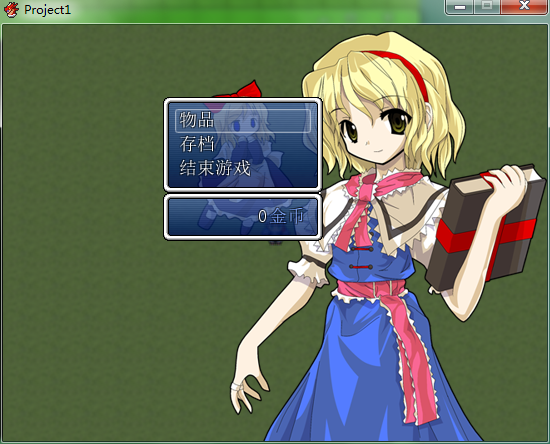
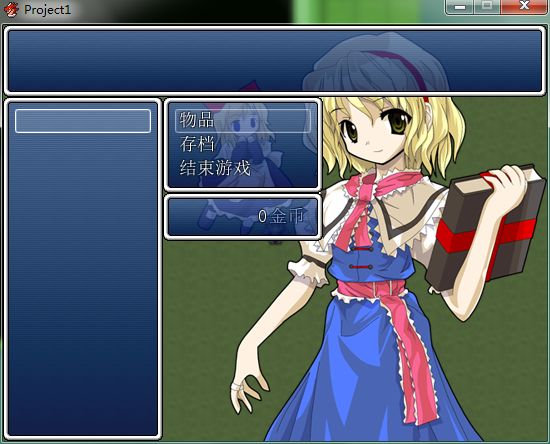
改了一下窗口位置。

QQ截图20181203141422.png

QQ截图20181203141354.png

把这段脚本复制了插入就行
[pre lang="ruby"]class Scene_Menu < Scene_MenuBase  #--------------------------------------------------------------------------
  # ● 生成指令窗口
  #--------------------------------------------------------------------------
  def create_command_window
    @command_window = Window_MenuCommand.new
    @command_window.y = SHIINA::GOLD ?
                        @gold_window.y - @command_window.height :
                        Graphics.height - @command_window.height
    #==================================================================改动
    @command_window.y -= 0
    @command_window.x = @command_window.width
    #==================================================================
    @command_window.set_handler(:item,      method(:command_item))
    @command_window.set_handler(:formation, method(:command_formation)) if SHIINA::FORMATION
    @command_window.set_handler(:save,      method(:command_save))
    @command_window.set_handler(:game_end,  method(:command_game_end))
    @command_window.set_handler(:cancel,    method(:return_scene))
    @command_window.set_handler(:pageup,    method(:prev_actor))
    @command_window.set_handler(:pagedown,  method(:next_actor))
    # 立绘塞进指令窗口
    @command_window.image = @image
  end
  #--------------------------------------------------------------------------
  # ● 生成金钱窗口
  #--------------------------------------------------------------------------
  def create_gold_window
    @gold_window = Window_Gold.new
    @gold_window.x = 0
    @gold_window.y = Graphics.height - @gold_window.height
    #==================================================================改动
    @gold_window.y -= 200
    @gold_window.x = 160
    #==================================================================
  end
  #--------------------------------------------------------------------------
  # ● 生成物品窗口
  #--------------------------------------------------------------------------
  def create_item_window
    item_window_y      = @category_window.y + (SHIINA::ITEM_TYPE ? @category_window.height : 0)
    item_window_height = Graphics.height - item_window_y - (Graphics.height - @command_window.y)
    #==================================================================改动
    item_window_height = Graphics.height - item_window_y
    #==================================================================
    @item_window = Window_ItemList.new(@category_window.x, item_window_y, @command_window.width, item_window_height)
    @item_window.viewport = @viewport
    @item_window.help_window = @help_window
    @item_window.deactivate
    @item_window.visible = false
    @item_window.set_handler(:ok,     method(:on_item_ok))
    @item_window.set_handler(:cancel, method(:on_item_cancel))
    @category_window.item_window = @item_window
  end
end[/pre]

点评

有用就好w  发表于 2018-12-3 19:39
谢谢大佬  发表于 2018-12-3 19:28

评分

参与人数 2星屑 +20 赞 +1 收起 理由
VIPArcher + 20 认可答案
864942354 + 1 认可答案

查看全部评分

用头画头像,用脚写脚本
回复 1 0

使用道具 举报

您需要登录后才可以回帖 登录 | 注册会员

本版积分规则

Powered by Discuz! X5.0 © 2001-2026 Discuz! Team.

在本版发帖返回顶部