| 赞 | 0 |
| VIP | |
| 好人卡 | |
| 积分 | 1 |
| 经验 | |
| 最后登录 | 2019-12-26 |
| 在线时间 | 10 小时 |
- 梦石
- 0
- 星屑
- 75
- 在线时间
- 10 小时
- 注册时间
- 2019-12-2
- 回帖
- 0
|
加入我们,或者,欢迎回来。
您需要 登录 才可以下载或查看,没有账号?注册会员
×
本帖最后由 guoxiaomi 于 2019-12-22 02:57 编辑
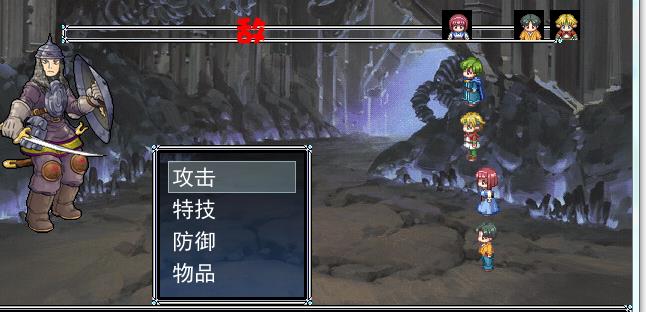
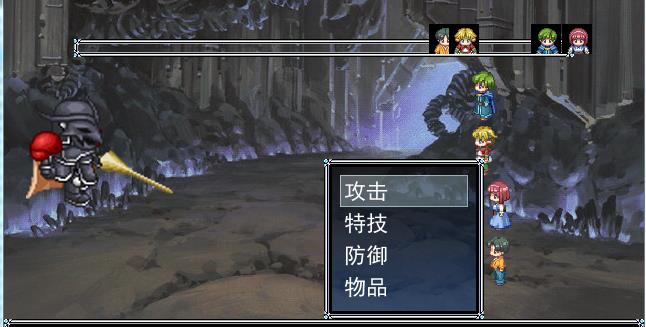
如图,本人使用RMXP制作了一个游戏,采用了半即时制的脚本,但在战斗测试时发现,CP槽上敌人的图标没有显示,跟其他队伍战斗时,有点敌人图标又有显示了。是参数设置出了问题还是脚本出了问题?
以下为脚本部分
[pre lang="ruby"] # ○ ガードフラグ
#--------------------------------------------------------------------------
def guarding=(n)
@guarding = n
end
#--------------------------------------------------------------------------
# ● 防御中判定 [再定義]
#--------------------------------------------------------------------------
def guarding?
return @guarding
end
end
#==============================================================================
# --- アクター「コマンド入力可能判定」:CPがないとコマンドしない ---
#==============================================================================
module XRXS_CP_INPUTABLE
def inputable?
return (self.cp_full? and super)
end
end
class Game_Actor < Game_Battler
include XRXS_CP_INPUTABLE
end
#==============================================================================
# --- エネミー「行動可能判定」:CPがないとコマンドしない ---
#==============================================================================
module XRXS_CP_MOVABLE
def movable?
return (self.cp_full? and super)
end
end
class Game_Enemy < Game_Battler
include XRXS_CP_MOVABLE
end
#==============================================================================
# --- 戦闘時 CPカウント ---
#==============================================================================
module XRXS_CP_Battle
#--------------------------------------------------------------------------
# ○ パーティ全員の CP を初期設定
#--------------------------------------------------------------------------
def cp_preset_party
for actor in $game_party.actors
actor.cp_preset
end
end
#--------------------------------------------------------------------------
# ○ トループ全員の CP を初期設定
#--------------------------------------------------------------------------
def cp_preset_troop
for enemy in $game_troop.enemies
enemy.cp_preset
end
end
#--------------------------------------------------------------------------
# ○ バトラー全員の CP をカウントアップ
#--------------------------------------------------------------------------
def cp_update
for battler in $game_party.actors + $game_troop.enemies
battler.cp_update
end
end
end
class Scene_Battle
include XRXS_CP_Battle
end
#==============================================================================
# ■ Scene_Battle
#==============================================================================
class Scene_Battle
#--------------------------------------------------------------------------
# ● メイン処理
#--------------------------------------------------------------------------
alias xrxs65_main main
def main
# エクストラスプライトの初期化
@extra_sprites = [] if @extra_sprites == nil
# CP の初期化
cp_preset_party
# CP メーターの作成
@cp_meters = CP_Meters.new
# CP メーターをエクストラスプライトへ登録
@extra_sprites.push(@cp_meters)
# 呼び戻す
xrxs65_main
# メーターの解放
@cp_meters.dispose
end
#--------------------------------------------------------------------------
# ● プレバトルフェーズ開始
#--------------------------------------------------------------------------
alias xrxs65_start_phase1 start_phase1
def start_phase1
# 呼び戻す
xrxs65_start_phase1
# CP の初期化
cp_preset_troop
# CP メーターの更新
@cp_meters.refresh
# インデックスを計算
@cp_escape_actor_command_index = @actor_command_window.height/32 - 1
# アクターコマンドウィンドウに追加
end
#--------------------------------------------------------------------------
# ● パーティコマンドフェーズ開始
#--------------------------------------------------------------------------
alias xrxs65_start_phase2 start_phase2
def start_phase2
# 呼び戻す
xrxs65_start_phase2
# パーティコマンドウィンドウを無効化
@party_command_window.active = false
@party_command_window.visible = false
# 強制的にフェイズ 2 を保持
@phase = 2
@cp_meters.refresh
# ただし、既に行動可能者が存在する場合は 3 へ
start_phase3 if anybody_movable?
end
#--------------------------------------------------------------------------
# ○ CP制での ターンのカウント
#--------------------------------------------------------------------------
def cp_turn_count
$game_temp.battle_turn += 1
# バトルイベントの全ページを検索
for index in 0...$data_troops[@troop_id].pages.size
# このページのスパンが [ターン] の場合
if $data_troops[@troop_id].pages[index].span == 1
# 実行済みフラグをクリア
$game_temp.battle_event_flags[index] = false
end
end
end
#--------------------------------------------------------------------------
# ● フレーム更新 (パーティコマンドフェーズ)
#--------------------------------------------------------------------------
alias xrxs65_update_phase2 update_phase2
def update_phase2
# パーティコマンドウィンドウのインデックスを無効化
@party_command_window.index = -1
# 呼び戻す
xrxs65_update_phase2
# 例外補正
@turn_count_time = 1 if @turn_count_time == nil
# ターンのカウント
if @turn_count_time > 0
@turn_count_time -= 1
if @turn_count_time == 0
cp_turn_count
@turn_count_time = XRXS65::CPT if XRXS65::TC == nil
end
end
# CP のフレーム更新
cp_update
@cp_meters.refresh
# フル CP のバトラーが存在する場合、ターン開始
start_phase3 if anybody_movable?
end
#--------------------------------------------------------------------------
# ○ フル CP バトラーが存在するか?
#--------------------------------------------------------------------------
def anybody_movable?
for battler in $game_party.actors + $game_troop.enemies
return true if battler.cp_full?
end
return false
end
#--------------------------------------------------------------------------
# ● アクターコマンドウィンドウのセットアップ
#--------------------------------------------------------------------------
alias xrxs65_phase3_setup_command_window phase3_setup_command_window
def phase3_setup_command_window
# 効果音の再生
Audio.se_play(XRXS65::COMMAND_UP_SE) rescue nil
# 呼び戻す
xrxs65_phase3_setup_command_window
end
#--------------------------------------------------------------------------
# ● フレーム更新 (アクターコマンドフェーズ : 基本コマンド)
#--------------------------------------------------------------------------
alias xrxs_bsp1_update_phase3_basic_command update_phase3_basic_command
def update_phase3_basic_command
# C ボタンが押された場合
if Input.trigger?(Input::C)
# アクターコマンドウィンドウのカーソル位置で分岐
case @actor_command_window.index
when @cp_escape_actor_command_index # 逃げる
if $game_temp.battle_can_escape
# 決定 SE を演奏
$game_system.se_play($data_system.decision_se)
# アクションを設定
@active_battler.current_action.kind = 0
@active_battler.current_action.basic = 4
# 次のアクターのコマンド入力へ
phase3_next_actor
else
# ブザー SE を演奏
$game_system.se_play($data_system.buzzer_se)
end
return
end
end
# 呼び戻す
xrxs_bsp1_update_phase3_basic_command
end
#--------------------------------------------------------------------------
# ● メインフェーズ開始
#--------------------------------------------------------------------------
alias xrxs65_start_phase4 start_phase4
def start_phase4
# ターン数を引くことによって擬似的にカウントに変化を起こさせない
$game_temp.battle_turn -= 1
# フラグを退避
save_flags = $game_temp.battle_event_flags.dup
# 呼び戻す
xrxs65_start_phase4
# フラグを復旧
$game_temp.battle_event_flags = save_flags
end
#--------------------------------------------------------------------------
# ● 行動順序作成
#--------------------------------------------------------------------------
alias xrxs65_make_action_orders make_action_orders
def make_action_orders
# 呼び戻す
xrxs65_make_action_orders
# CPが不足している場合は @action_battlers から除外する
for battler in @action_battlers.dup
@action_battlers.delete(battler) unless battler.cp_full?
end
end
#--------------------------------------------------------------------------
# ● フレーム更新 (メインフェーズ ステップ 2 : アクション開始)
#--------------------------------------------------------------------------
alias xrxs65_update_phase4_step2 update_phase4_step2
def update_phase4_step2
# ガードの解除
@active_battler.guarding = false
# CPの消費
@active_battler.cp = 0
# CP メーターの更新
@cp_meters.refresh
# 呼び戻す
xrxs65_update_phase4_step2
# 例外補正
return if @active_battler == nil
# ターンコントローラ
if @active_battler.is_a?(Game_Enemy) and @active_battler.index == XRXS65::TC
cp_turn_count
end
end
#--------------------------------------------------------------------------
# ● 基本アクション 結果作成
#--------------------------------------------------------------------------
alias xrxs65_make_basic_action_result make_basic_action_result
def make_basic_action_result
# 呼び戻す
xrxs65_make_basic_action_result
# 防御の場合
if @active_battler.current_action.basic == 1
@active_battler.guarding = true
return
end
# パーティの逃亡の場合
if @active_battler.current_action.basic == 4
# 逃走可能ではない場合
if $game_temp.battle_can_escape == false
# ブザー SE を演奏
$game_system.se_play($data_system.buzzer_se)
return
end
# パーティ全員の CP をクリア
for actor in $game_party.actors
actor.cp = 0
end
# CP メーターの更新
@cp_meters.refresh
# 逃走処理
update_phase2_escape
return
end
end
#--------------------------------------------------------------------------
# ● フレーム更新 (メインフェーズ ステップ 5 : ダメージ表示)
#--------------------------------------------------------------------------
alias xrxs65_update_phase4_step5 update_phase4_step5
def update_phase4_step5
# 呼び戻す
xrxs65_update_phase4_step5
# CP メーターの更新
@cp_meters.refresh
end
end
#==============================================================================
# --- CP メーターをまとめて管理するクラス、表示関係はすべてココ ---
#==============================================================================
class CP_Meters
#--------------------------------------------------------------------------
# ○ オブジェクト初期化
#--------------------------------------------------------------------------
def initialize
# メーター群の生成
@meters = []
for i in 0...$game_party.actors.size
make_meter(i)
end
refresh
end
#--------------------------------------------------------------------------
# ○ リフレッシュ
#--------------------------------------------------------------------------
def refresh
# 戦闘メンバー数の変更を判別
for i in @meters.size...$game_party.actors.size
make_meter(i)
end
for i in $game_party.actors.size...@meters.size
@meters.dispose
@meters = nil
end
@meters.compact!
# 表示更新
for i in 0...$game_party.actors.size
actor = $game_party.actors
@meters.line = actor.cp_linetype
@meters.amount = actor.cp_lineamount
end
end
#--------------------------------------------------------------------------
# ○ メーターひとつの生成
#--------------------------------------------------------------------------
def make_meter(i)
# スキンの取得
skin = RPG::Cache.windowskin(XRXS65::SKIN)
#
space = 640 / XRXS65::MAX
case XRXS65::ALIGN
when 0
actor_x = i * space + 4
when 1
actor_x = (space * ((XRXS65::MAX - $game_party.actors.size)/2.0 + i)).floor
when 2
actor_x = (i + XRXS65::MAX - $game_party.actors.size) * space + 4
end
meter = MeterSprite.new(skin, XRXS65::LINE_HEIGHT)
meter.x = actor_x + XRXS65::X_OFFSET - skin.width
meter.y = XRXS65::Y_OFFSET
@meters = meter
end
#--------------------------------------------------------------------------
# ○ 可視状態
#--------------------------------------------------------------------------
def visible=(b)
@meters.each{|sprite| sprite.visible = b }
end
#--------------------------------------------------------------------------
# ○ 解放
#--------------------------------------------------------------------------
def dispose
@meters.each{|sprite| sprite.dispose }
end
end
#==============================================================================
# --- XRXS. レクタンギュラーメーター表示・極 ---
#==============================================================================
class MeterSprite < Sprite
#--------------------------------------------------------------------------
# ○ オブジェクト初期化
#--------------------------------------------------------------------------
def initialize(skin, line_height)
@skin = skin
@width = @skin.width
@height = line_height
@line = 1
@amount = 0
@base_sprite = Sprite.new
@base_sprite.bitmap = @skin
@base_sprite.src_rect.set(0, 0, @width, @height)
@base_sprite.z = 601
super()
self.z = @base_sprite.z + 1
self.bitmap = @skin
self.line = 1
end
#--------------------------------------------------------------------------
# ○ 値の設定
#--------------------------------------------------------------------------
def line=(n)
@line = n
refresh
end
def amount=(n)
@amount = n
refresh
end
def refresh
self.src_rect.set(0, @line * @height, @width * @amount / 100, @height)
end
#--------------------------------------------------------------------------
# ○ 座標の設定
#--------------------------------------------------------------------------
def x=(n)
super
@base_sprite.x = n
end
def y=(n)
super
@base_sprite.y = n
end
#--------------------------------------------------------------------------
# ○ 解放
#--------------------------------------------------------------------------
def dispose
@base_sprite.dispose
super
end
end
#=end
上面和下面是两个脚本!!!
#=begin
# ▼▲▼ XRXS65A. CP制御ターンシステム「シンセ・ゲージ」 ▼▲▼ built201202
# by 桜雅 在土
#==============================================================================
# □ カスタマイズポイント
#==============================================================================
class XRXS65A
#--------------------------------------------------------------------------
# 「アイコン設定」
#--------------------------------------------------------------------------
DEFAULT = "敌人" # ディフォルトアイコン
# アイコンハッシュ 記述方式 : アクターID=>アイコン名
ICONS = {
1=>"A001号角色",
2=>"A002号角色",
3=>"A003号角色",
4=>"A004号角色",
5=>"A005号角色",
6=>"A006号角色",
7=>"A007号角色",
8=>"A008号角色",
10=>"",
11=>"",
12=>"",
}
# アイコンハッシュE 記述方式 : エネミーID=>アイコン名
ICONE = {
1=>"A009敌人",
2=>"A009敌人",
3=>"A009敌人",
5=>"A009敌人",
6=>"A009敌人",
7=>"A009敌人",
8=>"A009敌人",
9=>"A009敌人",
10=>"A009敌人",
}
#--------------------------------------------------------------------------
# 「シンセ・ゲージ」
#--------------------------------------------------------------------------
SKIN = "CP_Bar" # スキン
X = 70 # X 座標
Y = 40 # Y 座標
end
#==============================================================================
# --- CP メーターをまとめて管理するクラス、表示関係はすべてココ --- [再定義]
#==============================================================================
class CP_Meters
#--------------------------------------------------------------------------
# ○ オブジェクト初期化
#--------------------------------------------------------------------------
def initialize
# シンセゲージの生成
@base = Sprite.new
@base.bitmap = RPG::Cache.windowskin(XRXS65A::SKIN).dup
@base.x = XRXS65A::X
@base.y = XRXS65A::Y
@base.z = XRXS65A::X
@width = @base.bitmap.width
@height = @base.bitmap.height
@icon_set = []
refresh
end
#--------------------------------------------------------------------------
# ○ リフレッシュ
#--------------------------------------------------------------------------
def refresh
# 生成すべきバトラーの取得
need_initializes = []
for battler in $game_party.actors + $game_troop.enemies
exist = false
# need_initializes.push(battler) unless exist
for set in @icon_set
exist |= (set[1] == battler)
end
need_initializes.push(battler) unless exist
end
for battler in need_initializes
iconname = nil
if battler.is_a?(Game_Actor)
iconname = XRXS65A::ICONS[battler.id]
else
iconname = XRXS65A::ICONE[battler.id]
end
if iconname == nil
iconname = XRXS65A::DEFAULT
end
sprite = Sprite.new
sprite.bitmap = RPG::Cache.icon(iconname).dup
sprite.y = XRXS65A::Y + @height / 2 - 24
@icon_set.push([sprite, battler])
end
# 更新
for set in @icon_set
set[0].x = XRXS65A::X + @width * set[1].cp / set[1].max_cp - 12
set[0].z = set[0].x
# set[0].visible = false if set[1].dead? or !set[1].exist?
if set[1].dead? or !set[1].exist?
set[0].visible = false
else
set[0].visible = true
end
end
end
#--------------------------------------------------------------------------
# ○ 可視状態
#--------------------------------------------------------------------------
def visible=(b)
@base.visible = b
@icon_set.each{|set| set[0].visible = b }
end
#--------------------------------------------------------------------------
# ○ 解放
#--------------------------------------------------------------------------
def dispose
@base.dispose
@icon_set.each{|set| set[0].dispose }
end
end
#=end[/pre]
|
-
-
|



 写轮眼
写轮眼
 发表于 2019-12-12 21:34:58
 提升卡
提升卡 沉默号角
沉默号角 喧嚣号角
喧嚣号角 变色卡
变色卡 升龙剑
升龙剑