| 赞 | 1 |
| VIP | |
| 好人卡 | |
| 积分 | 7 |
| 经验 | |
| 最后登录 | 2026-7-8 |
| 在线时间 | 67 小时 |
- 梦石
- 0
- 星屑
- 650
- 在线时间
- 67 小时
- 注册时间
- 2017-7-25
- 回帖
- 1
|
加入我们,或者,欢迎回来。
您需要 登录 才可以下载或查看,没有账号?注册会员
×
本帖最后由 辰落九缈 于 2020-2-27 20:15 编辑
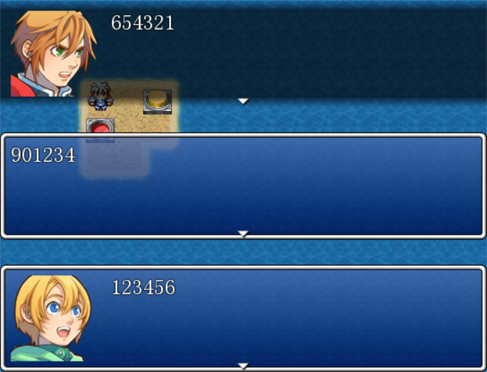
有时候想表现人物同时说话的氛围,奈何对话框只能显示一个。我去论坛里逛了逛,发现都是花里胡哨的对话框加强,自己写又有各种bug(还是对ruby不熟悉),后来找到了一个VX脚本,发现作者的逻辑十分简洁,就改编成了VA脚本。
VX脚本来源:https://lm-t.at.webry.info/200909/article_2.html
作者的想法是在Window_Message类下增加子窗口,通过主窗口的更新一并更新所有子窗口,主窗口消亡则子窗口一并消亡。改成VA脚本后要注意的点就是Fiber,VA通过Fiber切换执行不同的代码。
当所有窗口显示完文章,等待用户输入时,主窗口要判断用户是否输入确定键或退出键,如果用户没有输入就让出Fiber,如果用户进行相应的输入就往下执行,并且调用结束子窗口停顿的函数。子窗口停顿时,等待主窗口调用结束停顿的函数,如果主窗口没有调用就让出Fiber。
这里只贴出核心代码:
脚本内容- #==============================================================================
- # ■ Ex
- #------------------------------------------------------------------------------
- # VX Script Author: J-SON
- # blog: https://lm-t.at.webry.info/200909/article_2.html
- #
- # ●功能
- # ◆设置子对话框
- # Ex.submessage( idx, msg, fname, fidx, bktype, msgpos )
- #
- #==============================================================================
- module Ex
- #--------------------------------------------------------------------------
- # ● 常量
- #--------------------------------------------------------------------------
- #对话框背景
- MSGBK_NORMAL = 0 #普通
- MSGBK_DARK = 1 #暗色背景
- MSGBK_NONE = 2 #透明背景
-
- #对话框位置
- MSGPOS_TOP = 0 #上
- MSGPOS_CENTER = 1 #中
- MSGPOS_BOTTOM = 2 #下
-
- #--------------------------------------------------------------------------
- # ● 子消息设置
- # index : 子消息id(0 or 1)
- # message : 子消息文章内容
- # fname : 脸图文件名
- # findex : 脸图id
- # bktype : 对话框背景类型(0, 1, 2)
- # msgpos : 对话框位置
- #--------------------------------------------------------------------------
- def self.submessage(
- index,
- message = [],
- fname = "",
- findex = 0,
- bktype = MSGBK_NORMAL,
- msgpos = MSGPOS_BOTTOM
- )
- return if index < 0 or index > 1
- submsg = $game_sub_messages[index]
- submsg.clear
- submsg.texts = message
- submsg.face_name = fname
- submsg.face_index = findex
- submsg.background = bktype
- submsg.position = msgpos
- end
- end
- class Window_Message < Window_Base
- #--------------------------------------------------------------------------
- # ● 初始化对象
- #--------------------------------------------------------------------------
- def initialize(game_message = nil, main_window = true)
- super(0, 0, window_width, window_height)
- self.z = 200
- self.openness = 0
- create_all_windows
- create_back_bitmap
- create_back_sprite
- clear_instance_variables
-
- # ADD --------->
- @game_message = (game_message == nil ? $game_message : game_message)
- @main_window = main_window
-
- @sub_windows = [ nil, nil ]
- if @main_window == true
- @sub_windows[0] = Window_Message.new($game_sub_messages[0], false)
- @sub_windows[1] = Window_Message.new($game_sub_messages[1], false)
- end
- #<--------------
- end
- #--------------------------------------------------------------------------
- # ● 更新画面
- #--------------------------------------------------------------------------
- def update
- super
- update_all_windows
- # ADD --------->
- update_sub_windows
- #<--------------
- update_back_sprite
- update_fiber
- end
- #--------------------------------------------------------------------------
- # ● 更新子窗口
- #--------------------------------------------------------------------------
- def update_sub_windows
- if @main_window == true
- for i in 0..1
- @sub_windows[i].update if @sub_windows[i] != nil
- end
- end
- end
- ... ... ... ... ... ...
- #--------------------------------------------------------------------------
- # ● 处理输入等待
- #--------------------------------------------------------------------------
- def input_pause
- self.pause = true
- wait(10)
- if @main_window == true
- Fiber.yield until Input.trigger?(:B) || Input.trigger?(:C)
- Input.update
- finish_pause
- else
- Fiber.yield while self.pause
- end
- end
- #--------------------------------------------------------------------------
- # ● 等待结束
- #--------------------------------------------------------------------------
- def finish_pause
- self.pause = false
- if @main_window == true
- for i in 0..1
- @sub_windows[i].finish_pause if @sub_windows[i] != nil
- end
- end
- end
- end
用法:
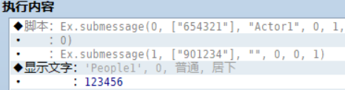
如果要显示多个对话框,每次在显示文章前,启用“脚本”功能,写入以下内容。
Ex.submessage( idx, msg, fname, fidx, bktype, msgpos )
#参数说明
#idx:子消息id号(0或者1)
#msg:["第一行文章内容", "第二行", ...]
#fname:脸图文件名
#fidx:文件中脸图id号
#bktype:背景类型(普通:0,暗色背景:1,透明背景:2)
#msgpos:对话框位置(上:0,中:1,下:2)
使用样例:
完整项目:
 HelloWorld.rar
(1.42 MB, 下载次数: 120)
HelloWorld.rar
(1.42 MB, 下载次数: 120)
|
评分
-
查看全部评分
|



 写轮眼
写轮眼
 发表于 2020-2-26 11:31:28

 提升卡
提升卡 沉默号角
沉默号角 喧嚣号角
喧嚣号角 变色卡
变色卡 升龙剑
升龙剑


