| 赞 | 1 |
| VIP | |
| 好人卡 | |
| 积分 | 11 |
| 经验 | |
| 最后登录 | 2026-10-2 |
| 在线时间 | 110 小时 |
- 梦石
- 0
- 星屑
- 1113
- 在线时间
- 110 小时
- 注册时间
- 2016-8-7
- 回帖
- 66
|
加入我们,或者,欢迎回来。
您需要 登录 才可以下载或查看,没有账号?注册会员
×
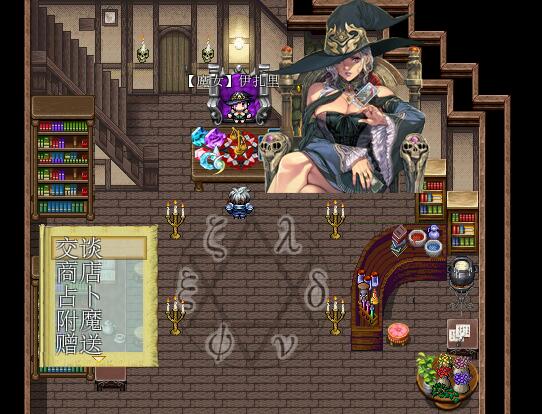
选择拓展脚本=begin
▼ 選択肢拡張 ver. 3.2
RPGツクールVXAce用スクリプト
制作 : 木星ペンギン
URL : http://woodpenguin.blog.fc2.com/
------------------------------------------------------------------------------
概要
□在连续设定了选项时,连接为一个选择项的功能的追加。
□通过设定条件,追加不显示该项目的功能。
□选择光标的指针初始位置的功能和
追加把当前光标位置做为变数的功能。
□追加可选窗口的位置临时变更的功能。
□通过设定条件,追加半透明的该项目不能选择的功能。
□追加每个选择项能够显示帮助信息的功能。
------------------------------------------------------------------------------
使用方法
□如果持续配置选项的表示,就能汇总成一个选项。
·“取消时”处理应用除无效之外的处理
有多个的话,适用于后面的选项。
□在可选的文章中加入if(条件),该条件成为假的话就不会显示项目。
·eval评价条件。(详情参见【嵌入式函数】)
·用s开关,v参考变量。
·“取消时”的项目未被表示时,将进行与无效相同的处理。
□在注释中加入以下字符串以确定变量的值
成为光标的初始位置。
光标存储(n)
n:进入光标初始位置的变量编号
·每次选择光标的位置被变更时,
在这个变量中加入选项的编号。
□在注释中加入以下字符串以确定选择窗口显示的位置
能临时更改。
选择位置(x, y[, row])
x:表示窗口的x坐标。
表示窗口的y坐标。
row:表示选择项的最大行数。
在没有指定的情况下,忽视通常的最大行数
显示出了所有的选项。
□在注释中加入以下字符串,选择窗口的背景将不显示。
背景折扣
□选择项的文章中加入en(条件),那个条件变成假的话项目会半透明地表示。
·eval评价条件。(详情参见【嵌入式函数】)
·用s开关,v参考变量。
·如果“取消”的项目是半透明的话,蜂鸣器会响。
□在每个项目下,注释包括以下字符串以提供后续注释
可以在光标对准作为项目的帮助信息时进行标记。
帮助选择
□详细内容请参照以下网站。
http://woodpenguin.web.fc2.com/rgss3/choice_ex.html
=end
module WdTk
module ChoiceEX
#//////////////////////////////////////////////////////////////////////////////
#
# 設定項目
#
#//////////////////////////////////////////////////////////////////////////////
#--------------------------------------------------------------------------
# ●选择项的最大行数
#表示选择项的窗口的行数的最大数量。
#选项小于该数量时,对应于该选项数量。
#--------------------------------------------------------------------------
RowMax = 20
#--------------------------------------------------------------------------
# ● 選択肢ヘルプを読み取る文字列
#--------------------------------------------------------------------------
Help = "選択肢ヘルプ"
end
#//////////////////////////////////////////////////////////////////////////////
#
# 以降、変更する必要なし
#
#//////////////////////////////////////////////////////////////////////////////
@material ||= []
@material << :ChoiceEX
def self.include?(sym)
@material.include?(sym)
end
end
#==============================================================================
# ■ Game_Message
#==============================================================================
class Game_Message
#--------------------------------------------------------------------------
# ● 公開インスタンス変数
#--------------------------------------------------------------------------
attr_accessor :choice_x # 選択肢ウィンドウの表示 X 座標
attr_accessor :choice_y # 選択肢ウィンドウの表示 Y 座標
attr_accessor :choice_row_max # 選択肢ウィンドウの表示行数
attr_accessor :choice_help # 選択肢のヘルプ
attr_accessor :choice_var_id # 選択肢のカーソル位置を入れる変数ID
attr_accessor :choice_background # 選択肢ウィンドウ背景の表示状態
#--------------------------------------------------------------------------
# ○ クリア
#--------------------------------------------------------------------------
alias _wdtk_choice_clear clear
def clear
_wdtk_choice_clear
@choice_x = @choice_y = nil
@choice_row_max = WdTk::ChoiceEX::RowMax
@choice_help = {}
@choice_var_id = 0
@choice_background = 0
end
end
#==============================================================================
# ■ Game_Interpreter
#==============================================================================
class Game_Interpreter
#--------------------------------------------------------------------------
# ☆ 選択肢のセットアップ
#--------------------------------------------------------------------------
def setup_choices(params)
add_choices(params, @index)
$game_message.choice_proc = Proc.new {|n| @branch[@indent] = n }
end
#--------------------------------------------------------------------------
# ● 選択肢の追加
#--------------------------------------------------------------------------
def add_choices(params, i, d = 0)
params[0].each_with_index {|s, n| $game_message.choices[n + d] = s }
$game_message.choice_cancel_type = params[1] + d if params[1] > 0
indent = @list.indent
loop do
i += 1
if @list.indent == indent
case @list.code
when 402 # [**] の場合
get_help_texts(@list.parameters[0] + d, i + 1)
when 404 # 分岐終了
break
end
end
end
i += 1
add_choices(@list.parameters, i, d + 5) if @list.code == 102
end
#--------------------------------------------------------------------------
# ● ヘルプ用テキストの取得
#--------------------------------------------------------------------------
def get_help_texts(b, i)
if @list.code == 108 && @list.parameters[0] == WdTk::ChoiceEX::Help
$game_message.choice_help = []
while @list[i + 1].code == 408
i += 1
$game_message.choice_help << @list.parameters[0]
end
end
end
#--------------------------------------------------------------------------
# ◯ 注釈
#--------------------------------------------------------------------------
alias _wdtk_choice_command_108 command_108
def command_108
_wdtk_choice_command_108
@comments.each do |comment|
case comment
when /選択肢位置\((\d+),\s*(\d+),?\s*(\d*)\)/
$game_message.choice_x = $1.to_i
$game_message.choice_y = $2.to_i
$game_message.choice_row_max = ($3.empty? ? 99 : $3.to_i)
when /カーソル記憶\((\d+)\)/
$game_message.choice_var_id = $1.to_i
when /背景(ON|OFF)/
$game_message.choice_background = ($1 == "ON" ? 0 : 1)
end
end
end
#--------------------------------------------------------------------------
# ☆ 分岐終了の場合
#--------------------------------------------------------------------------
def command_404
if next_event_code == 102
@branch[@indent] -= 5 if @branch.include?(@indent)
@index += 1
command_skip
end
end
end
#==============================================================================
# ■ Window_ChoiceList
#==============================================================================
class Window_ChoiceList
#--------------------------------------------------------------------------
# ☆ 入力処理の開始
#--------------------------------------------------------------------------
def start
return unless close?
clear_command_list
make_command_list
if @list.empty?
$game_message.choice_proc.call(-1)
return
end
update_placement
refresh
select(0)
if $game_message.choice_var_id > 0
select_ext($game_variables[$game_message.choice_var_id])
end
open
activate
end
#--------------------------------------------------------------------------
# ☆ ウィンドウ位置の更新
#--------------------------------------------------------------------------
def update_placement
self.width = [max_choice_width + 12, 96].max + padding * 2
self.width = [width, Graphics.width].min
n = [@list.size, $game_message.choice_row_max].min
self.height = fitting_height(n)
self.x = Graphics.width - width
if @message_window.y >= Graphics.height / 2
self.y = @message_window.y - height
else
self.y = @message_window.y + @message_window.height
end
self.x = $game_message.choice_x if $game_message.choice_x
self.y = $game_message.choice_y if $game_message.choice_y
end
#--------------------------------------------------------------------------
# ☆ 選択肢の最大幅を取得
#--------------------------------------------------------------------------
def max_choice_width
@list.collect {|com| text_size(com[:name]).width }.max || 0
end
#--------------------------------------------------------------------------
# ☆ コマンドリストの作成
#--------------------------------------------------------------------------
def make_command_list
$game_message.choices.each_with_index do |choice, i|
next unless choice
str = choice.dup
next if str.slice!(/\s*if\(([^\)]+)\)/i) && !choice_eval($1)
enable = !str.slice!(/\s*en\(([^\)]+)\)/i) || choice_eval($1)
add_command(str, :choice, enable, i)
end
end
#--------------------------------------------------------------------------
# ○ 項目の描画
#--------------------------------------------------------------------------
alias _wdtk_choice_draw_item draw_item
def draw_item(index)
@choice_enabled = command_enabled?(index)
_wdtk_choice_draw_item(index)
end
#--------------------------------------------------------------------------
# ● テキスト描画色の変更
#--------------------------------------------------------------------------
def change_color(color, enabled = true)
super(color, enabled && @choice_enabled)
end
#--------------------------------------------------------------------------
# ☆ 決定ハンドラの呼び出し
#--------------------------------------------------------------------------
def call_ok_handler
$game_message.choice_proc.call(current_ext)
close
end
#--------------------------------------------------------------------------
# ● キャンセルボタンが押されたときの処理
#--------------------------------------------------------------------------
def process_cancel
return super if $game_message.choice_cancel_type % 5 == 0
index = @list.index {|c| c[:ext] == $game_message.choice_cancel_type - 1 }
return unless index
return super if command_enabled?(index)
Sound.play_buzzer
end
#--------------------------------------------------------------------------
# ● ウィンドウを閉じる
#--------------------------------------------------------------------------
def close
@message_window.on_show_fast unless $game_message.choice_help.empty?
super
end
#--------------------------------------------------------------------------
# ● ヘルプウィンドウ更新メソッドの呼び出し
#--------------------------------------------------------------------------
def call_update_help
update_help if active && !$game_message.choice_help.empty?
end
#--------------------------------------------------------------------------
# ● ヘルプウィンドウの更新
#--------------------------------------------------------------------------
def update_help
@message_window.force_clear
if $game_message.choice_help.include?(current_ext)
$game_message.texts.replace($game_message.choice_help[current_ext])
else
$game_message.texts.clear
end
end
#--------------------------------------------------------------------------
# ● 分岐用
#--------------------------------------------------------------------------
def choice_eval(formula)
s, v = $game_switches, $game_variables
begin
Kernel.eval(formula)
rescue
msgbox "以下の条件判定でエラーが出ました。\n\n", formula
true
end
end
#--------------------------------------------------------------------------
# ● フレーム更新
#--------------------------------------------------------------------------
def update
last_index = @index
super
if last_index != @index && $game_message.choice_var_id > 0
$game_variables[$game_message.choice_var_id] = current_ext
end
end
end
#==============================================================================
# ■ Window_Message
#==============================================================================
class Window_Message
#--------------------------------------------------------------------------
# ○ ウィンドウ背景の更新
#--------------------------------------------------------------------------
alias _wdtk_choice_update_background update_background
def update_background
_wdtk_choice_update_background
@choice_window.opacity = $game_message.choice_background == 0 ? 255 : 0
end
#--------------------------------------------------------------------------
# ● 文章の標示を強制クリア
#--------------------------------------------------------------------------
def force_clear
@gold_window.close
@fiber = nil
close
if WdTk.include?(:MesEff)
@character_sprites.each do |sprite, params|
next if params.empty?
sprite.bitmap.clear
sprite.visible = false
params.clear
end
end
end
#--------------------------------------------------------------------------
# ● 文章を最後まで表示する
#--------------------------------------------------------------------------
def on_show_fast
@show_fast = true
end
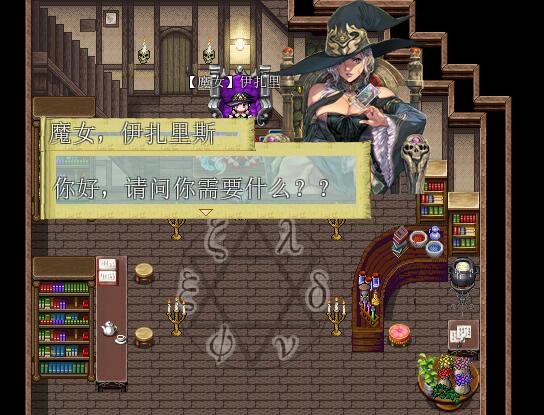
end对话框脚本=begin
吹出对话框VXAce
2011.12.25 tamura改造
2012年02月28日 改訂
※这个脚本是由、ちいさな本屋様(http://xrxs.at-ninja.jp/)
中的tamura为ACE改造的东西。
准备图片「Window-top」「Window-under」
放在文件夹「Graphics/System」里。
原版:
▽▽▽ XRXSv2. メッセージ表示フルグレードアップVX ▽▽▽
publish 2010/ 3/ 2
update - 11/ 1/10a
※※警告※※
当「立绘功能」开启、不显示立绘、且改变窗口位置到右边或左边时
对话框尾巴(就是对话框和说话者中间的小三角)的Y坐标可能会被改变。
原因还在调查中。如果你不想显示立绘、请使用事件「注释」:
「立ち絵表示 off」就可以关闭立绘功能。
●功能列表
在事件「脚本」中、如果你在 $win_x $win_y 中输入一个值、
会在($win_x 、$win_y)的位置显示一个窗口。画面左上角是(0,0)。
当你按下键盘上的Q(装備画面で前のキャラに戻るボタン)を押すと、
窗口会消失。Qか決定、再按取消键可以返回原来的状态。
以下是可以在对话框里使用的控制符:
\name[] : 在窗口的左上方显示一个小的名字窗口,[]里填入名字
\h[-1] : 对话框显示在玩家头上。
\h[0] : 对话框显示在当前事件头上。
\h[1] : 对话框显示在1号事件头上,也可以设定为其他id的事件
当窗口是通常大小时,可以使用以下控制符调整尾巴的显示:
\t[-2] : 对话框窗口在说话者上方或下方时、将X座标固定为MINAS_TWE_X_POS的值。
当使用 $win_x 来在说话者左方或右方显示对话框窗口时、Y座标会固定在窗口的中心偏下方。
\t[-3] : 对话框窗口在说话者上方或下方时、将X座标固定为MINAS_TWE_X_POS的值。
当使用 $win_x 来在说话者左方或右方显示对话框窗口时、Y座标会固定在窗口的中心偏下方。
\t[-1] : 尾巴显示在玩家头上。
\t[0] : 尾巴显示在当前事件头上。
\t[1] : 尾巴显示在1号事件头上,也可以设定为其他id的事件。
\O[128] : 文字的不透明度改为128、0则为、255是通常。
\D : 文字显示阴影
\hold : 只能用在文章的末尾。
即使当前对话结束、当前对话框也不会关闭,而是一直显示。
只有当显示其他对话框时才会消失。
而且被"hold"住的窗口、不能使用Q键消除掉。
●其他
ACE中的基础功能可以正常使用。
关于A1殿(http://a1tktk.web.fc2.com/)中立绘功能的脚本。
「RGSS3用A1共通処理」要放在本脚本之上
「空メッセージでウィンドウを開かない」「立ち絵表示」要放在本脚本之下
可惜的是、不能使用「名字窗口」。请使用上面的\name。
※不显示立绘时、最好使用事件注释「立ち絵表示 off」来把立绘功能关掉。
在脚本中设定POP_DIRECTION = ture ,可以自动判断对话框的弹出方向:从事件下方说话
时,对话框会向上弹出,反之向下弹出。
●停用功能
\I已经被使用、イタリック文字変換を廃止。
スピード変更、改行、最後に入手したアイテムの表示を、ACE化にともない廃止。
【改訂履歴】
2012.01.10 ?ウィンドウを消したまま次のウィンドウを自動で表示すると、
ネームウィンドウが表示されるのを修正。
2012.01.11 ?ネームウィンドウが出しっぱなしになるのを修正。
2012.01.12 ?メニューを出してから決定ボタンを押すとネームウィンドウがでる不具合の修正。
2012.02.01 ?ネームウィンドウのオープン&クローズのタイミングを変更。
?hold機能を追加。
2012.02.10 ?キャラポップした時、一行ずつしか表示されない不具合を修正。
2012.02.14 ?アイテム名などの文字数が正常に取得できなかったのを修正。
2012.02.21 ?話しかけられた方向によって、ポップ方向を変えられるようにした。
2012.02.25 ?すべてのシーン遷移の際はテールを破棄(イベント中でショップ起動など)
2012.02.28 ?エスケープ文字の処理が上手くいかない問題について暫定対策。
=end
#==============================================================================
# 设定部分
#==============================================================================
#=begin
class Window_Message < Window_Base
#
# 最大行数
#
MAX_LINE = 2
#
# \p[] - 字符弹出的高度
#
CHARPOP_HEIGHT = 40
#
# \name[] - 名字窗口的X,Y坐标偏移量
#
NAME_WINDOW_OFFSET_X = 0
NAME_WINDOW_OFFSET_Y = -24
#
#
MINAS_TWE_X_POS = 200 # $t[-2]时、对话框尾巴的X座标。
MINAS_THREE_X_POS = 888 # $t[-3]时、对话框尾巴的X座标。
POP_DIRECTION = false # 是否根据和事件的相对位置,自动设定对话框弹出的方向。
end
#==============================================================================
# 参照機能
#==============================================================================
class Game_Temp
attr_accessor :last_gain_material
attr_accessor :last_gain_holder
end
#==============================================================================
# フルグレードアップベース - 制御文字?基本機能
#==============================================================================
class Window_Message < Window_Base
attr_accessor :tail
#--------------------------------------------------------------------------
# ● 特殊文字の変換 + 準備
# 変換?消去してもいい部分を処理、フラグのセット。
#--------------------------------------------------------------------------
alias xrxsv2_convert_escape_characters convert_escape_characters
def convert_escape_characters(text)
#@textsが使いずらいので、ここで別変数に保管。
@all_texts = []
str = text.gsub(/\\/) { "\e" }
@all_texts = str.split("\n")
# 初期化
contents.font.size = Font.default_size
contents.font.bold = Font.default_italic
contents.font.italic = Font.default_bold
contents.font.shadow = Font.default_shadow
@type_wait = 0
@line_widths = []
@line_aligns = []
self.pop_character = nil
# ウィンドウ保持指定\holdがあるか?
@window_hold = (text.gsub!(/\\hold/) { "" } != nil)
# \info
@info_mode = (text.gsub!(/\\info/) { "" } != nil)
# 改行削除指定\_があるか?
if (/\\_(.*?)\x00/.match(@text)) != nil
$game_message.choice_start -= 1
text.gsub!(/\\_(.*?)\x00/) { $1.to_s }
end
# \name 判定
if text.sub!(/\\[Nn]ame\[(.*?)\]/) { "" }
name = $1
bitmap = @name_sprite.bitmap
w = [bitmap.text_size(name).width, 1].max
w = w + 32 ###SR
bitmap.dispose
@name_sprite.bitmap = Bitmap.new(w, 32)
bitmap = @name_sprite.bitmap
bitmap.draw_text(0, 0, bitmap.width, bitmap.height, name)
@name_window.width = w + 16
@name_window.create_contents
@name_window.open if @name_window.openness == 0
if self.visible #名前だけ表示されるのを防止。
@name_window.visible = true
@name_sprite.visible = true
else
@name_window.visible = false
@name_sprite.visible = false
end
else
@name_window.visible = false
@name_sprite.visible = false
@name_sprite.bitmap.dispose
@name_sprite.bitmap = Bitmap.new(32,32)
end
$name = $1 #あれこれで使うので、ネームウィンドウに表示予定の名前を取得。
# キャラボップモード
if text.gsub!(/\\[Hh]\[-1\]/) { "" }
self.pop_character = -1
elsif text.gsub!(/\\[Hh]\[([0-9]+)\]/) { "" }
self.pop_character = $1.to_i
elsif text.gsub!(/\\[Hh]/) { "" }
self.pop_character = 0
#テール表示モード
elsif text.gsub!(/\\[Tt]\[-1\]/) { "" }
self.tail_character = -1
elsif text.gsub!(/\\[Tt]\[-2\]/) { "" }
self.tail_character = -2
elsif text.gsub!(/\\[Tt]\[-3\]/) { "" }
self.tail_character = -3
elsif text.gsub!(/\\[Tt]\[([0-9]+)\]/) { "" }
self.tail_character = $1.to_i
elsif text.gsub!(/\\[Tt]/) { "" }
self.tail_character = 0
else
self.pop_character = nil
end
# 制御文字処理
text = xrxsv2_convert_escape_characters(text)
text.gsub!(/\\[Ss]\[([0-9]+)\]/i) { "\eS[#{$1}]" }
text.gsub!(/\\[Oo]\[([0-9]+)\]/i) { "\eO[#{$1}]" }
text.gsub!(/\\last_holder/i) { "\e18" }
text.gsub!(/\\last_material/i) { "\e19" }
text.gsub!(/\\B/) { "\eB" }
text.gsub!(/\\D/) { "\eD" }
#text.gsub!(/\\n/) { "\n" }
#
# ライン情報の取得
rxs = ["\x01","\x02","\x03","\x04","\x05","\x06","\x07","\x08",
/\[([0-9]+)\]/,
"\x11","\x12","\x13","\x14", "\x15", "\x16", "\x17", "\x18","\x19"]
lines = text.split("\x00")
@lines_max = lines.size
for i in 0...@lines_max
line = lines
for rx in rxs
line.gsub!(rx) {""}
end
@line_aligns =
line.sub!(/\\center/) {""} ? CENTER :
line.sub!(/\\right/) {""} ? RIGHT :
AUTO
# 行の横幅の取得と設定
cx = text_width_no_escape(line,text) #test
#cx = contents.text_size(line,text).width
@line_widths = cx
end
# 位置揃え制御文字の削除
text.gsub!(/\\center/) {""}
text.gsub!(/\\right/) {""}
# キャラポップ時のウィンドウリサイズ
reszie_window_for_pop
del_tail # if @tail != nil
# $mes_id が空のときと戦闘中はふきだしを表示しない
if defined?($game_system.show_stand_picture) #立ち絵に対応。
$mes_id = -1 if $game_system.show_stand_picture == true
end
if $mes_id != nil and not $game_party.in_battle
# ふきだしのテールを描画
skin = "Window"
if @background == 0
#画像の準備
@tail = Sprite.new
@tail.visible = false
# 位置を取得
tale_pos = get_tale_pos
if $win_x != nil
if $win_x > 0
@tail.bitmap = Cache.system(skin + "-right")
@tail.x = tale_pos[0]
@tail.y = tale_pos[1]
@tail.z = self.z + 1
elsif $win_x < 0
@tail.bitmap = Cache.system(skin + "-left")
@tail.x = tale_pos[0]
@tail.y = tale_pos[1]
@tail.z = self.z + 1
else
create_tail_up_under
end
else
create_tail_up_under
end
# エクストラスプライトに登録
@extra_sprites = [] if @extra_sprites.nil?
@extra_sprites.push(@tail) if @tail != nil
# 更新
update_tail
end
end
open_and_wait #リサイズが終わった時点でウィンドウオープン。
return text
end
#--------------------------------------------------------------------------
# ● 文字の長さを取得する。エスケープ文字は含まない。
# line : 表示しようとしている全ての文字列。
# text : その列の文字。
#--------------------------------------------------------------------------
def text_width_no_escape(line , text_o)
add = 0
text = Marshal.load(Marshal.dump(text_o))
text.gsub!(/\ehold/) { "" }
text.gsub!(/\einfo/) { "" }
# 改行削除指定\_があるか?
if (/\\_(.*?)\x00/.match(@text)) != nil
$game_message.choice_start -= 1
text.gsub!(/\\_(.*?)\x00/) { "" }
end
# \name 判定
text.sub!(/\e[Nn]ame\[(.*?)\]/) { "" }
text.gsub!(/\e[Hh]\[-1\]/) { "" }
text.gsub!(/\e[Hh]\[([0-9]+)\]/) { "" }
text.gsub!(/\e[Hh]/) { "" }
text.gsub!(/\e[Tt]\[-1\]/) { "" }
text.gsub!(/\e[Tt]\[-2\]/) { "" }
text.gsub!(/\e[Tt]\[-3\]/) { "" }
text.gsub!(/\e[Tt]\[([0-9]+)\]/) { "" }
text.gsub!(/\e[Tt]/) { "" }
# 制御文字処理
text.gsub!(/\e[Ss]\[([0-9]+)\]/i) { "" }
text.gsub!(/\e[Oo]\[([0-9]+)\]/i) { "" }
text.gsub!(/\elast_holder/i) { "" }
text.gsub!(/\elast_material/i) { "" }
#text.gsub!(/\eV/) { "" } #変数に置き換える。
#text.gsub!(/\eN/) { "" } #名前へ置き換える。
#text.gsub!(/\eP/) { "" } #名前へ置き換える。
#text.gsub!(/\eG/) { "" } #金額へ置き換える。
#text.gsub!(/\eC/) { "" }
text.gsub!(/\eB/) { "" }
text.gsub!(/\eD/) { "" }
if text =~ /\eI/
loop do
if str = text.sub!(/\eI\[(\d+)\]/){ "" }
add += 24
else
break
end
end
end
#text.gsub!(/\\n/) { "\n" }
text.sub!(/\ecenter/) {""}
text.sub!(/\eright/) {""}
text.gsub!(/\ecenter/) {""}
text.gsub!(/\eright/) {""}
text = xrxsv2_convert_escape_characters(text)
basic_width = text_size(text).width + add
esc = text.scan(/\e(\S)/)
return ( basic_width - esc.size * (contents.font.size - 4) ) #\eの幅は20?
end
#--------------------------------------------------------------------------
# ● 最も長い列の長さを調べる。エスケープ文字は含まない。
#--------------------------------------------------------------------------
def max_width
text_size = []
for i in 0 ... @all_texts.size
text_size.push text_width_no_escape(@all_texts,@all_texts) + 20
end
return text_size.max
end
#--------------------------------------------------------------------------
# ● 吹きだしテールが上か下の場合の画像を準備。
#--------------------------------------------------------------------------
def create_tail_up_under
skin = "Window"
tale_pos = get_tale_pos
case @position
when 0 # 上
@tail.bitmap = Cache.system(skin + "-top")
@tail.x = tale_pos[0]
@tail.y = tale_pos[1]
@tail.z = self.z + 1
when 1 # 中
@tail.dispose
@tail = nil
when 2 # 下
@tail.bitmap = Cache.system(skin + "-under")
@tail.x = tale_pos[0]
@tail.y = tale_pos[1]
@tail.z = self.z + 1
end
end
#--------------------------------------------------------------------------
# ● 全テキストの処理
#--------------------------------------------------------------------------
def process_all_text
#open_and_wait #リサイズがあるので、すぐにウィンドウをオープンしない。
text = convert_escape_characters($game_message.all_text)
pos = {}
new_page(text, pos)
process_character(text.slice!(0, 1), text, pos) until text.empty?
end
#--------------------------------------------------------------------------
# ● メッセージの更新 *
#--------------------------------------------------------------------------
def update_message
@wait_count = @type_wait
loop do
c = @text.slice!(/./m)
case update_message_type(c)
when 1
break
when 2
next
end
break unless @show_fast or @line_show_fast
end
end
###SR###
alias window_message_update_show_fast_ams update_show_fast
def update_show_fast
@show_fast = true if Input.press?(:B)
window_message_update_show_fast_ams
end
def input_pause
self.pause = true
wait(10)
Fiber.yield until Input.trigger?(:B) || Input.trigger?(:C) ||
Input.press?(:A)
Input.update
self.pause = false
end
########
#--------------------------------------------------------------------------
# 一文字の描画 (返り値 1:break, 2:next)
#--------------------------------------------------------------------------
#=begin
def process_escape_character(code, text, pos)
case code.upcase
when '$'
@gold_window.open
when '.'
wait(15)
when '|'
wait(60)
when '!'
input_pause
when '>'
@line_show_fast = true
when '<'
@line_show_fast = false
when '^'
@pause_skip = true
#when 'n' # 改行
# new_line
# max = MAX_LINE
# max = 14 if self.pop_character != nil
# if @line_count >= max # 行数が最大のとき
# unless @text.empty? # さらに続きがあるなら
# self.pause = true # 入力待ちを入れる
#return 1
# end
# end
#when 'S' # \S[n] (スピード変更)
# text.sub!(/\[([0-9]+)\]/, "")
# @type_wait = $1.to_i
# return 2
when 'O' # \O 文字を透明にする。
text.sub!(/\[([0-9]+)\]/, "")
contents.font.color.alpha = $1.to_i
#return 2
when 'D' #\D 文字に影をつける
contents.font.shadow ^= true
#when '18'
# name = ($game_temp.last_gain_holder.name rescue "")
# update_message_type_draw_at(name)
#when '19'
# item = ($game_temp.last_gain_material.item rescue nil)
# draw_item_name(item, @contents_x, @contents_y)
# @contents_x += 196
else
super
end
end
#=end
#--------------------------------------------------------------------------
# ● 改ページ処理
#--------------------------------------------------------------------------
alias xrxsv2_new_page new_page
def new_page(text, pos)
xrxsv2_new_page(text, pos)
update_charpop_window
end
#--------------------------------------------------------------------------
# ● 改行位置の取得
#--------------------------------------------------------------------------
#def new_line_x
# $game_message.face_name.empty? ? 0 : 112
#end
#--------------------------------------------------------------------------
# ● 改行処理
#--------------------------------------------------------------------------
alias xrxsv2_new_line_x new_line_x
def new_line
xrxsv2_new_line
set_align
end
#--------------------------------------------------------------------------
# 位置揃え
#--------------------------------------------------------------------------
def set_align
w = @line_widths[@line_count].to_i
a = @line_aligns[@line_count]
case a
when CENTER
@contents_x = @contents_x + ((contents.width - @contents_x) - w) / 2
when RIGHT
@contents_x = contents.width - w
end
end
#--------------------------------------------------------------------------
# ● ファイバーのメイン処理 ☆再定義
#--------------------------------------------------------------------------
def fiber_main
$game_message.visible = true
update_background
update_placement
loop do
process_all_text if $game_message.has_text?
process_input
$game_message.clear
@gold_window.close
process_hold #ホールドウィンドウの処理。
Fiber.yield
break unless text_continue?
end
close_and_wait
$game_message.visible = false
@fiber = nil
end
#--------------------------------------------------------------------------
# 定数
#--------------------------------------------------------------------------
AUTO = 0
LEFT = 1
CENTER = 2
RIGHT = 3
end
#==============================================================================
# アクティブイベント取得
#==============================================================================
class Game_Interpreter
attr_reader :event_id
end
#==============================================================================
# 各種機能の追加 - キャラポップ/ネーム/ホールド
#==============================================================================
class Window_Message < Window_Base
#--------------------------------------------------------------------------
# ● カーソルの更新 *
#--------------------------------------------------------------------------
def update_cursor
if @index >= 0
x = ($game_message.face_name.empty? ? 0 : 112)
y = ($game_message.choice_start + @index) * WLH - 1
w = contents.width - x
if self.pop_character != nil
x += 28
w -= 20
end
self.cursor_rect.set(x, y, w, WLH)
else
self.cursor_rect.empty
end
end
#--------------------------------------------------------------------------
# キャラクターの取得
# parameter : パラメータ
#--------------------------------------------------------------------------
def get_character(parameter)
if parameter <= 0
$game_player
else
$game_map.events[parameter]
end
end
#--------------------------------------------------------------------------
# (メッセージ終了時)ホールドの処理
#--------------------------------------------------------------------------
def process_hold
if @window_hold
@held_windows.push(Window_Copy.new(self))
@held_windows.push(Window_Copy.new(@name_window))
@held_windows.push(Sprite_Copy.new(@name_sprite))
@held_windows.push(Sprite_Copy.new(@back_sprite))
for sprite in @extra_sprites
next if sprite.disposed?
@held_windows.push(Sprite_Copy.new(sprite))
end
@extra_sprites.clear
self.openness = 0
#@name_window.openness = 0
@back_sprite.visible = false
else
@held_windows.each {|object| object.dispose}
@held_windows.clear
end
#@name_window.close
#@name_sprite.visible = false
end
#--------------------------------------------------------------------------
# キャラポップ位置の設定と取得
#--------------------------------------------------------------------------
def pop_character=(character_id)
@pop_character = character_id
end
def pop_character
return @pop_character
end
#--------------------------------------------------------------------------
# キャラポップ時のウィンドウリサイズ
#--------------------------------------------------------------------------
def reszie_window_for_pop
#キャラポップ
if self.pop_character != nil
max_x = @line_widths.max.to_i
n = max_x + 32
n += $game_message.face_name.empty? ? 0 : 122
m = $game_message.face_name.empty? ? 0 : 96
w = @name_sprite.bitmap.width
#self.width = [n, w].max
self.width = max_width + ($game_message.face_name.empty? ? 0 : 96)
#self.height = [@lines_max * line_height, m].max + 32
self.height = [@all_texts.size * line_height, m].max + 32
create_contents
update_charpop_window
elsif @info_mode
@line_aligns[0] = CENTER
self.x = - 8
self.width = Graphics.width + 16
self.height = 56
create_contents
else
self.x = 0
self.width = Graphics.width
self.height = MAX_LINE * line_height + 32
update_placement #位置情報修正。
create_contents
end
end
#--------------------------------------------------------------------------
# ● 背景スプライトの作成
#--------------------------------------------------------------------------
alias xrxsv2_create_back_sprite create_back_sprite
def create_back_sprite
xrxsv2_create_back_sprite
@back_sprite.zoom_x = 1.0 * Graphics.width / @back_sprite.bitmap.width
@name_window = Window_Base.new(0,0,112,36)
@name_window.visible = false
@name_sprite = Sprite.new
@name_sprite.bitmap = Bitmap.new(32,32)
@name_sprite.visible = false
self.x = self.x
self.y = self.y
self.z = self.z
@held_windows = []
@extra_sprites = []
end
#--------------------------------------------------------------------------
# ● 背景スプライトの解放
#--------------------------------------------------------------------------
alias xrxsv2_dispose_back_sprite dispose_back_sprite
def dispose_back_sprite
xrxsv2_dispose_back_sprite
@name_window.dispose if @name_window != nil #メニュー画面を出そうとするとエラー?
@name_sprite.dispose if @name_sprite != nil
for window in @held_windows
window.dispose
end
end
#--------------------------------------------------------------------------
# ● 背景スプライトの更新
#--------------------------------------------------------------------------
alias xrxsv2_update_back_sprite update_back_sprite
def update_back_sprite
@name_window.update
xrxsv2_update_back_sprite
update_charpop_window
end
#--------------------------------------------------------------------------
# ウィンドウの位置と不透明度の設定 (キャラポップ)
#--------------------------------------------------------------------------
def update_charpop_window
if self.pop_character
character = get_character(self.pop_character)
return if character == nil
# [X座標]
n = self.width / 2
n = [n, @name_skin.width + 16].max if @current_name != nil
w = @name_sprite.bitmap.width
x = character.screen_x - [[n, w].max, self.width - 32].min
# [Y座標]
if self.pop_character == 0 and POP_DIRECTION #イベントの方向を考慮。
if character.direction == 2 #下向き
@position = 0 #上にポップ
elsif character.direction == 8 #上向き
@position = 2 #下にポップ
end
end
case @position
when 0
y = character.screen_y - CHARPOP_HEIGHT - self.height
else
y = character.screen_y + 16
end
x_max = Graphics.width - 4 - self.width
x_min = 4
y_max = Graphics.height - self.height
y_min = 4
self.x = [[x, x_max].min, x_min].max
self.y = [[y, y_max].min, y_min].max
end
end
#--------------------------------------------------------------------------
# 位置の連動
#--------------------------------------------------------------------------
def x=(n)
super
if @name_window
@name_window.x = n + NAME_WINDOW_OFFSET_X
@name_sprite.x = n + NAME_WINDOW_OFFSET_X + 8
end
end
def y=(n)
super
if @name_window
@name_window.y = n + NAME_WINDOW_OFFSET_Y
@name_sprite.y = n + NAME_WINDOW_OFFSET_Y + 2
end
end
def z=(n)
super
if @name_window
@name_window.z = n + 11#1 テールの上に表示されるので、Zを水増しする。
@name_sprite.z = n + 12#2
end
end
#--------------------------------------------------------------------------
# ● ファイバーのメイン処理
#--------------------------------------------------------------------------
def fiber_main_namewin
fiber_main_namewin_default
@name_window.openness = 0
@name_sprite.bitmap.clear
$name = ""
end
alias :fiber_main_namewin_default :fiber_main
alias :fiber_main :fiber_main_namewin
end
#==============================================================================
# 伸縮対応
#==============================================================================
class Window_Message < Window_Base
#--------------------------------------------------------------------------
# ● ウィンドウの背景と位置の設定 [再定義]
#--------------------------------------------------------------------------
def reset_window
@background = $game_message.background
@position = $game_message.position
if @background == 0 # 通常ウィンドウ
self.opacity = 255
else # 背景を暗くする、透明にする
self.opacity = 0
end
case @position
when 0 # 上
self.y = 0
@gold_window.y = 360
when 1 # 中
self.y = (Graphics.height - self.height) / 2
@gold_window.y = 0
when 2 # 下
self.y = Graphics.height - self.height
@gold_window.y = 0
end
end
end
#==============================================================================
# □ Window_Copy
#------------------------------------------------------------------------------
# 指定のウィンドウのコピーを作成します。
#==============================================================================
class Window_Copy < Window_Base
#--------------------------------------------------------------------------
# ○ オブジェクト初期化
#--------------------------------------------------------------------------
def initialize(window)
super(window.x, window.y, window.width, window.height)
self.contents = window.contents.dup unless window.contents.nil?
self.opacity = window.opacity
self.back_opacity = window.back_opacity
self.z = window.z - 3
self.visible = window.visible
end
end
#==============================================================================
# □ Sprite_Copy
#------------------------------------------------------------------------------
# 指定のスプライトのコピーを作成します。
#==============================================================================
class Sprite_Copy < Sprite
#--------------------------------------------------------------------------
# ○ オブジェクト初期化
#--------------------------------------------------------------------------
def initialize(sprite)
super()
self.bitmap = sprite.bitmap.dup unless sprite.bitmap.nil?
self.opacity = sprite.opacity
self.x = sprite.x
self.y = sprite.y
self.z = sprite.z - 3
self.ox = sprite.ox
self.oy = sprite.oy
self.zoom_x = sprite.zoom_x
self.visible = sprite.visible
end
end
#■□■□■□■□■□■□■□■□■□■□■□■□■□■□■□■□■□■□■□■□
#■显示吹出对话框的尾巴。
#■□■□■□■□■□■□■□■□■□■□■□■□■□■□■□■□■□■□■□■□
#==============================================================================
# +++ 「+ふきだし表示」VX +++
# by パラ犬 http://2d6.parasite.jp/
# ×
# row http://xms.rdy.jp/
#
# publish 2010/ 3/ 2
# update -
#
#------------------------------------------------------------------------------
# 这是一个「显示气球」的功能,可以附加在几乎任何对话框窗口。
# 同时,还有尾巴自动跟踪窗口位置的功能。
# 显示尾巴的方法:、
# 准备图片「Window-top」「Window-under」
# 放在文件夹「Graphics/System」里。
#==============================================================================
# ■ Window_Message
#==============================================================================
class Window_Message < Window_Base
#--------------------------------------------------------------------------
# ● メッセージの開始
#--------------------------------------------------------------------------
alias parashelf_update_all_windows update_all_windows
def update_all_windows
parashelf_update_all_windows
update_tail
end
#--------------------------------------------------------------------------
# クローズ [オーバーライド]
#--------------------------------------------------------------------------
def close
super
del_tail
@name_window.close if @name_window != nil #ネームウィンドウのクローズ動作。
end
#--------------------------------------------------------------------------
# ● 背景スプライトの更新
#--------------------------------------------------------------------------
alias parashelf_update_back_sprite update_back_sprite
def update_back_sprite
parashelf_update_back_sprite
update_tail
end
#--------------------------------------------------------------------------
# ○ フレーム更新 (ふきだしテールの更新)
#--------------------------------------------------------------------------
def update_tail
# ふきだしモードではイベントの動きに追従
if $mes_id != nil and @tail != nil
tale_pos = get_tale_pos
@tail.x = tale_pos[0]
@tail.y = tale_pos[1]
update_tail_bitmap
end
end
##--------------------------------------------------------------------------
# ○ ふきだしテールの画像を更新。
#--------------------------------------------------------------------------
def update_tail_bitmap
skin = "Window"
if $win_x != nil
if $win_x > 0
@tail.bitmap = Cache.system(skin + "-right")
elsif $win_x < 0
@tail.bitmap = Cache.system(skin + "-left")
else
case @position
when 0 # 上
@tail.bitmap = Cache.system(skin + "-top")
when 2 # 下
@tail.bitmap = Cache.system(skin + "-under")
end
end
else
case @position
when 0 # 上
@tail.bitmap = Cache.system(skin + "-top")
when 2 # 下
@tail.bitmap = Cache.system(skin + "-under")
end
end
# 可視状態
if self.visible == true
@tail.visible = self.openness == 255
else
@tail.visible = false
end
end
#--------------------------------------------------------------------------
# ○ テールの位置を計算
#--------------------------------------------------------------------------
def get_tale_pos
if defined?($game_system.show_stand_picture) #A1立ち絵スクリプトを入れている。
if $game_system.show_stand_picture #立ち絵on
pos = get_tale_pos_stand_pic
else
pos = get_tale_pos_normal
end
else
pos = get_tale_pos_normal
end
return pos
end
#--------------------------------------------------------------------------
# ○ テールの位置を計算/立ち絵使用時。※NAME_CHANGEの編集必須。
#--------------------------------------------------------------------------
def get_tale_pos_stand_pic
if $game_message.face_name != "" and @tail != nil
name = A1_System::StandPicture::NAME_CHANGE[$game_message.face_name]
chara = name[$game_message.face_index][0]
if @stand_pic[chara] != nil #立ち絵無しの場合通常通り。
x = @stand_pic[chara].pic_sprite.x + @stand_pic[chara].pic_sprite.width / 2
y = get_tale_pos_normal_updown
update_tail_bitmap
else
return get_tale_pos_normal #立ち絵が見つからない場合は通常通り。
end
else
return get_tale_pos_normal #立ち絵が見つからない場合は通常通り。
end
return [x,y]
end
#--------------------------------------------------------------------------
# ○ テールの位置を計算/立ち絵未使用時。
#--------------------------------------------------------------------------
def get_tale_pos_normal
if $mes_id == (-2) #左右の場合は高さはウィンドウ中心。上下ならやや左に配置。
if $win_x != nil
if $win_x > 0
x = $win_x - @tail.width / 2
y = self.y + self.height / 2 - @tail.height / 2
elsif $win_x < 0
x = self.width - @tail.width / 2
y = self.y + self.height / 2 - @tail.height / 2
else
x = MINAS_TWE_X_POS
y = get_tale_pos_normal_updown
end
else
x = MINAS_TWE_X_POS
y = get_tale_pos_normal_updown
end
elsif $mes_id <= (-3) #左右の場合は高さはウィンドウ中心。上下ならやや左に配置。
if $win_x != nil
if $win_x > 0
x = $win_x - @tail.width / 2
y = self.y + self.height / 2
elsif $win_x < 0
x = self.width - @tail.width / 2
y = self.y + self.height / 2
else
x = MINAS_THREE_X_POS
y = get_tale_pos_normal_updown
end
else
x = MINAS_THREE_X_POS
y = get_tale_pos_normal_updown
end
else
character = get_character($mes_id)
#msgbox $mes_id
x = [[character.screen_x - 16, self.x].max, self.x + self.width - 32].min
if $win_x != nil
if $win_x > 0
x = $win_x - @tail.width / 2
y = character.screen_y
elsif $win_x < 0
x = self.width
y = character.screen_y
else
y = get_tale_pos_normal_updown
end
else
y = get_tale_pos_normal_updown
end
end
return [x, y]
end
#--------------------------------------------------------------------------
# ○ テールが上下の時、かつ[-2][-3]でない時のy座標の取得。
#--------------------------------------------------------------------------
def get_tale_pos_normal_updown
case @position
when 0
y = self.y + self.height - @tail.height / 2
else
y = self.y - @tail.height / 2
end
return y
end
#--------------------------------------------------------------------------
# ○ ふきだしを破棄
#--------------------------------------------------------------------------
def del_tail
if @tail != nil
@tail.dispose
@tail = nil
end
end
end
#
# ▼▲▼ XRXS 9拡張CO-X. ふきだし自動設定 ▼▲▼
#==============================================================================
# ■ Window_Message
#==============================================================================
class Window_Message < Window_Base
#--------------------------------------------------------------------------
# ○ ポップキャラクターの設定
#--------------------------------------------------------------------------
def pop_character=(character_id)
@pop_character = character_id
$mes_id = character_id
end
#--------------------------------------------------------------------------
# ○ テールキャラクターの設定
#--------------------------------------------------------------------------
def tail_character=(character_id)
#@pop_character = character_id
$mes_id = character_id
end
end
#==============================================================================
# ■ Scene_Menu
#------------------------------------------------------------------------------
# メニューを開いてからウィンドウが出るとネームウィンドウが表示される不具合修正。
#==============================================================================
#class Scene_Menu < Scene_MenuBase
# def terminate_hukidasi_menyu
# @name_window.openness = 0 if @name_window != nil
# terminate_hukidasi_menyu_default
# end
# alias :terminate_hukidasi_menyu_default :terminate
# alias :terminate :terminate_hukidasi_menyu
#end
#■□■□■□■□■□■□■□■□■□■□■□■□■□■□■□■□■□■□■□■□
#■ウィンドウ非表示ルーチン
#■吹きだしテールとネームウィンドウに対応。
#■□■□■□■□■□■□■□■□■□■□■□■□■□■□■□■□■□■□■□■□
#==============================================================================
# L(キーボードのQ)を押すと、メッセージウィンドウを表示?非表示
#==============================================================================
class Window_Message < Window_Base
def update_winoff
unless $game_party.in_battle #バトル中は無効。
if Input.trigger?(Input::L)
if self.visible == true
self.visible = false
@tail.visible = false if @tail != nil
else
self.visible = true
end
if @name_window != nil
if @name_window.visible == false and $name != nil and $name != ""
@name_window.visible = true
@name_sprite.visible = true
else
@name_window.visible = false
@name_sprite.visible = false
end
end
elsif Input.trigger?(Input::C) or Input.trigger?(Input::B)
self.visible = true if self.visible == false
@tail.visible = true if @tail != nil and @tail.visible == false
if @name_window != nil and $name != nil
if $name != ""
@name_window.visible = true
@name_sprite.visible = true
end
end
end
end
update_winoff_default
end
alias :update_winoff_default :update
alias :update :update_winoff
end
#■□■□■□■□■□■□■□■□■□■□■□■□■□■□■□■□■□■□■□■□
#■ウィンドウ表示位置指定ルーチン
#■□■□■□■□■□■□■□■□■□■□■□■□■□■□■□■□■□■□■□■□
#===========================================================================
#イベントコマンド「スクリプト」を使い、
#$win_x=100
#$win_y=100
#と入力すれば、ウィンドウを(100、100)の位置に表示します。
#使わない時は
#$win_x=nil
#などとnilを入力しておいてください。
#===========================================================================
class Window_Message < Window_Base
#--------------------------------------------------------------------------
# ● ウィンドウの背景と位置の設定 [再定義]
#--------------------------------------------------------------------------
def update_placement_position
update_placement_position_default
if $win_x != nil
if $win_x > 0
self.x = $win_x
self.width -= $win_x
else
self.x = 0
self.width += $win_x
end
end
if $win_y != nil
self.y = $win_y
end
end
alias_method :update_placement_position_default, :update_placement
alias_method :update_placement, :update_placement_position
end
#==============================================================================
# ■ SceneManager
#------------------------------------------------------------------------------
# シーン遷移のさい、テールを破棄する。
#==============================================================================
module SceneManager
#--------------------------------------------------------------------------
# ● 呼び出し
#--------------------------------------------------------------------------
def self.call_sceman_hukidasi(scene_class)
if defined?(self.scene.message_window)
self.scene.message_window.del_tail if self.scene.message_window.tail != nil
end
@stack.push(@scene)
@scene = scene_class.new
end
#--------------------------------------------------------------------------
# ● クラスメソッドのエイリアス
#--------------------------------------------------------------------------
class << self
alias :call_sceman_hukidasi_default :call
alias :call :call_sceman_hukidasi
end
end
#==============================================================================
# ■ Scene_Map
#------------------------------------------------------------------------------
# 戦闘トランジションのさい、テールを破棄。
#==============================================================================
class Scene_Map < Scene_Base
attr_accessor :message_window
#--------------------------------------------------------------------------
# ● 戦闘前トランジション実行
#--------------------------------------------------------------------------
def perform_battle_transition_hukidasi
@message_window.del_tail #テールの破棄
perform_battle_transition_hukidasi_default
end
alias_method :perform_battle_transition_hukidasi_default, :perform_battle_transition
alias_method :perform_battle_transition, :perform_battle_transition_hukidasi
end |
-
-
|



 写轮眼
写轮眼
 发表于 2020-3-1 18:25:35
 提升卡
提升卡 沉默号角
沉默号角 喧嚣号角
喧嚣号角 变色卡
变色卡 升龙剑
升龙剑


