查看: 2771|回复: 4

[有事请教] 脚本中,如何获取人物在屏幕中的相对位置

[复制链接]
梦石
0
星屑
751
在线时间
51 小时
注册时间
2020-5-26
回帖
10
发表于 2020-12-2 01:30:04 | 显示全部楼层 |阅读模式

加入我们,或者,欢迎回来。

您需要 登录 才可以下载或查看,没有账号?注册会员

×
spx07-alf8v.gif

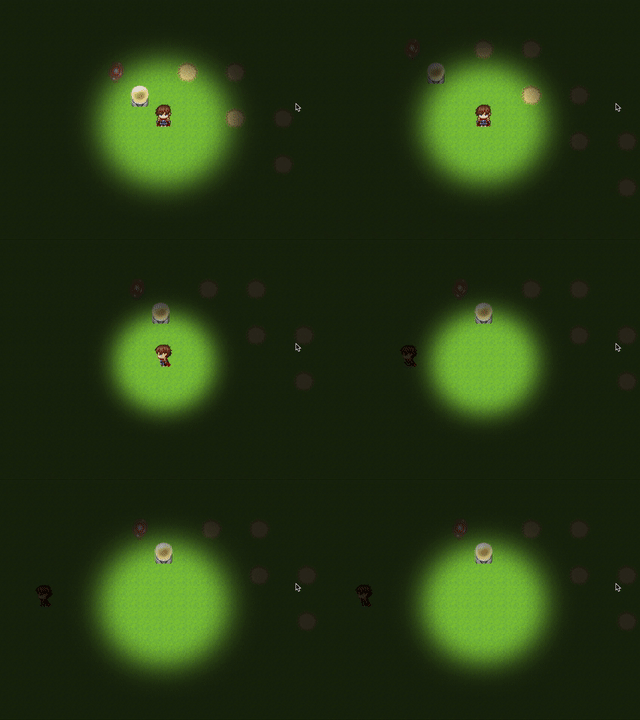
萌新,做了一个追光的效果,如图。
做法是在scene_map上添加一个window,用sprite加载一张图片,作为window的背景,设置锚点到屏幕中心,不断缩放。

当人物走到地图边缘、离开屏幕中心时,图片也应该随之调整位置。
我想在window.update()里获取人物的位置,计算出距屏幕中心的偏移量,根据这个偏移量来调整图片位置。

我只知道$gamePlayer.x可以绝对位置。
但是不知道如何获取人物在屏幕中的相对位置?

貌似在地图边缘留出足够大的空白可以规避这个问题,但我刚入门,想弄明白点儿。
还请大佬们指点一二。


另外我所在的用户组只能上传2MB的附件我也是服了。

评分

参与人数 1赞 +1 收起 理由
wr282828 + 1 塞糖

查看全部评分

梦石
0
星屑
751
在线时间
51 小时
注册时间
2020-5-26
回帖
10
 楼主| 发表于 2020-12-2 15:16:09 | 显示全部楼层
本帖最后由 wangdm 于 2020-12-2 15:18 编辑

9kq5p-9pg2c.gif

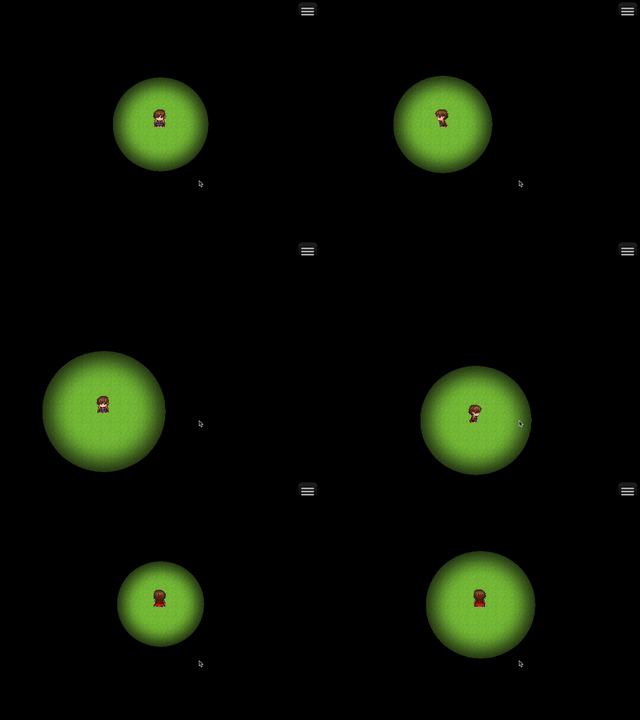
解决了。
获取"玩家画面坐标"的方法:$gamePlayer.screenX(), $gamePlayer.screenY()。

下边是主要代码。

[pre lang="ruby"](() => {
    const pluginName = "Spotlight";

    PluginManager.registerCommand(pluginName, "show", args => {
        let scene = SceneManager._scene;
        if (scene.objName() && scene.objName() === 'Scene_Map') {
            scene.createSpotLightWindow();
        }
    });

    Scene_Map.prototype.objName = function() {
        return 'Scene_Map';
    };

    Scene_Map.prototype.createSpotLightWindow = function () {
        this._spotLightWindow = new Window_SpotLight();
        // 本window放在最下层
        this.addWindowAt(this._spotLightWindow, 0);
    };

    Scene_Base.prototype.addWindowAt = function(window, index) {
        this._windowLayer.addChildAt(window, index);
    };

    // windowNameMap 隐藏
    Window_MapName.prototype.updateFadeOut = function() {
        this.contentsOpacity -= 16;
        if (this.contentsOpacity === 0) {
            this.hide();
        }
    };

    function Window_SpotLight() {
        this.initialize(...arguments);
    }

    Window_SpotLight.prototype = Object.create(Window.prototype);
    Window_SpotLight.prototype.constructor = Window_SpotLight;

    Window_SpotLight.prototype.initialize = function () {
        Window.prototype.initialize.call(this);

        let x = -this._margin / 2;
        let y = -this._margin / 2;
        let w = $dataSystem.advanced.screenWidth;
        let h = $dataSystem.advanced.screenHeight;

        this._sceenCenterX = w / 2;
        this._sceenCenterY = h / 2;
        // console.log(this._sceenCenterX, this._sceenCenterY);

        this.move(x, y, w, h);

        this._spotLightSprite = new Sprite(ImageManager.loadSystem('_spot_light2'));
        this._spotLightSprite.x = this._sceenCenterX;
        this._spotLightSprite.y = this._sceenCenterY;

        this._spotLightSprite.anchor.x = 0.5;
        this._spotLightSprite.anchor.y = 0.5;

        this.addChild(this._spotLightSprite);

        this._lastPlayerX = this._sceenCenterX;
        this._lastPlayerY = this._sceenCenterY + 18; // TODO 不知道这18是怎么来的

        this._canZoomOut = true;
    };

    Window_SpotLight.prototype.update = function () {
        if (this._lastPlayerX !== $gamePlayer.screenX()) {
            this._spotLightSprite.x -= this._lastPlayerX - $gamePlayer.screenX();
            this._lastPlayerX = $gamePlayer.screenX();
        }
        if (this._lastPlayerY !== $gamePlayer.screenY()) {
            this._spotLightSprite.y -= this._lastPlayerY - $gamePlayer.screenY();
            this._lastPlayerY = $gamePlayer.screenY();
        }

        if (this._canZoomOut) {
            this._spotLightSprite.scale.x += 0.01;
            this._spotLightSprite.scale.y += 0.01;
            if (this._spotLightSprite.scale.x >= 1.5) {
                this._canZoomOut = false;
            }
        } else {
            this._spotLightSprite.scale.x -= 0.01;
            this._spotLightSprite.scale.y -= 0.01;
            if (this._spotLightSprite.scale.x <= 1) {
                this._canZoomOut = true;
            }
        }
    };
})();[/pre]
回复

使用道具 举报

梦石
0
星屑
751
在线时间
51 小时
注册时间
2020-5-26
回帖
10
 楼主| 发表于 2020-12-2 16:07:46 | 显示全部楼层
本帖最后由 wangdm 于 2020-12-2 16:09 编辑

左了。
根本不用考虑偏移量,直接指定sprite的坐标和玩家画面坐标相同就行了。

[pre lang="ruby"]Window_Spotlight.prototype.update = function () {
    this._spotlightSprite.x = $gamePlayer.screenX();
    this._spotlightSprite.y = $gamePlayer.screenY() - 18;

    if (this._canZoomOut) {
        this._spotlightSprite.scale.x += 0.01;
        this._spotlightSprite.scale.y += 0.01;
        if (this._spotlightSprite.scale.x >= 1.5) {
            this._canZoomOut = false;
        }
    } else {
        this._spotlightSprite.scale.x -= 0.01;
        this._spotlightSprite.scale.y -= 0.01;
        if (this._spotlightSprite.scale.x <= 1) {
            this._canZoomOut = true;
        }
    }
};[/pre]

点评

你不如直接把Sprite加到地图上,也好过先加到window,再放到地图的周转  发表于 2020-12-5 06:37

评分

参与人数 1赞 +1 收起 理由
wabcmcc + 1 塞糖

查看全部评分

回复

使用道具 举报

您需要登录后才可以回帖 登录 | 注册会员

本版积分规则

Powered by Discuz! X5.0 © 2001-2026 Discuz! Team.

在本版发帖返回顶部