| 赞 | 5 |
| VIP | |
| 好人卡 | |
| 积分 | 73 |
| 经验 | |
| 最后登录 | 2026-7-13 |
| 在线时间 | 1244 小时 |
- 梦石
- 0
- 星屑
- 7296
- 在线时间
- 1244 小时
- 注册时间
- 2015-8-15
- 回帖
- 473
|
楼主 |
发表于 2023-3-1 09:08:11
|
显示全部楼层
本帖最后由 金芒芒 于 2023-3-8 14:30 编辑
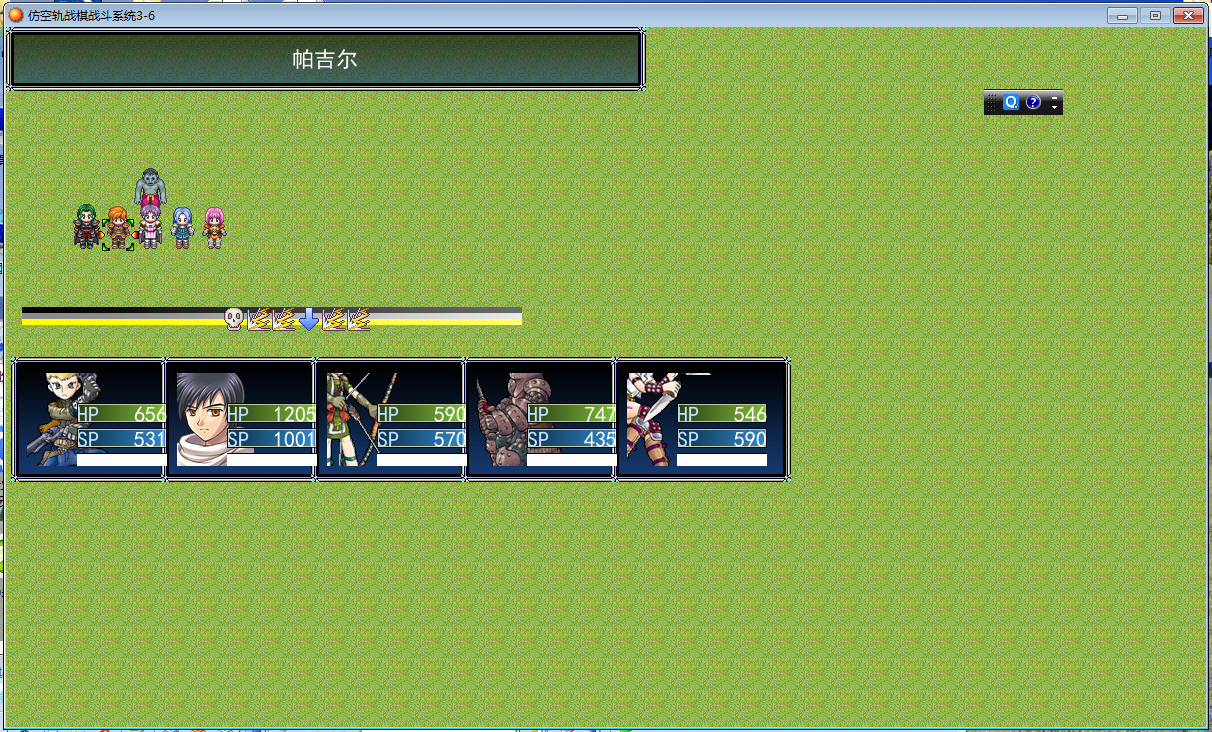
技能有30个技能每个技能的冷却时间多不一样的要用30个空轨顺序栏脚本
我这个是战棋空轨顺序栏脚本求大神操刀修改成群战的空轨顺序栏脚本
链接: https://pan.baidu.com/s/1VIVGn6_KJxlM8ShnJ24dWA?pwd=2msb 提取码: 2msb 复制这段内容后打开百度网盘手机App,操作更方便哦
[pre lang="ruby"]#==============================================================================
# ■ Sprite_Cursor
# 光标sprite
#==============================================================================
class Sprite_Cursor < RPG::Sprite
#--------------------------------------------------------------------------
# ● 公開インスタンス変数
#--------------------------------------------------------------------------
attr_reader :map_x # マップ X 座標 (論理座標)
attr_reader :map_y # マップ Y 座標 (論理座標)
attr_reader :real_x # マップ X 座標 (実座標 * 128)
attr_reader :real_y # マップ Y 座標 (実座標 * 128)
#--------------------------------------------------------------------------
# ● オブジェクト初期化
# viewport : ビューポート
# character : キャラクター (Game_Character)
#--------------------------------------------------------------------------
def initialize(viewport, x, y)
super(viewport)
self.bitmap = RPG::Cache.picture(ZTBS::CURSOR)
self.ox = self.bitmap.width / 2
self.oy = self.bitmap.height
moveto(x, y)
update
end
#--------------------------------------------------------------------------
# ● 解放
#--------------------------------------------------------------------------
def dispose
if self.bitmap != nil
self.bitmap.dispose
end
super
end
#--------------------------------------------------------------------------
# ● 指定位置に移動
# x : X 座標
# y : Y 座標
#--------------------------------------------------------------------------
def moveto(x, y)
@map_x = x % $game_map.width
@map_y = y % $game_map.height
@real_x = @map_x * 128
@real_y = @map_y * 128
end
#--------------------------------------------------------------------------
# ● 画面 X 座標の取得
#--------------------------------------------------------------------------
def screen_x
# 実座標とマップの表示位置から画面座標を求める
return (@real_x - $game_map.display_x + 3) / 4 + 16
end
#--------------------------------------------------------------------------
# ● 画面 Y 座標の取得
#--------------------------------------------------------------------------
def screen_y
# 実座標とマップの表示位置から画面座標を求める
y = (@real_y - $game_map.display_y + 3) / 4 + 32
end
#--------------------------------------------------------------------------
# ● 画面 Z 座標の取得
#--------------------------------------------------------------------------
def screen_z
# 実座標とマップの表示位置から画面座標を求める
z = (@real_y - $game_map.display_y + 3) / 4 + 32
end
#--------------------------------------------------------------------------
# ● conceal 这功能比较诡异
#--------------------------------------------------------------------------
def s_visible
self.visible = false
end
#--------------------------------------------------------------------------
# ● appear 太那啥,不说了
#--------------------------------------------------------------------------
def f_visible
self.visible = true
end
#--------------------------------------------------------------------------
# ● フレーム更新
#--------------------------------------------------------------------------
def update
super
moveto($game_player.x, $game_player.y)
# スプライトの座標を設定
self.x = screen_x
self.y = screen_y
self.z = screen_z + 1
end
end
#==============================================================================
# ■ Sprite_Area
# 魔法攻击范围sprite
#==============================================================================
class Sprite_Area < RPG::Sprite
#--------------------------------------------------------------------------
# ● 公開インスタンス変数
#--------------------------------------------------------------------------
attr_reader :map_x # マップ X 座標 (論理座標)
attr_reader :map_y # マップ Y 座標 (論理座標)
attr_reader :real_x # マップ X 座標 (実座標 * 128)
attr_reader :real_y # マップ Y 座標 (実座標 * 128)
#--------------------------------------------------------------------------
# ● オブジェクト初期化
# viewport : ビューポート
# character : キャラクター (Game_Character)
#--------------------------------------------------------------------------
def initialize(viewport, type, x, y, invisible = false)
super(viewport)
case type
when 0
self.bitmap = RPG::Cache.picture(ZTBS::ACTOR_AREA)
when 1
self.bitmap = RPG::Cache.picture(ZTBS::ENEMY_AREA)
end
self.ox = self.bitmap.width / 2
self.oy = self.bitmap.height
self.opacity = 0 if invisible
moveto(x, y)
update
end
#--------------------------------------------------------------------------
# ● 解放
#--------------------------------------------------------------------------
def dispose
if self.bitmap != nil
self.bitmap.dispose
end
super
end
#--------------------------------------------------------------------------
# ● 指定位置に移動
# x : X 座標
# y : Y 座標
#--------------------------------------------------------------------------
def moveto(x, y)
@map_x = x
@map_y = y
@real_x = @map_x * 128
@real_y = @map_y * 128
end
#--------------------------------------------------------------------------
# ● 画面 X 座標の取得
#--------------------------------------------------------------------------
def screen_x
# 実座標とマップの表示位置から画面座標を求める
return (@real_x - $game_map.display_x + 3) / 4 + 16
end
#--------------------------------------------------------------------------
# ● 画面 Y 座標の取得
#--------------------------------------------------------------------------
def screen_y
# 実座標とマップの表示位置から画面座標を求める
y = (@real_y - $game_map.display_y + 3) / 4 + 32
end
#--------------------------------------------------------------------------
# ● 画面 Z 座標の取得
#--------------------------------------------------------------------------
def screen_z
# 実座標とマップの表示位置から画面座標を求める
z = (@real_y - $game_map.display_y + 3) / 4 + 32
end
#--------------------------------------------------------------------------
# ● フレーム更新
#--------------------------------------------------------------------------
def update
super
# スプライトの座標を設定
self.x = screen_x
self.y = screen_y
self.z = screen_z
end
end
#==============================================================================
# ■ Sprite_Range
# 魔法攻击范围内的攻击区域sprite
#==============================================================================
class Sprite_Range < RPG::Sprite
#--------------------------------------------------------------------------
# ● 公開インスタンス変数
#--------------------------------------------------------------------------
attr_reader :map_x # マップ X 座標 (論理座標)
attr_reader :map_y # マップ Y 座標 (論理座標)
attr_reader :real_x # マップ X 座標 (実座標 * 128)
attr_reader :real_y # マップ Y 座標 (実座標 * 128)
#--------------------------------------------------------------------------
# ● オブジェクト初期化
# viewport : ビューポート
# character : キャラクター (Game_Character)
#--------------------------------------------------------------------------
def initialize(viewport, type, x, y, invisible = false)
super(viewport)
case type
when 0
self.bitmap = RPG::Cache.picture(ZTBS::ACTOR_TARGET_AREA)
when 1
self.bitmap = RPG::Cache.picture(ZTBS::ENEMY_TARGET_AREA)
end
self.ox = self.bitmap.width / 2
self.oy = self.bitmap.height
self.opacity = 0 if invisible
@plus_map_x = x - $game_player.x
@plus_map_y = y - $game_player.y
moveto(x, y)
update
end
#--------------------------------------------------------------------------
# ● 解放
#--------------------------------------------------------------------------
def dispose
if self.bitmap != nil
self.bitmap.dispose
end
super
end
#--------------------------------------------------------------------------
# ● 指定位置に移動
# x : X 座標
# y : Y 座標
#--------------------------------------------------------------------------
def moveto(x, y)
@map_x = x
@map_y = y
@real_x = @map_x * 128
@real_y = @map_y * 128
end
#--------------------------------------------------------------------------
# ● 画面 X 座標の取得
#--------------------------------------------------------------------------
def screen_x
# 実座標とマップの表示位置から画面座標を求める
return (@real_x - $game_map.display_x + 3) / 4 + 16
end
#--------------------------------------------------------------------------
# ● 画面 Y 座標の取得
#--------------------------------------------------------------------------
def screen_y
# 実座標とマップの表示位置から画面座標を求める
y = (@real_y - $game_map.display_y + 3) / 4 + 32
end
#--------------------------------------------------------------------------
# ● 画面 Z 座標の取得
#--------------------------------------------------------------------------
def screen_z
# 実座標とマップの表示位置から画面座標を求める
z = (@real_y - $game_map.display_y + 3) / 4 + 32
end
#--------------------------------------------------------------------------
# ● フレーム更新
#--------------------------------------------------------------------------
def update
super
@map_x = $game_player.x + @plus_map_x
@map_y = $game_player.y + @plus_map_y
@real_x = @map_x * 128
@real_y = @map_y * 128
# スプライトの座標を設定
self.x = screen_x
self.y = screen_y
self.z = screen_z
end
end
#==============================================================================
# ■ RPG::Skill
#==============================================================================
module RPG
class Skill
def name
name = @name.split(/@/)[0]
if name != nil then
return name.gsub("[T]", "")
else @name
end
end
def add_at
add = @name.split(/@/)[1].to_i
return add != nil ? add : 0
end
def tactical?
return @name.include?("[T]")
end
end
end
#==============================================================================
# ■ Window_TSkill
#==============================================================================
class Window_TSkill < Window_Selectable
#--------------------------------------------------------------------------
# ● 公開インスタンス変数
#--------------------------------------------------------------------------
attr_reader :data # データ
#--------------------------------------------------------------------------
# ● オブジェクト初期化
# actor : アクター
#--------------------------------------------------------------------------
def initialize(actor,type)
super(0, 64, 320, 256)
if $game_player.y < 4
self.y = 416 - self.height
end
if $game_player.x < 10
self.x = 640 - self.width
end
@actor = actor
@type = type
refresh
self.index = 0
end
#--------------------------------------------------------------------------
# ● スキルの取得
#--------------------------------------------------------------------------
def skill
return @data[self.index]
end
#--------------------------------------------------------------------------
# ● リフレッシュ
#--------------------------------------------------------------------------
def refresh
if self.contents != nil
self.contents.dispose
self.contents = nil
end
@data = []
#caste
if @type == 1 then
for i in 0...@actor.skills.size
skill = $data_skills[@actor.skills]
if skill != nil and skill.tactical? and not skill.element_set.include?($data_system.elements.index("craft"))
@data.push(skill)
end
end
end
#craft
if @type == 2 then
for i in 0...@actor.skills.size
skill = $data_skills[@actor.skills]
if skill != nil and skill.tactical? and skill.element_set.include?($data_system.elements.index("craft"))
@data.push(skill)
end
end
end
# 項目数が 0 でなければビットマップを作成し、全項目を描画
@item_max = @data.size
if @item_max > 0
self.contents = Bitmap.new(width - 32, row_max * 32)
for i in 0...@item_max
draw_item(i)
end
end
end
#--------------------------------------------------------------------------
# ● 項目の描画
# index : 項目番号
#--------------------------------------------------------------------------
def draw_item(index)
skill = @data[index]
if @type == 2 then
if @actor.craft_can_use?(skill.id)
self.contents.font.color = normal_color
else
self.contents.font.color = disabled_color
end
else
if @actor.skill_can_use?(skill.id)
self.contents.font.color = normal_color
else
self.contents.font.color = disabled_color
end
end
x = 4
y = index * 32
rect = Rect.new(x, y, self.width - 32, 32)
self.contents.fill_rect(rect, Color.new(0, 0, 0, 0))
bitmap = RPG::Cache.icon(skill.icon_name)
opacity = self.contents.font.color == normal_color ? 255 : 128
self.contents.blt(x, y + 4, bitmap, Rect.new(0, 0, 24, 24), opacity)
self.contents.draw_text(x + 28, y, 204, 32, skill.name, 0)
self.contents.draw_text(x + 232, y, 48, 32, skill.sp_cost.to_s, 2)
end
#--------------------------------------------------------------------------
# ● ヘルプテキスト更新
#--------------------------------------------------------------------------
def update_help
@help_window.set_text(self.skill == nil ? "" : self.skill.description)
end
end
#==============================================================================
# ■ RPG::Item
#==============================================================================
module RPG
class Item
def name
name = @name.split(/@/)[0]
if name != nil then
return name.gsub("[T]", "")
else @name
end
end
def at_add
add = @name.split(/@/)[1].to_i
return add != nil ? add : 0
end
def tactical?
return @name.include?("[T]")
end
end
end
#==============================================================================
# ■ Window_TItem
#==============================================================================
class Window_TItem < Window_Selectable
#--------------------------------------------------------------------------
# ● 公開インスタンス変数
#--------------------------------------------------------------------------
attr_reader :data # データ
#--------------------------------------------------------------------------
# ● オブジェクト初期化
# actor : アクター
#--------------------------------------------------------------------------
def initialize
super(0, 64, 320, 256)
if $game_player.y < 4
self.y = 416 - self.height
end
if $game_player.x < 10
self.x = 640 - self.width
end
refresh
self.index = 0
end
#--------------------------------------------------------------------------
# ● アイテムの取得
#--------------------------------------------------------------------------
def item
return @data[self.index]
end
#--------------------------------------------------------------------------
# ● リフレッシュ
#--------------------------------------------------------------------------
def refresh
if self.contents != nil
self.contents.dispose
self.contents = nil
end
@data = []
# アイテムを追加
for i in 1...$data_items.size
if $game_party.item_number(i) > 0 and $data_items.tactical?
@data.push($data_items)
end
end
# 項目数が 0 でなければビットマップを作成し、全項目を描画
@item_max = @data.size
if @item_max > 0
self.contents = Bitmap.new(width - 32, row_max * 32)
for i in 0...@item_max
draw_item(i)
end
end
end
#--------------------------------------------------------------------------
# ● 項目の描画
# index : 項目番号
#--------------------------------------------------------------------------
def draw_item(index)
item = @data[index]
case item
when RPG::Item
number = $game_party.item_number(item.id)
when RPG::Weapon
number = $game_party.weapon_number(item.id)
when RPG::Armor
number = $game_party.armor_number(item.id)
end
if item.is_a?(RPG::Item) and
$game_party.item_can_use?(item.id)
self.contents.font.color = normal_color
else
self.contents.font.color = disabled_color
end
x = 4
y = index * 32
rect = Rect.new(x, y, self.width - 32, 32)
self.contents.fill_rect(rect, Color.new(0, 0, 0, 0))
bitmap = RPG::Cache.icon(item.icon_name)
opacity = self.contents.font.color == normal_color ? 255 : 128
self.contents.blt(x, y + 4, bitmap, Rect.new(0, 0, 24, 24), opacity)
self.contents.draw_text(x + 28, y, 212, 32, item.name, 0)
self.contents.draw_text(x + 240, y, 16, 32, ":", 1)
self.contents.draw_text(x + 256, y, 24, 32, number.to_s, 2)
end
#--------------------------------------------------------------------------
# ● ヘルプテキスト更新
#--------------------------------------------------------------------------
def update_help
@help_window.set_text(self.item == nil ? "" : self.item.description)
end
end
#==============================================================================
# ■ Window_TActors
#==============================================================================
class Window_TActors < Window_Selectable
#--------------------------------------------------------------------------
# ● 公開インスタンス変数
#--------------------------------------------------------------------------
attr_reader :data # データ
#--------------------------------------------------------------------------
# ● オブジェクト初期化
# actor : アクター
#--------------------------------------------------------------------------
def initialize
super(0, 64, 640, 352)
refresh
self.index = 0
end
#--------------------------------------------------------------------------
# ● アクターの取得
#--------------------------------------------------------------------------
def actor
return @data[self.index]
end
#--------------------------------------------------------------------------
# ● リフレッシュ
#--------------------------------------------------------------------------
def refresh
if self.contents != nil
self.contents.dispose
self.contents = nil
end
@data = []
actors = $game_system.tactics_actors.keys + $game_system.tactics_dead_actors.keys
for actor in actors
@data.push(actor)
end
@data.sort!
# 項目数が 0 でなければビットマップを作成し、全項目を描画
@item_max = @data.size
if @item_max > 0
self.contents = Bitmap.new(width - 32, row_max * 32)
for i in 0...@item_max
draw_item(i)
end
end
end
#--------------------------------------------------------------------------
# ● 項目の描画
# index : 項目番号
#--------------------------------------------------------------------------
def draw_item(index)
if $game_system.tactics_actors.keys.include?(@data[index])
actor = $game_system.tactics_actors[@data[index]]
else
actor = $game_system.tactics_dead_actors[@data[index]]
end
x = 4
y = index * 32
rect = Rect.new(x, y, self.width - 32, 32)
draw_actor_name(actor, x, y)
draw_actor_state(actor, x + 136, y)
draw_actor_hp(actor, x + 280, y)
draw_actor_sp(actor, x + 456, y)
end
#--------------------------------------------------------------------------
# ● ヘルプテキスト更新
#--------------------------------------------------------------------------
def update_help
return
end
end
[/pre]
[pre lang="ruby"]module SXL_ICON
#ICONS =图标
ICONS = {
1=>"046-Skill03",
}
SKIN = "456" #皮肤轨道
X = 32
Y = 16
end
class KZGJ
def initialize #定义初始化
@base = Sprite.new #基础=新的精灵
@base.bitmap = RPG::Cache.picture(SXL_ICON::SKIN)
#基础位图=Cache.picture文件的SXL_ICON的滑道皮肤
@base.x = SXL_ICON::X
@base.y = SXL_ICON::Y
@base.z = SXL_ICON::Y+100
@width = @base.bitmap.width#宽度=基础位图的宽度
@height = @base.bitmap.height#高度=基础位图的高度
refresh #刷新
end
def refresh #定义刷新刷新
sort #分类
n = 0
@icon_set = [] #图标设置=[]
for battler in @battlers_array#用于@战斗图设置中的战斗者
p battler.id #复制战斗者的ID
iconname = SXL_ICON::ICONS[battler.id]#icon名称=SXL_ICON::ICONS[战斗.id]
sprite = Sprite.new #生成精灵=新的精灵
sprite.bitmap = RPG::Cache.icon(iconname)#精灵图标+RPG::Cache.icon(图标名字)
sprite.x = SXL_ICON::X + n * 25 + 25
sprite.y = SXL_ICON::Y# + n * 25 + 25
sprite.z = @base.z + 100
@icon_set.push([sprite,battler.id])#@图标设置推送([精灵,战斗者.id])
n += 1#下一个角色
end
end
def reset # def复位
@icon_set.each { |set| set[0].dispose}#@图标设置。每个{|放置|放置[0].布置}
refresh#刷新
end #终止
def cr(actor_id, position) #定义 cr(演员id,位置)
for set in @icon_set #用于在@图标_放置中设置
if set[1] == actor_id then #如果放置[1]==演员_id,则
set[0].x = SXL_ICON::X + position * 25 + 25# - 25 #放置[0]。x=SXL_ICON::x-25
set[0].y = SXL_ICON::Y- 25# + position * 25 + 25#放置[0]。y=SXL_ICON::y+位置*25+25
5.times { Graphics.update }# 5次{图形更新}
5.times { set[0].y +=5; Graphics.update}#5.次{放置[0].x+=5;图形更新}
break#强行终止
end
end
end
def move_up(array) #def上移(数组)
for element in array#用于数组中的元素
for i in 1..5 #对于1..5中的i
for set in @icon_set#用于在@图标_放置中设置
if $game_map.events[element].at < $game_map.events[set[1]].at and set[0].visible == true then
#如果$游戏 地图事件[要素]。位于< $游戏 地图事件[放置[1] 位于并设置[0]。可见==则为真
set[0].x -= 5 #放置[0].y -= 5
end
end
Graphics.update #图形更新
end
end
end
def move_down(index) #def下移(索引)
for i in 1..5#用于1..5中的i
for set in @icon_set#用于在@图标_放置中设置
if $game_map.events[index].at < $game_map.events[set[1]].at and set[0].visible == true then
#如果$游戏 地图事件[索引]。位于< $游戏 地图事件[放置[1] 位于并设置[0]。可见==则为真
set[0].x += 5#放置[0].y += 5
end
end
Graphics.update#图形更新
end
end
def forward #def转发
for i in 1..5 #用于1..5中的i
for set in @icon_set #用于在@图标_放置中设置
if set[0].visible == true then#如果放置[0]可见==则为真
set[0].x -= 5#放置[0].y -= 5
end
end
Graphics.update #图形更新
end
end
def conceal(array)#def隐藏(数组)
for id in array#用于数组中的id
for set in @icon_set#用于在@icon_set中设置
if id == set[1] then#如果id==set[1],则
set[0].visible = false#放置[0]。可见=假
end
end
end
end
def sort#def排序
@battlers_array = []#@战列兵阵=[]
for i in $game_system.tactics_actors.keys#我在$game系统中。战术演员。关键
actor = $game_map.events#actor=$游戏地图事件
if !$game_system.tactics_actors.dead? then#如果$游戏系统战术演员。死去的然后
@battlers_array.push(actor)#@战列兵阵列。推(演员)
end
end
for i in $game_system.tactics_enemies.keys#我在$game系统中。战术敌人。关键
enemy = $game_map.events# 敌人=$游戏地图事件
if !$game_system.tactics_enemies.dead? then#如果$游戏系统战术敌人。死去的然后
@battlers_array.push(enemy)#@战列兵阵列。推进(敌人)
end
end
@battlers_array.sort! {|a,b| a.at - b.at } #@战列兵阵列。分类{|a,b|a在-b在}
end
def dispose#def处置
@base.dispose#@底部排水管
@icon_set.each { |set| set[0].dispose}#@图标设置。每个{|集|集[0].dispose}
end
end
[/pre]
[pre lang="ruby"]class Game_Character
#--------------------------------------------------------------------------
# ● 指定イベントに近づく
#--------------------------------------------------------------------------
def move_toward_event(id)
# 指定イベントの座標との差を求める
sx = @x - $game_map.events[id].x
sy = @y - $game_map.events[id].y
# 座標が等しい場合
if sx == 0 and sy == 0
return
end
# 差の絶対値を求める
abs_sx = sx.abs
abs_sy = sy.abs
# 横の距離と縦の距離が等しい場合
if abs_sx == abs_sy
# ランダムでどちらかを 1 増やす
rand(2) == 0 ? abs_sx += 1 : abs_sy += 1
end
# 横の距離のほうが長い場合
if abs_sx > abs_sy
# 左右方向を優先し、指定イベントのいるほうへ移動
sx > 0 ? move_left : move_right
if not moving? and sy != 0
sy > 0 ? move_up : move_down
end
# 縦の距離のほうが長い場合
else
# 上下方向を優先し、指定イベントのいるほうへ移動
sy > 0 ? move_up : move_down
if not moving? and sx != 0
sx > 0 ? move_left : move_right
end
end
end
#--------------------------------------------------------------------------
# ● 指定イベントから遠ざかる
#--------------------------------------------------------------------------
def move_away_from_event(id)
# 指定イベントの座標との差を求める
sx = @x - $game_map.events[id].x
sy = @y - $game_map.events[id].y
# 座標が等しい場合
if sx == 0 and sy == 0
return
end
# 差の絶対値を求める
abs_sx = sx.abs
abs_sy = sy.abs
# 横の距離と縦の距離が等しい場合
if abs_sx == abs_sy
# ランダムでどちらかを 1 増やす
rand(2) == 0 ? abs_sx += 1 : abs_sy += 1
end
# 横の距離のほうが長い場合
if abs_sx > abs_sy
# 左右方向を優先し、指定イベントのいないほうへ移動
sx > 0 ? move_right : move_left
if not moving? and sy != 0
sy > 0 ? move_down : move_up
end
# 縦の距離のほうが長い場合
else
# 上下方向を優先し、指定イベントのいないほうへ移動
sy > 0 ? move_down : move_up
if not moving? and sx != 0
sx > 0 ? move_right : move_left
end
end
end
#--------------------------------------------------------------------------
# ● 指定座標に近づく
#--------------------------------------------------------------------------
def move_toward_position(x, y)
# 座標の差を求める
sx = @x - x
sy = @y - y
# 座標が等しい場合
if sx == 0 and sy == 0
return
end
# 差の絶対値を求める
abs_sx = sx.abs
abs_sy = sy.abs
# 横の距離と縦の距離が等しい場合
if abs_sx == abs_sy
# ランダムでどちらかを 1 増やす
rand(2) == 0 ? abs_sx += 1 : abs_sy += 1
end
# 横の距離のほうが長い場合
if abs_sx > abs_sy
sx > 0 ? move_left : move_right
if not moving? and sy != 0
sy > 0 ? move_up : move_down
end
# 縦の距離のほうが長い場合
else
sy > 0 ? move_up : move_down
if not moving? and sx != 0
sx > 0 ? move_left : move_right
end
end
end
#--------------------------------------------------------------------------
# ● 指定座標から遠ざかる
#--------------------------------------------------------------------------
def move_away_from_position(x, y)
# 座標の差を求める
sx = @x - x
sy = @y - y
# 座標が等しい場合
if sx == 0 and sy == 0
return
end
# 差の絶対値を求める
abs_sx = sx.abs
abs_sy = sy.abs
# 横の距離と縦の距離が等しい場合
if abs_sx == abs_sy
# ランダムでどちらかを 1 増やす
rand(2) == 0 ? abs_sx += 1 : abs_sy += 1
end
# 横の距離のほうが長い場合
if abs_sx > abs_sy
sx > 0 ? move_right : move_left
if not moving? and sy != 0
sy > 0 ? move_down : move_up
end
# 縦の距離のほうが長い場合
else
sy > 0 ? move_down : move_up
if not moving? and sx != 0
sx > 0 ? move_right : move_left
end
end
end
#--------------------------------------------------------------------------
# ● 指定イベントの方を向く
#--------------------------------------------------------------------------
def turn_toward_event(id)
# 指定イベントの座標との差を求める
sx = @x - $game_map.events[id].x
sy = @y - $game_map.events[id].y
# 座標が等しい場合
if sx == 0 and sy == 0
return
end
# 横の距離のほうが長い場合
if sx.abs > sy.abs
# 左右方向で指定イベントのいるほうを向く
sx > 0 ? turn_left : turn_right
# 縦の距離のほうが長い場合
else
# 上下方向で指定イベントのいるほうを向く
sy > 0 ? turn_up : turn_down
end
end
#--------------------------------------------------------------------------
# ● 指定イベントの逆を向く
#--------------------------------------------------------------------------
def turn_away_from_event(id)
# 指定イベントの座標との差を求める
sx = @x - $game_map.events[id].x
sy = @y - $game_map.events[id].y
# 座標が等しい場合
if sx == 0 and sy == 0
return
end
# 横の距離のほうが長い場合
if sx.abs > sy.abs
# 左右方向で指定イベントのいないほうを向く
sx > 0 ? turn_right : turn_left
# 縦の距離のほうが長い場合
else
# 上下方向で指定イベントのいないほうを向く
sy > 0 ? turn_down : turn_up
end
end
#--------------------------------------------------------------------------
# ● 指定座標の方を向く
#--------------------------------------------------------------------------
def turn_toward_position(x, y)
# 座標の差を求める
sx = @x - x
sy = @y - y
# 座標が等しい場合
if sx == 0 and sy == 0
return
end
# 横の距離のほうが長い場合
if sx.abs > sy.abs
sx > 0 ? turn_left : turn_right
# 縦の距離のほうが長い場合
else
sy > 0 ? turn_up : turn_down
end
end
#--------------------------------------------------------------------------
# ● 指定座標の逆を向く
#--------------------------------------------------------------------------
def turn_away_from_position(x, y)
# 座標の差を求める
sx = @x - x
sy = @y - y
# 座標が等しい場合
if sx == 0 and sy == 0
return
end
# 横の距離のほうが長い場合
if sx.abs > sy.abs
sx > 0 ? turn_right : turn_left
# 縦の距離のほうが長い場合
else
sy > 0 ? turn_down : turn_up
end
end
#--------------------------------------------------------------------------
# ● 指定範囲内をランダムに移動
#--------------------------------------------------------------------------
def move_random_area(x, y, distance)
# 自分とエリア中心の座標の差を求める
sx = @x - x
sy = @y - y
# 既に範囲外にいる場合
if sx.abs + sy.abs > distance
# エリア中心に近づく
move_toward_position(x, y)
return
end
# とりあえずどの方向に進むか決定した後に距離判定
case rand(4)
when 0 # 下に移動
if sx.abs + sy < distance
move_down(false)
end
when 1 # 左に移動
if -sx + sy.abs < distance
move_left(false)
end
when 2 # 右に移動
if sx + sy.abs < distance
move_right(false)
end
when 3 # 上に移動
if sx.abs - sy < distance
move_up(false)
end
end
end
end
[/pre] |
-
|



 写轮眼
写轮眼
 发表于 2022-11-24 17:17:41

 提升卡
提升卡 沉默号角
沉默号角 喧嚣号角
喧嚣号角 变色卡
变色卡 升龙剑
升龙剑