| 赞 | 91 |
| VIP | |
| 好人卡 | |
| 积分 | 105 |
| 经验 | |
| 最后登录 | 2024-6-24 |
| 在线时间 | 5019 小时 |
无限の剣制
- 梦石
- 0
- 星屑
- 10460
- 在线时间
- 5019 小时
- 注册时间
- 2013-2-28
- 回帖
- 4942
 
|
 发表于 2015-5-2 12:06:16
|
显示全部楼层
本帖最后由 VIPArcher 于 2018-11-20 14:02 编辑
来卖萌的
#==============================================================================
5月1日更新
自用的测试跳过标题- class << SceneManager
- def first_scene_class
- DataManager.setup_new_game;$game_map.autoplay;Scene_Map
- end
- end unless $BTEST
一个不能返回标题的版本- class Scene_Title
- def start; super; SceneManager.clear;DataManager.setup_new_game
- $game_map.autoplay;SceneManager.goto(Scene_Map)
- end; def terminate; super end
- end
1号开关开启,玩家无法输入方向键移动- class Game_Player < Game_Character
- alias viparcher_move_by_input move_by_input
- def move_by_input;return if $game_switches[1];viparcher_move_by_input end
- end
固定远景图文件名带有‘fix’的远景- class Spriteset_Map;alias fix_update_parallax update_parallax
- def update_parallax;fix_update_parallax;return unless @parallax_name =~ /fix/i
- @parallax.ox,@parallax.oy = @tilemap.ox,@tilemap.oy
- end
- end
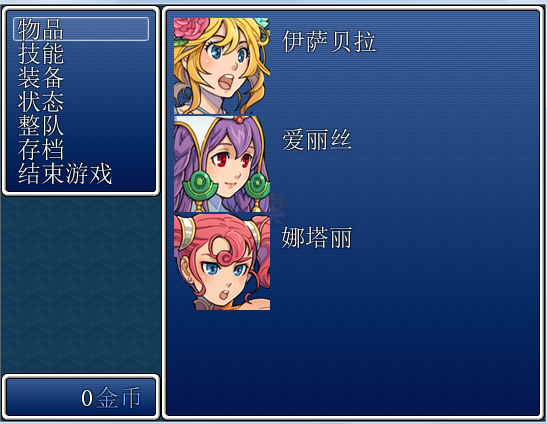
用下面3个和喵呜上面那个‘菜单的人物状态界面隐藏HP、MP等’一起食用可以做一个简单的解密菜单
简化菜单- class Window_MenuCommand;def make_command_list;add_command(Vocab::item,:item)
- add_command("读档",:save,DataManager.save_file_exists?)
- add_command(Vocab::game_end,:game_end) end end
- class Scene_Menu;def command_save;SceneManager.call(Scene_Load) end end
隐藏金币窗口- class Window_Gold
- def refresh
- self.visible = false
- end
- end
状态菜单适应大小- class Window_MenuStatus;def window_height; 24 + 98 * item_max end
- def item_height;(height - standard_padding * 2) / item_max end
- end
#==============================================================================
5月2日更新
事件名称里带有<move>的事件可以全地图自主移动- class Game_Event;alias vip1552usm update_self_movement;def update_self_movement
- return vip1552usm unless @event.name.include?('<move>');if @stop_count >
- stop_count_threshold;case @move_type;when 1 then move_type_random
- when 2 then move_type_toward_player;when 3 then move_type_custom
- end end end end
#==============================================================================
5月10日更新
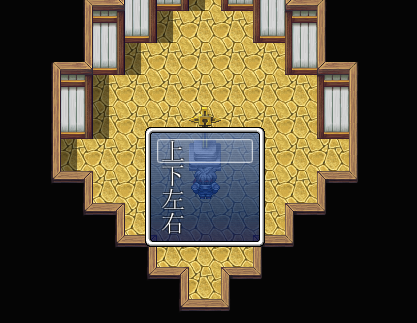
1号开关打开,显示选项显示在画面正中间- class Window_ChoiceList;alias vip15510_up update_placement;def update_placement
- vip15510_up;return unless $game_switches[1]
- self.x,self.y = (Graphics.width - width) / 2,(Graphics.height - height) / 2 end
- end
显示选项显示在画面正中间效果图
#==============================================================================
5月20日更新
XP行走图批量转化为VA/VX行走图- Dir.mkdir('VA_Characters') unless FileTest.exist?('VA_Characters')
- Dir["XP_Characters/*.png"].each{|path|f=File.basename(path,".png")
- b=Bitmap.new(path);w,h=b.width/4*3,b.height;r=Rect.new(b.width/4,0,w,h)
- (nb=Bitmap.new(w,h)).blt(0,0,b,r);nb.save_png("VA_Characters/$#{f}.png")}
- msgbox '转化结束,请查看VA_Characters文件夹';exit
使用该脚本注意首先你需要一个Bitmap#save_png,Bitmap#save_png可以在这个帖子里的范例找到https://rpg.blue/thread-377103-1-1.html
然后把要转化的行走图放在插入这个脚本的目录下的XP_Characters文件夹里,转化完成的行走图会保存在VA_Characters文件夹
参考:https://rpg.blue/thread-379267-1-1.html
#==============================================================================
5月28日更新
1号开关开启时,玩家跳跃跟随的队员也跳到玩家跳的位置上- class Game_Player < Game_Character
- def jump(x_plus, y_plus) super(x_plus, y_plus)
- followers.each{|f|f.jump(x - f.x, y - f.y)} if $game_switches[1]
- end
- end
说明默认系统里的移动事件的跳跃。玩家跳跃时,跟随队员并不会跳跃,这样子跳跃后就会出现很奇葩的情况。
用这个脚本后打开1号开关,然后玩家的跳跃就会让队员跳到玩家跳跃后的位置上,最好跳跃之前使用一下集合队员。效果更佳
区域扩充脚本的跳跃参考这个帖子https://rpg.blue/thread-379443-1-1.html
#==============================================================================
6月11日更新
改变默认文字颜色(\c[0]指定的颜色以及normal_color的颜色)- class Window_Base < Window; alias vip_text_color text_color
- def text_color(n)
- n != 0 ? vip_text_color(n) : Color.new(233,233,233)
- end
- end
说明直接改素材也可以,倒不如说直接改Graphics\System\Window.png来得彻底=。=
参考这个帖子https://rpg.blue/thread-379896-1-1.html用脚本偷个懒吧]゚(つд`゚)
#==============================================================================
6月15日更新
敌人战斗坐标修正- class Game_Enemy < Game_Battler
- def screen_x; @screen_x * Graphics.width / 544.0 end
- def screen_y; @screen_y * Graphics.height / 416.0 end
- end
说明扩大游戏分辨率后,敌人坐标会出现无法设置到扩大部分的位置(编辑器的限制)所以可以用这个脚本进行修正坐标使得数据库里设置的位置和实际的位置相符。
#==============================================================================
6月16日更新
事件名里包含notsee的事件触发时不会朝向玩家- class Game_Event < Game_Character
- alias vip150616_lock lock
- def lock; vip150616_lock unless @event.name =~ /not[ _]?see/i end
- end
说明未详细测试,如有问题请回复或点评本楼。
#==============================================================================
6月29日更新
备注栏备注No number的道具不绘制道具个数- class Window_ItemList; alias vip0629_din draw_item_number
- def draw_item_number(rect, item)
- vip0629_din(rect, item) unless item.note =~/No[ _]?number/i
- end
- end
说明备注No_number也可以,忽略大小写,Nonumber也行。你也可以自己改正则,反正很简单
#==============================================================================
6月30日更新
备注栏设置使用道具声效- class Scene_Item; alias vip0630_psfi play_se_for_item
- def play_se_for_item; return if item.note =~ /<no[ _]?se>/i
- item.note =~/<se[ _:]?(.*?)>/i ? Audio.se_play($1) : vip0630_psfi
- end
- end
说明道具备注栏备注<no se>的道具使用时不发声效,备注<se:文件名>的时候,使用道具时播放"\Audio\SE\文件名"的声效
#==============================================================================
7月22日更新 ※ 注意!大量分号【噗
物品栏取消分类窗口- class Scene_Item;def start;super;create_help_window;c_i_w end;def c_i_w;wy =
- @help_window.height;w=@item_window=Window_ItemList.new(0, wy, Graphics.width,
- Graphics.height-wy);w.viewport = @viewport;w.help_window=@help_window;
- w.set_handler(:ok,method(:on_item_ok));w.set_handler(:cancel,method(
- :return_scene));w.category = :item;w.activate;w.select_last end end
说明取消掉分类窗口,默认分类为普通物品
#==============================================================================
7月23日更新
移动指令的跳跃不会跳到不能移动的位置- class Game_Character < Game_CharacterBase
- alias viparcher_jump jump;def jump(x_plus, y_plus)
- return if collide_with_events?(x+x_plus, y+y_plus) ||
- [2,4,6,8].any?{|d|!map_passable?(x + x_plus, y + y_plus, d)}
- viparcher_jump(x_plus, y_plus) end end
说明事件里的移动指令中的跳跃,如果落点上有事件或者不能通行则不能跳跃
#==============================================================================
8月6日更新
数值输入扩展- class Game_Interpreter
- def num_input(id,size)
- @params = [id,size]; command_103
- end
- end
说明默认事件里的数值输入,可输入位数最大只到8位,用这个事件脚本调用- num_input(接受输入变量的ID,可输入的位数)
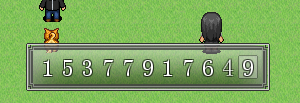
不要设置位数太多哦,会超出画面边框的。
#==============================================================================
8月29日更新
指定职业才可使用的道具- class Game_Actor < Game_Battler
- def item_test(user, item)
- return @class_id == $1.to_i if item.note =~ /<use_class:\s*(\d+)>/i; super
- end
- end
说明道具的使用范围请设置为单个队友。原帖:https://rpg.blue/thread-382960-1-1.html
#==============================================================================
12月11日更新
开关开启时震动画面也能震动计时器和显示的图片- class Spriteset_Map; alias picture_update_shake update_viewports
- def update_viewports
- @viewport2.ox = $game_map.screen.shake if $game_switches[1]
- picture_update_shake
- end end
说明打开1号开关时显示的图片计时器以及天气均会震动。请注意。如果某个东西不想也被震动,改一改它的端口就好了。
#==============================================================================
1月25日更新
关闭菜单之后调用一个公共事件- class Scene_Menu;alias vip16125_return_scene return_scene
- def return_scene;vip16125_return_scene
- $game_temp.reserve_common_event(1) #这里改公共事件的ID
- end
- end
说明我也不知道有什么用,参考这个帖子https://rpg.blue/thread-388730-1-1.html
#==============================================================================
5月25日更新
取消窗口皮肤背景的半透明- class Window_Base; alias vip20160525_initialize initialize
- def initialize(*args)
- vip20160525_initialize(*args); self.back_opacity = 255
- end
- end
说明色调数据库可以调
#==============================================================================
11月19日更新
技能追加限制使用武器类型- class Game_Actor;alias vip20161119_swok? skill_wtype_ok?
- def skill_wtype_ok?(skill) if skill.note =~ /<限制武器类型:\s*(\d+.*?)>/
- $1.scan(/\d+/).each do |wtype_id|
- return true if wtype_equipped?(wtype_id.to_i)
- end end; vip20161119_swok?(skill) end end
详情参考这个帖子https://rpg.blue/thread-397413-1-1.html
#==============================================================================
12月8日更新
职业备注隐藏技能类型- class Game_Actor; alias vip16127_addst added_skill_types
- def added_skill_types; vip16127_addst - hide_skill_types end
- def hide_skill_types; self.class.note =~ /<隐藏技能类型[ :]*(\d+.*?)>/
- $1 ? $1.scan(/\d+/).collect(&:to_i) : []
- end end
用法及参考原帖职业备注栏注释 <隐藏技能类型: 1,2,3> 隐藏1,2,3类型技能
可以参考这个帖子https://rpg.blue/thread-397652-1-1.html
#==============================================================================
12月15日更新
不显示禁用技能指令- class Game_Actor; alias vip161215_addst added_skill_types
- def added_skill_types
- vip161215_addst.select {|stype_id| !skill_type_sealed?(stype_id)}
- end
- end
参考这个帖子https://rpg.blue/forum.php?mod=viewthread&tid=397799
更新用帖子格式
#==============================================================================
18.11月20日更新
开关开启时反向移动- class Game_Player; alias reverse_move_straight move_straight
- def move_straight(d, turn_ok = true)
- reverse_move_straight($game_switches[1] ? 10 - d : d, turn_ok = true)
- end
- end
参考这个帖子https://rpg.blue/thread-410962-1-1.html
#==============================================================================
X月X日更新
name
说明或者效果图说明或者效果图 |
评分
-
查看全部评分
|


 RM-GUI延期。。。最近被黑心老板压迫T_T


 写轮眼


 发表于 2015-5-1 21:40:24


 提升卡
 沉默号角
 喧嚣号角
 变色卡
 升龙剑