查看: 13834|回复: 17

[搬运汉化] 学会用YEP插件怎么弄任务(多图杀爹)

[复制链接]
梦石
0
星屑
7735
在线时间
1227 小时
注册时间
2008-12-14
回帖
504
发表于 2018-2-13 11:04:39 | 显示全部楼层 |阅读模式
加入我们,或者,欢迎回来。

您需要 登录 才可以下载或查看,没有账号?注册会员

×
本帖最后由 if216 于 2018-2-13 12:37 编辑

==================================================================================
★干个体力活吧,这个教程思路比较清晰,图也多。缺范例的话看这个比较好。我一般不为论坛做贡献,这个算是给大家的新年礼物。。。。
==================================================================================
文名:Learn how to make Quest Journal with Yanfly YEP_QuestJournal Plugin
出处:https://forums.rpgmakerweb.com/index.php?threads/learn-how-to-make-quest-journal-with-yanfly-yep_questjournal-plugin.88948/
作者:donkisot123
==================================================================================
我在编辑该楼,稍后上图翻译
==================================================================================
Steps :
1. Installation
2. 2 NPC
3. Make The Quest
4. Quest Event
5. Explanation
步骤:
1.安装
2.放2个npc
3.制作任务
4.调事件
5.解释
===========================================================================
*NOTE* : The Plugin will not appear in your game / active until you finished the Plugin setting and quest event (Step 2,3,& 4).
注:你做完了2,3,4步以后任务才会出现在你的游戏里
===========================================================================
下面按上面的5步,一步步来阐述:
Let's get stated !
累死狗!
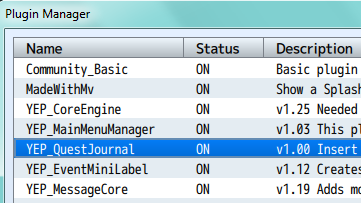
1.You need to instal Yanfly Plugins :
- YEP_EngineCore
- YEP_MessageCore
- YEP_QuestJournal
你需要3个插件,就上面这三个,一个核,一个消息核,一个任务插件

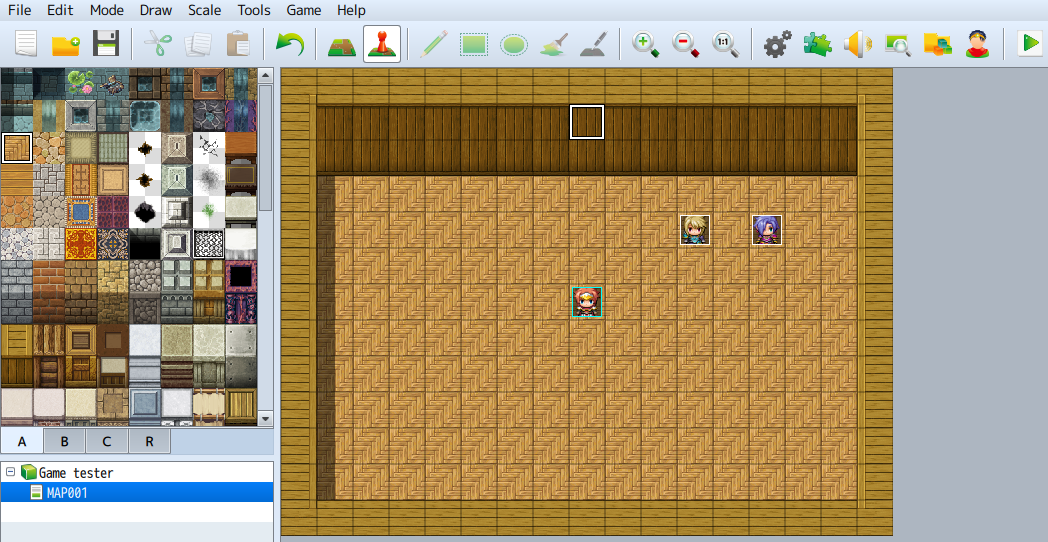
2.Place 2 NPC
F3SaagR.png 和 IvZ2g1P.png
Left them empty for now. Name them John and Eva.
让他们事件页为空,姓名是黄毛和紫毛。


3. Make the Quest
Go to LXW5fOR.png Plugins, Then click the YEP_QuestJournal
按f10,然后选中yep任务插件
xDZ7sWh.png
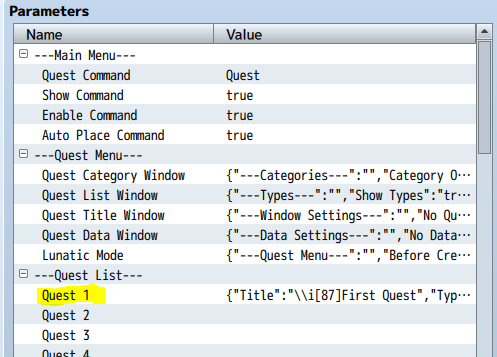
Next click The Quest List - Quest 1
然后点击任务1
SqEk9tJ.png

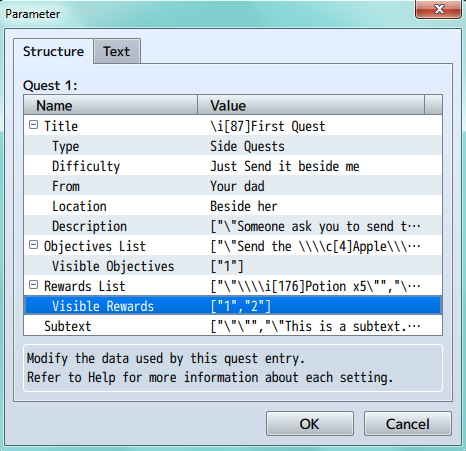
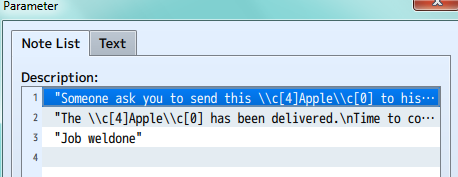
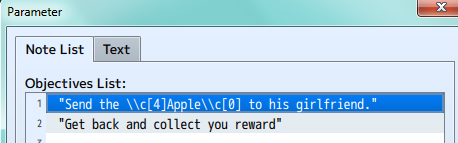
Next fill the data up. We need 3 Description and 2 Objective or you can follow me like this :
双击任务1打开,填充数据。我们需要3个描述和2个任务目标。
FEgDANJ.png
Spoiler: "Description"
hGqglq3.png
Spoiler: "Objective List"
OuH2Z0s.png

I did not change Visible Object, Reward List and SubText. Keep it like that.
我没改可见目标,奖励类别和文字,让它保持原样。

4.Quest Event
编辑事件
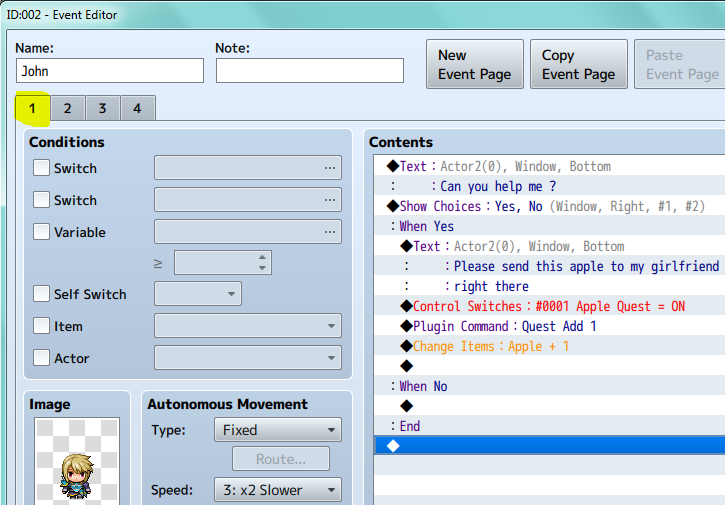
Edit the left NPC ( John ) event and make it like this:
编辑黄毛的事件
Page 1
NL7pW5U.png

Explanation : Plugin Command : Quest Add 1
This is condition when you turn on the Quest 1
这是激活任务1的条件。

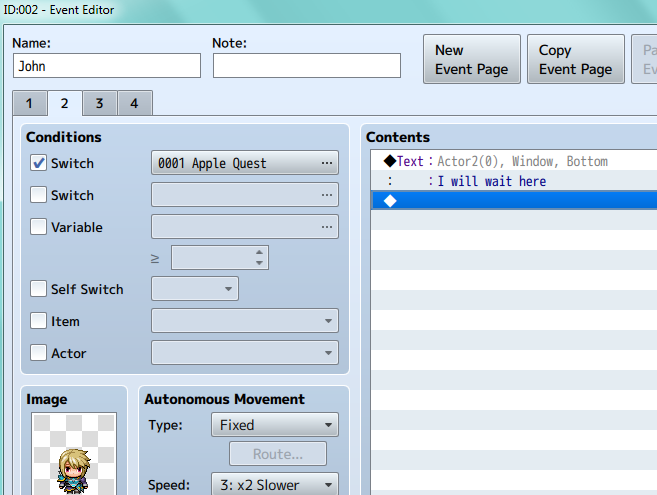
Page 2
mUL4HTZ.png
Explanation : Page 2
You need this page to wait player complete the condition/switch event.
你需要这页来表示等待玩家完成事件的条件或开关。(应该是说还没完成时显示的信息)

Page 3
5R4b4w1.png

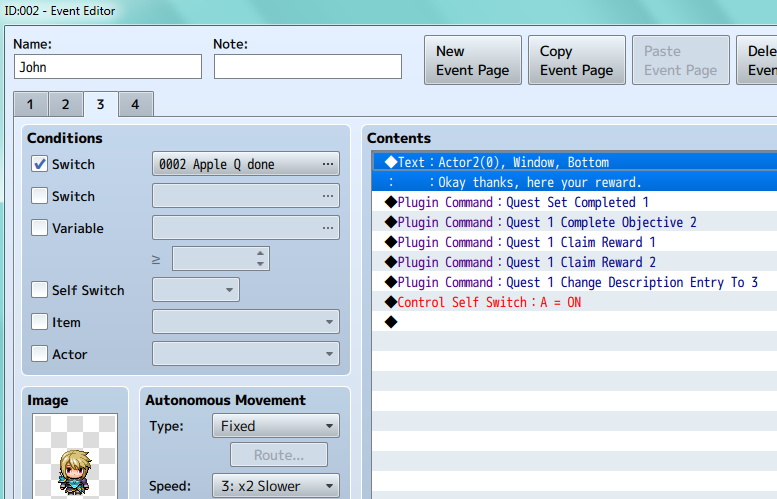
Explanation : Plugin Commands
Quest Set Completed 1 = Finish the quest and it will updated to Completed Quest in Quest Menu
完成任务并且在菜单-任务中更新

Quest 1 Complete Objective 2 = Objective in the Quest Menu will updated as Completed
在任务菜单中更新 任务目标

Quest 1 Claim Reward 1 = You will get the Quest Reward
拿任务奖励

Quest 1 Change Description Entry To 3 = The Description will be updated to Description 3
任务描述将被更新为描述3

Page 4
nd5qBIB.png

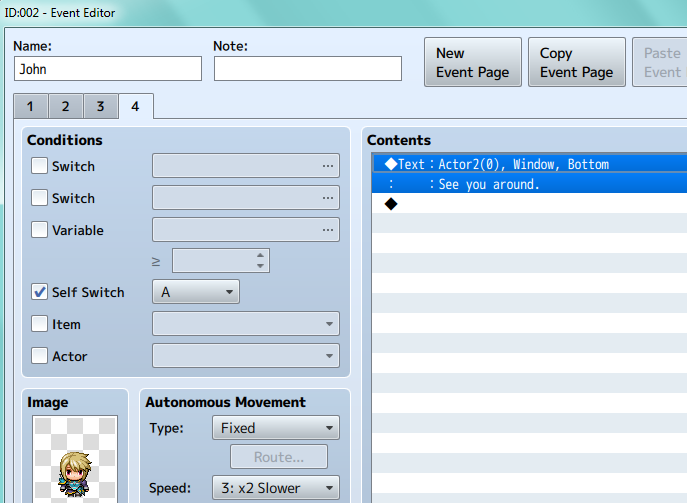
Explanation : Finishing Event.
This will be remaining like this after you finished The Quest
你完成任务以后,再触发事件时的状态

Next edit the other NPC ( Eva ) and make it like this :
下面我们来编辑紫毛的事件。

Page 1
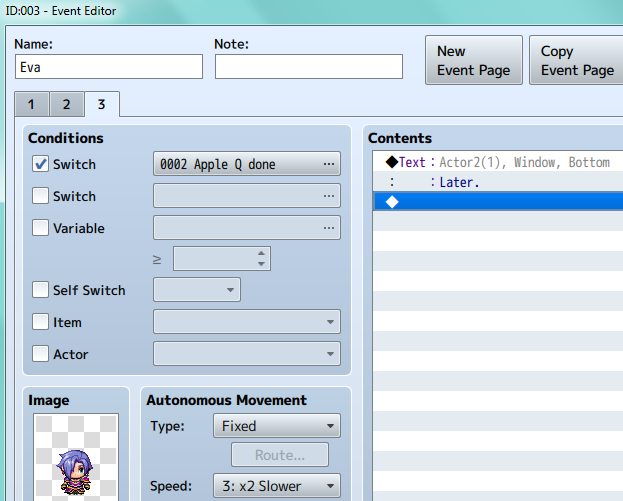
5sEJqy1.png

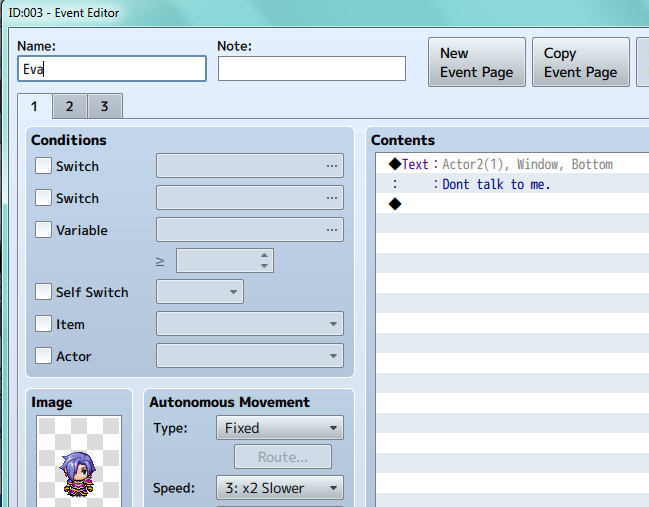
Explanation : This event will not move until Certain Condition met.

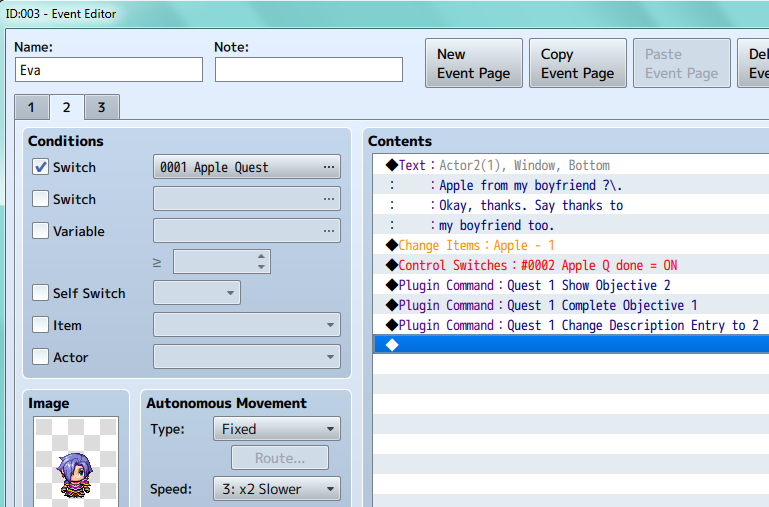
Spoiler: Page 2
pZCgUh0.png

Explanation : The Condition met and the event will active
条件满足事件将会激活
Quest 1 Show Objective 2 = The Objective 2 will show up in Quest Menu.
显示目标2
Quest 1 Complete Objective 1 = The Objective 1 will updated as Completed
目标1显示已完成
Quest Change Description Entry to 2 = The Description in Quest Menu will be updated.
任务描述将被更新为描述2

Spoiler: Page 3
FO4czjS.png

And there you go it's finished. Now it's time to Explanation.
你要做的就全完成了,下面剩下解释。累死狗。

5.Explanation

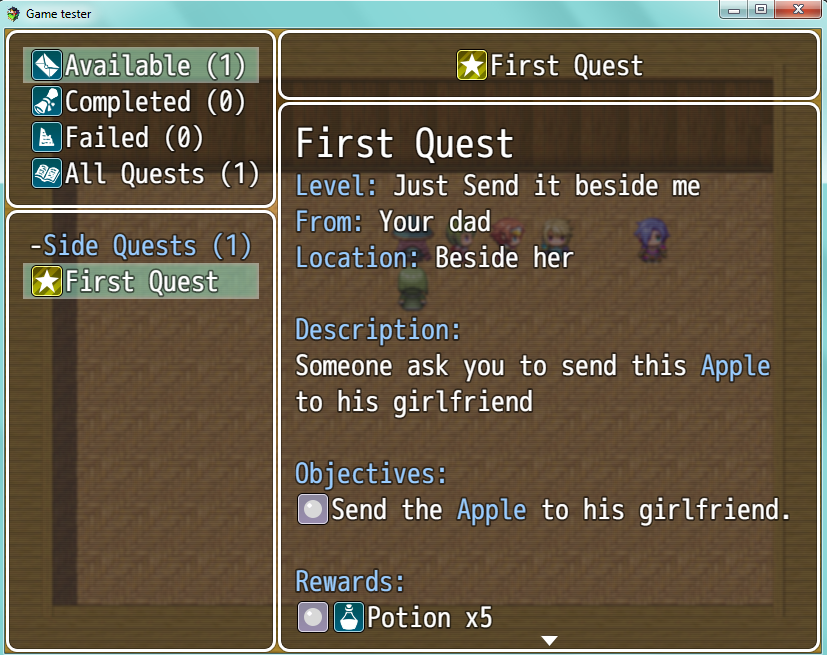
First we need talk to PF6oAVo.png to take the Quest and if you go talk to   First, she wont talk to you.
Accept Request to Turn on the event. The Quest will appear in the Quest Menu.

首先,我们和黄毛交谈,得到任务。如果你先和紫毛说话,她不会搭理你
接受黄毛的请求,任务将出现在任务菜单,

Quest Menu 任务菜单
HW9fSZh.png
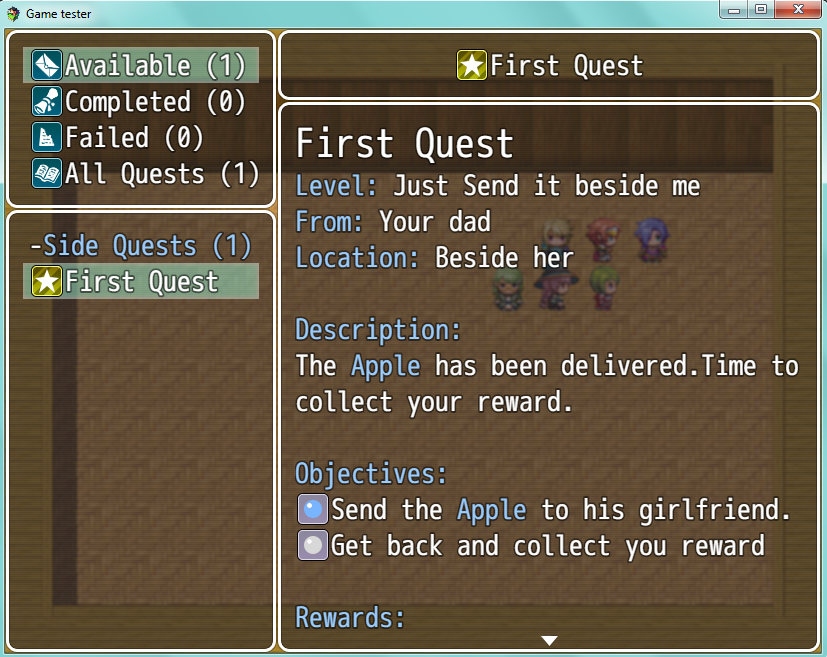
If you talk to again he will wait you until you do the Quest. After taking The Quest, talk to .
如果你再次和黄毛对话,他将等你直到你完成任务。之后带上任务和紫毛对话。
The Quest will be updated in the Quest Menu. 任务将在菜单更新

Quest Updated 任务更新

BkHKZa1.png
She will gratefull and ask you to go back toand collect your reward.
她将高兴并请你回去和黄毛谈话并且领取奖励。
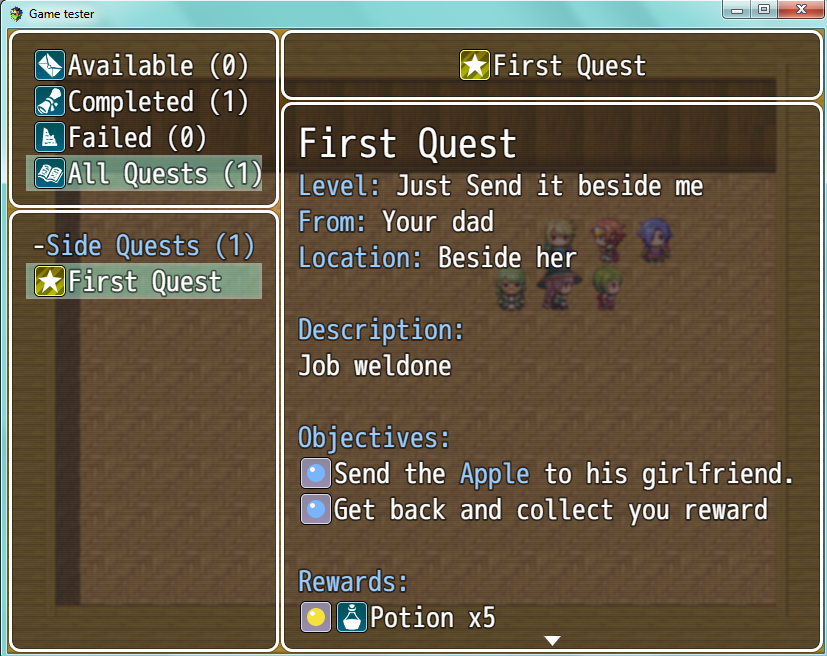
After you finished, The Quest will be Updated.
你完成后,任务更新。

Quest Completed 任务完成
GAa1dsZ.png

结束.

评分

参与人数 5赞 +5 收起 理由
1071257831 + 1 精品文章
ezong + 1 精品文章
ssrwkx + 1 塞糖
cuihaohaode + 1
白嫩白嫩的 + 1 塞糖

查看全部评分

需要购买本人MV插件必须先加wx好友。加不上wx就是本人忙,没时间卖。原则上太久以前的插件也不想卖,因为我也忘了,维护上会不给力。wx名:alskyif    本人插件地址:
   LCK_SRPG梦幻模拟战、火焰纹章类系统
   究极立绘ADV系统

   究极换装统合系统
   究极! 回想与CG系统
   消息文字的距离调整  
   自动返回上一张地图
梦石
0
星屑
7735
在线时间
1227 小时
注册时间
2008-12-14
回帖
504
 楼主| 发表于 2018-2-13 11:32:29 | 显示全部楼层
帖完图了,累死狗。
需要购买本人MV插件必须先加wx好友。加不上wx就是本人忙,没时间卖。原则上太久以前的插件也不想卖,因为我也忘了,维护上会不给力。wx名:alskyif    本人插件地址:
   LCK_SRPG梦幻模拟战、火焰纹章类系统
   究极立绘ADV系统

   究极换装统合系统
   究极! 回想与CG系统
   消息文字的距离调整  
   自动返回上一张地图
回复

使用道具 举报

梦石
0
星屑
52
在线时间
5 小时
注册时间
2018-4-10
回帖
5
发表于 2018-4-22 00:36:53 | 显示全部楼层
我想要任务插件。。找不到
回复

使用道具 举报

梦石
0
星屑
1573
在线时间
374 小时
注册时间
2017-12-26
回帖
291
发表于 2018-4-22 09:59:56 | 显示全部楼层
本帖最后由 qq1065526265 于 2018-4-22 10:11 编辑
pengbaoqian 发表于 2018-4-22 00:36
我想要任务插件。。找不到


http://yanfly.moe/plugins/en/YEP_QuestJournal.js
回复

使用道具 举报

梦石
0
星屑
164
在线时间
16 小时
注册时间
2018-2-17
回帖
2
发表于 2018-4-22 19:17:20 | 显示全部楼层
学习了!感谢楼主!
回复

使用道具 举报

梦石
0
星屑
627
在线时间
166 小时
注册时间
2010-9-22
回帖
18
发表于 2018-4-25 10:34:12 | 显示全部楼层
请问LZ,插件只能最多100个任务么?似乎没找到怎么增加上限的方法
回复

使用道具 举报

梦石
0
星屑
1285
在线时间
121 小时
注册时间
2019-11-16
回帖
121
发表于 2019-11-18 16:54:02 | 显示全部楼层
多谢分享
回复

使用道具 举报

梦石
0
星屑
245
在线时间
13 小时
注册时间
2019-11-26
回帖
11
发表于 2019-11-29 12:31:15 | 显示全部楼层
不知道啊 任务插件
回复

使用道具 举报

梦石
0
星屑
446
在线时间
51 小时
注册时间
2020-3-31
回帖
10
发表于 2020-4-1 21:40:56 | 显示全部楼层
马克一下,学习大佬做任务
回复

使用道具 举报

梦石
0
星屑
284
在线时间
89 小时
注册时间
2012-9-29
回帖
20
发表于 2020-7-31 15:48:53 | 显示全部楼层
碧灵羽殇 发表于 2018-4-25 10:34
请问LZ,插件只能最多100个任务么?似乎没找到怎么增加上限的方法


可以再額外安裝YEP MoreQuest任務包,我這拿到1.02版本有對1.5.0 優化
- Fixed a bug that caused a game freeze when using the Quest Journal Open plugin command.
然後翻譯了一點點,先拿去用用看 最新版本是1.03

YEP_QuestJournal 1.02 +MoreQuest 1~10.zip

94.36 KB, 下载次数: 159

只翻譯一點點

回复

使用道具 举报

您需要登录后才可以回帖 登录 | 注册会员

本版积分规则

Powered by Discuz! X5.0 © 2001-2026 Discuz! Team.

在本版发帖返回顶部