查看: 3797|回复: 6

[原创发布] 右上角添加ESC,取消按键

[复制链接]
梦石
0
星屑
12161
在线时间
4435 小时
注册时间
2014-4-11
回帖
5616

开拓者

发表于 2019-6-2 15:28:34 | 显示全部楼层 |阅读模式

加入我们,或者,欢迎回来。

您需要 登录 才可以下载或查看,没有账号?注册会员

×
本帖最后由 yang1zhi 于 2019-6-2 15:51 编辑

写的不好,有什么BUG我也不知道。
应该没有BUG

把图放在system文件夹里
把脚本做成插件使用

窗口界面时的取消功能是采用了Window_Selectable的取消函数CancelCancel

地图界面时是使用的打开菜单

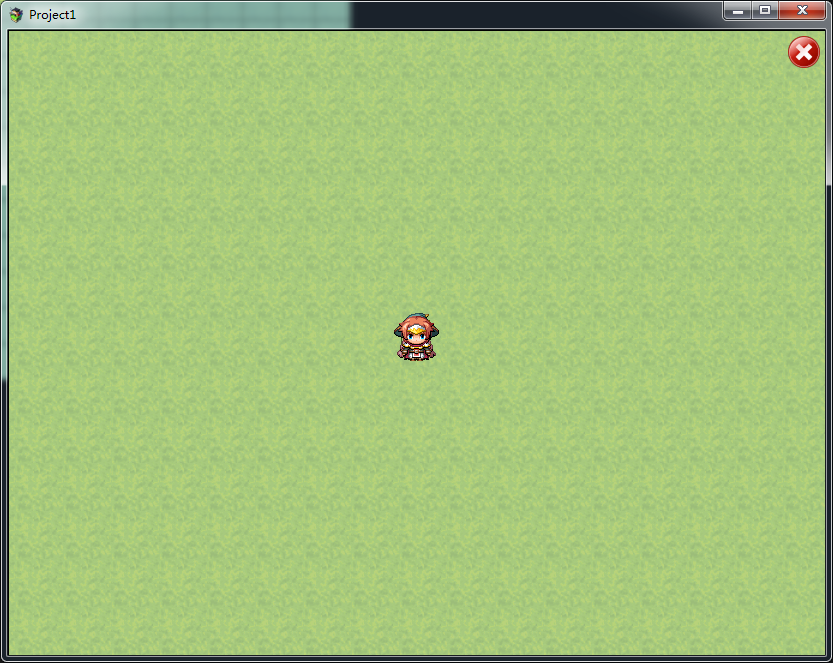
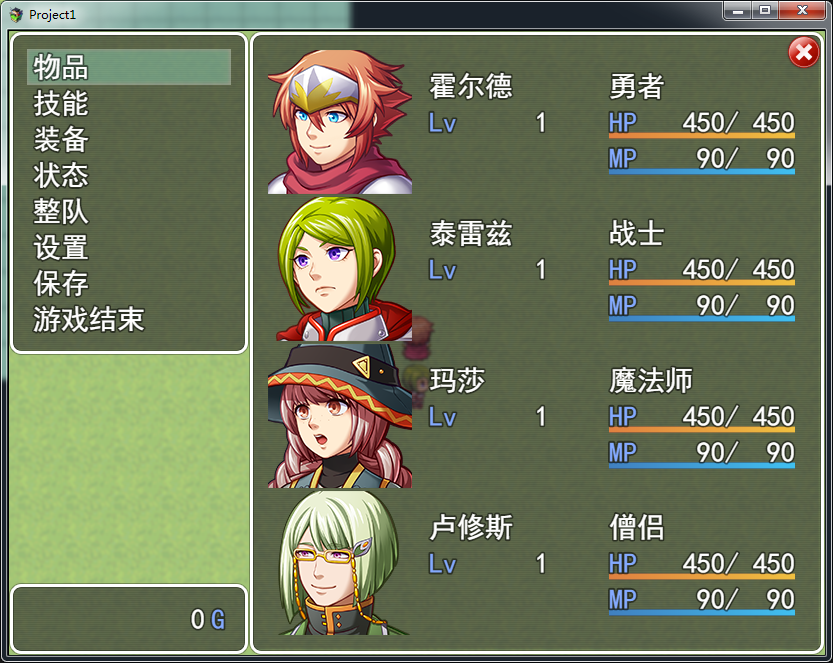
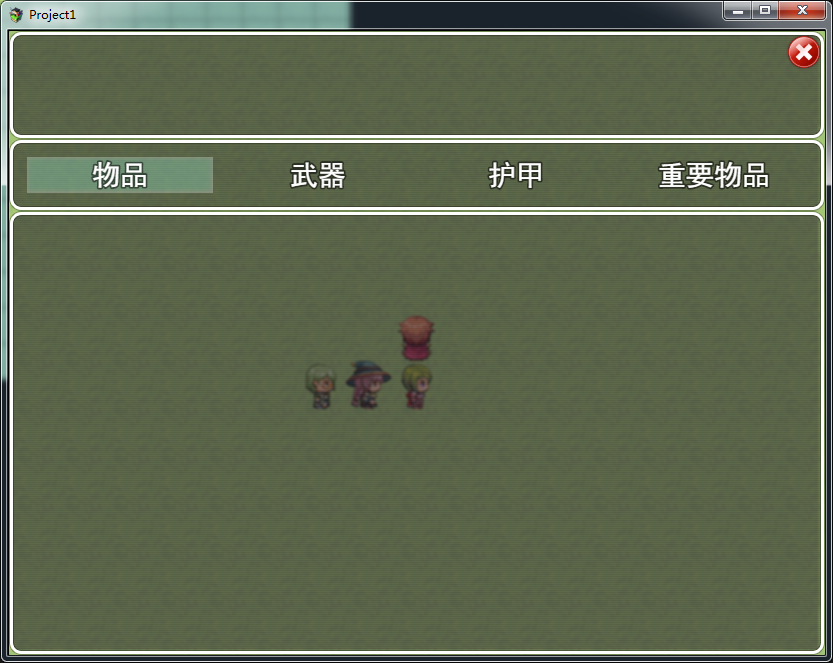
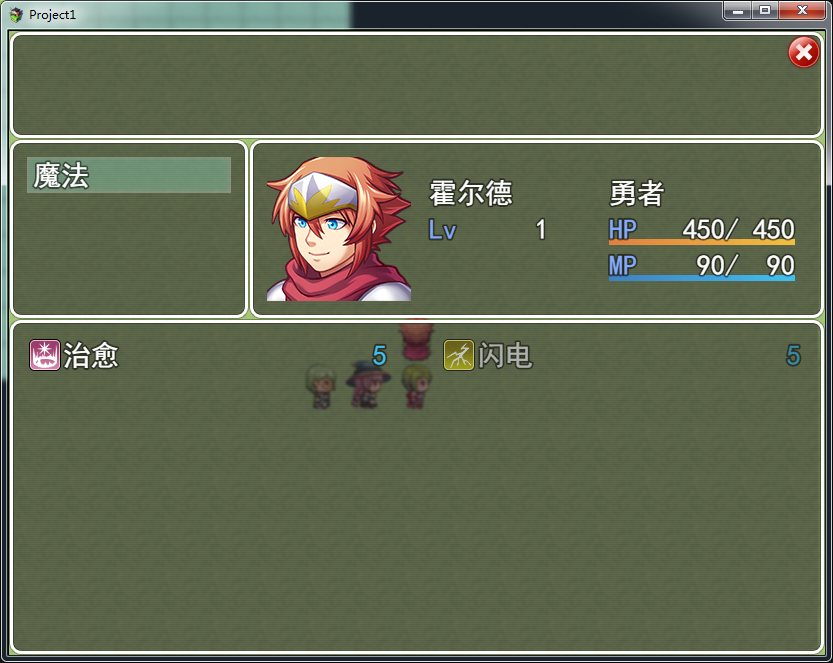
ESC会出现在所有Scene_Map的界面,Scene_MenuBase的界面


ESC.png

脚本

[pre lang="javascript"]//取消键---------------------------------------------------------
/*:
* @plugindesc 取消键.
* @author 杨志(yang1zhi)
* @help  右上角多个鼠标右键的功能
*
* yangzhi40#hotmail.com
* yangzhi40@hotmail.com
*/

Scene_Map.prototype.isMapTouchOk = function() {
        if (this.is_NOmove_window()) {return false}
    return this.isActive() && $gamePlayer.canMove();
};

//点击后不会移动的窗口
Scene_Map.prototype.is_NOmove_window = function() {
        //ESC窗口
        if (SceneManager._scene._escWindow.containsPoint({x: TouchInput.x, y: TouchInput.y})) {return true}
        return false
}


ESC_SELECTABLE_UPDATE = Window_Selectable.prototype.update
Window_Selectable.prototype.update = function() {
    ESC_SELECTABLE_UPDATE.call(this);
        this.CancelCancel();  //取消键
};

Window_Selectable.prototype.CancelCancel = function() {
        //不活动的窗口跳过
        if (!SceneManager._scene._escWindow) {return}
        //不活动的窗口跳过
        if (!this.isOpenAndActive()) {return}
        //当按下鼠标左键
        if (this.isCancelEnabled() && TouchInput.isTriggered('ok')) {
        //当鼠标X在取消键范围内
        if (SceneManager._scene._escWindow.containsPoint({x: TouchInput.x, y: TouchInput.y})) {
                this.processCancel();
        }
        }
            
};


ESC_DISPLAYOBJECTS = Scene_Map.prototype.createDisplayObjects
Scene_Map.prototype.createDisplayObjects = function() {
    ESC_DISPLAYOBJECTS.call(this);
        this.createescWindow();  //ESC键
};

ESC_MENUBASE_SREATE = Scene_MenuBase.prototype.create
Scene_MenuBase.prototype.create = function() {
    ESC_MENUBASE_SREATE.call(this);
        this.createescWindow();  //ESC键
       
};


Scene_Base.prototype.createescWindow = function() {
    this._escWindow = new Window_esc(779,5,32,32,this.constructor.name);
    this.addChild(this._escWindow);
};

Scene_Base.prototype.onESCOk = function() {
        //Scene_Map.isActive()
        this._escWindow.activate();
        if (this.constructor.name == 'Scene_Map') {SceneManager.push(Scene_Menu);}
};


//-----------------------------------------------------------------------------------------------------------------------------------------------------------------------------------------------------
//显示特效图片----------------------------------------------------------------------------------------------------------------------------------------------------------------------------------
function Window_esc() {
    this.initialize.apply(this, arguments);
}

Window_esc.prototype = Object.create(Sprite.prototype);
Window_esc.prototype.constructor = Window_esc;

Window_esc.prototype.initialize = function(x, y,w,h,name) {
    Sprite.prototype.initialize.call(this);
        this._sc_name = name
        var ww = w || 32
        var hh = h || 32
        this.move(x,y)
    this.contents = new Sprite(new Bitmap(ww, hh));
    this.addChild(this.contents);
        this.bitmap = ImageManager.loadSystem('ESC');
};


Window_esc.prototype.update = function() {
   Sprite.prototype.update.call(this);
   //不在地图上跳过
   if (this._sc_name != 'Scene_Map') {return}
        //当按下鼠标左键
        if (TouchInput.isTriggered('ok')) {
        //当鼠标X在取消键范围内
        if (this.containsPoint({x: TouchInput.x, y: TouchInput.y})) {
                //演奏SE
                SoundManager.playSystemSound(1);
                SceneManager.push(Scene_Menu);
        }
        }
};
Window_esc.prototype.show = function() {
    this.visible = this.contents.visible = true;
};
Window_esc.prototype.hide = function() {
    this.visible = this.contents.visible = false;
};
Window_esc.prototype.setAnchor = function (ax, ay) {
    this.anchor.x = this.contents.anchor = ax;
    this.anchor.y = this.contents.anchor = ay;
};
Window_esc.prototype.clear = function() {
    this.contents.bitmap.clear();
};
Window_esc.prototype.drawIcon = function(iconIndex, x, y) {
    var bitmap = ImageManager.loadSystem('IconSet');
    var sx = iconIndex % 16 * 32;
    var sy = Math.floor(iconIndex / 16) * 32;
    this.contents.bitmap.blt(bitmap, sx, sy, 32, 32, x, y);
};


[/pre]


截图

1.png
2.png
3.png
5.png

评分

参与人数 2赞 +2 收起 理由
if216 + 1 无情拷走
白嫩白嫩的 + 1 大佬666

查看全部评分

梦石
0
星屑
1593
在线时间
252 小时
注册时间
2017-10-24
回帖
158
发表于 2019-9-25 22:55:12 | 显示全部楼层
能设置 自己修改图片的位置吗

点评

new Window_esc这个后面括号里,自己改  发表于 2019-9-25 23:26
回复

使用道具 举报

梦石
0
星屑
2582
在线时间
363 小时
注册时间
2015-8-15
回帖
66
发表于 2020-6-8 08:53:13 | 显示全部楼层
希望楼主更新一个版本,所有功能可以通过按钮的形式操作
回复

使用道具 举报

梦石
0
星屑
7736
在线时间
1227 小时
注册时间
2008-12-14
回帖
504
发表于 2020-6-12 01:31:51 | 显示全部楼层
楼主,我加了些设置,希望对你也有用。加了图片名称、宽、高、右边距、上边距的设置。这样更灵活。发布在这层楼。如果不喜欢我的修改或发布,请联系我删除这层。
  1. //取消键---------------------------------------------------------
  2. var Imported = Imported || {};
  3. Imported.yang1zhi_esc = true;


  4. /*:
  5. * @plugindesc  取消键!
  6. * @author 杨志(yang1zhi)
  7. *
  8. * @param ---Configuration---
  9. *
  10. * @param Pic Name
  11. * @desc pic name
  12. * @default ESC
  13. *
  14. * @param Pic Width
  15. * @desc width
  16. * @default 32
  17. *
  18. * @param Pic Height
  19. * @desc height
  20. * @default 32
  21. *
  22. * @param Right Edge
  23. * @desc right_edge
  24. * @default 10
  25. *
  26. * @param Up Edge
  27. * @desc up_edge
  28. * @default 10
  29. *
  30. * @param
  31. * @help
  32. * ------------------------------------------------------------------------------
  33. *                                 取消键
  34. * ------------------------------------------------------------------------------
  35. */

  36. //Initialize global variables


  37. (function () {

  38. var params = PluginManager.parameters("yang1zhi_esc");
  39. var name = String(params["Pic Name"]);
  40. var esc_width = Number(params["Pic Width"]);
  41. var esc_height = Number(params["Pic Height"]);
  42. var right_edge = Number(params["Right Edge"]);
  43. var up_edge = Number(params["Up Edge"]);

  44. Scene_Map.prototype.isMapTouchOk = function() {
  45.         if (this.is_NOmove_window()) {return false}
  46.     return this.isActive() && $gamePlayer.canMove();
  47. };

  48. //点击后不会移动的窗口
  49. Scene_Map.prototype.is_NOmove_window = function() {
  50.         //ESC窗口
  51.         if (SceneManager._scene._escWindow.containsPoint({x: TouchInput.x, y: TouchInput.y})) {return true}
  52.         return false
  53. }


  54. ESC_SELECTABLE_UPDATE = Window_Selectable.prototype.update
  55. Window_Selectable.prototype.update = function() {
  56.     ESC_SELECTABLE_UPDATE.call(this);
  57.         this.CancelCancel();  //取消键
  58. };

  59. Window_Selectable.prototype.CancelCancel = function() {
  60.         //不活动的窗口跳过
  61.         if (!SceneManager._scene._escWindow) {return}
  62.         //不活动的窗口跳过
  63.         if (!this.isOpenAndActive()) {return}
  64.         //当按下鼠标左键
  65.         if (this.isCancelEnabled() && TouchInput.isTriggered('ok')) {
  66.         //当鼠标X在取消键范围内
  67.         if (SceneManager._scene._escWindow.containsPoint({x: TouchInput.x, y: TouchInput.y})) {
  68.                 this.processCancel();
  69.         }
  70.         }

  71. };


  72. ESC_DISPLAYOBJECTS = Scene_Map.prototype.createDisplayObjects
  73. Scene_Map.prototype.createDisplayObjects = function() {
  74.     ESC_DISPLAYOBJECTS.call(this);
  75.         this.createescWindow();  //ESC键
  76. };

  77. ESC_MENUBASE_SREATE = Scene_MenuBase.prototype.create
  78. Scene_MenuBase.prototype.create = function() {
  79.     ESC_MENUBASE_SREATE.call(this);
  80.         this.createescWindow();  //ESC键

  81. };


  82. Scene_Base.prototype.createescWindow = function() {
  83.     this._escWindow = new Window_esc(Graphics.width- esc_width - right_edge,up_edge,esc_width,esc_height,this.constructor.name);
  84.     this.addChild(this._escWindow);
  85. };

  86. Scene_Base.prototype.onESCOk = function() {
  87.         //Scene_Map.isActive()
  88.         this._escWindow.activate();
  89.         if (this.constructor.name == 'Scene_Map') {SceneManager.push(Scene_Menu);}
  90. };


  91. //-----------------------------------------------------------------------------------------------------------------------------------------------------------------------------------------------------
  92. //显示特效图片----------------------------------------------------------------------------------------------------------------------------------------------------------------------------------
  93. function Window_esc() {
  94.     this.initialize.apply(this, arguments);
  95. }

  96. Window_esc.prototype = Object.create(Sprite.prototype);
  97. Window_esc.prototype.constructor = Window_esc;

  98. Window_esc.prototype.initialize = function(x, y,w,h,name) {
  99.     Sprite.prototype.initialize.call(this);
  100.         this._sc_name = name
  101.         var ww = w || 32
  102.         var hh = h || 32
  103.         this.move(x,y)
  104.     this.contents = new Sprite(new Bitmap(ww, hh));
  105.     this.addChild(this.contents);
  106.         this.bitmap = ImageManager.loadSystem('ESC');
  107. };


  108. Window_esc.prototype.update = function() {
  109.    Sprite.prototype.update.call(this);
  110.    //不在地图上跳过
  111.    if (this._sc_name != 'Scene_Map') {return}
  112.         //当按下鼠标左键
  113.         if (TouchInput.isTriggered('ok')) {
  114.         //当鼠标X在取消键范围内
  115.         if (this.containsPoint({x: TouchInput.x, y: TouchInput.y})) {
  116.                 //演奏SE
  117.                 SoundManager.playSystemSound(1);
  118.                 SceneManager.push(Scene_Menu);
  119.         }
  120.         }
  121. };
  122. Window_esc.prototype.show = function() {
  123.     this.visible = this.contents.visible = true;
  124. };
  125. Window_esc.prototype.hide = function() {
  126.     this.visible = this.contents.visible = false;
  127. };
  128. Window_esc.prototype.setAnchor = function (ax, ay) {
  129.     this.anchor.x = this.contents.anchor = ax;
  130.     this.anchor.y = this.contents.anchor = ay;
  131. };
  132. Window_esc.prototype.clear = function() {
  133.     this.contents.bitmap.clear();
  134. };
  135. Window_esc.prototype.drawIcon = function(iconIndex, x, y) {
  136.     var bitmap = ImageManager.loadSystem('IconSet');
  137.     var sx = iconIndex % 16 * esc_width;
  138.     var sy = Math.floor(iconIndex / 16) * esc_width;
  139.     this.contents.bitmap.blt(bitmap, sx, sy, esc_width, esc_height, x, y);
  140. };


  141. })();
复制代码

点评

喜欢,喜欢的很!!不要删 哈哈哈  发表于 2020-6-12 01:41

评分

参与人数 3赞 +3 收起 理由
yang1zhi + 1 维护世界和平就靠你了
hanyilun + 1 精品文章
白嫩白嫩的 + 1 精品文章

查看全部评分

需要购买本人MV插件必须先加wx好友。加不上wx就是本人忙,没时间卖。原则上太久以前的插件也不想卖,因为我也忘了,维护上会不给力。wx名:alskyif    本人插件地址:
   LCK_SRPG梦幻模拟战、火焰纹章类系统
   究极立绘ADV系统

   究极换装统合系统
   究极! 回想与CG系统
   消息文字的距离调整  
   自动返回上一张地图
回复

使用道具 举报

您需要登录后才可以回帖 登录 | 注册会员

本版积分规则

Powered by Discuz! X5.0 © 2001-2026 Discuz! Team.

在本版发帖返回顶部