| 赞 | 5 |
| VIP | |
| 好人卡 | |
| 积分 | 39 |
| 经验 | |
| 最后登录 | 2026-8-3 |
| 在线时间 | 1899 小时 |
- 梦石
- 0
- 星屑
- 3850
- 在线时间
- 1899 小时
- 注册时间
- 2010-6-19
- 回帖
- 917
|
加入我们,或者,欢迎回来。
您需要 登录 才可以下载或查看,没有账号?注册会员
×
本帖最后由 黑米馒头 于 2022-4-14 16:32 编辑
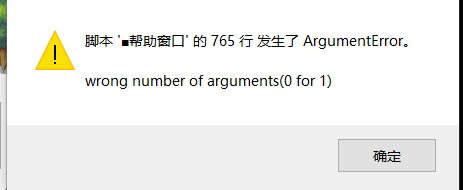
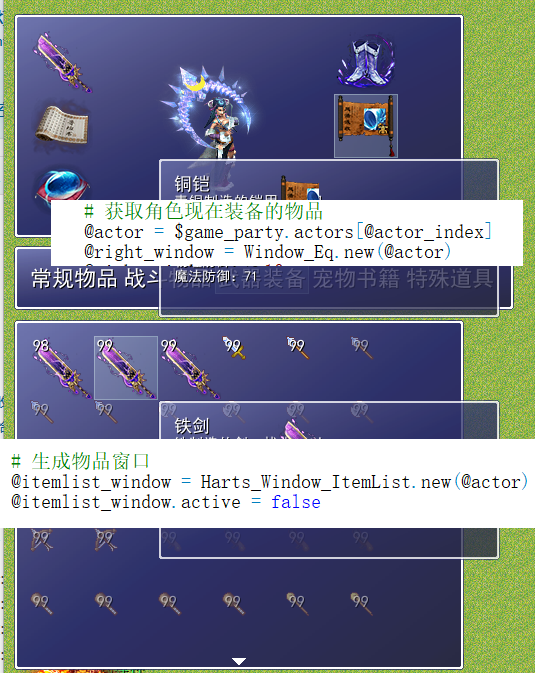
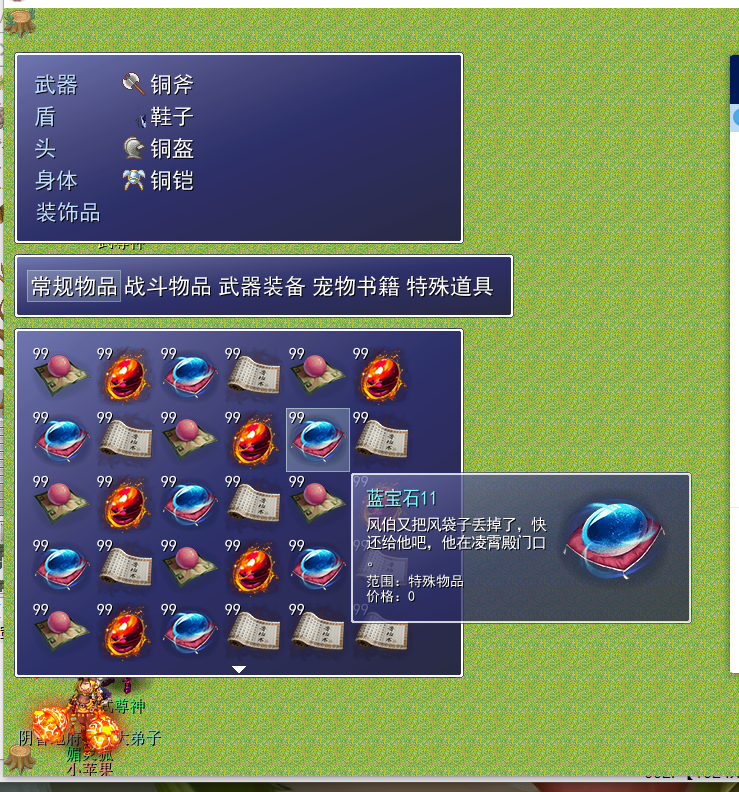
物品界面➕了个详情跟随脚本,一打开物品栏点击物品帧数就开始下降了,脚本看半天也没看出哪里有问题,请大佬帮忙看下
[pre lang="ruby"]#==============================================================================
# ■ Harts_Scene_Item
#------------------------------------------------------------------------------
# 处理物品画面的类。
#==============================================================================
class Scene_Item
#--------------------------------------------------------------------------
# ● 初始化对像■■■■■■■■■■■■■■■■■■■■■■
# actor_index : 角色索引
#--------------------------------------------------------------------------
def initialize(actor_index = 0, equip_index = 0)
@actor_index = actor_index
end
#--------------------------------------------------------------------------
# ● 主处理
#--------------------------------------------------------------------------
def main
# 获取角色现在装备的物品
@actor = $game_party.actors[@actor_index]
@right_window = Window_Eq.new(@actor)
@right_window.x = 10
@right_window.y = 54-10
@right_window.index = -1
# 提示窗口
@tip = Window_Tip.new
# 生成物品分类窗口
@itemcommand_window = Harts_Window_ItemCommand.new
@command_index = @itemcommand_window.index
# 生成物品窗口
@itemlist_window = Harts_Window_ItemList.new(@actor)
@itemlist_window.active = false
# 生成帮助窗口
@help_window = Harts_Window_ItemList_Help.new
# 关联帮助窗口
@itemlist_window.help_window = @help_window
# 生成目标窗口 (设置为不可见・不活动)
@target_window = Window_Target.new
@target_window.visible = false
@target_window.active = false
# 物品窗口索引
@itemlist_window.set_item(@command_index)
# 执行过度
Graphics.transition
# 主循环
loop do
# 刷新游戏画面
Graphics.update
# 刷新输入信息
Input.update
# 刷新画面
update
# 如果画面切换就中断循环
if $scene != self
break
end
end
# 装备过渡
Graphics.freeze
# 释放窗口
@itemcommand_window.dispose
@itemlist_window.dispose
@target_window.dispose
@tip.dispose
@right_window.dispose
@help_window.dispose
end
#--------------------------------------------------------------------------
# ● 刷新画面
#--------------------------------------------------------------------------
def update
#【仿网游动态地图界面】
$spriteset.update
# 刷新窗口
@right_window.update
# 物品提示窗口
@tip.update
@itemcommand_window.update
@itemlist_window.update
@help_window.update
@target_window.update
if @command_index != @itemcommand_window.index
@command_index = @itemcommand_window.index
@itemlist_window.set_item(@command_index)
end
# 物品分类被激活的情况下: 调用 update_itemcommand
if @itemcommand_window.active
update_itemcommand
return
end
# 物品窗口被激活的情况下: 调用 update_itemlist
if @itemlist_window.active
update_itemlist
return
end
# 目标窗口被激活的情况下: 调用 update_target
if @target_window.active
update_target
return
end
if @right_window.active
update_equip
return
end
end
#--------------------------------------------------------------------------
# ● 刷新画面 (物品分类窗口被激活的情况下)
#--------------------------------------------------------------------------
def update_itemcommand
# 按下 B 键的情况下
if Input.trigger?(Input::B)
# 演奏取消 SE
$game_system.se_play($data_system.cancel_se)
# 切换到菜单画面
$scene = Scene_Menu.new(0)
return
end
# 按下 C 键的情况下
if Input.trigger?(Input::C)
# 選択中のコマンドのアイテムがない場合
if @itemlist_window.item_number == 0
# 演奏冻结 SE
$game_system.se_play($data_system.buzzer_se)
return
end
# 演奏确定 SE
$game_system.se_play($data_system.decision_se)
# アイテムウィンドウをアクティブにする
@itemcommand_window.active = false
@itemlist_window.active = true
@itemlist_window.index = 0
return
end
end
#--------------------------------------------------------------------------
# ● 刷新画面 (目标窗口被激活的情况下)
#--------------------------------------------------------------------------
def update_itemlist
# 按下 B 键的情况下
if Input.trigger?(Input::B)
# 演奏取消 SE
$game_system.se_play($data_system.cancel_se)
# アイテムウィンドウをアクティブにする
@itemcommand_window.active = true
@itemlist_window.active = false
@itemlist_window.index = -1
# 隐藏帮助窗口
@help_window.visible = false
@itemcommand_window.index = @command_index
return
end
# 按下 C 键的情况下
if Input.trigger?(Input::C)
# アイテムウィンドウで現在選択されているデータを取得
@item = @itemlist_window.item
# 使用アイテムではない場合
unless @item.is_a?(RPG::Item)
######################################################################
unless @actor.can_equip?(@item) #不能装备演奏冻结SE。
# 演奏冻结 SE
$game_system.se_play($data_system.buzzer_se)
@tip.tip("你不能装备!")
return
end
# 激活装备界面
$game_system.se_play($data_system.decision_se)
if @item.nil?
@type = nil
else
@type = @item.is_a?(RPG::Weapon) ? 0 : @item.kind + 1
end
@itemlist_window.active = false
@right_window.index = @type.nil? ? 0 : @type
@right_window.active = true
return
end
#######################################################################
# 使用できない場合
unless $game_party.item_can_use?(@item.id)
# 演奏冻结 SE
$game_system.se_play($data_system.buzzer_se)
@tip.tip("你不能使用该物品!")
return
end
# 演奏确定 SE
$game_system.se_play($data_system.decision_se)
# 效果范围是我方的情况下
if @item.scope >= 3
# 激活目标窗口
@itemlist_window.active = false
# 调整物品画面使用对像角色选择的窗口位置
@target_window.x = 304
@target_window.visible = true
@target_window.active = true
# 设置效果范围 (单体/全体) 的对应光标位置
if @item.scope == 4 || @item.scope == 6
@target_window.index = -1
else
@target_window.index = 0
end
# 效果在我方以外的情况下
else
# 公共事件 ID 有效的情况下
if @item.common_event_id > 0
# 预约调用公共事件
$game_temp.common_event_id = @item.common_event_id
# 演奏物品使用时的 SE
$game_system.se_play(@item.menu_se)
# 消耗品的情况下
if @item.consumable
# 使用的物品数减 1
$game_party.lose_item(@item.id, 1)
# 再描绘物品窗口的项目
@itemlist_window.draw_item(@itemlist_window.index)
end
# 切换到地图画面
$scene = Scene_Map.new
return
end
end
return
end
end
#--------------------------------------------------------------------------
# ● 刷新画面 (目标窗口被激活的情况下)
#--------------------------------------------------------------------------
def update_target
# 按下 B 键的情况下
if Input.trigger?(Input::B)
# 演奏取消 SE
$game_system.se_play($data_system.cancel_se)
# 由于物品用完而不能使用的场合
unless $game_party.item_can_use?(@item.id)
# 再次生成物品窗口的内容
@itemlist_window.refresh
end
# 删除目标窗口
@itemlist_window.active = true
@target_window.visible = false
@target_window.active = false
@itemlist_window.set_item(@command_index)
return
end
# 按下 C 键的情况下
if Input.trigger?(Input::C)
# 如果物品用完的情况下
if $game_party.item_number(@item.id) == 0
# 演奏冻结 SE
$game_system.se_play($data_system.buzzer_se)
# 物品提示
@tip.tip("物品已用完!")
return
end
# 目标是全体的情况下
if @target_window.index == -1
# 对同伴全体应用物品使用效果
used = false
for i in $game_party.actors
used |= i.item_effect(@item)
end
end
# 目标是单体的情况下
if @target_window.index >= 0
# 对目标角色应用物品的使用效果
target = $game_party.actors[@target_window.index]
used = target.item_effect(@item)
end
# 使用物品的情况下
if used
# 演奏物品使用时的 SE
$game_system.se_play(@item.menu_se)
# 消耗品的情况下
if @item.consumable
# 使用的物品数减 1
$game_party.lose_item(@item.id, 1)
# 再描绘物品窗口的项目
@itemlist_window.draw_item(@itemlist_window.index)
@itemlist_window.set_item(@command_index)
end
# 再生成目标窗口的内容
@target_window.refresh
# 全灭的情况下
if $game_party.all_dead?
# 切换到游戏结束画面
$scene = Scene_Gameover.new
return
end
# 公共事件 ID 有效的情况下
if @item.common_event_id > 0
# 预约调用公共事件
$game_temp.common_event_id = @item.common_event_id
# 切换到地图画面
$scene = Scene_Map.new
return
end
end
# 无法使用物品的情况下
unless used
# 演奏冻结 SE
$game_system.se_play($data_system.buzzer_se)
# 物品提示
@tip.tip("你不能使用该物品!")
end
return
end
end
##########################################################################
# 刷新(角色装备)。
def update_equip
# 按下 B 键的情况下
if Input.trigger?(Input::B)
# 演奏取消 SE
$game_system.se_play($data_system.cancel_se)
@itemlist_window.active = true
@right_window.index = -1
@right_window.active = false
return
end
# 按下 C 键的情况下
if Input.trigger?(Input::C)
if @type != nil and @right_window.index != @type
# 演奏冻结 SE
$game_system.se_play($data_system.buzzer_se)
# 物品提示
@tip.tip("不能装备在这儿!")
return
end
$game_system.se_play($data_system.equip_se)
@actor.equip(@right_window.index, @item == nil ? 0 : @item.id)
@itemlist_window.set_item(@command_index)
@right_window.refresh
@itemlist_window.active = true
@itemlist_window.index = 0
@right_window.index = -1
@right_window.active = false
end
end
end
#==============================================================================[/pre]
[pre lang="ruby"]#==============================================================================
# ■ Window_Item_Help
#------------------------------------------------------------------------------
# 特技及物品的说明、角色的状态显示的窗口。
# 若要更改属性,请搜索element_set={1=>"火",2=>"冰",3=>"光",4=>"暗"} 改成对应属性即可
#==============================================================================
class Harts_Window_ItemList_Help < Window_Base
#--------------------------------------------------------------------------
# ● 初始化对像
#--------------------------------------------------------------------------
def initialize
super(150,200, 342, 431)
self.opacity = 200
self.z= 999
self.visible = false
end
#--------------------------------------------------------------------------
# ● 设置文本
# text : 窗口显示的字符串
# align : 对齐方式 (0..左对齐、1..中间对齐、2..右对齐)
#--------------------------------------------------------------------------
def set_text(data)
@data=data
case @data
when RPG::Item
set_item_text(@data)
when RPG::Weapon
set_weapon_text(@data)
when RPG::Armor
set_armor_text(@data)
when RPG::Skill
set_skill_text(@data)
end
end
#--------------------------------------------------------------------------
# ● 物品帮助窗口
#--------------------------------------------------------------------------
def set_item_text(item)
@item=item
description=@item.description
x=0
y=0
height=0.5 #依要显示的内容确定高
#由描叙确定高
height+=description.size/3/10
if description.size%10!=0
height+=1
end
height+=3 #空行,效果范围,价格
if @item.recover_hp_rate!=0 #HP 回复率。
height+=1
end
if @item.recover_hp!=0 #HP 回复量。
height+=1
end
if @item.recover_sp_rate!=0 #SP 回复率。
height+=1
end
if @item.recover_sp!=0 #SP 回复量。
height+=1
end
if @item.parameter_type!=0 #增加能力值
height+=1
end
if @item.element_set.empty?!=true #属性。为属性 ID 的数组
height+=1
end
if @item.plus_state_set.empty?!=true #附加状态。为状态 ID 的数组
height+=@item.plus_state_set.size
end
if @item.minus_state_set.empty?!=true #解除状态。为状态 ID 的数组
height+=@item.minus_state_set.size
end
self.height=height*15+40+15
self.contents = Bitmap.new(self.width - 32,self.height - 32)
self.contents.clear
#描绘名字
text=@item.name
self.contents.font.color =text_color(4)
self.contents.font.size=20
if text!=nil
self.visible = true
self.contents.draw_text(0,0, @item.name.size*7, 20, text, 0)
else
self.visible = false
end
x=0
y+=1
text=description
#描绘描叙
while ((text = description.slice!(/./m)) != nil)
self.contents.font.color = normal_color
self.contents.font.size=16
self.contents.draw_text(x*15, y*15+13, 16, 16, text, 0)
x+=1
if x==12#每行10个字
x=0
y+=1.2
end
end
#由特技属性确定高
#效果范围
scope = {0=>"特殊物品",1=>"敌单体",2=>"敌全体",3=>"己方单体",4=>"己方全体",5=>"己方昏死单体",6=>"己方昏死全体",7=>"使用者"}#HASH表
text="范围:"+scope[@item.scope]
x=0
y+=2 #空一行
self.contents.font.color = normal_color
self.contents.font.size=14
self.contents.draw_text(x, y*15+5, text.size*6, 14, text, 0)
#============================================================
# 显示物品图片
bitmap = RPG::Cache.icon(item.icon_name+"_W")
self.contents.blt(190, 0, bitmap, Rect.new(0, 0, 120, 120))#物品
#============================================================
#价格
x=0
y+=1
text="价格:"+@item.price.to_s
self.contents.font.color = normal_color
self.contents.font.size=14
self.contents.draw_text(x, y*15+5, text.size*6, 14, text, 0)
#HP 回复率
if @item.recover_hp_rate!=0
x=0
y+=1
text="回复HP:"+@item.recover_hp_rate.to_s+"%"
self.contents.font.color = normal_color
self.contents.font.size=14
self.contents.draw_text(x, y*15+5, text.size*6, 14, text, 0)
end
#HP回复量
if @item.recover_hp!=0
x=0
y+=1
text="回复HP:"+@item.recover_hp.to_s
self.contents.font.color = normal_color
self.contents.font.size=14
self.contents.draw_text(x, y*15+5, text.size*6, 14, text, 0)
end
#SP 回复率
if @item.recover_sp_rate!=0
x=0
y+=1
text="回复SP:"+@item.recover_sp_rate.to_s+"%"
self.contents.font.color = normal_color
self.contents.font.size=14
self.contents.draw_text(x, y*15+5, text.size*6, 14, text, 0)
end
#SP 回复量
if @item.recover_sp!=0
x=0
y+=1
text="回复SP:"+@item.recover_sp.to_s
self.contents.font.color = normal_color
self.contents.font.size=14
self.contents.draw_text(x, y*15+5, text.size*6, 14, text, 0)
end
#增加能力值
if @item.parameter_type!=0
parameter_type={1=>"MaxHP",2=>"MaxSP",3=>$data_system.words.str,4=>$data_system.words.dex,5=>$data_system.words.agi,6=>$data_system.words.int}
x=0
y+=1
text="增益:"+parameter_type[@item.parameter_type]+" +"+@item.parameter_points.to_s
self.contents.font.color = normal_color
self.contents.font.size=14
self.contents.draw_text(x, y*15+5, text.size*6, 14, text, 0)
end
#物品属性
if @item.element_set.empty?!=true #属性。为属性 ID 的数组
element_set={1=>"火",2=>"冰",3=>"光",4=>"暗",9=>"特殊物品",11=>"宠物书籍"}
text="属性:"
for i in 0...@item.element_set.size
text+=element_set[@item.element_set]+" "
end
x=0
y+=1
self.contents.font.color = normal_color
self.contents.font.size=14
self.contents.draw_text(x, y*15+5, text.size*6, 14, text, 0)
end
#附加状态
if @item.plus_state_set.empty?!=true #附加状态。为状态 ID 的数组
text="附加状态:"
x=0
y+=1
self.contents.font.color = normal_color
self.contents.font.size=14
self.contents.draw_text(x, y*15+5, text.size*6, 14, text, 0)
y-=1
x+=text.size*5
for i in 0...@item.plus_state_set.size
y+=1
text=$data_states[@item.plus_state_set].name
self.contents.font.color = normal_color
self.contents.font.size=14
self.contents.draw_text(x, y*15+5, text.size*6, 14, text, 0)
end
end
#解除状态
if @item.minus_state_set.empty?!=true #解除状态。为状态 ID 的数组
text="解除状态:"
x=0
y+=1
self.contents.font.color = normal_color
self.contents.font.size=14
self.contents.draw_text(x, y*15+5, text.size*6, 14, text, 0)
y-=1
x+=text.size*5
for i in 0...@item.minus_state_set.size
y+=1
text=$data_states[@item.minus_state_set].name
self.contents.font.color = normal_color
self.contents.font.size=14
self.contents.draw_text(x, y*15+5, text.size*6, 14, text, 0)
end
end
end
#--------------------------------------------------------------------------
# ● 武器帮助窗口
#--------------------------------------------------------------------------
def set_weapon_text(weapon)
@weapon=weapon
description=@weapon.description
x=0
y=0
height=1 #依要显示的内容确定高
#由描叙确定高
height+=description.size/3/10
if description.size%10!=0
height+=1
end
height+=4 #2个空行,攻击,价格
if @weapon.pdef!=0 #物理防御
height+=1
end
if @weapon.mdef!=0 #魔法防御
height+=1
end
if @weapon.str_plus!=0 #力量
height+=1
end
if @weapon.dex_plus!=0#体质
height+=1
end
if @weapon.agi_plus!=0#敏捷
height+=1
end
if @weapon.int_plus!=0 #智力
height+=1
end
if @weapon.element_set.empty?!=true #属性。为属性 ID 的数组
height+=1
end
if @weapon.plus_state_set.empty?!=true #附加状态。为状态 ID 的数组
height+=@weapon.plus_state_set.size
end
if @weapon.minus_state_set.empty?!=true #解除状态。为状态 ID 的数组
height+=@weapon.minus_state_set.size
end
self.height=height*15+40+15
self.contents = Bitmap.new(self.width - 32,self.height - 32)
self.contents.clear
#描绘名字
text=@weapon.name
self.contents.font.color = text_color(weapon.name_color_66RPG)#颜色脚本
self.contents.font.size=18
if text!=nil
self.visible = true
self.contents.draw_text(0,0, @weapon.name.size*7, 20, text, 0)
else
self.visible = false
end
x=0
y+=1
text=description
#描绘描叙
while ((text = description.slice!(/./m)) != nil)
self.contents.font.color = normal_color
self.contents.font.size=14
self.contents.draw_text(x*15, y*15+5, 14, 14, text, 0)
x+=1
if x==10#每行10个字
x=0
y+=1
end
end
#由特技属性确定高
#攻击
x=0
y+=2 #空行
text="攻击:"+@weapon.atk.to_s
self.contents.font.color = text_color(weapon.name_color_66RPG)#颜色脚本
self.contents.font.size=14
self.contents.draw_text(x, y*15+5, text.size*6, 14, text, 0)
#============================================================
# 显示武器图片
bitmap = RPG::Cache.icon(weapon.icon_name)
self.contents.blt(103, 0, bitmap, Rect.new(0, 0, 42, 42))#武器
#============================================================
#价格
x=0
y+=1
text="价格:"+@weapon.price.to_s
self.contents.font.color = normal_color
self.contents.font.size=14
self.contents.draw_text(x, y*15+5, text.size*6, 14, text, 0)
if @weapon.pdef!=0 #物理防御
x=0
y+=1
text="物理防御:"+@weapon.pdef.to_s
self.contents.font.color = text_color(weapon.name_color_66RPG)#颜色脚本
self.contents.font.size=14
self.contents.draw_text(x, y*15+5, text.size*6, 14, text, 0)
end
if @weapon.mdef!=0 #魔法防御
x=0
y+=1
text="魔法防御:"+@weapon.mdef.to_s
self.contents.font.color = text_color(weapon.name_color_66RPG)#颜色脚本
self.contents.font.size=14
self.contents.draw_text(x, y*15+5, text.size*6, 14, text, 0)
end
#武器属性
if @weapon.element_set.empty?!=true #属性。为属性 ID 的数组
element_set={1=>"火",2=>"冰",3=>"光",4=>"暗"}
text="属性:"
for i in 0...@weapon.element_set.size
text+=element_set[@weapon.element_set]+" "
end
x=0
y+=1
self.contents.font.color = normal_color
self.contents.font.size=14
self.contents.draw_text(x, y*15+5, text.size*6, 14, text, 0)
end
#附加状态
if @weapon.plus_state_set.empty?!=true #附加状态。为状态 ID 的数组
text="附加状态:"
x=0
y+=1
self.contents.font.color = normal_color
self.contents.font.size=14
self.contents.draw_text(x, y*15+5, text.size*6, 14, text, 0)
y-=1
x+=text.size*5
for i in 0...@weapon.plus_state_set.size
y+=1
text=$data_states[@weapon.plus_state_set].name
self.contents.font.color = normal_color
self.contents.font.size=14
self.contents.draw_text(x, y*15+5, text.size*6, 14, text, 0)
end
end
#解除状态
if @weapon.minus_state_set.empty?!=true #解除状态。为状态 ID 的数组
text="解除状态:"
x=0
y+=1
self.contents.font.color = normal_color
self.contents.font.size=14
self.contents.draw_text(x, y*15+5, text.size*6, 14, text, 0)
y-=1
x+=text.size*5
for i in 0...@weapon.minus_state_set.size
y+=1
text=$data_states[@weapon.minus_state_set].name
self.contents.font.color = normal_color
self.contents.font.size=14
self.contents.draw_text(x, y*15+5, text.size*6, 14, text, 0)
end
end
y+=1 #空行
if @weapon.str_plus!=0 #力量
x=0
y+=1
text=$data_system.words.str+" + "+@weapon.str_plus.to_s
self.contents.font.color = text_color(weapon.name_color_66RPG)#颜色脚本
self.contents.font.size=14
self.contents.draw_text(x, y*15+5, text.size*6, 14, text, 0)
end
if @weapon.dex_plus!=0#体质
x=0
y+=1
text=$data_system.words.dex+" + "+@weapon.dex_plus.to_s
self.contents.font.color = text_color(weapon.name_color_66RPG)#颜色脚本
self.contents.font.size=14
self.contents.draw_text(x, y*15+5, text.size*6, 14, text, 0)
end
if @weapon.agi_plus!=0#敏捷
x=0
y+=1
text=$data_system.words.agi+" + "+@weapon.agi_plus.to_s
self.contents.font.color = text_color(weapon.name_color_66RPG)#颜色脚本
self.contents.font.size=14
self.contents.draw_text(x, y*15+5, text.size*6, 14, text, 0)
end
if @weapon.int_plus!=0 #智力
x=0
y+=1
text=$data_system.words.int+" + "+@weapon.int_plus.to_s
self.contents.font.color = text_color(weapon.name_color_66RPG)#颜色脚本
self.contents.font.size=14
self.contents.draw_text(x, y*15+5, text.size*6, 14, text, 0)
end
end
#--------------------------------------------------------------------------
# ● 防具帮助窗口
#--------------------------------------------------------------------------
def set_armor_text(armor)
def set_armor_text(armor)
@armor=armor
description=@armor.description
x=0
y=0
height=1 #依要显示的内容确定高
#由描叙确定高
height+=description.size/3/10
if description.size%10!=0
height+=1
end
height+=2 #2个空行,价格
if @armor.pdef!=0 #物理防御
height+=1
end
if @armor.mdef!=0 #魔法防御
height+=1
end
if @armor.str_plus!=0 #力量
height+=1
end
if @armor.dex_plus!=0#体质
height+=1
end
if @armor.agi_plus!=0#敏捷
height+=1
end
if @armor.int_plus!=0 #智力
height+=1
end
if @armor.guard_element_set.empty?!=true #属性防御。为属性 ID 的数组
height+=1
end
if @armor.guard_state_set.empty?!=true #状态防御。为状态 ID 的数组
height+=@armor.guard_state_set.size
end
self.height=height*15+40+15
self.contents = Bitmap.new(self.width - 32,self.height - 32)
self.contents.clear
#描绘名字
text=@armor.name
self.contents.font.color = text_color(armor.name_color_66RPG)#颜色脚本
self.contents.font.size=18
if text!=nil
self.visible = true
self.contents.draw_text(0,0, @armor.name.size*7, 20, text, 0)
else
self.visible = false
end
x=0
y+=1
text=description
#描绘描叙
while ((text = description.slice!(/./m)) != nil)
self.contents.font.color = normal_color
self.contents.font.size=14
self.contents.draw_text(x*15, y*15+5, 14, 14, text, 0)
x+=1
if x==10#每行10个字
x=0
y+=1
end
end
#由特技属性确定高
#============================================================
# 显示防具图片
bitmap = RPG::Cache.icon(armor.icon_name)
self.contents.blt(103, 0, bitmap, Rect.new(0, 0, 42, 42))#防具
#============================================================
#价格
x=0
y+=2#空行
text="价格:"+@armor.price.to_s
self.contents.font.color = normal_color
self.contents.font.size=14
self.contents.draw_text(x, y*15+5, text.size*6, 14, text, 0)
if @armor.pdef!=0 #物理防御
x=0
y+=1
text="物理防御:"+@armor.pdef.to_s
self.contents.font.color = text_color(armor.name_color_66RPG)#颜色脚本
self.contents.font.size=14
self.contents.draw_text(x, y*15+5, text.size*6, 14, text, 0)
end
if @armor.mdef!=0 #魔法防御
x=0
y+=1
text="魔法防御:"+@armor.mdef.to_s
self.contents.font.color = text_color(armor.name_color_66RPG)#颜色脚本
self.contents.font.size=14
self.contents.draw_text(x, y*15+5, text.size*6, 14, text, 0)
end
#属性防御
if @armor.guard_element_set.empty?!=true #属性。为属性 ID 的数组
element_set={1=>"火",2=>"冰",3=>"光",4=>"暗"}
text="属性防御:"
for i in 0...@armor.guard_element_set.size
text+=element_set[@armor.guard_element_set]+" "
end
x=0
y+=1
self.contents.font.color = normal_color
self.contents.font.size=14
self.contents.draw_text(x, y*15+5, text.size*6, 14, text, 0)
end
#状态防御
if @armor.guard_state_set.empty?!=true #附加状态。为状态 ID 的数组
text="状态防御:"
x=0
y+=1
self.contents.font.color = normal_color
self.contents.font.size=14
self.contents.draw_text(x, y*15+5, text.size*6, 14, text, 0)
y-=1
x+=text.size*5
for i in 0...@armor.guard_state_set.size
y+=1
text=$data_states[@armor.guard_state_set].name
self.contents.font.color = normal_color
self.contents.font.size=14
self.contents.draw_text(x, y*15+5, text.size*6, 14, text, 0)
end
end
y+=1 #空行
if @armor.str_plus!=0 #力量
x=0
y+=1
text=$data_system.words.str+" + "+@armor.str_plus.to_s
self.contents.font.color = text_color(armor.name_color_66RPG)#颜色脚本
self.contents.font.size=14
self.contents.draw_text(x, y*15+5, text.size*6, 14, text, 0)
end
if @armor.dex_plus!=0#体质
x=0
y+=1
text=$data_system.words.dex+" + "+@armor.dex_plus.to_s
self.contents.font.color = text_color(armor.name_color_66RPG)#颜色脚本
self.contents.font.size=14
self.contents.draw_text(x, y*15+5, text.size*6, 14, text, 0)
end
if @armor.agi_plus!=0#敏捷
x=0
y+=1
text=$data_system.words.agi+" + "+@armor.agi_plus.to_s
self.contents.font.color = text_color(armor.name_color_66RPG)#颜色脚本
self.contents.font.size=14
self.contents.draw_text(x, y*15+5, text.size*6, 14, text, 0)
end
if @armor.int_plus!=0 #智力
x=0
y+=1
text=$data_system.words.int+" + "+@armor.int_plus.to_s
self.contents.font.color = text_color(armor.name_color_66RPG)#颜色脚本
self.contents.font.size=14
self.contents.draw_text(x, y*15+5, text.size*6, 14, text, 0)
end
end
end
#--------------------------------------------------------------------------
# ● 技能帮助窗口
#--------------------------------------------------------------------------
def set_skill_text(skill)
@skill=skill
description=@skill.description
x=0
y=0
height=1 #依要显示的内容确定高
#由描叙确定高
height+=description.size/3/10
if description.size%10!=0
height+=1
end
height+=4 #空行,效果范围,消费SP,命中率
if @skill.power!=0 #威力,威力为0,则可能为状态魔法
height+=1
end
if @skill.element_set.empty?!=true #属性。为属性 ID 的数组
height+=1
end
if @skill.plus_state_set.empty?!=true #附加状态。为状态 ID 的数组
height+=@skill.plus_state_set.size
end
if @skill.minus_state_set.empty?!=true #解除状态。为状态 ID 的数组
height+=@skill.minus_state_set.size
end
self.height=height*15+40+15
self.contents = Bitmap.new(self.width - 32,self.height - 32)
self.contents.clear
#描绘名字
text=@skill.name
self.contents.font.color =text_color(6)
self.contents.font.size=18
if text!=nil
self.visible = true
self.contents.draw_text(0,0, @skill.name.size*7, 20, text, 0)
else
self.visible = false
end
x=0
y+=1
text=description
#描绘描叙
while ((text = description.slice!(/./m)) != nil)
self.contents.font.color = normal_color
self.contents.font.size=14
self.contents.draw_text(x*15, y*15+5, 14, 14, text, 0)
x+=1
if x==10#每行10个字
x=0
y+=1
end
end
#由特技属性确定高
#效果范围
scope = {0=>"特殊技能",1=>"敌单体",2=>"敌全体",3=>"己方单体",4=>"己方全体",5=>"己方昏死单体",6=>"己方昏死全体",7=>"使用者"}#HASH表
text="范围:"+scope[@skill.scope]
x=0
y+=2 #空一行
self.contents.font.color = normal_color
self.contents.font.size=14
self.contents.draw_text(x, y*15+5, text.size*6, 14, text, 0)
#威力
if @skill.power!=0
x=0
y+=1
c=@skill.power > 0 ? @skill.power : -1* @skill.power
text="威力:"+c.to_s
self.contents.font.color = normal_color
self.contents.font.size=14
self.contents.draw_text(x, y*15+5, text.size*6, 14, text, 0)
end
#描绘消费SP
x=0
y+=1
text="消耗SP:"+@skill.sp_cost.to_s
self.contents.font.color = normal_color
self.contents.font.size=14
self.contents.draw_text(x, y*15+5, text.size*6, 14, text, 0)
#命中率
x=0
y+=1
text="命中率:"+@skill.hit.to_s+"%"
self.contents.font.color = normal_color
self.contents.font.size=14
self.contents.draw_text(x, y*15+5, text.size*6, 14, text, 0)
#攻击属性
if @skill.element_set.empty?!=true #属性。为属性 ID 的数组
element_set={1=>"火",2=>"冰",3=>"光",4=>"暗"}
text="属性:"
for i in 0...@skill.element_set.size
text+=element_set[@skill.element_set]+" "
end
x=0
y+=1
self.contents.font.color = normal_color
self.contents.font.size=14
self.contents.draw_text(x, y*15+5, text.size*6, 14, text, 0)
end
#附加状态
if @skill.plus_state_set.empty?!=true #附加状态。为状态 ID 的数组
text="附加状态:"
x=0
y+=1
self.contents.font.color = normal_color
self.contents.font.size=14
self.contents.draw_text(x, y*15+5, text.size*6, 14, text, 0)
y-=1
x+=text.size*5
for i in 0...@skill.plus_state_set.size
y+=1
text=$data_states[@skill.plus_state_set].name
self.contents.font.color = normal_color
self.contents.font.size=14
self.contents.draw_text(x, y*15+5, text.size*6, 14, text, 0)
end
end
#解除状态
if @skill.minus_state_set.empty?!=true #解除状态。为状态 ID 的数组
text="解除状态:"
x=0
y+=1
self.contents.font.color = normal_color
self.contents.font.size=14
self.contents.draw_text(x, y*15+5, text.size*6, 14, text, 0)
y-=1
x+=text.size*5
for i in 0...@skill.minus_state_set.size
y+=1
text=$data_states[@skill.minus_state_set].name
self.contents.font.color = normal_color
self.contents.font.size=14
self.contents.draw_text(x, y*15+5, text.size*6, 14, text, 0)
end
end
end
#--------------------------------------------------------------------------
# ● 设置角色
# actor : 要显示状态的角色
#--------------------------------------------------------------------------
def set_actor(actor)
if actor != @actor
self.contents.clear
draw_actor_name(actor, 4, 0)
draw_actor_state(actor, 140, 0)
draw_actor_hp(actor, 284, 0)
draw_actor_sp(actor, 460, 0)
@actor = actor
@text = nil
self.visible = true
end
end
#--------------------------------------------------------------------------
# ● 设置敌人
# enemy : 要显示名字和状态的敌人
#--------------------------------------------------------------------------
def set_enemy(enemy)
text = enemy.name
state_text = make_battler_state_text(enemy, 112, false)
if state_text != ""
text += " " + state_text
end
set_text(text, 1)
end
#--------------------------------------------------------------------------
# ● 校正帮助窗口位置
#--------------------------------------------------------------------------
def set_pos(x,y,width,oy,index,column_max)
#光标坐标
xx = index % column_max * 64 - ox
yy = index / column_max * 64 - oy
self.x=xx+x+80
self.y=yy+y+80
if self.x+self.width>1024
self.x=1024-self.width
end
if self.y+self.height>768
self.y=768-self.height
end
end
end[/pre]
|
-
|




 写轮眼
写轮眼
 发表于 2022-4-13 18:34:53
 提升卡
提升卡 沉默号角
沉默号角 喧嚣号角
喧嚣号角 变色卡
变色卡 升龙剑
升龙剑