| 赞 | 16 |
| VIP | |
| 好人卡 | |
| 积分 | 58 |
| 经验 | |
| 最后登录 | 2026-9-30 |
| 在线时间 | 671 小时 |
- 梦石
- 0
- 星屑
- 5773
- 在线时间
- 671 小时
- 注册时间
- 2020-6-14
- 回帖
- 86
|
加入我们,或者,欢迎回来。
您需要 登录 才可以下载或查看,没有账号?注册会员
×
本帖最后由 jie119168 于 2025-9-19 10:04 编辑
用过MOG_BattleHud插件的你或许和我一样困扰于一个很劝退的问题,即是这个插件它创建的角色战斗窗口竟然不显示状态回合数,只是一个状态摆在那里不知道要持续多久。相关的求助贴在P1,rpgmaker forum都很多,却无人能回答。
今天我偶然翻到一篇神文在MTK project上https://mtk-project.jimdofree.co ... %E8%A9%B3%E7%B4%B0/
其详细叙述了如何为该插件添加状态回合的功能,同时我也对此方法进行了一定改进工作,希望能帮到一部分人。
被解决的问题:1.状态不显示回合数。 2.buff与debuff更新时下方状态列表不刷新状态。3.(新增)状态不显示堆叠数
解决思路:为Game_Battler的increaseBuff、decreaseBuff、eraseBuff、overwriteBuffTurns、updateBuffTurns分别添加need_refresh_bhud_states标记以触发刷新。将Triacontane的StateRingIcon插件中获取状态回合数与buff回合数的函数搬到MOG_BattleHud,挂在Game_BattlerBase上,最后在Refresh States2函数中调用它。
如果是已经魔改过度的,就只能手动加代码了,请参阅[具体过程],如果是Drill版可直接下载最底下文件覆盖。
具体过程:我们假定你手里有一份MOG_BattleHud.js
第一步
[pre lang="javascript" line="877"] * @param States Adjust
* @parent ==状态==
* @desc ステートの間隔を自動調整する
* @default true
*
* @param States Turn
* @parent ==状态==
* @desc 味方ステートのターン数を表示する
* @default true
*
* @param States FontSize
* @parent ==状态==
* @desc 味方ステートのターン数のフォントサイズ
* @default 20
*
* @param States Turn X-Axis
* @parent ==状态==
* @desc 味方ステートのターン数のX座標調整
* @default 0
*
* @param States Turn Y-Axis
* @parent ==状态==
* @desc 味方ステートのターン数のY座標調整
* @default 0
*
* @param States Counter X-Axis
* @parent ==状态==
* @desc 味方ステートのターン数のX座標調整
* @default 0
*
* @param States Counter Y-Axis
* @parent ==状态==
* @desc 味方ステートのターン数のY座標調整
* @default 0
*
* @param State Color
* @parent ==状态==
* @type number
* @min 0
* @max 31
* @desc 状态颜色,如果有YEP状态核心设置了颜色,则遵循该插件的设置
* @default 0[/pre]
增加一部分控制状态回合数、堆叠数坐标与字体、颜色的插件参数
第二步
[pre lang="javascript" line="2168"] Moghunter.bhud_statesAdjust = String(Moghunter.parameters['States Adjust'] || true);
Moghunter.bhud_statesTurn = String(Moghunter.parameters['States Turn'] || true);
Moghunter.bhud_statesSize = Number(Moghunter.parameters['States FontSize'] || 20);
Moghunter.bhud_states_turn_x = Number(Moghunter.parameters['States Turn X-Axis'] || 0);
Moghunter.bhud_states_turn_y = Number(Moghunter.parameters['States Turn Y-Axis'] || 0);
Moghunter.bhud_states_counter_x = Number(Moghunter.parameters['States Counter X-Axis'] || 0);
Moghunter.bhud_states_counter_y = Number(Moghunter.parameters['States Counter Y-Axis'] || 0);
Moghunter.BSCTurnColor = Number(Moghunter.parameters['State Color']);[/pre]
增加更多读取步骤,让插件获取到你的插件参数
第2.5步
[pre lang="javascript" line="2475"]//==============================
// * addNewState
//==============================
var _alias_mog_bhud_addState = Game_Battler.prototype.addState
Game_Battler.prototype.addState = function (stateId) {
_alias_mog_bhud_addState.call(this, stateId);
this.need_refresh_bhud_states = true;
};[/pre]
原函数对addNewState添加的更新不够全面,无法在状态覆盖导致回合数变化时自动更新,故这里选择直接在addstate阶段添加更新标记,同时删去addNewState更改。
第三步
[pre lang="javascript" line="2493"] if (Imported.YEP_BuffsStatesCore) {
//==============================
// * setStateCounter
//==============================
var _alias_mog_bhud_setStateCounter = Game_BattlerBase.prototype.setStateCounter
Game_BattlerBase.prototype.setStateCounter = function (stateId, value) {
_alias_mog_bhud_setStateCounter.call(this, stateId, value);
this.need_refresh_bhud_states = true;
};
}
//==============================
// * increaseBuff
//==============================
var _alias_mog_bhud_increaseBuff = Game_BattlerBase.prototype.increaseBuff
Game_BattlerBase.prototype.increaseBuff = function (paramId) {
_alias_mog_bhud_increaseBuff.call(this, paramId);
this.need_refresh_bhud_states = true;
};
//==============================
// * decreaseBuff
//==============================
var _alias_mog_bhud_decreaseBuff = Game_BattlerBase.prototype.decreaseBuff
Game_BattlerBase.prototype.decreaseBuff = function (paramId) {
_alias_mog_bhud_decreaseBuff.call(this, paramId);
this.need_refresh_bhud_states = true;
};
//==============================
// * eraseBuff
//==============================
var _alias_mog_bhud_eraseBuff = Game_BattlerBase.prototype.eraseBuff
Game_BattlerBase.prototype.eraseBuff = function (paramId) {
_alias_mog_bhud_eraseBuff.call(this, paramId);
this.need_refresh_bhud_states = true;
};
//==============================
// * overwriteBuffTurns
//==============================
var _alias_mog_bhud_overwriteBuffTurns = Game_Battler.prototype.overwriteBuffTurns
Game_Battler.prototype.overwriteBuffTurns = function (paramId, turns) {
_alias_mog_bhud_overwriteBuffTurns.call(this, paramId, turns);
this.need_refresh_bhud_states = true;
};
//==============================
// * updateBuffTurns
//==============================
var _alias_mog_bhud_updateBuffTurns = Game_Battler.prototype.updateBuffTurns
Game_Battler.prototype.updateBuffTurns = function () {
_alias_mog_bhud_updateBuffTurns.call(this);
this.need_refresh_bhud_states = true;
};
Game_BattlerBase.prototype.getStateTurns = function () {
var stateTurns = this.states().map(function (state) {
if (state.iconIndex <= 0) {
return null;
} else if (state.autoRemovalTiming <= 0) {
return '';
} else {
var turns = this._stateTurns[state.id];
if (turns !== 0 && !turns) return '';
return Math.ceil(turns);//+ (state.autoRemovalTiming === 1 ? 1 : 0);
}
}, this);
return stateTurns.filter(function (turns) {
return turns !== null;
});
};
Game_BattlerBase.prototype.getBuffTurns = function () {
return this._buffTurns.filter(function (turns, index) {
return this._buffs[index] !== 0;
}, this);
};
Game_BattlerBase.prototype.getAllTurns = function () {
return this.getStateTurns().concat(this.getBuffTurns()).map(function (turn) {
return turn;
});
};
if (Imported.YEP_BuffsStatesCore) {
Game_BattlerBase.prototype.getStateCounters = function () {
var stateCounters = this.states().map(function (state) {
if (state.iconIndex <= 0) {
return null;
} else {
var counter = this.getStateCounter(state.id);
if (counter !== 0 && !counter) return '';
return Math.ceil(counter);//+ (state.autoRemovalTiming === 1 ? 1 : 0);
}
}, this);
return stateCounters.filter(function (counter) {
return counter !== null;
});
};
Game_BattlerBase.prototype.getBuffCounters = function () {
return this.getBuffTurns().map(function (counter) {
return '';
});
};
Game_BattlerBase.prototype.getAllCounters = function () {
return this.getStateCounters().concat(this.getBuffCounters()).map(function (counter) {
return counter;
});
};
}[/pre]
增加部分需要的函数,包括刷新,以及回合数获取。
由于YEP系列插件可能会允许你添加一些被动状态之类的,YEP系默认是不显示被动的状态回合,而Triacontane的StateRingIcon.js原样复制会导致显示文字‘NAN’,故我已经进行了相应调整,同理对回合结束消失状态和行动结束消失状态的回合数区分也注释掉了,不喜欢的话可以根据需要对2591行进行相应去注释。
第四步
[pre lang="javascript" line="4663"]Battle_Hud.prototype.refresh_states = function () {
this._states_data[0] = 0;
this._states_data[2] = 0;
if (this._turnSprite) this._turnSprite.bitmap.clear();
this._state_icon.visible = false;
if (this._battler.allIcons().length == 0) { this._states_data[1] = 0; return };
if (this._battler.allIcons()[this._states_data[1]]) {
this._states_data[0] = this._battler.allIcons()[this._states_data[1]];
this._state_icon.visible = true;
var turns = this._battler.getAllTurns();//ターン数取得
if (Imported.YEP_BuffsStatesCore) var counters = this._battler.getAllCounters();
var sx = this._states_data[0] % 16 * 32;
var sy = Math.floor(this._states_data[0] / 16) * 32;
this._state_icon.setFrame(sx, sy, 32, 32);
this._battler.need_refresh_bhud_states = false;
if (Moghunter.bhud_statesTurn) {//ステートターン数表示がONのとき
var sprite = new Sprite();
sprite.bitmap = new Bitmap(Sprite_StateIcon._iconWidth, Sprite_StateIcon._iconHeight);
sprite.bitmap.fontSize = Number(Moghunter.bhud_statesSize);
sprite.x = 0;
sprite.y = 0;
this._turnSprite = sprite;
this._state_icon.addChild(this._turnSprite);
var bitmap = this._turnSprite.bitmap;
// bitmap.clear();
bitmap.textColor = Imported.YEP_BuffsStatesCore ? SceneManager._scene._statusWindow.textColor(Yanfly.Param.BSCTurnColor) : SceneManager._scene._statusWindow.textColor(Moghunter.BSCTurnColor);
bitmap.drawText(turns[this._states_data[1]], -3 + Moghunter.bhud_states_turn_x, -6 + Moghunter.bhud_states_turn_y, bitmap.width, bitmap.height, 'right');
if (Imported.YEP_BuffsStatesCore) {
bitmap.textColor = SceneManager._scene._statusWindow.textColor(Yanfly.Param.BSCCounterColor);
bitmap.drawText(counters[this._states_data[1]], 0 + Moghunter.bhud_states_counter_x, 8 + Moghunter.bhud_states_counter_y, bitmap.width, bitmap.height, 'left');
}
};
};
this._states_data[1] += 1;
if (this._states_data[1] >= this._battler.allIcons().length) {
this._states_data[1] = 0
};
};[/pre]
[pre lang="javascript" line="4739"]Battle_Hud.prototype.refresh_states2 = function () {
this._state_icon.visible = false;
this._battler.need_refresh_bhud_states = false;
for (i = 0; i < this._stateIcons.length; i++) {
this._state_icon.removeChild(this._stateIcons);
};
if (this._battler.allIcons().length == 0) { return };
this._state_icon.visible = true;
this._stateIcons = [];
var w = Window_Base._iconWidth;
var icons = this._battler.allIcons().slice(0, w);
var m = Math.min(Math.max(this._battler.allIcons().length, 0), Moghunter.bhud_statesMax);
//var align = Moghunter.bhud_statesAlign;
var pad = 4;//間隔
var iwidth = this._layout.bitmap.width;//枠幅
var simax = Math.floor(iwidth / w);//調整なし最大表示数
var adjx = Math.floor((iwidth - w) / m);//調整したときの間隔
var turns = this._battler.getAllTurns();//ターン数取得
if (Imported.YEP_BuffsStatesCore) var counters = this._battler.getAllCounters();
for (i = 0; i < m; i++) {
this._stateIcons = new Sprite(this._state_img);
var sx = icons % 16 * w;
var sy = Math.floor(icons / 16) * w;
this._stateIcons.setFrame(sx, sy, w, w);
this._stateIcons.x = (w + pad) * i;//align左寄せ専用
if (Moghunter.bhud_statesAdjust) {//位置自動調整がONのときx変更
if (m >= simax) { //枠からはみ出る数なら詰める
this._stateIcons.x = adjx * i;
};
};
if (Moghunter.bhud_statesTurn) {//ステートターン数表示がONのとき
var sprite = new Sprite();
sprite.bitmap = new Bitmap(Sprite_StateIcon._iconWidth, Sprite_StateIcon._iconHeight);
sprite.bitmap.fontSize = Number(Moghunter.bhud_statesSize);
sprite.x = 0;
sprite.y = 0;
this._turnSprite = sprite;
this._stateIcons.addChild(this._turnSprite);
var bitmap = this._turnSprite.bitmap;
bitmap.clear();
bitmap.textColor = Imported.YEP_BuffsStatesCore ? SceneManager._scene._statusWindow.textColor(Yanfly.Param.BSCTurnColor) : SceneManager._scene._statusWindow.textColor(Moghunter.BSCTurnColor);
bitmap.drawText(turns, -3 + Moghunter.bhud_states_turn_x, -6 + Moghunter.bhud_states_turn_y, bitmap.width, bitmap.height, 'right');
if (Imported.YEP_BuffsStatesCore) {
bitmap.textColor = SceneManager._scene._statusWindow.textColor(Yanfly.Param.BSCCounterColor);
bitmap.drawText(counters, 0 + Moghunter.bhud_states_counter_x, 8 + Moghunter.bhud_states_counter_y, bitmap.width, bitmap.height, 'left');
}
};
// if (align === 1) {
// this._stateIcons.x = -((w + 4) * i);
// } else if (align === 2) {
// this._stateIcons.y = (w + 4) * i;
// } else if (align === 3) {
// this._stateIcons.y = -((w + 4) * i);
// } else {
// this._stateIcons.x = (w + 4) * i;
// };
this._state_icon.addChild(this._stateIcons);
};
};[/pre]
最关键的一步,在refresh_states和refresh_states2函数内改造(注意,并不是增加两个新函数,代码里已经有这两个函数了,记得改掉就行),其实就是添加一定步骤以完成回合数显示。虽然MTK project只提供了refresh_states2函数的改法(即直线并排),不过我发挥主观能动性,马上想到了refresh_states函数的改进思路(即依次闪烁)。
(可选)第五步
添加一定的第三方兼容
[pre lang="javascript" line="4814"]if (Imported.Olivia_StateOlivia_StateTooltipDisplay) {
var _alias_wr_mogbattlehud_create_states = Battle_Hud.prototype.create_states
Battle_Hud.prototype.create_states = function () {
_alias_wr_mogbattlehud_create_states.call(this);
this._statusTooltipWindow = new Window_StateIconTooltip();
this.addChild(this._statusTooltipWindow);
}
var _alias_wr_mogbattlehud_create_states2 = Battle_Hud.prototype.create_states2
Battle_Hud.prototype.create_states2 = function () {
_alias_wr_mogbattlehud_create_states2.call(this);
this._statusTooltipWindow = new Window_StateIconTooltip();
this.addChild(this._statusTooltipWindow);
}
var _alias_wr_mogbattlehud_update_states = Battle_Hud.prototype.update_states
Battle_Hud.prototype.update_states = function () {
_alias_wr_mogbattlehud_update_states.call(this);
x = TouchInput._mouseOverX;
y = TouchInput._mouseOverY;
if (this.is_hover_over_icon(x, y) && this._battler.allIcons().length > 0) {
this._statusTooltipWindow.tooltipWindow()._battler = this._battler;
this._statusTooltipWindow.updateStateIconTooltipWindow();
};
};
var _alias_wr_mogbattlehud_update_states2 = Battle_Hud.prototype.update_states2
Battle_Hud.prototype.update_states2 = function () {
_alias_wr_mogbattlehud_update_states2.call(this);
x = TouchInput._mouseOverX;
y = TouchInput._mouseOverY;
if (this.is_hover_over_icon(x, y) && this._battler.allIcons().length > 0) {
this._statusTooltipWindow.tooltipWindow()._battler = this._battler;
this._statusTooltipWindow.updateStateIconTooltipWindow();
};
};
Battle_Hud.prototype.is_hover_over_icon = function (x, y) {
if (x >= this._state_icon.x &&
x <= this._state_icon.x + 32 &&
y >= this._state_icon.y &&
y <= this._state_icon.y + 32) {
return true;
}
else {
return false;
}
}
}[/pre]
行了,到此为止,你可以运行你的工程测试一下战斗了。相信你也会和我一样有这样的效果:
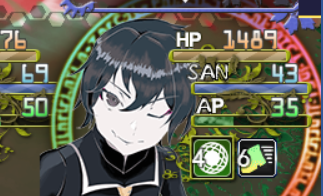
2022.12.16 修正了refresh_states的方法以保证不会让回合数数字重叠
2023.4.12 增加了在使用YEP状态核心时显示状态层数(counter)的需求
2023.5.18 修正了状态叠加时不更新回合数的情况
2023.5.20 增加了状态回合数与堆叠颜色调整(一般遵循YEP状态核心,如果没有可以自己给),增加坐标分别调整,避免了回合数达到2-3位数时显示不全问题
2024.2.7 修改了状态回合的坐标默认位置,增加对Olivia_StateOlivia_StateTooltipDisplay的兼容
如下文件提供给版本比较正常的MOG_Battlehud使用者,以Drill版为准,基本可直接覆盖
 MOG_BattleHud.zip
(22.89 KB, 下载次数: 165)
MOG_BattleHud.zip
(22.89 KB, 下载次数: 165)
注意:如果同时使用YEP状态核心,请将MOG_Battlehud插件放在更下层 |
评分
-
查看全部评分
|


 写轮眼
写轮眼
 发表于 2022-12-15 19:19:04


 提升卡
提升卡 沉默号角
沉默号角 喧嚣号角
喧嚣号角 变色卡
变色卡 升龙剑
升龙剑