| 赞 | 67 |
| VIP | |
| 好人卡 | |
| 积分 | 170 |
| 经验 | |
| 最后登录 | 2026-10-1 |
| 在线时间 | 6058 小时 |
- 梦石
- 0
- 星屑
- 17038
- 在线时间
- 6058 小时
- 注册时间
- 2011-7-18
- 回帖
- 152

|
 发表于 2020-1-28 00:02:11
|
显示全部楼层
发表于 2020-1-28 00:02:11
|
显示全部楼层
本帖最后由 gqxastg 于 2022-11-26 03:54 编辑
针对楼主在范例里发现的一些问题(BUG)
这边从脚本根源上试着找了一下出现原因和解决方案
[fold=关于<击退回避率>的设置无效]
出现原因
经检查,在RPG::BaseItem中,获取击退回避率的正则表达式书写错误。
与其他相似格式的相比,第二个\s后未加星号(即“*”),导致无法正确匹配<击退回避率>的备注
解决方法
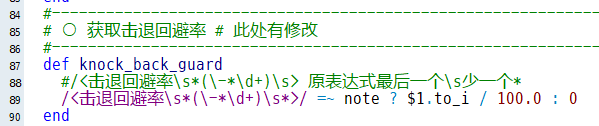
如图所示,将RPG::BaseItem原第88行的
修改为
即可
[/fold]
[fold=关于被击退后地形效果不刷新]
出现原因
就单纯的只是被击退后没刷新而已【
解决方法
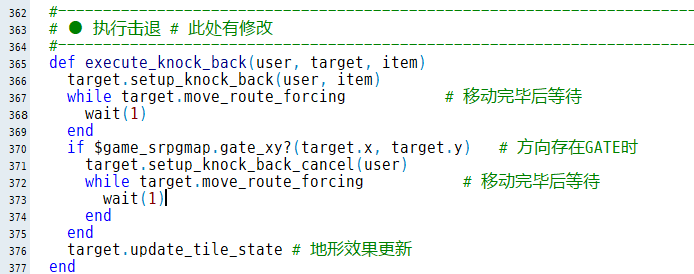
如图所示,在Scene_SrpgMap的原第376行插入
即可
[/fold]
[fold=关于非可操纵角色,使用调用公共事件的技能时,不能及时执行公共事件]
出现原因
敌对事件的行动处理时不会刷新地图的事件解释器,使用技能后无法及时执行公共事件
解决方法
![U84`DY8Y%O}O4~)GD]X50SQ.png](https://c.moenext.com/project1/data/attachment/forum/202001/28/004009eaxaeen5sygaiii4.png "U84`DY8Y%O}O4~)GD]X50SQ.png")
如图所示,在Scene_SrpgMap的原第291行插入
即可
[/fold]
[fold=关于<使用者除外>无效]
出现原因
经检查,在脚本中似乎并没有应用使用者除外效果的代码。
可能为作者遗忘或废案特性。
解决方法
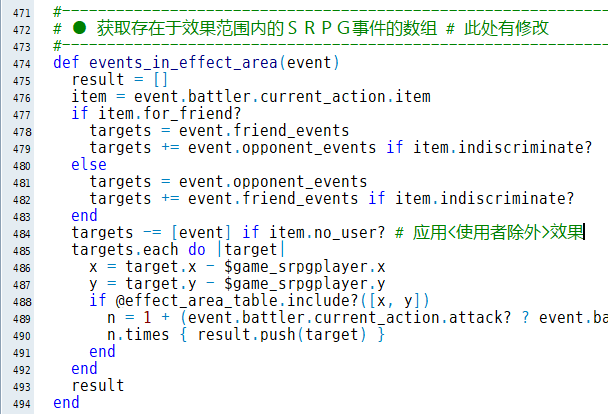
如图所示,在Game_SrpgMap的原第484行插入
- targets -= [event] if item.no_user?
[/fold]
针对“1.0.9 待改进的方向”中一些效果的实现
↓最后更新时间:1/30 21:57
[fold=※如果能在地图上绘制棋子血条,观感应该会好些。]
已集成角色显示图标
[pre lang="ruby"]# SRPG插件-棋子地图血条 Ver.2020.1.30
# 岚风雷(论坛ID:gqxastg)制作
#==============================================================================
# 补充说明:可通过修改
# $game_actors[ID].hp_gauge 和
# $game_srpgmap.events[ID].battler
# 来修改角色血条样式
#==============================================================================
# ■ 设定项目
#==============================================================================
module TMSRPG
MAP_HP_GAUGE = {
# 匹配棋子血条的正则表达式
# 默认为 <血条 样式ID>
# 仅读取角色和敌人页的备注
REGEXP: /<血条\s*(\S+?)\s*>/,
# 指定ID的开关打开时隐藏所有血条 不使用的话请设定为0
HIDE: 0,
# 默认的血条样式 默认不使用的话请设定为nil
# 如默认使用血条,可在备注中使用 <血条 nil> 来不使用血条
DEFAULT: {:actor => :blue, :enemy => :red},
# 血条样式预设
TYPE: {
# :default为样式ID,可以为数字等值
:default => {
z: 0,
visible: true,
back: {
origin: [15, 0],
offset: [0, 1],
width: 30,
height: 5,
color: "Color.new(32, 32, 64)",
zoom: [1.0, 1.0],
},
gauge: {
origin: [0, 0],
offset: [-14, 2],
width: 28,
height: 3,
color: ["Color.new(224, 128, 64)", "Color.new(240, 192, 64)"],
vertical: false,
zoom: [1.0, 1.0],
},
},
:blue => {
z: 0,
# 可用脚本指定来单独控制某个样式的血条是否显示
visible: "!$game_switches[0]",
back: {
origin: [15, 0],
offset: [0, 1],
width: 30,
height: 5,
color: "Color.new(32, 32, 64)",
zoom: [1.0, 1.0],
},
gauge: {
origin: [0, 0],
offset: [-14, 2],
width: 28,
height: 3,
color: ["Color.new(0, 183, 238)", "Color.new(145, 255, 255)"],
vertical: true,
zoom: [1.0, 1.0],
},
},
:red => {
z: 0,
visible: true,
back: {
origin: [15, 0],
offset: [0, 1],
width: 30,
height: 5,
color: "Color.new(32, 32, 64)",
zoom: [1.0, 1.0],
},
gauge: {
origin: [0, 0],
offset: [-14, 2],
width: 28,
height: 3,
color: ["Color.new(240, 60, 0)", "Color.new(255, 220, 210)"],
vertical: true,
zoom: [1.0, 1.0],
},
},
:only_icon => {
z: 0,
visible: false,
back: {
origin: [0, 0],
offset: [0, 0],
width: 1,
height: 1,
color: "Color.new(32, 32, 64)",
zoom: [1.0, 1.0],
},
gauge: {
origin: [0, 0],
offset: [0, 0],
width: 1,
height: 1,
color: ["Color.new(224, 128, 64)", "Color.new(240, 192, 64)"],
vertical: false,
zoom: [1.0, 1.0],
},
},
},
}
MAP_CUSTOM_ICON = {
# 是否启用自定义地图图标
ENABLE: true,
# 匹配自定义地图图标的正则表达式
# 默认为 <图标 图标ID, 显示优先度>
# 与“自定义角色脸图位置图标”不冲突
# 同一个备注可以通过不同行写入追加多个图标
REGEXP: /<图标\s*(\d+)\s*\,\s*(\d+)\s*>/,
# 指定ID的开关打开时隐藏所有图标 不使用的话请设定为0
HIDE: 0,
# 显示模式
# 0为仅显示优先级最高的图标
# 其他数字为循环显示,每对应数字帧切换
MODE: 180,
# 图标样式预设
# 将使用血条样式所对应的
TYPE: {
:default => {
visible: "!$game_switches[0]",
z: 1,
offset: [-16, -24],
origin: [0, 0],
},
:blue => {
visible: true,
z: 1,
offset: [-16, -24],
origin: [0, 0],
},
:red => {
visible: true,
z: 1,
offset: [-16, -24],
origin: [0, 0],
},
},
}
end
#==============================================================================
# ■ RPG::BaseItem
#==============================================================================
class RPG::BaseItem
#--------------------------------------------------------------------------
# ○ 获取自定义地图图标
#--------------------------------------------------------------------------
def custom_map_icons
icons = []
note.each_line do |line|
case line
when TMSRPG::MAP_CUSTOM_ICON[:REGEXP]
icons.push([$1.to_i, $2.to_i])
end
end
return icons.empty? ? nil : icons
end
end
#==============================================================================
# ■ RPG::Actor
#==============================================================================
class RPG::Actor
#--------------------------------------------------------------------------
# ○ 获取血条样式
#--------------------------------------------------------------------------
def hp_gauge
TMSRPG::MAP_HP_GAUGE[:REGEXP] =~ note ? eval($1) :
TMSRPG::MAP_HP_GAUGE[:DEFAULT][:actor]
end
end
#==============================================================================
# ■ RPG::Enemy
#==============================================================================
class RPG::Enemy
#--------------------------------------------------------------------------
# ○ 获取血条样式
#--------------------------------------------------------------------------
def hp_gauge
TMSRPG::MAP_HP_GAUGE[:REGEXP] =~ note ? eval($1) :
TMSRPG::MAP_HP_GAUGE[:DEFAULT][:enemy]
end
end
#==============================================================================
# ■ Game_BattlerBase
#==============================================================================
class Game_BattlerBase
#--------------------------------------------------------------------------
# ● 定义实例变量
#--------------------------------------------------------------------------
attr_accessor :hp_gauge # 血条样式
#--------------------------------------------------------------------------
# ○ 获取自定义地图图标
#--------------------------------------------------------------------------
def custom_map_icons
feature_objects.collect {|object| object.custom_map_icons}.compact.flatten.
each_slice(2).to_a.uniq.sort {|a, b| b[1] <=> a[1]}
end
end
#==============================================================================
# ■ Game_Actor
#==============================================================================
class Game_Actor < Game_Battler
#--------------------------------------------------------------------------
# ● 设置
#--------------------------------------------------------------------------
alias maphpgauge_setup setup
def setup(actor_id)
maphpgauge_setup(actor_id)
@hp_gauge = actor.hp_gauge
end
end
#==============================================================================
# ■ Game_Enemy
#==============================================================================
class Game_Enemy < Game_Battler
#--------------------------------------------------------------------------
# ● 初始化对象
#--------------------------------------------------------------------------
alias maphpgauge_initialize initialize
def initialize(index, enemy_id)
maphpgauge_initialize(index, enemy_id)
@hp_gauge = enemy.hp_gauge
end
end
#==============================================================================
# ■ Sprite_MapCustomIcon
#==============================================================================
class Sprite_MapCustomIcon < Sprite
include TMSRPG
#--------------------------------------------------------------------------
# ● 定义实例变量
#--------------------------------------------------------------------------
attr_accessor :character
#--------------------------------------------------------------------------
# ● 初始化对象
#--------------------------------------------------------------------------
def initialize(viewport, character = nil)
super(viewport)
@character = character
@index = 0
@icons = []
self.bitmap = Cache.system("Iconset")
self.src_rect.set(icon_rect)
update
end
#--------------------------------------------------------------------------
# ● 更新画面
#--------------------------------------------------------------------------
def update
super
return invisible if $game_switches[MAP_CUSTOM_ICON[:HIDE]]
return invisible unless @character && battler
return invisible unless battler.hp_gauge
return invisible if battler.custom_map_icons.empty?
return invisible unless eval(data[:visible].to_s)
self.visible = true
#--------------------------------------------------------------------------
if @icons != battler.custom_map_icons
@icons = battler.custom_map_icons
@index = 0
@wait = MAP_CUSTOM_ICON[:MODE]
end
#--------------------------------------------------------------------------
if @wait > 0
@wait -= 1
else
@wait = MAP_CUSTOM_ICON[:MODE] - 1
@index = (@index + 1) % @icons.size
end unless MAP_CUSTOM_ICON[:MODE] == 0
#--------------------------------------------------------------------------
self.x = @character.screen_x + data[:offset][0]
self.y = @character.screen_y + data[:offset][1]
self.z = @character.screen_z + data[:z]
self.ox, self.oy = data[:origin]
self.src_rect.set(icon_rect)
end
#--------------------------------------------------------------------------
# ● 不可见处理
#--------------------------------------------------------------------------
def invisible
self.visible = false
@index = 0
@wait = MAP_CUSTOM_ICON[:MODE]
end
#--------------------------------------------------------------------------
# ● 获取图标传输矩形
#--------------------------------------------------------------------------
def icon_rect
@icons.empty? ?
Rect.new(0, 0, 0, 0) :
Rect.new(@icons[@index][0] % 16 * 24, @icons[@index][0] / 16 * 24, 24, 24)
end
#--------------------------------------------------------------------------
# ● 获取战斗者
#--------------------------------------------------------------------------
def battler
@character.instance_variable_get(:@battler)
end
#--------------------------------------------------------------------------
# ● 获取图标样式参数
#--------------------------------------------------------------------------
def data
MAP_CUSTOM_ICON[:TYPE][battler.hp_gauge]
end
end
#==============================================================================
# ■ Sprite_MapHPGauge
#==============================================================================
class Sprite_MapHPGauge < Sprite
include TMSRPG
#--------------------------------------------------------------------------
# ● 获取角色
#--------------------------------------------------------------------------
def character; @character; end
#--------------------------------------------------------------------------
# ● 设定角色
#--------------------------------------------------------------------------
def character=(c)
@character = c
@icon_sprite.character = c if @icon_sprite
end
#--------------------------------------------------------------------------
# ● 初始化对象
#--------------------------------------------------------------------------
def initialize(viewport, character = nil)
super(viewport)
@character = character
@gauge_sprite = Sprite.new(viewport)
@icon_sprite = Sprite_MapCustomIcon.new(viewport, character) if
MAP_CUSTOM_ICON[:ENABLE]
@type = nil
update
end
#--------------------------------------------------------------------------
# ● 释放
#--------------------------------------------------------------------------
def dispose
@icon_sprite.dispose if @icon_sprite
@gauge_sprite.bitmap.dispose if @gauge_sprite.bitmap
@gauge_sprite.dispose
self.bitmap.dispose if self.bitmap
super
end
#--------------------------------------------------------------------------
# ● 更新画面
#--------------------------------------------------------------------------
def update
super
@icon_sprite.update if @icon_sprite
return self.opacity = 0 if $game_switches[MAP_HP_GAUGE[:HIDE]]
return self.opacity = 0 unless @character && battler
return self.opacity = 0 unless battler.hp_gauge
#--------------------------------------------------------------------------
if @type != battler.hp_gauge
@type = battler.hp_gauge
redraw_back
redraw_gauge
end
#--------------------------------------------------------------------------
update_back
update_gauge
end
#--------------------------------------------------------------------------
# ● 重绘血槽背景
#--------------------------------------------------------------------------
def redraw_back
self.bitmap.dispose if self.bitmap
w, h = eval(data[:back][:width].to_s), eval(data[:back][:height].to_s)
self.bitmap = Bitmap.new(w, h)
c = eval(data[:back][:color])
self.bitmap.fill_rect(0, 0, w, h, c)
@back_color = c
end
#--------------------------------------------------------------------------
# ● 重绘血槽
#--------------------------------------------------------------------------
def redraw_gauge
@gauge_sprite.bitmap.dispose if @gauge_sprite.bitmap
w, h = eval(data[:gauge][:width].to_s), eval(data[:gauge][:height].to_s)
@gauge_sprite.bitmap = Bitmap.new(w, h)
c = [eval(data[:gauge][:color][0]), eval(data[:gauge][:color][1])]
@gauge_sprite.bitmap.gradient_fill_rect(
Rect.new(0, 0, w, h), c[0], c[1], data[:gauge][:vertical])
@gauge_color = c
end
#--------------------------------------------------------------------------
# ● 更新血槽背景
#--------------------------------------------------------------------------
def update_back
redraw_back if @back_color != eval(data[:back][:color])
#--------------------------------------------------------------------------
self.x = @character.screen_x + data[:back][:offset][0]
self.y = @character.screen_y + data[:back][:offset][1]
self.z = @character.screen_z + data[:z]
#--------------------------------------------------------------------------
self.ox, self.oy = data[:back][:origin]
#--------------------------------------------------------------------------
self.zoom_x = eval(data[:back][:zoom][0].to_s)
self.zoom_y = eval(data[:back][:zoom][1].to_s)
#--------------------------------------------------------------------------
self.opacity = 255 #@character.opacity
self.visible = eval(data[:visible].to_s)
self.visible = false if @character.transparent
self.visible = false if battler.hp_hide? &&
!(CRISIS_HP_SHOW && battler.hp < battler.mhp / 4)
self.visible = false if battler.dead?
end
#--------------------------------------------------------------------------
# ● 更新血槽
#--------------------------------------------------------------------------
def update_gauge
redraw_gauge if @gauge_color !=
[eval(data[:gauge][:color][0]), eval(data[:gauge][:color][1])]
#--------------------------------------------------------------------------
@gauge_sprite.x = @character.screen_x + data[:gauge][:offset][0]
@gauge_sprite.y = @character.screen_y + data[:gauge][:offset][1]
#--------------------------------------------------------------------------
@gauge_sprite.ox, @gauge_sprite.oy = data[:gauge][:origin]
#--------------------------------------------------------------------------
@gauge_sprite.zoom_x = battler.hp_rate * eval(data[:gauge][:zoom][0].to_s)
@gauge_sprite.zoom_y = eval(data[:gauge][:zoom][1].to_s)
#--------------------------------------------------------------------------
#~ @gauge_sprite.visible = false if battler.hp_hide? &&
#~ !(CRISIS_HP_SHOW && battler.hp < battler.mhp / 4)
end
#--------------------------------------------------------------------------
# ● 获取血条样式参数
#--------------------------------------------------------------------------
def data
MAP_HP_GAUGE[:TYPE][@type]
end
#--------------------------------------------------------------------------
# ● 获取战斗者
#--------------------------------------------------------------------------
def battler
@character.instance_variable_get(:@battler)
end
#--------------------------------------------------------------------------
# ● 同步属性
#--------------------------------------------------------------------------
def z=(z); super; @gauge_sprite.z = z; end
def opacity=(o); super; @gauge_sprite.opacity = o; end
def visible=(v); super; @gauge_sprite.visible = v; end
end
#==============================================================================
# ■ Spriteset_SrpgMap
#==============================================================================
class Spriteset_SrpgMap
#--------------------------------------------------------------------------
# ● 生成人物精灵
#--------------------------------------------------------------------------
alias maphpgauge_create_characters create_characters
def create_characters
maphpgauge_create_characters
create_hp_gauge
end
#--------------------------------------------------------------------------
# ● 更新人物精灵
#--------------------------------------------------------------------------
alias maphpgauge_update_characters update_characters
def update_characters
maphpgauge_update_characters
update_hp_gauge
end
#--------------------------------------------------------------------------
# ● 释放人物精灵
#--------------------------------------------------------------------------
alias maphpgauge_dispose_characters dispose_characters
def dispose_characters
dispose_hp_gauge
maphpgauge_dispose_characters
end
#--------------------------------------------------------------------------
# ● 生成血槽精灵
#--------------------------------------------------------------------------
def create_hp_gauge
@hp_gauge_sprites = []
$game_srpgmap.all_battler_events.each do |event|
@hp_gauge_sprites.push(Sprite_MapHPGauge.new(@viewport1, event))
end
end
#--------------------------------------------------------------------------
# ● 更新血槽精灵
#--------------------------------------------------------------------------
def update_hp_gauge
arr = @hp_gauge_sprites.collect {|sprite| sprite.character}
$game_srpgmap.all_battler_events.each do |event|
@hp_gauge_sprites.push(Sprite_MapHPGauge.new(@viewport1, event)) unless
arr.include?(event)
end
@hp_gauge_sprites.each {|sprite| sprite.update }
end
#--------------------------------------------------------------------------
# ● 释放血槽精灵
#--------------------------------------------------------------------------
def dispose_hp_gauge
@hp_gauge_sprites.each {|sprite| sprite.dispose }
end
end[/pre]
[/fold]
[fold=※当队友在自身附近时,可通过“移动”指令与其交换位置。]
单独追加“换位”指令
[pre lang="ruby"]# SRPG插件-交换位置命令 Ver.2020.2.2
# 岚风雷(论坛ID:gqxastg)制作
#==============================================================================
# ■ 设定项目
#==============================================================================
module TMSRPG
VC_EXCHANGE_COMMAND = "换位" # 角色命令:交换位置
VC_EXCHANGE_INDEX = -2 # 交换位置命令插入的位置
VC_EXCHANGE_SKILL = 65 # 表示换位范围用的技能ID
VC_EXCHANGE_SOUND = ["Equip1"] # 交换时播放的音效
VC_EXCHANGE_SOUND = RPG::SE.new(*VC_EXCHANGE_SOUND) # 请勿修改
end
#==============================================================================
# ■ Window_SrpgActorCommand
#==============================================================================
class Window_SrpgActorCommand < Window_Command
#--------------------------------------------------------------------------
# ● 生成指令列表
#--------------------------------------------------------------------------
alias exchange_make_command_list make_command_list
def make_command_list
exchange_make_command_list
if @event.actor?
add_command(TMSRPG::VC_EXCHANGE_COMMAND, :exchange, exchange_enabled)
@list[TMSRPG::VC_EXCHANGE_INDEX, 0] = [@list[-1]]
@list.delete_at(-1)
end
end
#--------------------------------------------------------------------------
# ● 获取换位命令的有效状态
#--------------------------------------------------------------------------
def exchange_enabled
@event.battler.inputable?
end
#--------------------------------------------------------------------------
# ● 更新帮助内容
#--------------------------------------------------------------------------
alias exchange_update_help update_help
def update_help
case current_symbol
when :exchange
@help_window.set_text("与邻近友方交换位置")
else
exchange_update_help
end
end
end
#==============================================================================
# ■ Scene_SrpgMap
#==============================================================================
class Scene_SrpgMap < Scene_Base
#--------------------------------------------------------------------------
# ● 生成SRPG角色行动列表窗口
#--------------------------------------------------------------------------
alias exchange_create_srpg_actor_command_window create_srpg_actor_command_window
def create_srpg_actor_command_window
exchange_create_srpg_actor_command_window
@srpg_actor_command_window.set_handler(:exchange, method(:on_actor_command_exchange))
end
#--------------------------------------------------------------------------
# ● 角色行动命令【换位】
#--------------------------------------------------------------------------
def on_actor_command_exchange
@active_event.battler.make_actions
@active_event.battler.current_action.set_skill(TMSRPG::VC_EXCHANGE_SKILL)
@srpg_actor_command_window.hide # 隐藏角色命令窗口
@srpg_action_window = Window_SrpgDummy.new
@srpg_action_window.set_handler(:ok, method(:on_exchange_ok))
@srpg_action_window.set_handler(:cancel, method(:on_action_cancel))
@srpg_action_window.help_window = @help_window
@srpg_windows.push(@srpg_action_window)
$game_srpgmap.put_actable_area(@active_event)
$game_srpgmap.put_effect_area(@active_event)
$game_srpgplayer.unlock # 解除玩家锁定
@help_window.set_text("选择交换对象")
end
#--------------------------------------------------------------------------
# ● 换位命令【确定】
#--------------------------------------------------------------------------
def on_exchange_ok
targets = $game_srpgmap.events_in_effect_area(@active_event)
# 交换选中对象只能有一个且对象可操作
unless $game_srpgmap.actable_area? && targets.size == 1 &&
targets[0].battler.inputable?
Sound.play_buzzer
@srpg_windows[-1].activate
return
end
last = targets[0].priority_type
# 防止事件优先级影响通行判断
targets[0].instance_variable_set(:@priority_type, 0)
# 生成可移动范围
$game_srpgmap.put_movable_area(@active_event)
targets[0].instance_variable_set(:@priority_type, last)
# 检查是否能移动到对象事件
if !$game_srpgmap.movable_area_route(targets[0].x, targets[0].y)
$game_srpgmap.clear_flash_data
$game_srpgmap.put_actable_area(@active_event)
$game_srpgmap.put_effect_area(@active_event)
Sound.play_buzzer
@srpg_windows[-1].activate
return
end
last = @active_event.priority_type
@active_event.instance_variable_set(:@priority_type, 0)
$game_srpgmap.put_movable_area(targets[0])
@active_event.instance_variable_set(:@priority_type, last)
# 检查对象事件是否能移动过来
if !$game_srpgmap.movable_area_route(@active_event.x, @active_event.y)
$game_srpgmap.clear_flash_data
$game_srpgmap.put_actable_area(@active_event)
$game_srpgmap.put_effect_area(@active_event)
Sound.play_buzzer
@srpg_windows[-1].activate
return
end
$game_srpgmap.clear_flash_data
$game_srpgmap.put_actable_area(@active_event)
$game_srpgmap.put_effect_area(@active_event)
if $game_system.action_check
@srpg_action_check_window = Window_SrpgChoice.new
@srpg_action_check_window.set_handler(:yes, method(:on_exchange_choice_ok))
@srpg_action_check_window.set_handler(:no, method(:on_exchange_choice_cancel))
@srpg_action_check_window.set_handler(:cancel, method(:on_exchange_choice_cancel))
@srpg_action_check_window.help_window = @help_window
@srpg_windows.push(@srpg_action_check_window)
@srpg_actor_command_window.hide
@action_status_window.setup_target(@active_event, targets[0])
@help_window.set_text("确认交换吗?")
$game_srpgplayer.lock # 锁定玩家操作
else
on_exchange_choice_ok
end
end
#--------------------------------------------------------------------------
# ● 换位确认【确定】
#--------------------------------------------------------------------------
def on_exchange_choice_ok
targets = $game_srpgmap.events_in_effect_area(@active_event)
@srpg_windows[-1].hide
@action_status_window.setup_target(nil)
@spriteset.hide_flash
# 位置互换
x, y = @active_event.x, @active_event.y
@active_event.moveto(targets[0].x, targets[0].y)
targets[0].moveto(x, y)
TMSRPG::VC_EXCHANGE_SOUND.play
# 设定不能撤销移动
targets[0].set_last_pos(targets[0].x, targets[0].y, targets[0].direction)
@active_event.set_last_pos(@active_event.x, @active_event.y, @active_event.direction)
#
$game_srpgmap.clear_flash_data
@spriteset.show_flash
dispose_all_srpg_windows
end
#--------------------------------------------------------------------------
# ● 换位确认【取消】
#--------------------------------------------------------------------------
def on_exchange_choice_cancel
@help_window.set_text("选择交换对象")
dispose_active_srpg_window
$game_srpgplayer.unlock # 解除玩家操作
end
end[/pre]
[/fold]
[fold=※如果能够让角色发动连携攻击时面向攻击目标,战斗会更加自然]
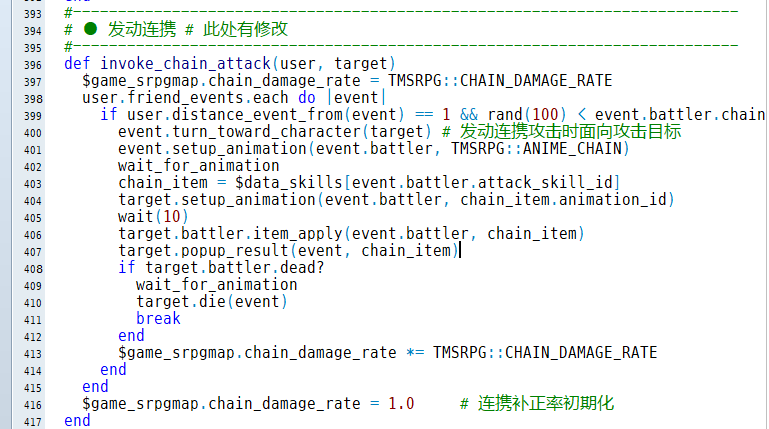
如图所示,在Scene_SrpgMap的原第400行插入
- event.turn_toward_character(target)
为了防止朝向改变可能影响被攻击背后等情况,可以改成这样在攻击后恢复朝向
![(({L4CQ6P3JUAHGKTH]DW85.png](https://c.moenext.com/project1/data/attachment/forum/202001/30/151231s9tizryn9gd1htof.png "(({L4CQ6P3JUAHGKTH]DW85.png")
- last = event.direction
- event.set_direction(last)
类似的,保护弱者发动时朝向被保护者可以这么写(因为已经改过了行数不准确,在“发动连携”下面一点)
![`SYT${{__PM]IBSXAL)D.png](https://c.moenext.com/project1/data/attachment/forum/202001/30/155737a9o1czcdgol5cckj.png "`SYT${{__PM]IBSXAL)D.png")
- last = substitute.direction
- substitute.turn_toward_character(target)
- substitute.set_direction(last)
[/fold]↓最后更新时间:2/2 18:07
[fold=※如果能够做到在某状态备注栏写下<动画 X,Y>使棋子在受某状态时以Y%音量循环播放X号动画,状态效果会更加直观。]
1/28 14:53 动画位移BUG已修正
2/2 18:07 特别兼容“角色被击震动”插件
局部调整动画音量相对复杂又没有太大必要就没做【
[pre lang="ruby"]# SRPG插件-状态循环动画 Ver.2020.2.2
# 岚风雷(论坛ID:gqxastg)制作
#==============================================================================
# ■ 设定项目
#==============================================================================
module TMSRPG
# 注意:如果使用了VXAce_SP1,请将本插件尽量紧跟着置于其下
LOOP_ANIME = {
REGEXP: /<动画\s*(\d+)\s*>/,
# 匹配状态循环动画的正则表达式
# 默认为 <动画 动画ID>
# 状态循环动画与状态显示优先级有关
# 当同时拥有多个包含循环动画的状态时
# 将选择其中显示优先级最高的状态
TILE: true,
# 是否包括地形效果附加的状态
# 不推荐启用,系统自身写法原因,地形效果不能及时刷新
# 显示优先级与普通状态相同的时候优先显示普通状态
HIT_SHAKE: 1,
# 特别兼容“角色被击震动”插件的模式
# false为不启用
# 1为只角色位移,动画不位移
# 2为角色与动画同时位移
# 另请将“角色被击震动”插件置于本插件之下
}
end
#==============================================================================
# ■ RPG::BaseItem
#==============================================================================
class RPG::BaseItem
#--------------------------------------------------------------------------
# ○ 获取循环动画
#--------------------------------------------------------------------------
def loop_anime
TMSRPG::LOOP_ANIME[:REGEXP] =~ note ? $1.to_i : nil
end
end
#==============================================================================
# ■ Game_BattlerBase
#==============================================================================
class Game_BattlerBase
#--------------------------------------------------------------------------
# ○ 获取循环动画
#--------------------------------------------------------------------------
def loop_anime
arr = states.collect {|state| state.loop_anime ?
[state.loop_anime, state.priority] : nil}.compact
if TMSRPG::LOOP_ANIME[:TILE] && tile_state_object &&
tile_state_object.loop_anime
arr.unshift([tile_state_object.loop_anime, 0]) if
(arr.empty? || tile_state_object.priority > arr[0][1])
end
return arr.empty? ? nil : arr[0][0]
end
end
#==============================================================================
# ■ Sprite_Base
#==============================================================================
class Sprite_Base < Sprite
#--------------------------------------------------------------------------
# ● 判定是否显示动画中
#--------------------------------------------------------------------------
alias loopanime_animation? animation?
def animation?
(!@loop || @old_testani) && loopanime_animation?
end
#--------------------------------------------------------------------------
# ● 更新动画
#--------------------------------------------------------------------------
alias loopanime_update_animation update_animation
def update_animation
@old_testani = true
loopanime_update_animation
@old_testani = false
end
#--------------------------------------------------------------------------
# ● 开始动画
#--------------------------------------------------------------------------
alias loopanime_start_animation start_animation
def start_animation(animation, mirror = false, loop = false)
@loop = loop
loopanime_start_animation(animation, mirror)
end
#--------------------------------------------------------------------------
# ● 结束动画
#--------------------------------------------------------------------------
alias loopanime_end_animation end_animation
def end_animation
if @loop
@ani_duration = @animation.frame_max * @ani_rate + 1
return update_animation
end
loopanime_end_animation
end
end
#==============================================================================
# ■ Sprite_Character
#==============================================================================
class Sprite_Character < Sprite_Base
#--------------------------------------------------------------------------
# ● 初始化对象
#--------------------------------------------------------------------------
alias vxace_sp1_initialize initialize
def initialize(viewport, character = nil)
vxace_sp1_initialize(viewport, character)
# 以下摘自 VXAce_SP1
if !defined?(move_animation)
alias vxace_sp1_update_position update_position
#------------------------------------------------------------------------
# ● 移动动画
#------------------------------------------------------------------------
def move_animation(dx, dy)
if @animation && @animation.position != 3
@ani_ox += dx
@ani_oy += dy
@ani_sprites.each do |sprite|
sprite.x += dx
sprite.y += dy
end
end
end
end
end
#------------------------------------------------------------------------
# ● 更新位置
#------------------------------------------------------------------------
def update_position
vxace_sp1_update_position
move_animation(self.x - @last_pos[0], self.y - @last_pos[1])
end
#--------------------------------------------------------------------------
# ● 更新动画
#--------------------------------------------------------------------------
def update_animation
@last_pos = [self.x, self.y]
if TMSRPG::LOOP_ANIME[:HIT_SHAKE] == 1
@last_pos[0] -= pos_offset[0].round
@last_pos[1] -= pos_offset[1].round
end
super
if TMSRPG::LOOP_ANIME[:HIT_SHAKE] == 2
@last_pos[0] -= pos_offset[0].round
@last_pos[1] -= pos_offset[1].round
end
end
#--------------------------------------------------------------------------
# ● 设置新的效果
#--------------------------------------------------------------------------
alias loopanime_setup_new_effect setup_new_effect
def setup_new_effect
if SceneManager.scene_is?(Scene_SrpgMap)
battler = @character.instance_variable_get(:@battler)
if battler && battler.loop_anime
if @character.animation_id > 0 && @loop
@loop = false
end_animation
else
if !@animation
animation = $data_animations[battler.loop_anime]
start_animation(animation, false, true)
end
end
elsif @loop
@loop = false
end_animation
end
end
loopanime_setup_new_effect
end
#--------------------------------------------------------------------------
# ● 结束动画 # Overwrite
#--------------------------------------------------------------------------
def end_animation
@character.animation_id = 0 if !SceneManager.scene_is?(Scene_SrpgMap) ||
(!@loop && $data_animations[@character.animation_id] == @animation)
super
end
end
#==============================================================================
# ■ Sprite_SrpgCharacter
#==============================================================================
class Sprite_SrpgCharacter < Sprite_Base
#--------------------------------------------------------------------------
# ● 更新动画
#--------------------------------------------------------------------------
def update_animation
@last_pos = [self.x, self.y]
if TMSRPG::LOOP_ANIME[:HIT_SHAKE] == 1
@last_pos[0] -= pos_offset[0].round
@last_pos[1] -= pos_offset[1].round
end
super
if TMSRPG::LOOP_ANIME[:HIT_SHAKE] == 2
@last_pos[0] -= pos_offset[0].round
@last_pos[1] -= pos_offset[1].round
end
end
#--------------------------------------------------------------------------
# ● 设置新的效果
#--------------------------------------------------------------------------
alias loopanime_setup_new_effect setup_new_effect
def setup_new_effect
battler = @character.instance_variable_get(:@battler)
if battler && battler.loop_anime
if @character.animation_id > 0 && @loop
@loop = false
end_animation
else
if !@animation
animation = $data_animations[battler.loop_anime]
start_animation(animation, false, true)
end
end
elsif @loop
@loop = false
end_animation
end
loopanime_setup_new_effect
end
#--------------------------------------------------------------------------
# ● 结束动画 # Overwrite
#--------------------------------------------------------------------------
def end_animation
@character.animation_id = 0 if
!@loop && $data_animations[@character.animation_id] == @animation
super
end
# 以下摘自 VXAce_SP1
#--------------------------------------------------------------------------
# ● 更新位置
#--------------------------------------------------------------------------
alias vxace_sp1_update_position update_position
def update_position
vxace_sp1_update_position
move_animation(self.x - @last_pos[0], self.y - @last_pos[1])
end
#--------------------------------------------------------------------------
# ● 移动动画
#--------------------------------------------------------------------------
def move_animation(dx, dy)
if @animation && @animation.position != 3
@ani_ox += dx
@ani_oy += dy
@ani_sprites.each do |sprite|
sprite.x += dx
sprite.y += dy
end
end
end
end[/pre]
[/fold]↓最后更新时间:4/1 0:10
[fold=※在指定地点生成NPC/敌人/<物品>的技能。]
[pre lang="ruby"]# SRPG插件-生成事件 Ver.2020.4.1
# 岚风雷(论坛ID:gqxastg)制作
#==============================================================================
# 使用方法
#------------------------------------------------------------------------------
# 在事件脚本中调用create_event(map_id, event_id, target_id, x, y)
# map_id : 读取事件的地图ID
# event_id : 读取的事件ID
# target_id : 生成到的地图事件ID
# x, y : 放置到的x坐标, 放置到的y坐标
# reset_swi : 是否重置生成事件的全部独立开关(true重置,false不重置,不填默认重置)
#==============================================================================
class Game_SrpgInterpreter
#--------------------------------------------------------------------------
# ● 从其他地图读取事件生成
#--------------------------------------------------------------------------
def create_event(map_id, event_id, target_id, x, y, reset_swi = true)
map = load_data(sprintf("Data/Map%03d.rvdata2", map_id))
event = map.events[event_id]
# 读取事件ID匹配生成事件ID
event.id = target_id
# 新建事件需地图上无对应target_id的事件 否则会覆盖
$game_srpgmap.events[target_id] = Game_SrpgEvent.new(@map_id, event)
$game_srpgmap.events[target_id].moveto(x, y)
# 重置独立开关
if reset_swi
("A".."D").each {|c|
$game_self_switches[[@map_id, target_id, c]] = false }
elsif TMSRPG::AUTO_D_RESET
key = [@map_id, target_id, "D"]
$game_self_switches[key] = false
end
# 添加新增加事件人物的精灵
SceneManager.scene.instance_eval do
@spriteset.instance_eval do
return if @character_sprites.find {|sprite| sprite.character ==
$game_srpgmap.events[target_id]}
@character_sprites.push(Sprite_SrpgCharacter.new(@viewport1,
$game_srpgmap.events[target_id]))
end
end
#~ # 重新创建所有地图人物的精灵
#~ SceneManager.scene.instance_eval{
#~ @spriteset.dispose_characters
#~ @spriteset.create_characters
#~ }
end
end[/pre]
[/fold]↓最后更新时间:1/30 20:24
[fold=※在角色、职业、武器、防具、敌人、状态的备注栏写下<图标 X>,使符合条件的单位左下角显示对应编号的ICON。]
该脚本为角色脸图位置显示图标,地图行走图上显示图标已集成到血条脚本
[pre lang="ruby"]# SRPG插件-自定义角色脸图位置图标 Ver.2020.1.30
# 岚风雷(论坛ID:gqxastg)制作
#==============================================================================
# ■ 设定项目
#==============================================================================
module TMSRPG
CUSTOM_ICON = {
REGEXP: /<图标\s*(\d+)\s*\,\s*(\-*\d+)\s*\,\s*(\d+)\s*\>/,
# 匹配自定义图标的正则表达式
# 默认为 <图标 图标ID, 显示优先度, 显示位置>
# 显示优先度可以为负数,同一显示位置有多个自定义图标时将显示优先度最高的
# 优先度大于等于0时将覆盖对应显示位置的默认图标(如水上移动、击破对象)
# 否则会显示默认图标
# 显示位置可以为1和2
# 1为显示在角色脸图左上角Y坐标+24处(显示水上移动、浮游的位置)
# 2为显示在角色脸图左上角Y坐标+48处(显示击破对象、护卫对象的位置)
# 同一个备注可以通过不同行写入追加多个图标
}
end
#==============================================================================
# ■ RPG::BaseItem
#==============================================================================
class RPG::BaseItem
#--------------------------------------------------------------------------
# ○ 获取自定义图标
#--------------------------------------------------------------------------
def custom_icons
icons = []
note.each_line do |line|
case line
when TMSRPG::CUSTOM_ICON[:REGEXP]
icons.push([$1.to_i, $2.to_i, $3.to_i])
end
end
return icons.empty? ? nil : icons
end
end
#==============================================================================
# ■ Game_BattlerBase
#==============================================================================
class Game_BattlerBase
#--------------------------------------------------------------------------
# ○ 获取自定义图标
#--------------------------------------------------------------------------
def custom_icons
arr = feature_objects.collect {|object| object.custom_icons}.compact.
flatten.each_slice(3).to_a
return nil if arr.empty?
return arr.sort {|a, b| b[1] <=> a[1]}.group_by {|a| a[2]}
end
end
#==============================================================================
# ■ Window_Base
#==============================================================================
class Window_Base < Window
#--------------------------------------------------------------------------
# ○ 绘制SRPG角色脸图上的图标(ICON)
#--------------------------------------------------------------------------
alias customicons_draw_srpg_face_icon draw_srpg_face_icon
def draw_srpg_face_icon(battler, x, y)
arr = battler.custom_icons
if arr
if arr[1]
if arr[1][0][1] >= 0
draw_icon(arr[1][0][0], x, y + 24)
else
if battler.float?; draw_icon(TMSRPG::ICON_FLOAT, x, y + 24)
elsif battler.ship?; draw_icon(TMSRPG::ICON_SHIP, x, y + 24)
else; draw_icon(arr[1][0][0], x, y + 24)
end
end
else
if battler.float?
draw_icon(TMSRPG::ICON_FLOAT, x, y + 24)
elsif battler.ship?
draw_icon(TMSRPG::ICON_SHIP, x, y + 24)
end
end
#----------------------------------------------------------------------
if arr[2]
if arr[2][0][1] >= 0
draw_icon(arr[2][0][0], x, y + 48)
else
if battler.boss?; draw_icon(TMSRPG::ICON_BOSS, x, y + 48)
elsif battler.princess?; draw_icon(TMSRPG::ICON_PRINCESS, x, y + 48)
else; draw_icon(arr[2][0][0], x, y + 48)
end
end
else
draw_icon(TMSRPG::ICON_BOSS, x, y + 48) if battler.boss?
draw_icon(TMSRPG::ICON_PRINCESS, x, y + 48) if battler.princess?
end
else
customicons_draw_srpg_face_icon(battler, x, y)
end
end
end[/pre]
[/fold]
写的一些其他插件
[fold=变更角色朝向命令]
[pre lang="ruby"]# SRPG插件-变更角色朝向命令 Ver.2020.1.30
# 岚风雷(论坛ID:gqxastg)制作
#==============================================================================
# ■ 设定项目
#==============================================================================
module TMSRPG
VC_DIRECTION_COMMAND = "朝向" # 角色命令:变更朝向
VC_DIRECTION_INDEX = -2 # 变更朝向命令插入的位置
end
#==============================================================================
# ■ Window_SrpgActorCommand
#==============================================================================
class Window_SrpgActorCommand < Window_Command
#--------------------------------------------------------------------------
# ● 生成指令列表
#--------------------------------------------------------------------------
alias changedir_make_command_list make_command_list
def make_command_list
changedir_make_command_list
if @event.actor?
add_command(TMSRPG::VC_DIRECTION_COMMAND, :direction, direction_enabled)
@list[TMSRPG::VC_DIRECTION_INDEX, 0] = [@list[-1]]
@list.delete_at(-1)
end
end
#--------------------------------------------------------------------------
# ● 获取朝向命令的有效状态
#--------------------------------------------------------------------------
def direction_enabled
@event.battler.inputable?
end
#--------------------------------------------------------------------------
# ● 更新帮助内容
#--------------------------------------------------------------------------
alias changedir_update_help update_help
def update_help
case current_symbol
when :direction
@help_window.set_text("变更角色朝向")
else
changedir_update_help
end
end
end
#==============================================================================
# ■ Scene_SrpgMap
#==============================================================================
class Scene_SrpgMap < Scene_Base
#--------------------------------------------------------------------------
# ● 生成SRPG角色行动列表窗口
#--------------------------------------------------------------------------
alias changedir_create_srpg_actor_command_window create_srpg_actor_command_window
def create_srpg_actor_command_window
changedir_create_srpg_actor_command_window
@srpg_actor_command_window.set_handler(:direction, method(:on_actor_command_direction))
end
#--------------------------------------------------------------------------
# ● 角色行动命令【朝向】
#--------------------------------------------------------------------------
def on_actor_command_direction
@srpg_actor_command_window.hide # 隐藏角色命令窗口
@srpg_direction_window = Window_SrpgDummy.new
@srpg_direction_window.help_window = @help_window
@srpg_windows.push(@srpg_direction_window)
@help_window.set_text("按方向键变更朝向")
last = @active_event.direction
loop do
update
if Input.trigger?(:C)
Sound.play_ok
break
elsif Input.trigger?(:B)
Sound.play_cancel
@active_event.set_direction(last)
break
elsif Input.trigger?(:DOWN)
@active_event.set_direction(2)
elsif Input.trigger?(:LEFT)
@active_event.set_direction(4)
elsif Input.trigger?(:RIGHT)
@active_event.set_direction(6)
elsif Input.trigger?(:UP)
@active_event.set_direction(8)
end
end
dispose_active_srpg_window
end
end[/pre]
[/fold]↓最后更新时间:2022/11/26[fold=物品类敌人功能拓展]
[pre lang="ruby"]# SRPG插件-物品类敌人功能拓展 Ver.2022.11.26
# 岚风雷(论坛ID:gqxastg)制作
#==============================================================================
# 补充说明
#------------------------------------------------------------------------------
# 可以对任何敌人备注<中立>
# 中立单位双方无法穿过,可以被双方效果范围内的任何技能影响,不会被敌方主动攻击
#==============================================================================
# ■ 设定项目
#==============================================================================
module TMSRPG
OBJECT_ENEMY = {
# 默认物品类敌人样式
# 备注<物品>不带参数则使用默认值
# 备注<物品 样式ID>使用指定样式
DEFAULT: :default,
TYPE: {
:default => {
show_name: true,
show_hp: false,
show_mp: false,
show_tp: false,
show_face: false,
show_srpg_icon: false,
show_icon: false,
show_gold: true,
show_exp: true,
show_level: false,
show_item: true,
# 是否显示能力值
show_param: false,
# 是否显示(属性、状态)有效度
show_rate: false,
# 是否显示在角色一览的窗口中
show_in_list: true,
# 是否可以查看其状态
can_see_status: true,
# 是否可被设定为行动目标
selectable: true,
},
:button => {
show_name: true,
show_hp: false,
show_mp: false,
show_tp: false,
show_face: false,
show_srpg_icon: false,
show_icon: false,
show_gold: false,
show_exp: false,
show_level: false,
show_item: false,
show_param: false,
show_rate: false,
show_in_list: true,
can_see_status: false,
selectable: false,
},
:obstacle => {
show_name: true,
show_hp: true,
show_mp: false,
show_tp: false,
show_face: false,
show_srpg_icon: false,
show_icon: false,
show_gold: false,
show_exp: false,
show_level: false,
show_item: false,
show_param: false,
show_rate: true,
show_in_list: true,
can_see_status: true,
selectable: true,
}
},
}
end
#==============================================================================
# ■ Game_Enemy
#==============================================================================
class Game_Enemy < Game_Battler
#--------------------------------------------------------------------------
# ○ 获取行走图名称 # Overwrite
#--------------------------------------------------------------------------
def character_name
/<行走图\s*(\S+?)\s*\,\s*(\d+)>/ =~ enemy.note ? $1 : nil
end
#--------------------------------------------------------------------------
# ○ 获取行走图索引编号 # Overwrite
#--------------------------------------------------------------------------
def character_index
/<行走图\s*(\S+?)\s*\,\s*(\d+)>/ =~ enemy.note ? $2.to_i : nil
end
#--------------------------------------------------------------------------
# ○ 获取是否为物品 # Overwrite
#--------------------------------------------------------------------------
def object?
/<物品\s*(\S+?)\s*>/ =~ enemy.note ? eval($1) :
(/<物品>/ =~ enemy.note ? TMSRPG::OBJECT_ENEMY[:DEFAULT] : false)
end
#--------------------------------------------------------------------------
# ○ 获取是否为中立单位
#--------------------------------------------------------------------------
def neutral?
/<中立>/ =~ enemy.note ? true : false
end
end
#==============================================================================
# ■ Game_SrpgEvent
#==============================================================================
class Game_SrpgEvent < Game_SrpgCharacter
#--------------------------------------------------------------------------
# ● 获取是否为中立单位
#--------------------------------------------------------------------------
def neutral?
battler? && battler.neutral?
end
#--------------------------------------------------------------------------
# ● 获取事件是否为友军
#--------------------------------------------------------------------------
alias objectenemy_ev_friend? friend?
def friend?(target)
return $game_srpgmap.neutral_force_friend if target.neutral?
objectenemy_ev_friend?(target)
end
#--------------------------------------------------------------------------
# ● 获取敌对事件的数组
#--------------------------------------------------------------------------
alias objectenemy_opponent_events opponent_events
def opponent_events
result = objectenemy_opponent_events
if [:both, nil].include?($game_srpgmap.neutral_force_friend)
a = $game_srpgmap.all_battler_events.select {|event| event.neutral? }
$game_srpgmap.neutral_force_friend ? (result |= a) : (result -= a)
end
result
end
#--------------------------------------------------------------------------
# ● 获取友方事件的数组
#--------------------------------------------------------------------------
alias objectenemy_friend_events friend_events
def friend_events
result = objectenemy_friend_events
result
end
#--------------------------------------------------------------------------
# ● 决定实行行动的坐标
#--------------------------------------------------------------------------
alias objectenemy_make_action_pos make_action_pos
def make_action_pos
item = battler.current_action.item
$game_srpgmap.neutral_force_friend = !item.for_friend?
result = objectenemy_make_action_pos
$game_srpgmap.neutral_force_friend = nil
result
end
#--------------------------------------------------------------------------
# ● 更改图像
#--------------------------------------------------------------------------
alias objectenemy_set_graphic set_graphic
def set_graphic(character_name, character_index)
return unless character_name && character_index
objectenemy_set_graphic(character_name, character_index)
end
end
#==============================================================================
# ■ Game_SrpgActorEvent
#==============================================================================
class Game_SrpgActorEvent < Game_SrpgEvent
#--------------------------------------------------------------------------
# ● 获取是否为中立单位
#--------------------------------------------------------------------------
def neutral?
false
end
#--------------------------------------------------------------------------
# ● 获取事件是否为友军
#--------------------------------------------------------------------------
alias objectenemy_ac_friend? friend?
def friend?(target)
return $game_srpgmap.neutral_force_friend if target.neutral?
objectenemy_ac_friend?(target)
end
end
#==============================================================================
# ■ Game_SrpgMap
#==============================================================================
class Game_SrpgMap
#--------------------------------------------------------------------------
# ● 定义实例变量
#--------------------------------------------------------------------------
attr_accessor :neutral_force_friend
#--------------------------------------------------------------------------
# ● 获取存在于效果范围内的SRPG事件的数组
#--------------------------------------------------------------------------
alias objectenemy_events_in_effect_area events_in_effect_area
def events_in_effect_area(event)
item = event.battler.current_action.item
@neutral_force_friend = item.for_friend?
result = objectenemy_events_in_effect_area(event)
@neutral_force_friend = nil
result.reject! {|event| event.object? &&
!TMSRPG::OBJECT_ENEMY[:TYPE][event.battler.object?][:selectable]}
result
end
#--------------------------------------------------------------------------
# ● 设置用来计算可移动范围的通行判定表
#--------------------------------------------------------------------------
alias objectenemy_setup_passable_table setup_passable_table
def setup_passable_table(event, mov)
#@neutral_force_friend = nil
result = objectenemy_setup_passable_table(event, mov)
#@neutral_force_friend = nil
result
end
end
#==============================================================================
# ■ Window_SrpgActorCommand
#==============================================================================
class Window_SrpgActorCommand < Window_Command
#--------------------------------------------------------------------------
# ● 获取状态命令的有效状态
#--------------------------------------------------------------------------
alias objectenemy_status_enabled status_enabled
def status_enabled
if @event.object? &&
!TMSRPG::OBJECT_ENEMY[:TYPE][@event.battler.object?][:can_see_status]
return false
else
return objectenemy_status_enabled
end
end
end
#==============================================================================
# ■ Window_SrpgBattlerList
#==============================================================================
class Window_SrpgBattlerList < Window_Selectable
#--------------------------------------------------------------------------
# ● 查询此角色是否可用
#--------------------------------------------------------------------------
alias objectenemy_enable? enable?
def enable?(item)
if item.object? &&
!TMSRPG::OBJECT_ENEMY[:TYPE][item.battler.object?][:can_see_status]
return false
else
return objectenemy_enable?(item)
end
end
#--------------------------------------------------------------------------
# ● 生成角色列表
#--------------------------------------------------------------------------
alias objectenemy_make_item_list make_item_list
def make_item_list
objectenemy_make_item_list
@data.reject! {|event| event.object? &&
!TMSRPG::OBJECT_ENEMY[:TYPE][event.battler.object?][:show_in_list]}
end
end
#==============================================================================
# ■ Window_SrpgActionStatus
#==============================================================================
class Window_SrpgActionStatus < Window_Base
#--------------------------------------------------------------------------
# ● 绘制战斗者A(左侧)
#--------------------------------------------------------------------------
alias objectenemy_draw_battler_a draw_battler_a
def draw_battler_a(battler)
if battler.enemy? && battler.object?
data = TMSRPG::OBJECT_ENEMY[:TYPE][battler.object?]
y = line_height * 4
if data[:show_mp]
draw_actor_mp(battler, 96, y, 124)
y -= line_height
end
if data[:show_hp]
draw_actor_hp(battler, 96, y, 124)
y -= line_height
end
draw_actor_icons(battler, 96, y, 124) if data[:show_icon]
draw_face(battler.face_name, battler.face_index, 0, line_height * 1) if
data[:show_face]
draw_srpg_face_icon(battler, 0, line_height * 1) if data[:show_srpg_icon]
draw_actor_tp(battler, 2, line_height * 4, 92) if data[:show_tp]
y = (data[:show_srpg_icon] || data[:show_face]) ? line_height * 1 :
(data[:show_tp] ? line_height * 3 : line_height * 4)
if data[:show_name]
draw_actor_name(battler, 0, y, 96)
y -= line_height
end
draw_tile_state(battler, 2, y, 220)
else
objectenemy_draw_battler_a(battler)
end
end
#--------------------------------------------------------------------------
# ● 绘制战斗者A(右侧)
#--------------------------------------------------------------------------
alias objectenemy_draw_battler_b draw_battler_b
def draw_battler_b(battler)
if battler.enemy? && battler.object?
data = TMSRPG::OBJECT_ENEMY[:TYPE][battler.object?]
x = contents.width - 96
y = line_height * 4
if data[:show_mp]
draw_actor_mp(battler, x - 124, y, 124)
y -= line_height
end
if data[:show_hp]
draw_actor_hp(battler, x - 124, y, 124)
y -= line_height
end
draw_actor_icons(battler, x - 124, y, 124) if data[:show_icon]
draw_face(battler.face_name, battler.face_index, x, line_height * 1) if
data[:show_face]
draw_srpg_face_icon(battler, x, line_height * 1) if data[:show_srpg_icon]
draw_actor_tp(battler, x + 2, line_height * 4, 92) if data[:show_tp]
y = (data[:show_srpg_icon] || data[:show_face]) ? line_height * 1 :
(data[:show_tp] ? line_height * 3 : line_height * 4)
if data[:show_name]
draw_actor_name(battler, x, y, 96)
y -= line_height
end
draw_tile_state(battler, x - 124, y, 220)
else
objectenemy_draw_battler_b(battler)
end
end
end
#==============================================================================
# ■ Window_SrpgStatus
#==============================================================================
class Window_SrpgStatus < Window_Status
#--------------------------------------------------------------------------
# ● 绘制能力值
#--------------------------------------------------------------------------
def draw_parameters(x, y)
return if @actor.enemy? && @actor.object? &&
!TMSRPG::OBJECT_ENEMY[:TYPE][@actor.object?][:show_param]
super
end
#--------------------------------------------------------------------------
# ○ 绘制能力值(第二页)
#--------------------------------------------------------------------------
def draw_parameters_ex(x, y)
return if @actor.enemy? && @actor.object? &&
!TMSRPG::OBJECT_ENEMY[:TYPE][@actor.object?][:show_param]
super
end
#--------------------------------------------------------------------------
# ○ 绘制属性有效度
#--------------------------------------------------------------------------
def draw_element_rate(x, y)
return if @actor.enemy? && @actor.object? &&
!TMSRPG::OBJECT_ENEMY[:TYPE][@actor.object?][:show_rate]
super
end
#--------------------------------------------------------------------------
# ○ 绘制状态有效度
#--------------------------------------------------------------------------
def draw_state_rate(x, y)
return if @actor.enemy? && @actor.object? &&
!TMSRPG::OBJECT_ENEMY[:TYPE][@actor.object?][:show_rate]
super
end
#--------------------------------------------------------------------------
# ● 绘制区域 2
#--------------------------------------------------------------------------
alias objectenemy_draw_block2 draw_block2
def draw_block2(y)
if @actor.enemy? && @actor.object?
data = TMSRPG::OBJECT_ENEMY[:TYPE][@actor.object?]
draw_actor_face(@actor, 8, y) if data[:show_face]
draw_srpg_face_icon(@actor, 8, y) if data[:show_srpg_icon]
draw_actor_tp(@actor, 10, y + line_height * 3, 92) if data[:show_tp]
draw_basic_info(136, y)
draw_exp_info(304, y)
else
objectenemy_draw_block2(y)
end
end
#--------------------------------------------------------------------------
# ● 绘制基本信息
#--------------------------------------------------------------------------
def draw_basic_info(x, y)
if @actor.enemy? && @actor.object?
data = TMSRPG::OBJECT_ENEMY[:TYPE][@actor.object?]
draw_actor_level(@actor, x, y + line_height * 0) if data[:show_level]
draw_actor_icons(@actor, x, y + line_height * 1) if data[:show_icon]
y2 = line_height * 3
if data[:show_mp]
draw_actor_mp(@actor, x, y + y2)
y2 -= line_height
end
draw_actor_hp(@actor, x, y + y2) if data[:show_hp]
else
super
end
end
#--------------------------------------------------------------------------
# ● 绘制经验值信息
#--------------------------------------------------------------------------
alias objectenemy_draw_exp_info draw_exp_info
def draw_exp_info(x, y)
if @actor.enemy? && @actor.object?
if TMSRPG::OBJECT_ENEMY[:TYPE][@actor.object?][:show_exp]
change_color(system_color)
draw_text(x, y + line_height * 0, 180, line_height, "经验值")
change_color(normal_color)
draw_text(x, y + line_height * 0, 180, line_height, @actor.enemy.exp, 2)
end
draw_drop_info(x, y + line_height * 1) if
TMSRPG::OBJECT_ENEMY[:TYPE][@actor.object?][:show_item]
else
objectenemy_draw_exp_info(x, y)
end
end
#--------------------------------------------------------------------------
# ● 绘制掉落物信息 # Overwrite
#--------------------------------------------------------------------------
def draw_drop_info(x, y)
@actor.enemy.drop_items.each_with_index do |drop_item, i|
break if i > 2 # 防止通过其它手段使掉落物多于三个导致绘制出界
case drop_item.kind
when 1; item = $data_items[drop_item.data_id]
when 2; item = $data_weapons[drop_item.data_id]
when 3; item = $data_armors[drop_item.data_id]
end
next unless item
if @mode == 0
if @actor.drop_hide?
draw_icon(TMSRPG::ICON_DROP_HIDE, x, y + line_height * i)
draw_text(x + 24, y + line_height * i, 172, line_height, "?" * item.name.size)
else
draw_item_name(item, x, y + line_height * i)
end
else
draw_text(x, y + line_height * i, 180, line_height,
sprintf("%.1f%%", 1.0 / drop_item.denominator * 100), 2)
draw_icon(@actor.drop_hide? ? TMSRPG::ICON_DROP_HIDE : item.icon_index,
x, y + line_height * i)
end
end
end
#--------------------------------------------------------------------------
# ● 绘制装备、金钱
#--------------------------------------------------------------------------
alias objectenemy_draw_equipments draw_equipments
def draw_equipments(x, y)
if @actor.enemy? && @actor.object? &&
!TMSRPG::OBJECT_ENEMY[:TYPE][@actor.object?][:show_gold]
super
else
objectenemy_draw_equipments(x, y)
end
end
end
[/pre]
[/fold]
[fold=自定义系统设置]
[pre lang="ruby"]# SRPG插件-自定义系统设置 Ver.2020.2.1
# 岚风雷(论坛ID:gqxastg)制作
#==============================================================================
# ■ 设定项目
#==============================================================================
module TMSRPG
CUSTOM_OPTION = {}
CUSTOM_OPTION[0] = {
enable: "!@level",
text: ['"光标速度设定"',
'$game_system.player_auto_dash ? "常时高速" : "按住A(键盘SHIFT)高速"'],
input: "$game_system.player_auto_dash ^= true; true",
help: '"对光标是常时高速还是按住A(键盘SHIFT)高速进行设定"',
ok: "call_handler(:ok)",
}
CUSTOM_OPTION[1] = {
enable: "!@level",
text: ['"游戏进行速度设定"',
'$game_system.turn_auto_dash ? "常时高速" : "按住A(键盘SHIFT)高速"'],
input: "$game_system.turn_auto_dash ^= true; true",
help: '"对战斗是常时高速还是按住A(键盘SHIFT)高速进行设定"',
ok: "call_handler(:ok)",
}
CUSTOM_OPTION[2] = {
enable: "!@level",
text: ['"行动实行前的确认"',
'$game_system.action_check ? "每次都确认" : "始终省略"'],
input: "$game_system.action_check ^= true; true",
help: '"对选择目标后是否再次进行确认进行设定"',
ok: "call_handler(:ok)",
}
CUSTOM_OPTION[3] = {
enable: "!@level",
text: ['"BGM音量"',
'sprintf("%d%%", $game_system.bgm_volume)'],
input: "
$game_system.bgm_volume += Input.repeat?(:LEFT) ? -10 : 10
$game_system.bgm_volume = 100 if $game_system.bgm_volume < 0
$game_system.bgm_volume = 0 if $game_system.bgm_volume > 100
RPG::BGM.last.replay
true
",
help: '"对音乐的音量进行设定"',
ok: "call_handler(:ok)",
}
CUSTOM_OPTION[4] = {
enable: "!@level",
text: ['"SE音量"',
'sprintf("%d%%", $game_system.se_volume)'],
input: "
$game_system.se_volume += Input.repeat?(:LEFT) ? -10 : 10
$game_system.se_volume = 100 if $game_system.se_volume < 0
$game_system.se_volume = 0 if $game_system.se_volume > 100
RPG::BGS.last.replay
true
",
help: '"对效果音的音量进行设定"',
ok: "call_handler(:ok)",
}
CUSTOM_OPTION[5] = {
enable: "!@level",
text: ['"血条设置"',
""],
input: nil,
help: '"对血条进行设定"',
ok: "
@level = :gauge
refresh
select(0)
activate
",
}
CUSTOM_OPTION[106] = {
enable: "@level == :gauge",
text: ['"友方血条颜色"',
'["蓝色", "绿色"][$game_variables[15]]'],
input: "
$game_variables[15] =
[[($game_variables[15] + (Input.repeat?(:LEFT) ? -1 : 1)), 0].max, 1].min
",
help: '"对友方血条颜色进行设定"',
ok: "call_cancel_handler",
}
CUSTOM_OPTION_CANCEL = '
case @level
when nil
call_handler(:cancel)
when :gauge
@level = nil
refresh
select_key(5)
activate
else
@level = nil
refresh
select(0)
activate
end
'
end
#==============================================================================
# ■ Window_SrpgOption
#==============================================================================
class Window_SrpgOption < Window_Selectable
#--------------------------------------------------------------------------
# ● 初始化对象
#-------------------------------------------------------------------------
alias customoption_initialize initialize
def initialize(x, y)
customoption_initialize(x, y)
set_handler(:ok_inner, method(:ok_inner))
set_handler(:cancel_inner, method(:cancel_inner))
end
#--------------------------------------------------------------------------
# ● 刷新 # Overwrite
#--------------------------------------------------------------------------
def refresh
make_item_list
return if item_max == 0
self.height = fitting_height(item_max)
create_contents
draw_all_items
end
#--------------------------------------------------------------------------
# ● 生成项目列表
#--------------------------------------------------------------------------
def make_item_list
@data = TMSRPG::CUSTOM_OPTION.keys.select {|key|
eval(TMSRPG::CUSTOM_OPTION[key][:enable].to_s)}
end
#--------------------------------------------------------------------------
# ● 获取项目参数
#--------------------------------------------------------------------------
def item(index); TMSRPG::CUSTOM_OPTION[@data[index]]; end
#--------------------------------------------------------------------------
# ● 获取项目数 # Overwrite
#--------------------------------------------------------------------------
def item_max; @data ? @data.size : 0; end
#--------------------------------------------------------------------------
# ● 绘制项目 # Overwrite
#--------------------------------------------------------------------------
def draw_item(index)
rect = item_rect_for_text(index)
draw_text(rect, eval(item(index)[:text][0]))
draw_text(rect, eval(item(index)[:text][1]), 2)
end
#--------------------------------------------------------------------------
# ● 更新画面 # Overwrite
#--------------------------------------------------------------------------
def update
super
if Input.repeat?(:LEFT) || Input.repeat?(:RIGHT)
if eval(item(index)[:input].to_s)
Sound.play_cursor
redraw_item(index)
end
end
end
#--------------------------------------------------------------------------
# ● 更新帮助内容 # Overwrite
#--------------------------------------------------------------------------
def update_help
@help_window.set_text(eval(item(index)[:help]))
end
#--------------------------------------------------------------------------
# ● 将光标移动到指定的键对应的选项
#--------------------------------------------------------------------------
def select_key(key)
@data.each_index {|i| select(i) if @data == key }
end
#--------------------------------------------------------------------------
# ● 内部用“确定”的处理
#--------------------------------------------------------------------------
def ok_inner; eval(item(@index)[:ok]); end
#--------------------------------------------------------------------------
# ● 内部用“取消”的处理
#--------------------------------------------------------------------------
def cancel_inner; eval(TMSRPG::CUSTOM_OPTION_CANCEL); end
#--------------------------------------------------------------------------
# ● 调用“确定”的处理方法 # Overwrite
#--------------------------------------------------------------------------
def call_ok_handler; call_handler(:ok_inner); end
#--------------------------------------------------------------------------
# ● 调用“取消”的处理方法 # Overwrite
#--------------------------------------------------------------------------
def call_cancel_handler; call_handler(:cancel_inner); end
end
[/pre]
[/fold]
[fold=角色被击震动]
[pre lang="ruby"]# SRPG插件-角色被击震动 Ver.2020.2.2
# 岚风雷(论坛ID:gqxastg)制作
#==============================================================================
# ■ 设定项目
#==============================================================================
module TMSRPG
# 动画里设定声效与闪烁效果,播放指定名称的SE时
# 以闪烁目标的参数对角色行走图进行位移(震动)
# 红:+x坐标 绿:-x坐标 蓝:+y坐标 强度:-y坐标
# 时间:设定为200时重置位移,其他无效
# 另外:红设定为255时,将以强度为震动强度,时间为持续帧数,蓝为震动速度,
# 绿为震动方向
# (0为横向先向右,1为横向先向左,2为纵向先向下,3为纵向先向上
# 4为斜向先向右下,5为斜向先向左上,6斜向先向右上,7斜向先向左下),
# 设置一个余弦震动
# (如已有震动时再次设置,会立刻结束当前,开始新设置的震动)
# 注意:判定为震动处理时,则实质不会执行播放SE和闪烁处理
# 动画帧数约为震动帧数的三倍多,如动画第一帧开始15帧震动,
# 需要在动画第8或第9帧重置位移
HIT_SHAKE_SE = "shake"
# 是否只有造成伤害时才进行位移(震动)处理
# 注意:因原系统写法问题,动画第1~3帧均会被判定为无伤害
HIT_SHAKE_DAMGE = true
# 是否动画播放完毕后位置自动复原
HIT_SHAKE_RESET = true
end
#==============================================================================
# ■ Sprite_Base
#==============================================================================
class Sprite_Base < Sprite
#--------------------------------------------------------------------------
# ● 初始化对象
#--------------------------------------------------------------------------
alias hitshake_initialize initialize
def initialize(viewport = nil)
hitshake_initialize(viewport)
@pos_offset = [0, 0]
# 剩余帧数 强度 速度 方向 正负
@animation_shake = [0, 0, 0, 0, 1]
@shake = 0
end
#--------------------------------------------------------------------------
# ● 释放动画
#--------------------------------------------------------------------------
alias hitshake_dispose_animation dispose_animation
def dispose_animation
hitshake_dispose_animation
@pos_offset = [0, 0] if TMSRPG::HIT_SHAKE_RESET
@animation_shake = [0, 0, 0, 0, 1]
@shake = 0
end
#--------------------------------------------------------------------------
# ● 更新动画
#--------------------------------------------------------------------------
alias hitshake_update_animation update_animation
def update_animation
hitshake_update_animation
if @animation_shake[0] > 0 || @shake != 0
delta = (@animation_shake[1] * @animation_shake[2] *
@animation_shake[4]) / 10.0
if @animation_shake[0] <= 1 && @shake * (@shake + delta) < 0
@shake = 0
else
@shake += delta
end
@animation_shake[4] = -1 if @shake > @animation_shake[1] * 2
@animation_shake[4] = 1 if @shake < - @animation_shake[1] * 2
@animation_shake[0] -= 1
end
end
#--------------------------------------------------------------------------
# ● 声效(SE)和闪烁时机的处理
#--------------------------------------------------------------------------
alias hitshake_animation_process_timing animation_process_timing
def animation_process_timing(timing)
if timing.se.name == TMSRPG::HIT_SHAKE_SE
return unless SceneManager.scene_is?(Scene_SrpgMap)
return unless @character &&
@character.instance_variable_get(:@battler)
# 无伤害则不处理
return if TMSRPG::HIT_SHAKE_DAMGE &&
@character.battler.result.hp_damage == 0
if timing.flash_color.red == 255
# 帧数
@animation_shake[0] = timing.flash_duration
# 强度
@animation_shake[1] = timing.flash_color.alpha.to_i
# 速度
@animation_shake[2] = timing.flash_color.blue.to_i
# 方向
@animation_shake[3] = timing.flash_color.green.to_i
# 正负
@animation_shake[4] = 1
elsif timing.flash_duration == 200
@pos_offset = [0, 0]
else
@pos_offset[0] +=
timing.flash_color.red - timing.flash_color.green
@pos_offset[1] +=
timing.flash_color.blue - timing.flash_color.alpha
end
else
hitshake_animation_process_timing(timing)
end
end
#--------------------------------------------------------------------------
# ● 获取坐标偏移
#--------------------------------------------------------------------------
def pos_offset
case @animation_shake[3]
when 0 # 横向先向右
return [@pos_offset[0] + @shake, @pos_offset[1]]
when 1 # 横向先向左
return [@pos_offset[0] - @shake, @pos_offset[1]]
when 2 # 纵向先向下
return [@pos_offset[0], @pos_offset[1] + @shake]
when 3 # 纵向先向上
return [@pos_offset[0], @pos_offset[1] - @shake]
when 4 # 斜向先向右下
return [@pos_offset[0] + @shake, @pos_offset[1] + @shake]
when 5 # 斜向先向左上
return [@pos_offset[0] - @shake, @pos_offset[1] - @shake]
when 6 # 斜向先向右上
return [@pos_offset[0] + @shake, @pos_offset[1] - @shake]
when 7 # 斜向先向左下
return [@pos_offset[0] - @shake, @pos_offset[1] + @shake]
end
end
end
#==============================================================================
# ■ Sprite_Character
#==============================================================================
class Sprite_Character < Sprite_Base
#--------------------------------------------------------------------------
# ● 更新位置
#--------------------------------------------------------------------------
alias hitshake_update_position update_position
def update_position
hitshake_update_position
self.x += pos_offset[0].round
self.y += pos_offset[1].round
end
end
#==============================================================================
# ■ Sprite_SrpgCharacter
#==============================================================================
class Sprite_SrpgCharacter < Sprite_Base
#--------------------------------------------------------------------------
# ● 更新位置
#--------------------------------------------------------------------------
alias hitshake_update_position update_position
def update_position
hitshake_update_position
self.x += pos_offset[0].round
self.y += pos_offset[1].round
end
end[/pre]
[/fold]其他待更新... |
评分
-
查看全部评分
|
 Click→
 ←Click


 写轮眼
写轮眼
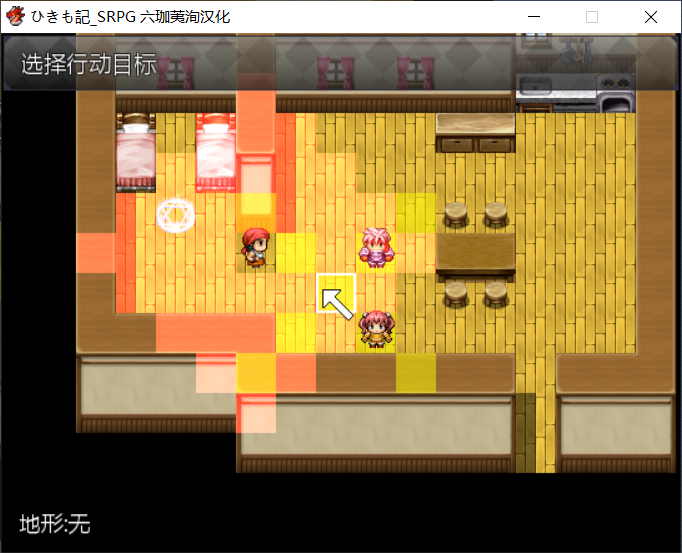
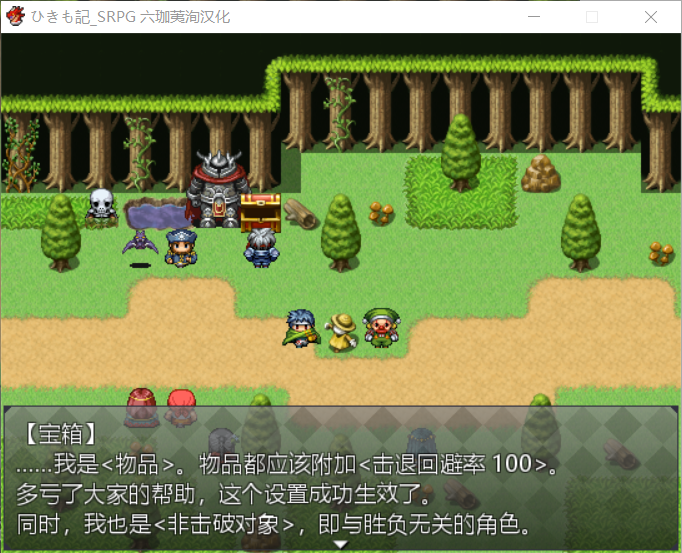
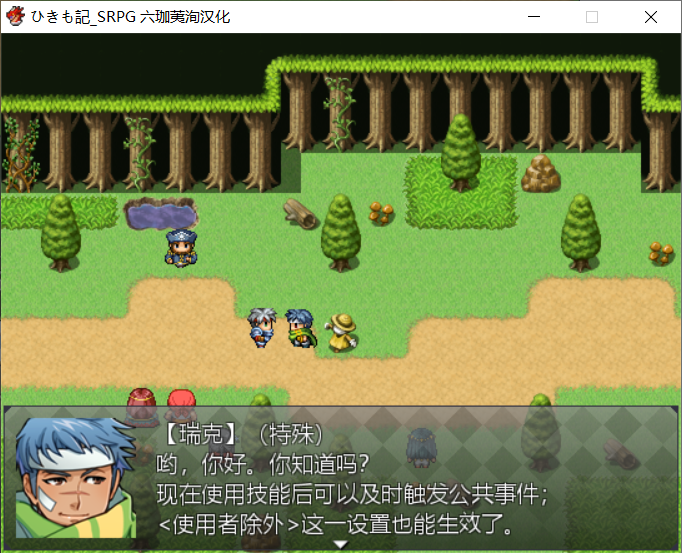


 提升卡
提升卡 沉默号角
沉默号角 喧嚣号角
喧嚣号角 变色卡
变色卡 升龙剑
升龙剑